-
关于Modal的封装的记录【Vue3、computed、Naive UI】
问题描述
现在我需要对modal模态框进行封装抽取,对于每一个模态框都当做一个组件需要时,调用即可。
\解决方法
<template> <n-modal v-model:show="showModal" :show-icon="showIcon" :preset="preset" :positive-text="positiveText" @positive-click="positiveClick" :negative-text="negativeText" @negative-click="negativeClick" class="max-w-105 min-w-10 w800" @close="closeModal" @after-leave="closeModal" :title="title" > 这是一个封装的拟态框 </n-modal> </template> <script setup lang="ts"> import { computed } from "vue"; interface Props { /** 展示弹窗 */ show: boolean; /** 是否显示icon */ showIcon?: boolean; /** 积极显示的文字 */ positiveText?: string; /** 消极显示的文字 */ negativeText?: string; /** modal显示的标题 */ title?: string; /** 预设类型 */ preset?:'dialog'|'card' } const Emit = defineEmits<{(e: "update:value", val: boolean): void; (e: "postive-click"): void; (e: "negative-click"): void; (e: "close-modal", value: boolean): void; }>(); const props = withDefaults(defineProps<Props>(), { preset: "dialog", show: false, showIcon: false, positiveText: "确 认", negativeText: "取 消", title: "标题", }); const showModal = computed({ get() { return props.show; }, set(val: boolean) { Emit("update:value", val); }, }); const closeModal = () => { Emit("close-modal", false); }; const negativeClick = () => { closeModal(); Emit("negative-click"); }; const positiveClick = () => { Emit("postive-click"); }; </script>- 1
- 2
- 3
- 4
- 5
- 6
- 7
- 8
- 9
- 10
- 11
- 12
- 13
- 14
- 15
- 16
- 17
- 18
- 19
- 20
- 21
- 22
- 23
- 24
- 25
- 26
- 27
- 28
- 29
- 30
- 31
- 32
- 33
- 34
- 35
- 36
- 37
- 38
- 39
- 40
- 41
- 42
- 43
- 44
- 45
- 46
- 47
- 48
- 49
- 50
- 51
- 52
- 53
- 54
- 55
- 56
- 57
- 58
- 59
- 60
- 61
- 62
- 63
- 64
- 65
- 66
- 67
- 68
- 69
- 70
- 71
- 72
- 73
- 74
- 75
- 76
父组件
<template> <div class="flex-1 flex-col items-center h-full bg-white pt-100px"> <el-button @click="openSubmitList">点击展开拟态框</el-button> <submit-list :show="showSubmitList" @close-modal="shutdownModal" @postive-click="positiveClick" /> <!-- 点击出现modal插入此处 --> </div> </template> <script lang="ts" setup> import { ref } from 'vue'; import { SubmitList } from './component/index'; import { asideData } from '../../assets/data' import { labelType } from '../../assets/type'; /** 点击出现提交列表 */ const showSubmitList = ref(false) const openSubmitList = () => { showSubmitList.value = true } const shutdownModal = (val : boolean) => { showSubmitList.value = val } const positiveClick = () => { shutdownModal(false) } </script> <style lang="less" scoped> @import '../../../problemsCss/problem.css'; </style>- 1
- 2
- 3
- 4
- 5
- 6
- 7
- 8
- 9
- 10
- 11
- 12
- 13
- 14
- 15
- 16
- 17
- 18
- 19
- 20
- 21
- 22
- 23
- 24
- 25
- 26
- 27
- 28
- 29
- 30
- 31
- 32
呈现结果
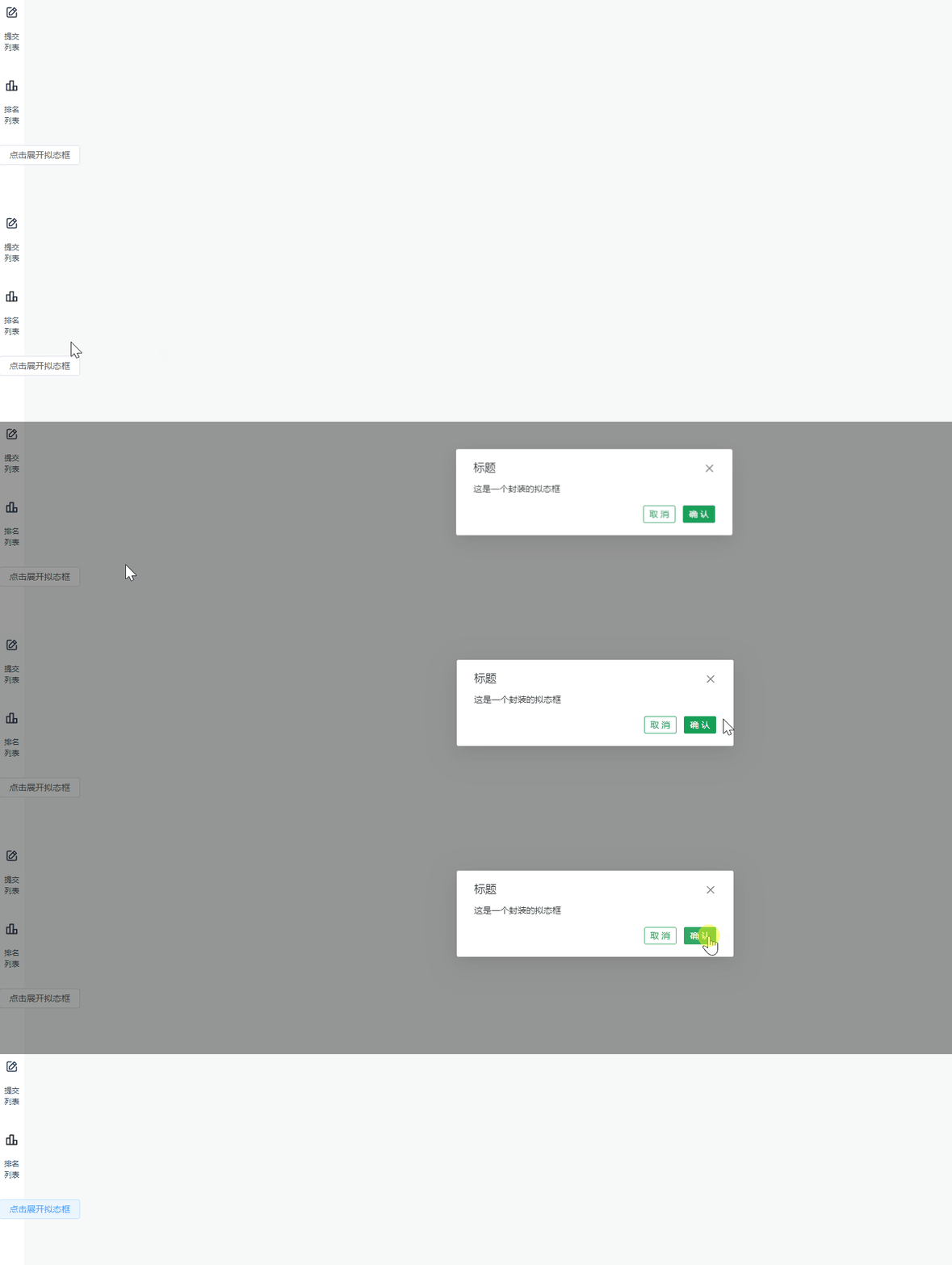
代码解释
定义传值与事件
通过interface和Emit限制对应父组件传值的类型与事件对应传参与返回值
这里需要定义所有组件需要接到的值(包括导入的其他组件和自己本身组件)
如果需要在点击确定后传值,需要在Emit的positive-click传值出去interface Props { /** 展示弹窗 */ show: boolean; /** 是否显示icon */ showIcon?: boolean; /** 积极显示的文字 */ positiveText?: string; /** 消极显示的文字 */ negativeText?: string; /** modal显示的标题 */ title?: string; } const Emit = defineEmits<{(e: "update:value", val: boolean): void; (e: "postive-click"): void; (e: "negative-click"): void; (e: "close-modal", value: boolean): void; }>();- 1
- 2
- 3
- 4
- 5
- 6
- 7
- 8
- 9
- 10
- 11
- 12
- 13
- 14
- 15
- 16
- 17
- 18
- 19
父组件中使用
/** 点击出现提交列表 */ const showSubmitList = ref(false) const openSubmitList = () => { showSubmitList.value = true } const shutdownModal = (val : boolean) => { showSubmitList.value = val } const positiveClick = () => { shutdownModal(false) }- 1
- 2
- 3
- 4
- 5
- 6
- 7
- 8
- 9
- 10
- 11
- 12
聚合数据和方法
为避免多个modal框一致命名,可作为各自模块导入
const show = ref(false) const openModal = () => { show.value = true } const shutdownModal = (val : boolean) => { show.value = val } const positiveClick = () => { shutdownModal(false) } const submitListModal = reactive({ show, openModal, shutdownModal, positiveClick, })- 1
- 2
- 3
- 4
- 5
- 6
- 7
- 8
- 9
- 10
- 11
- 12
- 13
- 14
- 15
- 16
- 17
使用直接使用
submitListModal去.访问对应的属性和方法即可 -
相关阅读:
面试官:你对Java线程池了解多少? 或者换个问法:为什么需要线程池?
C++信息学奥赛1184:明明的随机数
华为云云耀云服务器L实例评测|深度体验云耀云服务器购买和Ubuntu环境性能压力评测
常见消息队列分析对比
驱动开发day2(编程实现LED三盏小灯亮灭)
Github每日精选(第71期):自动网页抓取和浏览crawlee
Solana链,什么是sol跟单机器人、pump跟单机器人、sol狙击机器人、sol夹子机器人、sol聪明钱筛选
TFX发展简史/《Towards ML Engineering: A Brief History Of TensorFlow Extended (TFX)》
跑步运动耳机哪个牌子好、推荐几款专业跑步耳机
SaaS企业如何逐步进化与组织适配的销售力?
- 原文地址:https://blog.csdn.net/qq_22841387/article/details/125301261
