-
全志Tina Linux 修改串口(UART0->UART1)
说明:本人使用的是F133-A(D1s)1.修改boot0和uboot的串口
1.1.修改sys_config.fex文件。
1)文件路径为:tina-d1-h/device/config/chips/d1s/configs/nezha/sys_config.fex
修改前:
[uart_para] uart_debug_port = 0 uart_debug_tx = port:PF2<3><1><default><default> uart_debug_rx = port:PF4<3><1><default><default>- 1
- 2
- 3
- 4
修改后:
[uart_para] uart_debug_port = 1 uart_debug_tx = port:PG06<2><1><default><default> uart_debug_rx = port:PG07<2><1><default><default>- 1
- 2
- 3
- 4
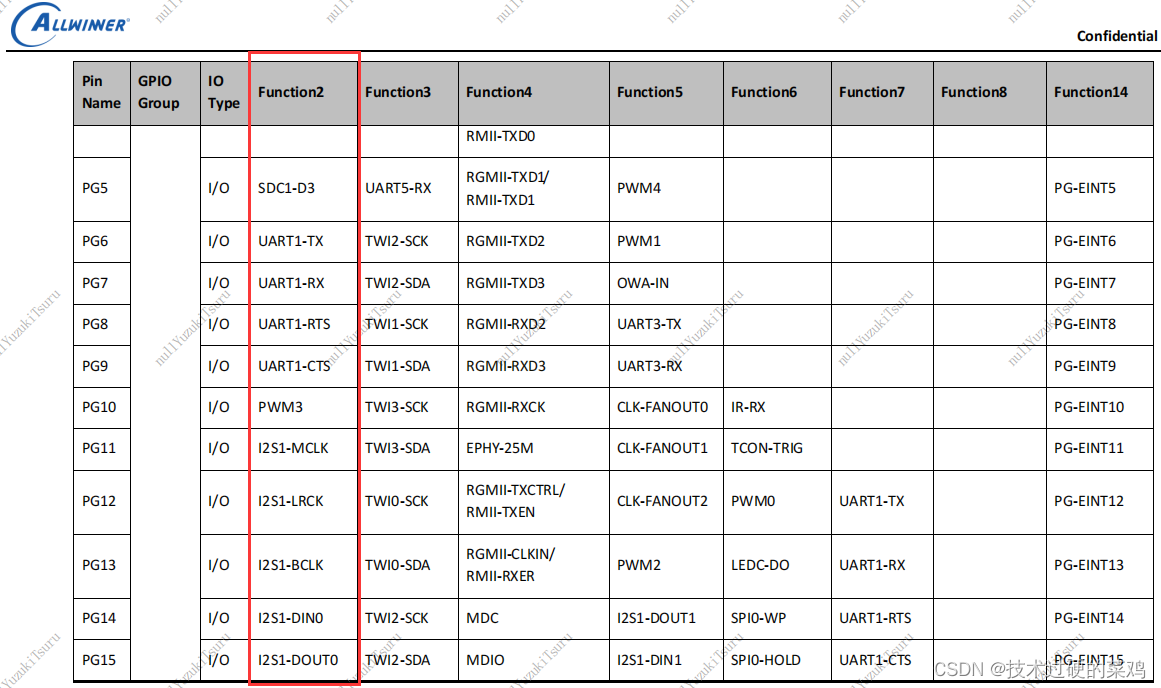
其中<3>改为<2> 需要查阅数据手册(D1s_Datasheet_V1.0)中 PG6、PG7 的UART1是 Function2 得知的
1.2.修改UBOOT CONSOLE INDEX
1)路径为:tina-d1-h/lichee/brandy-2.0/u-boot-2018/configs/sun20iw1p1_defconfig
2)在最后添加
CONFIG_SPECIFY_CONSOLE_INDEX=y CONFIG_CONS_INDEX=2 #说明:这里是UART 1+1 = 2 串口号+1 (注意,这个注释记得去掉,否则编译报错)- 1
- 2
2.修改kernel的串口
2.1.修改设备树(kernel使用的串口输出)
1)文件路径为:tina-d1-h/device/config/chips/d1s/configs/nezha/board.dts
修改前:
&uart0 { pinctrl-names = "default", "sleep"; pinctrl-0 = <&uart0_pins_a>; pinctrl-1 = <&uart0_pins_b>; status = "okay"; }; &uart1 { pinctrl-names = "default", "sleep"; pinctrl-0 = <&uart1_pins_a>; pinctrl-1 = <&uart1_pins_b>; status = "disabled"; }; &uart2 { pinctrl-names = "default", "sleep"; pinctrl-0 = <&uart2_pins_a>; pinctrl-1 = <&uart2_pins_b>; status = "disabled"; }; &uart3 { compatible = "allwinner,sun20iw1-dsp-uart"; pinctrl-names = "default", "sleep"; pinctrl-0 = <&uart3_pins_a>; pinctrl-1 = <&uart3_pins_a>; status = "disabled"; };- 1
- 2
- 3
- 4
- 5
- 6
- 7
- 8
- 9
- 10
- 11
- 12
- 13
- 14
- 15
- 16
- 17
- 18
- 19
- 20
- 21
- 22
- 23
- 24
- 25
- 26
- 27
- 28
修改后:
&uart0 { pinctrl-names = "default", "sleep"; pinctrl-0 = <&uart0_pins_a>; pinctrl-1 = <&uart0_pins_b>; status = "disabled"; //修改的地方:关闭 }; &uart1 { pinctrl-names = "default", "sleep"; pinctrl-0 = <&uart1_pins_a>; pinctrl-1 = <&uart1_pins_b>; status = "okay"; //修改的地方:打开 }; &uart2 { pinctrl-names = "default", "sleep"; pinctrl-0 = <&uart2_pins_a>; pinctrl-1 = <&uart2_pins_b>; status = "disabled"; }; &uart3 { compatible = "allwinner,sun20iw1-dsp-uart"; pinctrl-names = "default", "sleep"; pinctrl-0 = <&uart3_pins_a>; pinctrl-1 = <&uart3_pins_a>; status = "disabled"; };- 1
- 2
- 3
- 4
- 5
- 6
- 7
- 8
- 9
- 10
- 11
- 12
- 13
- 14
- 15
- 16
- 17
- 18
- 19
- 20
- 21
- 22
- 23
- 24
- 25
- 26
- 27
- 28
2.2.修改启动bootargs
1)路径为:tina-d1-h/device/config/chips/d1s/configs/default/env.cfg
修改前:
#kernel command arguments earlyprintk=sunxi-uart,0x02500000 initcall_debug=0 console=ttyS0,115200- 1
- 2
- 3
- 4
修改后:
#kernel command arguments earlyprintk=sunxi-uart,0x02500400 initcall_debug=0 console=ttyS1,115200- 1
- 2
- 3
- 4
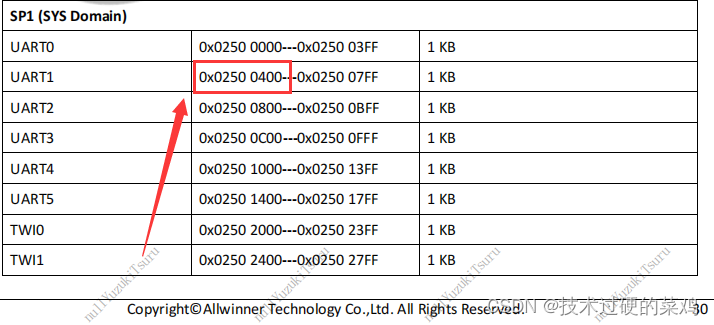
说明:earlyprintk=sunxi-uart,0x02500000 需要修改为 UART1 的地址,查阅手册可知为 0x02500400
-
相关阅读:
【C++】从零开始的CS:GO逆向分析1——寻找偏移与基址的方法
【排序算法】常见排序算法总结
延迟win11的更新
如何为项目匹配资源技能和要求?
探究美颜算法:直播实时美颜SDK的集成和定制
Arthas 介绍以及入门教程
Excel 公式的定义、语法和应用(LOOKUP 函数、HLOOKUP 函数、VLOOKUP 函数;MODE.MULT 函数; ROUND 函数)
新增测试场景:方言
wx:for-item wx:for-index wx:for-key
增删改查模块测试用例设计
- 原文地址:https://blog.csdn.net/qq_39721016/article/details/125524789
