-
JS 之 常用内置类的使用

目录
二、Number类 Number - JavaScript | MDN
05 - Number.parseInt(string[, radix])
三、Math对象 Math - JavaScript | MDN
四、String类String - JavaScript | MDN
01 - indexOf ( searchString , fromIndex ) : 查找
02 - includes( searchString , position ) : 查找
11. split( swparator,limit ) : 字符串分割
一、包装类
首先我们思考一个问题,基本数据类型是保存在栈中的,保存的是一个值,但是为什么,却可以调用一下方法呢
- const name = "Hello World"
- const height = 1.8888888
- console.log(name.length)
- console.log(name.split(" "))
- console.log(height.toFixed(2))
JavaScript的原始类型并非对象类型,所以从理论上来说,它们是没有办法获取属性或者调用方法的
原因 : 因为JavaScript为了可以使其可以获取属性和调用方法,对其封装了对应的包装类型
默认情况,当我们调用一个原始类型的属性或者方法时,会进行如下操作 :
- 根据原始值,创建一个原始类型对应的包装类型对象
- 调用对应的属性或者方法,返回一个新的值
- 创建的包装类对象被销毁
通常JavaScript引擎会进行很多的优化,它可以跳过创建包装类的过程在内部直接完成属性的获取或者方法的调用
- // 栗子
- let name = 'coder'
- console.log(name.length)
- // 进化🧬!!!
- let name = 'coder'
- // 1. 转变为包装类型,变为String对象
- name = new String(name)
- // 2. 所以可以调用方法
- console.log(name.length)
- // 3. 一旦调用完后,后续不再操作属性或方法时,会把该对象销毁,重新变成基本类型
- name = 'coder'
tip : null、undefined没有任何的方法,也没有对应的“对象包装类”
二、Number类 Number - JavaScript | MDN
1. 静态属性
01 - Number.MAX_VALUE
- // 表示在 JavaScript 里所能表示的最大数值
- console.log(Number.MAX_VALUE)
02 - Number.MIN_VALUE
- // 表示在 JavaScript 中所能表示的最小的正值
- console.log(Number.MIN_VALUE)
03 - Number.MAX_SAFE_INTEGER
- // 表示在 JavaScript 中最大的安全整数
- console.log(Number.MAX_SAFE_INTEGER)
04 - Number.MIN_SAFE_INTEGER
- // 代表在 JavaScript 中最小的安全的 integer 型数字
- console.log(Number.MIN_SAFE_INTEGER)
05 - Number.parseInt(string[, radix])
- // 转换为正整数
- const n = '90.123';
- console.log(Number.parseInt('0xF', 16));
- console.log(Number.parseInt(n));
- // 因为这个方法也在window上, 是同一个, 所以可以直接调用
- parseInt(n)
06 - Number.parseFloat()
- // 转换为小数
- const num = '123.521';
- console.log(Number.parseFloat(num));
- // 因为这个方法也在window上, 是同一个, 所以可以直接调用
- parseFloat(num)
2. 对象方法
01 - toString(base)
- base 的范围可以从 2 到 36,默认情况下是 10
- 如果是直接对一个数字操作,需要使用..运算符
- let num = 100
- console.log(num.toString(2)) // 二进制
- console.log(num.toString(8)) // 八进制
- console.log(num.toString(10)) // 十进制
- console.log(num.toString(16)) // 十六进制
- // 如果是数字直接操作 .. 写两个小数点
- console.log(123..toString(8))
02 - toFixed(digits)
digits的范围是0到20(包含)之间
注意 : 返回的是一个字符串
- var numObj = 12345.6789;
- numObj.toFixed(); // 返回 "12346":进行四舍六入五看情况,不包括小数部分
- numObj.toFixed(1); // 返回 "12345.7":进行四舍六入五看情况
- numObj.toFixed(6); // 返回 "12345.678900":用 0 填充
三、Math对象 Math - JavaScript | MDN
1. Math.PI
console.log(Math.PI) // 3.1415926542. Math.floor : 向下取整
- const num = 3.79
- console.log(Math.floor(num)). // 小数点后全部舍去,只留整数部分。 结果为3
3. Math.ceil : 向上取整
- const num = 3.79
- console.log(Math.ceil(num)). // 小数点后全部舍去,整数部分加一
4. Math.round : 四舍五入
- const num = 3.79
- console.log(Math.round(num)). // 四舍五日运算
5. Math.random : 随机数
- Math.random(). // 生成0-1 => [0,1) => 包含0,不包含1的 随机数
- //生成 [a,b) 区间的随机数
- Math.floor(Math.random() * (b - a)) + a
- // 栗子,生成[5,50)的随机数
- Math.floor(Math.random() * (45)) + 5
6. Math.pow() : 幂运算
- Math.pow(2,3) // 2的3次方 === 8
- // ES6之后,有简便写法
- 2 ** 4 // 2的4次方 === 16
四、String类String - JavaScript | MDN
1. 访问字符串字符
- const message = 'hello world'
- console.log( message[1] ) // e
- console.log( message.charAt(4) ) // o
2. 字符串遍历
01 - 普通循环
- const message = 'hello world'
- for (let i = 0; i < message.length; i++) {
- console.log(message[i])
- }
02 - for...of循环
- // for..of的遍历 -> 迭代器
- // 目前可迭代对象: 字符串/数组
- // 对象是不支持for..of
- // String对象内部是将字符串变成了一个可迭代对象
- for (let char of message) {
- console.log(char)
- }
3. 修改字符串
当字符串定义后是不可以修改的,所以当直接操作字符是无效的
- let message = "Hello World"
- message[2] = "A"
- console.log(message) // Hello World. 不会更改的
4. toUpperCase : 将所有字符变为大写
- const message = 'hello'
- console.log(message.toUpperCase()) // HELLO ,原来的字符串没有更改,而是生成了新的字符串
5. toLowerCase : 将所有字符变为小写
- const message = 'HeLLo'
- console.log(message.toUpperCase()) // hello,原来的字符串没有更改,而是生成了新的字符串
6. 查找字符串
01 - indexOf ( searchString , fromIndex ) : 查找
- 情况一: 搜索到, 搜索字符串所在索引位置
- 情况二: 没有搜索到, 返回-1
- const message = 'my name is coder'
- let index = message.indexOf('name')
- if(index !== -1){
- console.log('找到了')
- }else{
- console.log('没找到')
- }
02 - includes( searchString , position ) : 查找
- const message = 'my name is coder'
- if(message.includes('name')){
- console.log('找到了')
- }
03 - startsWith : 以xxx开头
- const message = 'my name is coder'
- if (message.startsWith("my")) {
- console.log("message以my开头")
- }
04 - endsWith : 以xxx结尾
- const message = 'my name is coder'
- if (message.endsWith("coder")) {
- console.log("message以my结尾")
- }
7. replace : 替换字符串
- 查找到对应的字符串,并且使用新的字符串进行替代
- 也可以传入一个正则表达式来查找,也可以传入一个函数来替换
- // 传入字符串
- const message = 'my name is star'
- let newMessage = message.replace("star", "kobe")
- console.log(newMessage) // my name is kobe
- // 传入函数
- const newName = "kobe"
- let newMessage = message.replace("star", function() {
- return newName.toUpperCase()
- })
- console.log(newMessage) // my name is KOBE
8. 获取子字符串

- const message = "Hello World"
- console.log(message.slice(3, 7)) // lo W
- console.log(message.slice(3, -1)) // lo Worl
- console.log(message.slice(3)) // lo World
- console.log(message.substr(3, 7)) // lo Worl
9. 拼接字符串
01 - +
- const str1 = "Hello"
- const str2 = "World"
- const str3 = "kobe"
- const newString = str1 + str2 + str3
- console.log(newString)
02 - concat
- const str1 = "Hello"
- const str2 = "World"
- const str3 = "kobe"
- // 可链式调用
- const newString2 = str1.concat(str2).concat(str3)
- // 可同时传入多个值
- const newString3 = str1.concat(str2, str3, "abc", "cba")
10. trim : 删除首尾字符串
console.log(" star abc ".trim()) // star abc11. split( swparator,limit ) : 字符串分割
- separator:以什么字符串进行分割,也可以是一个正则表达式;
- limit:限制返回片段的数量;
- const message = "abc-cba-nba-mba"
- // 切割字符为 => -
- const items = message.split("-")
- console.log(items) // ['abc','cba','nba','mba']
- // 通过数组的join方法,可变为字符串 连接字符为 *
- const newMessage = items.join("*")
- console.log(newMessage) // abc*cba*nba*mba
- //-----------------------------------------------
- const message = 'abc-cba-nba-mba';
- // 返回长度为2的数组
- const items = message.split('-', 2);
- console.log(items); // ['abc','cba']
五、对象Object - JavaScript | MDN
1. 对象的使用
- key: 字符串类型, 但是在定义对象的属性名时, 大部分情况下引号都是可以省略的
- value : 可以是任意值
- const person = {
- name: 'why',
- age: 18,
- height: 1.88,
- // 这种的就要加上''号
- 'my friend': {
- name: 'kobe',
- age: 30
- },
- run: function () {
- console.log('running');
- },
- eat: function () {
- console.log('eat foods');
- },
- };
2. 对象的创建方式
01 - 对象字面量
- // 直接花括号赋值即可,用的最多
- const obj1 = {
- name: "why"
- }
02 - 构造函数
- // 当函数被new关键词调用时,该函数就被称为构造函数
- const obj = new Object()
- obj.name = "star"
- obj2.runing = function(){}
03 - 类创建
- class Person {
- constructor(name) {
- this.name = name;
- }
- }
- const stu = new Person('star');
3. 对象的操作
01 - 定义
- const info = {
- name: "star",
- age: 18,
- friend: {
- name: "coder",
- age: 30
- },
- running: function() {
- console.log("running~")
- }
- }
02 - 访问对象属性
- console.log(info.name)
- console.log(info.friend.name)
- info.running()
03 - 修改对象属性
- info.age = 25
- info.running = function() {
- alert("I am running~")
- }
- console.log(info.age)
- info.running()
04 - 增加对象属性
- info.height = 1.88
- info.studying = function() {
- console.log("I am studying~")
- }
05 - 删除对象属性
- delete info.age
- delete info.height
4. 对象的方括号 [] 使用法
- const obj = {
- name: "why",
- "my friend": "kobe",
- "eating something": function() {
- console.log("eating~")
- }
- }
- // 这里 . 语法不能用
- console.log(obj["my friend"])
- console.log(obj.name)
- // 这和 . 语法一个意思
- console.log(obj["name"])
- // 用变量的值充当对象的key
- var eatKey = "eating something"
- obj[eatKey]()
- // 可连在一起使用
- obj["eating something"]()
5. 对象的遍历
01. 普通for循环
- // Object.keys() => 拿到对象的所有key
- const infoKeys = Object.keys(info)
- for (let i = 0; i < infoKeys.length; i++) {
- // 拿到key的值
- let key = infoKeys[i]
- // 拿到value的值
- let value = info[key]
- console.log(`key: ${key}, value: ${value}`)
- }
02 - for ... in ...
- // 可直接拿到对象的key
- for (let key in info) {
- let value = info[key]
- console.log(`key: ${key}, value: ${value}`)
- }
03 - 后续慢慢更新~
6. 对象的内存分配
js代码可以运行在浏览器,也可运行在node环境,无论是什么环境,最终都是运行在内存中
内存会映射在真实的电脑物理内存中,所以内存越大,跑的速度越快~~~
- 基本类型 : 存储在内存中的栈内存
- 引用类型 : 存储在内存中的堆内存

01. 面试题一
- const obj1 = {}
- const obj2 = {}
- console.log(obj1 === obj2) // false

02. 面试题二
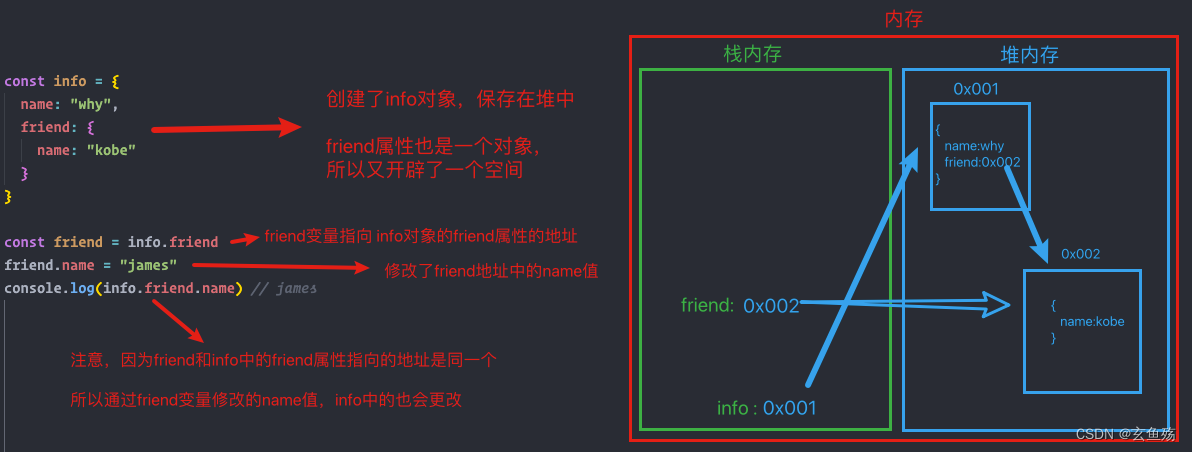
- const info = {
- name: "why",
- friend: {
- name: "kobe"
- }
- }
- const friend = info.friend
- friend.name = "james"
- console.log(info.friend.name) // james
03. 面试题三
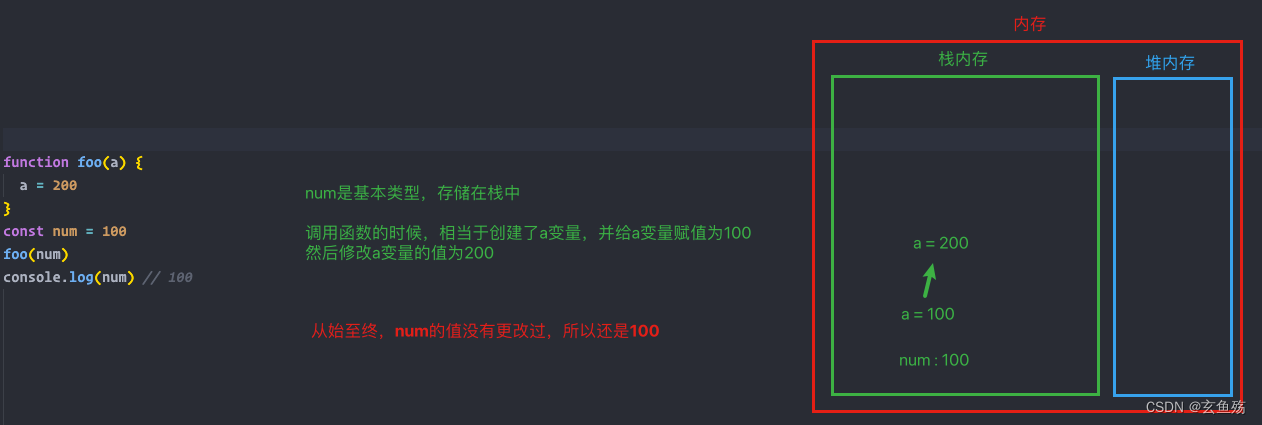
- function foo(a) {
- a = 200
- }
- const num = 100
- foo(num)
- console.log(num) // 100
04. 面试题四
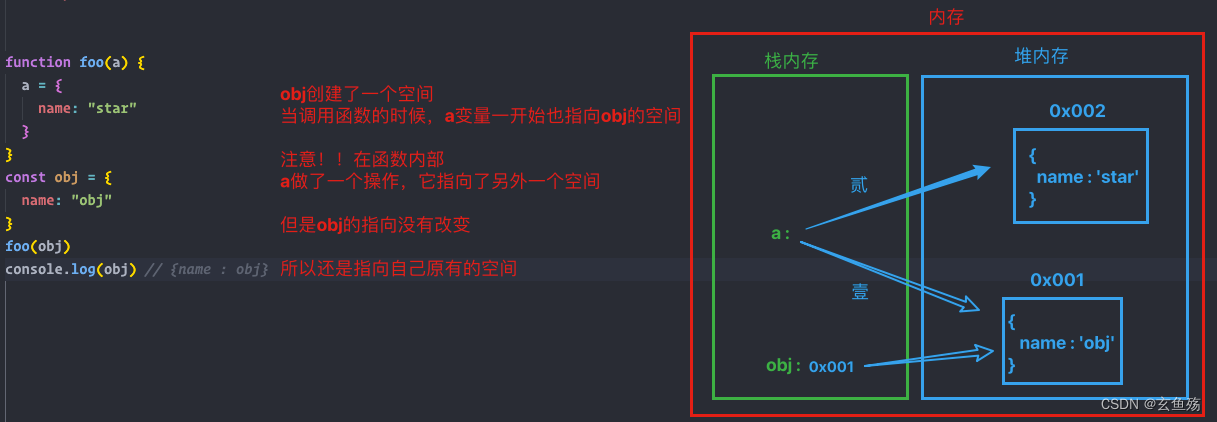
- function foo(a) {
- a = {
- name: "star"
- }
- }
- const obj = {
- name: "obj"
- }
- foo(obj)
- console.log(obj) //{ name:obj }
05. 面试题五
- function foo(a) {
- a.name = "star"
- }
- const obj = {
- name: "obj"
- }
- foo(obj)
- console.log(obj) // {name : star}

7. 创建一系列对象的方式
01. 一个一个写
有点小蠢~
- const stu1 = {
- name: 'star',
- age: 16,
- height: 1.66,
- running: function () {
- console.log('running~');
- }
- };
- const stu2 = {
- name: 'coder',
- age: 17,
- height: 1.77,
- running: function () {
- console.log('running~');
- }
- };
- const stu3 = {
- name: 'liuli',
- age: 18,
- height: 1.88,
- running: function () {
- console.log('running~');
- }
- };
02. 通过for循环写
还是有点蠢~
- const nameArr = ['star', 'coder', 'liuli'];
- const ageArr = [16, 17, 18];
- const heightArr = [1.66, 1.77, 1.88];
- const funcs = {
- running: function () {
- console.log('running~');
- }
- };
- for (let i = 0; i < nameArr.length; i++) {
- let stu = {
- name: nameArr[i],
- age: ageArr[i],
- height: heightArr[i],
- running: funcs.running
- };
- console.log(stu); //{name: 'star', age: 16, height: 1.66, running: ƒ} ...
- }
03. 通过工厂函数
- // 工厂函数(工厂生产student对象) -> 一种设计模式
- // 通过工厂设计模式, 自己来定义了一个这样的函数
- function createStudent(name, age, height) {
- const stu = {};
- stu.name = name;
- stu.age = age;
- stu.height = height;
- stu.running = function () {
- console.log('running~');
- };
- return stu;
- }
- const stu1 = createStudent('stare', 16, 1.66);
- const stu2 = createStudent('coder', 17, 1.77);
- const stu3 = createStudent('liuli', 18, 1.88);
- console.log(stu1);
- console.log(stu2);
- console.log(stu3);
弊端 : 拿到的数据的类型都是Object类型
04. 通过new操作符来创建
简单理解下构造函数


- // JavaScript已经默认提供给了我们可以更加符合JavaScript思维方式(面向对象的思维方式)的一种创建对象的规则
- // 在函数中的this一般指向某一个对象
- /*
- 如果一个函数被new操作符调用
- 1.创建出来一个新的空对象
- 2.这个对象的 __proto__ 指向构造函数的 prototype
- 3.让this指向这个空对象
- 4.执行函数体的代码块
- 5.如果没有明确的返回一个非空对象, 那么this指向的对象会自动返回
- */
- function Coder(name, age, height) {
- // 相当于new操作符做了
- // let obj = {}
- // this = obj
- this.name = name
- this.age = age
- this.height = height
- this.running = function() {
- console.log("running~")
- }
- // return this
- }
- // 在函数调用的前面加 new 关键字(操作符)
- const stu1 = new coder("why", 18, 1.88)
- const stu2 = new coder("kobe", 30, 1.98)
- console.log(stu1, stu2)
六、数组Array - JavaScript | MDN
1. 访问数组元素
01 - [索引]
- const names = ["abc", "cba", "nba"]
- console.log(names[0]) // abc
- console.log(names[names.length - 1]) //nba
02 - at
- const names = ["abc", "cba", "nba"]
- console.log(names.at(0)) // abc
- console.log(names.at(-1)) // nba
2. 新增|删除 元素
01 - push : 尾部新增
- const names = ["abc", "cba"]
- names.push("star", "kobe")
- console.log(names) // ["abc", "cba","star", "kobe"]
02 - pop : 尾部删除
- const names = ["abc", "cba"]
- names.pop()
- console.log(names) // ["abc"]
03 - unshift : 头部新增
- const names = ["abc", "cba"]
- names.unshift("star", "kobe")
- console.log(names) // ["star", "kobe","abc", "cba"]
04 - shift : 头部删除
- const names = ["abc", "cba"]
- names.shift()
- console.log(names) // ["cba"]

注意 : push/pop 方法运行的比较快,而 shift/unshift 比较慢,都不能链式调用
尾部操作不会影响数组结构,头部操作会导致后续元素的移动
05 - splice : 任意位置添加/删除/替换元素
splice : 可以说是处理数组的利器,它可以做所有事情:添加,删除和替换元素
注意 : 这个方法会修改原数组
- 参数一: start, 从什么位置开始操作元素
- 参数二: deleteCount, 删除元素的个数 , 如果为0或者负数表示不删除
- 参数三: 可以为添加的元素 或者 替换的元素
删除
- const names = ["abc", "cba", "nba", "mba", "abcd"]
- // 在第一个位置开始,删除两个元素
- names.splice(1, 2)
- console.log(names) // ["abc", "mba", "abcd"]
新增
- const names = ["abc", "cba", "nba"]
- // 在第一个位置开始,增加两个元素,注意删除元素的个数为0
- names.splice(1, 0, "star", "kobe")
- console.log(names) // ["abc","star", "kobe","cba", "nba"]
替换
- const names = ["abc", "cba", "nba", "mba"]
- // 从第一个元素开始,删除两个元素,同时增加元素,删除和增加的元素可以不一样 => 看起来就是替换了
- names.splice(1, 2, "star", "kobe", "james")
- console.log(names) // ["abc", "star", "kobe", "james", "mba"]
3. length属性
01 - 获取长度
- const arr = [1,2,3,4]
- console.log(arr.length) // 4
02 - 修改长度
- 如果我们手动增加一个大于默认length的数值,那么会增加数组的长度
- 但是如果我们减少它,数组就会被截断
- 清空数组最简单的方法就是:arr.length = 0
- const names = ['abc', 'cba', 'nba', 'mba'];
- // 设置的length大于原来的元素个数
- names.length = 10;
- console.log(names); // ["abc", "cba", "nba", "mba",empty × 6]
- // 设置的length小于原来的元素个数
- names.length = 2
- console.log(names) // ['abc', 'cba']
4. 数组的遍历
01 - for循环
- const names = ['abc', 'cba', 'nba', 'mba'];
- for (var i = 0; i < names.length; i++) {
- console.log(names[i])
- }
02 - for...in
- const names = ['abc', 'cba', 'nba', 'mba'];
- // index => 索引
- for (var index in names) {
- console.log(index, names[index])
- }
03 - for...of
- const names = ['abc', 'cba', 'nba', 'mba'];
- // item => 值
- for (var item of names) {
- console.log(item)
- }
5. slice : 数组截取
- const names = ["abc", "cba", "nba", "mba", "why", "kobe"]
- // slice方法: 不会修改原数组
- // splice有区别: splice修改原有的数组
- // start 从什么位置开始
- // end 结束位置, 不包含end本身
- const newNames = names.slice(2, 4)
- console.log(newNames) // ["nba", "mba"]
6. 数组合并
01 - concat
- const names1 = ["abc", "cba"]
- const names2 = ["nba", "mba"]
- const names3 = ["why", "kobe"]
- const newNames2 = names1.concat(names2, names3)
- console.log(newNames2)
02 - ... 运算符
- const names1 = ["abc", "cba"]
- const names2 = ["nba", "mba"]
- const names3 = ["why", "kobe"]
- names1.push(...names2, ...names3)
7. join : 数组变成字符串
- const names = ["abc", "cba", "nba", "mba", "why", "kobe"]
- console.log(names.join("-")) // "abc-cba-nba-mba-why-kobe"
8. 数组中查找元素
01 - indexOf
- const names = ["abc", "cba", "nba", "mba"]
- // 可以找到, 返回对应的索引
- // 没有找到, 返回-1
- console.log(names.indexOf("nbb")) // -1
02 - includes
- const names = ["abc", "cba", "nba", "mba"]
- console.log(names.includes("cba")) // true
- console.log(names.includes("nbb")) // false
03 - find
- const students = [
- { id: 100, name: "why", age: 18 },
- { id: 101, name: "kobe", age: 30 },
- { id: 102, name: "james", age: 25 },
- { id: 103, name: "why", age: 22 }
- ]
- // 有多少项,就会执行多少次find函数,执行的时候会把当前项的值,索引,数组传递过来
- const stu = students.find(function(item,index,arr) {
- console.log(item,index,arr)
- // 当返回的值不为空的时候,意味着找到了,会停止查找,返回当前项
- if (item.id === 101) return true
- })
- //可使用箭头函数简便写法
- const stu1 = students.find(item => item.id === 101)
04 - 手动实现find函数
- const names = [
- { id: 100, name: 'why', age: 18 },
- { id: 101, name: 'kobe', age: 30 },
- { id: 102, name: 'james', age: 25 },
- { id: 103, name: 'why', age: 22 }
- ];
- // 把该方法绑定到数组原型上面
- Array.prototype.starFind = function (fn) {
- let bool = false;
- for (let i = 0; i < this.length; i++) {
- // 接受返回的bool值
- bool = fn.call(this, this[i], i, this);
- // 如果返回true,说明找到了
- if (bool) {
- // 把找到的该项的值返回出去
- return this[i];
- }
- }
- // 如果没有找到,会默认返回undefined
- };
- // 可直接调用,同时接受返回的值
- const findValues = names.starFind((item, index, arr) => {
- return item.id === 102;
- });
- console.log(findValues); // { id: 102, name: 'james', age: 25 }
05 - findIndex
- const names = ["abc", "cba", "nba"]
- // 和find方法类似,不过这里是返回查找项的索引值
- const findIndex = names.findIndex(function(item, index, arr) {
- return item === "nba"
- })
- // 简便写法
- var findIndex1 = names.findIndex(item => item === "nba")
9. sort : 数组的排序
是一个高阶函数,用于对数组进行排序,并且生成一个排序后的新数组
- 如果 compareFunction(a, b) 小于 0 ,那么 a 会被排列到 b 前面
- 如果 compareFunction(a, b) 等于 0 , a 和 b 的相对位置不变
- 如果 compareFunction(a, b) 大于 0 , b 会被排列到 a 前面
- 也就是说,谁小谁排在 前面
- const nums = [20, 4, 10, 15, 100, 88]
- // sort: 排序
- nums.sort(function(item1, item2) {
- // 升序
- return item1 - item2 // [4,10,15,20,88,100]
- // 降序
- // return item2 - item1
- })
- // --------------------------------------------
- const students = [
- { id: 100, name: "why", age: 18 },
- { id: 101, name: "kobe", age: 30 },
- { id: 102, name: "james", age: 25 },
- { id: 103, name: "curry", age: 22 }
- ]
- students.sort(function(item1, item2) {
- return item1.age - item2.age
- })
- console.log(students)
10. reverse : 数组的反转
11. 数组其他高阶函数使用
01 - forEach
- const names = ['avbc', 'fggd', 'eerw'];
- // 可取出数组中的每一项的值,索引,数组本身
- // 第二个参数,传入指定的this对象
- names.forEach(function (item, index, names) {
- console.log(item, index, names, this);
- }, {});
02 - 手动实现forEach函数
- const names = ['abc', 'abvc', 'aser'];
- // 把该方法绑定到数组原型上面
- Array.prototype.starForEach = function (fn) {
- // this指向调用该函数的对象,names调用,所以指向names数组
- for (let i = 0; i < this.length; i++) {
- fn.call(this, this[i], i, this);
- }
- };
- // 可直接调用
- names.starForEach((item, index, arr) => {
- console.log(item, index, arr);
- });
03 - filter
- const nums = [11, 20, 55, 100, 88, 32];
- // 过滤数据,符合条件的会push到内部的数组中,最后一起返回出去
- const newNums = nums.filter(function (item) {
- return item % 2 === 0;
- });
- console.log(newNums); // [20,100,88,32]
04 - map
- const nums = [11, 20, 55, 100, 88, 32]
- // map => 映射 , 返回操作后的数据保存在新数组中,最后一起返回出去
- const newNums = nums.map(function(item) {
- return item * item
- })
- console.log(newNums)
05 - reduce
- const nums = [11, 20, 55, 100, 88, 32]
- // 第一次执行: preValue->0 item->11
- // 第二次执行: preValue->11 item->20
- // 第三次执行: preValue->31 item->55
- // 第四次执行: preValue->86 item->100
- // 第五次执行: preValue->186 item->88
- // 第六次执行: preValue->274 item->32
- // 最后一次执行的时候 preValue + item, 它会作为reduce的返回值
- // initialValue: 初始化值, 第一次执行的时候, 对应的preValue
- // 如果initialValue没有传,第一次的时候preValue = 11 item = 12
- const result = nums.reduce(function(preValue, item) {
- console.log(`preValue:${preValue} item:${item}`)
- return preValue + item
- }, 0)
- console.log(result)
-
相关阅读:
Squid代理服务器应用
Linux exec函数族
SpringBoot 注解 ==
CocosCreator3.8神秘面纱 CocosCreator 项目结构说明及编辑器的简单使用
c# 操作word中的表格 批量复制和批量插入
Linux环境搭建
新版HI3559AV100开发注意事项
idea中完美解决Error:java: Compilation failed: internal java compiler error的问题
ABAP接口部分-Web Service提供者与消费者
jenkins安装
- 原文地址:https://blog.csdn.net/a15297701931/article/details/125439708
