-
Flutter Hero 实现径向变换动画 — 圆形变成矩形的转场动画
系列文章
- Flutter 旋转动画 — RotationTransition
- Flutter 平移动画 — 4种实现方式
- Flutter 淡入淡出与逐渐出现动画
- Flutter 尺寸缩放、形状、颜色、阴影变换动画
- Flutter 列表Item动画 — AnimatedList实现Item左进左出、淡入淡出
- Flutter Hero 实现共享元素转场动画
- Flutter Hero 实现径向变换动画 — 圆形变成矩形的转场动画
- Flutter 自定义动画 — 数字递增动画和文字逐行逐字出现或消失动画
以下大部分内容源于官方文档及Demo
文档:https://docs.flutter.dev/development/ui/animations/hero-animations#radial-hero-animations
Demo:
1 动画效果图

2 Radial transformation(径向变换)动画
官方介绍:https://material.io/guidelines/motion/transforming-material.html
意思触摸圆形,然后圆形变换为其它形状的一种动画效果。
建议的2种展示方式:

3 Hero 实现圆形变成矩形的转场动画
Hero 是Flutter提供的一个可以实现子Widget在页面切换时带有飞行效果的Widget,一般用于图片。
可看博客:Flutter Hero 实现共享元素转场动画Radial transformation 径向变换动画效果一般用于圆形变矩形。
3.1 实现原理
实现变换圆形变矩形的转场动画原理(来源于官方文档)。
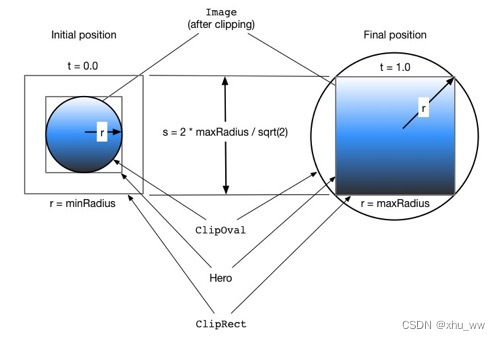
蓝色渐变代表图像,表示剪辑形状相交的位置。
在动画开始前,相交的结果是一个圆形剪辑 ( ClipOval)。
在动画执行过程中,ClipRect保持恒定大小,ClipOval开始缩放。
在动画结束时,圆形和矩形剪辑的交点产生一个与Hero Widget相同大小的矩形。即图像不再被剪裁。裁剪Widget的代码实现
import 'dart:math' as math; import 'package:flutter/material.dart'; class RadialExpansionWidget extends StatelessWidget { const RadialExpansionWidget({ super.key, required this.maxRadius, this.child, }) : clipRectSize = 2.0 * (maxRadius / math.sqrt2); final double maxRadius; final double clipRectSize; final Widget? child; @override Widget build(BuildContext context) { return ClipOval( child: Center( child: SizedBox( width: clipRectSize, height: clipRectSize, child: ClipRect(child: child), ), ), ); } }- 1
- 2
- 3
- 4
- 5
- 6
- 7
- 8
- 9
- 10
- 11
- 12
- 13
- 14
- 15
- 16
- 17
- 18
- 19
- 20
- 21
- 22
- 23
- 24
- 25
- 26
- 27
- 28
3.2 代码实现圆形变矩形动画
自定义的
RadialExpansionWidget实现裁剪形状,使用Hero实现飞行效果。第一页展示4个半径为30的圆
class FirstPage extends StatelessWidget { const FirstPage({Key? key}) : super(key: key); @override Widget build(BuildContext context) { // import 'package:flutter/scheduler.dart' show timeDilation; // 使转场速度变慢,便于观察转场动画形状的变化过程 timeDilation = 3.0; return Scaffold( appBar: AppBar(title: const Text('FirstPage')), body: Align( alignment: Alignment.bottomCenter, child: Row( mainAxisAlignment: MainAxisAlignment.spaceBetween, children: List.generate(4, (index) => _buildItem(context, index)), ), ), ); } Widget _buildItem(BuildContext context, int index) { return CupertinoButton( child: _buildHeroWidget(index), onPressed: () { Navigator.of(context).push( PageRouteBuilder<void>( pageBuilder: (context, animation, secondaryAnimation) { return SecondPage(index: index); }, ), ); }, ); } ///目标实现半径 30的圆,转换为半径120的圆包裹的矩形 Widget _buildHeroWidget(int index) { const radius = 30; return SizedBox( width: radius * 2, height: radius * 2, child: Hero( tag: 'hero_tag_$index', child: RadialExpansionWidget( maxRadius: 120, child: Container( color: Colors.red, child: LayoutBuilder( builder: (context, constraints) { return FlutterLogo(size: constraints.maxWidth); }, ), ), ), ), ); } }- 1
- 2
- 3
- 4
- 5
- 6
- 7
- 8
- 9
- 10
- 11
- 12
- 13
- 14
- 15
- 16
- 17
- 18
- 19
- 20
- 21
- 22
- 23
- 24
- 25
- 26
- 27
- 28
- 29
- 30
- 31
- 32
- 33
- 34
- 35
- 36
- 37
- 38
- 39
- 40
- 41
- 42
- 43
- 44
- 45
- 46
- 47
- 48
- 49
- 50
- 51
- 52
- 53
- 54
- 55
- 56
- 57
- 58
- 59
第二页展示一个卡片,圆形的图变成了矩形的图。点击页面内容回到上一页。
class SecondPage extends StatelessWidget { final int index; const SecondPage({Key? key, required this.index}) : super(key: key); @override Widget build(BuildContext context) { // 图片矩形是由半径为120的圆得来 const maxRadius = 120.0; return GestureDetector( onTap: () => Navigator.of(context).pop(), child: Container( color: Theme.of(context).canvasColor, height: double.infinity, width: double.infinity, alignment: Alignment.center, child: Card( elevation: 8.0, child: Column( mainAxisSize: MainAxisSize.min, children: [ SizedBox( width: maxRadius * 2, height: maxRadius * 2, child: Hero( tag: 'hero_tag_$index', child: RadialExpansionWidget( maxRadius: maxRadius, child: Container( color: Colors.red, child: LayoutBuilder( builder: (context, constraints) { return FlutterLogo(size: constraints.maxWidth); }, ), ), ), ), ), Text( '第$index个Item', style: const TextStyle(fontWeight: FontWeight.bold), ), const SizedBox(height: 16.0), ], ), ), ), ); } }- 1
- 2
- 3
- 4
- 5
- 6
- 7
- 8
- 9
- 10
- 11
- 12
- 13
- 14
- 15
- 16
- 17
- 18
- 19
- 20
- 21
- 22
- 23
- 24
- 25
- 26
- 27
- 28
- 29
- 30
- 31
- 32
- 33
- 34
- 35
- 36
- 37
- 38
- 39
- 40
- 41
- 42
- 43
- 44
- 45
- 46
- 47
- 48
- 49
- 50
- 51
此时的动画效果
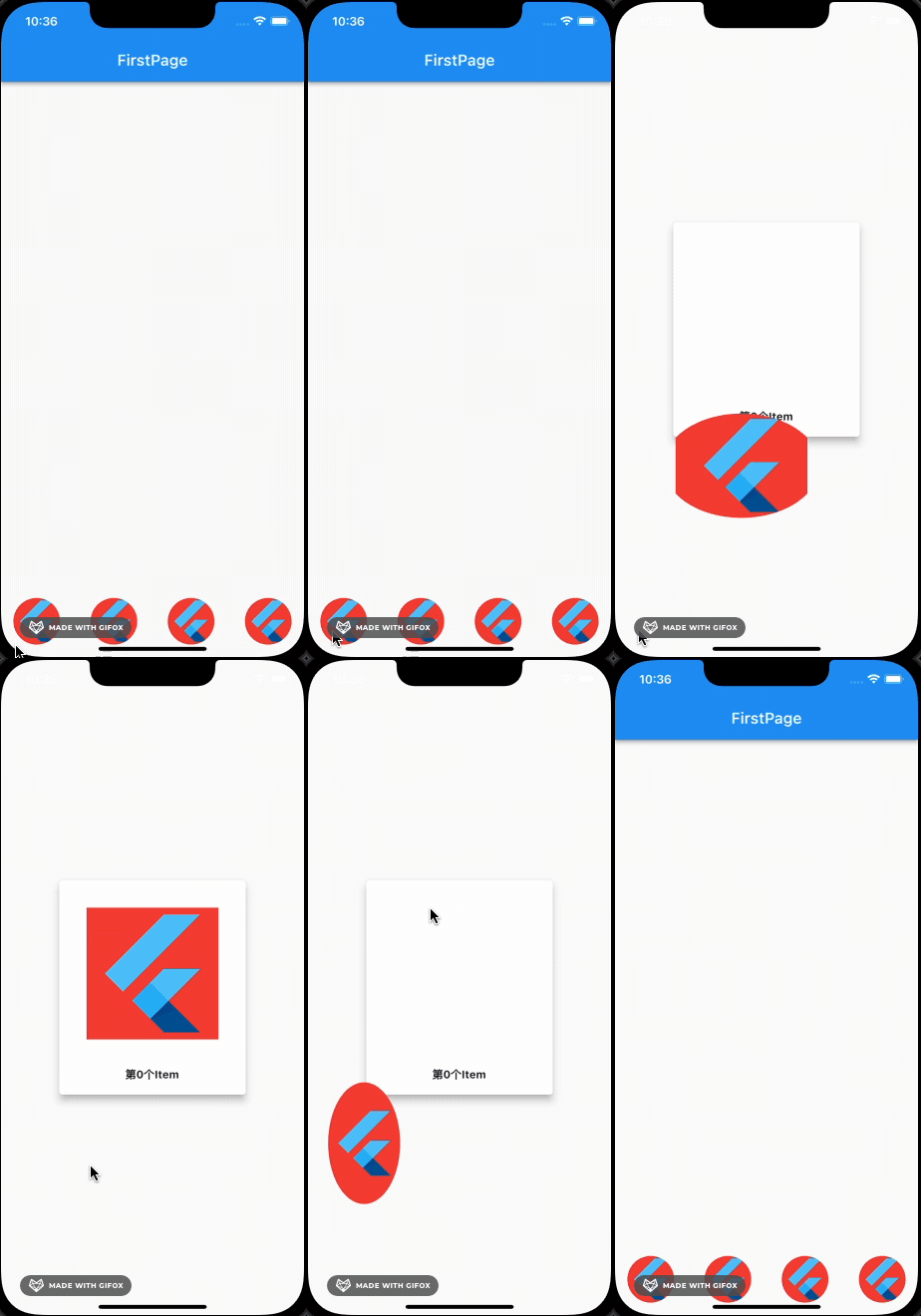
动画的形状变成了椭圆,Hero在MaterialApp中默认使用MaterialRectArcTween,要实现动画过程中裁剪形状为圆形,需要使用MaterialRectCenterArcTween。在使用了Hero的地方修改Hero的路径动画
Hero( tag: 'hero_tag_$index', createRectTween: (begin, end) { return MaterialRectCenterArcTween(begin: begin, end: end); }, child: ... )- 1
- 2
- 3
- 4
- 5
- 6
- 7
此时的效果
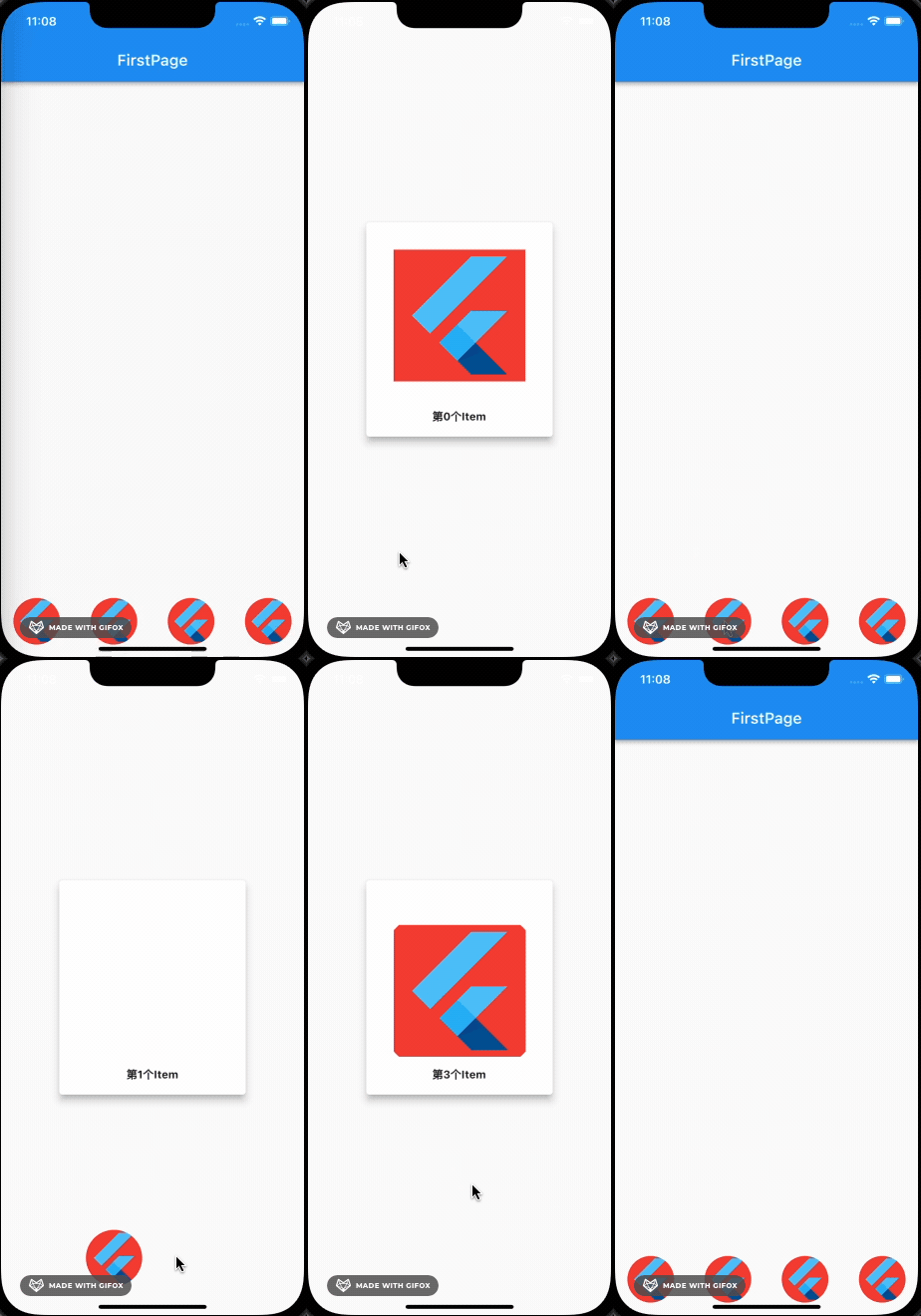
3.3 添加背景透明度动画让转场动画更自然
在
Navigator.of(context).push()PageRouteBuilder中,添加透明度动画,让页面切换更自然。Widget _buildItem(BuildContext context, int index) { return CupertinoButton( child: _buildHeroWidget(index), onPressed: () { Navigator.of(context).push( PageRouteBuilder<void>( pageBuilder: (context, animation, secondaryAnimation) { // 透明度变换Widget return FadeTransition( opacity: CurvedAnimation( parent: animation, curve: Curves.fastOutSlowIn, // 非曲线动画,慢进快出 ), child: SecondPage(index: index), ); }, ), ); }, ); }- 1
- 2
- 3
- 4
- 5
- 6
- 7
- 8
- 9
- 10
- 11
- 12
- 13
- 14
- 15
- 16
- 17
- 18
- 19
- 20
- 21
最终动画效果
文中的代码基本是参考的官方DEMO:
https://github.com/flutter/website/tree/main/examples/_animation/radial_hero_animation -
相关阅读:
版本管理 | 如何解决SVN的合并冲突与分支问题?
并发编程基础底层原理学习(四)
mybatis
leetcode 985. Sum of Even Numbers After Queries(query之后的偶数和)
__slots__限制类动态增加属性【Python面向对象进阶二】
文献学习-4-面向机器人手术的基于数据驱动控制的连续体腹腔镜器械跟踪控制方法
redis
新手指南|如何快速参与Moonbeam Ignite
知识点6--CMS项目管理员后台
REDIS05_SpringBoot整合redis、RedisTemplate操作各个基本类型、工具类的抽取
- 原文地址:https://blog.csdn.net/ww897532167/article/details/125487416
