-
table通过伪类实现 另类自适应
<!DOCTYPE html> <html lang="en"> <head> <meta charset="UTF-8"> <meta http-equiv="X-UA-Compatible" content="IE=edge"> <meta name="viewport" content="width=device-width, initial-scale=1.0"> <title>Document</title> <style> * { padding: 0; margin: 0; box-sizing: border-box; } @media screen and (min-width: 800px) { table { width: 100vw; border: 1px solid black; border-collapse: collapse; } tr { border-bottom: 1px solid black; } td { text-align: center; } } @media screen and (max-width: 800px) { table { border: 0; width: 100vw; } table thead { display: none; } table tr { display:block; margin-bottom: 20px; } table td { border-bottom: 1px solid #ddd; /* position: relative; */ /* display: block; */ /* text-align: right; */ display: flex; justify-content: space-between; } table td::before { /* position: absolute; */ /* left: 10px; */ content: attr(data-label); font-weight: 600; } } </style> </head> <body> <table> <caption>Lorem ipsum !</caption> <thead> <tr> <th>Account</th> <th>Due Date</th> <th>Amount</th> <th>Period</th> </tr> </thead> <tbody> <tr> <td data-label="Account">Visa -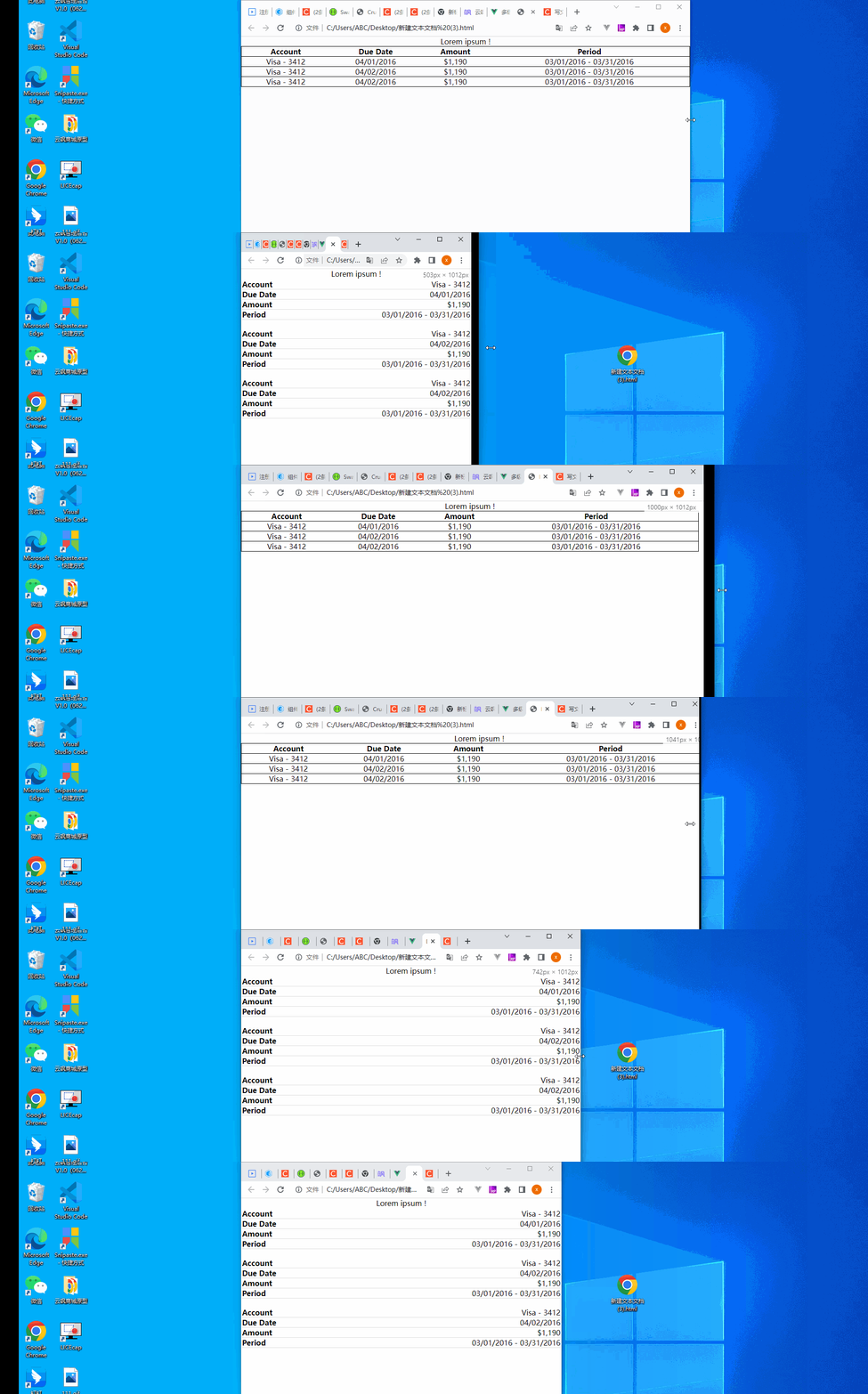 3412</td> <td data-label="Due Date">04/01/2016</td> <td data-label="Amount">$1,190</td> <td data-label="Period">03/01/2016 - 03/31/2016</td> </tr> <tr> <td data-label="Account">Visa - 3412</td> <td data-label="Due Date">04/02/2016</td> <td data-label="Amount">$1,190</td> <td data-label="Period">03/01/2016 - 03/31/2016</td> </tr> <tr> <td data-label="Account">Visa - 3412</td> <td data-label="Due Date">04/02/2016</td> <td data-label="Amount">$1,190</td> <td data-label="Period">03/01/2016 - 03/31/2016</td> </tr> </tbody> </table> </body> </html>- 1
- 2
- 3
- 4
- 5
- 6
- 7
- 8
- 9
- 10
- 11
- 12
- 13
- 14
- 15
- 16
- 17
- 18
- 19
- 20
- 21
- 22
- 23
- 24
- 25
- 26
- 27
- 28
- 29
- 30
- 31
- 32
- 33
- 34
- 35
- 36
- 37
- 38
- 39
- 40
- 41
- 42
- 43
- 44
- 45
- 46
- 47
- 48
- 49
- 50
- 51
- 52
- 53
- 54
- 55
- 56
- 57
- 58
- 59
- 60
- 61
- 62
- 63
- 64
- 65
- 66
- 67
- 68
- 69
- 70
- 71
- 72
- 73
- 74
- 75
- 76
- 77
- 78
- 79
- 80
- 81
- 82
- 83
- 84
- 85
- 86
- 87
- 88
- 89
- 90
- 91
- 92
- 93
- 94
- 95
- 96
- 97
- 98
- 99
- 100
- 101
- 102

主要实现方法
媒体查询 +借助伪元素极其特性,实现表头信息展示这里 当他满足屏幕小于800时 隐藏表头 然后打碎td 并通过伪类中的
content 实现 表头填充
这里,我们核心的知识点就是利用了元素的伪元素可以在 content 属性里,读取其 HTML 元素内的属性内容,并进行展示的知识点。假设一个 HTML 标签定义为:
那么该 div 对应的伪元素如果设置了 content: attr(data-msg) ,就可以读取到 data-msg 的值,相当于 content:“ABC” -
相关阅读:
Qt配置OpenCV(保姆级教程)
【附源码】计算机毕业设计JAVA智能社区管理系统
vue2进阶学习知识汇总
【深度学习】 Python 和 NumPy 系列教程(五):Python容器:3、集合Set详解(初始化、访问元素、常用操作、常用函数)
xxljob2.3.0适配oracle12c数据库具体实施
【成为红帽工程师】第五天 NFS服务器
字符串的大小(补充)
力扣(LeetCode)2731. 移动机器人(C++)
san.js源码解读之工具(util)篇——extend函数
npm换更换淘宝镜像
- 原文地址:https://blog.csdn.net/IT_iosers/article/details/125499713
