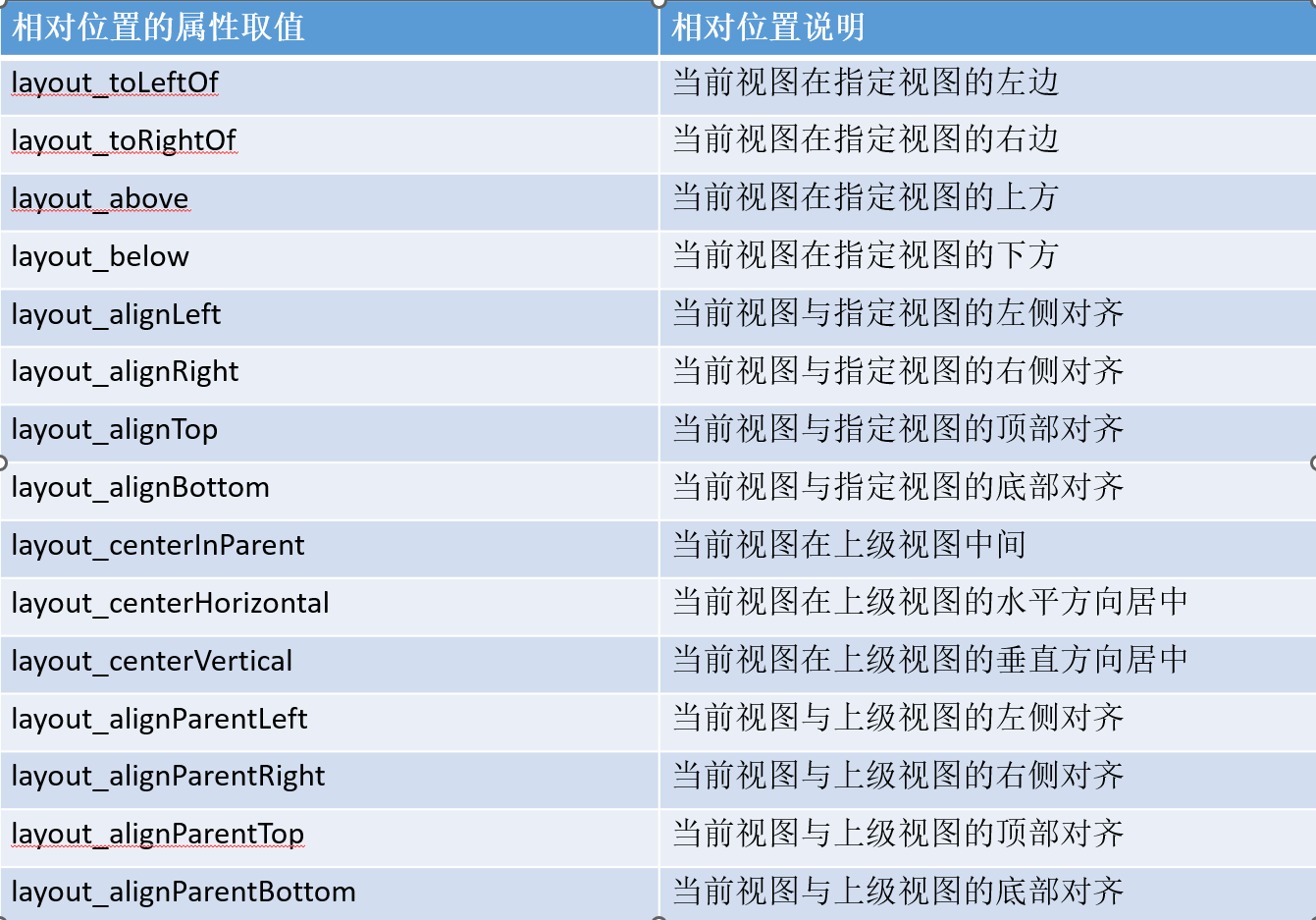
| 相对位置的属性取值 | 相对位置说明 |
| layout_toLeftOf | 当前视图在指定视图的左边 |
| layout_toRightOf | 当前视图在指定视图的右边 |
| layout_above | 当前视图在指定视图的上方 |
| layout_below | 当前视图在指定视图的下方 |
| layout_alignLeft | 当前视图与指定视图的左侧对齐 |
| layout_alignRight | 当前视图与指定视图的右侧对齐 |
| layout_alignTop | 当前视图与指定视图的顶部对齐 |
| layout_alignBottom | 当前视图与指定视图的底部对齐 |
| layout_centerInParent | 当前视图在上级视图中间 |
| layout_centerHorizontal | 当前视图在上级视图的水平方向居中 |
| layout_centerVertical | 当前视图在上级视图的垂直方向居中 |
| layout_alignParentLeft | 当前视图与上级视图的左侧对齐 |
| layout_alignParentRight | 当前视图与上级视图的右侧对齐 |
| layout_alignParentTop | 当前视图与上级视图的顶部对齐 |
| layout_alignParentBottom | 当前视图与上级视图的底部对齐 |

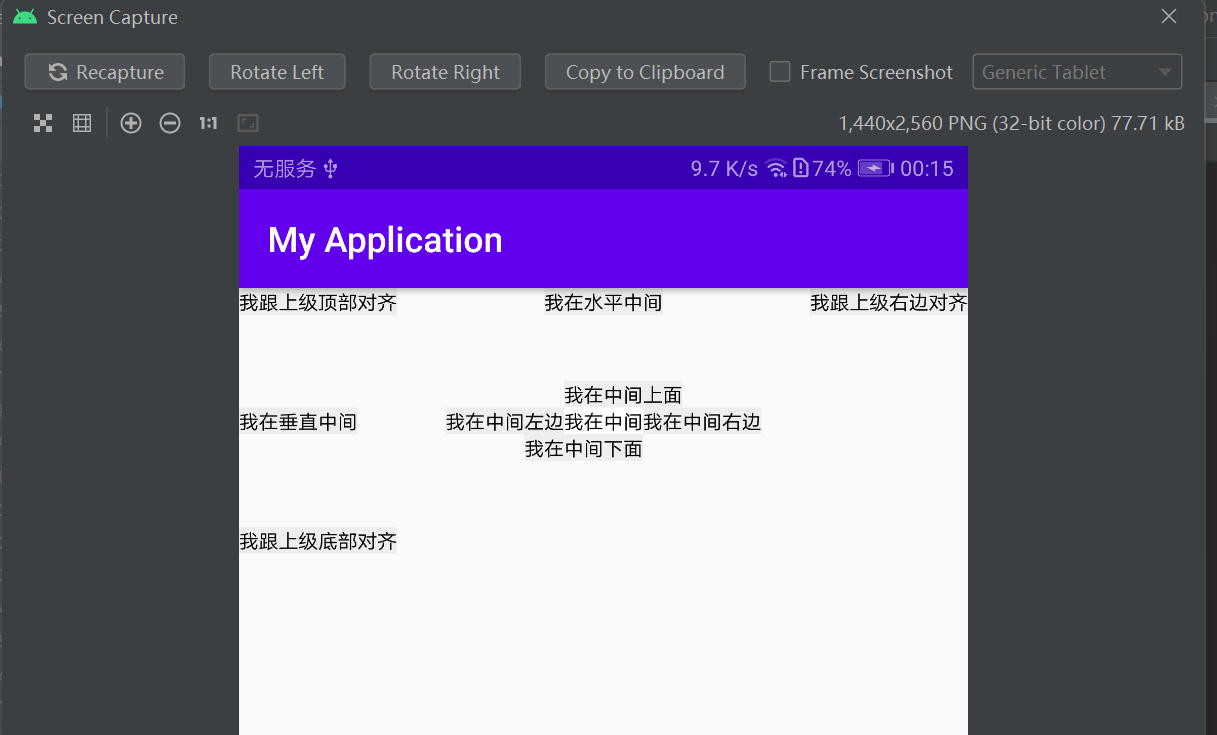
书本示例:
- <RelativeLayout xmlns:android="http://schemas.android.com/apk/res/android"
- android:layout_width="match_parent"
- android:layout_height="150dp" >
-
- <TextView
- android:id="@+id/tv_center"
- android:layout_width="wrap_content"
- android:layout_height="wrap_content"
- android:layout_centerInParent="true"
- android:background="#ffffff"
- android:text="我在中间"
- android:textSize="11sp"
- android:textColor="#000000" />
-
- <TextView
- android:id="@+id/tv_center_horizontal"
- android:layout_width="wrap_content"
- android:layout_height="wrap_content"
- android:layout_centerHorizontal="true"
- android:background="#eeeeee"
- android:text="我在水平中间"
- android:textSize="11sp"
- android:textColor="#000000" />
-
- <TextView
- android:id="@+id/tv_center_vertical"
- android:layout_width="wrap_content"
- android:layout_height="wrap_content"
- android:layout_centerVertical="true"
- android:background="#eeeeee"
- android:text="我在垂直中间"
- android:textSize="11sp"
- android:textColor="#000000" />
-
- <TextView
- android:id="@+id/tv_parent_left"
- android:layout_width="wrap_content"
- android:layout_height="wrap_content"
- android:layout_alignParentLeft="true"
- android:background="#eeeeee"
- android:text="我跟上级左边对齐"
- android:textSize="11sp"
- android:textColor="#000000" />
-
- <TextView
- android:id="@+id/tv_parent_right"
- android:layout_width="wrap_content"
- android:layout_height="wrap_content"
- android:layout_alignParentRight="true"
- android:background="#eeeeee"
- android:text="我跟上级右边对齐"
- android:textSize="11sp"
- android:textColor="#000000" />
-
- <TextView
- android:id="@+id/tv_parent_top"
- android:layout_width="wrap_content"
- android:layout_height="wrap_content"
- android:layout_alignParentTop="true"
- android:background="#eeeeee"
- android:text="我跟上级顶部对齐"
- android:textSize="11sp"
- android:textColor="#000000" />
-
- <TextView
- android:id="@+id/tv_parent_bottom"
- android:layout_width="wrap_content"
- android:layout_height="wrap_content"
- android:layout_alignParentBottom="true"
- android:background="#eeeeee"
- android:text="我跟上级底部对齐"
- android:textSize="11sp"
- android:textColor="#000000" />
-
- <TextView
- android:id="@+id/tv_left_center"
- android:layout_width="wrap_content"
- android:layout_height="wrap_content"
- android:layout_toLeftOf="@+id/tv_center"
- android:layout_alignTop="@+id/tv_center"
- android:background="#eeeeee"
- android:text="我在中间左边"
- android:textSize="11sp"
- android:textColor="#000000" />
-
- <TextView
- android:id="@+id/tv_right_center"
- android:layout_width="wrap_content"
- android:layout_height="wrap_content"
- android:layout_toRightOf="@+id/tv_center"
- android:layout_alignBottom="@+id/tv_center"
- android:background="#eeeeee"
- android:text="我在中间右边"
- android:textSize="11sp"
- android:textColor="#000000" />
-
- <TextView
- android:id="@+id/tv_above_center"
- android:layout_width="wrap_content"
- android:layout_height="wrap_content"
- android:layout_above="@+id/tv_center"
- android:layout_alignLeft="@+id/tv_center"
- android:background="#eeeeee"
- android:text="我在中间上面"
- android:textSize="11sp"
- android:textColor="#000000" />
-
- <TextView
- android:id="@+id/tv_below_center"
- android:layout_width="wrap_content"
- android:layout_height="wrap_content"
- android:layout_below="@+id/tv_center"
- android:layout_alignRight="@+id/tv_center"
- android:background="#eeeeee"
- android:text="我在中间下面"
- android:textSize="11sp"
- android:textColor="#000000" />
- </RelativeLayout>

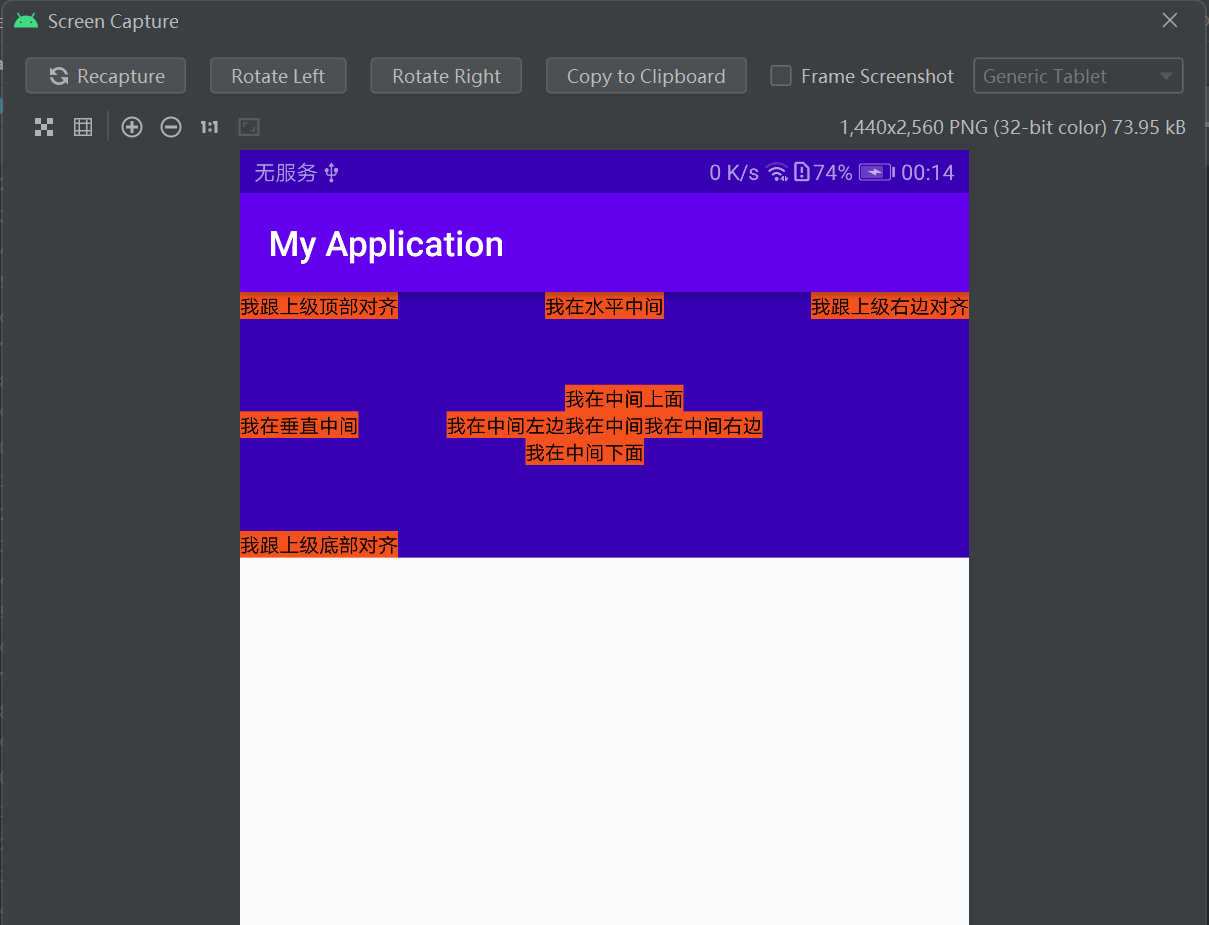
改变了背景颜色的示例:
- <RelativeLayout xmlns:android="http://schemas.android.com/apk/res/android"
- android:layout_width="match_parent"
- android:background="@color/purple_700"
- android:layout_height="150dp" >
-
- <TextView
- android:id="@+id/tv_center"
- android:layout_width="wrap_content"
- android:layout_height="wrap_content"
- android:layout_centerInParent="true"
- android:background="#F4511E"
- android:text="我在中间"
- android:textSize="11sp"
- android:textColor="#000000" />
-
- <TextView
- android:id="@+id/tv_center_horizontal"
- android:layout_width="wrap_content"
- android:layout_height="wrap_content"
- android:layout_centerHorizontal="true"
- android:background="#F4511E"
- android:text="我在水平中间"
- android:textSize="11sp"
- android:textColor="#000000" />
-
- <TextView
- android:id="@+id/tv_center_vertical"
- android:layout_width="wrap_content"
- android:layout_height="wrap_content"
- android:layout_centerVertical="true"
- android:background="#F4511E"
- android:text="我在垂直中间"
- android:textSize="11sp"
- android:textColor="#000000" />
-
- <TextView
- android:id="@+id/tv_parent_left"
- android:layout_width="wrap_content"
- android:layout_height="wrap_content"
- android:layout_alignParentLeft="true"
- android:background="#F4511E"
- android:text="我跟上级左边对齐"
- android:textSize="11sp"
- android:textColor="#000000" />
-
- <TextView
- android:id="@+id/tv_parent_right"
- android:layout_width="wrap_content"
- android:layout_height="wrap_content"
- android:layout_alignParentRight="true"
- android:background="#F4511E"
- android:text="我跟上级右边对齐"
- android:textSize="11sp"
- android:textColor="#000000" />
-
- <TextView
- android:id="@+id/tv_parent_top"
- android:layout_width="wrap_content"
- android:layout_height="wrap_content"
- android:layout_alignParentTop="true"
- android:background="#F4511E"
- android:text="我跟上级顶部对齐"
- android:textSize="11sp"
- android:textColor="#000000" />
-
- <TextView
- android:id="@+id/tv_parent_bottom"
- android:layout_width="wrap_content"
- android:layout_height="wrap_content"
- android:layout_alignParentBottom="true"
- android:background="#F4511E"
- android:text="我跟上级底部对齐"
- android:textSize="11sp"
- android:textColor="#000000" />
-
- <TextView
- android:id="@+id/tv_left_center"
- android:layout_width="wrap_content"
- android:layout_height="wrap_content"
- android:layout_alignTop="@+id/tv_center"
- android:layout_toLeftOf="@+id/tv_center"
- android:background="#F4511E"
- android:text="我在中间左边"
- android:textColor="#000000"
- android:textSize="11sp" />
-
- <TextView
- android:id="@+id/tv_right_center"
- android:layout_width="wrap_content"
- android:layout_height="wrap_content"
- android:layout_toRightOf="@+id/tv_center"
- android:layout_alignBottom="@+id/tv_center"
- android:background="#F4511E"
- android:text="我在中间右边"
- android:textSize="11sp"
- android:textColor="#000000" />
-
- <TextView
- android:id="@+id/tv_above_center"
- android:layout_width="wrap_content"
- android:layout_height="wrap_content"
- android:layout_above="@+id/tv_center"
- android:layout_alignLeft="@+id/tv_center"
- android:background="#F4511E"
- android:text="我在中间上面"
- android:textSize="11sp"
- android:textColor="#000000" />
-
- <TextView
- android:id="@+id/tv_below_center"
- android:layout_width="wrap_content"
- android:layout_height="wrap_content"
- android:layout_below="@+id/tv_center"
- android:layout_alignRight="@+id/tv_center"
- android:background="#F4511E"
- android:text="我在中间下面"
- android:textSize="11sp"
- android:textColor="#000000" />
- </RelativeLayout>