-
基于Springboot+MySQL的个人健康监控管理系统
资源下载地址:https://download.csdn.net/download/sheziqiong/85798666
<?xml version="1.0" encoding="UTF-8"?>
资源下载地址:https://download.csdn.net/download/sheziqiong/85798666
目录
摘要 1
summary 2
一.项目简介 4
1.1背景分析 4
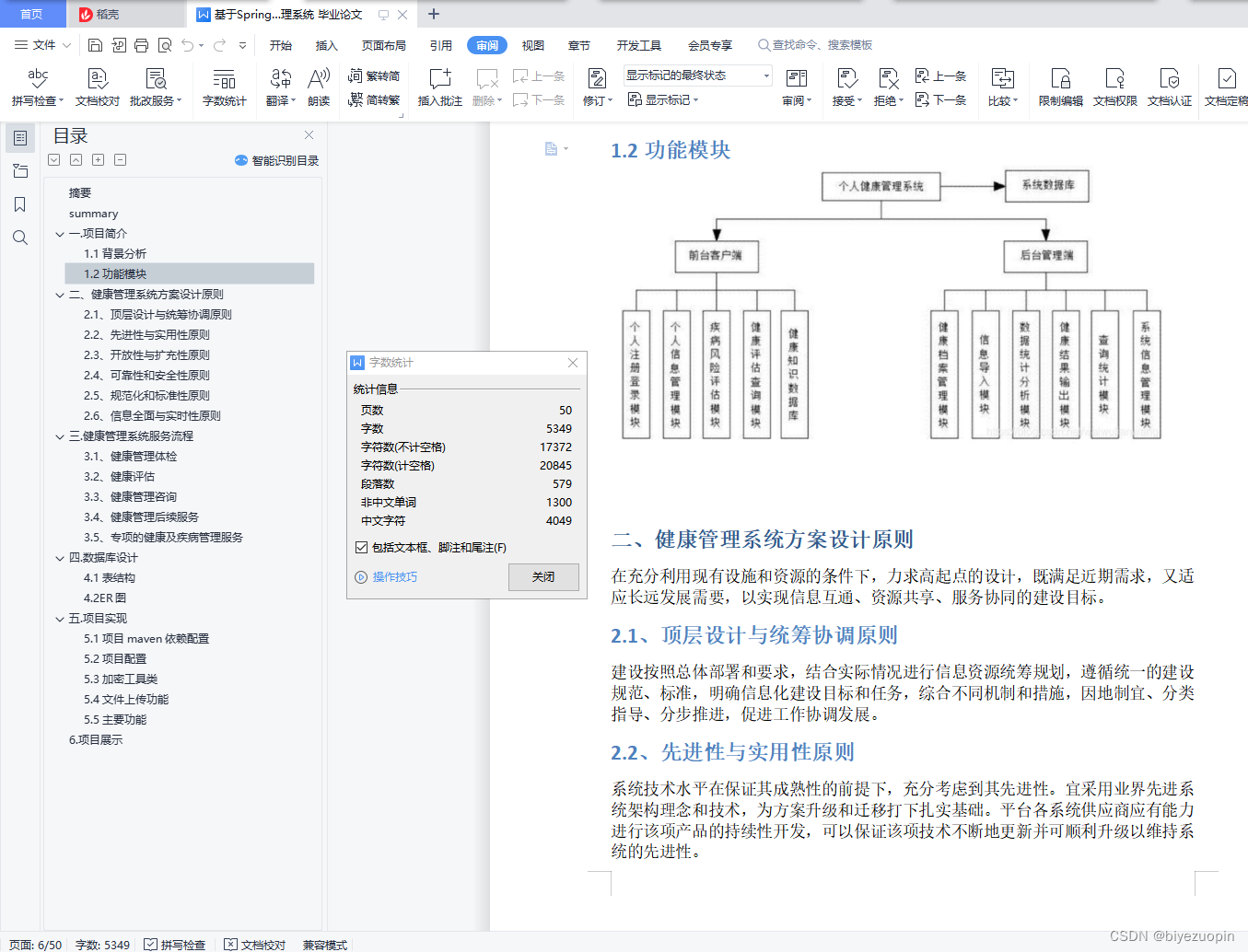
1.2功能模块 5
二、健康管理系统方案设计原则 5
2.1、顶层设计与统筹协调原则 5
2.2、先进性与实用性原则 5
2.3、开放性与扩充性原则 6
2.4、可靠性和安全性原则 6
2.5、规范化和标准性原则 7
2.6、信息全面与实时性原则 7
三.健康管理系统服务流程 7
3.1、健康管理体检 7
3.2、健康评估 7
3.3、健康管理咨询 7
3.4、健康管理后续服务 8
3.5、专项的健康及疾病管理服务 8
四.数据库设计 8
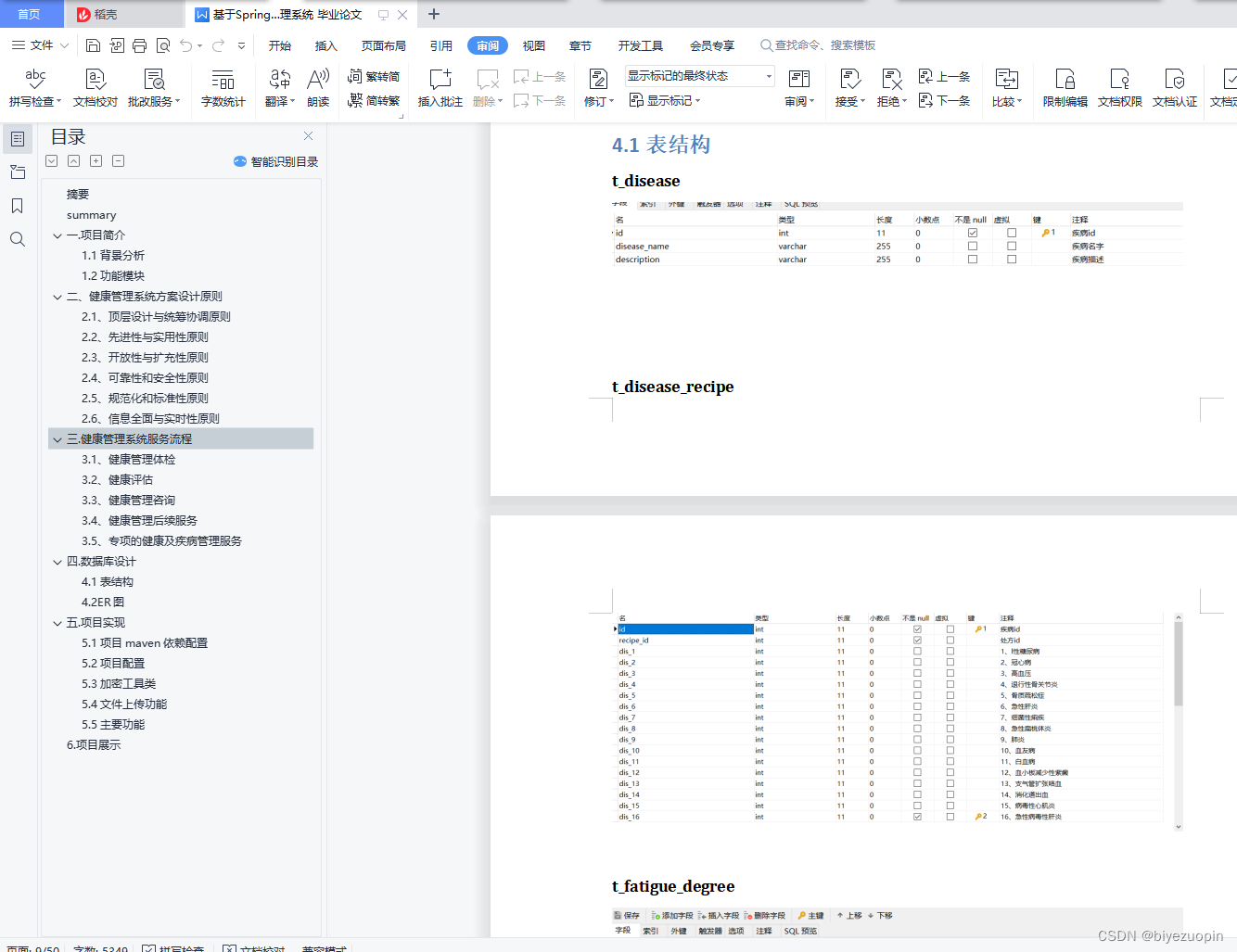
4.1表结构 8
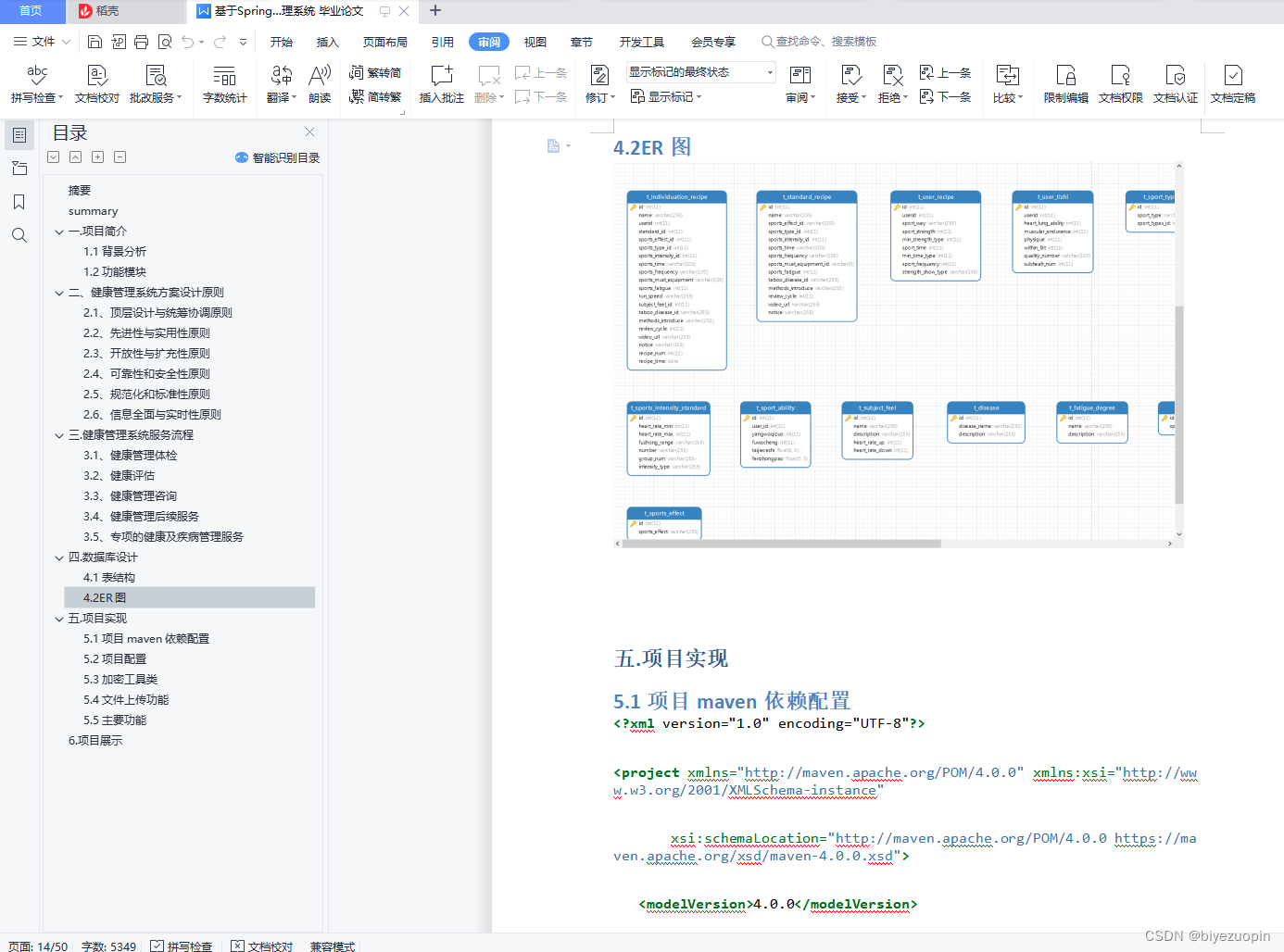
4.2ER图 13
五.项目实现 13
5.1项目maven依赖配置 13
5.2项目配置 23
5.3加密工具类 27
5.4文件上传功能 30
5.5主要功能 34
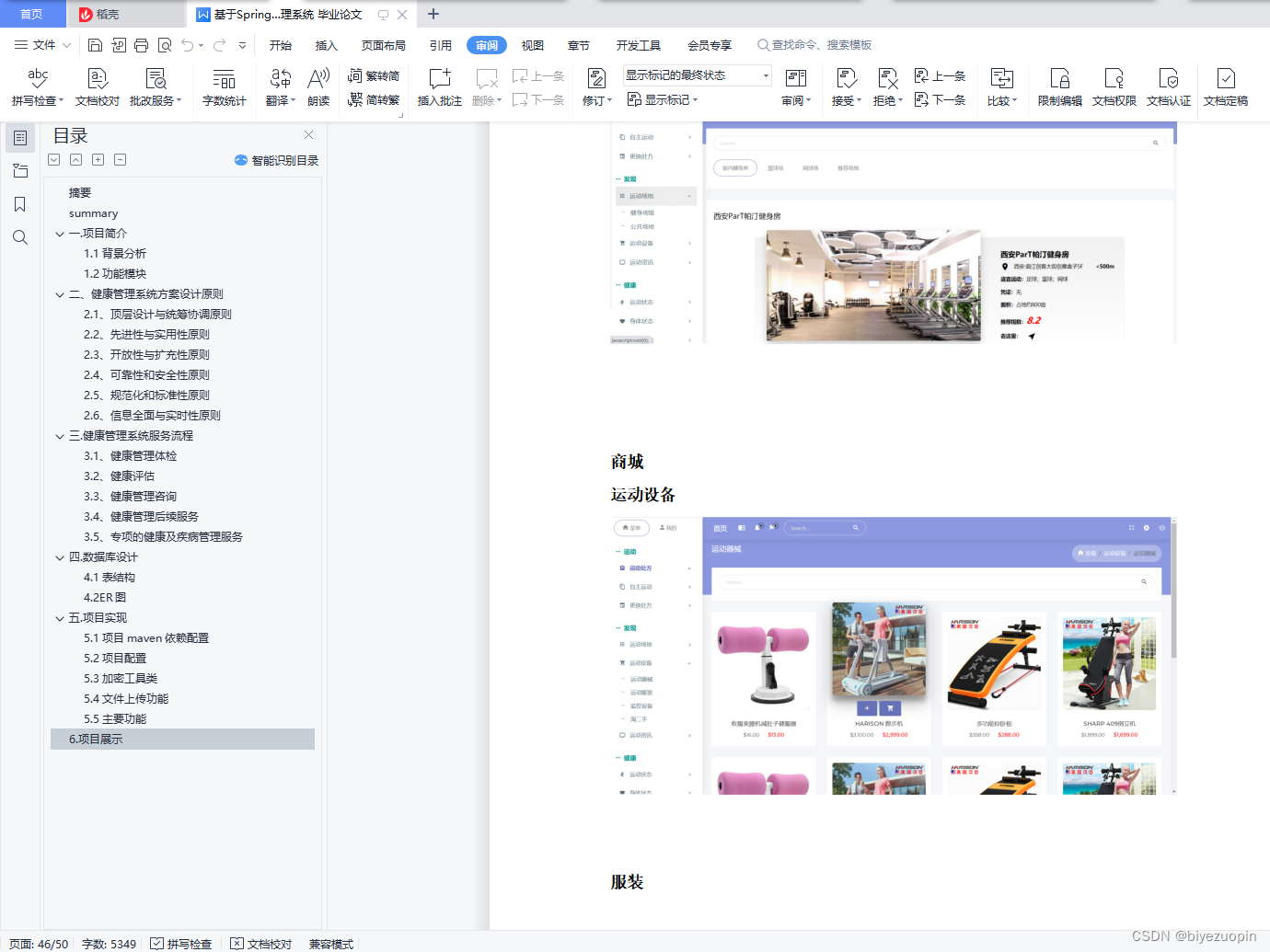
6.项目展示 42
三.健康管理系统服务流程
3.1、健康管理体检
健康管理体检是以人群的健康需求为基础,按照早发现,早干预的原则来选定体格检查的项目。检查的结果对后期的健康干预活动具有明确的指导意义。健康管理体检项目可以根据个人的年龄、性别、工作特点等进行调整。目前一般的体检服务所提供的信息应该可以满足这方面的要求。
3.2、健康评估
通过分析个人健康史、家族史、生活方式和从精神压力等问卷获取的资料,可以为服务对象提供一系列的评估报告,其中包括用来反映各项检查指标状况的个人健康体检报告,个人总体健康评估报告,精神压力评估报告等。
3.3、健康管理咨询
在完成上述步骤后,个人可以得到不同层次的健康咨询服务。个人可以去健康管理服务中心接受咨询,也可以由健康管理师通过电话与个人进行沟通。内容可以包括以下几方面:解释个人健康信息及健康评估结果及其对健康的影响,制定健康管理计划,提供健康指导,制定随访跟踪计划等。
3.4、健康管理后续服务
健康管理的后续服务内容主要取决于被服务者(人群)的情况以及资源的多少,可以根据个人及人群的需求提供不同的服务。后续服务的形式可以是通过互联网查询个人健康信息和接受健康指导,定期寄送健康管理通讯和健康提示;以及提供个性化的健康改善行动计划。监督随访是后续服务的一个常用手段。随访的主要内容是检查健康管理计划的实现状况,并检查(必要时测量)主要危险因素的变化情况。健康教育课堂也是后续服务的重要措施,在营养改善、生活方式改变与疾病控制方面有很好的效果。
3.5、专项的健康及疾病管理服务
除了常规的健康管理服务外,还可根据具体情况为个体和群体提供专项的健康管理服务。这些服务的设计通常会按病人及健康人来划分。对已患有慢性病的个体,可选择针对特定疾病或疾病危险因素的服务,如糖尿病管理、心血管疾病及相关危险因素管理、精神压力缓解、戒烟、运动、营养及膳食咨询等。对没有慢性病的个体,可选择的服务也很多,如个人健康教育、生活方式改善咨询、疾病高危人群的教育及维护项目等。
五.项目实现
5.1项目maven依赖配置<project xmlns=“http://maven.apache.org/POM/4.0.0” xmlns:xsi=“http://www.w3.org/2001/XMLSchema-instance”
xsi:schemaLocation="http://maven.apache.org/POM/4.0.0 https://maven.apache.org/xsd/maven-4.0.0.xsd">- 1
4.0.0
<groupId>org.springframework.boot</groupId> <artifactId>spring-boot-starter-parent</artifactId> <version>2.1.13.RELEASE</version> <relativePath/> <!-- lookup parent from repository -->- 1
- 2
- 3
- 4
- 5
- 6
- 7
com.sport
sport
0.0.1-SNAPSHOT
sport
Demo project for Spring Boot
<java.version>1.8</java.version>- 1
<dependency> <groupId>org.springframework.boot</groupId> <artifactId>spring-boot-starter</artifactId> </dependency> <dependency> <groupId>org.springframework.boot</groupId> <artifactId>spring-boot-starter-jdbc</artifactId> </dependency> <dependency> <groupId>org.springframework.boot</groupId> <artifactId>spring-boot-starter-web</artifactId> </dependency> <!--实现Spring Boot项目的热部署--> <dependency> <groupId>org.springframework.boot</groupId> <artifactId>spring-boot-devtools</artifactId> <optional>true</optional> </dependency> <dependency> <groupId>org.springframework.boot</groupId> <artifactId>spring-boot-starter-test</artifactId> <scope>test</scope> </dependency> <!--mybatis依赖--> <dependency> <groupId>org.mybatis.spring.boot</groupId> <artifactId>mybatis-spring-boot-starter</artifactId> <version>1.1.1</version> </dependency> <!--mysql依赖--> <dependency> <groupId>mysql</groupId> <artifactId>mysql-connector-java</artifactId> <version>5.1.46</version> <scope>runtime</scope> </dependency> <!--<dependency>--> <!--<groupId>org.springframework.boot</groupId>--> <!--<artifactId>spring-boot-starter-data-jpa</artifactId>--> <!--</dependency>--> <dependency> <groupId>org.mybatis.generator</groupId> <artifactId>mybatis-generator-core</artifactId> <version>1.3.5</version> </dependency> <!--前端模版引擎,可完全替代jsp--> <dependency> <groupId>org.springframework.boot</groupId> <artifactId>spring-boot-starter-thymeleaf</artifactId> </dependency> <!--使用注解在源码中不需要写一些通用的方法,但是在编译生成的字节码文件中会帮我们生成这些方法--> <dependency> <groupId>org.projectlombok</groupId> <artifactId>lombok</artifactId> <version>1.16.10</version> </dependency> <!--阿里的数据源--> <dependency> <groupId>com.alibaba</groupId> <artifactId>druid</artifactId> <version>1.1.19</version> </dependency> <!--jean推理机--> <dependency> <groupId>org.apache.jena</groupId> <artifactId>apache-jena</artifactId> <version>3.8.0</version> <type>pom</type> <exclusions> <exclusion> <groupId>org.slf4j</groupId> <artifactId>slf4j-log4j12</artifactId> </exclusion> </exclusions> </dependency> <dependency> <groupId>com.sport</groupId> <artifactId>sport</artifactId> <version>0.0.1-SNAPSHOT</version> </dependency> <!--抓取网页--> <dependency> <groupId>org.jsoup</groupId> <artifactId>jsoup</artifactId> <version>1.7.3</version> </dependency> <dependency> <groupId>com.alibaba</groupId> <artifactId>fastjson</artifactId> <version>1.2.66</version> </dependency> <!--阿里云oss依赖(必须)--> <dependency> <groupId>com.aliyun.oss</groupId> <artifactId>aliyun-sdk-oss</artifactId> <version>3.10.2</version> </dependency> <!--日期工具依赖(非必须)--> <dependency> <groupId>joda-time</groupId> <artifactId>joda-time</artifactId> <version>2.10.1</version> </dependency> <dependency> <groupId>org.projectlombok</groupId> <artifactId>lombok</artifactId> <version>1.18.10</version> <scope>provided</scope> </dependency>- 1
- 2
- 3
- 4
- 5
- 6
- 7
- 8
- 9
- 10
- 11
- 12
- 13
- 14
- 15
- 16
- 17
- 18
- 19
- 20
- 21
- 22
- 23
- 24
- 25
- 26
- 27
- 28
- 29
- 30
- 31
- 32
- 33
- 34
- 35
- 36
- 37
- 38
- 39
- 40
- 41
- 42
- 43
- 44
- 45
- 46
- 47
- 48
- 49
- 50
- 51
- 52
- 53
- 54
- 55
- 56
- 57
- 58
- 59
- 60
- 61
- 62
- 63
- 64
- 65
- 66
- 67
- 68
- 69
- 70
- 71
- 72
- 73
- 74
- 75
- 76
- 77
- 78
- 79
- 80
- 81
- 82
- 83
- 84
- 85
- 86
- 87
- 88
- 89
- 90
- 91
- 92
- 93
- 94
- 95
- 96
- 97
- 98
- 99
- 100
- 101
- 102
- 103
- 104
- 105
- 106
- 107
- 108
- 109
- 110
- 111
- 112
- 113
- 114
- 115
- 116
- 117
- 118
- 119
- 120
- 121
- 122
- 123
- 124
- 125
- 126
- 127
- 128
- 129
- 130
- 131
- 132
- 133
- 134
- 135
- 136
- 137
- 138
- 139
- 140
- 141
- 142
- 143
- 144
- 145
- 146
- 147
- 148
- 149
- 150
- 151
- 152
- 153
- 154
- 155
- 156
- 157
- 158
- 159
- 160
- 161
- 162
- 163
- 164
- 165
- 166
- 167
- 168
- 169
- 170
- 171
- 172
- 173
- 174
- 175
- 176
- 177
- 178
- 179
- 180
- 181
- 182
- 183
- 184
- 185
- 186
- 187
- 188
- 189
- 190
- 191
- 192
- 193
- 194
- 195
- 196
- 197
- 198
- 199
- 200
- 201
- 202
- 203
- 204
- 205
- 206
- 207
- 208
- 209
- 210
- 211
- 212
- 213
- 214
- 215
- 216
- 217
- 218
- 219
- 220
- 221
- 222
- 223
- 224
- 225
- 226
- 227
- 228
- 229
- 230
- 231
- 232
- 233
- 234
- 235
- 236
- 237
- 238
- 239
- 240
- 241
- 242
- 243
- 244
- 245
<plugins> <plugin> <groupId>org.springframework.boot</groupId> <artifactId>spring-boot-maven-plugin</artifactId> </plugin> <!--mybatis generator 自动生成代码插件--> <plugin> <groupId>org.mybatis.generator</groupId> <artifactId>mybatis-generator-maven-plugin</artifactId> <version>1.3.5</version> <configuration> <!--generatorConfig.xml位置--> <configurationFile>${basedir}/src/main/resources/generator/generatorConfig.xml</configurationFile> <overwrite>true</overwrite> <verbose>true</verbose> </configuration> <!--此处必须添加mysql驱动包--> <dependencies> <dependency> <groupId>mysql</groupId> <artifactId>mysql-connector-java</artifactId> <!--<scope>runtime</scope>--> <version>8.0.18</version> </dependency> </dependencies> </plugin> </plugins>- 1
- 2
- 3
- 4
- 5
- 6
- 7
- 8
- 9
- 10
- 11
- 12
- 13
- 14
- 15
- 16
- 17
- 18
- 19
- 20
- 21
- 22
- 23
- 24
- 25
- 26
- 27
- 28
- 29
- 30
- 31
- 32
- 33
- 34
- 35
- 36
- 37
- 38
- 39
- 40
- 41
- 42
- 43
- 44
- 45
- 46
- 47
- 48
- 49
- 50
- 51
- 52
- 53
- 54
- 55
spring:
配置数据源
datasource:
driver-class-name: com.mysql.jdbc.Driver url: jdbc:mysql://127.0.0.1:3306/sport?useUnicode=true&characterEncoding=utf8&useSSL=false&serverTimezone=Asia/Shanghai username: root password: 123456- 1
- 2
- 3
- 4
- 5
- 6
- 7
resources:
# 配置静态资源路径 static-locations: classpath:/templates/,classpath:/static/- 1
- 2
- 3
chain:
strategy: content: enabled: true paths: /**- 1
- 2
- 3
- 4
- 5
- 6
- 7
mybatis-plus:
xml
mapper-locations: classpath:mapper/*Mapper.xml
实体扫描,多个package用逗号或者分号分隔
type-aliases-package: com.fengwenyi.mp3demo.model
configuration:
# 这个配置会将执行的sql打印出来,在开发或测试的时候可以用 log-impl: org.apache.ibatis.logging.stdout.StdOutImpl cache-enabled: true #启动结果集自动映射 auto-mapping-behavior: partial #驼峰映射 多数据源时,必须使用自定义配置,比如使用配置类来实现 map-underscore-to-camel-case: true- 1
- 2
- 3
- 4
- 5
- 6
- 7
- 8
- 9
- 10
- 11
- 12
- 13
mybatis:
mybatis 控制台输出sql语句
configuration:
log-impl: org.apache.ibatis.logging.stdout.StdOutImpl- 1
配置.xml文件路径
mapper-locations: classpath:mappers/*.xml
type-aliases-package: com.sports.entity
密码MD5加密盐值
password:
salt: geelysdafaqj23ou89ZXcj@#KaTeX parse error: Expected 'EOF', got '#' at position 2: @#̲#@KJdjklj;D…/dSF.,
上传到远程阿里云OSS配置
#aliyun:
oss:
file:
# bucket可以在控制台创建,也可以使用java代码创建
bucketname: sport-image-manage
# 不同的服务器地址不同
endpoint: oss-cn-beijing.aliyuncs.com
keyid: LTAI4GCFeP6gnz7Ru4Z4tuSa
keysecret: iMg6aNpSrtpQMyeV1sD83GF0I5PbTP
oss:
endpoint: oss-cn-beijing.aliyuncs.com
url: https://sport-image-manage.oss-cn-beijing.aliyuncs.com/
accessKeyId: LTAI4GCFeP6gnz7Ru4Z4tuSa
accessKeySecret: iMg6aNpSrtpQMyeV1sD83GF0I5PbTP
bucketName: sport-image-manage
5.3加密工具类
public class MD5Util {private static String byteArrayToHexString(byte b[]) { StringBuffer resultSb = new StringBuffer(); for (int i = 0; i < b.length; i++) resultSb.append(byteToHexString(b[i])); return resultSb.toString(); } private static String byteToHexString(byte b) { int n = b; if (n < 0) n += 256; int d1 = n / 16; int d2 = n % 16; return hexDigits[d1] + hexDigits[d2]; } /** * 返回大写MD5 * * @param origin * @param charsetname * @return */ private static String MD5Encode(String origin, String charsetname) { String resultString = null; try { resultString = new String(origin); MessageDigest md = MessageDigest.getInstance("MD5"); if (charsetname == null || "".equals(charsetname)) resultString = byteArrayToHexString(md.digest(resultString.getBytes())); else resultString = byteArrayToHexString(md.digest(resultString.getBytes(charsetname))); } catch (Exception exception) { } return resultString.toUpperCase(); } public static String MD5EncodeUtf8(String origin) { // 获取盐值 origin = origin + PropertiesUtil.getProperty("password.salt", ""); return MD5Encode(origin, "utf-8"); } private static final String hexDigits[] = {"0", "1", "2", "3", "4", "5", "6", "7", "8", "9", "a", "b", "c", "d", "e", "f"};- 1
- 2
- 3
- 4
- 5
- 6
- 7
- 8
- 9
- 10
- 11
- 12
- 13
- 14
- 15
- 16
- 17
- 18
- 19
- 20
- 21
- 22
- 23
- 24
- 25
- 26
- 27
- 28
- 29
- 30
- 31
- 32
- 33
- 34
- 35
- 36
- 37
- 38
- 39
- 40
- 41
- 42
- 43
- 44
- 45
- 46
- 47
- 48
- 49
- 50
- 51
- 52
- 53
- 54
- 55
- 56
- 57
- 58
- 59
- 60
- 61
- 62
- 63
- 64
- 65
- 66
- 67
- 68
- 69
- 70
- 71
- 72
- 73
- 74
- 75
- 76
- 77
- 78
- 79
- 80
- 81
- 82
- 83
- 84
- 85
- 86
- 87
- 88
- 89
- 90
- 91
- 92
- 93
}
5.4文件上传功能
/**- 阿里云 oss 上传工具类(高依赖版)
*/
public class OSSBootUtil {
private OSSBootUtil(){} /** * oss 工具客户端 */ private volatile static OSSClient ossClient = null; /** * 上传文件至阿里云 OSS * 文件上传成功,返回文件完整访问路径 * 文件上传失败,返回 null * * @param ossConfig oss 配置信息 * @param file 待上传文件 * @param fileDir 文件保存目录 * @return oss 中的相对文件路径 */ public static String upload(OSSConfig ossConfig, MultipartFile file, String fileDir){ initOSS(ossConfig); StringBuilder fileUrl = new StringBuilder(); try { String suffix = file.getOriginalFilename().substring(file.getOriginalFilename().lastIndexOf('.')); String fileName = System.currentTimeMillis() + "-" + UUID.randomUUID().toString().substring(0,18) + suffix; if (!fileDir.endsWith("/")) { fileDir = fileDir.concat("/"); } fileUrl = fileUrl.append(fileDir + fileName); ossClient.putObject(ossConfig.getBucketName(), fileUrl.toString(), file.getInputStream()); } catch (IOException e) { e.printStackTrace(); return null; } fileUrl = fileUrl.insert(0,ossConfig.getUrl()); return fileUrl.toString(); } /** * 初始化 oss 客户端 * @param ossConfig * @return */ private static OSSClient initOSS(OSSConfig ossConfig) { if (ossClient == null ) { synchronized (OSSBootUtil.class) { if (ossClient == null) { ossClient = new OSSClient(ossConfig.getEndpoint(), new DefaultCredentialProvider(ossConfig.getAccessKeyId(), ossConfig.getAccessKeySecret()), new ClientConfiguration()); } } } return ossClient; }- 1
- 2
- 3
- 4
- 5
- 6
- 7
- 8
- 9
- 10
- 11
- 12
- 13
- 14
- 15
- 16
- 17
- 18
- 19
- 20
- 21
- 22
- 23
- 24
- 25
- 26
- 27
- 28
- 29
- 30
- 31
- 32
- 33
- 34
- 35
- 36
- 37
- 38
- 39
- 40
- 41
- 42
- 43
- 44
- 45
- 46
- 47
- 48
- 49
- 50
- 51
- 52
- 53
- 54
- 55
- 56
- 57
- 58
- 59
- 60
- 61
- 62
- 63
- 64
- 65
- 66
- 67
- 68
- 69
- 70
- 71
- 72
- 73
- 74
- 75
- 76
- 77
- 78
- 79
- 80
- 81
- 82
- 83
- 84
- 85
- 86
- 87
- 88
- 89
- 90
- 91
- 92
- 93
- 94
- 95
- 96
- 97
- 98
- 99
- 100
- 101
- 102
- 103
- 104
- 105
- 106
- 107
}
5.5主要功能
疾病等级的判断
package com.sports.controller;import com.alibaba.fastjson.JSONArray;
import com.sports.common.ServerResponse;
import com.sports.entity.FatigueDegree;
import com.sports.exception.FatigueDegreeException;
import com.sports.service.impl.FatigueDegreeServiceImpl;
import org.springframework.beans.factory.annotation.Autowired;
import org.springframework.transaction.annotation.Transactional;
import org.springframework.web.bind.annotation.*;
import javax.servlet.http.HttpSession;
@RestController
@RequestMapping(“/fatigueDegree/”)
@CrossOrigin(origins=“*”,maxAge=3600)
public class FatigueDegreeController {
@Autowired FatigueDegreeServiceImpl fatigueDegreeService; /** * 疲劳度等级的添加 */ @RequestMapping(value = "addFatigueDegree.do", method = RequestMethod.POST) @Transactional(rollbackFor = FatigueDegreeException.class) public ServerResponse addFatigueDegree(FatigueDegree fatigueDegree){ return fatigueDegreeService.addFatigueDegree(fatigueDegree); } /**- 1
- 2
- 3
- 4
- 5
- 6
- 7
- 8
- 9
- 10
- 11
- 12
- 13
- 14
- 15
- 16
- 17
- 18
- 19
- 20
- 21
- 22
- 23
- 24
- 25
- 26
- 27






资源下载地址:https://download.csdn.net/download/sheziqiong/85798666
资源下载地址:https://download.csdn.net/download/sheziqiong/85798666 -
相关阅读:
kafka复习:(25)kafka stream
docker图形胡界面管理工具--Portainer可视化面板安装
FastStone Capture
Python爬虫详解:原理、常用库与实战案例
Selenium + Python自动化测试入门
阿旭机器学习实战【5】KNN算法实战练习2:利用KNN模型进行手写体数字识别
面渣逆袭:Spring三十五问,四万字+五十图详解
磁盘调度算法
【SemiDrive源码分析】【MailBox核间通信】52 - DCF Notify 实现原理分析 及 代码实战
常用的 Spring Boot 注解及其作用
- 原文地址:https://blog.csdn.net/sheziqiong/article/details/125482961
