-
Flutter 内嵌原生组件 for ios
前言:
前面介绍了 Flutter 内嵌 android 原生组件;Flutter 内嵌原生组件 for android
这里介绍下 Flutter 内嵌 ios 原生组件 ;
ios 相对于 android 要稍微复杂点(多了几个环节),先看效果
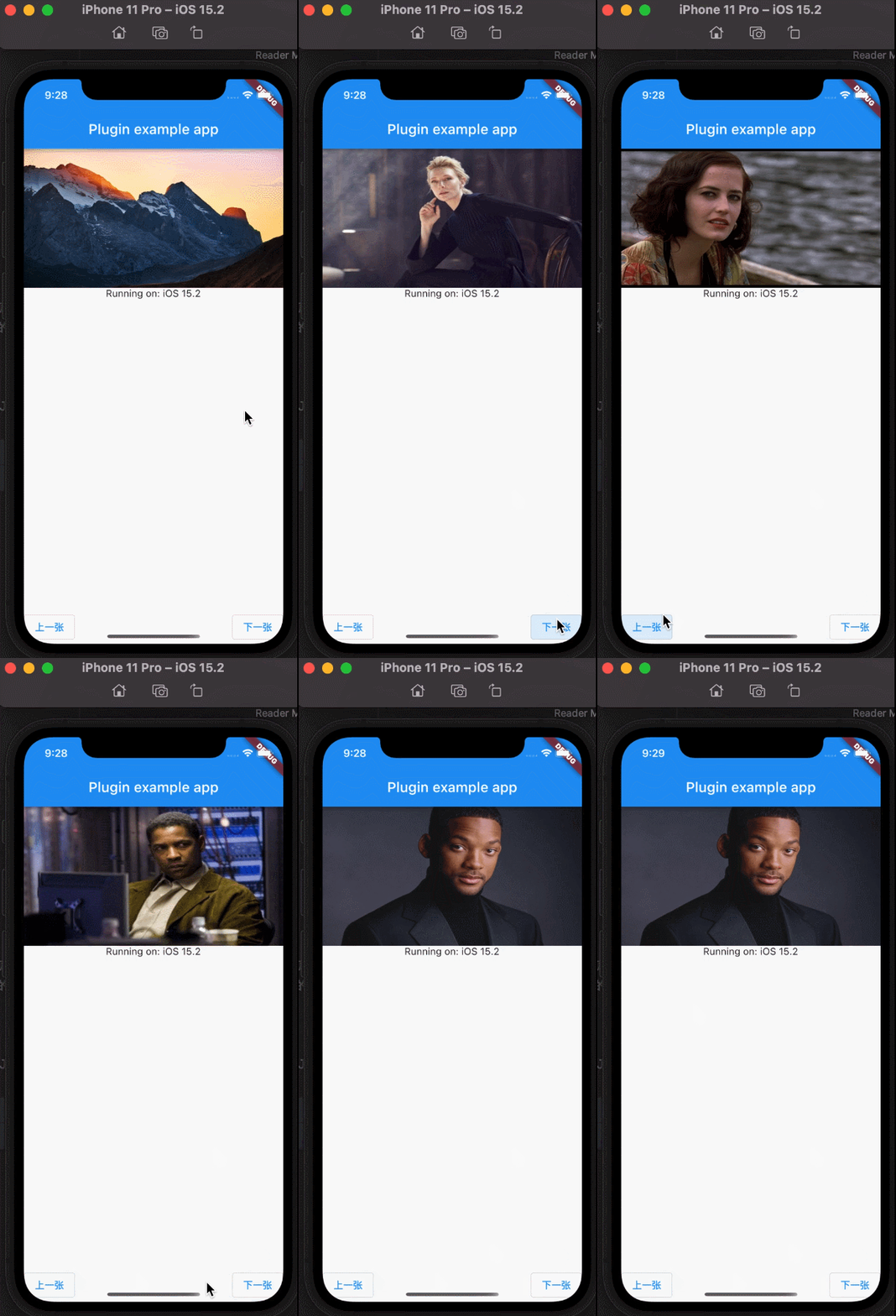
其中 Flutter 代码部分基本不用动;我们添加上 ios部分就可以了;
- return UiKitView(
- viewType: 'imageView', //视图标识符 要和原生 保持一致 要不然加载不到视图
- onPlatformViewCreated: onPlatformViewCreated, //原生视图创建成功的回调
- creationParams: <String, String>{
- 'initUrl': widget.initUrl
- }, //给原生传递初始化参数 就是上面定义的初始化参数
- // 用来编码 creationParams 的形式,可选 [StandardMessageCodec], [JSONMessageCodec], [StringCodec], or [BinaryCodec]
- // 如果存在 creationParams,则该值不能为null
- creationParamsCodec: const StandardMessageCodec(),
- );
完整的 native_image.dart
- import 'dart:io';
- import 'package:flutter/material.dart';
- import 'package:flutter/services.dart';
- import 'package:flutter_plugins/native_image_controller.dart';
- class NativeImage extends StatefulWidget {
- final NativeImageController controller;
- final String initUrl;
- const NativeImage({Key? key, required this.initUrl, required this.controller})
- : super(key: key);
- @override
- _NativeImageState createState() => _NativeImageState();
- }
- class _NativeImageState extends State<NativeImage> {
- static const MethodChannel _channel =
- MethodChannel('flutter_plugins_native_image');
- @override
- void initState() {
- // TODO: implement initState
- super.initState();
- // 执行的切换图命令, 参数就是 图片的url
- widget.controller.addListener(() {
- // print(
- // '-----------------------------imageUrl:${widget.controller.imageUrl}');
- _channel
- .invokeListMethod("changeImage", {'url': widget.controller.imageUrl});
- });
- }
- @override
- void dispose() {
- // TODO: implement dispose
- super.dispose();
- widget.controller.removeListener(() {});
- }
- @override
- Widget build(BuildContext context) {
- return Container(
- color: Colors.grey,
- width: MediaQuery.of(context).size.width,
- height: 200,
- child: _loadNativeView(),
- );
- }
- Future<void> onPlatformViewCreated(int id) async {
- // return widget.onCreated( new FlutterPlugins().)
- print('-----创建成功');
- }
- _loadNativeView() {
- if (Platform.isAndroid) {
- return AndroidView(
- viewType: 'imageView', //视图标识符 要和原生 保持一致 要不然加载不到视图
- onPlatformViewCreated: onPlatformViewCreated, //原生视图创建成功的回调
- creationParams: <String, String>{
- 'initUrl': widget.initUrl
- }, //给原生传递初始化参数 就是上面定义的初始化参数
- // 用来编码 creationParams 的形式,可选 [StandardMessageCodec], [JSONMessageCodec], [StringCodec], or [BinaryCodec]
- // 如果存在 creationParams,则该值不能为null
- creationParamsCodec: const StandardMessageCodec(),
- );
- } else if (Platform.isIOS) {
- return UiKitView(
- viewType: 'imageView', //视图标识符 要和原生 保持一致 要不然加载不到视图(IOS 必须)
- onPlatformViewCreated: onPlatformViewCreated, //原生视图创建成功的回调
- creationParams: <String, String>{
- 'initUrl': widget.initUrl
- }, //给原生传递初始化参数 就是上面定义的初始化参数
- // 用来编码 creationParams 的形式,可选 [StandardMessageCodec], [JSONMessageCodec], [StringCodec], or [BinaryCodec]
- // 如果存在 creationParams,则该值不能为null
- creationParamsCodec: const StandardMessageCodec(),
- );
- }
- }
- }
编写 IOS脚本
打开 Flutter 中 IOS 的工程路径 ;
因为 ios工程都是通过 pod 安装依赖的 ; 所有先执行下 pod install
新建 以下四组文件

nativeViewPluginsView
主要用于图片的具体展示
nativeViewPluginsView.h
- //
- // NSObject+NativeViewPlugins.h
- // Runner
- //
- // Created by user on 2022/6/22.
- //
- #import <Foundation/Foundation.h>
- #import <Flutter/Flutter.h>
- NS_ASSUME_NONNULL_BEGIN
- @interface NativeViewPlugins :NSObject<FlutterPlugin>
- + (void)registerWithRegistrar:(NSObject<FlutterPluginRegistrar> *)registrar;
- @end
- NS_ASSUME_NONNULL_END
NativeViewPluginsView.m
- //
- // NSObject+NativeImage.m
- // Runner
- //
- // Created by user on 2022/6/22.
- //
- #import "NativeViewPluginsView.h"
- @implementation NativeViewPluginsView{
- int64_t _viewID;
- UIImageView * _uiImageView;
- NSString * _imageUrl;
- }
- -(instancetype)initWithFrame:(CGRect)frame viewIdentifier:(int64_t)viewId argument:(id _Nullable)args binaryMessager:(NSObject<FlutterBinaryMessenger> *)messenger{
- if([super init]){
- // 不设置大小也是可以的
- // if(frame.size.width == 0 ){
- // frame = CGRectMake(frame.origin.x, frame.origin.y, [UIScreen mainScreen].bounds.size.width, 250.0);
- // }
- _uiImageView = [[UIImageView alloc] initWithFrame:frame];
- _uiImageView.backgroundColor = [UIColor yellowColor];
- _viewID = viewId;
- //NSDictionary *dictionary = [NSDictionary dictionaryWithDictionary:args];
- NSDictionary *dictionary = args;
- _imageUrl = dictionary[@"initUrl"];
- NSLog(@"imageUrl---------------------->%@",dictionary);
- NSLog(@"messenger---------------------->%@",messenger);
- [_uiImageView setImage:[UIImage imageWithData:[NSData dataWithContentsOfURL:[NSURL URLWithString:_imageUrl]]]];
- // [imageview setImage:[UIImage imageWithData:[NSData dataWithContentsOfURL:[NSURL URLWithString:annotation.subtitle]]]];
- /// 这里的channelName是和Flutter
- /// 创建MethodChannel时的名字保持一致的,保证一个原生视图有一个平台通道传递消息
- FlutterMethodChannel *channel = [FlutterMethodChannel methodChannelWithName:@"flutter_plugins_native_image" binaryMessenger:messenger];
- // 处理 Flutter 发送的消息事件
- [channel setMethodCallHandler:^(FlutterMethodCall *call, FlutterResult result) {
- if ([call.method isEqualToString:@"changeImage"]) {
- NSDictionary *dictionary = [NSDictionary dictionaryWithDictionary:call.arguments];
- self->_imageUrl = dictionary[@"url"];
- NSLog(@"url---------------------->%@",self->_imageUrl);
- [self->_uiImageView setImage:[UIImage imageWithData:[NSData dataWithContentsOfURL:[NSURL URLWithString:_imageUrl]]]];
- }
- }];
- }
- return self;
- }
- -(nonnull UIView *)view {
- return _uiImageView;
- }
- @end
NativeViewPluginsFactory
主要用来创建或者调用 NativeViewPluginsView
NativeViewPluginsFactory.h
- //
- // NSObject+NativeViewPluginsFactory.h
- // Runner
- //
- // Created by user on 2022/6/22.
- //
- #import <Foundation/Foundation.h>
- #import <Flutter/Flutter.h>
- NS_ASSUME_NONNULL_BEGIN
- @interface NativeViewPluginsFactory : NSObject<FlutterPlatformViewFactory>
- -(instancetype)initWithMessenger:(NSObject<FlutterBinaryMessenger>*)messager;
- @end
- NS_ASSUME_NONNULL_END
NativeViewPluginsFactory.m
- //
- // NSObject+NativeViewPluginsFactory.m
- // Runner
- //
- // Created by user on 2022/6/22.
- //
- #import "NativeViewPluginsFactory.h"
- #import "NativeViewPluginsView.h"
- @implementation NativeViewPluginsFactory{
- NSObject<FlutterBinaryMessenger>* _messenger;
- }
- - (instancetype)initWithMessenger:(NSObject<FlutterBinaryMessenger> *)messager{
- self = [super init];
- if(self){
- _messenger = messager;
- }
- return self;
- }
- - (NSObject<FlutterMessageCodec>*)createArgsCodec {
- return [FlutterStandardMessageCodec sharedInstance];
- }
- - (nonnull NSObject<FlutterPlatformView> *)createWithFrame:(CGRect)frame viewIdentifier:(int64_t)viewId arguments:(id _Nullable)args {
- // 接收flutter 传来的 图片 初始化参数;以及启动原生UI时候给的参数
- NativeViewPluginsView *view = [[NativeViewPluginsView alloc] initWithFrame:frame viewIdentifier:viewId argument:args binaryMessager:_messenger];
- return view;
- }
- @end
NativeViewPlugins
用于注册原生页面 调用 NativeViewPluginsFactory
NativeViewPlugins.h
- //
- // NSObject+NativeViewPlugins.h
- // Runner
- //
- // Created by user on 2022/6/22.
- //
- #import <Foundation/Foundation.h>
- #import <Flutter/Flutter.h>
- NS_ASSUME_NONNULL_BEGIN
- @interface NativeViewPlugins :NSObject<FlutterPlugin>
- + (void)registerWithRegistrar:(NSObject<FlutterPluginRegistrar> *)registrar;
- @end
- NS_ASSUME_NONNULL_END
NativeViewPlugins.m
- //
- // NSObject+NativeViewPlugins.m
- // Runner
- //
- // Created by user on 2022/6/22.
- //
- #import "NativeViewPlugins.h"
- #import "NativeViewPluginsFactory.h"
- @implementation NativeViewPlugins
- + (void)registerWithRegistrar:(NSObject<FlutterPluginRegistrar> *)registrar{
- // 注册插件
- // 注册 NaviveViewPluginsFactory
- [registrar registerViewFactory:[[NativeViewPluginsFactory alloc] initWithMessenger:registrar.messenger] withId:@"imageView"];
- }
- @end
NativeViewRegistrant
主要用于 注册插件 调用 NativeViewPlugins
NativeViewRegistrant.h
- //
- // NativeViewRegistrant.h
- // Runner
- //
- // Created by user on 2022/6/22.
- //
- #import <Foundation/Foundation.h>
- #import <Flutter/Flutter.h>
- NS_ASSUME_NONNULL_BEGIN
- @interface NativeViewRegistrant:NSObject
- + (void)registerWithRegistry:(NSObject<FlutterPluginRegistry>*)registry;
- @end
- NS_ASSUME_NONNULL_END
NativeViewRegistrant.m
- //
- // NSObject+NativeViewRegistrant.m
- // Runner
- //
- // Created by user on 2022/6/22.
- //
- #import "NativeViewRegistrant.h"
- #import <flutter_plugins/FlutterPluginsPlugin.h>
- #import "NativeViewPlugins.h"
- @implementation NativeViewRegistrant
- + (void)registerWithRegistry:(NSObject<FlutterPluginRegistry>*)registry {
- [NativeViewPlugins registerWithRegistrar:[registry registrarForPlugin:@"NativeViewPlugins"]];
- }
- @end
AppDelegate
注册自己写的
- #import "AppDelegate.h"
- #import "GeneratedPluginRegistrant.h"
- #import "NativeViewRegistrant.h"
- @implementation AppDelegate
- - (BOOL)application:(UIApplication *)application
- didFinishLaunchingWithOptions:(NSDictionary *)launchOptions {
- [GeneratedPluginRegistrant registerWithRegistry:self];
- // Override point for customization after application launch.
- // 注册自己写的nativeView
- [NativeViewRegistrant registerWithRegistry:self];
- return [super application:application didFinishLaunchingWithOptions:launchOptions];
- }
- @end
-
相关阅读:
Python21天学习挑战赛Day(9)·操作MongoDB数据库
Ps:明度直方图
正则表达式
Paxos 算法详解
总结最近遇到的几个问题
【数字信号调制】基于matlab GUI PCM编码和QAM调制系统【含Matlab源码 2080期】
保姆级教程:Linux (Ubuntu) 部署流光卡片开源 API
接口使用的最佳时机
开源啦!一键部署免费使用!Kubernetes上直接运行大数据平台!
如何在云服务器上部署 Servlet 项目
- 原文地址:https://blog.csdn.net/nicepainkiller/article/details/125420308