-
Java实现网上书店管理系统(idea+MySQL+navicat)
最近一直在做网上书店管理系统,现在这个项目已基本具有一个图书管理系统的雏形,实现了数据的增删改查功能。本项目采用swing技术开发,使用数据库存放具体数据,现在做一个总结,供学习参考!

1. 开发工具
本项目采用idea+MySQL开发,使用数据库可视化工具navicat管理数据。其中用到的MySQL版本是8.0。

2.数据库设计
数据库中共维护了四个关系表:

管理员信息表:

订单表信息:

图书信息表:
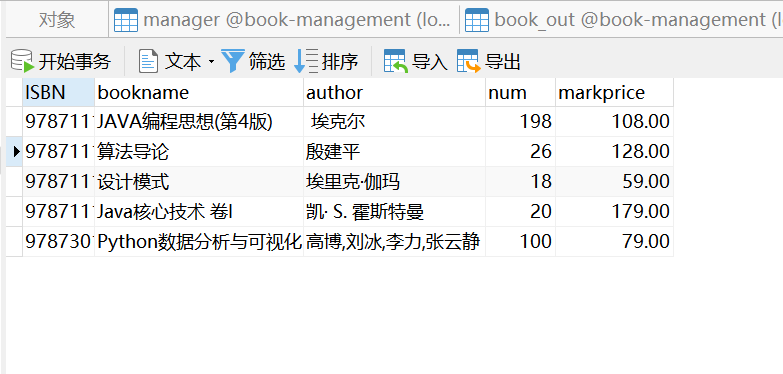
进货信息表:

连接数据库:
package jdbc; import java.text.SimpleDateFormat; import java.util.Calendar; import java.sql.*; /** *数据库管理类 */ public class ConnectionManager { //连接数据库的四大必需属性 private static final String driver = "com.mysql.cj.jdbc.Driver"; private static final String url = "jdbc:mysql://localhost:3306/book-management?useSSL=false&serverTimezone=Asia/Shanghai"; private static final String user = "root"; private static final String psd = "abc123"; //静态块加载驱动 static { try { Class.forName(driver); System.out.println("加载驱动成功!"); } catch (ClassNotFoundException e) { e.printStackTrace(); System.out.println("加载驱动失败!"); } } //返回一个连接对象 public static Connection getConnection() { Connection connection = null; try { connection = DriverManager.getConnection(url, user, psd); // System.out.println("连接数据库成功"); } catch (SQLException e) { e.printStackTrace(); } return connection; }- 1
- 2
- 3
- 4
- 5
- 6
- 7
- 8
- 9
- 10
- 11
- 12
- 13
- 14
- 15
- 16
- 17
- 18
- 19
- 20
- 21
- 22
- 23
- 24
- 25
- 26
- 27
- 28
- 29
- 30
- 31
- 32
- 33
- 34
- 35
- 36
- 37
使用jdbc技术连接数据库,记得下载驱动包!
创建数据库关系表格:
DROP TABLE IF EXISTS `book_stack`; CREATE TABLE `book_stack` ( `ISBN` varchar(255) CHARACTER SET utf8 COLLATE utf8_general_ci NOT NULL COMMENT 'ISBN码', `bookname` varchar(255) CHARACTER SET utf8 COLLATE utf8_general_ci NULL DEFAULT NULL COMMENT '书名', `author` varchar(50) CHARACTER SET utf8 COLLATE utf8_general_ci NULL DEFAULT NULL COMMENT '作者', `num` int(11) NULL DEFAULT NULL COMMENT '数量', `markprice` decimal(10, 2) NULL DEFAULT NULL COMMENT '标价', PRIMARY KEY (`ISBN`) USING BTREE, INDEX `bookname`(`bookname`) USING BTREE, INDEX `num`(`num`) USING BTREE ) ENGINE = InnoDB CHARACTER SET = utf8 COLLATE = utf8_general_ci ROW_FORMAT = Dynamic; SET FOREIGN_KEY_CHECKS = 1;- 1
- 2
- 3
- 4
- 5
- 6
- 7
- 8
- 9
- 10
- 11
- 12
- 13
3. 项目功能设计
1.登录界面设计

2.图书信息维护界面
3.图书信息查询界面

4.图书销售信息界面

此系统实现了对图书信息的增删改查功能,以及对图书订单的相关操作。已基本完善相关功能,下面只对部分代码做一个展示,供初学者学习参考:
package frame; import jdbc.ConnectionManager; import model.Manager; import javax.swing.*; import javax.swing.border.EmptyBorder; import javax.swing.event.DocumentEvent; import javax.swing.event.DocumentListener; import javax.swing.text.Document; import java.awt.*; import java.awt.event.ActionEvent; import java.awt.event.ActionListener; import java.sql.ResultSet; import java.sql.SQLException; public class Login extends JFrame { private JPanel contentPane; private JTextField jt_user; private JPasswordField jt_psw; public static Jrame2 jrame; private final JPanel panel_3 = new JPanel(); public static void main(String[] args) { EventQueue.invokeLater(new Runnable() { public void run() { try { Login frame = new Login(); frame.setVisible(true); } catch (Exception e) { e.printStackTrace(); } } }); } /** * Create the frame. */ public Login() { setBackground(new Color(224, 255, 255)); setIconImage(Toolkit.getDefaultToolkit().getImage(Login.class.getResource("/img/线性图书 (1).png"))); setTitle("网上书店管理系统"); setDefaultCloseOperation(JFrame.EXIT_ON_CLOSE); setBounds(100, 100, 610, 377); contentPane = new JPanel(); contentPane.setBackground(SystemColor.menu); contentPane.setBorder(new EmptyBorder(5, 5, 5, 5)); setContentPane(contentPane); contentPane.setLayout(null); JPanel panel = new JPanel(); panel.setBackground(SystemColor.menu); panel.setBounds(10, 25, 576, 81); contentPane.add(panel); panel.setLayout(null); JLabel lblNewLabel = new JLabel("Welcome to use the System!"); lblNewLabel.setIcon(new ImageIcon(Login.class.getResource("/img/welcome.png"))); lblNewLabel.setBounds(73, 25, 435, 34); lblNewLabel.setForeground(new Color(0, 0, 0)); lblNewLabel.setFont(new Font("宋体", Font.BOLD, 29)); panel.add(lblNewLabel); JPanel panel_1 = new JPanel(); panel_1.setBackground(SystemColor.menu); panel_1.setBounds(10, 116, 576, 60); contentPane.add(panel_1); panel_1.setLayout(null); JLabel lblNewLabel_1 = new JLabel("账号:"); lblNewLabel_1.setBounds(96, 5, 98, 32); lblNewLabel_1.setIcon(new ImageIcon(Login.class.getResource("/img/账号 (1).png"))); lblNewLabel_1.setFont(new Font("宋体", Font.BOLD, 20)); panel_1.add(lblNewLabel_1); jt_user = new JTextField(); jt_user.setBounds(199, 6, 281, 30); jt_user.setFont(new Font("宋体", Font.BOLD, 20)); panel_1.add(jt_user); jt_user.setColumns(25); JLabel mess1 = new JLabel(""); mess1.setFont(new Font("宋体", Font.PLAIN, 14)); mess1.setForeground(Color.RED); mess1.setBounds(199, 38, 125, 24); panel_1.add(mess1); JPanel panel_1_1 = new JPanel(); panel_1_1.setBackground(SystemColor.menu); panel_1_1.setBounds(10, 186, 576, 60); contentPane.add(panel_1_1); panel_1_1.setLayout(null); JLabel lblNewLabel_1_1 = new JLabel("密码:"); lblNewLabel_1_1.setBounds(97, 10, 98, 32); lblNewLabel_1_1.setIcon(new ImageIcon(Login.class.getResource("/img/密码 (7).png"))); lblNewLabel_1_1.setFont(new Font("宋体", Font.BOLD, 20)); panel_1_1.add(lblNewLabel_1_1); jt_psw = new JPasswordField(); jt_psw.setBounds(201, 5, 280, 32); jt_psw.setFont(new Font("宋体", Font.BOLD, 15)); jt_psw.setColumns(25); panel_1_1.add(jt_psw); JLabel mess2 = new JLabel(""); mess2.setForeground(Color.RED); mess2.setFont(new Font("宋体", Font.PLAIN, 14)); mess2.setBounds(201, 36, 125, 24); panel_1_1.add(mess2); JPanel panel_2 = new JPanel(); panel_2.setBackground(SystemColor.menu); panel_2.setBounds(10, 270, 576, 60); contentPane.add(panel_2); panel_2.setLayout(null); JButton jb_reset = new JButton("重置"); jb_reset.addActionListener(new ActionListener() { public void actionPerformed(ActionEvent e) { // 重置输入框 jt_user.setText(""); jt_psw.setText(""); } }); jb_reset.setIcon(new ImageIcon(Login.class.getResource("/img/重置.png"))); jb_reset.setFont(new Font("宋体", Font.BOLD, 17)); jb_reset.setBounds(113, 10, 97, 23); panel_2.add(jb_reset); JButton jb_login = new JButton("登录"); jb_login.setIcon(new ImageIcon(Login.class.getResource("/img/登录统计.png"))); jb_login.addActionListener(new ActionListener() { public void actionPerformed(ActionEvent e) { // 获取账号和密码 String userString=jt_user.getText(); char[] a=jt_psw.getPassword(); String pswString=String.valueOf(a); // 查询是否匹配 String sql="select * from manager where user=?"; if (jt_user.getText().equals("")) { mess1.setText("请输入账号:"); }else { try { ResultSet set=ConnectionManager.query(sql, new Object[] {userString}); if(set.next()) { // 找到用户 String user=set.getString("user"); String psw=set.getString("password"); System.out.println(user+psw); // 判断密码 if (pswString.equals("")) { mess2.setText("请输入密码!"); }else if (psw.equals(pswString)) { // 登录成功 System.out.println("登录成功!"); // 打开新窗口 jrame=new Jrame2(new Manager(userString, pswString)); // 关闭当前 dispose(); jrame.setVisible(true); }else { System.out.println("密码输入错误!"); mess2.setText("密码输入错误!"); } }else { System.out.println("账号不存在!"); mess1.setText("该账号不存在!"); } } catch (SQLException e1) { // TODO Auto-generated catch block e1.printStackTrace(); } } } }); // 动态清零 Document dt=jt_user.getDocument(); dt.addDocumentListener(new DocumentListener() { @Override public void removeUpdate(DocumentEvent e) { // TODO Auto-generated method stub mess1.setText(""); mess2.setText(""); } @Override public void insertUpdate(DocumentEvent e) { // TODO Auto-generated method stub mess1.setText(""); mess2.setText(""); } @Override public void changedUpdate(DocumentEvent e) { // TODO Auto-generated method stub mess1.setText(""); mess2.setText(""); } }); jb_login.setFont(new Font("宋体", Font.BOLD, 17)); jb_login.setBounds(356, 10, 97, 23); panel_2.add(jb_login); } }- 1
- 2
- 3
- 4
- 5
- 6
- 7
- 8
- 9
- 10
- 11
- 12
- 13
- 14
- 15
- 16
- 17
- 18
- 19
- 20
- 21
- 22
- 23
- 24
- 25
- 26
- 27
- 28
- 29
- 30
- 31
- 32
- 33
- 34
- 35
- 36
- 37
- 38
- 39
- 40
- 41
- 42
- 43
- 44
- 45
- 46
- 47
- 48
- 49
- 50
- 51
- 52
- 53
- 54
- 55
- 56
- 57
- 58
- 59
- 60
- 61
- 62
- 63
- 64
- 65
- 66
- 67
- 68
- 69
- 70
- 71
- 72
- 73
- 74
- 75
- 76
- 77
- 78
- 79
- 80
- 81
- 82
- 83
- 84
- 85
- 86
- 87
- 88
- 89
- 90
- 91
- 92
- 93
- 94
- 95
- 96
- 97
- 98
- 99
- 100
- 101
- 102
- 103
- 104
- 105
- 106
- 107
- 108
- 109
- 110
- 111
- 112
- 113
- 114
- 115
- 116
- 117
- 118
- 119
- 120
- 121
- 122
- 123
- 124
- 125
- 126
- 127
- 128
- 129
- 130
- 131
- 132
- 133
- 134
- 135
- 136
- 137
- 138
- 139
- 140
- 141
- 142
- 143
- 144
- 145
- 146
- 147
- 148
- 149
- 150
- 151
- 152
- 153
- 154
- 155
- 156
- 157
- 158
- 159
- 160
- 161
- 162
- 163
- 164
- 165
- 166
- 167
- 168
- 169
- 170
- 171
- 172
- 173
- 174
- 175
- 176
- 177
- 178
- 179
- 180
- 181
- 182
- 183
- 184
- 185
- 186
- 187
- 188
- 189
- 190
- 191
- 192
- 193
- 194
- 195
- 196
- 197
- 198
- 199
- 200
- 201
- 202
- 203
- 204
- 205
- 206
- 207
- 208
- 209
- 210
- 211
- 212
- 213
- 214
5.项目结构
以下是项目此项目的结构:

4.总结
在互联网的快速发展的今天,电脑的普及为人们适应快速的生活节奏提供了条件。电子商务的概念也随之产生。相比传统的零售业务,电子商务不管是在地域上、时间上还是经济上都优于传统业务,但因其以开放的互联网为基础,存在一定的局限性。随着互联网技术的进一步发展,电子商务正以一种惊人的速度发展着。
通过建立网上书店购物系统,可以提高企业的生产效率,降低经营成本,优化资源配置,从而实现企业的利润最大化由。于网上图书交易打破了图书经销的规则及图书经营模式,越来越的网上书店的出现,要想很好的发展下去,就需要开发一套行之有效的网上图书交易系统。
本项目采用Java swing技术开发,对于学习Java编程和刚学习数据库系统的初学者来说,是一个练手的好项目。在项目开发时遇到了很多的问题,在解决完问题以后对深入理解Java面向对象编程有很大的帮助,虽然GUI技术现在没有很大的市场,甚至很多初学者放弃学习,但是利用GUI技术编程的过程对于提高编程兴趣,理解Java编程有很大的作用。
谢谢大家!
-
相关阅读:
白盒测试与黑盒测试
后厂村路灯:苹果签名是什么? 苹果签名有什么作用?苹果签名能做什么?原理是什么?有哪些方式?
【c ++ primer 笔记】第15章 面向对象程序设计
【译】Visual Studio Enterprise 中的代码覆盖率特性
一文讲透java弱引用以及使用场景
Mysql存储过程与存储函数
浅析synchronized锁升级的原理与实现
AWTK开发编译环境踩坑记录1(编译提示powershell.exe出错)
【历史上的今天】10 月 12 日:C 语言之父逝世;西门子诞生;乔布斯推出 NeXT 电脑
解决跨域问题(vite、axios/koa)
- 原文地址:https://blog.csdn.net/zhangxia_/article/details/125260534