-
Pandas+Pyecharts | 40000+汽车之家数据分析可视化
大家好,我是 👉 【Python当打之年】本期我们通过分析 40000+汽车之家在售汽车信息数据,看看国民消费等级以及各品牌汽车性能(排列/油耗)情况等等。
涉及到的库:
- Pandas — 数据处理
- Pyecharts — 数据可视化
可视化部分:
- 柱状图 — Bar
- 折线图 — Line
- 饼图 — Pie
- 象形图 — PictorialBar
- 词云图 — stylecloud
- 组合组件 — Grid
希望对小伙伴们有所帮助,如有疑问或者需要改进的地方可以联系小编~
1. 导入模块
import stylecloud import pandas as pd from PIL import Image from pyecharts.charts import Bar from pyecharts.charts import Line from pyecharts.charts import Grid from pyecharts.charts import Pie from pyecharts.charts import PictorialBar from pyecharts import options as opts from pyecharts.globals import ThemeType- 1
- 2
- 3
- 4
- 5
- 6
- 7
- 8
- 9
- 10
2. Pandas数据处理
2.1 读取数据
df = pd.read_csv('autohome.csv', encoding='gbk', low_memory=False) df.head(5)- 1
- 2
结果:

2.2 数据大小
df.shape (40460, 18)- 1
- 2
(40460, 18),可以看到一共有: 40460 条数据,包含18个字段。
2.3 筛选部分列数据
df1 = df.loc[:,['full_name', 'name', 'brand_name', 'group_name', 'series_name', 'price', 'year', 'carType', 'displacement', 'month', 'chexi', 'oil', 'chargetime', 'color']]- 1
- 2
- 3
2.4 查看索引、数据类型和内存信息
df1.info()- 1

2.5 查看所有汽车品牌
df1['brand_name'].unique()- 1

一共有 237个汽车品牌。
3. Pyecharts可视化
3.1 汽车售价区间占比饼图
price_bin = pd.cut(df_tmp['price'],bins=[0,10,30,50,70,100,500,7000],include_lowest=True,right=False, labels=['<10万', '10-30万', '30-50万', '50-70万', '70-100万', '100-500万', '>500万']) df_price = pd.value_counts(price_bin) data_pair = [list(z) for z in zip(df_price.index.tolist(), df_price.values.tolist())] p1 = ( Pie(init_opts=opts.InitOpts(theme=ThemeType.DARK,width='1000px',height='600px',bg_color='#0d0735')) .add( '售价', data_pair, radius=['40%', '70%'], label_opts=opts.LabelOpts( position="outside", formatter="{a|{a}}{abg|}\n{hr|}\n {b|{b}: }{c|{c}} {d|{d}%} ", background_color="#eee", border_color="#aaa", border_width=1, border_radius=4, rich={ "a": {"color": "#c92a2a", "lineHeight": 20, "align": "center"}, "abg": { "backgroundColor": "#00aee6", "width": "100%", "align": "right", "height": 22, "borderRadius": [4, 4, 0, 0], }, "hr": { "borderColor": "#00d1b2", "width": "100%", "borderWidth": 0.5, "height": 0, }, "b": {"color": "#bc0024","fontSize": 16, "lineHeight": 33}, "c": {"color": "#4c6ef5","fontSize": 16, "lineHeight": 33}, "d": {"color": "#bc0024","fontSize": 20, "lineHeight": 33}, }, ), itemstyle_opts={ 'normal': { 'shadowColor': 'rgba(0, 0, 0, .5)', 'shadowBlur': 5, 'shadowOffsetY': 2, 'shadowOffsetX': 2, 'borderColor': '#fff' } } ) .set_global_opts( title_opts=opts.TitleOpts( title="汽车售价区间占比", pos_left='center', pos_top='center', title_textstyle_opts=opts.TextStyleOpts( color='#ea1d5d', font_size=26, font_weight='bold' ), ), visualmap_opts=opts.VisualMapOpts( is_show=False, min_=0, max_=20000, is_piecewise=False, dimension=0, range_color=['#e7e1ef','#d4b9da','#c994c7','#df65b0','#e7298a','#ce1256','#91003f'] ), legend_opts=opts.LegendOpts(is_show=False), ) )- 1
- 2
- 3
- 4
- 5
- 6
- 7
- 8
- 9
- 10
- 11
- 12
- 13
- 14
- 15
- 16
- 17
- 18
- 19
- 20
- 21
- 22
- 23
- 24
- 25
- 26
- 27
- 28
- 29
- 30
- 31
- 32
- 33
- 34
- 35
- 36
- 37
- 38
- 39
- 40
- 41
- 42
- 43
- 44
- 45
- 46
- 47
- 48
- 49
- 50
- 51
- 52
- 53
- 54
- 55
- 56
- 57
- 58
- 59
- 60
- 61
- 62
- 63
- 64
- 65
- 66
- 67
- 68
- 69
效果:

3.2 xx品牌汽车百公里油耗/排量/价格
colors = ["#ea1d5d", "#00ad45", "#0061d5"] width = 3 car_brand_name = '凯迪拉克' # car_brand_name = '玛莎拉蒂' data_tmp = df1[(df1.brand_name == car_brand_name)] data = data_tmp.copy() data = data.dropna(subset=['price','displacement','oil']) data = data[(data['price']>0) & (data['displacement']>0) & (data['oil']>0)] data['price'] = data['price'] /10000 price = data.price.values.tolist() displacement = data.displacement.values.tolist() oil = data.oil.tolist() region = [i for i in range(len(price))] ... line2.overlap(bar1) grid2 = Grid(init_opts=opts.InitOpts(width='1000px', height='600px',bg_color='#0d0735')) grid2.add(line2, opts.GridOpts(pos_top="20%",pos_left="5%", pos_right="15%"), is_control_axis_index=True)- 1
- 2
- 3
- 4
- 5
- 6
- 7
- 8
- 9
- 10
- 11
- 12
- 13
- 14
- 15
- 16
- 17
效果:

3.3 在售汽车品牌数量TOP15象形图
df_brand_name_tmp = df1.groupby(['brand_name'])['name'].count().to_frame('数量').reset_index().sort_values(by=['数量'],ascending=False) df_brand_name = df_brand_name_tmp[:15] x_data = df_brand_name['brand_name'].values.tolist()[::-1] y_data = df_brand_name['数量'].values.tolist()[::-1] for idx,sch in enumerate(x_data): icons.append(dict(name=sch, value=y_data[idx], symbol=sch_icons[sch])) p1 = ( PictorialBar(init_opts=opts.InitOpts(theme='light', width='1000px', height='700px')) .add_xaxis(x_data) .add_yaxis('', icons, label_opts=opts.LabelOpts(is_show=False), category_gap='40%', symbol_repeat='fixed', symbol_margin='30%!', symbol_size=40, is_symbol_clip=True, itemstyle_opts={"normal": { 'shadowBlur': 10, 'shadowColor': 'rgba(0, 0, 200, 0.3)', 'shadowOffsetX': 10, 'shadowOffsetY': 10,} } ) .set_global_opts( title_opts=opts.TitleOpts(title='在售汽车品牌数量TOP15',pos_top='2%',pos_left = 'center', title_textstyle_opts=opts.TextStyleOpts(color="blue",font_size=30)), xaxis_opts=opts.AxisOpts( position='top', is_show=True, axistick_opts=opts.AxisTickOpts(is_show=True), axislabel_opts=opts.LabelOpts(font_size=20,color='#ed1941',font_weight=700,margin=12), splitline_opts=opts.SplitLineOpts(is_show=True, linestyle_opts=opts.LineStyleOpts(type_='dashed')), axisline_opts=opts.AxisLineOpts(is_show=False, linestyle_opts=opts.LineStyleOpts(width=2, color='#DB7093')) ), yaxis_opts=opts.AxisOpts( is_show=True, is_scale=True, axistick_opts=opts.AxisTickOpts(is_show=False), axislabel_opts=opts.LabelOpts(font_size=20,color='#ed1941',font_weight=700,margin=20), axisline_opts=opts.AxisLineOpts(is_show=False, linestyle_opts=opts.LineStyleOpts(width=2, color='#DB7093')) ), ) .reversal_axis() )- 1
- 2
- 3
- 4
- 5
- 6
- 7
- 8
- 9
- 10
- 11
- 12
- 13
- 14
- 15
- 16
- 17
- 18
- 19
- 20
- 21
- 22
- 23
- 24
- 25
- 26
- 27
- 28
- 29
- 30
- 31
- 32
- 33
- 34
- 35
- 36
- 37
- 38
- 39
- 40
- 41
- 42
- 43
- 44
- 45
- 46
- 47
- 48
- 49
效果:

3.4 在售汽车品牌数量TOP15堆叠图
效果:
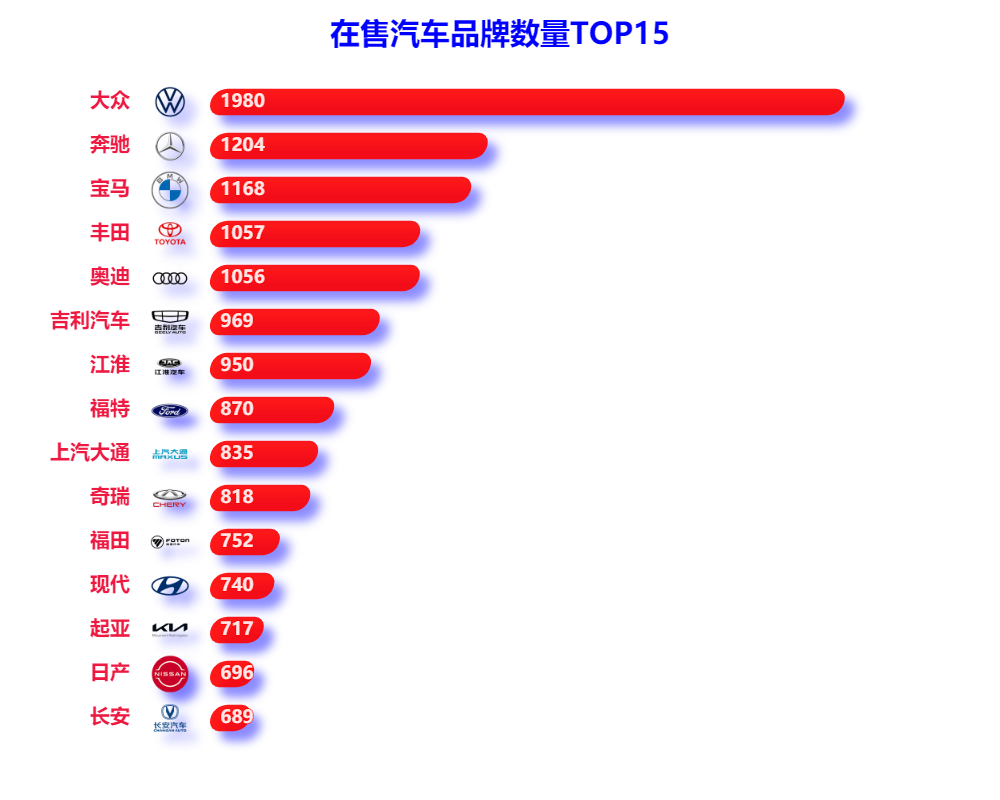
- 可以看到 大众汽车 在售量遥遥领先, 奔驰、宝马 等品牌紧随其后
3.5 汽车品牌词云
brand_name_list = [] for idx, value in enumerate(df_brand_name_tmp.brand_name.values.tolist()): brand_name_list += [value] * (df_brand_name_tmp.数量.values.tolist())[idx] pic_name = '词云.png' stylecloud.gen_stylecloud( text=' '.join(brand_name_list), font_path=r'STXINWEI.TTF', palette='cartocolors.qualitative.Bold_5', max_font_size=100, icon_name='fas fa-car-side', background_color='#0d0735', output_name=pic_name, ) Image.open(pic_name)- 1
- 2
- 3
- 4
- 5
- 6
- 7
- 8
- 9
- 10
- 11
- 12
- 13
- 14

4. 项目在线运行地址
篇幅原因,部分代码未展示,在线运行地址(含数据): 【点我跳转】
以上就是本期为大家整理的全部内容了,赶快练习起来吧,原创不易,喜欢的朋友可以点赞、收藏也可以分享(注明出处)让更多人知道。
推荐阅读
- 🚗 【Pandas+Pyecharts | 40000+汽车之家数据分析可视化】
- 🛒 【Pandas+Pyecharts | 20000+天猫订单数据可视化】
- 🏠 【Pandas+Pyecharts | 广州市已成交房源信息数据可视化】
- 🏫 【Pandas+Pyecharts | 考研信息数据可视化】
- 💸 【Pandas+Pyecharts | 某平台招聘信息数据可视化】
- 🏥 【Pandas+Pyecharts | 医院药品销售数据可视化】
- 💰️ 【Pyecharts | 比特币每日价格动态可视化】
- 🥮 【可视化 | Python中秋月饼销量分析,这些口味才是yyds!】
- 🎦 【Pyecharts | 《白蛇2:青蛇劫起》20000+数据分析可视化】
- 💑 【Pyecharts | 历年全国各地民政局登记数据分析+可视化】
- 🌏 【Pandas+Pyecharts | 全国热门旅游景点数据分析+可视化】
- 🏆 【Pandas+Pyecharts | 2020东京奥运会奖牌数据可视化】
- 🏹 【Pandas常用基础操作指令汇总 】
- 🎯 【pandas + pyecharts | ADX游戏广告投放渠道综合分析】
- 🕔 【Schedule + Pyecharts | 时间序列图(动态轮播图)】
- 🏠 【Pandas+Pyecharts | 北京某平台二手房数据分析+可视化】
- 🏫 【Pandas+Pyecharts | 2021中国大学综合排名分析+可视化】
- 🎦 【爬虫 | Python爬取豆瓣电影Top250 + 数据可视化】
- 📡 【技巧 | Python创建自己的高匿代理IP池】
文章首发微信公众号 “Python当打之年” ,每天都有python编程技巧推送,希望大家可以喜欢

-
相关阅读:
Etcd 概要 机制 和使用场景
深度学习笔记_5 经典卷积神经网络LeNet-5 解决MNIST数据集
Facebook 广告投放中有哪些不允许的做法
LeetCode 236. 二叉树的最近公共祖先(C++)
【深度学习】6-卷积过程中数据的结构变化
JS高级 之 ES6~ES13 新特性
保姆级教程之SABO-VMD-CNN-SVM的分类诊断,特征可视化
代码随想录1刷—二叉树篇(二)
Git的基本操作
DataWhale - 吃瓜教程学习笔记(二)
- 原文地址:https://blog.csdn.net/weixin_42152811/article/details/124969498