-
Ubuntu20.04安装docker
- //删除旧版本
- sudo apt-get remove docker docker-engine docker.io containerd runc
- //更新软件包
- sudo apt-get update
- //安装需要的包
- sudo apt-get install apt-transport-https ca-certificates software-properties-common curl
- //添加官方GPG秘钥,Docker-ce 软件源
- curl -fsSL https://download.docker.com/linux/ubuntu/gpg|sudo apt-key add -
- sudo add-apt-repository "deb [arch=amd64] https://download.docker.com/linux/ubuntu $(lsb_release -cs) stable"
- //添加中国科技大学的 Docker-ce 源,其中$(lsb_release -cs)返回Ubuntu发行版的名称
- curl -fsSL https://mirrors.ustc.edu.cn/docker-ce/linux/ubuntu/gpg | sudo apt-key add -
- sudo add-apt-repository "deb [arch=amd64] https://mirrors.ustc.edu.cn/docker-ce/linux/ubuntu \
- $(lsb_release -cs) stable"
- //注意:添加错了可以用以下命令删除
- #查询keyid
- sudo apt-key list
- #keyid 就是90那一串
- sudo apt-key del <keyid>
- #加参数-r可以移除
- sudo add-apt-repository -r "deb [arch=amd64] https://download.docker.com/linux/ubuntu $(lsb_release -cs) stable"
- //更新软件包
- sudo apt-get update
- //安装docker-ce
- sudo apt-get install docker-ce
- //测试运行,默认镜像源,运行hello-world会报错,因为网络问题
- docker --version
- docker run hello-world
- //查询可以安装的软件包版本
- apt-cache madison docker-ce
- //安装指定的版本
- sudo apt-get install docker-ce=<版本号>
- //查询安装的位置
- dpkg -L docker-ce
docker 设置国内镜像源
1.Docker中国区官方镜像
https://registry.docker-cn.com2.网易
http://hub-mirror.c.163.com3.ustc
https://docker.mirrors.ustc.edu.cn4.中国科技大学
https://docker.mirrors.ustc.edu.cn5.阿里云容器 生成自己的加速地址
登录:cr.console.aliyun.com
点击“创建我的容器镜像”,得到专属加速地址。
创建或修改 /etc/docker/daemon.json 文件,修改为如下形式:
{
"registry-mirrors": [
"http://hub-mirror.c.163.com",
"https://docker.mirrors.ustc.edu.cn",
"https://registry.docker-cn.com"
]
}- //重启
- service docker restart
- //查看是否成功
- docker info
备注:如果是用
systemd代替SysV init命令,对照如下: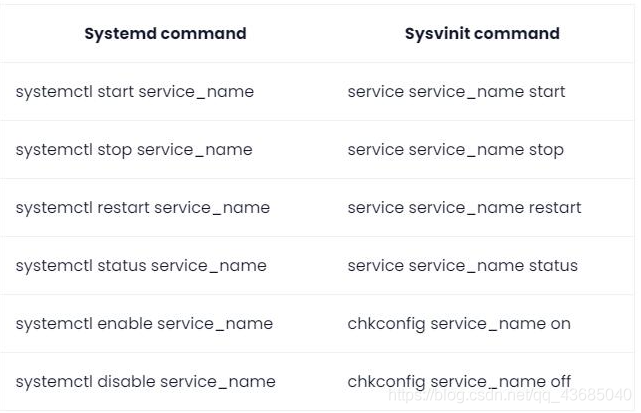
目前 wsl 是不支持 docker 的守护进程的,错误提示:
Cannot connect to the Docker daemon at unix:///var/run/docker.sock. Is the docker daemon running?
-
相关阅读:
合并单元格
蓝牙基带的基础
浙大计算机研究生复试上机考试-2005年畅通工程(考察并查集)
8. 列表
java-php-python-基于SpringBoot的桦木加工厂管理系统计算机毕业设计
精准用户画像!商城用户分群2.0!
英特尔参与 CentOS Stream 项目
三板斧的使用、全局配置文件、静态文件的配置、orm介绍
vue路由详解
牛客刷题<二>异步复位的串联T触发器
- 原文地址:https://blog.csdn.net/chaishen10000/article/details/124914492