-
Python刷题系列(9)_Pandas_Series
文章目录
- Python Series
- 1、创建并显示包含数据数组的一维数组类对象
- 2、将pandas系列转换为Python列表类型
- 3、添加、减去、多重和划分两个pandas系列
- 4、比较两个series系列的元素
- 5、将字典转换为series系列
- 6、将 NumPy 数组转换为series系列
- 7、更改给定列或系列的数据类型为数值型
- 8、将数据帧的第一列转换为series
- 9、将给定series转换为数组
- 10、将series列表转换为一个series
- 11、对给定series进行排序
- 12、向现有series添加一些数据
- 13、根据值和条件创建给定series的子集
- 14、更改给定series的索引顺序
- 15、创建给定series的平均值和标准差
- 16、计算给定series中每个唯一值的频率计数
- 17、将单词的第一个和最后一个字符转为大写
- 18、计算给定系列中每个单词的字符数
- 19、将一系列日期字符串转换为时间序列
- 20、垂直和水平堆叠两个给定系列
Python Series
1、创建并显示包含数据数组的一维数组类对象
import pandas as pd ds = pd.Series([2, 4, 6, 8, 10]) print(ds) ''' 0 2 1 4 2 6 3 8 4 10 dtype: int64 '''- 1
- 2
- 3
- 4
- 5
- 6
- 7
- 8
- 9
- 10
- 11
- 12
2、将pandas系列转换为Python列表类型
# 创建一个pandas类 import pandas as pd ds = pd.Series([2, 4, 6, 8, 10]) print("Pandas Series and type") print(ds) print(type(ds)) ''' Pandas Series and type 0 2 1 4 2 6 3 8 4 10 dtype: int64 <class 'pandas.core.series.Series'> '''- 1
- 2
- 3
- 4
- 5
- 6
- 7
- 8
- 9
- 10
- 11
- 12
- 13
- 14
- 15
- 16
- 17
将series变成list类型,下面两种得到的结果都相同:
方法1:X.tolist()
方法2:list(X)#方法一 print(ds.tolist()) print(type(ds.tolist())) #方法二 print(list(ds)) print(type(list(ds))) ''' [2, 4, 6, 8, 10] <class 'list'> '''- 1
- 2
- 3
- 4
- 5
- 6
- 7
- 8
- 9
- 10
- 11
3、添加、减去、多重和划分两个pandas系列
编写一个熊猫程序来添加,减去,多重和除以两个熊猫系列。
import pandas as pd ds1 = pd.Series([2, 4, 6]) ds2 = pd.Series([1, 3, 5]) ds = ds1 + ds2 print("Add two Series:") print(ds) print("Subtract two Series:") ds = ds1 - ds2 print(ds) print("Multiply two Series:") ds = ds1 * ds2 print(ds) print("Divide Series1 by Series2:") ds = ds1 / ds2 print(ds) ''' Add two Series: 0 3 1 7 2 11 dtype: int64 Subtract two Series: 0 1 1 1 2 1 dtype: int64 Multiply two Series: 0 2 1 12 2 30 dtype: int64 Divide Series1 by Series2: 0 2.000000 1 1.333333 2 1.200000 dtype: float64 '''- 1
- 2
- 3
- 4
- 5
- 6
- 7
- 8
- 9
- 10
- 11
- 12
- 13
- 14
- 15
- 16
- 17
- 18
- 19
- 20
- 21
- 22
- 23
- 24
- 25
- 26
- 27
- 28
- 29
- 30
- 31
- 32
- 33
- 34
- 35
- 36
- 37
- 38
这里如果两个series的元素个数不一致的话,仍然可以进行加减乘除,不会报错,并且缺少的部分会使用NaN进行填充:
import pandas as pd ds1 = pd.Series([2, 4, 6]) ds2 = pd.Series([1, 3]) ds = ds1 + ds2 print("Add two Series:") print(ds) print("Subtract two Series:") ds = ds1 - ds2 print(ds) print("Multiply two Series:") ds = ds1 * ds2 print(ds) print("Divide Series1 by Series2:") ds = ds1 / ds2 print(ds) ''' Add two Series: 0 3.0 1 7.0 2 NaN dtype: float64 Subtract two Series: 0 1.0 1 1.0 2 NaN dtype: float64 Multiply two Series: 0 2.0 1 12.0 2 NaN dtype: float64 Divide Series1 by Series2: 0 2.000000 1 1.333333 2 NaN dtype: float64 '''- 1
- 2
- 3
- 4
- 5
- 6
- 7
- 8
- 9
- 10
- 11
- 12
- 13
- 14
- 15
- 16
- 17
- 18
- 19
- 20
- 21
- 22
- 23
- 24
- 25
- 26
- 27
- 28
- 29
- 30
- 31
- 32
- 33
- 34
- 35
- 36
- 37
- 38
4、比较两个series系列的元素
编写一个熊猫程序来比较两个熊猫系列的元素。
import pandas as pd ds1 = pd.Series([2, 4, 6]) ds2 = pd.Series([1, 7, 6]) print("Series1:") print(ds1) print("Series2:") print(ds2) print("Compare the elements of the said Series:") print("Equals:") print(ds1 == ds2) print("Greater than:") print(ds1 > ds2) print("Less than:") print(ds1 < ds2) ''' Series1: 0 2 1 4 2 6 dtype: int64 Series2: 0 1 1 7 2 6 dtype: int64 Compare the elements of the said Series: Equals: 0 False 1 False 2 True dtype: bool Greater than: 0 True 1 False 2 False dtype: bool Less than: 0 False 1 True 2 False dtype: bool '''- 1
- 2
- 3
- 4
- 5
- 6
- 7
- 8
- 9
- 10
- 11
- 12
- 13
- 14
- 15
- 16
- 17
- 18
- 19
- 20
- 21
- 22
- 23
- 24
- 25
- 26
- 27
- 28
- 29
- 30
- 31
- 32
- 33
- 34
- 35
- 36
- 37
- 38
- 39
- 40
- 41
- 42
- 43
5、将字典转换为series系列
编写一个程序,将字典转换为熊猫系列。
示例字典: d1 = {‘a’: 100, ‘b’: 200, ‘c’:300, ‘d’:400, ‘e’:800}使用pd.Series(d1):会将字典的键变成index,值对应值
import pandas as pd d1 = {'a': 100, 'b': 200, 'c':300, 'd':400, 'e':800} print("Original dictionary:") print(d1) new_series = pd.Series(d1) print("Converted series:") print(new_series) ''' Original dictionary: {'a': 100, 'b': 200, 'c': 300, 'd': 400, 'e': 800} Converted series: a 100 b 200 c 300 d 400 e 800 dtype: int64 '''- 1
- 2
- 3
- 4
- 5
- 6
- 7
- 8
- 9
- 10
- 11
- 12
- 13
- 14
- 15
- 16
- 17
- 18
- 19
6、将 NumPy 数组转换为series系列
编写一个熊猫程序,将NumPy数组转换为熊猫系列。
示例 NumPy 数组:d1 = [10, 20, 30, 40, 50]
import numpy as np import pandas as pd np_array = np.array([10, 20, 30, 40, 50]) print("NumPy array:") print(np_array) new_series = pd.Series(np_array) print("Converted Pandas series:") print(new_series) ''' NumPy array: [10 20 30 40 50] Converted Pandas series: 0 10 1 20 2 30 3 40 4 50 dtype: int32 '''- 1
- 2
- 3
- 4
- 5
- 6
- 7
- 8
- 9
- 10
- 11
- 12
- 13
- 14
- 15
- 16
- 17
- 18
- 19
- 20
7、更改给定列或系列的数据类型为数值型
编写 Pandas 程序来更改给定列或系列的数据类型。
示例系列:
原始数据系列:
0 100
1 200
2 python
3 300.12
4 400
dtype: object
将所述数据类型更改为数字:
0 100.00
1 200.00
2 NaN
3 300.12
4 400.00
dtype: float64import pandas as pd s1 = pd.Series(['100', '200', 'python', '300.12', '400']) print("Original Data Series:") print(s1) print("Change the said data type to numeric:") s2 = pd.to_numeric(s1, errors='coerce') print(s2) ''' Original Data Series: 0 100 1 200 2 python 3 300.12 4 400 dtype: object Change the said data type to numeric: 0 100.00 1 200.00 2 NaN 3 300.12 4 400.00 dtype: float64 '''- 1
- 2
- 3
- 4
- 5
- 6
- 7
- 8
- 9
- 10
- 11
- 12
- 13
- 14
- 15
- 16
- 17
- 18
- 19
- 20
- 21
- 22
- 23
- 24
to_numeric
这里使用了to_numeric()函数
【1】to_numeric()函数不能直接操作DataFrame对象【2】to_numeric()函数较之astype()方法的优势在于解决了后者的局限性:只要待转换的数据中存在数字以外的字符,在使用后者进行类型转换时就会出现错误,而to_numeric()函数之所以可以解决这个问题,就源于其errors参数可以取值coerce——当出现非数字字符时,会将其替换为缺失值之后进行数据类型转换。
【3】参数
1、arg:表示要转换的数据,可以是list、tuple、Series
2、errors:错误采用的处理方式可以取值除raise、ignore外,还可以取值coerce,默认为raise。其中raise表示允许引发异常,ignore表示抑制异常,如果使用coerce,那么非数字元素就会被转化成NaN8、将数据帧的第一列转换为series
编写一个 Pandas 程序,将数据帧的第一列转换为序列。
方法:直接使用切片iloc将数据取出,得到的结果就是series
import pandas as pd d = {'col1': [1, 2, 3, 4, 7, 11], 'col2': [4, 5, 6, 9, 5, 0], 'col3': [7, 5, 8, 12, 1,11]} df = pd.DataFrame(data=d) print("Original DataFrame") print(df) s1 = df.iloc[:,0] # 取全部数据的第0列 print("\n1st column as a Series:") print(s1) print(type(s1)) ''' Original DataFrame col1 col2 col3 0 1 4 7 1 2 5 5 2 3 6 8 3 4 9 12 4 7 5 1 5 11 0 11 1st column as a Series: 0 1 1 2 2 3 3 4 4 7 5 11 Name: col1, dtype: int64 <class 'pandas.core.series.Series'> '''- 1
- 2
- 3
- 4
- 5
- 6
- 7
- 8
- 9
- 10
- 11
- 12
- 13
- 14
- 15
- 16
- 17
- 18
- 19
- 20
- 21
- 22
- 23
- 24
- 25
- 26
- 27
- 28
- 29
- 30
9、将给定series转换为数组
编写一个 Pandas 程序,将给定的系列转换为数组。
import pandas as pd import numpy as np s1 = pd.Series(['100', '200', 'python', '300.12', '400']) print("Original Data Series:") print(s1) print("Series to an array") a = np.array(s1) print (a) ''' Original Data Series: 0 100 1 200 2 python 3 300.12 4 400 dtype: object Series to an array ['100' '200' 'python' '300.12' '400'] '''- 1
- 2
- 3
- 4
- 5
- 6
- 7
- 8
- 9
- 10
- 11
- 12
- 13
- 14
- 15
- 16
- 17
- 18
- 19
- 20
10、将series列表转换为一个series
import pandas as pd s = pd.Series([ ['Red', 'Green', 'White'], ['Red', 'Black'], ['Yellow']]) print("Original Series of list") print(s) s = s.apply(pd.Series).stack() # .reset_index(drop=True) print("删除原索引前:") print(s) s = s.apply(pd.Series).stack().reset_index(drop=True) print("删除原索引后:") print(s) ''' Original Series of list 0 [Red, Green, White] 1 [Red, Black] 2 [Yellow] dtype: object 删除原索引前 0 0 Red 1 Green 2 White 1 0 Red 1 Black 2 0 Yellow dtype: object 删除原索引后 0 Red 1 Green 2 White 3 Red 4 Black 5 Yellow dtype: object '''- 1
- 2
- 3
- 4
- 5
- 6
- 7
- 8
- 9
- 10
- 11
- 12
- 13
- 14
- 15
- 16
- 17
- 18
- 19
- 20
- 21
- 22
- 23
- 24
- 25
- 26
- 27
- 28
- 29
- 30
- 31
- 32
- 33
- 34
- 35
- 36
- 37
【1】np.stack():对多个数组进行堆叠
【2】reset_index(drop=True):重新设置索引,并将原索引进行删除11、对给定series进行排序
使用函数sort_values()
import pandas as pd s = pd.Series(['100', '200', 'python', '300.12', '400']) print("Original Data Series:") print(s) new_s = s.sort_values() print(new_s) ''' Original Data Series: 0 100 1 200 2 python 3 300.12 4 400 dtype: object 0 100 1 200 3 300.12 4 400 2 python dtype: object '''- 1
- 2
- 3
- 4
- 5
- 6
- 7
- 8
- 9
- 10
- 11
- 12
- 13
- 14
- 15
- 16
- 17
- 18
- 19
- 20
- 21
- 22
12、向现有series添加一些数据
编写一个 Pandas 程序以将一些数据添加到现有series中。
import pandas as pd s = pd.Series(['100', '200', 'python', '300.12', '400']) print("Original Data Series:") print(s) print("\nData Series after adding some data:") new_s = s.append(pd.Series(['500', 'php'])) print(new_s) ''' Original Data Series: 0 100 1 200 2 python 3 300.12 4 400 dtype: object Data Series after adding some data: 0 100 1 200 2 python 3 300.12 4 400 0 500 1 php dtype: object '''- 1
- 2
- 3
- 4
- 5
- 6
- 7
- 8
- 9
- 10
- 11
- 12
- 13
- 14
- 15
- 16
- 17
- 18
- 19
- 20
- 21
- 22
- 23
- 24
- 25
- 26
- 27
【1】这里需要先将列表变成series,然后再使用append函数,否则直接用list会报错
【2】注意到index没有重新开始编号,而是在4之后直接继续使index从0开始
【3】如果想让index重新开始编号,则使用reset_indexa=new_s.reset_index(drop=True) print(a) ''' 0 100 1 200 2 python 3 300.12 4 400 5 500 6 php dtype: object '''- 1
- 2
- 3
- 4
- 5
- 6
- 7
- 8
- 9
- 10
- 11
- 12
- 13
13、根据值和条件创建给定series的子集
import pandas as pd s = pd.Series([0, 1,2,3,4,5]) print("Original Data Series:") print(s) print("\nSubset of the above Data Series:") new_s = s[s < 3] print(new_s) ''' Original Data Series: 0 0 1 1 2 2 3 3 4 4 5 5 dtype: int64 Subset of the above Data Series: 0 0 1 1 2 2 dtype: int64 '''- 1
- 2
- 3
- 4
- 5
- 6
- 7
- 8
- 9
- 10
- 11
- 12
- 13
- 14
- 15
- 16
- 17
- 18
- 19
- 20
- 21
- 22
- 23
- 24
14、更改给定series的索引顺序
编写一个 Pandas 程序来更改给定series的索引顺序。
import pandas as pd s = pd.Series(data = [1,2,3,4,5], index = ['A', 'B', 'C','D','E']) print("Original Data Series:") print(s) s = s.reindex(['B','A','C','D','E']) print("Data Series after changing the order of index:") print(s) ''' Original Data Series: A 1 B 2 C 3 D 4 E 5 dtype: int64 Data Series after changing the order of index: B 2 A 1 C 3 D 4 E 5 dtype: int64 '''- 1
- 2
- 3
- 4
- 5
- 6
- 7
- 8
- 9
- 10
- 11
- 12
- 13
- 14
- 15
- 16
- 17
- 18
- 19
- 20
- 21
- 22
- 23
- 24
【1】reindex()是pandas对象的一个重要方法,其作用是创建一个新索引的新对象。
15、创建给定series的平均值和标准差
import pandas as pd s = pd.Series(data = [1,2,3,4,5]) print("Original Data Series:") print(s) print("均值:") print(s.mean()) print("标准差:") print(s.std()) ''' Original Data Series: 0 1 1 2 2 3 3 4 4 5 dtype: int64 均值: 3.0 标准差: 1.5811388300841898 '''- 1
- 2
- 3
- 4
- 5
- 6
- 7
- 8
- 9
- 10
- 11
- 12
- 13
- 14
- 15
- 16
- 17
- 18
- 19
- 20
- 21
16、计算给定series中每个唯一值的频率计数
编写一个 Pandas 程序来计算给定series的每个唯一值的频率计数。
import pandas as pd import numpy as np num_series = pd.Series(np.take(list('0123456789'), np.random.randint(10, size=20))) print("Original Series:") print(num_series) print("Frequency of each unique value of the said series.") result = num_series.value_counts() print(result) ''' Original Series: 0 2 1 9 2 1 3 3 4 5 5 0 6 7 7 1 8 5 9 3 10 4 11 3 12 1 13 4 14 9 15 1 16 8 17 9 18 9 19 4 dtype: object Frequency of each unique value of the said series. 9 4 1 4 3 3 4 3 5 2 2 1 0 1 7 1 8 1 dtype: int64 '''- 1
- 2
- 3
- 4
- 5
- 6
- 7
- 8
- 9
- 10
- 11
- 12
- 13
- 14
- 15
- 16
- 17
- 18
- 19
- 20
- 21
- 22
- 23
- 24
- 25
- 26
- 27
- 28
- 29
- 30
- 31
- 32
- 33
- 34
- 35
- 36
- 37
- 38
- 39
- 40
- 41
- 42
- 43
- 44
【1】np.take:检索a对应的行,并返回索引行的值。具体用法,请看》》np.take
【2】value_counts() :返回一个序列 Series,该序列包含每个值的数量。也就是说,对于数据框中的任何列,value-counts () 方法会返回该列每个项的计数。
【3】这题也不是非要使用np.take,使用下面这段代码也是能够得出相同的结果的import pandas as pd import numpy as np num_series = pd.Series(np.random.randint(10, size=20),list('0123456789')*2) print("Original Series:") print(num_series) print("Frequency of each unique value of the said series.") result = num_series.value_counts() print(result) ''' Original Series: 0 1 1 9 2 1 3 0 4 7 5 9 6 2 7 0 8 8 9 8 0 2 1 2 2 2 3 5 4 6 5 6 6 9 7 4 8 6 9 6 dtype: int32 Frequency of each unique value of the said series. 2 4 6 4 9 3 1 2 0 2 8 2 7 1 5 1 4 1 dtype: int64 '''- 1
- 2
- 3
- 4
- 5
- 6
- 7
- 8
- 9
- 10
- 11
- 12
- 13
- 14
- 15
- 16
- 17
- 18
- 19
- 20
- 21
- 22
- 23
- 24
- 25
- 26
- 27
- 28
- 29
- 30
- 31
- 32
- 33
- 34
- 35
- 36
- 37
- 38
- 39
- 40
- 41
- 42
- 43
- 44
17、将单词的第一个和最后一个字符转为大写
将每个单词的第一个和最后一个字符转换为大写
关键:使用map和匿名函数,map的作用是将匿名函数作用于series当中的每个单词上面,而匿名函数则使用切片的方式,加好可以直接连接字符串
import pandas as pd series1 = pd.Series(['php', 'python', 'java', 'c#']) print("Original Series:") print(series1) result = series1.map(lambda x: x[0].upper() + x[1:-1] + x[-1].upper()) print("\nFirst and last character of each word to upper case:") print(result)- 1
- 2
- 3
- 4
- 5
- 6
- 7

18、计算给定系列中每个单词的字符数
分析:和上面那题差不多,len可以求每个单词的长度(字符数)
import pandas as pd series1 = pd.Series(['Php', 'Python', 'Java', 'C#']) print("Original Series:") print(series1) result = series1.map(lambda x: len(x)) print("\nNumber of characters in each word in the said series:") print(result)- 1
- 2
- 3
- 4
- 5
- 6
- 7
19、将一系列日期字符串转换为时间序列
关键:pd.to_datetime(date_series)
import pandas as pd date_series = pd.Series(['01 Jan 2015', '10-02-2016', '20180307', '2014/05/06', '2016-04-12', '2019-04-06T11:20']) print("Original Series:") print(date_series) print("\nSeries of date strings to a timeseries:") print(pd.to_datetime(date_series))- 1
- 2
- 3
- 4
- 5
- 6

20、垂直和水平堆叠两个给定系列
编写一个Pandas程序,在垂直和水平方向上堆叠两个给定的系列。
import pandas as pd series1 = pd.Series(range(10)) series2 = pd.Series(list('pqrstuvwxy')) print("原始的两个列表") print(series1) print("\n") print(series2) series1.append(series2) print("\n") print(series1.append(series2)) df=pd.concat([series1, series2], axis=1) print("\n") print(df) df=pd.concat([series1, series2], axis=0) print("\n") print(df)- 1
- 2
- 3
- 4
- 5
- 6
- 7
- 8
- 9
- 10
- 11
- 12
- 13
- 14
- 15
- 16

注意到index是直接拼接,没有改变
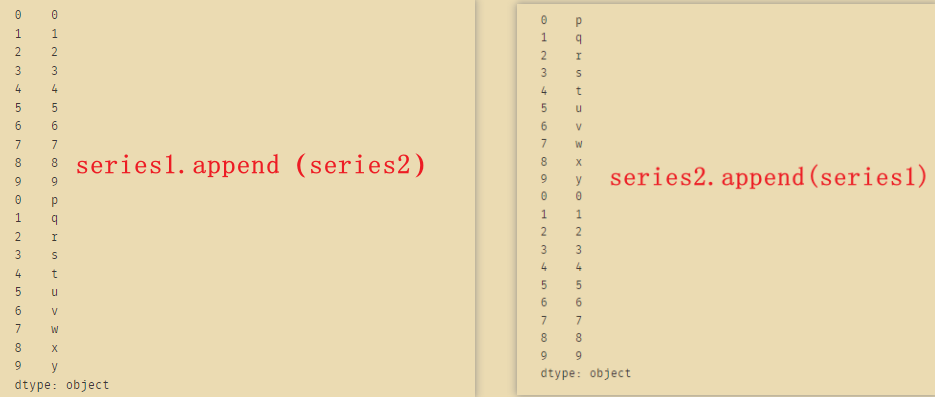

如果上面的axis=1改成axis=0,则和append是一样的 -
相关阅读:
领悟《信号与系统》之 连续系统的频域分析
KWin、libdrm、DRM从上到下全过程 —— drmModeAddFBxxx(3)
Python--循环中的两大关键词 break 与 continue
【MySql】mysql 常用查询优化策略详解
【附源码】计算机毕业设计SSM社区信息管理系统
巨好用的log分析工具---klogg
【Visual Studio 使用技巧分享】任务列表的使用
垃圾分类热词获取易语言代码
面试~jvm(JVM内存结构、类加载、双亲委派机制、对象分配,了解垃圾回收)
【Spring Boot 源码学习】OnBeanCondition 详解
- 原文地址:https://blog.csdn.net/wxfighting/article/details/124626506