-
1. Mybatis基础操作
目录
学习完mybatis入门后,我们继续学习mybatis基础操作。
1.1 需求
需求说明:
-
根据资料中提供的《tlias智能学习辅助系统》页面原型及需求,完成员工管理的需求开发。


通过分析以上的页面原型和需求,我们确定了功能列表:
-
查询
-
根据主键ID查询
-
条件查询
-
-
新增
-
更新
-
删除
-
根据主键ID删除
-
根据主键ID批量删除
-
1.2 准备
实施前的准备工作:
-
准备数据库表
-
创建一个新的springboot工程,选择引入对应的起步依赖(mybatis、mysql驱动、lombok)
-
application.properties中引入数据库连接信息
-
创建对应的实体类 Emp(实体类属性采用驼峰命名)
-
准备Mapper接口 EmpMapper
准备数据库表
- -- 部门管理
- create table dept
- (
- id int unsigned primary key auto_increment comment '主键ID',
- name varchar(10) not null unique comment '部门名称',
- create_time datetime not null comment '创建时间',
- update_time datetime not null comment '修改时间'
- ) comment '部门表';
- -- 部门表测试数据
- insert into dept (id, name, create_time, update_time)
- values (1, '学工部', now(), now()),
- (2, '教研部', now(), now()),
- (3, '咨询部', now(), now()),
- (4, '就业部', now(), now()),
- (5, '人事部', now(), now());
- -- 员工管理
- create table emp
- (
- id int unsigned primary key auto_increment comment 'ID',
- username varchar(20) not null unique comment '用户名',
- password varchar(32) default '123456' comment '密码',
- name varchar(10) not null comment '姓名',
- gender tinyint unsigned not null comment '性别, 说明: 1 男, 2 女',
- image varchar(300) comment '图像',
- job tinyint unsigned comment '职位, 说明: 1 班主任,2 讲师, 3 学工主管, 4 教研主管, 5 咨询师',
- entrydate date comment '入职时间',
- dept_id int unsigned comment '部门ID',
- create_time datetime not null comment '创建时间',
- update_time datetime not null comment '修改时间'
- ) comment '员工表';
- -- 员工表测试数据
- INSERT INTO emp (id, username, password, name, gender, image, job, entrydate, dept_id, create_time, update_time)
- VALUES
- (1, 'jinyong', '123456', '金庸', 1, '1.jpg', 4, '2000-01-01', 2, now(), now()),
- (2, 'zhangwuji', '123456', '张无忌', 1, '2.jpg', 2, '2015-01-01', 2, now(), now()),
- (3, 'yangxiao', '123456', '杨逍', 1, '3.jpg', 2, '2008-05-01', 2, now(), now()),
- (4, 'weiyixiao', '123456', '韦一笑', 1, '4.jpg', 2, '2007-01-01', 2, now(), now()),
- (5, 'changyuchun', '123456', '常遇春', 1, '5.jpg', 2, '2012-12-05', 2, now(), now()),
- (6, 'xiaozhao', '123456', '小昭', 2, '6.jpg', 3, '2013-09-05', 1, now(), now()),
- (7, 'jixiaofu', '123456', '纪晓芙', 2, '7.jpg', 1, '2005-08-01', 1, now(), now()),
- (8, 'zhouzhiruo', '123456', '周芷若', 2, '8.jpg', 1, '2014-11-09', 1, now(), now()),
- (9, 'dingminjun', '123456', '丁敏君', 2, '9.jpg', 1, '2011-03-11', 1, now(), now()),
- (10, 'zhaomin', '123456', '赵敏', 2, '10.jpg', 1, '2013-09-05', 1, now(), now()),
- (11, 'luzhangke', '123456', '鹿杖客', 1, '11.jpg', 5, '2007-02-01', 3, now(), now()),
- (12, 'hebiweng', '123456', '鹤笔翁', 1, '12.jpg', 5, '2008-08-18', 3, now(), now()),
- (13, 'fangdongbai', '123456', '方东白', 1, '13.jpg', 5, '2012-11-01', 3, now(), now()),
- (14, 'zhangsanfeng', '123456', '张三丰', 1, '14.jpg', 2, '2002-08-01', 2, now(), now()),
- (15, 'yulianzhou', '123456', '俞莲舟', 1, '15.jpg', 2, '2011-05-01', 2, now(), now()),
- (16, 'songyuanqiao', '123456', '宋远桥', 1, '16.jpg', 2, '2010-01-01', 2, now(), now()),
- (17, 'chenyouliang', '123456', '陈友谅', 1, '17.jpg', NULL, '2015-03-21', NULL, now(), now());
创建一个新的springboot工程,选择引入对应的起步依赖(mybatis、mysql驱动、lombok)
提示:可以把之前项目中已有的配置信息复制过来即可
- #驱动类名称
- spring.datasource.driver-class-name=com.mysql.cj.jdbc.Driver
- #数据库连接的url
- spring.datasource.url=jdbc:mysql://localhost:3306/mybatis
- #连接数据库的用户名
- spring.datasource.username=root
- #连接数据库的密码
- spring.datasource.password=1234
创建对应的实体类Emp(实体类属性采用驼峰命名)
- @Data
- @NoArgsConstructor
- @AllArgsConstructor
- public class Emp {
- private Integer id;
- private String username;
- private String password;
- private String name;
- private Short gender;
- private String image;
- private Short job;
- private LocalDate entrydate; //LocalDate类型对应数据表中的date类型
- private Integer deptId;
- private LocalDateTime createTime;//LocalDateTime类型对应数据表中的datetime类型
- private LocalDateTime updateTime;
- }
准备Mapper接口:EmpMapper
- /*@Mapper注解:表示当前接口为mybatis中的Mapper接口
- 程序运行时会自动创建接口的实现类对象(代理对象),并交给Spring的IOC容器管理
- */
- @Mapper
- public interface EmpMapper {
- }

1.3 删除
1.3.1 功能实现
页面原型:

功能:根据主键删除数据
-
SQL语句
- -- 删除id=17的数据
- delete from emp where id = 17;
Mybatis框架让程序员更关注于SQL语句
-
接口方法
- @Mapper
- public interface EmpMapper {
- //@Delete("delete from emp where id = 17")
- //public void delete();
- //以上delete操作的SQL语句中的id值写成固定的17,就表示只能删除id=17的用户数据
- //SQL语句中的id值不能写成固定数值,需要变为动态的数值
- //解决方案:在delete方法中添加一个参数(用户id),将方法中的参数,传给SQL语句
- /**
- * 根据id删除数据
- * @param id 用户id
- */
- @Delete("delete from emp where id = #{id}")//使用#{key}方式获取方法中的参数值
- public void delete(Integer id);
- }
@Delete注解:用于编写delete操作的SQL语句
如果mapper接口方法形参只有一个普通类型的参数,#{…} 里面的属性名可以随便写,如:#{id}、#{value}。但是建议保持名字一致。
-
测试
-
在单元测试类中通过@Autowired注解注入EmpMapper类型对象
-
- @SpringBootTest
- class SpringbootMybatisCrudApplicationTests {
- @Autowired //从Spring的IOC容器中,获取类型是EmpMapper的对象并注入
- private EmpMapper empMapper;
- @Test
- public void testDel(){
- //调用删除方法
- empMapper.delete(16);
- }
- }
如果运行遇到这种情况:

处理方法:

1.3.2 日志输入
在Mybatis当中我们可以借助日志,查看到sql语句的执行、执行传递的参数以及执行结果。具体操作如下:
-
打开application.properties文件
-
开启mybatis的日志,并指定输出到控制台
#指定mybatis输出日志的位置, 输出控制台
mybatis.configuration.log-impl=org.apache.ibatis.logging.stdout.StdOutImpl
开启日志之后,我们再次运行单元测试,可以看到在控制台中,输出了以下的SQL语句信息:

1.3.3 预编译SQL
1.3.3.1 介绍
预编译SQL有两个优势:
-
性能更高
-
更安全(防止SQL注入)

性能更高:预编译SQL,编译一次之后会将编译后的SQL语句缓存起来,后面再次执行这条语句时,不会再次编译。(只是输入的参数不同)
更安全(防止SQL注入):将敏感字进行转义,保障SQL的安全性。
1.3.3.2 SQL注入
SQL注入:是通过操作输入的数据来修改事先定义好的SQL语句,以达到执行代码对服务器进行攻击的方法。
由于没有对用户输入进行充分检查,而SQL又是拼接而成,在用户输入参数时,在参数中添加一些SQL关键字,达到改变SQL运行结果的目的,也可以完成恶意攻击。
测试1:使用资料中提供的程序,来验证SQL注入问题

第1步:进入到DOS


第2步:执行以下命令,启动程序
- #启动存在SQL注入的程序
- java -jar sql_Injection_demo-0.0.1-SNAPSHOT.jar

第3步:打开浏览器输入
http://localhost:9090/login.html
发现竟然能够登录成功:

以上操作为什么能够登录成功呢?
-
由于没有对用户输入内容进行充分检查,而SQL又是字符串拼接方式而成,在用户输入参数时,在参数中添加一些SQL关键字,达到改变SQL运行结果的目的,从而完成恶意攻击。

测试2:使用资料中提供的程序,来验证SQL注入问题
第1步:进入到DOS
第2步:执行以下命令,启动程序:
#启动解决了SQL注入的程序
java -jar sql_prepared_demo-0.0.1-SNAPSHOT.jar第3步:打开浏览器输入
http://localhost:9090/login.html
发现无法登录:

以上操作SQL语句的执行:

1.3.3.3 参数占位符
在Mybatis中提供的参数占位符有两种:${...} 、#{...}
-
#{...}
-
执行SQL时,会将#{…}替换为?,生成预编译SQL,会自动设置参数值
-
使用时机:参数传递,都使用#{…}
-
-
${...}
-
拼接SQL。直接将参数拼接在SQL语句中,存在SQL注入问题
-
使用时机:如果对表名、列表进行动态设置时使用
-
注意事项:在项目开发中,建议使用#{...},生成预编译SQL,防止SQL注入安全。
1.4 新增
功能:新增员工信息

1.4.1 基本新增
员工表结构:

SQL语句:
insert into emp(username, name, gender, image, job, entrydate, dept_id, create_time, update_time) values ('songyuanqiao','宋远桥',1,'1.jpg',2,'2012-10-09',2,'2022-10-01 10:00:00','2022-10-01 10:00:00');
接口方法:
- @Mapper
- public interface EmpMapper {
- @Insert("insert into emp(username, name, gender, image, job, entrydate, dept_id, create_time, update_time) values (#{username}, #{name}, #{gender}, #{image}, #{job}, #{entrydate}, #{deptId}, #{createTime}, #{updateTime})")
- public void insert(Emp emp);
- }
说明:#{...} 里面写的名称是对象的属性名
测试类:
- import com.itheima.mapper.EmpMapper;
- import com.itheima.pojo.Emp;
- import org.junit.jupiter.api.Test;
- import org.springframework.beans.factory.annotation.Autowired;
- import org.springframework.boot.test.context.SpringBootTest;
- import java.time.LocalDate;
- import java.time.LocalDateTime;
- @SpringBootTest
- class SpringbootMybatisCrudApplicationTests {
- @Autowired
- private EmpMapper empMapper;
- @Test
- public void testInsert(){
- //创建员工对象
- Emp emp = new Emp();
- emp.setUsername("tom");
- emp.setName("汤姆");
- emp.setImage("1.jpg");
- emp.setGender((short)1);
- emp.setJob((short)1);
- emp.setEntrydate(LocalDate.of(2000,1,1));
- emp.setCreateTime(LocalDateTime.now());
- emp.setUpdateTime(LocalDateTime.now());
- emp.setDeptId(1);
- //调用添加方法
- empMapper.insert(emp);
- }
- }

1.4.2 主键返回
概念:在数据添加成功后,需要获取插入数据库数据的主键。
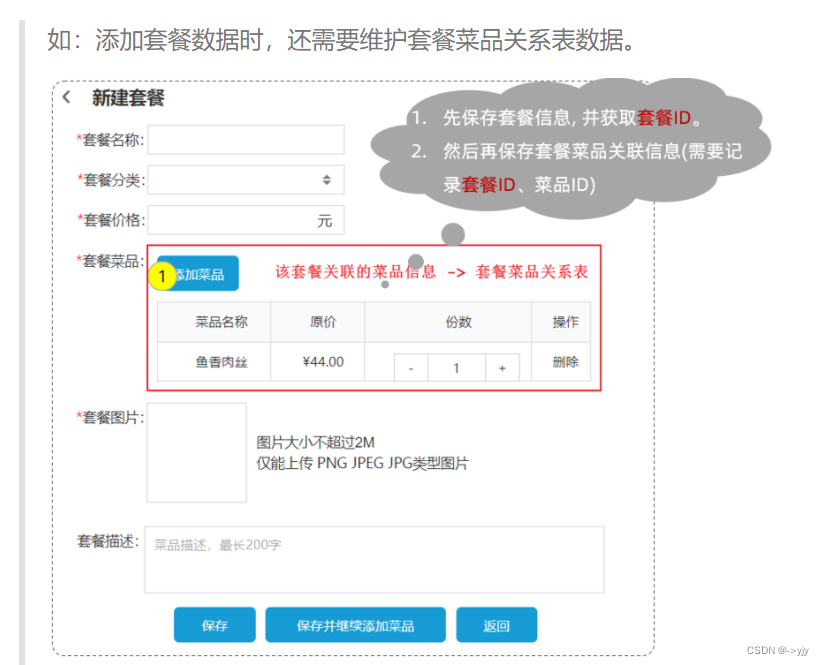
业务场景:在前面讲解到的苍穹外卖菜品与套餐模块的表结构,菜品与套餐是多对多的关系,一个套餐对应多个菜品。既然是多对多的关系,是不是有一张套餐菜品中间表来维护它们之间的关系。

在添加套餐的时候,我们需要在界面当中来录入套餐的基本信息,还需要来录入套餐与菜品的关联信息。这些信息录入完毕之后,我们一点保存,就需要将套餐的信息以及套餐与菜品的关联信息都需要保存到数据库当中。其实具体的过程包括两步,首先第一步先需要将套餐的基本信息保存了,接下来第二步再来保存套餐与菜品的关联信息。套餐与菜品的关联信息就是往中间表当中来插入数据,来维护它们之间的关系。而中间表当中有两个外键字段,一个是菜品的ID,就是当前菜品的ID,还有一个就是套餐的ID,而这个套餐的 ID 指的就是此次我所添加的套餐的ID,所以我们在第一步保存完套餐的基本信息之后,就需要将套餐的主键值返回来供第二步进行使用。这个时候就需要用到主键返回功能。
也就是这个id需要复用,用于维护套餐菜品关系的时候用
那要如何实现在插入数据之后返回所插入行的主键值呢?
-
默认情况下,执行插入操作时,是不会主键值返回的。如果我们想要拿到主键值,需要在Mapper接口中的方法上添加一个Options注解,并在注解中指定属性useGeneratedKeys=true和keyProperty="实体类属性名"
主键返回代码实现:

- @Mapper
- public interface EmpMapper {
- //会自动将生成的主键值,赋值给emp对象的id属性
- @Options(useGeneratedKeys = true,keyProperty = "id")
- @Insert("insert into emp(username, name, gender, image, job, entrydate, dept_id, create_time, update_time) values (#{username}, #{name}, #{gender}, #{image}, #{job}, #{entrydate}, #{deptId}, #{createTime}, #{updateTime})")
- public void insert(Emp emp);
- }
测试:
- @SpringBootTest
- class SpringbootMybatisCrudApplicationTests {
- @Autowired
- private EmpMapper empMapper;
- @Test
- public void testInsert(){
- //创建员工对象
- Emp emp = new Emp();
- emp.setUsername("jack");
- emp.setName("杰克");
- emp.setImage("1.jpg");
- emp.setGender((short)1);
- emp.setJob((short)1);
- emp.setEntrydate(LocalDate.of(2000,1,1));
- emp.setCreateTime(LocalDateTime.now());
- emp.setUpdateTime(LocalDateTime.now());
- emp.setDeptId(1);
- //调用添加方法
- empMapper.insert(emp);
- System.out.println(emp.getDeptId());
- }
- }
1.5 更新
功能:修改员工信息

点击"编辑"按钮后,会查询所在行记录的员工信息,并把员工信息回显在修改员工的窗体上(下个知识点学习)
在修改员工的窗体上,可以修改的员工数据:用户名、员工姓名、性别、图像、职位、入职日期、归属部门
思考:在修改员工数据时,要以什么做为条件呢?
答案:员工id
SQL语句:
update emp set username = 'linghushaoxia', name = '令狐少侠', gender = 1 , image = '1.jpg' , job = 2, entrydate = '2012-01-01', dept_id = 2, update_time = '2022-10-01 12:12:12' where id = 18;
接口方法:
- @Mapper
- public interface EmpMapper {
- /**
- * 根据id修改员工信息
- * @param emp
- */
- @Update("update emp set username=#{username}, name=#{name}, gender=#{gender}, image=#{image}, job=#{job}, entrydate=#{entrydate}, dept_id=#{deptId}, update_time=#{updateTime} where id=#{id}")
- public void update(Emp emp);
- }
测试类:
- @SpringBootTest
- class SpringbootMybatisCrudApplicationTests {
- @Autowired
- private EmpMapper empMapper;
- @Test
- public void testUpdate(){
- //要修改的员工信息
- Emp emp = new Emp();
- emp.setId(23);
- emp.setUsername("songdaxia");
- emp.setPassword(null);
- emp.setName("老宋");
- emp.setImage("2.jpg");
- emp.setGender((short)1);
- emp.setJob((short)2);
- emp.setEntrydate(LocalDate.of(2012,1,1));
- emp.setCreateTime(null);
- emp.setUpdateTime(LocalDateTime.now());
- emp.setDeptId(2);
- //调用方法,修改员工数据
- empMapper.update(emp);
- }
- }
1.6 查询
1.6.1 根据ID查询
在员工管理的页面中,当我们进行更新数据时,会点击 “编辑” 按钮,然后此时会发送一个请求到服务端,会根据Id查询该员工信息,并将员工数据回显在页面上。

SQL语句:
select id, username, password, name, gender, image, job, entrydate, dept_id, create_time, update_time from emp;
接口方法:
- @Mapper
- public interface EmpMapper {
- @Select("select id, username, password, name, gender, image, job, entrydate, dept_id, create_time, update_time from emp where id=#{id}")
- public Emp getById(Integer id);
- }
测试类:
- @SpringBootTest
- class SpringbootMybatisCrudApplicationTests {
- @Autowired
- private EmpMapper empMapper;
- @Test
- public void testGetById(){
- Emp emp = empMapper.getById(1);
- System.out.println(emp);
- }
- }

1.6.2 数据封装
我们看到查询返回的结果中大部分字段是有值的,但是deptId,createTime,updateTime这几个字段是没有值的,而数据库中是有对应的字段值的,这是为什么呢?

原因如下:
-
实体类属性名和数据库表查询返回的字段名一致,mybatis会自动封装。
-
如果实体类属性名和数据库表查询返回的字段名不一致,不能自动封装。
解决方案:
-
起别名
-
结果映射
-
开启驼峰命名
起别名:在SQL语句中,对不一样的列名起别名,别名和实体类属性名一样
@Select("select id, username, password, name, gender, image, job, entrydate, " +
"dept_id AS deptId, create_time AS createTime, update_time AS updateTime " +
"from emp " +
"where id=#{id}")
public Emp getById(Integer id);
手动结果映射:通过 @Results及@Result 进行手动结果映射
@Results({@Result(column = "dept_id", property = "deptId"),
@Result(column = "create_time", property = "createTime"),
@Result(column = "update_time", property = "updateTime")})
@Select("select id, username, password, name, gender, image, job, entrydate, dept_id, create_time, update_time from emp where id=#{id}")
public Emp getById(Integer id);

开启驼峰命名(推荐):如果字段名与属性名符合驼峰命名规则,mybatis会自动通过驼峰命名规则映射
驼峰命名规则: abc_xyz => abcXyz
-
表中字段名:abc_xyz
-
类中属性名:abcXyz
# 在application.properties中添加:
mybatis.configuration.map-underscore-to-camel-case=true
要使用驼峰命名前提是 实体类的属性 与 数据库表中的字段名严格遵守驼峰命名。
1.6.3 条件查询
在员工管理的列表页面中,我们需要根据条件查询员工信息,查询条件包括:姓名、性别、入职时间。

通过页面原型以及需求描述我们要实现的查询:
-
姓名:要求支持模糊匹配
-
性别:要求精确匹配
-
入职时间:要求进行范围查询
-
根据最后修改时间进行降序排序
SQL语句:
select id, username, password, name, gender, image, job, entrydate, dept_id, create_time, update_time
from emp
where name like '%张%'
and gender = 1
and entrydate between '2010-01-01' and '2020-01-01 '
order by update_time desc;接口方法:
-
方式一
- @Mapper
- public interface EmpMapper {
- @Select("select * from emp " +
- "where name like '%${name}%' " +
- "and gender = #{gender} " +
- "and entrydate between #{begin} and #{end} " +
- "order by update_time desc")
- public List
list(String name, Short gender, LocalDate begin, LocalDate end); - }

-
方式二(解决SQL注入风险)
-
使用MySQL提供的字符串拼接函数:concat('%' , '关键字' , '%')
-
- @Mapper
- public interface EmpMapper {
- @Select("select * from emp " +
- "where name like concat('%',#{name},'%') " +
- "and gender = #{gender} " +
- "and entrydate between #{begin} and #{end} " +
- "order by update_time desc")
- public List
list(String name, Short gender, LocalDate begin, LocalDate end); - }

1.6.4 参数名说明
在上面我们所编写的条件查询功能中,我们需要保证接口中方法的形参名和SQL语句中的参数占位符名相同。
当方法中的形参名和SQL语句中的占位符参数名不相同时,就会出现以下问题:

参数名在不同的SpringBoot版本中,处理方案还不同:
-
在springBoot的2.x版本(保证参数名一致)

-
在springBoot的1.x版本/单独使用mybatis(使用@Param注解来指定SQL语句中的参数名)

2. Mybatis的XML配置文件
Mybatis的开发有两种方式:
-
注解
-
XML
2.1 XML配置文件规范
使用Mybatis的注解方式,主要是来完成一些简单的增删改查功能。如果需要实现复杂的SQL功能,建议使用XML来配置映射语句,也就是将SQL语句写在XML配置文件中。
在Mybatis中使用XML映射文件方式开发,需要符合一定的规范:
-
XML映射文件的名称与Mapper接口名称一致,并且将XML映射文件和Mapper接口放置在相同包下(同包同名)
-
XML映射文件的namespace属性为Mapper接口全限定名一致
-
XML映射文件中sql语句的id与Mapper接口中的方法名一致,并保持返回类型一致。

2.2 XML配置文件实现
第1步:创建XML映射文件


第2步:编写XML映射文件
xml映射文件中的dtd约束,直接从mybatis官网复制即可
- "1.0" encoding="UTF-8" ?>
- mapper
- PUBLIC "-//mybatis.org//DTD Mapper 3.0//EN"
- "https://mybatis.org/dtd/mybatis-3-mapper.dtd">
- <mapper namespace="">
- mapper>
配置:XML映射文件的namespace属性为Mapper接口全限定名

配置:XML映射文件中sql语句的id与Mapper接口中的方法名一致,并保持返回类型一致

- "1.0" encoding="UTF-8" ?>
- mapper
- PUBLIC "-//mybatis.org//DTD Mapper 3.0//EN"
- "https://mybatis.org/dtd/mybatis-3-mapper.dtd">
- <mapper namespace="com.itheima.mapper.EmpMapper">
- <select id="list" resultType="com.itheima.pojo.Emp">
- select * from emp
- where name like concat('%',#{name},'%')
- and gender = #{gender}
- and entrydate between #{begin} and #{end}
- order by update_time desc
- select>
- mapper>

2.3 MybatisX的使用
MybatisX是一款基于IDEA的快速开发Mybatis的插件,为效率而生。
MybatisX的安装:

可以通过MybatisX快速定位:

学习了Mybatis中XML配置文件的开发方式了,大家可能会存在一个疑问:到底是使用注解方式开发还是使用XML方式开发?
官方说明:入门_MyBatis中文网

. Mybatis动态SQL
3.1 什么是动态SQL
在页面原型中,列表上方的条件是动态的,是可以不传递的,也可以只传递其中的1个或者2个或者全部。

而在我们刚才编写的SQL语句中,我们会看到,我们将三个条件直接写死了。 如果页面只传递了参数姓名name 字段,其他两个字段 性别 和 入职时间没有传递,那么这两个参数的值就是null。
此时,执行的SQL语句为:

这个查询结果是不正确的。正确的做法应该是:传递了参数,再组装这个查询条件;如果没有传递参数,就不应该组装这个查询条件。
比如:如果姓名输入了"张", 对应的SQL为:
select * from emp where name like '%张%' order by update_time desc;如果姓名输入了"张",,性别选择了"男",则对应的SQL为:
select * from emp where name like '%张%' and gender = 1 order by update_time desc;SQL语句会随着用户的输入或外部条件的变化而变化,我们称为:动态SQL。

在Mybatis中提供了很多实现动态SQL的标签,我们学习Mybatis中的动态SQL就是掌握这些动态SQL标签。
3.2 动态SQL-if
要拼接的sql语句
接下来,我们就通过
3.2.1 条件查询
示例:把SQL语句改造为动态SQL方式
-
原有的SQL语句
- <select id="list" resultType="com.itheima.pojo.Emp">
- select * from emp
- where name like concat('%',#{name},'%')
- and gender = #{gender}
- and entrydate between #{begin} and #{end}
- order by update_time desc
- select>
-
动态SQL语句
- <select id="list" resultType="com.itheima.pojo.Emp">
- select * from emp
- where
- <if test="name != null">
- name like concat('%',#{name},'%')
- if>
- <if test="gender != null">
- and gender = #{gender}
- if>
- <if test="begin != null and end != null">
- and entrydate between #{begin} and #{end}
- if>
- order by update_time desc
- select>
测试方法:
- @Test
- public void testList(){
- //性别数据为null、开始时间和结束时间也为null
- List
list = empMapper.list("张", null, null, null); - for(Emp emp : list){
- System.out.println(emp);
- }
- }

下面呢,我们修改测试方法中的代码,再次进行测试,观察执行情况:
- @Test
- public void testList(){
- //姓名为null
- List
list = empMapper.list(null, (short)1, null, null); - for(Emp emp : list){
- System.out.println(emp);
- }
- }

再次修改测试方法中的代码,再次进行测试:
- @Test
- public void testList(){
- //传递的数据全部为null
- List
list = empMapper.list(null, null, null, null); - for(Emp emp : list){
- System.out.println(emp);
- }
- }

以上问题的解决方案:使用
-
- <select id="list" resultType="com.itheima.pojo.Emp">
- select * from emp
- <where>
- <if test="name != null">
- and name like concat('%',#{name},'%')
- if>
- <if test="gender != null">
- and gender = #{gender}
- if>
- <if test="begin != null and end != null">
- and entrydate between #{begin} and #{end}
- if>
- where>
- order by update_time desc
- select>
测试方法:
- @Test
- public void testList(){
- //只有性别
- List
list = empMapper.list(null, (short)1, null, null); - for(Emp emp : list){
- System.out.println(emp);
- }
- }

3.2.2 更新员工
案例:完善更新员工功能,修改为动态更新员工数据信息
-
动态更新员工信息,如果更新时传递有值,则更新;如果更新时没有传递值,则不更新
-
解决方案:动态SQL
修改Mapper接口:
- @Mapper
- public interface EmpMapper {
- //删除@Update注解编写的SQL语句
- //update操作的SQL语句编写在Mapper映射文件中
- public void update(Emp emp);
- }
修改Mapper映射文件:
- "1.0" encoding="UTF-8" ?>
- mapper
- PUBLIC "-//mybatis.org//DTD Mapper 3.0//EN"
- "https://mybatis.org/dtd/mybatis-3-mapper.dtd">
- <mapper namespace="com.itheima.mapper.EmpMapper">
- <update id="update">
- update emp
- set
- <if test="username != null">
- username=#{username},
- if>
- <if test="name != null">
- name=#{name},
- if>
- <if test="gender != null">
- gender=#{gender},
- if>
- <if test="image != null">
- image=#{image},
- if>
- <if test="job != null">
- job=#{job},
- if>
- <if test="entrydate != null">
- entrydate=#{entrydate},
- if>
- <if test="deptId != null">
- dept_id=#{deptId},
- if>
- <if test="updateTime != null">
- update_time=#{updateTime}
- if>
- where id=#{id}
- update>
- mapper>
测试方法:
- @Test
- public void testUpdate2(){
- //要修改的员工信息
- Emp emp = new Emp();
- emp.setId(20);
- emp.setUsername("Tom111");
- emp.setName("汤姆111");
- emp.setUpdateTime(LocalDateTime.now());
- //调用方法,修改员工数据
- empMapper.update(emp);
- }

再次修改测试方法,观察SQL语句执行情况:
- @Test
- public void testUpdate2(){
- //要修改的员工信息
- Emp emp = new Emp();
- emp.setId(20);
- emp.setUsername("Tom222");
- //调用方法,修改员工数据
- empMapper.update(emp);
- }

-
- "1.0" encoding="UTF-8" ?>
- mapper
- PUBLIC "-//mybatis.org//DTD Mapper 3.0//EN"
- "https://mybatis.org/dtd/mybatis-3-mapper.dtd">
- <mapper namespace="com.itheima.mapper.EmpMapper">
- <update id="update">
- update emp
- <set>
- <if test="username != null">
- username=#{username},
- if>
- <if test="name != null">
- name=#{name},
- if>
- <if test="gender != null">
- gender=#{gender},
- if>
- <if test="image != null">
- image=#{image},
- if>
- <if test="job != null">
- job=#{job},
- if>
- <if test="entrydate != null">
- entrydate=#{entrydate},
- if>
- <if test="deptId != null">
- dept_id=#{deptId},
- if>
- <if test="updateTime != null">
- update_time=#{updateTime}
- if>
- set>
- where id=#{id}
- update>
- mapper>

小结
-
-
用于判断条件是否成立,如果条件为true,则拼接SQL
-
形式:
…
-
-
-
where元素只会在子元素有内容的情况下才插入where子句,而且会自动去除子句的开头的AND或OR
-
-
-
动态地在行首插入 SET 关键字,并会删掉额外的逗号。(用在update语句中)
-
3.3 动态SQL-foreach
案例:员工删除功能(既支持删除单条记录,又支持批量删除)

SQL语句:
delete from emp where id in (1,2,3);Mapper接口:
- @Mapper
- public interface EmpMapper {
- //批量删除
- public void deleteByIds(List
ids) ; - }
XML映射文件:
-
使用
- <foreach collection="集合名称" item="集合遍历出来的元素/项" separator="每一次遍历使用的分隔符"
- open="遍历开始前拼接的片段" close="遍历结束后拼接的片段">
- foreach>
- "1.0" encoding="UTF-8" ?>
- mapper
- PUBLIC "-//mybatis.org//DTD Mapper 3.0//EN"
- "https://mybatis.org/dtd/mybatis-3-mapper.dtd">
- <mapper namespace="com.itheima.mapper.EmpMapper">
- <delete id="deleteByIds">
- delete from emp where id in
- <foreach collection="ids" item="id" separator="," open="(" close=")">
- #{id}
- foreach>
- delete>
- mapper>

3.4 动态SQL-sql&include
问题分析:
-
在xml映射文件中配置的SQL,有时可能会存在很多重复的片段,此时就会存在很多冗余的代码

我们可以对重复的代码片段进行抽取,将其通过
-
-

SQL片段: 抽取重复的代码
- <sql id="commonSelect">
- select id, username, password, name, gender, image, job, entrydate, dept_id, create_time, update_time from emp
- sql>
然后通过
- <select id="list" resultType="com.itheima.pojo.Emp">
- <include refid="commonSelect"/>
- <where>
- <if test="name != null">
- name like concat('%',#{name},'%')
- if>
- <if test="gender != null">
- and gender = #{gender}
- if>
- <if test="begin != null and end != null">
- and entrydate between #{begin} and #{end}
- if>
- where>
- order by update_time desc
- select>
下面是上面代码的整合:
- package com.itheima.mapper;
- import com.itheima.pojo.Emp;
- import org.apache.ibatis.annotations.*;
- import java.time.LocalDate;
- import java.util.List;
- @Mapper
- public interface EmpMapper {
- //根据ID删除数据
- @Delete("delete from emp where id = #{id}")
- public void delete(Integer id);
- //public int delete(Integer id);
- //新增员工
- @Options(useGeneratedKeys = true, keyProperty = "id")
- @Insert("insert into emp(username, name, gender, image, job, entrydate, dept_id, create_time, update_time)" +
- " values (#{username},#{name},#{gender},#{image},#{job},#{entrydate},#{deptId},#{createTime},#{updateTime})")
- public void insert(Emp emp);
- //更新员工
- @Update("update emp set username = #{username}, name = #{name}, gender = #{gender}, image = #{image}," +
- " job = #{job}, entrydate = #{entrydate}, dept_id = #{deptId},update_time = #{updateTime} where id = #{id}")
- public void update(Emp emp);
- //方案三: 开启mybatis的驼峰命名自动映射开关 --- a_cloumn ------> aColumn
- //根据ID查询员工
- @Select("select * from emp where id = #{id}")
- public Emp getById(Integer id);
- //方案一: 给字段起别名, 让别名与实体类属性一致
- //@Select("select id, username, password, name, gender, image, job, entrydate, " +
- // "dept_id deptId, create_time createTime, update_time updateTime from emp where id = #{id}")
- //public Emp getById(Integer id);
- //方案二: 通过@Results, @Result注解手动映射封装
- //@Results({
- // @Result(column = "dept_id", property = "deptId"),
- // @Result(column = "create_time", property = "createTime"),
- // @Result(column = "update_time", property = "updateTime")
- //})
- //@Select("select * from emp where id = #{id}")
- //public Emp getById(Integer id);
- //条件查询员工
- //方式一
- //@Select("select * from emp where name like '%${name}%' and gender = #{gender} and " +
- // "entrydate between #{begin} and #{end} order by update_time desc ")
- //public List
list(String name, Short gender, LocalDate begin , LocalDate end); - //方式二
- // @Select("select * from emp where name like concat('%',#{name},'%') and gender = #{gender} and " +
- // "entrydate between #{begin} and #{end} order by update_time desc ")
- // public List
list(String name, Short gender, LocalDate begin , LocalDate end); - //动态条件查询
- public List
list(String name, Short gender, LocalDate begin , LocalDate end); - //动态更新员工
- public void update2(Emp emp);
- //批量删除员工
- public void deleteByIds(List
ids) ; - }
- package com.itheima;
- import com.itheima.mapper.EmpMapper;
- import com.itheima.pojo.Emp;
- import org.junit.jupiter.api.Test;
- import org.springframework.beans.factory.annotation.Autowired;
- import org.springframework.boot.test.context.SpringBootTest;
- import java.time.LocalDate;
- import java.time.LocalDateTime;
- import java.util.Arrays;
- import java.util.List;
- @SpringBootTest
- class SpringbootMybatisCrudApplicationTests {
- @Autowired
- private EmpMapper empMapper;
- //根据ID删除
- @Test
- public void testDelete(){
- //int delete = empMapper.delete(16);
- //System.out.println(delete);
- empMapper.delete(16);
- }
- //新增员工
- @Test
- public void testInsert(){
- //构造员工对象
- Emp emp = new Emp();
- emp.setUsername("Tom3");
- emp.setName("汤姆3");
- emp.setImage("1.jpg");
- emp.setGender((short)1);
- emp.setJob((short)1);
- emp.setEntrydate(LocalDate.of(2000,1,1));
- emp.setCreateTime(LocalDateTime.now());
- emp.setUpdateTime(LocalDateTime.now());
- emp.setDeptId(1);
- //执行新增员工信息操作
- empMapper.insert(emp);
- System.out.println(emp.getId());
- }
- //更新员工
- @Test
- public void testUpdate(){
- //构造员工对象
- Emp emp = new Emp();
- emp.setId(18);
- emp.setUsername("Tom1");
- emp.setName("汤姆1");
- emp.setImage("1.jpg");
- emp.setGender((short)1);
- emp.setJob((short)1);
- emp.setEntrydate(LocalDate.of(2000,1,1));
- emp.setUpdateTime(LocalDateTime.now());
- emp.setDeptId(1);
- //执行更新员工操作
- empMapper.update(emp);
- }
- //根据ID查询员工
- @Test
- public void testGetById(){
- Emp emp = empMapper.getById(20);
- System.out.println(emp);
- }
- //根据条件查询员工
- @Test
- public void testList(){
- //List
empList = empMapper.list("张", (short) 1, LocalDate.of(2010, 1, 1), LocalDate.of(2020, 1, 1)); - //List
empList = empMapper.list("张", null, null, null); - //List
empList = empMapper.list("张", (short)1, null, null); - //List
empList = empMapper.list(null, (short)1, null, null); - List
empList = empMapper.list(null, null, null, null); - System.out.println(empList);
- }
- //动态更新员工 - 更新ID为18的员工 username 更新为 Tom111, name更新为 汤姆111, gender更新为2
- @Test
- public void testUpdate2(){
- //构造员工对象
- Emp emp = new Emp();
- emp.setId(19);
- emp.setUsername("Tom222333");
- // emp.setName("汤姆222");
- // emp.setGender((short)1);
- // emp.setUpdateTime(LocalDateTime.now());
- //执行更新员工操作
- empMapper.update2(emp);
- }
- //批量删除员工 - 13,14,15
- @Test
- public void testDeleteByIds(){
- List
ids = Arrays.asList(13, 14, 15); - empMapper.deleteByIds(ids);
- }
- }
Mapper.xml
- <mapper namespace="com.itheima.mapper.EmpMapper">
- <sql id="commonSelect"> select id, username, password, name, gender, image, job, entrydate, dept_id, create_time, update_time from emp sql>
- <update id="update2">
- update emp
- <set>
- <if test="username != null">username = #{username},if>
- <if test="name != null">name = #{name},if>
- <if test="gender != null">gender = #{gender},if>
- <if test="image != null">image = #{image},if>
- <if test="job != null">job = #{job},if>
- <if test="entrydate != null">entrydate = #{entrydate},if>
- <if test="deptId != null">dept_id = #{deptId},if>
- <if test="updateTime != null">update_time = #{updateTime}if>
- set>
- where id = #{id}
- update>
- <select id="list" resultType="com.itheima.pojo.Emp">
- <include refid="commonSelect"/>
- <where>
- <if test="name != null"> name like concat('%', #{name}, '%') if>
- <if test="gender != null"> and gender = #{gender} if>
- <if test="begin != null and end != null"> and entrydate between #{begin} and #{end} if>
- where>
- order by update_time desc
- select>
- <delete id="deleteByIds">
- delete from emp where id in
- <foreach collection="ids" item="id" separator="," open="(" close=")"> #{id} foreach>
- delete>
- mapper>
-
-
相关阅读:
树莓派换内存卡系统了远程没用用了怎么解决
万能的JSON解析方法,获取指定字段值
淘宝问大家怎么投诉不良评价?
R语言中实现马尔可夫链蒙特卡罗MCMC模型
mediasoup学习与实践
关于城市旅游的HTML网页设计 HTML+CSS上海博物馆网站 dreamweaver作业静态HTML网页设计 html网页制作期末大作业
Class.forName() 与 ClassLoader.loadClass() 的区别
Linux组的介绍:1.文件/目录 所有者相关命令+2.组的创建+3.权限的基本介绍
阿里巴巴开源组件Easy Excel的Excel导入导出
与客户沟通需要注意什么?
- 原文地址:https://blog.csdn.net/2301_79602614/article/details/139376011