-
TCP/IP_第八章_静态路由_实验案例一
实验案例一:配置静态路由实现全网互通
1、实验环境
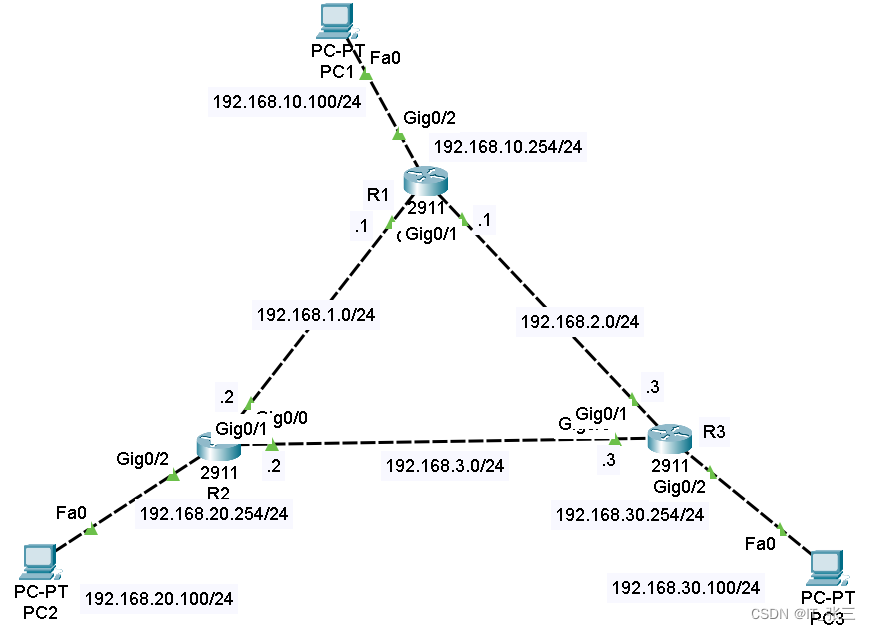
如图8.10所示,三台路由器R1.R2,R3两两互连,每台路由器上都配置了Loopback地址模拟网络环境。
2、需求描述
需要在三台路由器上配置静态路由,以实现各网段之间的互通。
若要实现全网互通,必须明确如下两个问题。
- 数据包被路由器转发或丢弃.取决于是否能够在路由表中找到数据包的目标地址所对应的条目。
- 路由器可以自动生成所有直连网段的路由条目,对于那些非直连网段就需要通过静态路由指定了
因此,要想实现全网互通,就必须为每台路由器指定所有非直连网段的路由条目。
3、推荐步骤
步骤1、在R1、R2、R3上分别配置静态路由。
- 在R1上分别配置192.168.20.0/24、192.168.30.0/24、192.168.3.0/24的静态路由。
- 在R2上分别配置192.168.10.0/24、192.168.30.0/24、192.168.2.0/24的静态路由。
- 在R3上分别配置192.168.20.0/24、192.168.10.0/24、192.168.1.0/24的静态路由。
步骤2、通过ping命令测试网络连通性.
4、实验步骤
(1)路由器R1的基础配置
- R1(config)#interface gigabitEthernet 0/0
- R1(config-if)#ip address 192.168.1.1 255.255.255.0
- R1(config-if)#no shutdown
- R1(config-if)#exit
- R1(config)#interface gigabitEthernet 0/1
- R1(config-if)#ip address 192.168.2.1 255.255.255.0
- R1(config-if)#no shutdown
- R1(config-if)#exit
- R1(config)#interface gigabitEthernet 0/2
- R1(config-if)#ip address 192.168.10.254 255.255.255.0
- R1(config-if)#no shutdown
- R1(config-if)#exit
(2)路由器R2的基础配置
- R2(config)#interface gigabitEthernet 0/0
- R2(config-if)#ip address 192.168.1.2 255.255.255.0
- R2(config-if)#no shutdown
- R2(config-if)#exit
- R2(config)#interface gigabitEthernet 0/1
- R2(config-if)#ip address 192.168.3.2 255.255.255.0
- R2(config-if)#no shutdown
- R2(config-if)#exit
- R2(config)#interface gigabitEthernet 0/2
- R2(config-if)#ip address 192.168.20.254 255.255.255.0
- R2(config-if)#no shutdown
- R2(config-if)#exit
(3)路由器R3的基础配置
- R3(config)#interface gigabitEthernet 0/0
- R3(config-if)#ip address 192.168.3.3 255.255.255.0
- R3(config-if)#no shutdown
- R3(config-if)#exit
- R3(config)#interface gigabitEthernet 0/1
- R3(config-if)#ip address 192.168.2.3 255.255.255.0
- R3(config-if)#no shutdown
- R3(config-if)#exit
- R3(config)#interface gigabitEthernet 0/2
- R3(config-if)#ip address 192.168.30.254 255.255.255.0
- R3(config-if)#no shutdown
- R3(config-if)#exit
(4)各路由器配置静态路由
R1上的配置
- R1(config)#ip route 192.168.20.0 255.255.255.0 192.168.1.2
- //配置去往192.168.20.0网段的路由指定下一跳地址为192.168.1.2
- R1(config)#ip route 192.168.30.0 255.255.255.0 192.168.2.3
- //配置去往192.168.30.0网段的路由指定下一跳地址为192.168.2.3
R2上的配置
- R2(config)#ip route 192.168.10.0 255.255.255.0 192.168.1.1
- //配置去往192.168.10.0网段的路由指定下一跳地址为192.168.1.1
- R2(config)#ip route 192.168.30.0 255.255.255.0 192.168.3.3
- //配置去往192.168.30.0网段的路由指定下一跳地址为192.168.3.3
R3上的配置
- R3(config)#ip route 192.168.10.0 255.255.255.0 192.168.2.1
- //配置去往192.168.10.0网段的路由指定下一跳地址为192.168.2.1
- R3(config)#ip route 192.168.20.0 255.255.255.0 192.168.3.2
- //配置去往192.168.20.0网段的路由指定下一跳地址为192.168.3.2
5、实验调试
(1)查看路由表信息
5.1、查看R1、R2、R3上的路由表信息
- R1#show ip route static //查看路由表中的静态路由条目
- S 192.168.20.0/24 [1/0] via 192.168.1.2
- S 192.168.30.0/24 [1/0] via 192.168.2.3
- R2#show ip route static
- S 192.168.10.0/24 [1/0] via 192.168.1.1
- S 192.168.30.0/24 [1/0] via 192.168.3.3
- R3#show ip route static
- S 192.168.10.0/24 [1/0] via 192.168.2.1
- S 192.168.20.0/24 [1/0] via 192.168.3.2
路由信息解析
- s:表示该路由类型为静态路由
- 192.168.20.0/24:表示目的网段以及目的网段的掩码
- [1/0]:1表示为路由的AD值(管理距离),0表示为该路由的开销
- 192.168.1.2:表示为下一跳地址
(2)在PC上使用ping测试连通性

-
相关阅读:
MySQL索引和事务
代码随想录算法训练营第三十四天| LeetCode1005. K 次取反后最大化的数组和、LeetCode134. 加油站、LeetCode135. 分发糖果
【Python 零基础入门】Numpy 常用函数 通用函数 & 保存加载
数组的拷贝和反转和扩容与缩减
.NET 反向代理 YARP 自定义配置提供程序(Configuration Providers)
31.7.4 忽略指定的数据表
编程向导-JavaScript-基础语法-算术/赋值/逗号/运算符
制作温馨浪漫爱心表白动画特效HTML5+jQuery【附源码】
Android——ScrollView与ConstraintLayout约束布局失效场景以及方案
MongoDB数据的导入与导出
- 原文地址:https://blog.csdn.net/m0_38096339/article/details/137902459