-
ThreadLocal&上传下载文件
文章目录
ThreadLocal
1.基本介绍
1.什么是ThreadLocal?

2.示意图

2.快速入门
1.创建普通java项目
2.编写代码
1.T1.java
创建线程放入dog对象,调用T1Service的update()
package threadlocal; /** * @author 孙显圣 * @version 1.0 */ public class T1 { //创建ThreadLocal对象 public static ThreadLocal<Object> threadLocal = new ThreadLocal<>(); //静态内部类,也是一个线程类 public static class Task implements Runnable { @Override public void run() { Dog dog = new Dog(); Pig pig = new Pig(); //把dog放到当前线程里 threadLocal.set(dog); System.out.println("在run方法中线程=" + Thread.currentThread().getName()); new T1Service().update(); } } public static void main(String[] args) { new Thread(new Task()).start(); //主线程中启动一个线程 } }- 1
- 2
- 3
- 4
- 5
- 6
- 7
- 8
- 9
- 10
- 11
- 12
- 13
- 14
- 15
- 16
- 17
- 18
- 19
- 20
- 21
- 22
- 23
- 24
- 25
- 26
- 27
- 28
2.T1Service.java
取出dog,调用T2Dao的update()
package threadlocal; /** * @author 孙显圣 * @version 1.0 */ public class T1Service { public void update(){ //取出dog Object o = T1.threadLocal.get(); String name = Thread.currentThread().getName(); System.out.println("在T1Service里面的update线程=" + name); System.out.println("T1Service取出 " + o.getClass()); new T2Dao().update(); } }- 1
- 2
- 3
- 4
- 5
- 6
- 7
- 8
- 9
- 10
- 11
- 12
- 13
- 14
- 15
- 16
- 17
3.T2Dao.java
取出dog,调用T2Dao的update()
package threadlocal; /** * @author 孙显圣 * @version 1.0 */ public class T2Dao { public void update(){ Object o = T1.threadLocal.get(); String name = Thread.currentThread().getName(); System.out.println("在T2Dao的update的线程=" + name); System.out.println("T2Dao取出 " + o.getClass()); } }- 1
- 2
- 3
- 4
- 5
- 6
- 7
- 8
- 9
- 10
- 11
- 12
- 13
- 14
- 15
4.Dog.java
package threadlocal; /** * @author 孙显圣 * @version 1.0 */ public class Dog { }- 1
- 2
- 3
- 4
- 5
- 6
- 7
- 8
- 9
3.结果
可以理解为,一个ThreadLocal对象可以将一个数据存放在当前线程的Entry对象里,只要在当前线程中就可以使用ThreadLocal对象取出存放的数据

3.ThreadLocal源码解读
1.set方法
-
打断点,调试

-
跳入

-
下一步,跳入

-
跳出,下一步

-
下一步,跳入

-
跳入,下一步,下一步

-
下一步
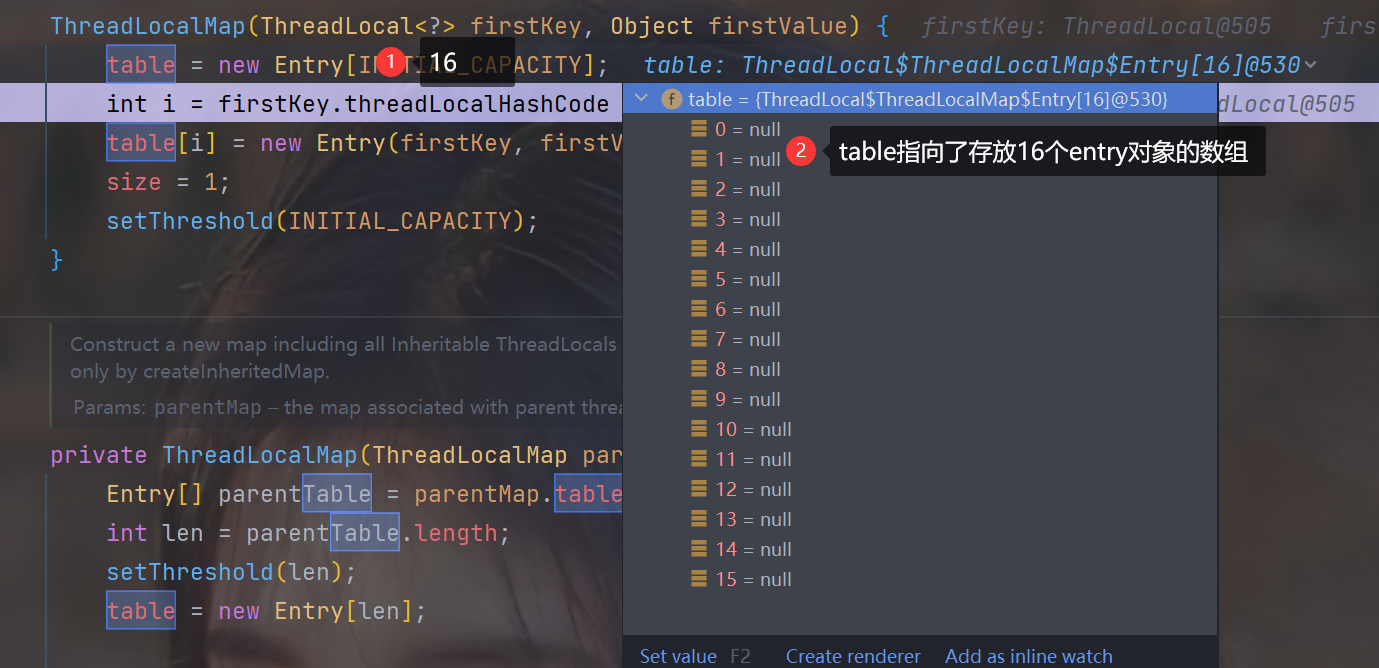
-
下一步,下一步

-
跳出,跳出

2.set方法总结
简而言之,
threadLocal.set(dog);这句话,就是在当前线程下,存储了key为这个threadlocal,value为dog对象的Entry对象3.get方法
- 打断点,调试

- 跳入

- 下一步,跳入

- 跳出,下一步
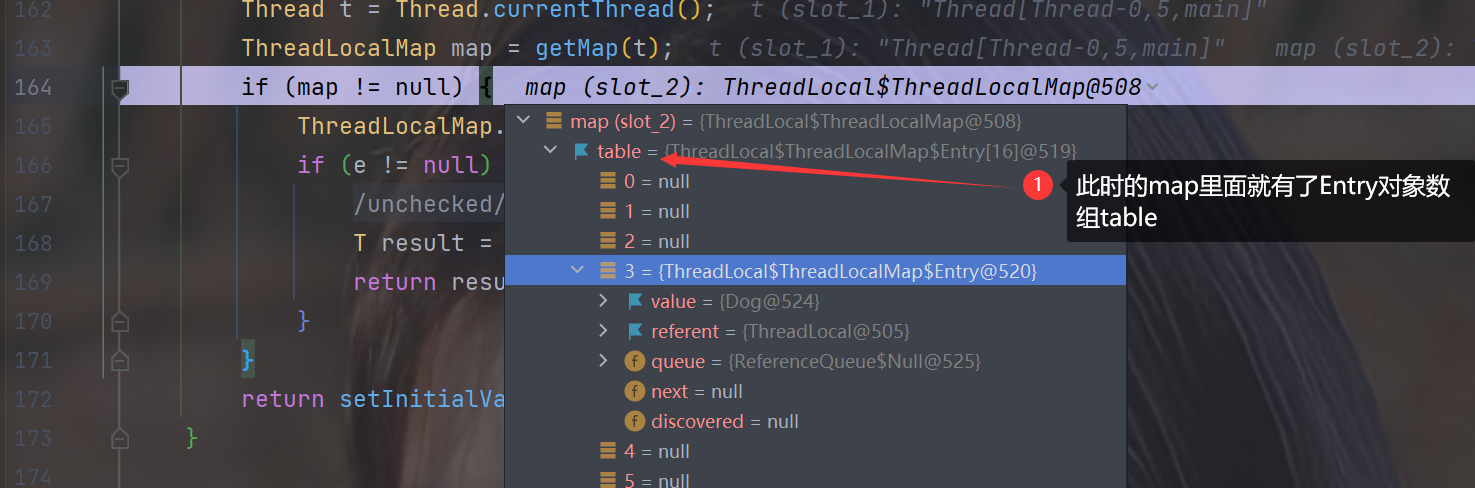
- 下一步,跳入

- 跳出,下一步

- 下一步,下一步

上传下载文件
1.基本介绍
1.基本说明

2.文件上传原理 分析


2.文件上传案例
1.创建maven项目,导入依赖
<dependency> <groupId>commons-fileuploadgroupId> <artifactId>commons-fileuploadartifactId> <version>1.2.1version> dependency> <dependency> <groupId>commons-iogroupId> <artifactId>commons-ioartifactId> <version>1.4version> dependency> <dependency> <groupId>javax.servlet.jspgroupId> <artifactId>jsp-apiartifactId> <version>2.2version> <scope>providedscope> dependency> <dependency> <groupId>javax.servletgroupId> <artifactId>javax.servlet-apiartifactId> <version>3.1.0version> dependency> <dependency> <groupId>org.apache.taglibsgroupId> <artifactId>taglibs-standard-implartifactId> <version>1.2.5version> <scope>runtimescope> dependency> <dependency> <groupId>org.apache.taglibsgroupId> <artifactId>taglibs-standard-specartifactId> <version>1.2.5version> dependency>- 1
- 2
- 3
- 4
- 5
- 6
- 7
- 8
- 9
- 10
- 11
- 12
- 13
- 14
- 15
- 16
- 17
- 18
- 19
- 20
- 21
- 22
- 23
- 24
- 25
- 26
- 27
- 28
- 29
- 30
- 31
- 32
2.基本功能实现
1.upload.jsp
<%@ page contentType="text/html;charset=UTF-8" language="java" %> DOCTYPE html> <html lang="en"> <head> <meta charset="UTF-8"> <title>Titletitle>>"> <style type="text/css"> input[type="submit"] { outline: none; border-radius: 5px; cursor: pointer; background-color: #31B0D5; border: none; width: 70px; height: 35px; font-size: 20px; } img { border-radius: 50%; } form { position: relative; width: 200px; height: 200px; } input[type="file"] { position: absolute; left: 0; top: 0; height: 200px; opacity: 0; cursor: pointer; } style> <script type="text/javascript"> function prev(event) { //获取展示图片的区域 var img = document.getElementById("prevView"); //获取文件对象 var file = event.files[0]; //获取文件阅读器: Js的一个类,直接使用即可 var reader = new FileReader(); reader.readAsDataURL(file); reader.onload = function () { //给img的src设置图片url img.setAttribute("src", this.result); } } script> head> <body> <form action="fileUploadServlet" method="post" enctype="multipart/form-data"> 家居图: <img src="2.jpeg" alt="" width="200" height="200" id="prevView"> <input type="file" name="pic" id="" value="" onchange="prev(this)"/> 家居名: <input type="text" name="name"><br/> <input type="submit" value="上传"/> form> body> html> - 1
- 2
- 3
- 4
- 5
- 6
- 7
- 8
- 9
- 10
- 11
- 12
- 13
- 14
- 15
- 16
- 17
- 18
- 19
- 20
- 21
- 22
- 23
- 24
- 25
- 26
- 27
- 28
- 29
- 30
- 31
- 32
- 33
- 34
- 35
- 36
- 37
- 38
- 39
- 40
- 41
- 42
- 43
- 44
- 45
- 46
- 47
- 48
- 49
- 50
- 51
- 52
- 53
- 54
- 55
- 56
- 57
- 58
- 59
- 60
- 61
- 62
- 63
- 64
- 65
- 66
- 67
- 68
- 69
- 70
- 71
- 72
- 73
- 74
2.FileUploadServlet.java
import org.apache.commons.fileupload.FileItem; import org.apache.commons.fileupload.FileUploadException; import org.apache.commons.fileupload.disk.DiskFileItemFactory; import org.apache.commons.fileupload.servlet.ServletFileUpload; import javax.servlet.ServletException; import javax.servlet.annotation.WebServlet; import javax.servlet.http.HttpServlet; import javax.servlet.http.HttpServletRequest; import javax.servlet.http.HttpServletResponse; import java.io.File; import java.io.IOException; import java.net.SocketTimeoutException; import java.util.List; /** * @author 孙显圣 * @version 1.0 */ @WebServlet("/fileUploadServlet") public class FileUploadServlet extends HttpServlet { @Override protected void doGet(HttpServletRequest req, HttpServletResponse resp) throws ServletException, IOException { //1.判断是否为文件表单enctype="multipart/form-data" if (ServletFileUpload.isMultipartContent(req)) { //2.构建一个解析上传数据的工具对象 DiskFileItemFactory diskFileItemFactory = new DiskFileItemFactory(); //3.将工具对象传入ServletFileUpload ServletFileUpload servletFileUpload = new ServletFileUpload(diskFileItemFactory); //解决文件名乱码问题 servletFileUpload.setHeaderEncoding("utf-8"); try { //4.servletFileUpload可以把表单提交的数据text/文件封装到FileItem文件项中 List<FileItem> list = servletFileUpload.parseRequest(req); /* 下面两个就是数据,他已经把文件上传到了StoreLocation的位置 name=1.png, StoreLocation=D:\apache-tomcat-8.5.81\temp\upload_7e78ef67_18d6e981444__7f40_00000000.tmp, size=57722bytes, isFormField=false, FieldName=pic name=null, StoreLocation=D:\apache-tomcat-8.5.81\temp\upload_7e78ef67_18d6e981444__7f40_00000001.tmp, size=0bytes, isFormField=true, FieldName=name */ for (FileItem fileItem : list) { //4.遍历数据,判断是一个文件还是普通表单字段,进行处理 if (fileItem.isFormField()) { String string = fileItem.getString("utf-8"); //以value形式传的信息需要使用getString System.out.println(string); } else { //是一个文件 //获取上传的文件的名字 String name = fileItem.getName(); //创建将来要存放文件的目录 String filePath = "/upload/"; //获取真实路径,javase和javaweb是不同的,javaweb的真实目录是在target文件夹下 String realPath = super.getServletContext().getRealPath(filePath); //判断是否有这个目录,如果没有再创建 File file = new File(realPath); if (!file.exists()) { file.mkdirs(); } //将文件拷贝到刚才创建的目录下 String fileFullPath = realPath + name; System.out.println("路径为" + fileFullPath); fileItem.write(new File(fileFullPath)); //提示信息 resp.setContentType("text/html;charset=utf-8"); resp.getWriter().print("上传成功!"); } } } catch (FileUploadException e) { throw new RuntimeException(e); } catch (Exception e) { throw new RuntimeException(e); } } else { System.out.println("no"); } } @Override protected void doPost(HttpServletRequest req, HttpServletResponse resp) throws ServletException, IOException { doGet(req, resp); } }- 1
- 2
- 3
- 4
- 5
- 6
- 7
- 8
- 9
- 10
- 11
- 12
- 13
- 14
- 15
- 16
- 17
- 18
- 19
- 20
- 21
- 22
- 23
- 24
- 25
- 26
- 27
- 28
- 29
- 30
- 31
- 32
- 33
- 34
- 35
- 36
- 37
- 38
- 39
- 40
- 41
- 42
- 43
- 44
- 45
- 46
- 47
- 48
- 49
- 50
- 51
- 52
- 53
- 54
- 55
- 56
- 57
- 58
- 59
- 60
- 61
- 62
- 63
- 64
- 65
- 66
- 67
- 68
- 69
- 70
- 71
- 72
- 73
- 74
- 75
- 76
- 77
- 78
- 79
- 80
- 81
- 82
3.注意事项以及细节处理
1.分目录存放
将每天的信息存放到一个目录里
1.工具类获取年月日
import java.time.LocalDateTime; /** * @author 孙显圣 * @version 1.0 */ public class WebUtils { /** * 获取年月日 * @return */ public static String getYearMonthDay() { LocalDateTime now = LocalDateTime.now(); int year = now.getYear(); int month = now.getMonthValue(); int day = now.getDayOfMonth(); return year + "/" + month + "/" + day + "/"; } }- 1
- 2
- 3
- 4
- 5
- 6
- 7
- 8
- 9
- 10
- 11
- 12
- 13
- 14
- 15
- 16
- 17
- 18
- 19
- 20
2.修改FileUploadServlet.java

2.解决文件重名问题
为防止文件名重复,在前面加一个前缀,保证唯一
修改FileUploadServlet.java

3.创建目录问题

3.文件下载
1.原理示意图


2.文件下载案例
1.在本地创建文件夹,存放文件

- 存放完成后看看文件是否在target目录下

- 如果不在,则需要rebuild项目 + redeploy项目
- 在本地创建的文件,通过上下文路径+资源路径是可以定位到的
文件上传与下载创建目录的区别
- 文件上传:由于web应用已经启动,与其交互的就是target目录,所以如果需要下载到某个目录,必须获取真实路径
- 文件下载:文件下载是将本地的文件响应给浏览器,所以,在本地存放文件即可,只需要重新构建一下项目,把本地的文件同步到target目录下。当web服务启动的时候,通过上下文路径+资源路径是可以定位到本地映射到target目录下的文件的
2.download.jsp
<%-- Date: 2024/2/4 Time: 9:11 User: 孙显圣 Version:1.0 --%> <%@ page contentType="text/html;charset=UTF-8" language="java" %> <html> <head> <title>Titletitle> head> <body> <a href="/fileupdown/downLoad?name=1.png">点击下载小狗图片a><br><br> <a href="/fileupdown/downLoad?name=java基础笔记.pdf">点击下载java基础笔记a> body> html>- 1
- 2
- 3
- 4
- 5
- 6
- 7
- 8
- 9
- 10
- 11
- 12
- 13
- 14
- 15
- 16
- 17
3.FileDownLoad.java
import org.apache.commons.io.IOUtils; import sun.misc.BASE64Encoder; import javax.servlet.ServletContext; import javax.servlet.ServletException; import javax.servlet.ServletOutputStream; import javax.servlet.annotation.WebServlet; import javax.servlet.http.HttpServlet; import javax.servlet.http.HttpServletRequest; import javax.servlet.http.HttpServletResponse; import java.io.IOException; import java.io.InputStream; import java.net.URLEncoder; /** * @author 孙显圣 * @version 1.0 */ @WebServlet(urlPatterns = "/downLoad") public class FileDownLoad extends HttpServlet { @Override protected void doGet(HttpServletRequest req, HttpServletResponse resp) throws ServletException, IOException { req.setCharacterEncoding("utf-8"); String downLoadFileName = req.getParameter("name"); //给http响应,设置响应头Content-Type就是文件的MINE ServletContext servletContext = req.getServletContext(); //在本地的文件夹可以直接定位 String downLoadPath = "/download/"; String downLoadFileFullPath = downLoadPath + downLoadFileName; //找到该文件的MINE类型 String mimeType = servletContext.getMimeType(downLoadFileFullPath); resp.setContentType(mimeType); //给http响应,设置响应头 Content-Disposition // 这里考虑的细节比较多,比如不同的浏览器写法不一样,考虑编码 // ff 是 文件名中文需要 base64, 而 ie/chrome 是 URL编码 //(1)如果是Firefox 则中文编码需要 base64 //(2)Content-Disposition 是指定下载的数据的展示形式 , 如果attachment 则使用文件下载方式 //(3)如果是其他(主流ie/chrome) 中文编码使用URL编码 if (req.getHeader("User-Agent").contains("Firefox")) { // 火狐 Base64编码 resp.setHeader("Content-Disposition", "attachment; filename==?UTF-8?B?" + new BASE64Encoder().encode(downLoadFileName.getBytes("UTF-8")) + "?="); } else { // 其他(主流ie/chrome)使用URL编码操作 resp.setHeader("Content-Disposition", "attachment; filename=" + URLEncoder.encode(downLoadFileName, "UTF-8")); } //读取要下载到浏览器的文件并返回给浏览器 //创建与要下载文件相关的输入流 InputStream resourceAsStream = servletContext.getResourceAsStream(downLoadFileFullPath); //创建返回数据的输出流 ServletOutputStream outputStream = resp.getOutputStream(); //使用工具类从本地读取文件并且发送到浏览器 IOUtils.copy(resourceAsStream, outputStream); } @Override protected void doPost(HttpServletRequest req, HttpServletResponse resp) throws ServletException, IOException { doGet(req, resp); } }- 1
- 2
- 3
- 4
- 5
- 6
- 7
- 8
- 9
- 10
- 11
- 12
- 13
- 14
- 15
- 16
- 17
- 18
- 19
- 20
- 21
- 22
- 23
- 24
- 25
- 26
- 27
- 28
- 29
- 30
- 31
- 32
- 33
- 34
- 35
- 36
- 37
- 38
- 39
- 40
- 41
- 42
- 43
- 44
- 45
- 46
- 47
- 48
- 49
- 50
- 51
- 52
- 53
- 54
- 55
- 56
- 57
- 58
- 59
- 60
- 61
- 62
- 63
- 64
- 65
- 66
-
相关阅读:
ARM端部署PP-OCR_V3
9. JVM-方法区
【vue组件】使用element-ui table 实现嵌套表格 点击展开时获取数据
前端技能树,面试复习第 46 天—— Vue 生命周期 | 父子组件钩子的执行顺序 | 组件间通信有哪些方式
概念解析 | 光电神经网络:optoelectronic neural network
Kotlin学习笔记(八)by的作用,属性委托和类的委托,和Lazy的关系
网络工程师---第十四天
做UI设计师是否需要美术功底?
【MyBatis】快速入门
webpack构建vue项目 基础09之生产环境 打包为zip文件 与 public静态文件的copy
- 原文地址:https://blog.csdn.net/m0_64637029/article/details/137440048
