-
云备份项目2
云备份项目
4. 服务端代码设计
4.1 服务端工具类实现
4.1.1 文件实用工具类设计
不管是客户端还是服务端,文件的传输备份都涉及到文件的读写,包括数据管理信息的持久化也是如此,因此首先设计封装文件操作类,这个类封装完毕之后,则在任意模块中对文件进行操作时都将变的简单化。
文件操作我们使用C++17提供的文件系统更简单:C++17中filesystem手册
此类设计在
util.hpp中#pragma once #include#include #include #include #include #include #include "bundle.h" #include #include #include namespace fs=std::experimental::filesystem; namespace yjcloud { class FileUtil { public: FileUtil(const std::string&filename) :_filename(filename) { } int64_t file_size() // 获取文件大小 { struct stat st; if(stat(_filename.c_str(),&st)<0) { std::cout<<"get file size fail"<<std::endl; return -1; } return st.st_size; } time_t last_mtime() // 获取最后一次修改时间 { struct stat st; if(stat(_filename.c_str(),&st)<0) { std::cout<<"get last modify time fail"<<std::endl; return -1; } return st.st_mtime; } time_t last_atime() // 获取最后一次访问时间 { struct stat st; if(stat(_filename.c_str(),&st)<0) { std::cout<<"get last modify time fail"<<std::endl; return -1; } return st.st_atime; } std::string file_name() // 获取文件路径中的文件名称 ./abc/a.txt => a.txt { size_t pos=_filename.find_last_of("/"); if(pos==std::string::npos) return _filename; return _filename.substr(pos+1); } bool get_pos_len(std::string*body,size_t pos,size_t len) // 获取文件指定位置,指定长度的数据 { size_t fsize=this->file_size(); if(fsize>len) { std::cout<<"get file len is error"<<std::endl; return false; } std::ifstream ifs; ifs.open(_filename,std::ios::binary); if(ifs.is_open()==false) { std::cout<<"read open file failed"<<std::endl; return false; } ifs.seekg(pos,std::ios::beg); // 文件跳转到指定位置 body->resize(len); ifs.read(&(*body)[0],len); if (ifs.good() == false) { std::cout << "read file fail" << std::endl; ifs.close(); return false; } ifs.close(); return true; } bool get_content(std::string*body) // 获取整个文件内容 { return get_pos_len(body,0,file_size()); } bool set_content(const std::string&body) // 向文件中写入数据 { std::ofstream ofs; ofs.open(_filename, std::ios::binary); if (ofs.is_open() == false) { std::cout << "write open file failed" << std::endl; return false; } ofs.write(&body[0], body.size()); if (ofs.good() == false) { std::cout << "write file fail" << std::endl; ofs.close(); return false; } ofs.close(); return true; } bool compress(const std::string&packname) // 压缩文件 { // 1. 获取源文件数据 std::string body; if(this->get_content(&body)==false) { std::cout << "compress get file content failed" << std::endl; return false; } // 2. 对数据进行压缩 std::string packed=bundle::pack(bundle::LZIP,body); // 3. 将压缩的数据存储到压缩包文件中 FileUtil fu(packname); if(fu.set_content(packed)==false) { std::cout << "compress write unpacked data failed" << std::endl; return false; } return true; } bool uncompress(const std::string&unpackname) // 解压缩文件 { // 1. 将当前压缩包数据读取出来 std::string body; if(this->get_content(&body)==false) { std::cout << "uncompress get file content failed" << std::endl; return false; } // 2. 对压缩的数据进行解压缩 std::string unpacked=bundle::unpack(body); // 3. 将压缩数据写入到新文件 FileUtil fu(unpackname); if(fu.set_content(unpacked)==false) { std::cout << "uncompress write unpacked data failed" << std::endl; return false; } return true; } bool exists() // 判断文件是否存在 { return fs::exists(_filename); } bool create_directory() // 创建目录 { if(exists()) return true; return fs::create_directories(_filename); } bool scan_directory(std::vector<std::string>*array) // 浏览获取目录下所有文件路径名 { for(auto&p: fs::directory_iterator(_filename)) { // 是目录就跳过 if(fs::is_directory(p)==true) continue; // relative_path 带有路径的文件名 array->push_back(fs::path(p).relative_path().string()); } return true; } private: std::string _filename; }; - 1
- 2
- 3
- 4
- 5
- 6
- 7
- 8
- 9
- 10
- 11
- 12
- 13
- 14
- 15
- 16
- 17
- 18
- 19
- 20
- 21
- 22
- 23
- 24
- 25
- 26
- 27
- 28
- 29
- 30
- 31
- 32
- 33
- 34
- 35
- 36
- 37
- 38
- 39
- 40
- 41
- 42
- 43
- 44
- 45
- 46
- 47
- 48
- 49
- 50
- 51
- 52
- 53
- 54
- 55
- 56
- 57
- 58
- 59
- 60
- 61
- 62
- 63
- 64
- 65
- 66
- 67
- 68
- 69
- 70
- 71
- 72
- 73
- 74
- 75
- 76
- 77
- 78
- 79
- 80
- 81
- 82
- 83
- 84
- 85
- 86
- 87
- 88
- 89
- 90
- 91
- 92
- 93
- 94
- 95
- 96
- 97
- 98
- 99
- 100
- 101
- 102
- 103
- 104
- 105
- 106
- 107
- 108
- 109
- 110
- 111
- 112
- 113
- 114
- 115
- 116
- 117
- 118
- 119
- 120
- 121
- 122
- 123
- 124
- 125
- 126
- 127
- 128
- 129
- 130
- 131
- 132
- 133
- 134
- 135
- 136
- 137
- 138
- 139
- 140
- 141
- 142
- 143
- 144
- 145
- 146
- 147
- 148
- 149
- 150
- 151
- 152
- 153
- 154
- 155
- 156
- 157
- 158
- 159
- 160
- 161
- 162
- 163
- 164
- 165
- 166
- 167
- 168
- 169
- 170
- 171
- 172
- 173
- 174
- 175
- 176
- 177
- 178
- 179
- 180
- 181
- 182
- 183
- 184
- 185
- 186
- 187
- 188
- 189
- 190
- 191
- 192
- 193
- 194
- 195
- 196
- 197
- 198
- 199
在makefile文件中,我们要链接C++17的文件系统
-lstdc++fs,同时压缩解压缩文件时要引入bundle.cpp并链接线程库
几种功能测试:
void FileUtil_test(const std::string&filename) { // 压缩与解压缩测试 std::string packname=filename+".lz"; yjcloud::FileUtil file(filename); file.compress(packname); yjcloud::FileUtil nfile(packname); nfile.uncompress("./1.txt"); // 目录操作测试 yjcloud::FileUtil file(filename); file.create_directory(); std::vector<std::string> array; file.scan_directory(&array); for(auto&a:array) std::cout<<a<<std::endl; } int main(int argc,char*argv[]) { FileUtil_test(argv[1]); return 0; }- 1
- 2
- 3
- 4
- 5
- 6
- 7
- 8
- 9
- 10
- 11
- 12
- 13
- 14
- 15
- 16
- 17
- 18
- 19
- 20
- 21
- 22
- 23
运行结果:
压缩与解压缩:

目录操作:

因为链接了bundle库编译速度比较慢,此时将
bundle.cpp打包成静态库g++ -c bundle.cpp -o bundle.o ar -rc libbundle.a bundle.o- 1
- 2
生成
libbundle.a的静态库
修改makefile文件

此时编译速度会大大提升

4.1.2 Json实用工具类设计
namespace yjcloud { class JsonUtil { public: static bool serialize(const Json::Value&val,std::string*str) // 序列化 { Json::StreamWriterBuilder swb; std::unique_ptr<Json::StreamWriter> sw(swb.newStreamWriter()); std::stringstream ss; if(sw->write(val,&ss)!=0) { std::cout << "json write failed!" <<std::endl; return false; } *str=ss.str(); return true; } static bool unserialize(std::string&str,Json::Value*val) // 反序列化 { Json::CharReaderBuilder cb; std::unique_ptr<Json::CharReader> cr(cb.newCharReader()); std::string error; bool ret = cr->parse(str.c_str(), str.c_str() + str.size(), val, &error); if (ret == false) { std::cout << "parse error: " << error << std::endl; return false; } return true; } }; }- 1
- 2
- 3
- 4
- 5
- 6
- 7
- 8
- 9
- 10
- 11
- 12
- 13
- 14
- 15
- 16
- 17
- 18
- 19
- 20
- 21
- 22
- 23
- 24
- 25
- 26
- 27
- 28
- 29
- 30
- 31
- 32
- 33
- 34
- 35
4.2 服务端配置信息模块实现
服务端采用读取配置文件的方式来获取程序的运行关键信息,使代码运行更加灵活。
关键信息:
-
热点判断时间
- 热点管理:多长时间没有被访问的文件算是非热点文件
-
文件下载的URL前缀路径
-
用于表示客户端请求是一个下载请求
-
比如:当用户发来一个备份列表查看请求
/listshow,我们如何判断这个不是listshow的文件下载请求;可以专门创建一个目录/download,下存放要下载的文件,如/download/listshow
-
-
压缩包后缀名
- 规定的压缩包命名规则,就是在文件原名称之后加上后缀。如
".lz"
- 规定的压缩包命名规则,就是在文件原名称之后加上后缀。如
-
上传文件存放路径
- 决定了文件上传之后实际存储在服务器的哪里
-
压缩包存放路径
- 决定非热点文件压缩后存放的路径
-
服务端备份信息存放文件
- 服务端记录的备份文件信息持久化存储
-
服务器的监听IP地址
- 当程序运行在其他主机上时,不需要直接去修改程序
-
服务器的监听端口
4.2.1 系统配置信息
{ "hot_time": 30, "server_port": 8080, "server_ip": "111.231.169.213", "download_prefix": "/download/", "packfile_suffix": ".lz", "pack_dir": "./packdir/", "back_dir": "./backdir/", "backup_file": "./cloud.dat" }- 1
- 2
- 3
- 4
- 5
- 6
- 7
- 8
- 9
- 10
4.2.2 单例文件配置类设计
使用单例模式管理系统配置信息,能够让配置信息的管理控制更加统一灵活
#pragma once #include "util.hpp" #include#define CONFIG_FILE "./cloud.conf" namespace yjcloud { class Config { public: static Config *getinstance() { if (_ins == nullptr) { _mtx.lock(); if (_ins == nullptr) _ins = new Config; _mtx.unlock(); } return _ins; } public: int get_hot_time() { return _hot_time; } std::string get_server_ip() { return _server_ip; } int get_server_port() { return _server_port; } std::string get_dload_pre() { return _download_prefix; } std::string get_pfile_suf() { return _packfile_suffix; } std::string get_pack_dir() { return _pack_dir; } std::string get_back_dir() { return _back_dir; } std::string get_backup_file() { return _backup_file; } private: static std::mutex _mtx; static Config *_ins; Config() { read_config_file(); } private: int _hot_time; std::string _server_ip; uint16_t _server_port; std::string _download_prefix; // 文件下载URL前缀路径,如/download/ std::string _packfile_suffix; // 压缩包后缀名称,如.lz std::string _pack_dir; // 压缩文件存放路径 std::string _back_dir; // 上传文件存放路径 std::string _backup_file; // 服务端备份信息存放文件-->配置文件如 ./cloud.dat bool read_config_file() { // 1. 读取文件到字符串body中 FileUtil fu(CONFIG_FILE); std::string body; if (fu.get_content(&body) == false) { std::cout << "load config file failed" << std::endl; return false; } // 2. 用Json来进行反序列化 Json::Value val; if (JsonUtil::unserialize(body, &val) == false) { std::cout << "parse config file failed" << std::endl; return false; } _hot_time = val["hot_time"].asInt(); _server_port = val["server_port"].asInt(); _server_ip = val["server_ip"].asString(); _download_prefix = val["download_prefix"].asString(); _packfile_suffix = val["packfile_suffix"].asString(); _pack_dir = val["pack_dir"].asString(); _back_dir = val["back_dir"].asString(); _backup_file = val["backup_file"].asString(); return true; } }; Config *Config::_ins = nullptr; std::mutex Config::_mtx; } - 1
- 2
- 3
- 4
- 5
- 6
- 7
- 8
- 9
- 10
- 11
- 12
- 13
- 14
- 15
- 16
- 17
- 18
- 19
- 20
- 21
- 22
- 23
- 24
- 25
- 26
- 27
- 28
- 29
- 30
- 31
- 32
- 33
- 34
- 35
- 36
- 37
- 38
- 39
- 40
- 41
- 42
- 43
- 44
- 45
- 46
- 47
- 48
- 49
- 50
- 51
- 52
- 53
- 54
- 55
- 56
- 57
- 58
- 59
- 60
- 61
- 62
- 63
- 64
- 65
- 66
- 67
- 68
- 69
- 70
- 71
- 72
- 73
- 74
- 75
- 76
- 77
- 78
- 79
- 80
- 81
- 82
- 83
- 84
- 85
- 86
- 87
- 88
- 89
- 90
- 91
- 92
- 93
- 94
- 95
- 96
- 97
- 98
- 99
- 100
- 101
- 102
- 103
- 104
- 105
- 106
- 107
- 108
- 109
- 110
- 111
- 112
- 113
- 114
- 115
代码测试:
void Config_test() { yjcloud::Config*cof=yjcloud::Config::getinstance(); std::cout<<cof->get_hot_time()<<std::endl; std::cout<<cof->get_server_port()<<std::endl; std::cout<<cof->get_server_ip()<<std::endl; std::cout<<cof->get_dload_pre()<<std::endl; std::cout<<cof->get_pfile_suf()<<std::endl; std::cout<<cof->get_pack_dir()<<std::endl; std::cout<<cof->get_back_dir()<<std::endl; std::cout<<cof->get_backup_file()<<std::endl; }- 1
- 2
- 3
- 4
- 5
- 6
- 7
- 8
- 9
- 10
- 11
- 12
测试结果:

4.3 服务端数据管理模块实现
4.3.1 备份数据类的实现
需要管理的数据:
- 文件实际存储路径
- 当客户端要下载文件时,则从这个文件中读取数据进行响应
- 文件是否压缩标志
- 判断文件是否已经被压缩了
- 压缩包存储路径
- 若此文件是一个非热点文件会被压缩,则这个就是压缩包路径名称。当客户端想要下载文件时,则需要先解压,然后读取解压后的文件数据
- 文件访问URL中资源路径
- 如:
/download/a.txt
- 如:
- 文件最后一次修改时间
- 文件最后一次访问时间
- 文件大小
namespace yjcloud { struct BackupInfo // 数据信息结构体 { bool pack_flag; // 文件是否压缩标志 size_t fsize; // 文件大小 time_t atime; // 最后一次访问时间 time_t mtime; // 最后一次修改时间 std::string real_path; // 文件实际存储路径名称 std::string pack_path; // 压缩包存储路径名称 std::string url_path; // 文件访问URL中资源路径 bool new_backup_info(const std::string &realpath, BackupInfo *info) { yjcloud::FileUtil fu(realpath); if (fu.exists() == false) { std::cout << "file not exists" << std::endl; return false; } yjcloud::Config *conf = Config::getinstance(); std::string packdir = conf->get_pack_dir(); std::string packsuffix = conf->get_pfile_suf(); std::string downprefix = conf->get_dload_pre(); pack_flag = false; fsize = fu.file_size(); atime = fu.last_atime(); mtime = fu.last_mtime(); real_path = realpath; // ./backdir/a.txt -> ./packdir/a.txt.lz pack_path = packdir + fu.file_name() + packsuffix; // ./backdir/a.txt -> ./download/a.txt url_path = downprefix + fu.file_name(); return true; } }; }- 1
- 2
- 3
- 4
- 5
- 6
- 7
- 8
- 9
- 10
- 11
- 12
- 13
- 14
- 15
- 16
- 17
- 18
- 19
- 20
- 21
- 22
- 23
- 24
- 25
- 26
- 27
- 28
- 29
- 30
- 31
- 32
- 33
- 34
- 35
- 36
- 37
- 38
- 39
- 40
- 41
- 42
4.3.2 数据管理类的设计
- 内存中以文件访问URL为key,数据信息结构为val,使用哈希表进行管理,查询速度快。使用url作为key是因为往后客户端浏览器下载文件的时候总是以url作为请求。
- 采用文件形式对数据进行持久化存储(序列化方式采用json 格式)
namespace yjcloud { class DataManger // 数据管理类 { public: DataManger() { _backup_file = Config::getinstance()->get_backup_file(); pthread_rwlock_init(&_rwlock, nullptr); init_load(); } ~DataManger() { pthread_rwlock_destroy(&_rwlock); } bool insert(const BackupInfo &info) { pthread_rwlock_wrlock(&_rwlock); _hash[info.url_path] = info; pthread_rwlock_unlock(&_rwlock); storage(); return true; } bool update(const BackupInfo &info) { pthread_rwlock_wrlock(&_rwlock); _hash[info.url_path] = info; pthread_rwlock_unlock(&_rwlock); storage(); return true; } // get: 此类接口都是查询数据 bool get_one_by_url(const std::string &url, BackupInfo *info) { pthread_rwlock_wrlock(&_rwlock); auto it = _hash.find(url); if (it == _hash.end()) { pthread_rwlock_unlock(&_rwlock); return false; } *info = it->second; pthread_rwlock_unlock(&_rwlock); return true; } bool get_one_by_realpath(const std::string &realpath, BackupInfo *info) { pthread_rwlock_wrlock(&_rwlock); for (auto &it : _hash) { if (it.second.real_path == realpath) { *info = it.second; pthread_rwlock_unlock(&_rwlock); return true; } } pthread_rwlock_unlock(&_rwlock); return false; } bool get_all(std::vector<BackupInfo> *array) { pthread_rwlock_wrlock(&_rwlock); for (auto &it : _hash) { array->push_back(it.second); } pthread_rwlock_unlock(&_rwlock); return true; } bool storage() // 负责数据持久化(在每次新增和更新数据时持久化) { // 1. 获取数据 std::vector<BackupInfo> array; get_all(&array); // 2. 添加到Json::Value中 Json::Value val; for(int i=0;i<array.size();++i) { Json::Value item; item["pack_flag"]=array[i].pack_flag; item["fsize"]=(Json::Int64)array[i].fsize; item["atime"]=(Json::Int64)array[i].atime; item["mtime"]=(Json::Int64)array[i].mtime; item["real_path"]=array[i].real_path; item["pack_path"]=array[i].pack_path; item["url_path"]=array[i].url_path; val.append(item); // 添加数组元素 } // 3. 对Json::Value序列化 std::string body; JsonUtil::serialize(val,&body); // 4. 写文件 FileUtil fu(_backup_file); fu.set_content(body); return true; } bool init_load() // 初始化程序运行时从文件读取数据(对象构造后) { // 1. 将数据文件中的数据读取出来 FileUtil fu(_backup_file); if(fu.exists()==false) return true; std::string body; fu.get_content(&body); // 2. 反序列化 Json::Value val; JsonUtil::unserialize(body,&val); // 3. 将反序列化得到的Json::Value中的数据添加到hash中 for(int i=0;i<val.size();++i) { BackupInfo info; info.pack_flag=val[i]["pack_flag"].asBool(); info.fsize=val[i]["fsize"].asInt(); info.atime=val[i]["atime"].asInt64(); info.mtime=val[i]["mtime"].asInt64(); info.real_path=val[i]["real_path"].asString(); info.pack_path=val[i]["pack_path"].asString(); info.url_path=val[i]["url_path"].asString(); insert(info); } return true; } private: std::string _backup_file; // 服务端备份信息存放文件 // <文件url, 数据信息结构> std::unordered_map<std::string, yjcloud::BackupInfo> _hash; pthread_rwlock_t _rwlock; // 读写锁, 读共享, 写互斥 }; }- 1
- 2
- 3
- 4
- 5
- 6
- 7
- 8
- 9
- 10
- 11
- 12
- 13
- 14
- 15
- 16
- 17
- 18
- 19
- 20
- 21
- 22
- 23
- 24
- 25
- 26
- 27
- 28
- 29
- 30
- 31
- 32
- 33
- 34
- 35
- 36
- 37
- 38
- 39
- 40
- 41
- 42
- 43
- 44
- 45
- 46
- 47
- 48
- 49
- 50
- 51
- 52
- 53
- 54
- 55
- 56
- 57
- 58
- 59
- 60
- 61
- 62
- 63
- 64
- 65
- 66
- 67
- 68
- 69
- 70
- 71
- 72
- 73
- 74
- 75
- 76
- 77
- 78
- 79
- 80
- 81
- 82
- 83
- 84
- 85
- 86
- 87
- 88
- 89
- 90
- 91
- 92
- 93
- 94
- 95
- 96
- 97
- 98
- 99
- 100
- 101
- 102
- 103
- 104
- 105
- 106
- 107
- 108
- 109
- 110
- 111
- 112
- 113
- 114
- 115
- 116
- 117
- 118
- 119
- 120
- 121
- 122
- 123
- 124
- 125
- 126
- 127
- 128
- 129
- 130
- 131
- 132
- 133
- 134
- 135
- 136
- 137
- 138
- 139
- 140
- 141
- 142
- 143
- 144
- 145
- 146
- 147
- 148
- 149
- 150
注意:
- 在数据操纵时采用读写锁
pthread_rwlock_t _rwlock而非互斥锁,因为读写锁:读共享,写互斥。单单读取数据时效率更高。 - 由于测试阶段数据量不大,我们在插入和更新数据时进行持久化存储,初始化程序时我们也要从配置文件中读取数据。
代码测试:
void Data_test(const std::string&filename) { yjcloud::DataManger data; std::vector<yjcloud::BackupInfo> array; data.get_all(&array); for(auto&a:array) { std::cout << a.pack_flag << std::endl; std::cout << a.fsize << std::endl; std::cout << a.atime << std::endl; std::cout << a.mtime << std::endl; std::cout << a.real_path << std::endl; std::cout << a.pack_path << std::endl; std::cout << a.url_path << std::endl; } }- 1
- 2
- 3
- 4
- 5
- 6
- 7
- 8
- 9
- 10
- 11
- 12
- 13
- 14
- 15
- 16
运行结果:

4.4 服务端热点管理模块实现
4.4.1 热点管理实现思路
-
设计思想
-
对服务器上备份的文件进行检测,哪些文件长时间没有被访问,则认为是非热点文件,进行压缩存储,节省磁盘空间
-
实现思路
-
遍历所有的文件,检测文件的最后一次访问时间,与当前时间进行相减得到差值,此差值如果大于设定好的非热点判断时间则认为是非热点文件,进行压缩存储到压缩路径中,删除源文件
-
遍历所有文件:
-
从数据管理模块中遍历所有的备份文件信息
-
遍历备份文件夹,对所有的文件进行属性获取,最终判断
-
-
选择第二种:遍历备份文件夹,每次获取文件的最新数据进行判断,并且还可以解决数据信息缺漏的问题
-
-
关键点:
-
上传文件有自己的上传存储位置,非热点文件的压缩存储有自己的存储位置
-
流程:
- 遍历备份目录,获取所有文件路径名称
- 逐个文件获取最后一次访问时间与当前系统时间进行比较判断
- 对非热点文件进行压缩处理,删除源文件
- 修改数据管理模块对应的文件信息,即压缩标志置为true
4.4.2 热点管理类的设计
#pragma once #include"data.hpp" // 因为数据管理要在多个模块中访问的,将其作为全局数据定义,在此处声明使用即可 extern yjcloud::DataManger*_data; namespace yjcloud { class HotManger { public: HotManger() { Config*conf=Config::getinstance(); _back_dir=conf->get_back_dir(); _pack_dir=conf->get_pack_dir(); _hot_time=conf->get_hot_time(); _pack_suffix=conf->get_pfile_suf(); // 创建好两个目录() FileUtil fu1(_back_dir); FileUtil fu2(_pack_dir); fu1.create_directory(); fu2.create_directory(); } bool run_modle() { while (1) { // 1. 遍历备份目录, 获取所有文件名 FileUtil fu(_back_dir); std::vector<std::string> array; fu.scan_directory(&array); // 2. 遍历判断文件是否是非热点文件 for (auto &a : array) { if (hot_judge(a) == true) // 这里的a是文件路径名 continue; // 3. 获取文件的备份信息 BackupInfo info; if (_data->get_one_by_realpath(a, &info) == false) { // 文件存在, 但是没有备份信息 info.new_backup_info(a, &info); // 设置一个新的备份信息 } // 4. 对非热点文件进行压缩处理 FileUtil tmp(a); tmp.compress(info.pack_path); // 传入压缩后的文件名称 // 5. 删除源文件, 修改备份信息 tmp.remove_file(); info.pack_flag = true; // 修改标志位 _data->update(info); } usleep(1000); // 1ms循环一次, 避免空目录循环遍历, 消耗cpu资源过高 } return true; } private: bool hot_judge(const std::string&filename) // 非热点文件-返回假; 热点文件-返回真 { FileUtil fu(filename); time_t last_time=fu.last_atime(); time_t cur_time=time(nullptr); if(cur_time-last_time>_hot_time) return false; return true; } private: std::string _back_dir; // 备份文件路径 std::string _pack_dir; // 压缩文件路径 std::string _pack_suffix; // 压缩包后缀名 int _hot_time; // 热点判断时间 }; }- 1
- 2
- 3
- 4
- 5
- 6
- 7
- 8
- 9
- 10
- 11
- 12
- 13
- 14
- 15
- 16
- 17
- 18
- 19
- 20
- 21
- 22
- 23
- 24
- 25
- 26
- 27
- 28
- 29
- 30
- 31
- 32
- 33
- 34
- 35
- 36
- 37
- 38
- 39
- 40
- 41
- 42
- 43
- 44
- 45
- 46
- 47
- 48
- 49
- 50
- 51
- 52
- 53
- 54
- 55
- 56
- 57
- 58
- 59
- 60
- 61
- 62
- 63
- 64
- 65
- 66
- 67
- 68
- 69
- 70
- 71
- 72
- 73
- 74
- 75
- 76
- 77
- 78
- 79
代码测试
void Hot_test() { _data=new yjcloud::DataManger(); yjcloud::HotManger hot; hot.run_modle(); }- 1
- 2
- 3
- 4
- 5
- 6
运行结果:此时./cloud运行后会生成两个目录,将文件拷贝到backdir目录中, 30后文件会被视为非热点文件,直接压缩存储到packdir中,同时backdir中没有源文件

此时生成的cloud.dat中就写入了1.txt文件的相关信息

4.5 服务端业务处理模块实现
4.5.1 网络通信接口设计
业务处理模块要对客户端的请求进行处理,那么我们就需要提前定义好客户端与服务端的通信,明确客户端发送什么样的请求,服务端处理后应该给与什么样的响应,而这就是网络通信接口的设计。
请求:文件上传,展示页面,文件下载
HTTP文件上传:
当服务器收到一个POST方法的/upload请求,我们则认为这是一个文件上传请求。解析请求,得到文件数据,将数据写到文件中。
POST /upload HTTP/1.1 Content-Length:11 Content-Type:multipart/form-data;boundary= ----WebKitFormBoundary+16字节随机字符 ------WebKitFormBoundary Content-Disposition:form-data;filename="a.txt"; hello world ------WebKitFormBoundary--- 1
- 2
- 3
- 4
- 5
- 6
- 7
HTTP/1.1 200 OK Content-Length: 0- 1
- 2
HTTP展示页面:
GET /listshow HTTP/1.1 Content-Length: 0- 1
- 2
HTTP/1.1 200 OK Content-Length: Content-Type: text/html <html> <head> <meta http-equiv="Content-Type" content="text/html; charset=UTF-8" /> <title>Page of Downloadtitle> head> <body> <h1>Downloadh1> <table> <tr> <td><a href="/download/a.txt"> a.txt a>td> <td align="right"> 1994-07-08 03:00 td> <td align="right"> 27K td> tr> table> body> html>- 1
- 2
- 3
- 4
- 5
- 6
- 7
- 8
- 9
- 10
- 11
- 12
- 13
- 14
- 15
- 16
- 17
- 18
- 19
- 20
HTTP文件下载:
GET /download/a.txt http/1.1 Content-Length: 0- 1
- 2
HTTP/1.1 200 OK Content-Length: 100000 ETags: "filename+fsize+mtime一个能够唯一标识文件的数据" Accept-Ranges: bytes 文件数据- 1
- 2
- 3
- 4
- 5
字段解析:
-
ETag
- 存储了一个资源的唯一标识。客户端第一次下载文件的时候,会收到这个响应;第二次下载,会将这个信息发送给服务器,让服务器根据这个唯一标识判断这个资源是否被修改过,若没有被修改,则直接使用原先缓存的数据,不用重新下载。
- HTTP协议本身对于ETag中是什么数据并不关心,只要服务器能够唯一标识就行。此时我们这里的ETag就用“文件名-文件大小-最后一次修改时间”组成。
- ETag字段不仅仅是缓存用到,下面的断点续传实现也会用到。因为断点续传要保证文件没有被修改过
-
Accept-Ranges: bytes
- 用于告诉客户端服务器支持断点续传,并且数据单位以字节作为单位
-
Content-Type
- 决定了浏览器如何处理响应正文
4.5.2 业务处理类设计
//因为业务处理的回调函数没有传入参数的地方,因此无法直接访问外部的数据管理模块数据 //可以使用lamda表达式解决,但是所有的业务功能都要在一个函数内实现,于功能划分上模块不够清晰 //因此将数据管理模块的对象定义为全局数据,在这里声明一下,就可以在任意位置访问了 extern yjcloud::DataManger*_data; namespace yjcloud { class Service { public: Service() { Config*conf=Config::getinstance(); _server_port=conf->get_server_port(); _server_ip=conf->get_server_ip(); _download_prefix=conf->get_dload_pre(); } bool run_modle() { _svr.Post("/upload", upload); _svr.Get("/listshow", listshow); _svr.Get("/", listshow); // .* 正则表达式, 表示匹配任意字符任意次 std::string download_url = _download_prefix + "(.*)"; _svr.Get(download_url, download); // 云服务器的公网是一个子网共享的,个人的机器是接受从公网ip转发的数据,所以必须绑定0.0.0.0才行 _svr.listen("0.0.0.0", _server_port); return true; } private: static void upload(const httplib::Request&req,httplib::Response&resp) { } static void listshow(const httplib::Request&req,httplib::Response&resp) { } static void download(const httplib::Request&req,httplib::Response&resp) { } private: int _server_port; std::string _server_ip; std::string _download_prefix; // 文件下载的前缀路径 httplib::Server _svr; }; }- 1
- 2
- 3
- 4
- 5
- 6
- 7
- 8
- 9
- 10
- 11
- 12
- 13
- 14
- 15
- 16
- 17
- 18
- 19
- 20
- 21
- 22
- 23
- 24
- 25
- 26
- 27
- 28
- 29
- 30
- 31
- 32
- 33
- 34
- 35
- 36
- 37
- 38
- 39
- 40
- 41
- 42
- 43
- 44
- 45
- 46
- 47
- 48
<1> upload
static void upload(const httplib::Request &req, httplib::Response &resp) // 上传请求处理函数 { // post /upload 文件数据在正文中(正文并不全是文件数据) auto res = req.has_file("file"); // 判断有没有上传的文件区域 if (res == false) { std::cout << "not file upload" << std::endl; resp.status = 400; return; } const auto &file = req.get_file_value("file"); // 获取文件各项数据 // file.filename 文件名称 file.content 文件内容 std::string back_dir = Config::getinstance()->get_back_dir(); // 备份的文件目录 std::string realpath = back_dir + FileUtil((file.filename)).file_name(); FileUtil fu(realpath); fu.set_content(file.content); // 将数据写入文件中 BackupInfo info; info.new_backup_info(realpath); // 组织备份的文件信息 _data->insert(info); // 向数据管理模块添加备份的文件信息 return; }- 1
- 2
- 3
- 4
- 5
- 6
- 7
- 8
- 9
- 10
- 11
- 12
- 13
- 14
- 15
- 16
- 17
- 18
- 19
- 20
- 21
- 22
- 23
验证:我们启动服务器
void ServiceTest() { yjcloud::Service svr; svr.run_modle(); }- 1
- 2
- 3
- 4
- 5
进入编写好前端页面的,点击选择文件,选择好后直接上传

这里我上传了test.html文件,上传后出现下面场景

同时backdir目录下出现了上传的文件:

<2> listshow
static void listshow(const httplib::Request &req, httplib::Response &resp)//展示页面获取请求 { // 1. 获取所有文件的备份信息 std::vector<BackupInfo> arr; _data->get_all(&arr); // 2. 根据所有备份信息, 组织html文件数据 std::stringstream ss; ss << "Download "; ss << "Download
"; for (auto &a : arr) { ss << "
"; resp.body = ss.str(); resp.set_header("Content-Type", "text/html"); resp.status = 200; } static const char *time_tostr(time_t t) { return ctime(&t); }"; std::string filename = FileUtil(a.real_path).file_name(); ss << " "; } ss << "" << filename << " "; ss << "" << time_tostr(a.mtime) << " "; ss << "" << a.fsize / 1024 << "k "; ss << "- 1
- 2
- 3
- 4
- 5
- 6
- 7
- 8
- 9
- 10
- 11
- 12
- 13
- 14
- 15
- 16
- 17
- 18
- 19
- 20
- 21
- 22
- 23
- 24
- 25
- 26
- 27
- 28
- 29
验证:
<3> download
static void download(const httplib::Request &req, httplib::Response &resp)//文件下载处理函数 { // 1. 获取客户端请求的资源路径path req.path // 2. 根据资源路径, 获取文件备份信息 BackupInfo info; _data->get_one_by_url(req.path, &info); // 3. 判断文件是否被压缩, 如果被压缩, 要先解压缩 if (info.pack_flag == true) { FileUtil fu(info.pack_path); fu.uncompress(info.real_path); // 文件解压到备份目录下 // 4. 删除压缩包, 修改备份信息(已经没有被压缩) fu.remove_file(); info.pack_flag = false; _data->update(info); } // 5. 读取文件数据, 放入resp.body中 FileUtil fu(info.real_path); fu.get_content(&resp.body); // 6. 设置响应头部字段: Accept-Ranges: bytes resp.set_header("Accept-Ranges", "bytes"); resp.set_header("ETag", get_etag(info)); resp.set_header("Content-Type", "application/octet-stream"); // octet-stream: 代表二进制数据流(一定要设置) resp.status = 200; } // 设置一个能够唯一标识文件的数据 static std::string get_etag(const BackupInfo &info) // 文件名-文件大小-文件最近修改时间 { // etag: filename-fsize-mtime FileUtil fu(info.real_path); std::string etag = fu.file_name(); etag += "-"; etag += std::to_string(info.fsize); etag += "-"; etag += std::to_string(info.mtime); return etag; }- 1
- 2
- 3
- 4
- 5
- 6
- 7
- 8
- 9
- 10
- 11
- 12
- 13
- 14
- 15
- 16
- 17
- 18
- 19
- 20
- 21
- 22
- 23
- 24
- 25
- 26
- 27
- 28
- 29
- 30
- 31
- 32
- 33
- 34
- 35
- 36
- 37
- 38
- 39
- 40
- 41
- 42
验证:启动服务器后,直接点击蓝色文件名,下载文件

对比两个文件的哈希值,发现完全相同。则证明文件一致

断点续传
功能:当文件下载过程中,因为某种异常而中断,如果再次从头下载,效率较低,因为需要将之前已经传输过的数据再次传输一遍。断点续传就是从上次下载断开的位置,重新下载即可,之前已经传输的数据将不需要再重新传输
目的:提高文件重新传输的效率
实现思想:
- 客户端在下载文件的时候,要每次接收到数据写入文件后记录自己当前下载的数据量。
- 当异常下载中断时,下次断点续传的时候,将要重新下载的数据区间(下载起始位置,结束位置)发送给服务器,服务器收到后,仅仅回传客户端需要的区间数据即可
考虑问题:如果上次下载文件之后,这个文件在服务器上被修改了,则这时候不能重新断点续传,而是应该重新进行文件下载操作
主要关键点:
- 要能够告诉服务器下载区间范围
- 服务器上要能够检测上一次下载之后这个文件是否被修改过
结合协议:
- 客户端
- HTTP请求头部携带
If-Range字段告诉服务器支持断点续传; - HTTP请求头部携带
Range: bytes字段告诉服务器自己需要数据区间的范围。如:Range: bytes=89-999表示需要89-999字节的数据
- HTTP请求头部携带
- 服务器
- HTTP响应头部携带
Accept-Ranges: bytes字段告诉客户端支持断点续传,且数据单位以字节为单位。 - 服务器会根据
Range: bytes数据范围,将数据范围填入响应头部Content-Range,响应正文中就是对应区间的数据。如:Content-Range: bytes 100-表示从100字节开始到文件末尾的数据。 - 最后设置状态码206:表示所请求的区间数据已请求成功。
- HTTP响应头部携带
GET /download/a.txt http/1.1 Content-Length: 0 If-Range: "文件唯一标识" Range: bytes=89-999- 1
- 2
- 3
- 4
HTTP/1.1 206 Partial Content Content-Length: Content-Range: bytes 89-999/100000 Content-Type: application/octet-stream ETag: "filename+fsize+mtime一个能够唯一标识文件的数据" Accept-Ranges: bytes 对应文件从89到999字节的数据。- 1
- 2
- 3
- 4
- 5
- 6
- 7
加上断点续传后的下载代码:
static void download(const httplib::Request &req, httplib::Response &resp)//文件下载处理函数 { // 1. 获取客户端请求的资源路径path req.path // 2. 根据资源路径, 获取文件备份信息 BackupInfo info; _data->get_one_by_url(req.path, &info); // 3. 判断文件是否被压缩, 如果被压缩, 要先解压缩 if (info.pack_flag == true) { FileUtil fu(info.pack_path); fu.uncompress(info.real_path); // 文件解压到备份目录下 // 4. 删除压缩包, 修改备份信息(已经没有被压缩) fu.remove_file(); info.pack_flag = false; _data->update(info); } bool retrans=false; std::string old_etag; if(req.has_header("If-Range")) { old_etag=req.get_header_value("If-Range"); // 有If-Range字段且, 这个字段的值与请求文件的最新etag一致, 则符合断点续传 if(old_etag==get_etag(info)) { retrans=true; } } // 5. 读取文件数据, 放入resp.body中 FileUtil fu(info.real_path); fu.get_content(&resp.body); // 6. 设置响应头部字段: ETag, Accept-Ranges: bytes if(retrans==false) { fu.get_content(&resp.body); resp.set_header("Accept-Ranges", "bytes"); resp.set_header("ETag", get_etag(info)); resp.set_header("Content-Type", "application/octet-stream"); // octet- resp.status = 200; } else { // httplib内部实现了对于区间请求也就是断点续传请求的处理 // 只需要我们用户将文件所有数据读取到rsp.body中, // 它内部会自动根据请求区间, 从body中提取指定区间数据进行响应 // std::string range = req.get_header_val("Range"); bytes=start-end fu.get_content(&resp.body); resp.set_header("Accept-Ranges", "bytes"); resp.set_header("ETag", get_etag(info)); resp.set_header("Content-Type", "application/octet-stream"); // resp.set_header("Content-Range", "bytes start-end/fsize"); resp.status = 206; } } // 设置一个能够唯一标识文件的数据 static std::string get_etag(const BackupInfo &info) // 文件名-文件大小-文件最近修改时间 { // etag: filename-fsize-mtime FileUtil fu(info.real_path); std::string etag = fu.file_name(); etag += "-"; etag += std::to_string(info.fsize); etag += "-"; etag += std::to_string(info.mtime); return etag; }- 1
- 2
- 3
- 4
- 5
- 6
- 7
- 8
- 9
- 10
- 11
- 12
- 13
- 14
- 15
- 16
- 17
- 18
- 19
- 20
- 21
- 22
- 23
- 24
- 25
- 26
- 27
- 28
- 29
- 30
- 31
- 32
- 33
- 34
- 35
- 36
- 37
- 38
- 39
- 40
- 41
- 42
- 43
- 44
- 45
- 46
- 47
- 48
- 49
- 50
- 51
- 52
- 53
- 54
- 55
- 56
- 57
- 58
- 59
- 60
- 61
- 62
- 63
- 64
- 65
- 66
- 67
- 68
- 69
- 70
- 71
- 72
- 73
验证:我们点击下载后直接断开网络
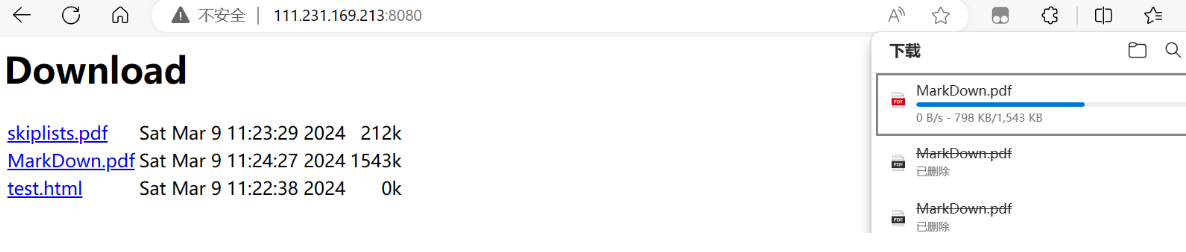
后重新联网,文件就会从刚才断开的地方继续下载
下载完成后,对比两个文件哈希值,发现一致

4.6 服务端整体模块测试
在前面模块的实现业务处理模块与热点管理模块都是死循环,所以我们可以使用多线程来测试这两个模块。
yjcloud::DataManger*_data; void Hot_test() { yjcloud::HotManger hot; hot.run_modle(); } void ServiceTest() { yjcloud::Service svr; svr.run_modle(); } int main(int argc,char*argv[]) { // 服务端整体测试 _data=new yjcloud::DataManger(); std::thread hot_thread(Hot_test); std::thread ser_thread(ServiceTest); hot_thread.join(); ser_thread.join(); return 0; }- 1
- 2
- 3
- 4
- 5
- 6
- 7
- 8
- 9
- 10
- 11
- 12
- 13
- 14
- 15
- 16
- 17
- 18
- 19
- 20
- 21
验证:启动服务器,下载某个文件的前后过程

5. 客户端代码设计
为了让用户体验感更好,客户端我们在Windows下编写。客户端代码设计相比服务端比较简单。
-
功能:自动对指定文件夹中的文件进行备份
-
模块划分:
- 数据管理模块:管理备份的文件信息
- 文件操作模块:获取指定的一些文件信息
- 文件备份模块:将需要备份的文件上传备份到服务器
5.1 客户端文件操作实用类设计
此类设计与服务端雷同,直接拷贝服务端的设计即可
#pragma once #define _SILENCE_EXPERIMENTAL_FILESYSTEM_DEPRECATION_WARNING #include#include #include #include #include #include #include namespace fs = std::experimental::filesystem; namespace yjcloud { class FileUtil { public: FileUtil(const std::string& filename) :_filename(filename) { } bool remove_file() { if (exists() == false) return true; remove(_filename.c_str()); return true; } int64_t file_size() { struct stat st; if (stat(_filename.c_str(), &st) < 0) { std::cout << "get file size fail" << std::endl; return -1; } return st.st_size; } time_t last_mtime() { struct stat st; if (stat(_filename.c_str(), &st) < 0) { std::cout << "get last modify time fail" << std::endl; return -1; } return st.st_mtime; } time_t last_atime() { struct stat st; if (stat(_filename.c_str(), &st) < 0) { std::cout << "get last modify time fail" << std::endl; return -1; } return st.st_atime; } std::string file_name() { size_t pos = _filename.find_last_of("\\"); // "\\"就是原始'\' if (pos == std::string::npos) return _filename; //return fs::path(_filename).filename().string(); // c++17文件系统: 获取纯文件名 return _filename.substr(pos + 1); } bool get_pos_len(std::string* body, size_t pos, size_t len) { size_t fsize = this->file_size(); if (fsize > len) { std::cout << "get file len is error" << std::endl; return false; } std::ifstream ifs; ifs.open(_filename, std::ios::binary); if (ifs.is_open() == false) { std::cout << "read open file failed" << std::endl; return false; } ifs.seekg(pos, std::ios::beg); body->resize(len); ifs.read(&(*body)[0], len); if (ifs.good() == false) { std::cout << "read file fail" << std::endl; ifs.close(); return false; } ifs.close(); return true; } bool get_content(std::string* body) { return get_pos_len(body, 0, file_size()); } bool set_content(const std::string& body) { std::ofstream ofs; ofs.open(_filename, std::ios::binary); if (ofs.is_open() == false) { std::cout << "write open file failed" << std::endl; return false; } ofs.write(&body[0], body.size()); if (ofs.good() == false) { std::cout << "write file fail" << std::endl; ofs.close(); return false; } ofs.close(); return true; } bool exists() { return fs::exists(_filename); } bool create_directory() { if (exists()) return true; return fs::create_directories(_filename); } bool scan_directory(std::vector<std::string>* array) { for (auto& p : fs::directory_iterator(_filename)) { if (fs::is_directory(p) == true) continue; array->push_back(fs::path(p).relative_path().string()); } return true; } private: std::string _filename; }; } - 1
- 2
- 3
- 4
- 5
- 6
- 7
- 8
- 9
- 10
- 11
- 12
- 13
- 14
- 15
- 16
- 17
- 18
- 19
- 20
- 21
- 22
- 23
- 24
- 25
- 26
- 27
- 28
- 29
- 30
- 31
- 32
- 33
- 34
- 35
- 36
- 37
- 38
- 39
- 40
- 41
- 42
- 43
- 44
- 45
- 46
- 47
- 48
- 49
- 50
- 51
- 52
- 53
- 54
- 55
- 56
- 57
- 58
- 59
- 60
- 61
- 62
- 63
- 64
- 65
- 66
- 67
- 68
- 69
- 70
- 71
- 72
- 73
- 74
- 75
- 76
- 77
- 78
- 79
- 80
- 81
- 82
- 83
- 84
- 85
- 86
- 87
- 88
- 89
- 90
- 91
- 92
- 93
- 94
- 95
- 96
- 97
- 98
- 99
- 100
- 101
- 102
- 103
- 104
- 105
- 106
- 107
- 108
- 109
- 110
- 111
- 112
- 113
- 114
- 115
- 116
- 117
- 118
- 119
- 120
- 121
- 122
- 123
- 124
- 125
- 126
- 127
- 128
- 129
- 130
- 131
- 132
- 133
- 134
- 135
- 136
- 137
- 138
- 139
- 140
- 141
- 142
- 143
- 144
- 145
- 146
- 147
- 148
- 149
- 150
- 151
- 152
- 153
- 154
- 155
- 156
- 157
- 158
5.2 客户端数据管理模块实现
实现思想:
-
内存存储:高访问效率—使用哈希表
-
持久化存储:文件存储
文件存储涉及到数据序列化:由于在VS中安装jsoncpp较为麻烦,这里直接自定义序列格式化
格式:
key val\nkey val\nkey是文件路径名,val是文件唯一标识。'\n'作为序列化与反序列化时的分隔符。如:./a.txt a.txt-1234-145177\n./b.txt b.txt-1567-18976#pragma once #include#include #include #include"util.hpp" namespace yjcloud { class DataManger { public: DataManger(const std::string &backup_file) :_backup_file(backup_file) { init_load(); } bool storage() // 数据持久化 { // 1. 获取所有备份信息 std::stringstream ss; for (auto& it : _hash) { // 2. 将所有备份信息进行制定持久化格式的组织(格式: key val\nkey val\n) ss << it.first << " " << it.second << "\n"; } // 3. 持久化存储 FileUtil fu(_backup_file); fu.set_content(ss.str()); return true; } bool init_load() // 初始化加载 { // 1. 从文件读取所有数据 FileUtil fu(_backup_file); std::string body; fu.get_content(&body); // 2. 进行数据解析, 添加到表中 std::vector<std::string> arr; split(body, "\n", &arr); // 分割一个一个文件 for (auto& a : arr) { // a的格式: b.txt b.txt-1245(文件大小)-14453(最后一次访问时间) std::vector<std::string> tmp; split(a, " ", &tmp); // 分割文件名和文件唯一标识 if (tmp.size() != 2) // 分割有问题 continue; _hash[tmp[0]] = tmp[1]; // tmp[0]: 文件名 tmp[1]: 文件唯一标识 } return true; } bool insert(const std::string&key,const std::string&val) { _hash[key] = val; storage(); return true; } bool update(const std::string& key, const std::string& val) { _hash[key] = val; storage(); return true; } bool get_one_by_key(const std::string& key, std::string*val) { auto it = _hash.find(key); if (it == _hash.end()) return false; *val = it->second; return true; } private: int split(const std::string& str, const std::string& sep, std::vector<std::string>* array) { int count = 0; size_t pos = 0, idx = 0; while (1) { pos = str.find(sep, idx); if (pos == std::string::npos) break; if (pos == idx) { idx = pos + sep.size(); continue; } std::string tmp = str.substr(idx, pos - idx); array->push_back(tmp); ++count; idx = pos + sep.size(); } if (idx < str.size()) { array->push_back(str.substr(idx)); ++count; } return count; } private: std::string _backup_file; // 备份信息的持久化存储文件 std::unordered_map<std::string, std::string> _hash; // <路径名, 文件唯一标识> }; } - 1
- 2
- 3
- 4
- 5
- 6
- 7
- 8
- 9
- 10
- 11
- 12
- 13
- 14
- 15
- 16
- 17
- 18
- 19
- 20
- 21
- 22
- 23
- 24
- 25
- 26
- 27
- 28
- 29
- 30
- 31
- 32
- 33
- 34
- 35
- 36
- 37
- 38
- 39
- 40
- 41
- 42
- 43
- 44
- 45
- 46
- 47
- 48
- 49
- 50
- 51
- 52
- 53
- 54
- 55
- 56
- 57
- 58
- 59
- 60
- 61
- 62
- 63
- 64
- 65
- 66
- 67
- 68
- 69
- 70
- 71
- 72
- 73
- 74
- 75
- 76
- 77
- 78
- 79
- 80
- 81
- 82
- 83
- 84
- 85
- 86
- 87
- 88
- 89
- 90
- 91
- 92
- 93
- 94
- 95
- 96
- 97
- 98
- 99
- 100
- 101
- 102
- 103
- 104
- 105
- 106
- 107
- 108
- 109
- 110
- 111
- 112
- 113
- 114
5.3 客户端文件备份类设计
实现功能:自动将指定文件夹中文件备份到服务器
思路:
- 遍历指定文件夹,获取文件信息
- 逐一判断文件是否需要备份
- 需要备份的文件进行上传备份
#pragma once #include"data.hpp" #include"httplib.h" #include#define SERVER_ADDR "111.231.169.213" #define SERVER_PORT 8080 namespace yjcloud { class Backup { public: Backup(const std::string& back_dir, const std::string& back_file) :_back_dir(back_dir) { _data = new DataManger(back_file); } bool run_module() { while (1) { // 1. 遍历获取指定文件夹中所有文件 FileUtil fu(_back_dir); std::vector<std::string> arr; fu.scan_directory(&arr); // 2. 逐个判断文件是否需要上传 for (auto& a : arr) { if (is_need_upload(a) == false) continue; // 3. 如果需要上传则上传文件 if (upload(a) == true) { _data->insert(a, get_file_identify(a)); // 新增文件备份信息 std::cout << a << " upload success!" << std::endl; } } Sleep(1); } return true; } private: bool upload(const std::string& filename) { // 1. 获取文件数据 FileUtil fu(filename); std::string body; fu.get_content(&body); // 2. 搭建http客户端上传文件数据 httplib::Client client(SERVER_ADDR, SERVER_PORT); httplib::MultipartFormData item; item.name = "file"; // 标识字段名(服务端upload用file标识) item.filename = fu.file_name(); item.content = body; item.content_type = "application/octet-stream"; httplib::MultipartFormDataItems items; items.push_back(item); auto res = client.Post("/upload", items); if (!res || res->status != 200) return false; return true; } bool is_need_upload(const std::string& filename) { // 需要上传文件的判断条件: 文件是新增的或文件不是新增但是被修改过 // 文件是新增的: 看有没有历史备份信息 // 不是新增但是被修改过: 有历史信息, 但是历史的唯一标识与当前最新的唯一标识不一致 std::string id; if (_data->get_one_by_key(filename, &id) != false) { // 有历史信息 std::string new_id = get_file_identify(filename); if (new_id == id) return false; // 不需要被上传-上一次上传后没有被修改过 } // 一个文件比较大, 正在徐徐的拷贝到这个目录下。拷贝需要一个过程, // 如果每次遍历则都会判断标识不一致需要上传一个几十G的文件会上传上百次 // 因此应该判断一个文件一段时间都没有被修改过了, 则才能上传 FileUtil fu(filename); if (time(nullptr) - fu.last_mtime() < 3) // 3秒钟之内刚修改过---认为文件还在修改中 return false; std::cout << filename << " need upload!" << std::endl; return true; } std::string get_file_identify(const std::string& filename) // 计算获取文件唯一标识 { // b.txt-1234-16792 FileUtil fu(filename); std::stringstream ss; ss << fu.file_name() << "-" << fu.file_size() << "-" << fu.last_mtime(); return ss.str(); } private: std::string _back_dir; // 要监控的文件夹 DataManger* _data; }; } - 1
- 2
- 3
- 4
- 5
- 6
- 7
- 8
- 9
- 10
- 11
- 12
- 13
- 14
- 15
- 16
- 17
- 18
- 19
- 20
- 21
- 22
- 23
- 24
- 25
- 26
- 27
- 28
- 29
- 30
- 31
- 32
- 33
- 34
- 35
- 36
- 37
- 38
- 39
- 40
- 41
- 42
- 43
- 44
- 45
- 46
- 47
- 48
- 49
- 50
- 51
- 52
- 53
- 54
- 55
- 56
- 57
- 58
- 59
- 60
- 61
- 62
- 63
- 64
- 65
- 66
- 67
- 68
- 69
- 70
- 71
- 72
- 73
- 74
- 75
- 76
- 77
- 78
- 79
- 80
- 81
- 82
- 83
- 84
- 85
- 86
- 87
- 88
- 89
- 90
- 91
- 92
- 93
- 94
- 95
- 96
- 97
- 98
- 99
- 100
- 101
- 102
- 103
- 104
- 105
- 106
5.4 客户端服务器功能联调测试
客户端:在当前客户端代码路径下自己创建备份目录

将需要备份的文件拷贝至此,运行客户端程序。文件就会备份成功
cloud.dat中也写入了对应文件信息

服务器:
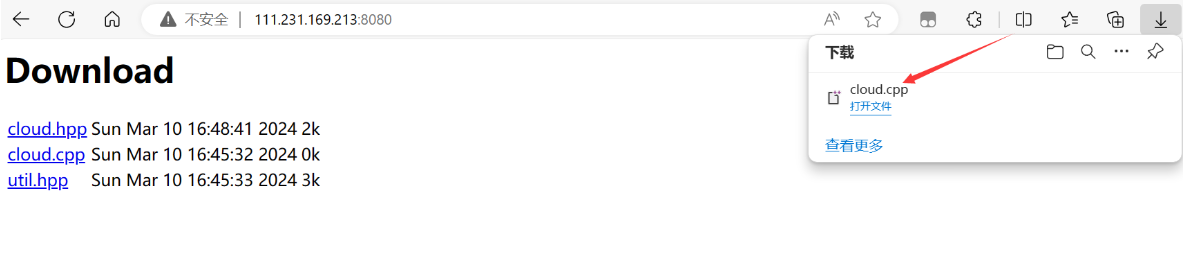
在服务器这端就可以看到对应文件

用浏览器访问,F5刷新页面就可以点击下载文件
6. 项目总结
-
项目名称:云备份系统
-
项目功能:搭建云备份服务器与客户端,客户端程序运行在客户机上自动将指定目录下的文件备份到服务器,并且能够支持浏览器查看与下载,其中下载支持断点续传功能,并且服务器端对备份的文件进行热点管理,将长时间无访问文件进行压缩存储。
-
开发环境:
centos7.6/vim、g++、gdb、makefile以及windows11/vs2019 -
技术特点:
http客户端/服务器搭建,json序列化,文件压缩,热点管理,断点续传,线程池(httplib中),读写锁,单例模式 -
项目模块:
-
服务端:
- 数据管理模块:内存中使用hash表存储提高访问效率,持久化使用文件存储管理备份数据
- 业务处理模块:搭建http 服务器与客户端进行通信处理客户端的上传,下载,查看请求,并支持断点续传
- 热点管理模块:对备份的文件进行热点管理,将长时间无访问文件进行压缩存储,节省磁盘空间。
-
客户端:
- 数据管理模块:内存中使用hash表存储提高访问效率,持久化使用文件存储管理备份数据
- 文件检索模块:基于c++17 文件系统库,遍历获取指定文件夹下所有文件。
- 文件备份模块:搭建http 客户端上传备份文件。
-
-
项目扩展:
- 给客户端开发一个好看的界面,让监控目录可以选择
- 内存中的管理的数据也可以采用热点管理
- 压缩模块也可以使用线程池实现
- 实现用户管理,不同的用户分文件夹存储以及查看
- 实现断点上传
- 客户端限速,收费则放开
-
相关阅读:
Elasticsearch详解
8月PMP出成绩了,意味着什么?
【序列召回推荐】(task2)序列召回GRU4Rec模型
OpenGL ES /Metal滤镜处理
【每日一题Day331】LC2560打家劫舍 IV | 二分查找 + 贪心
【HTML5高级第二篇】WebWorker多线程、EventSource事件推送、History历史操作
【工程数学】笔记2:数学物理方程
Spring之Bean的初始化和销毁
Vim常用命令
CSS的伪类选择器:nth-child()
- 原文地址:https://blog.csdn.net/Ryujianli/article/details/136662530
