-
macOS - 获取硬件设备信息
1、CPU
获取方式 一: system_profiler
% system_profiler SPHardwareDataType Hardware: Hardware Overview: Model Name: MacBook Pro Model Identifier: MacBookPro11,2 Processor Name: Quad-Core Intel Core i7 // CPU 名字 Processor Speed: 2.2 GHz // CPU 频率 Number of Processors: 1 // CPU 个数 Total Number of Cores: 4 L2 Cache (per Core): 256 KB L3 Cache: 6 MB Hyper-Threading Technology: Enabled Memory: 16 GB // 内存 Boot ROM Version: 159.0.0.0.0 // ROM 版本 SMC Version (system): 2.18f15 Serial Number (system): C02N638KG3QC Hardware UUID: 2B738C51-061E-5FDF-89FE-4D6640916EF9- 1
- 2
- 3
- 4
- 5
- 6
- 7
- 8
- 9
- 10
- 11
- 12
- 13
- 14
- 15
- 16
- 17
- 18
- 19
- 20
- 21
- 22
获取方式二:sysctl, machdep
machdep
machdep 是
Machine Dependent的缩写,即机器依赖的意思。你能通过 terminal 命令sysctl machdep查看关于计算机机器的很多信息。% sysctl hw.cpu sysctl: unknown oid 'hw.cpu' % sysctl machdep.cpu machdep.cpu.max_basic: 13 machdep.cpu.max_ext: 2147483656 machdep.cpu.vendor: GenuineIntel # 制造商 machdep.cpu.brand_string: Intel(R) Core(TM) i7-4770HQ CPU @ 2.20GHz # CPU型号 machdep.cpu.family: 6 machdep.cpu.model: 70 machdep.cpu.extmodel: 4 machdep.cpu.extfamily: 0 machdep.cpu.stepping: 1 machdep.cpu.feature_bits: 9221959987971750911 machdep.cpu.leaf7_feature_bits: 10155 0 machdep.cpu.leaf7_feature_bits_edx: 2617246720 machdep.cpu.extfeature_bits: 142473169152 machdep.cpu.signature: 263777 machdep.cpu.brand: 0 machdep.cpu.features: FPU VME DE PSE TSC MSR PAE MCE CX8 APIC SEP MTRR PGE MCA CMOV PAT PSE36 CLFSH DS ACPI MMX FXSR SSE SSE2 SS HTT TM PBE SSE3 PCLMULQDQ DTES64 MON DSCPL VMX EST TM2 SSSE3 FMA CX16 TPR PDCM SSE4.1 SSE4.2 x2APIC MOVBE POPCNT AES PCID XSAVE OSXSAVE SEGLIM64 TSCTMR AVX1.0 RDRAND F16C # 支持的指令集 machdep.cpu.leaf7_features: RDWRFSGS TSC_THREAD_OFFSET BMI1 AVX2 SMEP BMI2 ERMS INVPCID FPU_CSDS MDCLEAR IBRS STIBP L1DF SSBD machdep.cpu.extfeatures: SYSCALL XD 1GBPAGE EM64T LAHF LZCNT RDTSCP TSCI machdep.cpu.logical_per_package: 16 machdep.cpu.cores_per_package: 8 machdep.cpu.microcode_version: 27 machdep.cpu.processor_flag: 5 machdep.cpu.mwait.linesize_min: 64 machdep.cpu.mwait.linesize_max: 64 machdep.cpu.mwait.extensions: 3 machdep.cpu.mwait.sub_Cstates: 270624 machdep.cpu.thermal.sensor: 1 machdep.cpu.thermal.dynamic_acceleration: 1 machdep.cpu.thermal.invariant_APIC_timer: 1 machdep.cpu.thermal.thresholds: 2 machdep.cpu.thermal.ACNT_MCNT: 1 machdep.cpu.thermal.core_power_limits: 1 machdep.cpu.thermal.fine_grain_clock_mod: 1 machdep.cpu.thermal.package_thermal_intr: 1 machdep.cpu.thermal.hardware_feedback: 0 machdep.cpu.thermal.energy_policy: 1 machdep.cpu.xsave.extended_state: 7 832 832 0 machdep.cpu.xsave.extended_state1: 1 0 0 0 machdep.cpu.arch_perf.version: 3 machdep.cpu.arch_perf.number: 4 machdep.cpu.arch_perf.width: 48 machdep.cpu.arch_perf.events_number: 7 machdep.cpu.arch_perf.events: 0 machdep.cpu.arch_perf.fixed_number: 3 machdep.cpu.arch_perf.fixed_width: 48 machdep.cpu.cache.linesize: 64 machdep.cpu.cache.L2_associativity: 8 machdep.cpu.cache.size: 256 machdep.cpu.tlb.inst.large: 8 machdep.cpu.tlb.data.small: 64 machdep.cpu.tlb.data.small_level1: 64 machdep.cpu.tlb.shared: 1024 machdep.cpu.address_bits.physical: 39 machdep.cpu.address_bits.virtual: 48 machdep.cpu.core_count: 4 # 内核数量 machdep.cpu.thread_count: 8 # 线程数 machdep.cpu.tsc_ccc.numerator: 0 machdep.cpu.tsc_ccc.denominator: 0- 1
- 2
- 3
- 4
- 5
- 6
- 7
- 8
- 9
- 10
- 11
- 12
- 13
- 14
- 15
- 16
- 17
- 18
- 19
- 20
- 21
- 22
- 23
- 24
- 25
- 26
- 27
- 28
- 29
- 30
- 31
- 32
- 33
- 34
- 35
- 36
- 37
- 38
- 39
- 40
- 41
- 42
- 43
- 44
- 45
- 46
- 47
- 48
- 49
- 50
- 51
- 52
- 53
- 54
- 55
- 56
- 57
- 58
- 59
- 60
- 61
- 62
- 63
2、内存
可使用 vm_stat 命令获取内存即时的使用情况。
% system_profiler SPMemoryDataType Memory: Memory Slots: ECC: Disabled Upgradeable Memory: No BANK 0/DIMM0: Size: 8 GB Type: DDR3 Speed: 1600 MHz Status: OK Manufacturer: 0x80AD Part Number: 0x484D54343147533641465238412D50422020 Serial Number: - BANK 1/DIMM0: Size: 8 GB Type: DDR3 Speed: 1600 MHz Status: OK Manufacturer: 0x80AD Part Number: 0x484D54343147533641465238412D50422020 Serial Number: -- 1
- 2
- 3
- 4
- 5
- 6
- 7
- 8
- 9
- 10
- 11
- 12
- 13
- 14
- 15
- 16
- 17
- 18
- 19
- 20
- 21
- 22
- 23
- 24
- 25
- 26
- 27
3、硬盘

fsAttributes : { NSFileSystemFreeNodes = 2448637683; NSFileSystemFreeSize = 6541807616; // 可用空间 NSFileSystemNodes = 2449125360; NSFileSystemNumber = 16777224; NSFileSystemSize = 250790436864; // 卷宗容量 } path = / // 卷宗地址 name = Macintosh HD // 卷宗名称 removable = 0 // 是否可移除 writable = 1 // 是否可写 unmountable = 0 // 是否可取消挂载 description = apfs // type = apfs // 文件系统格式- 1
- 2
- 3
- 4
- 5
- 6
- 7
- 8
- 9
- 10
- 11
- 12
- 13
- 14
- 15
4、显卡
重要参数:
显示器型号、尺寸、分辨率

% system_profiler SPDisplaysDataType Graphics/Displays: Intel Iris Pro: Chipset Model: Intel Iris Pro # 型号 Type: GPU Bus: Built-In VRAM (Dynamic, Max): 1536 MB Vendor: Intel # 厂商 Device ID: 0x0d26 Revision ID: 0x0008 Metal: Supported, feature set macOS GPUFamily1 v4 Displays: Color LCD: Display Type: Built-In Retina LCD # 显示类型 Resolution: 2880 x 1800 Retina # 分辨率 Framebuffer Depth: 24-Bit Color (ARGB8888) Main Display: Yes Mirror: Off Online: Yes Automatically Adjust Brightness: No Connection Type: Internal- 1
- 2
- 3
- 4
- 5
- 6
- 7
- 8
- 9
- 10
- 11
- 12
- 13
- 14
- 15
- 16
- 17
- 18
- 19
- 20
- 21
- 22
- 23
5、声卡
重要参数:
声道数

% system_profiler SPAudioDataType Audio: Devices: Apowersoft_AudioDevice: # 设备名称 Input Channels: 2 # 输入声道数 Manufacturer: ma++ ingalls for Cycling '74 Output Channels: 2 # 输出声道数 Current SampleRate: 44100 # 采样率 Transport: Unknown Input Source: Default # 输入源 Output Source: Default # 输出源 Built-in Microphone: Default Input Device: Yes Input Channels: 2 Manufacturer: Apple Inc. Current SampleRate: 44100 Transport: Built-in Input Source: Internal Microphone Built-in Output: Default Output Device: Yes Default System Output Device: Yes Manufacturer: Apple Inc. Output Channels: 2 Current SampleRate: 44100 Transport: Built-in Output Source: Internal Speakers ZoomAudioDevice: Input Channels: 2 Manufacturer: zoom.us Output Channels: 2 Current SampleRate: 48000 Transport: Virtual Input Source: Default Output Source: Default- 1
- 2
- 3
- 4
- 5
- 6
- 7
- 8
- 9
- 10
- 11
- 12
- 13
- 14
- 15
- 16
- 17
- 18
- 19
- 20
- 21
- 22
- 23
- 24
- 25
- 26
- 27
- 28
- 29
- 30
- 31
- 32
- 33
- 34
- 35
- 36
- 37
- 38
- 39
- 40
- 41
- 42
- 43
6、光驱
Mac 普遍没有光驱,需要外接光驱来测试
7、系统序列号
相关参数:
序列号:C02ZK0P8JV3Q
型号标识符:
iMac19,1硬件 UUID :
1C7CA0CE-5D15-59BA-A6D9-FCD01493FDCD
8、型号标识符
$ sysctl hw.model hw.model: iMac19,1- 1
- 2
9、UUID 等信息
$ ioreg -rd1 -c IOPlatformExpertDevice +-o iMac19,1 <class IOPlatformExpertDevice, id 0x100000116, registered, matche$ { "IOPlatformSystemSleepPolicy" = <534c505402000800200000002000000000000000$ "compatible" = <"iMac19,1"> "version" = <"1.0"> "board-id" = <"Mac-AA95B1DDAB278B95"> "IOInterruptSpecifiers" = (<0900000005000000>) "platform-feature" = <2000000000000000> "serial-number" = <4a5633510000000000000000004330325a4b3050384a5633510000$ "IOInterruptControllers" = ("io-apic-0") "IOPolledInterface" = "SMCPolledInterface is not serializable" "target-type" = <"Mac"> "clock-frequency" = <0084d717> "manufacturer" = <"Apple Inc."> "IOPlatformUUID" = "1C7CA0CE-5D15-59BA-A6D9-FCD01493FDCD" "IOPlatformSerialNumber" = "C02ZK0P8JV3Q" "system-type" = <01> "product-name" = <"iMac19,1"> "model" = <"iMac19,1"> "name" = <"/"> "IOBusyInterest" = "IOCommand is not serializable" }- 1
- 2
- 3
- 4
- 5
- 6
- 7
- 8
- 9
- 10
- 11
- 12
- 13
- 14
- 15
- 16
- 17
- 18
- 19
- 20
- 21
- 22
- 23
- 24
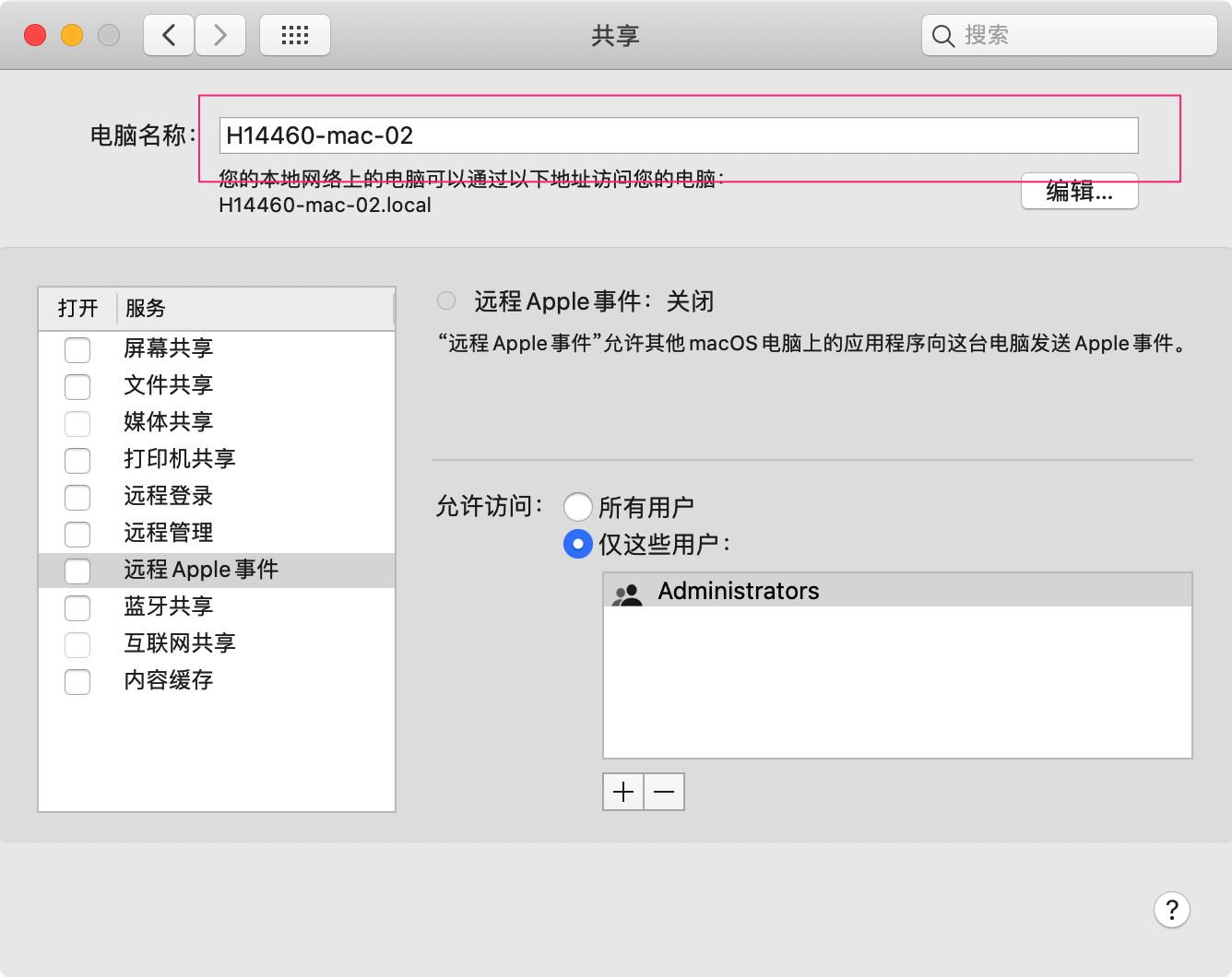
10. 计算机名称
共享中显示的名字
NSString *computerName = (NSString *)CFBridgingRelease(SCDynamicStoreCopyComputerName(NULL, NULL));- 1
- 2
伊织 2024-03-14(四)
-
相关阅读:
不同色系的窗帘带来的含义也不一样 | 好佳居窗帘十大品牌
简单DIV+CSS学生网页设计——电影请以你的名字呼唤我(4页)带音乐特效
如何使用ChatGPT构建一个Web应用程序?
Excel快速对齐表格的中姓名(两个字姓名和三个字姓名对齐)
红蓝对抗 网络安全 网络安全红蓝对抗演练
C/C++函数调用过程的汇编代码分析(arm64指令集)
Android 11.0 framework层实现app默认全屏显示
博客从 CloudBase 迁移至云主机
nginx rewrite(重定向)
pytorch实现Unet
- 原文地址:https://blog.csdn.net/lovechris00/article/details/136710562