-
springboot-异步、定时、邮件任务
一、异步任务
1、创建项目
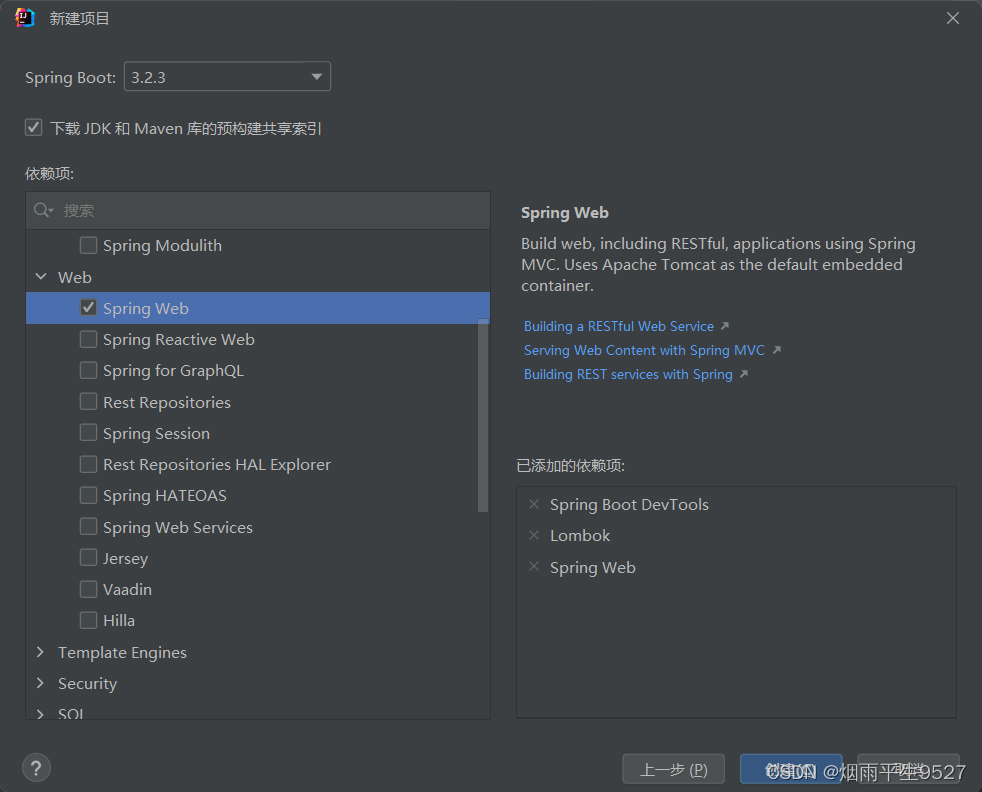
2、创建一个service包
3、创建一个类AsyncService
异步处理还是非常常用的,比如我们在网站上发送邮件,后台会去发送邮件,此时前台会造成响应不动,直到邮件发送完毕,响应才会成功,所以我们一般会采用多线程的方式去处理这些任务。
编写方法,假装正在处理数据,使用线程设置一些延时,模拟同步等待的情况;
4、编写controller包
5、编写AsyncController类
- package com.example.springboottask.controller;
- import com.example.springboottask.service.AsyncService;
- import org.springframework.beans.factory.annotation.Autowired;
- import org.springframework.web.bind.annotation.GetMapping;
- import org.springframework.web.bind.annotation.RestController;
- @RestController
- public class AsyncController {
- @Autowired
- AsyncService asyncService;
- @GetMapping("/hello")
- public String hello(){
- asyncService.hello();
- return "success";
- }
- }
6、访问http://localhost:8080/hello进行测试,3秒后出现success,这是同步等待的情况。
问题:我们如果想让用户直接得到消息,就在后台使用多线程的方式进行处理即可,但是每次都需要自己手动去编写多线程的实现的话,太麻烦了,我们只需要用一个简单的办法,在我们的方法上加一个简单的注解即可,如下:
7、给hello方法添加@Async注解;

-
@EnableAsync //开启异步注解功能
- package com.example.springboottask.service;
- import org.springframework.scheduling.annotation.Async;
- import org.springframework.stereotype.Service;
- @Service
- public class AsyncService {
- @Async
- public void hello(){
- try {
- Thread.sleep(3000);
- } catch (InterruptedException e) {
- e.printStackTrace();
- }
- System.out.println("业务进行中....");
- }
- }
@Async注解用于声明一个方法是异步的,在Spring框架中使用。这个注解的主要作用是将方法的执行委托给Spring的任务执行器(TaskExecutor),以便在单独的线程中运行,从而实现异步处理。使用@Async注解可以提升应用程序的性能,特别是在处理耗时较长的操作时,因为它允许调用者不必等待方法执行完毕就可以继续执行其他操作。SpringBoot就会自己开一个线程池,进行调用!但是要让这个注解生效,我们还需要在主程序上添加一个注解@EnableAsync ,开启异步注解功能;
二、定时任务
项目开发中经常需要执行一些定时任务,比如需要在每天凌晨的时候,分析一次前一天的日志信息,Spring为我们提供了异步执行任务调度的方式,提供了两个接口。
-
TaskExecutor接口
-
TaskScheduler接口
两个注解:
-
@EnableScheduling
-
@Scheduled
cron表达式:

测试步骤:
1、创建一个ScheduledService
我们里面存在一个hello方法,他需要定时执行,怎么处理呢?
- package com.example.springmvcexamples.example07.timer;
- import lombok.extern.slf4j.Slf4j;
- import org.springframework.scheduling.annotation.Scheduled;
- import org.springframework.stereotype.Component;
- @Component
- @Slf4j
- public class MyTimer {
- @Scheduled(cron = "0 0 8 10 * ?")
- public void paySalary() {
- log.debug("Your salary has been paid!");
- }
- }
2、这里写完定时任务之后,我们需要在主程序上增加@EnableScheduling 开启定时任务功能
- package com.example.springmvcexamples.example07.timer;
- import lombok.extern.slf4j.Slf4j;
- import org.springframework.scheduling.annotation.Scheduled;
- import org.springframework.stereotype.Component;
- @Component
- @Slf4j
- public class MyTimer {
- @Scheduled(cron = "0 0 8 10 * ?")
- public void paySalary() {
- log.debug("Your salary has been paid!");
- }
- }
三、邮件任务
邮件发送,在我们的日常开发中,也非常的多,Springboot也帮我们做了支持
-
邮件发送需要引入spring-boot-start-mail
-
SpringBoot 自动配置MailSenderAutoConfiguration
-
定义MailProperties内容,配置在application.yml中
-
自动装配JavaMailSender
-
测试邮件发送
测试:
1、引入pom依赖
org.springframework.boot spring-boot-starter-mail
2、配置文件:
- spring.mail.username=33430657322@qq.com
- spring.mail.password=你的qq授权码
- spring.mail.host=smtp.qq.com
- # qq需要配置ssl
- spring.mail.properties.mail.smtp.ssl.enable=true
获取授权码:在QQ邮箱中的设置->账户->开启pop3和smtp服务
3、Spring单元测试
- package com.example.springboottask;
- import jakarta.mail.MessagingException;
- import jakarta.mail.internet.MimeMessage;
- import org.junit.jupiter.api.Test;
- import org.springframework.beans.factory.annotation.Autowired;
- import org.springframework.boot.test.context.SpringBootTest;
- import org.springframework.mail.SimpleMailMessage;
- import org.springframework.mail.javamail.JavaMailSenderImpl;
- import org.springframework.mail.javamail.MimeMessageHelper;
- import java.io.File;
- @SpringBootTest
- class SpringbootTaskApplicationTests {
- @Autowired
- JavaMailSenderImpl mailSender;
- @Test
- public void contextLoads() {
- //邮件设置1:一个简单的邮件
- SimpleMailMessage message = new SimpleMailMessage();
- message.setSubject("通知-明天来这听课"); // 设置邮件主题
- message.setText("今晚7:30开会"); // 设置邮件正文
- message.setTo("24736743@qq.com"); // 设置收件人邮箱
- message.setFrom("24736743@qq.com"); // 设置发件人邮箱
- mailSender.send(message); // 发送邮件
- }
- @Test
- public void contextLoads2() throws MessagingException {
- //邮件设置2:一个复杂的邮件
- MimeMessage mimeMessage = mailSender.createMimeMessage(); // 创建一个MimeMessage对象
- MimeMessageHelper helper = new MimeMessageHelper(mimeMessage, true); // 创建一个MimeMessageHelper对象,用于构建复杂邮件
- helper.setSubject("通知-明天来这听课"); // 设置邮件主题
- helper.setText("今天 7:30来开会",true); // 设置邮件正文,支持HTML格式
- //发送附件
- helper.addAttachment("1.jpg",new File("")); // 添加附件1
- helper.addAttachment("2.jpg",new File("")); // 添加附件2
- helper.setTo("24736743@qq.com"); // 设置收件人邮箱
- helper.setFrom("24736743@qq.com"); // 设置发件人邮箱
- mailSender.send(mimeMessage); // 发送邮件
- }
- }
-
相关阅读:
微信小程序手写时间间隔组件,可设置间隔时间一分钟,半小时,一小时的间隔
【百度AI_人脸识别】图片对比相似度、人脸对比登录(调摄像头)
JavaScript系列:JS实现复制粘贴文字以及图片
FFmpeg抓取RTSP图像进行图像分析
046:mapboxGL加载天地图路网图+标记(wmts方式)
mysql为什么使用B+树
一文带你了解【抽象类和接口】
JavaScript基本语法详解
基于JAVA SpringBoot的网课管理系统设计与实现源码
1455. 检查单词是否为句中其他单词的前缀
- 原文地址:https://blog.csdn.net/qq_62377885/article/details/136486100
