-
基于Qt的UDP通信、TCP文件传输程序的设计与实现——QQ聊天群聊
🙌秋名山码民的主页
😂oi退役选手,Java、大数据、单片机、IoT均有所涉猎,热爱技术,技术无罪
🎉欢迎关注🔎点赞👍收藏⭐️留言📝
获取源码,添加WX
前言
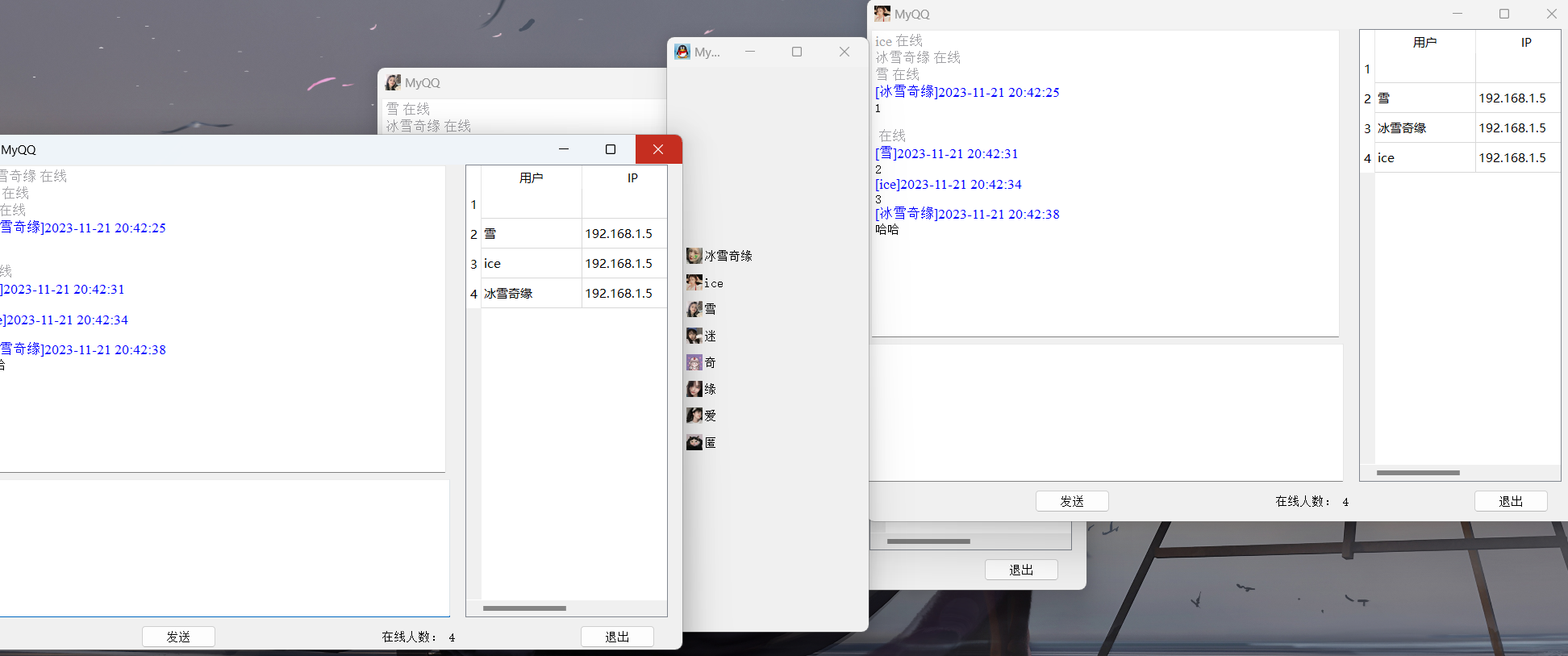
QQ是一款优秀的聊天软件,本文将提供主要代码和思路来实现一个类似于QQ群聊的网络聊天软件,大致有以下俩个功能:
采用qt5编写,实现基于UDP的文本聊天功能,和基于TCP的文件传输功能基本聊天会话功能
通过获取每一个用户运行该程序的时候,发送广播来实现,不仅用户登录的时候进行广播,退出、发送信息的时候都使用UDP广播来告知用户,每个用户的聊天窗口为一个端点
文件传输功能实现
文件的传输采用TCP来实现,用C/S架构
- 主界面选中要发送的文件,单击传输,打开发送文件对话框
- 当用户单击发送的时候,程序通过UDP广播给接收端,接收端在收到文件的UDP消息后,弹出提示框,是否接收
- 如果接收,先创建一个TCP通信客户端,双方进行TCP通信,如果拒绝,再通过UDP广播告知发送端
一、主界面和聊天窗口
#ifndef DRAWER_H #define DRAWER_H #include#include #include #include "myqq.h" class Drawer : public QToolBox { public: Drawer(); private: QToolButton *toolBtn1; //聊天对象窗口指针 QWidget *chatWidget1; private slots: // 显示聊天对象窗口 void showChatWidget1(); MyQQ *myqq; }; #endif // DRAWER_H - 1
- 2
- 3
- 4
- 5
- 6
- 7
- 8
- 9
- 10
- 11
- 12
- 13
- 14
- 15
- 16
- 17
- 18
- 19
- 20
- 21
- 22
- 23
- 24
- 25
- 26
- 27
- 28
- 29
- 30
- 31
setWindowTitle(tr("My QQ v01")); setWindowIcon(QPixmap(":/images/R-C.jpg")); toolBtn1 = new QToolButton; toolBtn1->setText(tr("冰雪奇缘")); toolBtn1->setIcon(QPixmap(":/images/girl1.jpg")); toolBtn1->setAutoRaise(true); //设置toolBtn1在显示时自动提升,使得按钮外观更加立体感。 toolBtn1->setToolButtonStyle(Qt::ToolButtonTextBesideIcon); //设置toolBtn1的按钮样式为图标在文本旁边的形式。 // 将显示函数与抽屉盒中相对应的用户按钮进行绑定 //connect(toolBtn1,SIGNAL(clicked()),this,SLOT(showChatWidget1())); //connect(toolBtn1, &QToolButton::clicked, this, &QToolBox::showChatWidget1); connect(toolBtn1, &QToolButton::clicked, this, &Drawer::showChatWidget1);- 1
- 2
- 3
- 4
- 5
- 6
- 7
- 8
- 9
- 10
- 11
- 12
二、UDP聊天
原理:如果要进行聊天,则首先要获取所有登录用户的信息,这个功能是通过在每一个用户运行该程序时发送广播实现的,不仅用户登录时要进行广播,而且在用户退出、发送消息时都使用UDP广播来告知所有用户。
#ifndef SERVER_H #define SERVER_H #include#include #include #include namespace Ui { class Server; } class Server : public QDialog { Q_OBJECT public: explicit Server(QWidget *parent = nullptr); ~Server(); void initSrv(); // 初始化服务器 void refused(); // 关闭服务器 protected: void closeEvent(QCloseEvent *); void updClntProgress(qint64 numBytes); private slots: void on_Server_accepted(); void sendMsg(); //发送数据 void updclntProgress(qint64 numBytes); // 更新进度条 void on_sOpenBtn_clicked(); void on_sSendBtn_clicked(); void on_sCloseBtn_clicked(); private: Ui::Server *ui; qint16 tPort; QTcpServer *tSrv; QString fileName; QString theFileName; QFile *locFile; //待发送的文件 qint64 totalBytes; //总共要发送的 qint64 bytesWritten; //已发送的 qint64 bytesTobeWrite; //待发送的 qint64 payloadSize; //被初始化为一个常量 QByteArray outBlock; // 缓存一次的 QTcpSocket *clntConn; QTime time; signals: void sendFileName(QString fileName); }; #endif // SERVER_H - 1
- 2
- 3
- 4
- 5
- 6
- 7
- 8
- 9
- 10
- 11
- 12
- 13
- 14
- 15
- 16
- 17
- 18
- 19
- 20
- 21
- 22
- 23
- 24
- 25
- 26
- 27
- 28
- 29
- 30
- 31
- 32
- 33
- 34
- 35
- 36
- 37
- 38
- 39
- 40
- 41
- 42
- 43
- 44
- 45
- 46
- 47
- 48
- 49
- 50
- 51
- 52
- 53
- 54
- 55
- 56
- 57
- 58
#include "server.h" #include "ui_server.h" #include#include #include #include #include #include Server::Server(QWidget *parent) : QDialog(parent), ui(new Ui::Server) { ui->setupUi(this); setFixedSize(400,207); tPort = 5555; tSrv = new QTcpServer(this); connect(tSrv,&QTcpServer::newConnection,this,&Server::sendMsg); initSrv(); } void Server::initSrv() { payloadSize = 64*1024; totalBytes = 0; bytesWritten = 0; ui->sOpenBtn->setEnabled(true); ui->sSendBtn->setEnabled(false); tSrv->close(); } // 发送数据 void Server::sendMsg() { ui->sSendBtn->setEnabled(false); clntConn = tSrv->nextPendingConnection(); connect(clntConn,SIGNAL(bytesWritten(gint64)),this,SLOT(updCIntProgress(qint64))); ui->sStatusLabel->setText(tr("开始传送文件 号1 !").arg(theFileName)); locFile = new QFile(fileName); if(!locFile->open((QFile::ReadOnly))) { QMessageBox::warning(this,tr("应用程序"), tr("无法读取文件号1: n各2").arg(fileName).arg(locFile->errorString())); return; } totalBytes = locFile->size(); QDataStream sendOut(&outBlock, QIODevice::WriteOnly); sendOut.setVersion(QDataStream::Qt_4_7); time.start(); QString curFile = fileName.right(fileName.size() - fileName.lastIndexOf('/') - 1); sendOut << qint64(0) << qint64((outBlock.size() - sizeof(qint64)*2)); bytesTobeWrite = totalBytes - clntConn->write(outBlock); outBlock.reserve(0); } // 更新进度条 void Server::updClntProgress(qint64 numBytes) { // 防止传输大文件产生冻结 qApp->processEvents(); bytesWritten += (int)numBytes; if(bytesTobeWrite > 0) { outBlock = locFile->read(qMin(bytesTobeWrite,payloadSize)); bytesTobeWrite -= (int)clntConn->write(outBlock); outBlock.resize(0); } else{ locFile->close(); } ui->progressBar->setMaximum(totalBytes); ui->progressBar->setValue(bytesWritten); float useTime = time.elapsed(); double speed = bytesWritten / useTime; ui->sStatusLabel->setText(tr("已发送 %1MB (%2MB/s)\n 共%3MB 已用时:%4s\n 估计剩余时间:%5秒") .arg(bytesWritten/(1024*1024)) .arg(bytesWritten / (1024*1024)) .arg(speed*1000 / (1024*1024),0,'f',0) .arg(totalBytes / (1024 * 1024)).arg(useTime/1000,0,'f',0) .arg(totalBytes/speed/1000 - useTime/1000,0,'f',0)); if(bytesWritten == totalBytes) { locFile->close(); tSrv->close(); ui->sStatusLabel->setText(tr("传送文件 %1 成功").arg(theFileName)); } } Server::~Server() { delete ui; } void Server::on_sOpenBtn_clicked() { fileName = QFileDialog::getOpenFileName(this); if(!fileName.isEmpty()) { theFileName = fileName.right(fileName.size() - fileName.lastIndexOf('/')-1); ui->sStatusLabel->setText(tr("要发送的文件为:%1").arg(theFileName)); ui->sOpenBtn->setEnabled(false); ui->sSendBtn->setEnabled(true); } } void Server::on_sSendBtn_clicked() { if(!tSrv->listen(QHostAddress::Any,tPort)) { qDebug() << tSrv ->errorString(); close(); return; } ui->sStatusLabel->setText("等待……"); emit sendFileName(theFileName); } void Server::on_sCloseBtn_clicked() { if(tSrv->isListening()) { tSrv->close(); if(locFile->isOpen()) locFile->close(); clntConn->abort(); } close(); } void Server::closeEvent(QCloseEvent *) { on_sCloseBtn_clicked(); } void Server::refused() { tSrv->close(); ui->sStatusLabel->setText(tr("对方拒绝!")); } - 1
- 2
- 3
- 4
- 5
- 6
- 7
- 8
- 9
- 10
- 11
- 12
- 13
- 14
- 15
- 16
- 17
- 18
- 19
- 20
- 21
- 22
- 23
- 24
- 25
- 26
- 27
- 28
- 29
- 30
- 31
- 32
- 33
- 34
- 35
- 36
- 37
- 38
- 39
- 40
- 41
- 42
- 43
- 44
- 45
- 46
- 47
- 48
- 49
- 50
- 51
- 52
- 53
- 54
- 55
- 56
- 57
- 58
- 59
- 60
- 61
- 62
- 63
- 64
- 65
- 66
- 67
- 68
- 69
- 70
- 71
- 72
- 73
- 74
- 75
- 76
- 77
- 78
- 79
- 80
- 81
- 82
- 83
- 84
- 85
- 86
- 87
- 88
- 89
- 90
- 91
- 92
- 93
- 94
- 95
- 96
- 97
- 98
- 99
- 100
- 101
- 102
- 103
- 104
- 105
- 106
- 107
- 108
- 109
- 110
- 111
- 112
- 113
- 114
- 115
- 116
- 117
- 118
- 119
- 120
- 121
- 122
- 123
- 124
- 125
- 126
- 127
- 128
- 129
- 130
- 131
- 132
- 133
- 134
- 135
- 136
- 137
- 138
- 139
- 140
- 141
- 142
- 143
- 144
- 145
- 146
- 147
三、TCP文件传输
文件的传输采用TCP来实现,用C/S(客户端/服务器)方式,创建俩个新类,client和server类
server类

#ifndef SERVER_H #define SERVER_H #include#include #include #include namespace Ui { class Server; } class Server : public QDialog { Q_OBJECT public: explicit Server(QWidget *parent = nullptr); ~Server(); void initSrv(); // 初始化服务器 void refused(); // 关闭服务器 protected: void closeEvent(QCloseEvent *); void updClntProgress(qint64 numBytes); private slots: void on_Server_accepted(); void sendMsg(); //发送数据 void updclntProgress(qint64 numBytes); // 更新进度条 void on_sOpenBtn_clicked(); void on_sSendBtn_clicked(); void on_sCloseBtn_clicked(); private: Ui::Server *ui; qint16 tPort; QTcpServer *tSrv; QString fileName; QString theFileName; QFile *locFile; //待发送的文件 qint64 totalBytes; //总共要发送的 qint64 bytesWritten; //已发送的 qint64 bytesTobeWrite; //待发送的 qint64 payloadSize; //被初始化为一个常量 QByteArray outBlock; // 缓存一次的 QTcpSocket *clntConn; QTime time; signals: void sendFileName(QString fileName); }; #endif // SERVER_H - 1
- 2
- 3
- 4
- 5
- 6
- 7
- 8
- 9
- 10
- 11
- 12
- 13
- 14
- 15
- 16
- 17
- 18
- 19
- 20
- 21
- 22
- 23
- 24
- 25
- 26
- 27
- 28
- 29
- 30
- 31
- 32
- 33
- 34
- 35
- 36
- 37
- 38
- 39
- 40
- 41
- 42
- 43
- 44
- 45
- 46
- 47
- 48
- 49
- 50
- 51
- 52
- 53
- 54
- 55
- 56
- 57
- 58
#include "server.h" #include "ui_server.h" #include#include #include #include #include #include Server::Server(QWidget *parent) : QDialog(parent), ui(new Ui::Server) { ui->setupUi(this); setFixedSize(400,207); tPort = 5555; tSrv = new QTcpServer(this); connect(tSrv,&QTcpServer::newConnection,this,&Server::sendMsg); initSrv(); } void Server::initSrv() { payloadSize = 64*1024; totalBytes = 0; bytesWritten = 0; ui->sOpenBtn->setEnabled(true); ui->sSendBtn->setEnabled(false); tSrv->close(); } // 发送数据 void Server::sendMsg() { ui->sSendBtn->setEnabled(false); clntConn = tSrv->nextPendingConnection(); connect(clntConn,SIGNAL(bytesWritten(gint64)),this,SLOT(updCIntProgress(qint64))); ui->sStatusLabel->setText(tr("开始传送文件 号1 !").arg(theFileName)); locFile = new QFile(fileName); if(!locFile->open((QFile::ReadOnly))) { QMessageBox::warning(this,tr("应用程序"), tr("无法读取文件号1: n各2").arg(fileName).arg(locFile->errorString())); return; } totalBytes = locFile->size(); QDataStream sendOut(&outBlock, QIODevice::WriteOnly); sendOut.setVersion(QDataStream::Qt_4_7); time.start(); QString curFile = fileName.right(fileName.size() - fileName.lastIndexOf('/') - 1); sendOut << qint64(0) << qint64((outBlock.size() - sizeof(qint64)*2)); bytesTobeWrite = totalBytes - clntConn->write(outBlock); outBlock.reserve(0); } // 更新进度条 void Server::updClntProgress(qint64 numBytes) { // 防止传输大文件产生冻结 qApp->processEvents(); bytesWritten += (int)numBytes; if(bytesTobeWrite > 0) { outBlock = locFile->read(qMin(bytesTobeWrite,payloadSize)); bytesTobeWrite -= (int)clntConn->write(outBlock); outBlock.resize(0); } else{ locFile->close(); } ui->progressBar->setMaximum(totalBytes); ui->progressBar->setValue(bytesWritten); float useTime = time.elapsed(); double speed = bytesWritten / useTime; ui->sStatusLabel->setText(tr("已发送 %1MB (%2MB/s)\n 共%3MB 已用时:%4s\n 估计剩余时间:%5秒") .arg(bytesWritten/(1024*1024)) .arg(bytesWritten / (1024*1024)) .arg(speed*1000 / (1024*1024),0,'f',0) .arg(totalBytes / (1024 * 1024)).arg(useTime/1000,0,'f',0) .arg(totalBytes/speed/1000 - useTime/1000,0,'f',0)); if(bytesWritten == totalBytes) { locFile->close(); tSrv->close(); ui->sStatusLabel->setText(tr("传送文件 %1 成功").arg(theFileName)); } } Server::~Server() { delete ui; } void Server::on_sOpenBtn_clicked() { fileName = QFileDialog::getOpenFileName(this); if(!fileName.isEmpty()) { theFileName = fileName.right(fileName.size() - fileName.lastIndexOf('/')-1); ui->sStatusLabel->setText(tr("要发送的文件为:%1").arg(theFileName)); ui->sOpenBtn->setEnabled(false); ui->sSendBtn->setEnabled(true); } } void Server::on_sSendBtn_clicked() { if(!tSrv->listen(QHostAddress::Any,tPort)) { qDebug() << tSrv ->errorString(); close(); return; } ui->sStatusLabel->setText("等待……"); emit sendFileName(theFileName); } void Server::on_sCloseBtn_clicked() { if(tSrv->isListening()) { tSrv->close(); if(locFile->isOpen()) locFile->close(); clntConn->abort(); } close(); } void Server::closeEvent(QCloseEvent *) { on_sCloseBtn_clicked(); } void Server::refused() { tSrv->close(); ui->sStatusLabel->setText(tr("对方拒绝!")); } - 1
- 2
- 3
- 4
- 5
- 6
- 7
- 8
- 9
- 10
- 11
- 12
- 13
- 14
- 15
- 16
- 17
- 18
- 19
- 20
- 21
- 22
- 23
- 24
- 25
- 26
- 27
- 28
- 29
- 30
- 31
- 32
- 33
- 34
- 35
- 36
- 37
- 38
- 39
- 40
- 41
- 42
- 43
- 44
- 45
- 46
- 47
- 48
- 49
- 50
- 51
- 52
- 53
- 54
- 55
- 56
- 57
- 58
- 59
- 60
- 61
- 62
- 63
- 64
- 65
- 66
- 67
- 68
- 69
- 70
- 71
- 72
- 73
- 74
- 75
- 76
- 77
- 78
- 79
- 80
- 81
- 82
- 83
- 84
- 85
- 86
- 87
- 88
- 89
- 90
- 91
- 92
- 93
- 94
- 95
- 96
- 97
- 98
- 99
- 100
- 101
- 102
- 103
- 104
- 105
- 106
- 107
- 108
- 109
- 110
- 111
- 112
- 113
- 114
- 115
- 116
- 117
- 118
- 119
- 120
- 121
- 122
- 123
- 124
- 125
- 126
- 127
- 128
- 129
- 130
- 131
- 132
- 133
- 134
- 135
- 136
- 137
- 138
- 139
- 140
- 141
- 142
- 143
- 144
- 145
- 146
- 147
- 148
Clint类
TCP客户端类,用于接收文件。

#ifndef CLIENT_H #define CLIENT_H #include#include #include #include #include namespace Ui { class client; } class client : public QDialog { Q_OBJECT public: explicit client(QWidget *parent = nullptr); ~client(); void setHostAddr(QHostAddress addr); void setFileName(QString name); protected: void closeEvent(QCloseEvent *); private: Ui::client *ui; QTcpSocket *tClnt; quint16 blockSize; QHostAddress hostAddr; qint16 tPort; qint64 totalBytes; qint64 bytesReceived; qint64 fileNameSize; QString fileName; QFile *locFile; QByteArray inBlock; QTime time; private slots: void newConn(); // 连接到服务器 void readMsg(); // 读取文件数据 // void displayErr(QAbstractSocket::SocketError); // 显示错误信息 void on_cCancleBtn_clicked(); void on_cCloseBtn_clicked(); }; #endif // CLIENT_H - 1
- 2
- 3
- 4
- 5
- 6
- 7
- 8
- 9
- 10
- 11
- 12
- 13
- 14
- 15
- 16
- 17
- 18
- 19
- 20
- 21
- 22
- 23
- 24
- 25
- 26
- 27
- 28
- 29
- 30
- 31
- 32
- 33
- 34
- 35
- 36
- 37
- 38
- 39
- 40
- 41
- 42
- 43
- 44
- 45
- 46
- 47
- 48
- 49
- 50
- 51
- 52
#include "client.h" #include "ui_client.h" #include#include #include client::client(QWidget *parent) : QDialog(parent), ui(new Ui::client) { ui->setupUi(this); setFixedSize(400,190); totalBytes = 0; bytesReceived = 0; fileNameSize = 0; tClnt = new QTcpSocket(this); tPort = 5555; connect(tClnt, &QTcpSocket::readyRead, this, &client::readMsg); } // 连接服务器 void client::newConn() { blockSize = 0; tClnt->abort(); tClnt->connectToHost(hostAddr,tPort); time.start(); } // 发送文件 void client::readMsg() { QDataStream in(tClnt); in.setVersion(QDataStream::Qt_4_7); float useTime = time.elapsed(); if (bytesReceived <= sizeof(qint64)*2) { if ((tClnt->bytesAvailable() >= sizeof(qint64)*2) && (fileNameSize == 0)) { in>>totalBytes>>fileNameSize; bytesReceived += sizeof(qint64)*2; } if((tClnt->bytesAvailable() >= fileNameSize) && (fileNameSize != 0)) { in>>fileName; bytesReceived +=fileNameSize; if(!locFile->open(QFile::WriteOnly)) { QMessageBox::warning(this,tr("应用程序"),tr("无法读取文件%1:\n%2.").arg(fileName).arg(locFile->errorString())); } return; }else { return; } } if (bytesReceived < totalBytes) { bytesReceived += tClnt->bytesAvailable(); inBlock = tClnt->readAll(); locFile->write(inBlock); inBlock.resize(0); } ui->progressBar->setMaximum(totalBytes); ui->progressBar->setValue(bytesReceived); double speed = bytesReceived / useTime; ui->label_2->setText(tr("已接收 %1MB (%2MB/s)\n 共%3MB 已用时:%4s\n 估计剩余时间:%5秒") .arg(bytesReceived/(1024*1024)) .arg(speed*1000 / (1024*1024),0,'f',0) .arg(totalBytes / (1024 * 1024)) .arg(useTime/1000,0,'f',0) .arg(totalBytes/speed/1000 - useTime/1000,0,'f',0)); if(bytesReceived == totalBytes) { locFile->close(); tClnt->close(); ui->label->setText(tr("接收文件 %1 成功").arg(fileName)); } } client::~client() { delete ui; } void client::on_cCancleBtn_clicked() { tClnt->abort(); if(locFile->isOpen()) locFile->close(); } void client::on_cCloseBtn_clicked() { tClnt->abort(); if(locFile->isOpen()) locFile->close(); close(); } void client::closeEvent(QCloseEvent *) { on_cCloseBtn_clicked(); } - 1
- 2
- 3
- 4
- 5
- 6
- 7
- 8
- 9
- 10
- 11
- 12
- 13
- 14
- 15
- 16
- 17
- 18
- 19
- 20
- 21
- 22
- 23
- 24
- 25
- 26
- 27
- 28
- 29
- 30
- 31
- 32
- 33
- 34
- 35
- 36
- 37
- 38
- 39
- 40
- 41
- 42
- 43
- 44
- 45
- 46
- 47
- 48
- 49
- 50
- 51
- 52
- 53
- 54
- 55
- 56
- 57
- 58
- 59
- 60
- 61
- 62
- 63
- 64
- 65
- 66
- 67
- 68
- 69
- 70
- 71
- 72
- 73
- 74
- 75
- 76
- 77
- 78
- 79
- 80
- 81
- 82
- 83
- 84
- 85
- 86
- 87
- 88
- 89
- 90
- 91
- 92
- 93
- 94
- 95
- 96
- 97
- 98
- 99
- 100
- 101
- 102
- 103
- 104
- 105
- 106
- 107
- 108
- 109
最后
至此已完成,读者还可根据自己所需来添加一些拓展功能,更改字体、字号和颜色等等……如果本文对你有所帮助,还请三连支持一下博主!

-
相关阅读:
【手写算法实现】 之 KNN K近邻算法
数据结构每日亿题(六)
交互与前端9 Tabulator+Flask开发日志006
03- Nginx的核心配置文件-nginx.conf
深度学习入门:基于Python的理论与实现
numpy.testing.assert_allclose
JUC第四讲:Java中的锁/CAS原理与案例分析
解决typescript报错:不能将类型xxx分配给类型xxx
卷积神经网络(VGG-16)海贼王人物识别
【优化模型】航空公司的预订票策略
- 原文地址:https://blog.csdn.net/weixin_45920495/article/details/134564189
