-
深入分析TaskView源码之触摸相关
问题背景
hi,粉丝朋友们:
大家好!android 10以后TaskView作为替代ActivityView的容器,在课程的分屏pip自由窗口专题也进行了相关的详细介绍分析。

这里再补充一下相关的TaskView和桌面内嵌情况下的触摸分析
主要问题点:
1、明明TaskView属于CarLauncher的一个View,凭啥触摸自己的TaskView事件会让TaskView的Activity接收到
2、TaskView的Activity是怎么可以接收事件的呢?桌面怎么做到单独只排除TaskView其他地方都可以触摸呢?
哈哈,简单总结就是要搞清楚TaskView触摸响应原理。问题分析切入点
一般说道触摸问题分析,一想到当然是窗口和input部分的dump信息分析
1、dumpsys activity containers#1 DefaultTaskDisplayArea type=undefined mode=fullscreen override-mode=fullscreen requested-bounds=[0,0][0,0] bounds=[0,0][1408,792] #2 Task=1000011 type=standard mode=multi-window override-mode=multi-window requested-bounds=[404,76][1408,696] bounds=[404,76][1408,696] #0 ActivityRecord{38f55a5 u10 com.android.car.mapsplaceholder/.MapsPlaceholderActivity t1000011} type=standard mode=multi-window override-mode=undefined requested-bounds=[0,0][0,0] bounds=[404,76][1408,696] #0 60a6fdf com.android.car.mapsplaceholder/com.android.car.mapsplaceholder.MapsPlaceholderActivity type=standard mode=multi-window override-mode=undefined requested-bounds=[0,0][0,0] bounds=[404,76][1408,696] #1 Task=1 type=home mode=fullscreen override-mode=undefined requested-bounds=[0,0][0,0] bounds=[0,0][1408,792] #0 Task=1000006 type=home mode=fullscreen override-mode=undefined requested-bounds=[0,0][0,0] bounds=[0,0][1408,792] #0 ActivityRecord{185661 u10 com.android.car.carlauncher/.CarLauncher t1000006} type=home mode=fullscreen override-mode=undefined requested-bounds=[0,0][0,0] bounds=[0,0][1408,792] #0 6845fdb com.android.car.carlauncher/com.android.car.carlauncher.CarLauncher type=home mode=fullscreen override-mode=undefined requested-bounds=[0,0][0,0] bounds=[0,0][1408,792]- 1
- 2
- 3
- 4
- 5
- 6
- 7
- 8
- 9
明显看到地图Activity的Task,windowmode属于multi-window
#2 Task=1000011 type=standard mode=multi-window override-mode=multi-window requested-bounds=[404,76][1408,696] bounds=[404,76][1408,696]
在CarLauncher 的Task ,windowmode为fullscreen
#1 Task=1 type=home mode=fullscreen override-mode=undefined requested-bounds=[0,0][0,0] bounds=[0,0][1408,792]注意一下地图的Task的bounds区域[404,76][1408,696] ,而CarLauncher的区域属于全屏的 bounds=[0,0][1408,792]
这么一看确实桌面的显示bound是包含了地图的Bound所以这里可以初步理解为:
TaskView的地图是可以独立接受触摸时间的,因为它本身是独立的bounds区域,触摸到了这个区域就行
但是因为和CarLauncher有重叠,那么CarLauncher对这个TaskView部分的区域触摸是怎么处理的,会接受这一部分的触摸事件吗?毕竟这区域又是CarLauncher的一个TaskView区域,地图Activity也只是TaskView显示的内容而已
哈哈,这里就需要使用我们dumpsys input来解密adb shell dumpsys input:
Input Dispatcher State: DispatchEnabled: true DispatchFrozen: false InputFilterEnabled: false FocusedDisplayId: 0 FocusedApplications: displayId=0, name='ActivityRecord{38f55a5 u10 com.android.car.mapsplaceholder/.MapsPlaceholderActivity t1000011}', dispatchingTimeout=5000ms FocusedWindows: displayId=0, name='60a6fdf com.android.car.mapsplaceholder/com.android.car.mapsplaceholder.MapsPlaceholderActivity' FocusRequests: displayId=0, name='60a6fdf com.android.car.mapsplaceholder/com.android.car.mapsplaceholder.MapsPlaceholderActivity' result='OK' Pointer Capture Requested: false Current Window with Pointer Capture: None TouchStates: <no displays touched> Display: 0 logicalSize=1408x792 transform (ROT_0) (IDENTITY) Windows: 0: name='aa0d3fc BottomCarSystemBar', id=77, displayId=0, inputConfig=NOT_FOCUSABLE | TRUSTED_OVERLAY | WATCH_OUTSIDE_TOUCH, alpha=1.00, frame=[0,696][1408,792], globalScale=1.000000, applicationInfo.name=, applicationInfo.token=<null>, touchableRegion=[0,696][1408,792], ownerPid=1375, ownerUid=10150, dispatchingTimeout=5000ms, hasToken=0x7c04338b1ad0, touchOcclusionMode=BLOCK_UNTRUSTED transform (ROT_0) (TRANSLATE) 1.0000 0.0000 -0.0000 0.0000 1.0000 -696.0000 0.0000 0.0000 1.0000 1: name='e8091e TopCarSystemBar', id=76, displayId=0, inputConfig=NOT_FOCUSABLE | TRUSTED_OVERLAY | WATCH_OUTSIDE_TOUCH, alpha=1.00, frame=[0,0][1408,76], globalScale=1.000000, applicationInfo.name=, applicationInfo.token=<null>, touchableRegion=[0,0][1408,76], ownerPid=1375, ownerUid=10150, dispatchingTimeout=5000ms, hasToken=0x7c04338d6310, touchOcclusionMode=BLOCK_UNTRUSTED transform (ROT_0) (IDENTITY) 2: name='aff2cfa com.android.car.rotary', id=101, displayId=0, inputConfig=NOT_FOCUSABLE | PREVENT_SPLITTING | TRUSTED_OVERLAY | WATCH_OUTSIDE_TOUCH, alpha=1.00, frame=[1408,76][1408,76], globalScale=1.000000, applicationInfo.name=, applicationInfo.token=<null>, touchableRegion=<empty>, ownerPid=1871, ownerUid=1010088, dispatchingTimeout=5000ms, hasToken=0x7c04338e0bd0, touchOcclusionMode=USE_OPACITY transform (ROT_0) (TRANSLATE) 1.0000 0.0000 -1408.0000 0.0000 1.0000 -76.0000 0.0000 0.0000 1.0000 3: name='2cdb9e1 ActivityRecordInputSink com.aospinsight.dummyaidlapp/.MainActivity', id=194, displayId=0, inputConfig=NO_INPUT_CHANNEL | NOT_VISIBLE | NOT_FOCUSABLE | NOT_TOUCHABLE, alpha=1.00, frame=[0,0][0,0], globalScale=0.000000, applicationInfo.name=, applicationInfo.token=<null>, touchableRegion=[-14079,-7919][14080,7920], ownerPid=701, ownerUid=1000, dispatchingTimeout=0ms, hasToken=<null>, touchOcclusionMode=BLOCK_UNTRUSTED transform (ROT_0) (IDENTITY) 4: name='6845fdb com.android.car.carlauncher/com.android.car.carlauncher.CarLauncher', id=205, displayId=0, inputConfig=TRUSTED_OVERLAY, alpha=1.00, frame=[0,0][1408,792], globalScale=1.000000, applicationInfo.name=ActivityRecord{185661 u10 com.android.car.carlauncher/.CarLauncher t1000006}, applicationInfo.token=0x7c04e3536310, touchableRegion=[0,0][1408,76]|[0,76][404,696]|[0,696][1408,792], ownerPid=1658, ownerUid=1010079, dispatchingTimeout=5000ms, hasToken=0x7c04338f3cd0, touchOcclusionMode=BLOCK_UNTRUSTED transform (ROT_0) (IDENTITY) 5: name='60a6fdf com.android.car.mapsplaceholder/com.android.car.mapsplaceholder.MapsPlaceholderActivity', id=223, displayId=0, inputConfig=0x0, alpha=1.00, frame=[404,76][1408,696], globalScale=1.000000, applicationInfo.name=ActivityRecord{38f55a5 u10 com.android.car.mapsplaceholder/.MapsPlaceholderActivity t1000011}, applicationInfo.token=0x7c04e355be70, touchableRegion=[404,76][1408,696], ownerPid=22792, ownerUid=1010122, dispatchingTimeout=5000ms, hasToken=0x7c0433933dd0, touchOcclusionMode=BLOCK_UNTRUSTED transform (ROT_0) (TRANSLATE) 1.0000 0.0000 -404.0000 0.0000 1.0000 -76.0000 0.0000 0.0000 1.0000 6: name='a9ab86e ActivityRecordInputSink com.android.car.mapsplaceholder/.MapsPlaceholderActivity', id=221, displayId=0, inputConfig=NO_INPUT_CHANNEL | NOT_FOCUSABLE, alpha=1.00, frame=[404,76][404,76], globalScale=0.000000, applicationInfo.name=, applicationInfo.token=<null>, touchableRegion=[404,76][1408,696], ownerPid=701, ownerUid=1000, dispatchingTimeout=0ms, hasToken=<null>, touchOcclusionMode=BLOCK_UNTRUSTED transform (ROT_0) (TRANSLATE) 1.0000 0.0000 -404.0000 0.0000 1.0000 -76.0000 0.0000 0.0000 1.0000 7: name='c2d4eae ActivityRecordInputSink com.android.car.carlauncher/.CarLauncher', id=126, displayId=0, inputConfig=NO_INPUT_CHANNEL | NOT_FOCUSABLE, alpha=1.00, frame=[0,0][0,0], globalScale=0.000000, applicationInfo.name=, applicationInfo.token=<null>, touchableRegion=[-14079,-7919][14080,7920], ownerPid=701, ownerUid=1000, dispatchingTimeout=0ms, hasToken=<null>, touchOcclusionMode=BLOCK_UNTRUSTED- 1
- 2
- 3
- 4
- 5
- 6
- 7
- 8
- 9
- 10
- 11
- 12
- 13
- 14
- 15
- 16
- 17
- 18
- 19
- 20
- 21
- 22
- 23
- 24
- 25
- 26
- 27
- 28
- 29
- 30
- 31
- 32
- 33
- 34
- 35
- 36
- 37
- 38
- 39
- 40
- 41
- 42
- 43
- 44
- 45
- 46
这里我们只需要重点关注窗口4和窗口5:
–桌面Activity
4: name=‘6845fdb com.android.car.carlauncher/com.android.car.carlauncher.CarLauncher’, id=205, displayId=0, inputConfig=TRUSTED_OVERLAY, alpha=1.00, frame=[0,0][1408,792], globalScale=1.000000, applicationInfo.name=ActivityRecord{185661 u10 com.android.car.carlauncher/.CarLauncher t1000006}, applicationInfo.token=0x7c04e3536310, touchableRegion=[0,0][1408,76]|[0,76][404,696]|[0,696][1408,792], ownerPid=1658, ownerUid=1010079, dispatchingTimeout=5000ms, hasToken=0x7c04338f3cd0, touchOcclusionMode=BLOCK_UNTRUSTED
transform (ROT_0) (IDENTITY)
–地图Activity
5: name=‘60a6fdf com.android.car.mapsplaceholder/com.android.car.mapsplaceholder.MapsPlaceholderActivity’, id=223, displayId=0, inputConfig=0x0, alpha=1.00, frame=[404,76][1408,696], globalScale=1.000000, applicationInfo.name=ActivityRecord{38f55a5 u10 com.android.car.mapsplaceholder/.MapsPlaceholderActivity t1000011}, applicationInfo.token=0x7c04e355be70, touchableRegion=[404,76][1408,696], ownerPid=22792, ownerUid=1010122, dispatchingTimeout=5000ms, hasToken=0x7c0433933dd0, touchOcclusionMode=BLOCK_UNTRUSTED
transform (ROT_0) (TRANSLATE)
1.0000 0.0000 -404.0000
0.0000 1.0000 -76.0000
0.0000 0.0000 1.0000明显发现触摸派发window层级方面还是以桌面为顶部window,地图为底下window,这样其实也可以理解,我们上面的说的情况一样,其实整个画面都是CarLauncher的,地图Activity也只是CarLauncher的一个View而已。所以当然把桌面作为顶部的派发事件window完全没有问题。
但是问题来了,桌面把fullscreen面积占了?那么怎么才可以轮到地图Activity大家注意看看桌面的window的这个属性
touchableRegion=[0,0][1408,76]|[0,76][404,696]|[0,696][1408,792],
是不是有个touchableRegion,对他就是真相,他负责了划定CarLauncher这个window可以响应的触摸区域,这里明显看出,这个区域划分了看了如下部分:[0,76][404,696]| ----排除TaskView的的地图Activity区域
正常地图Activity的区域是[404,76][1408,696]从404开始到屏幕最右
[0,76][404,696]| 明显是只从0到404就截止了这里就说明了CarLauncher虽然在顶部,但是他的touchRegion根本没有包含地图Activity的区域,所以派发事件时候根本不会抢地图Activity的,即地图区域的事件不会派发到桌面
总结:
问题关键找到了,就是靠touchRegion来让CarLauncher不接受地图Activity的Region哪里设置的TouchRegion呢?
这里如果直接寻找比较麻烦可以用dumpsys window windows命令看看window是不是带了

下面就来分析这个桌面的TouchRegion是在哪里设置的呢?来看看对应dump代码
frameworks/base/services/core/java/com/android/server/wm/WindowState.javaif (dumpAll) { pw.println(prefix + "mGivenContentInsets=" + mGivenContentInsets.toShortString(sTmpSB) + " mGivenVisibleInsets=" + mGivenVisibleInsets.toShortString(sTmpSB)); if (mTouchableInsets != 0 || mGivenInsetsPending) { pw.println(prefix + "mTouchableInsets=" + mTouchableInsets + " mGivenInsetsPending=" + mGivenInsetsPending); Region region = new Region(); getTouchableRegion(region); pw.println(prefix + "touchable region=" + region); } pw.println(prefix + "mFullConfiguration=" + getConfiguration()); pw.println(prefix + "mLastReportedConfiguration=" + getLastReportedConfiguration()); } //再来看看getTouchableRegion方法 /** Get the touchable region in global coordinates. */ void getTouchableRegion(Region outRegion) { final Rect frame = mWindowFrames.mFrame; switch (mTouchableInsets) { default: case TOUCHABLE_INSETS_FRAME: outRegion.set(frame); break; case TOUCHABLE_INSETS_CONTENT: applyInsets(outRegion, frame, mGivenContentInsets); break; case TOUCHABLE_INSETS_VISIBLE: applyInsets(outRegion, frame, mGivenVisibleInsets); break; case TOUCHABLE_INSETS_REGION: {//走的是这里 outRegion.set(mGivenTouchableRegion); if (frame.left != 0 || frame.top != 0) { outRegion.translate(frame.left, frame.top); } break; } } cropRegionToRootTaskBoundsIfNeeded(outRegion); subtractTouchExcludeRegionIfNeeded(outRegion); }- 1
- 2
- 3
- 4
- 5
- 6
- 7
- 8
- 9
- 10
- 11
- 12
- 13
- 14
- 15
- 16
- 17
- 18
- 19
- 20
- 21
- 22
- 23
- 24
- 25
- 26
- 27
- 28
- 29
- 30
- 31
- 32
- 33
- 34
- 35
- 36
- 37
- 38
- 39
- 40
那么这里的mGivenTouchableRegion是哪里设置的呢?
frameworks/base/services/core/java/com/android/server/wm/WindowManagerService.java
void setInsetsWindow(Session session, IWindow client, int touchableInsets, Rect contentInsets, Rect visibleInsets, Region touchableRegion) { int uid = Binder.getCallingUid(); int pid = Binder.getCallingPid(); final long origId = Binder.clearCallingIdentity(); try { synchronized (mGlobalLock) { WindowState w = windowForClientLocked(session, client, false); if (DEBUG_LAYOUT) Slog.d(TAG, "setInsetsWindow " + w + ", contentInsets=" + w.mGivenContentInsets + " -> " + contentInsets + ", visibleInsets=" + w.mGivenVisibleInsets + " -> " + visibleInsets + ", touchableRegion=" + w.mGivenTouchableRegion + " -> " + touchableRegion + ", touchableInsets " + w.mTouchableInsets + " -> " + touchableInsets); if (w != null) { w.mGivenInsetsPending = false; w.mGivenContentInsets.set(contentInsets); w.mGivenVisibleInsets.set(visibleInsets); w.mGivenTouchableRegion.set(touchableRegion);//这里进行的设置 w.mTouchableInsets = touchableInsets; if (w.mGlobalScale != 1) { w.mGivenContentInsets.scale(w.mGlobalScale); w.mGivenVisibleInsets.scale(w.mGlobalScale); w.mGivenTouchableRegion.scale(w.mGlobalScale); } w.setDisplayLayoutNeeded(); w.updateSourceFrame(w.getFrame()); mWindowPlacerLocked.performSurfacePlacement(); w.getDisplayContent().getInputMonitor().updateInputWindowsLw(true); // We need to report touchable region changes to accessibility. if (mAccessibilityController.hasCallbacks()) { mAccessibilityController.onSomeWindowResizedOrMovedWithCallingUid( uid, w.getDisplayContent().getDisplayId()); } } } } finally { Binder.restoreCallingIdentity(origId); } }- 1
- 2
- 3
- 4
- 5
- 6
- 7
- 8
- 9
- 10
- 11
- 12
- 13
- 14
- 15
- 16
- 17
- 18
- 19
- 20
- 21
- 22
- 23
- 24
- 25
- 26
- 27
- 28
- 29
- 30
- 31
- 32
- 33
- 34
- 35
- 36
- 37
- 38
- 39
- 40
- 41
那么接下来再看看谁进行的setInsetsWindow调用:
frameworks/base/services/core/java/com/android/server/wm/Session.java@Override public void setInsets(IWindow window, int touchableInsets, Rect contentInsets, Rect visibleInsets, Region touchableArea) { mService.setInsetsWindow(this, window, touchableInsets, contentInsets, visibleInsets, touchableArea); }- 1
- 2
- 3
- 4
- 5
- 6
- 7
那么是谁调用了setInsets呢?
frameworks/base/libs/WindowManager/Shell/src/com/android/wm/shell/TaskView.java
public void onComputeInternalInsets(ViewTreeObserver.InternalInsetsInfo inoutInfo) { // TODO(b/176854108): Consider to move the logic into gatherTransparentRegions since this // is dependent on the order of listener. // If there are multiple TaskViews, we'll set the touchable area as the root-view, then // subtract each TaskView from it. if (inoutInfo.touchableRegion.isEmpty()) { inoutInfo.setTouchableInsets( ViewTreeObserver.InternalInsetsInfo.TOUCHABLE_INSETS_REGION); View root = getRootView(); root.getLocationInWindow(mTmpLocation); mTmpRootRect.set(mTmpLocation[0], mTmpLocation[1], root.getWidth(), root.getHeight()); inoutInfo.touchableRegion.set(mTmpRootRect); } getLocationInWindow(mTmpLocation); mTmpRect.set(mTmpLocation[0], mTmpLocation[1], mTmpLocation[0] + getWidth(), mTmpLocation[1] + getHeight()); inoutInfo.touchableRegion.op(mTmpRect, Region.Op.DIFFERENCE); if (mObscuredTouchRegion != null) { inoutInfo.touchableRegion.op(mObscuredTouchRegion, Region.Op.UNION); } }- 1
- 2
- 3
- 4
- 5
- 6
- 7
- 8
- 9
- 10
- 11
- 12
- 13
- 14
- 15
- 16
- 17
- 18
- 19
- 20
- 21
- 22
然后在调用对于的setInsets
在 performTraversals() 中进行相关的调用操作
frameworks/base/core/java/android/view/ViewRootImpl.java
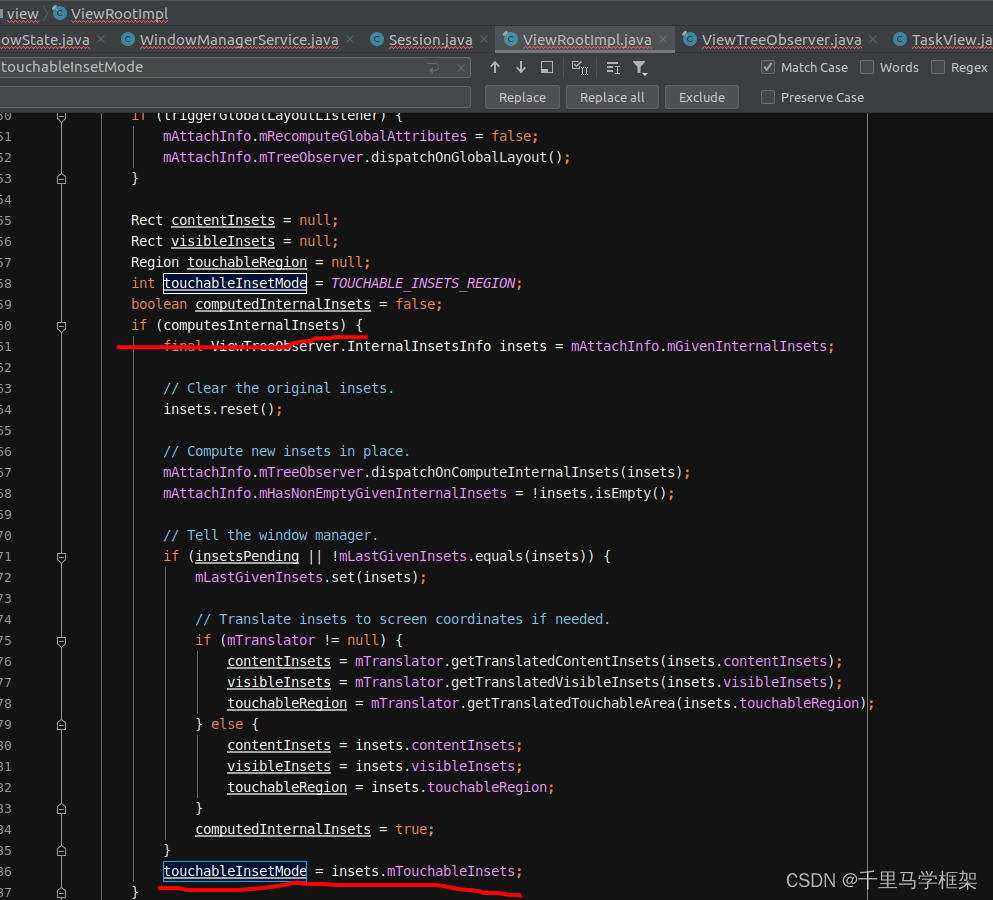
setInsets

更多framework干货课程如下(需要的可以私聊马哥 获取优惠 +V :androidframework007):

-
相关阅读:
基于微信小程序的个人健康管理系统的设计与实现(源码+lw+部署文档+讲解等)
2022-基于树木形态和有限状态机的森林火灾蔓延实时三维可视化
android10.0(Q) MTK 6765 user版本打开root权限
显示今天的年、月、日日期、时间的数据处理timetuple()
SAP 权限设置--访问VPN地址
Android优化RecyclerView图片展示:Glide成堆加载批量Bitmap在RecyclerView成片绘制Canvas,Kotlin(b)
2023年,全球CIO最关注的问题是什么?
【牛客网-公司真题-前端入门篇】——百度2021校招Web前端研发工程师笔试卷(第三批)
卷积神经网络(CNN)实现服装图像分类
Java设计模式之迭代器模式
- 原文地址:https://blog.csdn.net/learnframework/article/details/134525306
