-
身份证阅读器和社保卡读卡器Harmony鸿蒙系统ArkTS语言SDK开发包
项目需求,用ArkTS新一代开发语言实现了在Harmony鸿蒙系统上面兼容身份证阅读器和社保卡读卡器,调用了DonseeDeviceLib.har这个读卡库。

需要注意的是,鸿蒙系统的app扩展名为.hap,本项目编译输出的应用为:entry-default-signed.hap
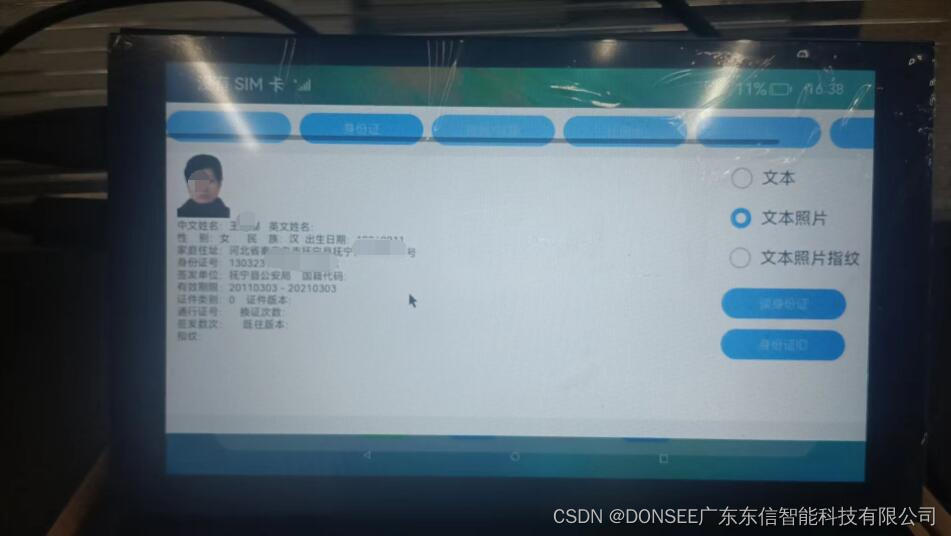
下面是调用身份证阅读器读取身份证信息的接口,支持居民身份证、GAT居民居住证以及外国人永久居留身份证三种证件读取。

ArkTS语言,CSDN这里没有这个选项,选择的TypeScript。
- import CommonContants from '../common/CommonContants';
- import DonseeDevice from '@ohos/DonseeDevice/src/main/ets/model/DonseeDevice';
- import { IDCardInfor } from '@ohos/DonseeDevice/src/main/ets/model/IDCardInfor';
- /**
- * 广东东信智能科技有限公司
- * EST-100多功能智能卡读写器
- */
- @Component
- export struct IDCardComponent {
- @State tvResult: string = '';
- @State imgBase64: string = '';
- @State imageVisible: Visibility = Visibility.None;
- @State nType : number = 1;//0,文本信息;1,文本+照片;2,文本+照片+指纹
- @Provide showSelector: boolean = false // 是否展开下拉菜单
- @Provide modesData: any = [{id: 1,name: '文本信息'},{id: 2,name: '文本照片'},{id: 3,name: '文本照片指纹'}]
- @Provide modeId: number = 0 // 当前选中项id
- build() {
- Column() {
- Row() {
- Column() {
- Image(this.imgBase64)
- .visibility(this.imageVisible)
- .width(51)
- .height(63)
- .objectFit(ImageFit.Contain)
- Text(this.tvResult)
- .fontSize(10)
- .margin({ top: 2 })
- }
- .layoutWeight(1)
- .margin({left:10})
- .alignItems(HorizontalAlign.Start)
- Column() {
- Column() {
- Row() {
- Radio({ value: "文本", group: "1234" })
- .checked(this.nType === 0 ? true : false)
- .height(20)
- .width(20)
- .onClick(() => {
- this.nType = 0;
- })
- Text('文本')
- }.margin({ left: 10 })
- Row() {
- Radio({ value: "文本照片", group: "1234" })
- .checked(this.nType === 1 ? true : false)
- .height(20)
- .width(20)
- .onClick(() => {
- this.nType = 1;
- console.info("Radio onClick")
- })
- Text('文本照片')
- }.margin({ left: 10 })
- Row() {
- Radio({ value: "文本照片指纹", group: "1234" })
- .checked(this.nType === 2 ? true : false)
- .height(20)
- .width(20)
- .onClick(() => {
- this.nType = 2;
- console.info("Radio onClick")
- })
- Text('文本照片指纹')
- }.margin({ left: 10 })
- }.justifyContent(FlexAlign.Start)
- .alignItems(HorizontalAlign.Start)
- Button("读身份证")
- .fontSize($r('app.float.submit_button_font_size'))
- .fontWeight(CommonContants.FONT_WEIGHT)
- .height(30)
- .width(120)
- .onClick(() => {
- let idInfo:IDCardInfor = DonseeDevice.Donsee_ReadIDCard(this.nType)
- // HexUtil.bytesToHex()
- // if(obj.result>0){
- // console.info("version: " + obj.version)
- // }
- // let[result,base64] = this.donseeDevice.Donsee_ReadIDCard()
- console.info("result: " + idInfo.result)
- if(idInfo.result==0){
- // console.info("obj.base64: " + obj.base64)
- // console.info("imgBase64.length1: " + this.imgBase64.length)
- // console.log(("中文姓名:"), idInfo.name);
- // console.log(("英文姓名:"), idInfo.ENfullname);
- // console.log(("性 别:"), idInfo.sex);
- // console.log(("民 族:"), idInfo.people);
- // console.log(("出身日期:"), idInfo.birthday);
- // console.log(("家庭住址:"), idInfo.address);
- // console.log(("身份证号:"), idInfo.number);
- // console.log(("签发单位:"), idInfo.organs);
- // console.log(("开始有效期限:"), idInfo.signdate);
- // console.log(("结束有效期限:"), idInfo.validterm);
- // console.log(("证件类别:"), idInfo.certType);
- // console.log(("证件版本:"), idInfo.certVersion);
- // console.log(("通行证号:"), idInfo.passNu);
- // console.log(("签发数次:"), idInfo.signCount);
- if(idInfo.ENfullnameOther.length>0){
- idInfo.ENfullname += idInfo.ENfullnameOther
- }
- this.tvResult =
- "中文姓名:"+ idInfo.name+" "
- +"英文姓名:"+ idInfo.ENfullname+"\n"
- +"性 别:"+ idInfo.sex+" "
- +"民 族:"+ idInfo.people+" "
- +"出生日期:"+ idInfo.birthday+"\n"
- +"家庭住址:"+ idInfo.address+"\n"
- +"身份证号:"+ idInfo.number+"\n"
- +"签发单位:"+ idInfo.organs+" "
- +"国籍代码:"+ idInfo.nationality+"\n"
- +"有效期限:"+ idInfo.signdate+" - "+ idInfo.validterm+"\n"
- +"证件类别:"+ idInfo.certType+" "
- +"证件版本:"+ idInfo.certVersion+"\n"
- +"通行证号:"+ idInfo.passNu+" "
- +"换证次数:"+ idInfo.changCount+"\n"
- +"签发数次:"+ idInfo.signCount+" "
- +"既往版本:"+ idInfo.oldNumber+"\n"
- +"指纹:"+ idInfo.figData+"\n"
- if(idInfo.imgBase64.length>0){
- this.imgBase64 = 'data:image/png;base64,'+idInfo.imgBase64
- this.imageVisible = Visibility.Visible
- }else{
- this.imageVisible = Visibility.None
- }
- }else{
- this.imgBase64 = ''
- this.tvResult = "读取失败:"+ idInfo.result
- }
- }).margin({top:10})
- Button("身份证ID")
- .fontSize($r('app.float.submit_button_font_size'))
- .fontWeight(CommonContants.FONT_WEIGHT)
- .height(30)
- .width(120)
- .onClick(() => {
- let[result,data] = DonseeDevice.Donsee_ReadIDCardUid()
- if(result == 0){
- this.tvResult = "Uid:"+ data
- }else{
- this.tvResult = "Uid读取失败:"+ result
- }
- }).margin({top:10})
- }.justifyContent(FlexAlign.End)
- .margin({right:10})
- }.justifyContent(FlexAlign.Start)
- .width(CommonContants.FULL_PARENT)
- }.justifyContent(FlexAlign.Start)
- .backgroundColor($r('app.color.card_background'))
- .width(CommonContants.FULL_PARENT)
- .height(CommonContants.FULL_PARENT)
- }
- // 获取选中项的内容
- getSelectedText() {
- const selectedItem = this.modesData.find(item => {
- console.info('this.modeId==='+this.modeId)
- console.info('item.id==='+item.id)
- return item.id == this.modeId
- })
- if (selectedItem) {
- console.info('selectedItem.name==='+selectedItem.name)
- return selectedItem.name
- }
- return ''
- }
- }
以下是社保卡读卡器读取社保卡的代码,支持二代社保卡和三代社保卡读卡。
ArkTS语言,CSDN这里没有这个选项,选择的TypeScript。
- import CommonContants from '../common/CommonContants';
- import DonseeDevice from '@ohos/DonseeDevice/src/main/ets/model/DonseeDevice';
- import { IDCardInfor } from '@ohos/DonseeDevice/src/main/ets/model/IDCardInfor';
- import { SSCardInfor } from '@ohos/DonseeDevice/src/main/ets/model/SSCardInfor';
- import util from '@ohos.util';
- /**
- * 广东东信智能科技有限公司
- * EST-100多功能智能卡读写器
- */
- @Component
- export struct SSCardComponent {
- @State tvResult: string = '';
- @State pKkey: string = '01020304050607080102030405060708||';
- @State slot : number = 0;//卡座
- private textInputController: TextInputController = new TextInputController();
- build() {
- Column() {
- Row() {
- Column() {
- Row() {
- Text("pkey:")
- .fontSize(18)
- TextInput({ controller: this.textInputController,text:'01020304050607080102030405060708||' })
- .type(InputType.Normal)
- .height(32)
- .margin({ left: $r('app.float.text_input_margin_left') })
- .layoutWeight(CommonContants.TEXTINPUT_LAYOUT_WEIGHT)
- .onChange(value => {
- this.pKkey = value
- })
- }
- Text(this.tvResult)
- .fontSize(18)
- Text("").layoutWeight(1)
- }
- .layoutWeight(1)
- .margin({left:10})
- .alignItems(HorizontalAlign.Start)
- Column() {
- Column() {
- Row() {
- Text('SAM卡座选择:')
- }.margin({ left: 10 })
- Row() {
- Radio({ value: "SCard", group: "3" })
- .checked(this.slot === 1 ? true : false)
- .height(20)
- .width(20)
- .onClick(() => {
- this.slot = 1;
- console.info("Radio onClick")
- })
- Text('SAM1')
- Radio({ value: "SCard", group: "3" })
- .checked(this.slot === 2 ? true : false)
- .height(20)
- .width(20)
- .onClick(() => {
- this.slot = 2;
- console.info("Radio onClick")
- }).margin({ left: 10 })
- Text('SAM2')
- }.margin({ left: 10 })
- Row() {
- Radio({ value: "SCard", group: "3" })
- .checked(this.slot === 3 ? true : false)
- .height(20)
- .width(20)
- .onClick(() => {
- this.slot = 3;
- console.info("Radio onClick")
- })
- Text('SAM3')
- Radio({ value: "SCard", group: "3" })
- .checked(this.slot === 4 ? true : false)
- .height(20)
- .width(20)
- .onClick(() => {
- this.slot = 4;
- console.info("Radio onClick")
- }).margin({ left: 10 })
- Text('SAM4')
- }.margin({ left: 10 })
- Row() {
- Radio({ value: "SCard", group: "3" })
- .checked(this.slot === 0 ? true : false)
- .height(20)
- .width(20)
- .onClick(() => {
- this.slot = 0;
- console.info("Radio onClick")
- }).margin({ left: 15 })
- Text('无').margin({ left: 10 })
- }
- }.justifyContent(FlexAlign.Start)
- .alignItems(HorizontalAlign.Start)
- Row() {
- Button("读取社保卡")
- .fontSize($r('app.float.submit_button_font_size'))
- .fontWeight(CommonContants.FONT_WEIGHT)
- .height(20)
- .width(95)
- .onClick(() => {
- //nType 1, 有SAM卡返回全部信息 2, 无SAM卡返回卡号
- var nType = 1
- if (this.slot == 0) {
- nType = 2
- }
- console.info("nType = " + nType)
- console.info("this.slot = " + this.slot)
- let ssCardInfor: SSCardInfor = DonseeDevice.Donsee_ReadSSCardPre(this.slot, nType)
- console.info("ssCardInfor.result = " + ssCardInfor.result)
- if (ssCardInfor.result == 0) {
- // const str = new util.TextDecoder('gbk').decode(ssCardInfor.name)
- // let gbkDecoder = new util.TextDecoder("gbk",{ignoreBOM: true});
- console.info("ssCardInfor.name = " + ssCardInfor.nation)
- console.info("ssCardInfor.name = " + ssCardInfor.name)
- // this.tvResult = "姓 名:"+ ssCardInfor.name
- this.tvResult = "姓 名:" + ssCardInfor.name + "\n"
- + "性 别:" + ssCardInfor.sex + "\n"
- + "民 族:" + ssCardInfor.nation + "\n"
- + "出身日期:" + ssCardInfor.birthday + "\n"
- + "城市代码:" + ssCardInfor.city + "\n"
- + "身份证号:" + ssCardInfor.idnumber + "\n"
- + "社保卡号:" + ssCardInfor.cardnumber + "\n"
- + "开始有效期限:" + ssCardInfor.signdate + "\n"
- + "结束有效期限:" + ssCardInfor.validterm + "\n"
- + "社保版本:" + ssCardInfor.cardveVrsion + "\n"
- } else {
- this.tvResult = "读卡失败:" + ssCardInfor.result
- }
- })
- Button("读基本信息")
- .fontSize($r('app.float.submit_button_font_size'))
- .fontWeight(CommonContants.FONT_WEIGHT)
- .height(20)
- .width(95)
- .onClick(() => {
- let [result, data] = DonseeDevice.Donsee_iReadCardBas(3)
- if (result == 0) {
- this.tvResult = "读基本信息成功:" + data
- } else {
- this.tvResult = "读基本信息失败:" + result
- }
- })
- }.margin({ top: 10 })
- Row() {
- Button("加密步骤1")
- .fontSize($r('app.float.submit_button_font_size'))
- .fontWeight(CommonContants.FONT_WEIGHT)
- .height(20)
- .width(95)
- .onClick(() => {
- let [result, data] = DonseeDevice.Donsee_iReadCardBas_HSM_Step1(3)
- if (result == 0) {
- this.tvResult = "读卡成功:" + data
- } else {
- this.tvResult = "读卡失败:" + result
- }
- })
- Button("加密步骤2")
- .fontSize($r('app.float.submit_button_font_size'))
- .fontWeight(CommonContants.FONT_WEIGHT)
- .height(20)
- .width(95)
- .onClick(() => {
- let [result, data] = DonseeDevice.Donsee_iReadCardBas_HSM_Step2(this.pKkey)
- if (result == 0) {
- this.tvResult = "读卡成功:" + data
- } else {
- this.tvResult = "读卡失败:" + result
- }
- })
- } .margin({ top: 10 })
- }.justifyContent(FlexAlign.End)
- .margin({right:10})
- }.justifyContent(FlexAlign.Start)
- .width(CommonContants.FULL_PARENT)
- }.justifyContent(FlexAlign.Start)
- .backgroundColor($r('app.color.card_background'))
- .width(CommonContants.FULL_PARENT)
- .height(CommonContants.FULL_PARENT)
- }
- }
-
相关阅读:
深入浅出理解串口
Python顺序结构程序设计
R语言替换字符串中指定字符的子串:sub函数查找字符串中第一个匹配到的子串并替换(第一个之后的子串不做替换)
30天黑客(网络安全)自学
开源Java诊断工具Arthas:开篇之watch实战
语文世界杂志语文世界杂志社语文世界编辑部2022年第9期目录
SSM教学网站毕业设计-附源码211611
MySQL 一键安装 (支持8.0.16-8.0.30)
一元三次方程求解
黑马JVM总结(四)
- 原文地址:https://blog.csdn.net/cntianya/article/details/134515647
