-
『Spring Boot Actuator & Spring Boot Admin』 实现应用监控管理
前言
本文将会使用 Spring Boot Actuator 组件实现应用监视和管理,同时结合 Spring Boot Admin 对 Actuator 中的信息进行界面化展示,监控应用的健康状况,提供实时警报功能
Spring Boot Actuator
简介
Actuator 的核心是端点(Endpoint),它用来监视、提供应用程序的信息,Spring Boot 提供的 spring-boot-actuator 组件中已经内置了非常多的 Endpoint(health、info、beans、metrics、httptrace、shutdown 等),每个端点都可以启用和禁用。Actuator 也允许我们扩展自己的端点。通过 JMX 或 HTTP 的形式暴露自定义端点
注:查看全部 Endpoints 请参照上方的官方文档
Actuator 会将自定义端点的 ID 默认映射到一个带
/actuator前缀的 URL。比如,health 端点默认映射到/actuator/health。这样就可以通过 HTTP 的形式获取自定义端点的数据,许多网关作为反向代理需要 URL 来探测后端集群应用是否存活,这个 URL 就可以提供给网关使用启动端点
默认情况下,除
shutdown之外的所有终结点都处于启用状态。若要配置终结点的启用,请使用其management.endpoint.属性。以下示例启用终结点.enabled shutdownmanagement: endpoint: shutdown: enabled: true- 1
- 2
- 3
- 4
如果您希望端点启用选择加入而不是选择退出,请将该
management.endpoints.enabled-by-default属性设置为false并使用单个端点enabled属性选择重新加入。以下示例启用该info终结点并禁用所有其他终结点:management: endpoints: enabled-by-default: false endpoint: info: enabled: true- 1
- 2
- 3
- 4
- 5
- 6
注:禁用的端点将从应用程序上下文中完全删除。如果只想更改公开终结点的技术,请改用
include和exclude属性。公开端点
禁用的端点将从应用程序上下文中完全删除。如果只想更改公开终结点的技术,请改用 include 和 exclude 属性。若要更改公开的终结点,请使用以下特定于 include 技术的 exclude 属性
include 属性列出了公开的终结点的 ID。exclude 属性列出了不应公开的终结点的 ID。 exclude 属性优先于该 include 属性。您可以使用端点 ID 列表配置属性和 exclude 属性 include 。
例如,要仅通过 JMX 公开
health和info端点,请使用以下属性management: endpoints: jmx: exposure: include: "health,info"- 1
- 2
- 3
- 4
- 5
*可用于选择所有端点。例如,若要通过 HTTP 公开除 env 和 beans 终结点之外的所有内容,请使用以下属性management: endpoints: web: exposure: include: "*" exclude: "env,beans"- 1
- 2
- 3
- 4
- 5
- 6
Actuator 同时还可以与外部应用监控系统整合,比如 Prometheus, Graphite, DataDog, Influx, Wavefront, New Relic 等。这些系统提供了非常好的仪表盘、图标、分析和告警等功能,使得你可以通过统一的接口轻松的监控和管理你的应用系统。这对于实施微服务的中小团队来说,无疑快速高效的解决方案
配置集成
首先我们需要创建 springboot web 项目,然后
pom.xml中添加如下 actuator 依赖<dependency> <groupId>org.springframework.bootgroupId> <artifactId>spring-boot-starter-actuatorartifactId> dependency>- 1
- 2
- 3
- 4
配置
application.ymlserver: port: 8080 management: endpoints: enabled-by-default: false web: base-path: /manage exposure: include: 'info,health,env,beans' endpoint: info: enabled: true health: enabled: true env: enabled: true beans: enabled: true- 1
- 2
- 3
- 4
- 5
- 6
- 7
- 8
- 9
- 10
- 11
- 12
- 13
- 14
- 15
- 16
- 17
- 18
- 19
上述配置只暴露 info,health,env,beans 四个 endpoints, web 通过可以
/manage访问访问:localhost:8080/manage 查看所有开放的端点
{ "_links": { "self": { "href": "http://localhost:8080/manage", "templated": false }, "beans": { "href": "http://localhost:8080/manage/beans", "templated": false }, "health": { "href": "http://localhost:8080/manage/health", "templated": false }, "health-path": { "href": "http://localhost:8080/manage/health/{*path}", "templated": true }, "info": { "href": "http://localhost:8080/manage/info", "templated": false }, "env": { "href": "http://localhost:8080/manage/env", "templated": false }, "env-toMatch": { "href": "http://localhost:8080/manage/env/{toMatch}", "templated": true } } }- 1
- 2
- 3
- 4
- 5
- 6
- 7
- 8
- 9
- 10
- 11
- 12
- 13
- 14
- 15
- 16
- 17
- 18
- 19
- 20
- 21
- 22
- 23
- 24
- 25
- 26
- 27
- 28
- 29
- 30
- 31
- 32
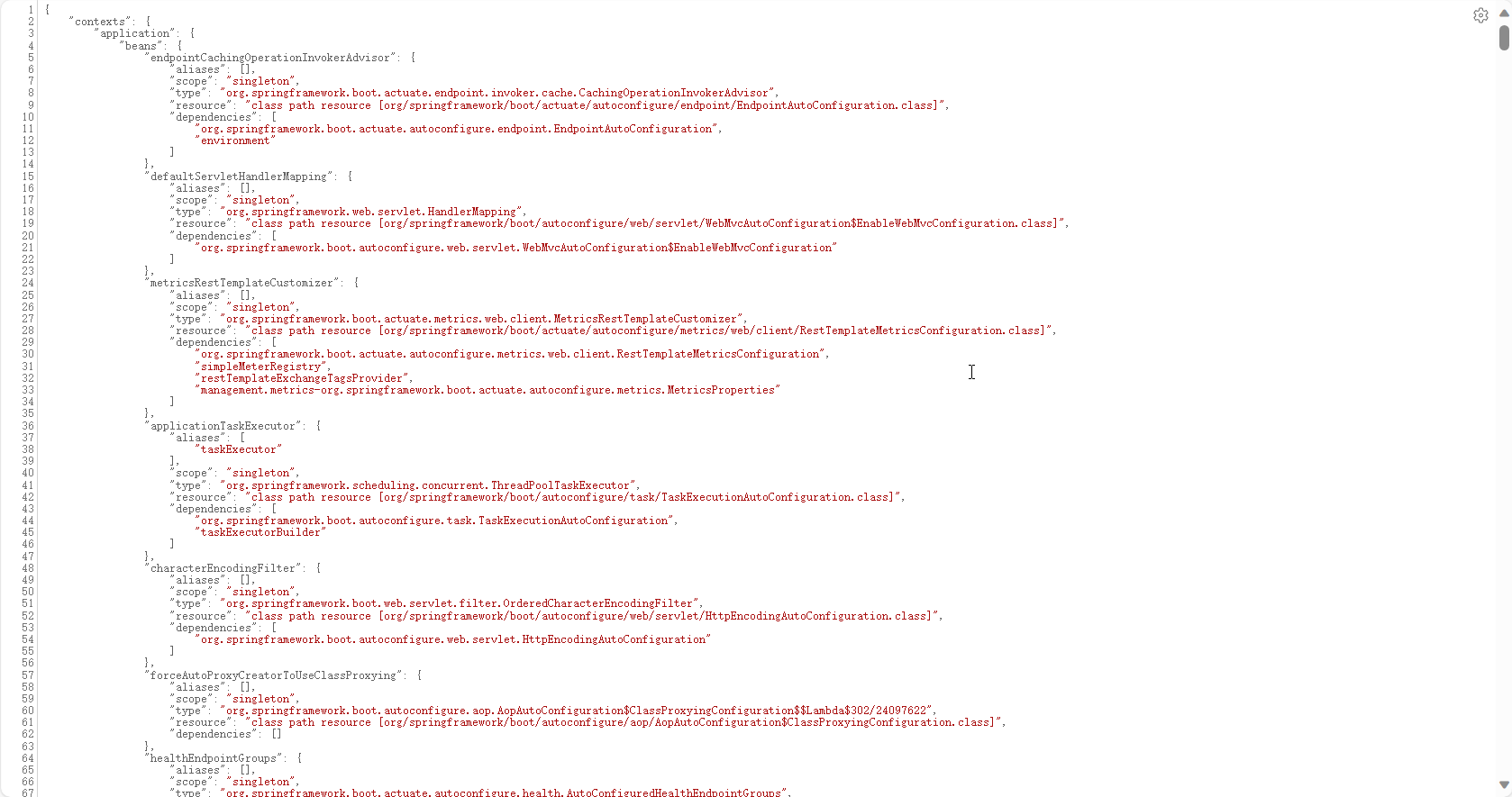
访问:localhost:8080/manage/beans
拓展配置
安全性
当我们想要暴露更多接口,同时保证 endpoint 接口安全,可以与 Spring Security 集成
@Configuration(proxyBeanMethods = false) public class MySecurityConfiguration { @Bean public SecurityFilterChain securityFilterChain(HttpSecurity http) throws Exception { http.requestMatcher(EndpointRequest.toAnyEndpoint()) .authorizeRequests((requests) -> requests.anyRequest().hasRole("ENDPOINT_ADMIN")); http.httpBasic(); return http.build(); } }- 1
- 2
- 3
- 4
- 5
- 6
- 7
- 8
- 9
- 10
- 11
- 12
此外,如果存在 Spring Security,同时你需要添加自定义安全配置,以允许对端点进行未经身份验证的访问,如以下示例所示
@Configuration(proxyBeanMethods = false) public class MySecurityConfiguration { @Bean public SecurityFilterChain securityFilterChain(HttpSecurity http) throws Exception { http.securityMatcher(EndpointRequest.toAnyEndpoint()); http.authorizeHttpRequests((requests) -> requests.anyRequest().permitAll()); return http.build(); } }- 1
- 2
- 3
- 4
- 5
- 6
- 7
- 8
- 9
- 10
- 11
跨域访问
management: endpoints: web: cors: allowed-origins: "https://example.com" allowed-methods: "GET,POST"- 1
- 2
- 3
- 4
- 5
- 6
自定义端点
我们可以通过@JmxEndpoint or @WebEndpoint 注解来定义自己的 endpoint, 然后通过@ReadOperation, @WriteOperation 或者@DeleteOperation 来暴露操作
比如添加系统时间 date 的 endpoint
@RestController("custom") @WebEndpoint(id = "date") public class CustomEndpointController { @ReadOperation public ResponseEntity<String> currentDate() { return ResponseEntity.ok(LocalDateTime.now().toString()); } }- 1
- 2
- 3
- 4
- 5
- 6
- 7
- 8
- 9
management: endpoints: enabled-by-default: false web: base-path: /manage exposure: include: 'info,health,env,beans,date' endpoint: info: enabled: true health: enabled: true env: enabled: true beans: enabled: true date: enabled: true- 1
- 2
- 3
- 4
- 5
- 6
- 7
- 8
- 9
- 10
- 11
- 12
- 13
- 14
- 15
- 16
- 17
- 18
info 不显示
我们直接访问 info 接口是空的
问题出处官方文档:Production-ready Features (spring.io)

解决方案,修改
application.yml如下management: endpoint: info: env: enabled: true- 1
- 2
- 3
- 4
- 5
Spring Boot Admin
简介
官方仓库:codecentric/spring-boot-admin
官方文档:Spring Boot Admin – (spring-boot-admin.com)
Spring Boot Admin(简称 SBA)由两部分组成:SBA Server 和 SBA Client

SBA Server: 包括 Admin 用户界面并独立运行于被监控应用
SBA Client: 提供一种方式将被监控应用注册到 SBA Server
SBA 分为服务端和客户端原理:因为 SBA 需要做集中化的监控(比如应用的集群,多个服务或者微服务等),而不是每个应用都需要有一个 UI。同时被监控的应用应该是和监控平台是分离的,并且需要考虑其他语言和其他平台的集成
除此之外,SBA Client 不仅只可以注册到 SBA Server ,还可以注册到 Spring Cloud Discovery(微服务),Python Applications Using Pyctuator(其他语言)等平台
启用 Server
pom.xml配置<dependency> <groupId>de.codecentricgroupId> <artifactId>spring-boot-admin-starter-serverartifactId> <version>2.5.3version> dependency>- 1
- 2
- 3
- 4
- 5
注意:这里我们必须添加
spring-boot-starter-parent中的 BOM(Bill of Material) 并没有配置 SBA 的 version,无法自动识别通过 @EnableAdminServer 注解启用 SBA Server
@Configuration @EnableAdminServer @SpringBootApplication public class SpringBootActuatorDemoApplication { public static void main(String[] args) { SpringApplication.run(SpringBootActuatorDemoApplication.class, args); } }- 1
- 2
- 3
- 4
- 5
- 6
- 7
- 8
- 9
- 10

注册 Client
引入 SBA Client 依赖
<dependency> <groupId>de.codecentricgroupId> <artifactId>spring-boot-admin-starter-clientartifactId> <version>2.5.3version> dependency>- 1
- 2
- 3
- 4
- 5
配置
application.ymlserver: port: 8080 management: endpoints: enabled-by-default: false web: base-path: /manage exposure: include: 'info,health,env,beans' endpoint: info: env: enabled: true enabled: true health: enabled: true env: enabled: true beans: enabled: true # 添加如下配置 spring: boot: admin: client: url: 'http://localhost:8080'- 1
- 2
- 3
- 4
- 5
- 6
- 7
- 8
- 9
- 10
- 11
- 12
- 13
- 14
- 15
- 16
- 17
- 18
- 19
- 20
- 21
- 22
- 23
- 24
- 25
- 26
- 27

之后点击进入实例,可以自行探索监控信息

其他问题
启用 JMX 管理
默认下 SBA 没有启用 JMX,需要通过如下配置启用。
首先需要引入 POM 依赖(PS:需要 SpringBoot2.2+ 版本)
<dependency> <groupId>org.jolokiagroupId> <artifactId>jolokia-coreartifactId> dependency>- 1
- 2
- 3
- 4
yml 配置
spring: jmx: enabled: true- 1
- 2
- 3
显示日志内容
默认下没有显示 Log File 的内容,如果需要显示 SpringBoot 应用日志需要进行如下配置(配置 logging.file.path 或者 logging.file.name)
logging: file: name: 'pdai-spring-boot-application.log' pattern: file: '%clr(%d{yyyy-MM-dd HH:mm:ss.SSS}){faint} %clr(%5p) %clr(${PID}){magenta} %clr(---){faint} %clr([%15.15t]){faint} %clr(%-40.40logger{39}){cyan} %clr(:){faint} %m%n%wEx'- 1
- 2
- 3
- 4
- 5
继承 Spring Security
<dependency> <groupId>org.springframework.bootgroupId> <artifactId>spring-boot-starter-securityartifactId> dependency>- 1
- 2
- 3
- 4
@Configuration public static class SecurityPermitAllConfig extends WebSecurityConfigurerAdapter { @Override protected void configure(HttpSecurity http) throws Exception { http.authorizeRequests().anyRequest().permitAll() .and().csrf().disable(); } }- 1
- 2
- 3
- 4
- 5
- 6
- 7
- 8
通知告警信息
集成 spring-boot-starter-mail 配置 JavaMailSender 来用邮件通知信息
官方文档对应链接:Spring Boot Admin – (spring-boot-admin.com)
<dependency> <groupId>org.springframework.bootgroupId> <artifactId>spring-boot-starter-mailartifactId> dependency>- 1
- 2
- 3
- 4
spring: mail: host:smtp.example.com boot: admin: notify: mail: to:admin@example.com- 1
- 2
- 3
- 4
- 5
- 6
- 7
- 8
注:更多通知方式(钉钉,微信等)可以直接参考上方官方文档
补充
在生产环境下,使用 Prometheus + Grafana 组合也是非常推荐的监控解决方案,这里篇章有限,读者可以自行探索
参考链接
- SpringBoot 监控 - 集成 actuator 监控工具 | Java 全栈知识体系 (pdai.tech)
- SpringBoot 监控 - 集成 springboot admin 监控工具 | Java 全栈知识体系 (pdai.tech)
- 微服务系列:服务监控 Spring Boot Actuator 和 Spring Boot Admin - 掘金 (juejin.cn)
- 实战:使用 Spring Boot Admin 实现运维监控平台-阿里云开发者社区 (aliyun.com)
- Prometheus 快速入门教程(六):Spring Boot Actuator 实现应用监控
- Prometheus简介 - prometheus-book (gitbook.io)
本文由博客一文多发平台 OpenWrite 发布!
-
相关阅读:
如何在IDEA上创建一个Maven项目2022版
react引入antd组件示例步骤
HOOK Native API
Java---数据库---MyBatisPlus
【无标题】
外汇天眼:如何识别外汇欺诈?你也可以拥有“火眼金睛”一步识别黑平台!
Android 底部导航栏(四、ViewPager+RadioGroup+Fragment)简单易懂
【JavaEE】JUC 常见的类 -- 多线程篇(8)
HCIP复习第二课:HCIA(网络类型及数据链路层协议)
Java学习笔记3.9.3 Lambda表达式 - 方法引用
- 原文地址:https://blog.csdn.net/m0_63748493/article/details/134497371
