-
vscode终端npm install报错
报错如下:
- npm WARN read-shrinkwrap This version of npm is compatible with lockfileVersion@1, but package-lock.json was generated for lockfileVersion@2. I'll try to do my best
- with it!
- npm ERR! code EPERM
- npm ERR! syscall open
- npm ERR! errno -4048
- npm ERR! Error: EPERM: operation not permitted, open 'E:\NODEJS\node_cache\_cacache\tmp\c606bc49'
- npm ERR! [OperationalError: EPERM: operation not permitted, open 'E:\NODEJS\node_cache\_cacache\tmp\c606bc49'] {
- npm ERR! cause: [Error: EPERM: operation not permitted, open 'E:\NODEJS\node_cache\_cacache\tmp\c606bc49'] {
- npm ERR! errno: -4048,
- npm ERR! code: 'EPERM',
- npm ERR! syscall: 'open',
- npm ERR! path: 'E:\\NODEJS\\node_cache\\_cacache\\tmp\\c606bc49'
- npm ERR! },
- npm ERR! isOperational: true,
- npm ERR! errno: -4048,
- npm ERR! code: 'EPERM',
- npm ERR! syscall: 'open',
- npm ERR! path: 'E:\\NODEJS\\node_cache\\_cacache\\tmp\\c606bc49'
- npm ERR! }
- npm ERR!
- npm ERR! The operation was rejected by your operating system.
- npm ERR! It's possible that the file was already in use (by a text editor or antivirus),
- npm ERR! or that you lack permissions to access it.
- npm ERR!
- npm ERR! If you believe this might be a permissions issue, please double-check the
- npm ERR! permissions of the file and its containing directories, or try running
- npm ERR! the command again as root/Administrator.
最后一句:
npm ERR! the command again as root/Administrator.说明是权限问题。
把nodejs文件的权限改一下。右键-属性-安全

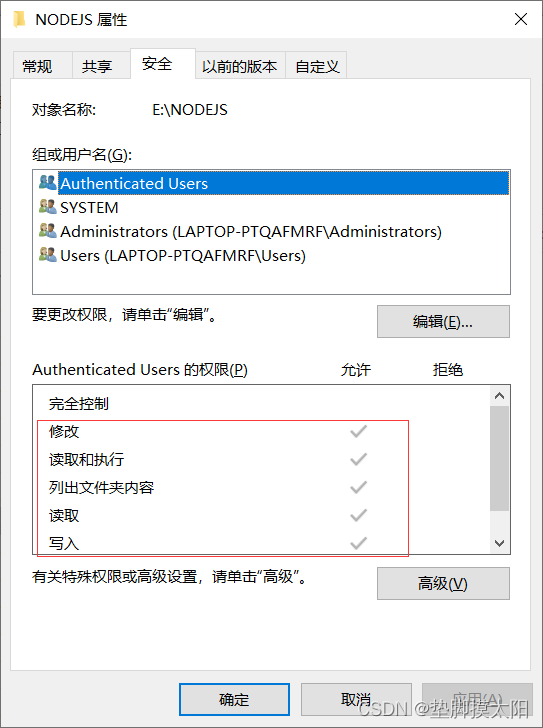
问题就解决了。
-
相关阅读:
svg 知识点总结
LeetCode每日一题——1161. 最大层内元素和
python openpyxl excel库
【LeetCode】94. 二叉树的中序遍历
计算机网络——组成、分类、性能指标、分层结构
nginx源码分析--基数树
从开发到部署微服务保姆级视频教程
【Python笔记-设计模式】装饰器模式
nginx代理本地服务请求,避免跨域;前端图片压缩并上传
Python 读取 Word 详解(python-docx)
- 原文地址:https://blog.csdn.net/m0_62600503/article/details/134450497
