-
uni-app学习笔记
目录
一、前期准备
1、项目认识
(1)新建项目

(2)启动项目
①运行到浏览器上

②运行到微信开发者工具

如果出现以下弹框,选择已安装好的微信开发者工具路径,确定即可

如果出现“工具的服务端口已关闭”,是因为微信开发者工具设置问题
解决如下:
随便打开微信开发者工具的一个工程=》点击设置=》通用设置=》安全=》打开服务端口


(3)中文解释

2、pages.json基本配置
(1)globalStyle全局配置
- {
- "globalStyle": {
- "navigationBarTextStyle": "black",
- "navigationBarTitleText": "全局",
- "navigationBarBackgroundColor": "#F8F8F8",
- "backgroundColor": "#F8F8F8"
- },
- }

(2)局部页面的配置
- {
- "pages": [ //pages数组中第一项表示应用启动页,参考:https://uniapp.dcloud.io/collocation/pages
- {
- "path": "pages/index/index",
- "style": {
- "navigationBarTitleText": "首页"
- }
- }
- ],
- }

3、创建页面
(1)右键pages文件夹=》点击新建页面

(2)新页面配置
①如果没有自动生成需要手动添加配置
②注意:与微信小程序一样,配置时,哪个页面放在前面,就先显示哪个页面
- {
- "pages": [
- {
- "path" : "pages/about/about",
- "style" :
- {
- "navigationBarTitleText": "关于",
- "enablePullDownRefresh": false
- }
- },
- {
- "path": "pages/index/index",
- "style": {
- "navigationBarTitleText": "首页"
- }
- }
- ],
- "globalStyle": {
- "navigationBarTextStyle": "black",
- "navigationBarTitleText": "全局",
- "navigationBarBackgroundColor": "#F8F8F8",
- "backgroundColor": "#F8F8F8"
- },
- "uniIdRouter": {}
- }

二、tabBar
1、获取图标
(1)小伙伴可以在iconfont选择需要的图标
iconfont-阿里巴巴矢量图标库iconfont-国内功能很强大且图标内容很丰富的矢量图标库,提供矢量图标下载、在线存储、格式转换等功能。阿里巴巴体验团队倾力打造,设计和前端开发的便捷工具
 https://www.iconfont.cn/(2)将下载好的图标放到static文件夹中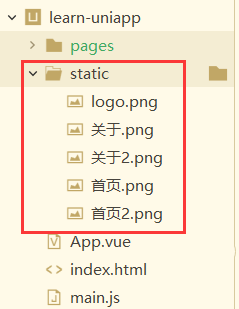
2、代码配置
- {
- "pages": [
- {
- "path" : "pages/about/about",
- "style" :
- {
- "navigationBarTitleText": "关于",
- "enablePullDownRefresh": false
- }
- },
- {
- "path": "pages/index/index",
- "style": {
- "navigationBarTitleText": "首页"
- }
- }
- ],
- "globalStyle": {
- "navigationBarTextStyle": "white",
- "navigationBarTitleText": "全局",
- "navigationBarBackgroundColor": "#000000",
- "backgroundColor": "#ffffff"
- },
- "tabBar": {
- "color": "#7A7E83",
- "selectedColor": "#1296db",
- "borderStyle": "black",
- "backgroundColor": "#000000",
- "list": [{
- "pagePath": "pages/index/index",
- "iconPath": "/static/首页2.png",
- "selectedIconPath": "/static/首页.png",
- "text": "首页"
- }, {
- "pagePath": "pages/about/about",
- "iconPath": "/static/关于2.png",
- "selectedIconPath": "/static/关于.png",
- "text": "关于"
- }]
- },
- "uniIdRouter": {}
- }

三、基础认识
1、页面生命周期
(1)onLoad 监听页面加载【类似于 vue2 生命周期中的 create】
此时响应式数据、计算属性、方法、侦听器、props、slots 已设置完成,其参数为上个页面传递的数据,参数类型为 Object
2、App.vue应用生命周期
(1)globalData 全局变量,此处定义的变量,可以在任何页面获取
①App.vue
②index.vue

四、基础组件
1、scroll-view可滚动视图区域
- <view>
- <view class="uni-padding-wrap uni-common-mt">
- <view class="uni-title uni-common-mt">
- Vertical Scroll
- <text>\n纵向滚动text>
- view>
- <view>
- <scroll-view :scroll-top="scrollTop" scroll-y="true" class="scroll-Y" @scrolltoupper="upper"
- @scrolltolower="lower" @scroll="scroll">
- <view id="demo1" class="scroll-view-item uni-bg-red">Aview>
- <view id="demo2" class="scroll-view-item uni-bg-green">Bview>
- <view id="demo3" class="scroll-view-item uni-bg-blue">Cview>
- scroll-view>
- view>
- <view @tap="goTop" class="uni-link uni-center uni-common-mt">
- 点击这里返回顶部
- view>
- view>
- view>
- <script>
- export default {
- data() {
- return {
- // 设置竖向滚动条位置
- scrollTop: 0,
- old: {
- scrollTop: 0
- }
- }
- },
- onLoad() {
- console.log(getApp().globalData);
- },
- methods: {
- // 滚动到顶部/左边会触发
- upper: function(e) {
- console.log(e)
- },
- // 滚动到底部/右边会触发
- lower: function(e) {
- console.log(e)
- },
- // 滚动时触发
- scroll: function(e) {
- console.log(e)
- this.old.scrollTop = e.detail.scrollTop
- },
- // 返回顶部
- goTop: function(e) {
- // 解决view层不同步的问题
- this.scrollTop = this.old.scrollTop
- this.$nextTick(function() {
- this.scrollTop = 0
- });
- // 弹窗
- uni.showToast({
- icon: "none",
- title: "纵向滚动 scrollTop 值已被修改为 0"
- })
- }
- }
- }
- script>
- <style>
- .scroll-Y {
- height: 300rpx;
- }
- .scroll-view_H {
- white-space: nowrap;
- width: 100%;
- }
- .scroll-view-item {
- height: 300rpx;
- line-height: 300rpx;
- text-align: center;
- font-size: 36rpx;
- }
- .scroll-view-item_H {
- display: inline-block;
- width: 100%;
- height: 300rpx;
- line-height: 300rpx;
- text-align: center;
- font-size: 36rpx;
- }
- .uni-bg-red{
- background-color: red;
- }
- .uni-bg-green{
- background-color: green;
- }
- .uni-bg-blue{
- background-color: blue;
- }
- style>

2、提示框
(1)showToast显示消息提示框
(2)showLoading显示 loading 加载中
- <view>
- <button @click="showToast" class="btn">点击显示消息提示框button>
- <button @click="showLoading" class="btn">点击显示Loading提示框button>
- view>
- <script>
- export default {
- data() {
- return {
- }
- },
- methods: {
- // 显示消息提示框
- showToast: function(e) {
- uni.showToast({
- icon: "none",
- title: "显示消息内容"
- })
- },
- // 显示Loading提示框
- showLoading: function(e) {
- uni.showLoading({
- title: "加载中"
- })
- // 2秒后提示隐藏
- setTimeout(function () {
- uni.hideLoading();
- }, 2000);
- },
- }
- }
- script>
- <style>
- .btn{
- width: 80%;
- margin:20rpx auto;
- }
- style>

3、swiper滑块视图容器
- <view>
- <view class="uni-margin-wrap">
- <swiper class="swiper" circular :indicator-dots="indicatorDots" :autoplay="autoplay" :interval="interval"
- :duration="duration">
- <swiper-item v-for="(item,index) in imgArr">
- <view class="swiper-item" :class="item.background">{{item.title}}view>
- swiper-item>
- swiper>
- view>
- <view class="swiper-list">
- <view class="uni-list-cell uni-list-cell-pd">
- <view class="uni-list-cell-db">指示点view>
- <switch :checked="indicatorDots" @change="changeIndicatorDots" />
- view>
- <view class="uni-list-cell uni-list-cell-pd">
- <view class="uni-list-cell-db">自动播放view>
- <switch :checked="autoplay" @change="changeAutoplay" />
- view>
- view>
- <view class="uni-padding-wrap">
- <view class="uni-common-mt">
- <text>幻灯片切换时长(ms)text>
- <text class="info">{{duration}}text>
- view>
- <slider @change="durationChange" :value="duration" min="500" max="2000" />
- <view class="uni-common-mt">
- <text>自动播放间隔时长(ms)text>
- <text class="info">{{interval}}text>
- view>
- <slider @change="intervalChange" :value="interval" min="2000" max="10000" />
- view>
- view>
- <script>
- export default {
- data() {
- return {
- // 是否显示面板指示点
- indicatorDots: true,
- // 是否自动切换
- autoplay: true,
- interval: 2000,
- duration: 500,
- imgArr:[{
- title:"A",
- background:"uni-bg-red"
- },
- {
- title:"B",
- background:"uni-bg-green"
- },
- {
- title:"C",
- background:"uni-bg-blue"
- }]
- }
- },
- methods: {
- changeIndicatorDots(e) {
- this.indicatorDots = !this.indicatorDots
- },
- changeAutoplay(e) {
- this.autoplay = !this.autoplay
- },
- intervalChange(e) {
- this.interval = e.target.value
- },
- durationChange(e) {
- this.duration = e.target.value
- }
- }
- }
- script>
- <style>
- .uni-margin-wrap {
- width: 690rpx;
- width: 100%;
- }
- .swiper {
- height: 300rpx;
- }
- .swiper-item {
- display: block;
- height: 300rpx;
- line-height: 300rpx;
- text-align: center;
- }
- .swiper-list {
- margin-top: 40rpx;
- margin-bottom: 0;
- }
- .uni-common-mt {
- margin-top: 60rpx;
- position: relative;
- }
- .info {
- position: absolute;
- right: 20rpx;
- }
- .uni-padding-wrap {
- width: 550rpx;
- padding: 0 100rpx;
- }
- style>

注意:如果滑块没有背景色,是因为小编把背景色的css配置在了App.vue的全局样式

4、form表单组件
(1)说明
<form @submit="formSubmit" @reset="formReset">form>① @submit:携带 form 中的数据,触发 submit 事件
② @reset:表单重置,触发 reset 事件
(2)代码实例
- <view>
- <view>
- <form @submit="formSubmit" @reset="formReset">
- <view class="uni-form-item uni-column">
- <view class="title">switchview>
- <view>
- <switch name="switch" />
- view>
- view>
- <view class="uni-form-item uni-column">
- <view class="title">性别view>
- <radio-group name="radio">
- <label>
- <radio value="0" /><text>男text>
- label>
- <label>
- <radio value="1" /><text>女text>
- label>
- radio-group>
- view>
- <view class="uni-form-item uni-column">
- <view class="title">爱好view>
- <checkbox-group name="checkbox">
- <label>
- <checkbox value="sing" /><text>唱歌text>
- label>
- <label>
- <checkbox value="dance" /><text>跳舞text>
- label>
- <label>
- <checkbox value="other" /><text>其它text>
- label>
- checkbox-group>
- view>
- <view class="uni-form-item uni-column">
- <view class="title">sliderview>
- <slider value="50" name="slider" show-value>slider>
- view>
- <view class="uni-form-item uni-column">
- <view class="title">inputview>
- <input class="uni-input" name="input" placeholder="这是一个输入框" />
- view>
- <view class="uni-btn-v">
- <button form-type="submit">Submitbutton>
- <button type="default" form-type="reset">Resetbutton>
- view>
- form>
- view>
- view>
- <script>
- export default {
- data() {
- return {
- }
- },
- methods: {
- formSubmit: function(e) {
- console.log('form发生了submit事件,携带数据为:' + JSON.stringify(e.detail.value))
- var formdata = e.detail.value
- uni.showModal({
- content: '表单数据内容:' + JSON.stringify(formdata),
- showCancel: false
- });
- },
- formReset: function(e) {
- console.log('清空数据')
- }
- }
- }
- script>
- <style>
- .uni-form-item .title {
- padding: 20rpx 0;
- }
- style>
form 中的组件需要加上 name 来作为 key,使得 submit 事件会将组件中的 value 值进行提交

-
相关阅读:
JVM内存模型
【Java程序员面试专栏 算法思维】一 高频面试算法题:排序算法
java计算机毕业设计科研成果管理系统设计与实现MyBatis+系统+LW文档+源码+调试部署
95后阿里P7晒出工资单:真的是狠狠扎心了...
外贸SEO 站长工具
Vue中的常用指令v-html / v-show / v-if / v-else / v-on / v-bind / v-for / v-model
Swoole Compiler 加密PHP源代码(简版)
RabbitMQ:消息队列的卓越之选
Mygin上下文之sync.Pool复用
vant3的option写法示例(部分组件:swipe、popup、picker、stepper、field、tab、tabbar)
- 原文地址:https://blog.csdn.net/qq_51478745/article/details/133847463
