-
Langchain-Chatchat项目:5.1-ChatGLM3-6B工具调用
在语义、数学、推理、代码、知识等不同角度的数据集上测评显示,ChatGLM3-6B-Base 具有在10B以下的基础模型中最强的性能。ChatGLM3-6B采用了全新设计的Prompt格式,除正常的多轮对话外。同时原生支持工具调用(Function Call)、代码执行(Code Interpreter)和Agent任务等复杂场景。本文主要通过天气查询例子介绍了在tool_registry.py中注册新的工具来增强模型能力。
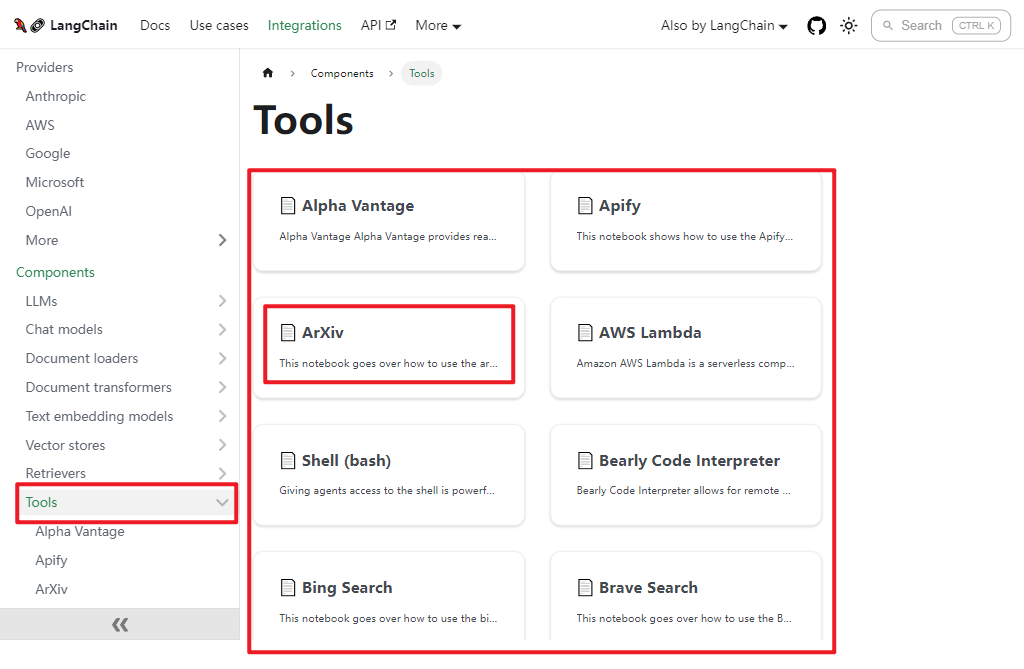
可以直接调用LangChain自带的工具(比如,ArXiv),也可以调用自定义的工具。LangChain自带的部分工具[2],如下所示:
一.自定义天气查询工具
1.Weather类
可以参考Tool/Weather.py以及Tool/Weather.yaml文件,继承BaseTool类,重载_run()方法,如下所示:class Weather(BaseTool): # 天气查询工具 name = "weather" description = "Use for searching weather at a specific location" def __init__(self): super().__init__() def get_weather(self, location): api_key = os.environ["SENIVERSE_KEY"] url = f"https://api.seniverse.com/v3/weather/now.json?key={api_key}&location={location}&language=zh-Hans&unit=c" response = requests.get(url) if response.status_code == 200: data = response.json() weather = { "temperature": data["results"][0]["now"]["temperature"], "description": data["results"][0]["now"]["text"], } return weather else: raise Exception( f"Failed to retrieve weather: {response.status_code}") def _run(self, para: str) -> str: return self.get_weather(para)- 1
- 2
- 3
- 4
- 5
- 6
- 7
- 8
- 9
- 10
- 11
- 12
- 13
- 14
- 15
- 16
- 17
- 18
- 19
- 20
- 21
- 22
- 23
- 24
2.weather.yaml文件
weather.yaml文件内容,如下所示:name: weather description: Search the current weather of a city parameters: type: object properties: city: type: string description: City name required: - city- 1
- 2
- 3
- 4
- 5
- 6
- 7
- 8
- 9
- 10
二.自定义天气查询工具调用
自定义天气查询工具调用,在main.py中导入Weather工具。如下所示:run_tool([Weather()], llm, [ "今天北京天气怎么样?", "What's the weather like in Shanghai today", ])- 1
- 2
- 3
- 4
其中,run_tool()函数实现如下所示:
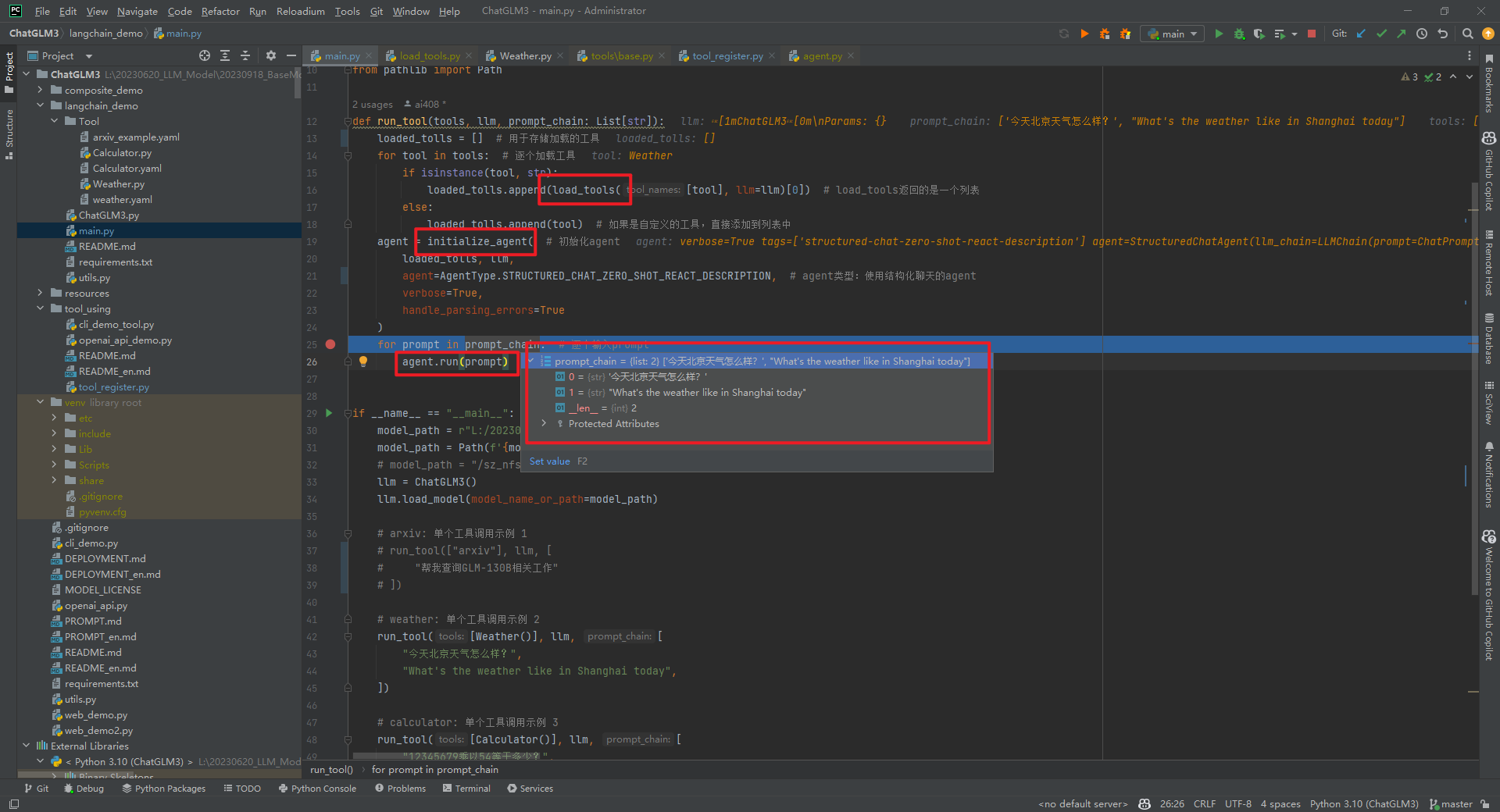
def run_tool(tools, llm, prompt_chain: List[str]): loaded_tolls = [] # 用于存储加载的工具 for tool in tools: # 逐个加载工具 if isinstance(tool, str): loaded_tolls.append(load_tools([tool], llm=llm)[0]) # load_tools返回的是一个列表 else: loaded_tolls.append(tool) # 如果是自定义的工具,直接添加到列表中 agent = initialize_agent( # 初始化agent loaded_tolls, llm, agent=AgentType.STRUCTURED_CHAT_ZERO_SHOT_REACT_DESCRIPTION, # agent类型:使用结构化聊天的agent verbose=True, handle_parsing_errors=True ) for prompt in prompt_chain: # 逐个输入prompt agent.run(prompt)- 1
- 2
- 3
- 4
- 5
- 6
- 7
- 8
- 9
- 10
- 11
- 12
- 13
- 14
- 15
1.load_tools()函数
根据工具名字加载相应的工具,如下所示:def load_tools( tool_names: List[str], llm: Optional[BaseLanguageModel] = None, callbacks: Callbacks = None, **kwargs: Any, ) -> List[BaseTool]:- 1
- 2
- 3
- 4
- 5
- 6
2.initialize_agent()函数
根据工具列表和LLM加载一个agent executor,如下所示:def initialize_agent( tools: Sequence[BaseTool], llm: BaseLanguageModel, agent: Optional[AgentType] = None, callback_manager: Optional[BaseCallbackManager] = None, agent_path: Optional[str] = None, agent_kwargs: Optional[dict] = None, *, tags: Optional[Sequence[str]] = None, **kwargs: Any, ) -> AgentExecutor:- 1
- 2
- 3
- 4
- 5
- 6
- 7
- 8
- 9
- 10
- 11
其中,agent默认为
AgentType.ZERO_SHOT_REACT_DESCRIPTION。本文中使用为AgentType.STRUCTURED_CHAT_ZERO_SHOT_REACT_DESCRIPTION,一种为聊天模型优化的zero-shot react agent,该agent能够调用具有多个输入的工具。
3.run()函数
执行链的便捷方法,这个方法与Chain.__call__之间的主要区别在于,这个方法期望将输入直接作为位置参数或关键字参数传递,而Chain.__call__期望一个包含所有输入的单一输入字典。如下所示:def run( self, *args: Any, callbacks: Callbacks = None, tags: Optional[List[str]] = None, metadata: Optional[Dict[str, Any]] = None, **kwargs: Any, ) -> Any:- 1
- 2
- 3
- 4
- 5
- 6
- 7
- 8
4.结果分析
结果输出,如下所示:> Entering new AgentExecutor chain... ====== ====== Action: `` {"action": "weather", "action_input": "北京"} `` Observation: {'temperature': '20', 'description': '晴'} Thought:====== ====== Action: `` {"action": "Final Answer", "action_input": "根据查询结果,北京今天的天气是晴,气温为20℃。"} `` > Finished chain. > Entering new AgentExecutor chain... ====== ====== Action: `` {"action": "weather", "action_input": "Shanghai"} `` Observation: {'temperature': '20', 'description': '晴'} Thought:====== ====== Action: `` {"action": "Final Answer", "action_input": "根据最新的天气数据,今天上海的天气情况是晴朗的,气温为20℃。"} `` > Finished chain.- 1
- 2
- 3
- 4
- 5
- 6
- 7
- 8
- 9
- 10
- 11
- 12
- 13
- 14
- 15
- 16
- 17
- 18
- 19
- 20
- 21
- 22
- 23
- 24
- 25
- 26
- 27
- 28
- 29
- 30
- 31
- 32
- 33
- 34
- 35
- 36
- 37
- 38
刚开始的时候没有找到识别实体city的地方,后面调试ChatGLM3/langchain_demo/ChatGLM3.py->
_call()时发现了一个巨长的prompt,这不就是zero-prompt(AgentType.STRUCTURED_CHAT_ZERO_SHOT_REACT_DESCRIPTION)吗?顺便吐槽下LangChain的代码真的不好调试。


三.注册工具增强LLM能力
1.注册工具
可以通过在tool_registry.py中注册新的工具来增强模型的能力。只需要使用@register_tool装饰函数即可完成注册。对于工具声明,函数名称即为工具的名称,函数docstring即为工具的说明;对于工具的参数,使用Annotated[typ: type, description: str, required: bool]标注参数的类型、描述和是否必须。将get_weather()函数进行注册,如下所示:@register_tool def get_weather( # 工具函数 city_name: Annotated[str, 'The name of the city to be queried', True], ) -> str: """ Get the current weather for `city_name` """ if not isinstance(city_name, str): # 参数类型检查 raise TypeError("City name must be a string") key_selection = { # 选择的键 "current_condition": ["temp_C", "FeelsLikeC", "humidity", "weatherDesc", "observation_time"], } import requests try: resp = requests.get(f"https://wttr.in/{city_name}?format=j1") resp.raise_for_status() resp = resp.json() ret = {k: {_v: resp[k][0][_v] for _v in v} for k, v in key_selection.items()} except: import traceback ret = "Error encountered while fetching weather data!\n" + traceback.format_exc() return str(ret)- 1
- 2
- 3
- 4
- 5
- 6
- 7
- 8
- 9
- 10
- 11
- 12
- 13
- 14
- 15
- 16
- 17
- 18
- 19
- 20
- 21
- 22
- 23
- 24
- 25
具体工具注册实现方式@register_tool装饰函数,如下所示:
def register_tool(func: callable): # 注册工具 tool_name = func.__name__ # 工具名 tool_description = inspect.getdoc(func).strip() # 工具描述 python_params = inspect.signature(func).parameters # 工具参数 tool_params = [] # 工具参数描述 for name, param in python_params.items(): # 遍历参数 annotation = param.annotation # 参数注解 if annotation is inspect.Parameter.empty: raise TypeError(f"Parameter `{name}` missing type annotation") # 参数缺少注解 if get_origin(annotation) != Annotated: # 参数注解不是Annotated raise TypeError(f"Annotation type for `{name}` must be typing.Annotated") # 参数注解必须是Annotated typ, (description, required) = annotation.__origin__, annotation.__metadata__ # 参数类型, 参数描述, 是否必须 typ: str = str(typ) if isinstance(typ, GenericAlias) else typ.__name__ # 参数类型名 if not isinstance(description, str): # 参数描述必须是字符串 raise TypeError(f"Description for `{name}` must be a string") if not isinstance(required, bool): # 是否必须必须是布尔值 raise TypeError(f"Required for `{name}` must be a bool") tool_params.append({ # 添加参数描述 "name": name, "description": description, "type": typ, "required": required }) tool_def = { # 工具定义 "name": tool_name, "description": tool_description, "params": tool_params } print("[registered tool] " + pformat(tool_def)) # 打印工具定义 _TOOL_HOOKS[tool_name] = func # 注册工具 _TOOL_DESCRIPTIONS[tool_name] = tool_def # 添加工具定义 return func- 1
- 2
- 3
- 4
- 5
- 6
- 7
- 8
- 9
- 10
- 11
- 12
- 13
- 14
- 15
- 16
- 17
- 18
- 19
- 20
- 21
- 22
- 23
- 24
- 25
- 26
- 27
- 28
- 29
- 30
- 31
- 32
- 33
- 34
- 35
- 36
2.调用工具
参考文件ChatGLM3/tool_using/openai_api_demo.py,如下所示:def main(): messages = [ # 对话信息 system_info, { "role": "user", "content": "帮我查询北京的天气怎么样", } ] response = openai.ChatCompletion.create( # 调用OpenAI API model="chatglm3", messages=messages, temperature=0, return_function_call=True ) function_call = json.loads(response.choices[0].message.content) # 获取函数调用信息 logger.info(f"Function Call Response: {function_call}") # 打印函数调用信息 tool_response = dispatch_tool(function_call["name"], function_call["parameters"]) # 调用函数 logger.info(f"Tool Call Response: {tool_response}") # 打印函数调用结果 messages = response.choices[0].history # 获取历史对话信息 messages.append( { "role": "observation", "content": tool_response, # 调用函数返回结果 } ) response = openai.ChatCompletion.create( # 调用OpenAI API model="chatglm3", messages=messages, temperature=0, ) logger.info(response.choices[0].message.content) # 打印对话结果- 1
- 2
- 3
- 4
- 5
- 6
- 7
- 8
- 9
- 10
- 11
- 12
- 13
- 14
- 15
- 16
- 17
- 18
- 19
- 20
- 21
- 22
- 23
- 24
- 25
- 26
- 27
- 28
- 29
- 30
- 31
- 32
- 33
- 34
参考文献:
[1]https://github.com/THUDM/ChatGLM3/tree/main
[2]https://python.langchain.com/docs/integrations/tools -
相关阅读:
Python基本数据类型
算法训练第六十二天
App线上网络问题优化策略
2022中国地理信息产业大会 荣誉背后国产GIS的自主创新力量
png转gif怎么操作?png动图怎么制作
如何上传代码到github
自动驾驶传感器技术
JCL入门教程
Linux安装MySQL8
鲁大师7月新机性能/流畅榜:性能跑分突破123万!
- 原文地址:https://blog.csdn.net/shengshengwang/article/details/134256441