-
初试Shiro
Shiro是一个用于身份验证、授权和会话管理的Java安全框架。它提供了一套易于使用的API,可以帮助开发人员构建安全性强大的应用程序。
环境准备
添加依赖
- <dependency>
- <groupId>org.apache.shiro</groupId>
- <artifactId>shiro-core</artifactId>
- <version>1.9.0</version>
- </dependency>
- <dependency>
- <groupId>commons-logging</groupId>
- <artifactId>commons-logging</artifactId>
- <version>1.2</version>
- </dependency>
INI 文件
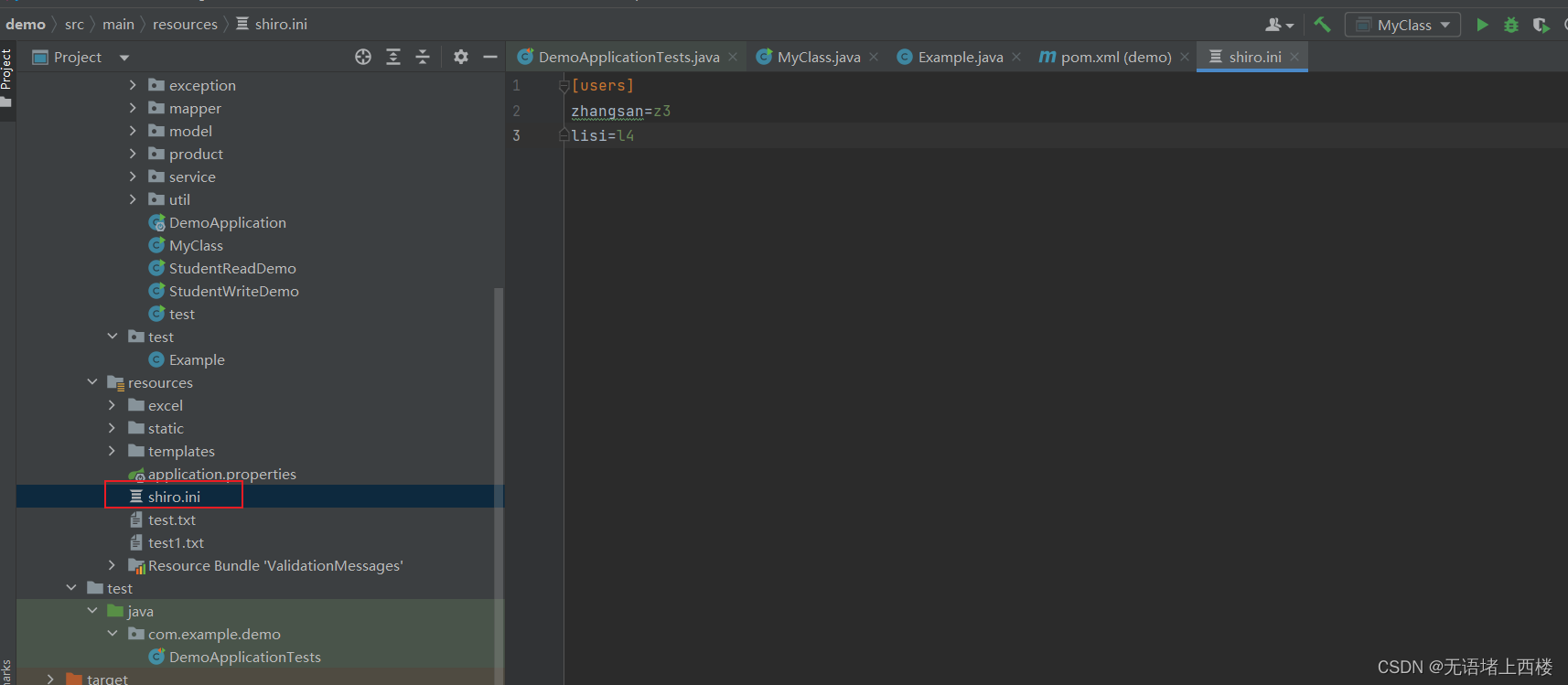
Shiro 获取权限相关信息可以通过数据库获取,也 可以通过 ini 配置文件获取。- [users]
- zhangsan=z3
- lisi=l4
登录认证
登录认证概念
- 身份验证:一般需要提供如身份ID等一些标识信息来表明登录者的身份,如提供email,用户名/密码来证明。
- 在shiro中,用户需要提供principals(身份)和credentials(证明)给shiro,从而应用能验证用户身份:
- principals:身份,即主体的标识属性,可以是任何属性,如用户名、邮箱等,唯一即可。一个主体可以有多个principals,但只有一个Primary principals,一般是用户名/邮箱/手机号。
- credentials:证明/凭证,即只有主体知道的安全值,如密码/数字证书等。
- 最常见的principals和credentials组合就是用户名/密码
登录认证基本流程
- 收集用户身份/凭证,即如用户名/密码
- 调用 Subject.login 进行登录,如果失败将得到相应 的 AuthenticationException异常,根据异常提示用户 错误信息;否则登录成功
- 创建自定义的 Realm 类,继承 org.apache.shiro.realm.AuthenticatingRealm类,实现 doGetAuthenticationInfo() 方法
 登录认证实例创建测试类,获取认证对象,进行登录认证,如下:
- public class ShiroRun {
- public static void main(String[] args) {
- IniSecurityManagerFactory factory = new IniSecurityManagerFactory("classpath:shiro.ini");
- SecurityManager securityManager = (SecurityManager) factory.getInstance();
- SecurityUtils.setSecurityManager((SecurityManager) securityManager);
- //2 获取 Subject 对象
- Subject subject = SecurityUtils.getSubject();
- //3 创建 token 对象,web 应用用户名密码从页面传递
- AuthenticationToken token = new UsernamePasswordToken("zhangsan","z3");
- //4 完成登录
- try {
- subject.login(token);
- System.out.println("登录成功");
- }
- catch (UnknownAccountException e) {
- e.printStackTrace();
- System.out.println("用户不存在");
- }
- catch (IncorrectCredentialsException e) {
- e.printStackTrace();
- System.out.println("密码错误");
- }
- catch (AuthenticationException ae) {
- //unexpected condition? error?
- }
- }
- }
身份认证流程
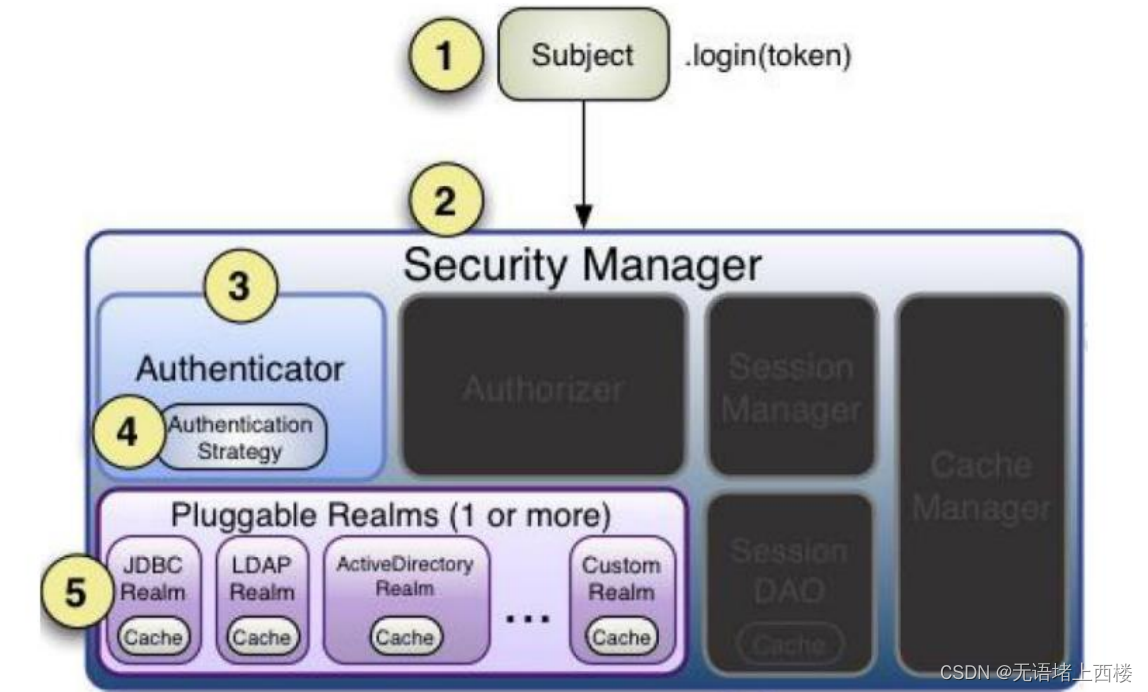
- 首先调用 Subject.login(token) 进行登录,其会自动委托给 SecurityManager
- SecurityManager 负责真正的身份验证逻辑;它会委托给 Authenticator 进行身份验证;
- Authenticator 才是真正的身份验证者,Shiro API 中核心的身份 认证入口点,此处可以自定义插入自己的实现;
- Authenticator 可能会委托给相应的 AuthenticationStrategy 进 行多 Realm 身份验证,默认 ModularRealmAuthenticator 会调用 AuthenticationStrategy 进行多 Realm身份验证;
- Authenticator 会把相应的 token 传入 Realm,从 Realm 获取 身份验证信息,如果没有返回/抛出异常表示身份验证失败了。此处 可以配置多个Realm,将按照相应的顺序及策略进行访问。
测试
 角色授权
角色授权 授权概念
- 授权,也叫访问控制,即在应用中控制谁访问哪些资源(如访问页面/编辑数据/页面操作 等)。在授权中需了解的几个关键对象:主体(Subject)、资源(Resource)、权限 (Permission)、角色(Role)。
- 主体(Subject):访问应用的用户,在 Shiro 中使用 Subject 代表该用户。用户只有授权 后才允许访问相应的资源。
- 资源(Resource):在应用中用户可以访问的 URL,比如访问 JSP 页面、查看/编辑某些 数据、访问某个业务方法、打印文本等等都是资源。用户只要授权后才能访问。
- 权限(Permission):安全策略中的原子授权单位,通过权限我们可以表示在应用中用户 有没有操作某个资源的权力。即权限表示在应用中用户能不能访问某个资源,如:访问用 户列表页面查看/新增/修改/删除用户数据(即很多时候都是CRUD(增查改删)式权限控 制)等。权限代表了用户有没有操作某个资源的权利,即反映在某个资源上的操作允不允 许。
- Shiro 支持粗粒度权限(如用户模块的所有权限)和细粒度权限(操作某个用户的权限, 即实例级别的)
- 角色(Role):权限的集合,一般情况下会赋予用户角色而不是权限,即这样用户可以拥有 一组权限,赋予权限时比较方便。典型的如:项目经理、技术总监、CTO、开发工程师等 都是角色,不同的角色拥有一组不同的权限
授权方式
编程式:通过写if/else 授权代码块完成- if (subject.hasRole("admin")) {
- // 有权限
- }else {
- // 无权限
- }
注解式:通过在执行的Java方法上放置相应的注解完成,没有权限将抛出相 应的异常- @RequiresRoles("admin")
- public void hello(){
- // 有权限
- }
JSP/GSP 标签:在JSP/GSP 页面通过相应的标签完成

授权流程
- 首先调用Subject.isPermitted*/hasRole*接口,其会委托给SecurityManager,而SecurityManager接着会委托给 Authorizer;
- Authorizer是真正的授权者,如果调用如isPermitted(“user:view”),其首先会通过PermissionResolver把字符串转换成相应的Permission实例;
- 在进行授权之前,其会调用相应的Realm获取Subject相应的角色/权限用于匹配传入的角色/权限;
- Authorizer会判断Realm的角色/权限是否和传入的匹配,如果有多个Realm,会委托给ModularRealmAuthorizer进行循环判断,如果匹配如isPermitted*/hasRole* 会返回true,否则返回false表示授权失败
 授权实例 获取角色信息
- // 给shiro.ini增加角色配置
- [users]
- zhangsan=z3,role1,role2
- lisi=l4
给例子添加代码,沟通过hasRole()判断用户是否有指定角色- try {
- subject.login(token);
- System.out.println("登录成功");
- // 判断角色
- boolean role1 = subject.hasRole("role1");
- System.out.println("师范拥有此角色" + role1);
- }
判断权限信息信息- // 给shiro.ini增加权限配置
- [roles]
- role1=user:insert,user:select
给例子添加代码,判断用户是否有指定权限- //判断权限
- boolean isPermitted = subject.isPermitted("user:insert");
- System.out.println("是否拥有此权限:"+isPermitted);
- //也可以用 checkPermission 方法,但没有返回值,没权限抛 AuthenticationException
- subject.checkPermission("user:select");
测试

Shiro加密
实际系统开发中,一些敏感信息需要进行加密,比如说用户的密码。Shiro 内嵌很多常用的加密算法,比如 MD5 加密。Shiro 可以很简单的使用信息加密。使用Shiro进行密码加密
- import org.apache.shiro.crypto.hash.Md5Hash;
- import org.apache.shiro.crypto.hash.SimpleHash;
- public class ShiroMD {
- public static void main(String[] args) {
- //密码明文
- String password = "z3";
- //使用 md5 加密
- Md5Hash md5Hash = new Md5Hash(password);
- System.out.println("md5 加密:"+md5Hash.toHex());
- //带盐的 md5 加密,盐就是在密码明文后拼接新字符串,然后再进行加密
- Md5Hash md5Hash2 = new Md5Hash(password,"salt");
- System.out.println("md5 带盐加密:"+md5Hash2.toHex());
- //为了保证安全,避免被破解还可以多次迭代加密,保证数据安全
- Md5Hash md5Hash3 = new Md5Hash(password,"salt",3);
- System.out.println("md5 带盐三次加密:"+md5Hash3.toHex());
- //使用父类实现加密
- SimpleHash simpleHash = new SimpleHash("MD5",password,"salt",3);
- System.out.println("父类带盐三次加密:"+simpleHash.toHex());
- }
- }
Shiro 自定义登录认证
Shiro 默认的登录认证是不带加密的,如果想要实现加密认证需要自定义登录认证,自定义 Realm。自定义登录认证
- public class MyRealm extends AuthenticatingRealm {
- //自定义的登录认证方法,Shiro 的 login 方法底层会调用该类的认证方法完成登录认证
- //需要配置自定义的 realm 生效,在 ini 文件中配置,或 Springboot 中配置
- //该方法只是获取进行对比的信息,认证逻辑还是按照 Shiro 的底层认证逻辑完成认证
- protected AuthenticationInfo doGetAuthenticationInfo(AuthenticationToken authenticationToken) throws AuthenticationException {
- //1 获取身份信息
- String principal = authenticationToken.getPrincipal().toString();
- //2 获取凭证信息
- String password = new String((char[])
- authenticationToken.getCredentials());
- System.out.println("认证用户信息:"+principal+"---"+password);
- //3 获取数据库中存储的用户信息
- if(principal.equals("zhangsan")){
- //3.1 数据库存储的加盐迭代 3 次密码
- String pwdInfo = "7174f64b13022acd3c56e2781e098a5f";
- //3.2 创建封装了校验逻辑的对象,将要比较的数据给该对象
- AuthenticationInfo info = new SimpleAuthenticationInfo(
- authenticationToken.getPrincipal(),
- pwdInfo,
- ByteSource.Util.bytes("salt"),
- authenticationToken.getPrincipal().toString());
- return info;
- }
- return null;
- }
- }
在shiro.ini中添加配置信息
- [main]
- md5CredentialsMatcher=org.apache.shiro.authc.credential.Md5CredentialsMatcher
- md5CredentialsMatcher.hashIterations=3
- myrealm=com.example.demo.component.MyRealm
- myrealm.credentialsMatcher=$md5CredentialsMatcher
- securityManager.realms=$realm
- [users]
- zhangsan=7174f64b13022acd3c56e2781e098a5f,role1,
- role2
- lisi=l4
- [roles]
- role1=user:insert,user:select
参数:
-
md5CredentialsMatcher=org.apache.shiro.authc.credential.Md5CredentialsMatcher:这行配置指定了使用MD5算法进行凭证匹配的CredentialsMatcher实现类。 -
md5CredentialsMatcher.hashIterations=3:这行配置指定了MD5算法的哈希迭代次数,即将密码哈希化的循环次数。 -
myrealm=com.example.demo.component.MyRealm:这行配置指定了自定义的Realm实现类,即MyRealm。 -
myrealm.credentialsMatcher=$md5CredentialsMatcher:这行配置将之前定义的md5CredentialsMatcher赋值给MyRealm的凭证匹配器(credentialsMatcher)属性。 -
securityManager.realms=$myrealm:这行配置将MyRealm添加到SecurityManager中的Realms列表中。
测试

-
相关阅读:
kubeadm快速部署kubernetes集群(1.24.2版本)
3PC(三阶段提交)
Flutter常用命令,持续更新
模型资源加载引起的内存对齐问题
【ASP.NET Core】标记帮助器——替换元素名称
[附源码]Python计算机毕业设计Django高校流浪动物领养网站
禁止ios和android用户选中文字
使用 docker-compose 部署 golang 的 Athens 私有代理
供应商滥用“云原生”标签,客户表示并不care
【2021年全国大学生数学建模竞赛题“生产企业原材料的订购与运输”详细解析】——《基于模糊综合评价的企业生产订购与运输模型》论文笔记(内附MATLAB代码)
- 原文地址:https://blog.csdn.net/qq_63431773/article/details/134040857
