-
【C++】网络在线五子棋
项目介绍
-
本项目主要实现⼀个网页版的五⼦棋对战游戏,其主要⽀持以下核心功能:
• 用户管理:实现用户注册,用户登录、获取用户信息、用户天梯分数记录、用户比赛场次记录等
• 匹配对战:实现两个玩家在网页端根据天梯分数匹配游戏对手,并进行五子棋游戏对战的功能
• 聊天功能:实现两个玩家在下棋的同时可以进⾏实时聊天的功能 -
开发环境
• Linux(Centos-7.6)
• VSCode/Vim
• g++/gdb
• Makefile -
核⼼技术
• HTTP/WebSocket
• Websocket++
• JsonCpp
• Mysql
• C++11
• BlockQueue
• HTML/CSS/JS/AJAX
前置知识准备
1.websocketcpp使用
Websocketpp介绍
WebSocket是从HTML5开始⽀持的⼀种⽹⻚端和服务端保持⻓连接的消息推送机制。
• 传统的web程序都是属于"⼀问⼀答"的形式,即客⼾端给服务器发送了⼀个HTTP请求,服务器
给客⼾端返回⼀个HTTP响应。这种情况下服务器是属于被动的⼀⽅,如果客⼾端不主动发起请求
服务器就⽆法主动给客⼾端响应
• 像⽹⻚即时聊天或者我们做的五⼦棋游戏这样的程序都是⾮常依赖"消息推送"的,即需要服务器
主动推动消息到客⼾端。如果只是使⽤原⽣的HTTP协议,要想实现消息推送⼀般需要通过"轮
询"的⽅式实现,⽽轮询的成本⽐较⾼并且也不能及时的获取到消息的响应。
基于上述两个问题,就产⽣了WebSocket协议。WebSocket更接近于TCP这种级别的通信⽅式,⼀
旦连接建⽴完成客⼾端或者服务器都可以主动的向对⽅发送数据。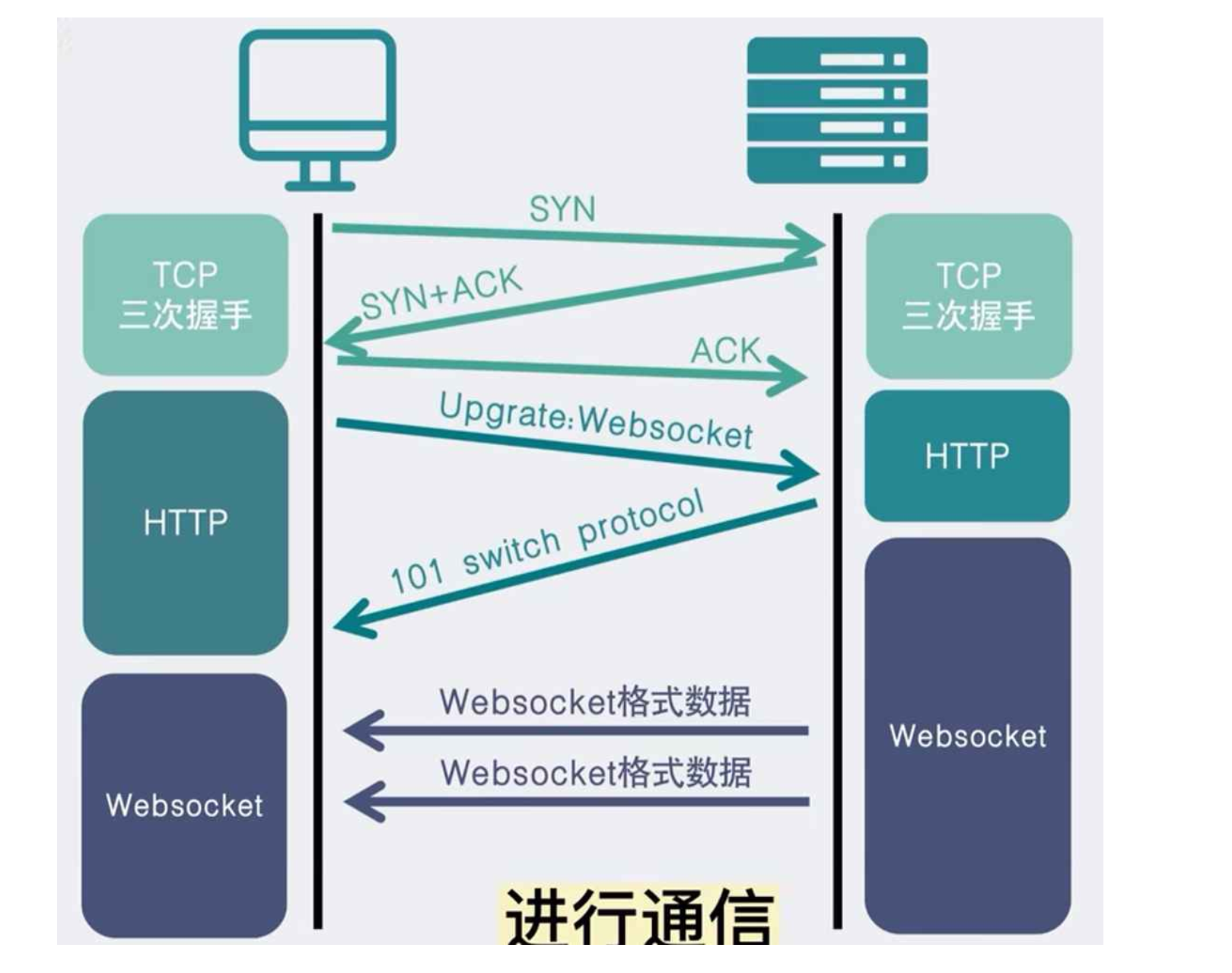
WebSocketpp是⼀个跨平台的开源(BSD许可证)头部专⽤C++库,它实现了RFC6455(WebSocket协议)和RFC7692(WebSocketCompressionExtensions)。它允许将WebSocket客⼾端和服务器功能集成到C++程序中。在最常⻅的配置中,全功能⽹络I/O由Asio⽹络库提供。
WebSocketpp的主要特性包括:
-
事件驱动的接口
-
⽀持HTTP/HTTPS、WS/WSS、IPv6
-
灵活的依赖管理—Boost库/C++11标准库
-
可移植性:Posix/Windows、32/64bit、Intel/ARM
-
线程安全
WebSocketpp同时⽀持HTTP和Websocket两种⽹络协议,⽐较适⽤于我们本次的项⽬,所以我们选⽤该库作为项⽬的依赖库⽤来搭建HTTP和WebSocket服务器。
websocket常用网站
• github:https://github.com/zaphoyd/websocketpp
• ⽤⼾⼿册:http://docs.websocketpp.org/
• 官⽹:http://www.zaphoyd.com/websocketppwebsocketpp常⽤接⼝介绍:
namespace websocketpp { typedef lib::weak_ptr<void> connection_hdl; template <typename config> class endpoint : public config::socket_type { typedef lib::shared_ptr<lib::asio::steady_timer> timer_ptr; typedef typename connection_type::ptr connection_ptr; typedef typename connection_type::message_ptr message_ptr; typedef lib::function<void(connection_hdl)> open_handler; typedef lib::function<void(connection_hdl)> close_handler; typedef lib::function<void(connection_hdl)> http_handler; typedef lib::function<void(connection_hdl, message_ptr)> message_handler; /* websocketpp::log::alevel::none 禁⽌打印所有⽇志*/ void set_access_channels(log::level channels);/*设置⽇志打印等级*/ void clear_access_channels(log::level channels);/*清除指定等级的⽇志*/ /*设置指定事件的回调函数*/ void set_open_handler(open_handler h);/*websocket握⼿成功回调处理函数*/ void set_close_handler(close_handler h);/*websocket连接关闭回调处理函数*/ void set_message_handler(message_handler h);/*websocket消息回调处理函数*/ void set_http_handler(http_handler h);/*http请求回调处理函数*/ /*发送数据接⼝*/ void send(connection_hdl hdl, std::string& payload, frame::opcode::value op); void send(connection_hdl hdl, void* payload, size_t len, frame::opcode::value op); /*关闭连接接⼝*/ void close(connection_hdl hdl, close::status::value code, std::string& reason); /*获取connection_hdl 对应连接的connection_ptr*/ connection_ptr get_con_from_hdl(connection_hdl hdl); /*websocketpp基于asio框架实现,init_asio⽤于初始化asio框架中的io_service调度 器*/ void init_asio(); /*设置是否启⽤地址重⽤*/ void set_reuse_addr(bool value); /*设置endpoint的绑定监听端⼝*/ void listen(uint16_t port); /*对io_service对象的run接⼝封装,⽤于启动服务器*/ std::size_t run(); /*websocketpp提供的定时器,以毫秒为单位*/ timer_ptr set_timer(long duration, timer_handler callback); }; template <typename config> class server : public endpoint<connection<config>, config> { /*初始化并启动服务端监听连接的accept事件处理*/ void start_accept(); }; template <typename config> class connection : public config::transport_type::transport_con_type , public config::connection_base { /*发送数据接⼝*/ error_code send(std::string& payload, frame::opcode::value op = frame::opcode::text); /*获取http请求头部*/ std::string const& get_request_header(std::string const& key) /*获取请求正⽂*/ std::string const& get_request_body(); /*设置响应状态码*/ void set_status(http::status_code::value code); /*设置http响应正⽂*/ void set_body(std::string const& value); /*添加http响应头部字段*/ void append_header(std::string const& key, std::string const& val); /*获取http请求对象*/ request_type const& get_request(); /*获取connection_ptr 对应的 connection_hdl */ connection_hdl get_handle(); }; namespace http { namespace parser { class parser { std::string const& get_header(std::string const& key) } class request : public parser { /*获取请求⽅法*/ std::string const& get_method() /*获取请求uri接⼝*/ std::string const& get_uri() }; } }; namespace message_buffer { /*获取websocket请求中的payload数据类型*/ frame::opcode::value get_opcode(); /*获取websocket中payload数据*/ std::string const& get_payload(); }; namespace log { struct alevel { static level const none = 0x0; static level const connect = 0x1; static level const disconnect = 0x2; static level const control = 0x4; static level const frame_header = 0x8; static level const frame_payload = 0x10; static level const message_header = 0x20; static level const message_payload = 0x40; static level const endpoint = 0x80; static level const debug_handshake = 0x100; static level const debug_close = 0x200; static level const devel = 0x400; static level const app = 0x800; static level const http = 0x1000; static level const fail = 0x2000; static level const access_core = 0x00003003; static level const all = 0xffffffff; }; } namespace http { namespace status_code { enum value { uninitialized = 0, continue_code = 100, switching_protocols = 101, ok = 200, created = 201, accepted = 202, non_authoritative_information = 203, no_content = 204, reset_content = 205, partial_content = 206, multiple_choices = 300, moved_permanently = 301, found = 302, see_other = 303, not_modified = 304, use_proxy = 305, temporary_redirect = 307, bad_request = 400, unauthorized = 401, payment_required = 402, forbidden = 403, not_found = 404, method_not_allowed = 405, not_acceptable = 406, proxy_authentication_required = 407, request_timeout = 408, conflict = 409, gone = 410, length_required = 411, precondition_failed = 412, request_entity_too_large = 413, request_uri_too_long = 414, unsupported_media_type = 415, request_range_not_satisfiable = 416, expectation_failed = 417, im_a_teapot = 418, upgrade_required = 426, precondition_required = 428, too_many_requests = 429, request_header_fields_too_large = 431, internal_server_error = 500, not_implemented = 501, bad_gateway = 502, service_unavailable = 503, gateway_timeout = 504, http_version_not_supported = 505, not_extended = 510, network_authentication_required = 511 }; } } namespace frame { namespace opcode { enum value { continuation = 0x0, text = 0x1, binary = 0x2, rsv3 = 0x3, rsv4 = 0x4, rsv5 = 0x5, rsv6 = 0x6, rsv7 = 0x7, close = 0x8, ping = 0x9, pong = 0xA, control_rsvb = 0xB, control_rsvc = 0xC, control_rsvd = 0xD, control_rsve = 0xE, control_rsvf = 0xF, }; } } }- 1
- 2
- 3
- 4
- 5
- 6
- 7
- 8
- 9
- 10
- 11
- 12
- 13
- 14
- 15
- 16
- 17
- 18
- 19
- 20
- 21
- 22
- 23
- 24
- 25
- 26
- 27
- 28
- 29
- 30
- 31
- 32
- 33
- 34
- 35
- 36
- 37
- 38
- 39
- 40
- 41
- 42
- 43
- 44
- 45
- 46
- 47
- 48
- 49
- 50
- 51
- 52
- 53
- 54
- 55
- 56
- 57
- 58
- 59
- 60
- 61
- 62
- 63
- 64
- 65
- 66
- 67
- 68
- 69
- 70
- 71
- 72
- 73
- 74
- 75
- 76
- 77
- 78
- 79
- 80
- 81
- 82
- 83
- 84
- 85
- 86
- 87
- 88
- 89
- 90
- 91
- 92
- 93
- 94
- 95
- 96
- 97
- 98
- 99
- 100
- 101
- 102
- 103
- 104
- 105
- 106
- 107
- 108
- 109
- 110
- 111
- 112
- 113
- 114
- 115
- 116
- 117
- 118
- 119
- 120
- 121
- 122
- 123
- 124
- 125
- 126
- 127
- 128
- 129
- 130
- 131
- 132
- 133
- 134
- 135
- 136
- 137
- 138
- 139
- 140
- 141
- 142
- 143
- 144
- 145
- 146
- 147
- 148
- 149
- 150
- 151
- 152
- 153
- 154
- 155
- 156
- 157
- 158
- 159
- 160
- 161
- 162
- 163
- 164
- 165
- 166
- 167
- 168
- 169
- 170
- 171
- 172
- 173
- 174
- 175
- 176
- 177
- 178
- 179
- 180
- 181
- 182
- 183
- 184
- 185
- 186
- 187
使⽤Websocketpp实现⼀个简单的http和websocket服务器
#include#include #include using namespace std; typedef websocketpp::server<websocketpp::config::asio> wsserver_t ; void http_handler(wsserver_t* server,websocketpp::connection_hdl hdl){ cout<<"处理http请求"<<endl; wsserver_t::connection_ptr con=server->get_con_from_hdl(hdl); std::stringstream ss; ss<<"hello world"; con->set_body(ss.str()); con->set_status(websocketpp::http::status_code::ok); } void open_handler(wsserver_t* server,websocketpp::connection_hdl hdl){ cout<<"连接成功"<<endl; } void close_handler(wsserver_t* server,websocketpp::connection_hdl hdl){ cout<<"连接关闭"<<endl; } void message_handler(wsserver_t* server,websocketpp::connection_hdl hdl,wsserver_t::message_ptr msg){ cout<<"收到消息"<<msg->get_payload()<<endl; //收到消息将相同的消息发回给websocketpp客户端 server->send(hdl,msg->get_payload(),websocketpp::frame::opcode::text); } int main() { //使用websocketpp库创建服务器 wsserver_t srv; //设置websocketpp打印日志等级 //all表示全部都打印 //none表示什么日志都不打印 srv.set_access_channels(websocketpp::log::alevel::none); //初始化asio srv.init_asio(); //注册http请求函数 srv.set_http_handler(std::bind(http_handler,&srv,std::placeholders::_1)); // 注册websocket请求的处理函数 srv.set_open_handler(std::bind(open_handler,&srv,std::placeholders::_1)); srv.set_close_handler(std::bind(close_handler,&srv,std::placeholders::_1)); srv.set_message_handler(std::bind(message_handler,&srv,std::placeholders::_1,std::placeholders::_2)); //监听8080端口 srv.listen(8080); //开始接收tcp连接 srv.start_accept(); //开始运行服务器 srv.run(); return 0; } - 1
- 2
- 3
- 4
- 5
- 6
- 7
- 8
- 9
- 10
- 11
- 12
- 13
- 14
- 15
- 16
- 17
- 18
- 19
- 20
- 21
- 22
- 23
- 24
- 25
- 26
- 27
- 28
- 29
- 30
- 31
- 32
- 33
- 34
- 35
- 36
- 37
- 38
- 39
- 40
- 41
- 42
- 43
- 44
- 45
- 46
- 47
- 48
- 49
- 50
- 51
- 52
- 53
- 54
Http客⼾端
使⽤浏览器作为http客⼾端即可,访问服务器的8080端⼝。
WS客⼾端
DOCTYPE html> <html lang="en"> <head> <meta charset="UTF-8"> <meta http-equiv="X-UA-Compatible" content="IE=edge"> <meta name="viewport" content="width=device-width, initial-scale=1.0"> <title>Test Websockettitle> head> <body> <input type="text" id="message"> <button id="submit">提交button> <script> // 创建 websocket 实例 // ws://192.168.51.100:8888 // 类⽐http // ws表⽰websocket协议 // 192.168.51.100 表⽰服务器地址 // 8888表⽰服务器绑定的端⼝ let websocket = new WebSocket("ws://47.120.34.99:8080/"); // 处理连接打开的回调函数 websocket.onopen = function() { alert("连接建立"); } // 处理收到消息的回调函数 // 控制台打印消息 websocket.onmessage = function(e) { alert("收到信息:"+e.data); } // 处理连接异常的回调函数 websocket.onerror = function() { alert("连接异常"); } // 处理连接关闭的回调函数 websocket.onclose = function() { alert("连接关闭"); } // 实现点击按钮后, 通过 websocket实例 向服务器发送请求 let input = document.querySelector('#message'); let button = document.querySelector('#submit'); button.onclick = function() { console.log("发送消息: " + input.value); websocket.send(input.value); } script> body> html>- 1
- 2
- 3
- 4
- 5
- 6
- 7
- 8
- 9
- 10
- 11
- 12
- 13
- 14
- 15
- 16
- 17
- 18
- 19
- 20
- 21
- 22
- 23
- 24
- 25
- 26
- 27
- 28
- 29
- 30
- 31
- 32
- 33
- 34
- 35
- 36
- 37
- 38
- 39
- 40
- 41
- 42
- 43
- 44
- 45
- 46
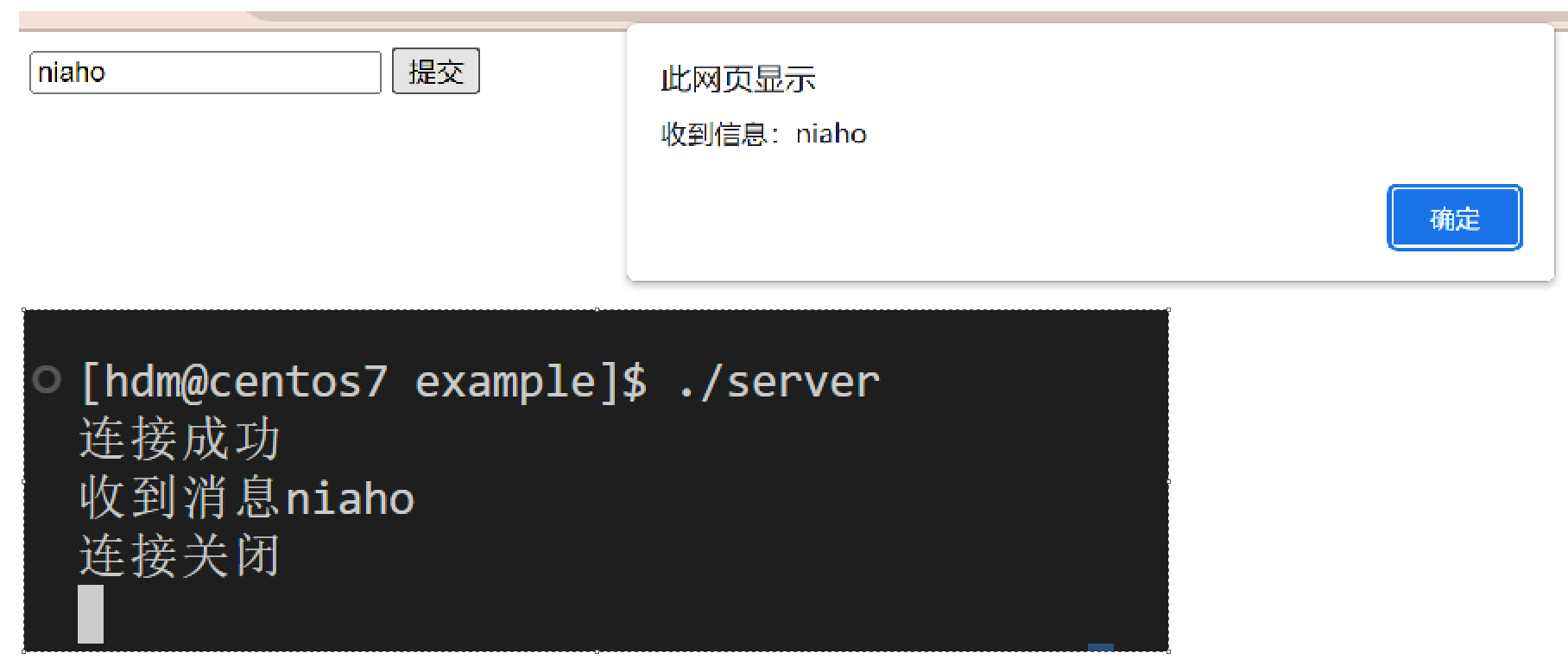
2. JsonCpp使⽤
Json数据格式
Json是⼀种数据交换格式,它采⽤完全独⽴于编程语⾔的⽂本格式来存储和表⽰数据。
例如:我们想表⽰⼀个同学的学⽣信息-
C 代码表⽰
char* name="zhangsan"; int age=20; float score[3];={80.5,90,85};- 1
- 2
- 3
Json表⽰
{ "姓名" : "zhangsan", "年龄" : 20, "成绩" : [80.5,90,85] }- 1
- 2
- 3
- 4
- 5
Json的数据类型包括对象,数组,字符串,数字等。-
对象:使⽤花括号 {} 括起来的表⽰⼀个对象
-
数组:使⽤中括号 [] 括起来的表⽰⼀个数组
-
字符串:使⽤常规双引号 “” 括起来的表⽰⼀个字符串
-
数字:包括整形和浮点型,直接使用
JsonCpp介绍
Jsoncpp 库主要是⽤于实现 Json 格式数据的序列化和反序列化,它实现了将多个数据对象组织成为 json 格式字符串,以及将 Json 格式字符串解析得到多个数据对象的功能。
先看⼀下 Json 数据对象类的表示
class Json::Value { Value& operator=(const Value& other); //Value重载了[]和=,因此所有的赋值和获取数据都可以通过 Value& operator[](const std::string& key);//简单的⽅式完成 val["name"] ="xx"; Value& operator[](const char* key); Value removeMember(const char* key);//移除元素 const Value& operator[](ArrayIndex index) const; //val["score"][0] Value& append(const Value& value);//添加数组元素val["score"].append(88); ArrayIndex size() const;//获取数组元素个数 val["score"].size(); bool isNull(); //⽤于判断是否存在某个字段 std::string asString() const;//转string string name = val["name"].asString(); const char* asCString() const;//转char* char *name = val["name"].asCString(); Int asInt() const;//转int int age = val["age"].asInt(); float asFloat() const;//转float float weight = val["weight"].asFloat(); bool asBool() const;//转 bool bool ok = val["ok"].asBool(); };- 1
- 2
- 3
- 4
- 5
- 6
- 7
- 8
- 9
- 10
- 11
- 12
- 13
- 14
- 15
- 16
- 17
jsoncpp库主要借助三个类以及其对应的少量成员函数完成序列化及反序列化- 序列化接口
class JSON_API StreamWriter { virtual int write(Value const& root, std::ostream* sout) = 0; } class JSON_API StreamWriterBuilder : public StreamWriter::Factory { virtual StreamWriter* newStreamWriter() const; }- 1
- 2
- 3
- 4
- 5
- 6
- 反序列化接口
class JSON_API CharReader { virtual bool parse(char const* beginDoc, char const* endDoc, Value* root, std::string* errs) = 0; } class JSON_API CharReaderBuilder : public CharReader::Factory { virtual CharReader* newCharReader() const; }- 1
- 2
- 3
- 4
- 5
- 6
- 7
JsonCpp功能代码⽤例编写
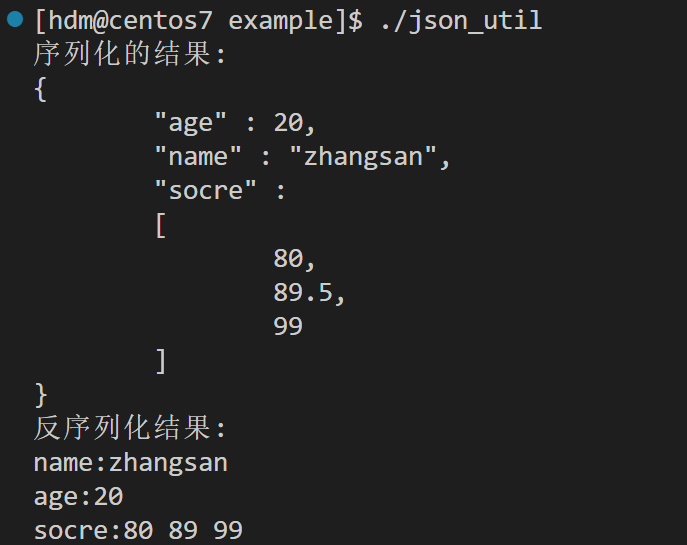
#include#include #include #include #include int main() { //序列化 Json::Value stu; stu["name"]="zhangsan"; stu["age"]=20; stu["socre"].append(80); stu["socre"].append(89.5); stu["socre"].append(99); Json::StreamWriterBuilder swb; std::unique_ptr<Json::StreamWriter> sw(swb.newStreamWriter()); std::stringstream ss; int ret=sw->write(stu,&ss); if(ret!=0){ std::cout<<"Serialize failed"<<std::endl; return -1; } std::cout<<"序列化的结果:\n"<<ss.str()<<std::endl; //反序列化 std::string str=ss.str(); Json::Value root; Json::CharReaderBuilder crb; std::unique_ptr<Json::CharReader> cr(crb.newCharReader()); bool ret1=cr->parse(str.c_str(),str.c_str()+str.size(),&root,nullptr); if(!ret1){ std::cout<<"UnSerialize failed"<<std::endl; return -2; } std::cout << "反序列化结果:\n" << "name:" << root["name"].asString() << "\n" << "age:" << root["age"].asInt() << "\n" << "socre:" << root["socre"][0].asFloat() << " " << root["socre"] [1].asInt() << " " << root["socre"][2].asFloat() << "\n"; return 0; } - 1
- 2
- 3
- 4
- 5
- 6
- 7
- 8
- 9
- 10
- 11
- 12
- 13
- 14
- 15
- 16
- 17
- 18
- 19
- 20
- 21
- 22
- 23
- 24
- 25
- 26
- 27
- 28
- 29
- 30
- 31
- 32
- 33
- 34
- 35
- 36
- 37
- 38
- 39
- 40
- 41
- 42
- 43
- 44
- 45
- 46
运行结果
3. MySQLAPI
MySQLAPI介绍
MySQL是C/S模式,C API其实就是⼀个 MySQL 客⼾端,提供⼀种⽤ C 语⾔代码操作数据库的流程接口说明
// Mysql操作句柄初始化 // 参数说明: // mysql为空则动态申请句柄空间进⾏初始化 // 返回值: 成功返回句柄指针, 失败返回NULL MYSQL* mysql_init(MYSQL* mysql); // 连接mysql服务器 // 参数说明: // mysql--初始化完成的句柄 // host---连接的mysql服务器的地址 // user---连接的服务器的⽤⼾名 // passwd-连接的服务器的密码 // db ----默认选择的数据库名称 // port---连接的服务器的端⼝: 默认0是3306端⼝ // unix_socket---通信管道⽂件或者socket⽂件,通常置NULL // client_flag---客⼾端标志位,通常置0 // 返回值:成功返回句柄指针,失败返回NULL MYSQL * mysql_real_connect(MYSQL * mysql, const char* host, const char* user, const char* passwd, const char* db, unsigned int port, const char* unix_socket, unsigned long client_flag); // 设置当前客⼾端的字符集 // 参数说明: // mysql--初始化完成的句柄 // csname--字符集名称,通常:"utf8" // 返回值:成功返回0, 失败返回⾮0 int mysql_set_character_set(MYSQL* mysql, const char* csname); // 选择操作的数据库 // 参数说明: // mysql--初始化完成的句柄 // db-----要切换选择的数据库名称 // 返回值:成功返回0, 失败返回⾮0 int mysql_select_db(MYSQL* mysql, const char* db); // 执⾏sql语句 // 参数说明: // mysql--初始化完成的句柄 // stmt_str--要执⾏的sql语句 // 返回值:成功返回0, 失败返回⾮0 int mysql_query(MYSQL* mysql, const char* stmt_str); // 保存查询结果到本地 // 参数说明: // mysql--初始化完成的句柄 // 返回值:成功返回结果集的指针, 失败返回NULL MYSQL_RES* mysql_store_result(MYSQL* mysql); // 获取结果集中的⾏数 // 参数说明: // result--保存到本地的结果集地址 // 返回值:结果集中数据的条数 uint64_t mysql_num_rows(MYSQL_RES* result); // 获取结果集中的列数 // 参数说明: // result--保存到本地的结果集地址 // 返回值:结果集中每⼀条数据的列数 unsigned int mysql_num_fields(MYSQL_RES* result); // 遍历结果集, 并且这个接⼝会保存当前读取结果位置,每次获取的都是下⼀条数据 // 参数说明: // result--保存到本地的结果集地址 // 返回值:实际上是⼀个char **的指针,将每⼀条数据做成了字符串指针数组 // row[0]-第0列 row[1]-第1列 ... MYSQL_ROW mysql_fetch_row(MYSQL_RES* result); // 释放结果集 // 参数说明: // result--保存到本地的结果集地址 void mysql_free_result(MYSQL_RES* result); // 关闭数据库客⼾端连接,销毁句柄 // 参数说明: // mysql--初始化完成的句柄 void mysql_close(MYSQL* mysql); // 获取mysql接⼝执⾏错误原因 // 参数说明: // mysql--初始化完成的句柄 const char* mysql_error(MYSQL* mysql);- 1
- 2
- 3
- 4
- 5
- 6
- 7
- 8
- 9
- 10
- 11
- 12
- 13
- 14
- 15
- 16
- 17
- 18
- 19
- 20
- 21
- 22
- 23
- 24
- 25
- 26
- 27
- 28
- 29
- 30
- 31
- 32
- 33
- 34
- 35
- 36
- 37
- 38
- 39
- 40
- 41
- 42
- 43
- 44
- 45
- 46
- 47
- 48
- 49
- 50
- 51
- 52
- 53
- 54
- 55
- 56
- 57
- 58
- 59
- 60
- 61
- 62
- 63
- 64
- 65
- 66
- 67
- 68
- 69
- 70
MySQLAPI使⽤
下⾯我们使⽤ C API 来实现 MySQL 的增删改查操作
- 创建测试数据库
create database if not exists test_db; use test_db; create table stu( id int primary key auto_increment, age int, name varchar(32) );- 1
- 2
- 3
- 4
- 5
- 6
- 7
-
连接MySQL服务,进⼊shell并执⾏sql语句
-
实现增删改查操作
#include#include #define HOST "127.0.0.1" #define USER "root" #define PASSWD "sa1212@@" #define DBNAME "test_db" //添加数据 void add(MYSQL* mysql){ const char* sql="insert into stu value(null,20,'zhangsan')"; //执行sql语句 int ret=mysql_query(mysql,sql); if(ret!=0){ std::cerr<<mysql_error(mysql)<<std::endl; } } //删除数据 void del(MYSQL* mysql){ const char* sql="delete from stu where name='zhangsan'"; //执行sql语句 int ret=mysql_query(mysql,sql); if(ret!=0){ std::cerr<<mysql_error(mysql)<<std::endl; } } //修改数据 void mod(MYSQL* mysql){ const char* sql="update stu set age=20 where name='zhangsan' "; //执行sql语句 int ret=mysql_query(mysql,sql); if(ret!=0){ std::cerr<<mysql_error(mysql)<<std::endl; } } void get(MYSQL* mysql){ const char* sql=" select * from stu "; //执行sql语句 int ret=mysql_query(mysql,sql); if(ret!=0){ std::cerr<<mysql_error(mysql)<<std::endl; return; } // 保存查询结果到本地 MYSQL_RES* res=mysql_store_result(mysql); if(res==nullptr){ printf("mysql store result error:%s\n", mysql_error(mysql)); return ; } //获取结果集的行数 int row=mysql_num_rows(res); //获取结果集的列数 int col=mysql_num_fields(res); //遍历结果集 printf("%10s%10s%10s\n","id","age","name"); for(int i=0;i<row;++i){ MYSQL_ROW reslut=mysql_fetch_row(res); for(int j=0;j<col;++j){ printf("%10s",reslut[j]); } std::cout<<std::endl; } //释放结果集 mysql_free_result(res); } int main() { //MySQL操作句柄初始化 MYSQL* mysql=mysql_init(nullptr); if(mysql==nullptr){ std::cerr<<"mysql_init fail"<<std::endl; return -1; } //连接MySQL服务器 // 参数说明: // mysql--初始化完成的句柄 // host---连接的mysql服务器的地址 // user---连接的服务器的⽤⼾名 // passwd-连接的服务器的密码 // db ----默认选择的数据库名称 // port---连接的服务器的端⼝: 默认0是3306端⼝ // unix_socket---通信管道⽂件或者socket⽂件,通常置NULL // client_flag---客⼾端标志位,通常置0 //MYSQL* mysql_real_connect(MYSQL* mysql, const char* host, const char* user,const char* passwd, //const char* db, unsigned int port,const char* unix_socket, unsigned long client_flag) if(mysql_real_connect(mysql,HOST,USER,PASSWD,DBNAME,0,nullptr,0)==nullptr){ std::cerr<<"mysql_real_connect fail!!!"<<std::endl; return 2; } // 设置当前客⼾端的字符集 int ret=mysql_set_character_set(mysql, "utf8"); if(ret!=0){ std::cerr<<"mysql_set_character_set fail!!!"<<std::endl; return 3; } // add(mysql); // mod(mysql); // del(mysql); get(mysql); //关闭客户端连接 mysql_close(mysql); return 0; } - 1
- 2
- 3
- 4
- 5
- 6
- 7
- 8
- 9
- 10
- 11
- 12
- 13
- 14
- 15
- 16
- 17
- 18
- 19
- 20
- 21
- 22
- 23
- 24
- 25
- 26
- 27
- 28
- 29
- 30
- 31
- 32
- 33
- 34
- 35
- 36
- 37
- 38
- 39
- 40
- 41
- 42
- 43
- 44
- 45
- 46
- 47
- 48
- 49
- 50
- 51
- 52
- 53
- 54
- 55
- 56
- 57
- 58
- 59
- 60
- 61
- 62
- 63
- 64
- 65
- 66
- 67
- 68
- 69
- 70
- 71
- 72
- 73
- 74
- 75
- 76
- 77
- 78
- 79
- 80
- 81
- 82
- 83
- 84
- 85
- 86
- 87
- 88
- 89
- 90
- 91
- 92
- 93
- 94
- 95
- 96
- 97
- 98
- 99
- 100
- 101
- 102
- 103
- 104
- 105
- 106
- 107
- 108
项⽬结构设计
项⽬模块划分说明
项⽬的实现,咱们将其划分为三个⼤模块来进⾏:
• 数据管理模块:基于Mysql数据库进⾏⽤⼾数据的管理
•前端界⾯模块:基于JS实现前端⻚⾯(注册,登录,游戏⼤厅,游戏房间)的动态控制以及与服务器的通信。
• 业务处理模块:搭建WebSocket服务器与客⼾端进⾏通信,接收请求并进⾏业务处理。
在这⾥回顾⼀下我们要实现的项⽬功能,我们要实现的是⼀个在线五⼦棋对战服务器,提供⽤⼾通过浏览器进⾏⽤⼾注册,登录,以及实时匹配,对战,聊天等功能。
⽽如果要实现这些功能,那么就需要对业务处理模块再次进⾏细分为多个模块来实现各个功能。
业务处理模块的⼦模块划分
• ⽹络通信模块:基于websocketpp库实现Http&WebSocket服务器的搭建,提供⽹络通信功能。
• 会话管理模块:对客⼾端的连接进⾏cookie&session管理,实现http短连接时客⼾端⾝份识别功能。
• 在线管理模块:对进⼊游戏⼤厅与游戏房间中⽤⼾进⾏管理,提供⽤⼾是否在线以及获取⽤⼾连接的功能。
•房间管理模块:为匹配成功的⽤⼾创建对战房间,提供实时的五⼦棋对战与聊天业务功能。
•⽤⼾匹配模块:根据天梯分数不同进⾏不同层次的玩家匹配,为匹配成功的玩家创建房间并加⼊房间。
项⽬流程图
玩家⽤⼾⻆度流程图

服务器流程结构图

1.实⽤⼯具类模块代码实现
实⽤⼯具类模块主要是负责提前实现⼀些项⽬中会⽤到的边缘功能代码,提前实现好了就可以在项⽬中⽤到的时候直接使⽤了。
日志宏的实现
需要用到函数
time_t time(time_t *t); struct tm *localtime(const time_t *timep); struct tm *localtime_r(const time_t *timep, struct tm *result); size_t strftime(char *s, size_t max, const char *format,const struct tm *tm);- 1
- 2
- 3
- 4
- 5
#pragma once #include#include #define INF 0 #define DBG 1 #define ERR 2 #define DEFAULT_LOG_LEVEL INF // #define LOG(format,...) fprintf(stdout,format"\n" ,__VA_ARGS__) // #define LOG(format,...) fprintf(stdout,format"\n" ,##__VA_ARGS__) #define LOG(level,format,...) do{\ if(level < DEFAULT_LOG_LEVEL) break;\ time_t t=time(nullptr);\ struct tm* tm=localtime(&t);\ char tmp[32]={0};\ strftime(tmp,31,"%H:%M:%S",tm);\ fprintf(stdout,"[%s:%s:%d] " format "\n",tmp,__FILE__,__LINE__,##__VA_ARGS__);\ }while(0) #define INF_LOG(format,...) LOG(INF,format,##__VA_ARGS__) #define DBG_LOG(format,...) LOG(DBG,format,##__VA_ARGS__) #define ERR_LOG(format,...) LOG(ERR,format,##__VA_ARGS__) //运行出来的结果类似 //[21:47:23:filename:位于第几行数] xxxxx //[21:47:23:filename:位于第几行数] xxxx - 1
- 2
- 3
- 4
- 5
- 6
- 7
- 8
- 9
- 10
- 11
- 12
- 13
- 14
- 15
- 16
- 17
- 18
- 19
- 20
- 21
- 22
- 23
- 24
- 25
- 26
- 27
Jsoncpp-API封装
#pragma once #include#include #include #include #include "logger.hpp" class json_util{ public: //序列化 static bool serialize(const Json::Value& value,std::string& str){ std::stringstream ss; Json::StreamWriterBuilder swb; std::unique_ptr<Json::StreamWriter> sw(swb.newStreamWriter()); int ret=sw->write(value,&ss); if(ret!=0){ ERR_LOG("serialize fail"); return false; } str=ss.str(); return true; } //反序列化 static bool unserialize(const std::string& str,Json::Value& value){ Json::CharReaderBuilder crb; std::unique_ptr<Json::CharReader> cb(crb.newCharReader()); bool ret=cb->parse(str.c_str(),str.c_str()+str.size(),&value,nullptr); if(ret==false){ ERR_LOG("unserialize fail"); return false; } return true; } }; - 1
- 2
- 3
- 4
- 5
- 6
- 7
- 8
- 9
- 10
- 11
- 12
- 13
- 14
- 15
- 16
- 17
- 18
- 19
- 20
- 21
- 22
- 23
- 24
- 25
- 26
- 27
- 28
- 29
- 30
- 31
- 32
- 33
- 34
Mysql-API封装
class mysql_util{ public: //创建mysql句柄 static MYSQL* mysql_create(const std::string& host, const std::string& user, const std::string passwd, const std::string& db,int port){ //MySQL操作句柄初始化 MYSQL* mysql=mysql_init(nullptr); if(mysql==nullptr){ ERR_LOG("mysql_init fail"); return nullptr; } //连接MySQL服务器 if(mysql_real_connect(mysql,host.c_str(),user.c_str(),passwd.c_str(),db.c_str(),port,nullptr,0)==nullptr){ ERR_LOG("mysql connect fail"); return nullptr; } // 设置当前客⼾端的字符集 int ret=mysql_set_character_set(mysql,"utf8"); if(ret!=0){ ERR_LOG("set character fail"); return nullptr; } return mysql; } //关闭连接 static void mysql_release(MYSQL* mysql){ if(mysql==nullptr) return; mysql_close(mysql); } //执行sql语句 static bool mysql_exec(MYSQL* mysql,const std::string& sql){ if(mysql_query(mysql,sql.c_str())!=0){ ERR_LOG("SQL:%s",sql.c_str()); ERR_LOG("ERR:%s",mysql_errno(mysql)); return false; } return true; } };- 1
- 2
- 3
- 4
- 5
- 6
- 7
- 8
- 9
- 10
- 11
- 12
- 13
- 14
- 15
- 16
- 17
- 18
- 19
- 20
- 21
- 22
- 23
- 24
- 25
- 26
- 27
- 28
- 29
- 30
- 31
- 32
- 33
- 34
- 35
- 36
- 37
- 38
- 39
- 40
- 41
- 42
String-Split封装
class string_util{ public: static int split(const std::string &in,const std::string& seq,std::vector<std::string>& array){ int index=0,pos; while(index<in.size()){ pos=in.find(seq,index); if(pos==std::string::npos){ array.push_back(in.substr(index)); break; } if(pos-index>0) array.push_back(in.substr(index,pos-index)); index=pos+seq.size(); } return array.size(); } };- 1
- 2
- 3
- 4
- 5
- 6
- 7
- 8
- 9
- 10
- 11
- 12
- 13
- 14
- 15
- 16
- 17
File-read封装
class file_util{ public: static bool read(const std::string& filename,std::string& body){ std::ifstream file; //打开文件 file.open(filename,std::ios::in | std::ios::binary); if(!file){ ERR_LOG(" %s: open fail",filename); return false; } //获取文件大小 //把文件指针移动到末尾 file.seekg(0,std::ios::end); //获取当前位置偏移量并用它来给body开好空间 body.resize(file.tellg()); //让文件指针重新回到开始 file.seekg(0,std::ios::beg); file.read(&body[0],body.size()); if(file.good()==false){ ERR_LOG("%s : Read failed!",filename); file.close(); return false; } file.close(); return true; } };- 1
- 2
- 3
- 4
- 5
- 6
- 7
- 8
- 9
- 10
- 11
- 12
- 13
- 14
- 15
- 16
- 17
- 18
- 19
- 20
- 21
- 22
- 23
- 24
- 25
- 26
- 27
2. 数据管理模块实现
数据管理模块主要负责对于数据库中数据进⾏统⼀的增删改查管理,其他模块要对数据操作都必须通过数据管理模块完成。
数据库设计
创建user表,⽤来表⽰⽤⼾信息及积分信息
• ⽤⼾信息,⽤来实现登录、注册、游戏对战数据管理等功能
• 积分信息,⽤来实现匹配功能create database if not exists online_gobang; use online_gobang; create table if not exists user( id int primary key auto_increment, username varchar(32) not null, password varchar(128) not null, score int, total_count int, win_count int );- 1
- 2
- 3
- 4
- 5
- 6
- 7
- 8
- 9
- 10
创建user_table类
数据库中有可能存在很多张表,每张表中管理的数据⼜有不同,要进⾏的数据操作也各不相同,因此
我们可以为每⼀张表中的数据操作都设计⼀个类,通过类实例化的对象来访问这张数据库表中的数据,这样的话当我们要访问哪张表的时候,使⽤哪个类实例化的对象即可。创建user_table类,该类的作⽤是负责通过 MySQL 接⼝管理⽤⼾数据。主要提供了四个⽅法:-
select_by_name:根据⽤⼾名查找⽤⼾信息,⽤于实现登录功能
-
insert:新增⽤⼾,⽤⼾实现注册功能
-
login:登录验证,并获取完整的⽤⼾信息
-
win:⽤于给获胜玩家修改分数
-
lose:⽤⼾给失败玩家修改分数
#pragma once #include "util.hpp" #include#include class user_table{ private: std::mutex _mutex;//互斥锁保护数据库的访问操作 MYSQL* _mysql;//mysql操作句柄 public: user_table( const std::string& host, const std::string& user, const std::string passwd, const std::string& db,int port){ _mysql=mysql_util::mysql_create(host,user,passwd,db,port); if(_mysql==nullptr){ ERR_LOG("msyql create failed!!!"); assert(_mysql); } } //注册时新增用户 bool insert(Json::Value &user){ //初始分数给1000 #define INSERT_USER "insert into user value(null,'%s',MD5('%s'),1000,0,0);" if(user["username"].isNull() || user["password"].isNull() ){ DBG_LOG("用户名和密码不完整!!"); return false; } char sql[1024]; sprintf(sql,INSERT_USER,user["username"].asCString(),user["password"].asCString()); bool ret=mysql_util::mysql_exec(_mysql,sql); if(ret==false){ DBG_LOG("insert user info failed!!"); return false; } return true; } //登录验证,并返回详细的用户信息 bool login(Json::Value & user){ if(user["username"].isNull() || user["password"].isNull()){ DBG_LOG("INPUT USERNAME OR PASSWORD"); return false; } #define LOGIN_USER "select id, score,total_count,win_count from user where username= '%s' and password=MD5('%s'); " char sql[1024]; sprintf(sql,LOGIN_USER,user["username"].asCString(),user["password"].asCString()); MYSQL_RES* res=nullptr; { std::unique_lock<std::mutex> lock(_mutex); bool ret=mysql_util::mysql_exec(_mysql,sql); if(ret==false){ DBG_LOG("user login failed!!"); return false; } //按理来说,要么没数据,要么只有一条数据 res=mysql_store_result(_mysql); if(res==nullptr){ DBG_LOG("no login info!!!"); return false; } } //行数不等于1的情况 if(mysql_num_rows(res)!=1){ DBG_LOG("the user information queried is not unique!!"); return false; } //获取这一行数据 MYSQL_ROW row=mysql_fetch_row(res); user["id"]=(Json::UInt64)std::stoi(row[0]); user["score"]=(Json::UInt64)std::stoi(row[1]); user["total_count"]=(Json::UInt64)std::stoi(row[2]); user["win_count"]=(Json::UInt64)std::stoi(row[3]); //释放结果集 mysql_free_result(res); return true; } //通过用户名获取用户信息 bool select_by_name(const std::string& name,Json::Value &user){ #define USER_BY_NAME "select id,score,total_count,win_count from user where username='%s';" char sql[1024]; sprintf(sql,USER_BY_NAME,name.c_str()); MYSQL_RES* res=nullptr; { std::unique_lock<std::mutex> lock(_mutex); bool ret=mysql_util::mysql_exec(_mysql,sql); if(ret==false){ DBG_LOG("get user by name failed!!!"); return false; } res=mysql_store_result(_mysql); if(res==nullptr){ DBG_LOG("name:%s not in mysql",name.c_str()); return false; } } if(mysql_num_rows(res)!=1){ DBG_LOG("the user information queried is not unique!!"); return false; } //获取这一行数据 MYSQL_ROW row=mysql_fetch_row(res); user["id"]=(Json::UInt64)std::stoi(row[0]); user["username"]=name; user["score"]=(Json::UInt64)std::stoi(row[1]); user["total_count"]=(Json::UInt64)std::stoi(row[2]); user["win_count"]=(Json::UInt64)std::stoi(row[3]); //释放结果集 mysql_free_result(res); return true; } //通过ID获取用户信息 bool select_by_id(const uint64_t id,Json::Value &user){ #define USER_BY_ID "select username,score,total_count,win_count from user where id=%d;" char sql[1024]; sprintf(sql,USER_BY_ID,id); MYSQL_RES* res=nullptr; { std::unique_lock<std::mutex> lock(_mutex); bool ret=mysql_util::mysql_exec(_mysql,sql); if(ret==false){ DBG_LOG("get user by name failed!!!"); return false; } res=mysql_store_result(_mysql); if(res==nullptr){ DBG_LOG("id: %d have no user info!!",id); return false; } } if(mysql_num_rows(res)!=1){ DBG_LOG("the user information queried is not unique!!"); return false; } //获取这一行数据 MYSQL_ROW row=mysql_fetch_row(res); user["id"]=(Json::UInt64)id; user["username"]=row[0]; user["score"]=(Json::UInt64)std::stoi(row[1]); user["total_count"]=(Json::UInt64)std::stoi(row[2]); user["win_count"]=(Json::UInt64)std::stoi(row[3]); //释放结果集 mysql_free_result(res); return true; } //胜利时天梯分数增加30,战斗场次增加1,胜利场次增加1 bool win(uint64_t id){ #define USER_WIN "update user set score=score+30,total_count=total_count+1,win_count=win_count+1 where id=%d;" char sql[1024]; sprintf(sql,USER_WIN,id); bool ret=mysql_util::mysql_exec(_mysql,sql); if(ret==false){ DBG_LOG("update win user info failed!!!"); return false; } return true; } //失败时天梯分数减少30,战斗场数增加1,其他不变 bool lose(uint64_t id){ #define USER_LOSE "update user set score=score-30,total_count=total_count+1 where id=%d;" char sql[1024]; sprintf(sql,USER_LOSE,id); bool ret=mysql_util::mysql_exec(_mysql,sql); if(ret==false){ DBG_LOG("update lose user info failed!!!"); return false; } return true; } }; - 1
- 2
- 3
- 4
- 5
- 6
- 7
- 8
- 9
- 10
- 11
- 12
- 13
- 14
- 15
- 16
- 17
- 18
- 19
- 20
- 21
- 22
- 23
- 24
- 25
- 26
- 27
- 28
- 29
- 30
- 31
- 32
- 33
- 34
- 35
- 36
- 37
- 38
- 39
- 40
- 41
- 42
- 43
- 44
- 45
- 46
- 47
- 48
- 49
- 50
- 51
- 52
- 53
- 54
- 55
- 56
- 57
- 58
- 59
- 60
- 61
- 62
- 63
- 64
- 65
- 66
- 67
- 68
- 69
- 70
- 71
- 72
- 73
- 74
- 75
- 76
- 77
- 78
- 79
- 80
- 81
- 82
- 83
- 84
- 85
- 86
- 87
- 88
- 89
- 90
- 91
- 92
- 93
- 94
- 95
- 96
- 97
- 98
- 99
- 100
- 101
- 102
- 103
- 104
- 105
- 106
- 107
- 108
- 109
- 110
- 111
- 112
- 113
- 114
- 115
- 116
- 117
- 118
- 119
- 120
- 121
- 122
- 123
- 124
- 125
- 126
- 127
- 128
- 129
- 130
- 131
- 132
- 133
- 134
- 135
- 136
- 137
- 138
- 139
- 140
- 141
- 142
- 143
- 144
- 145
- 146
- 147
- 148
- 149
- 150
- 151
- 152
- 153
- 154
- 155
- 156
- 157
- 158
- 159
- 160
- 161
- 162
- 163
- 164
- 165
- 166
- 167
- 168
- 169
- 170
- 171
在线用户管理模块实现
在线用户管理,是对于当前游戏⼤厅和游戏房间中的用户进⾏管理,主要是建⽴起用户与Socket连接的映射关系,这个模块具有两个功能:
-
能够让程序中根据用户信息,进⽽找到能够与用户客⼾端进⾏通信的Socket连接,进⽽实现与客⼾端的通信。
-
判断⼀个用户是否在线,或者判断用户是否已经掉线。
class online_manager { private: /*游戏⼤厅的客⼾端连接管理*/ std::unordered_map<uint64_t, websocket_server::connection_ptr> _game_hall; /*游戏房间的客⼾端连接管理*/ std::unordered_map<uint64_t, websocket_server::connection_ptr> _game_room; std::mutex _mutex; public: /*进⼊游戏⼤厅--游戏⼤厅连接建⽴成功后调⽤*/ void enter_game_hall(uint64_t uid, const websocket_server::connection_ptr& conn) { std::unique_lock<std::mutex> lock(_mutex); _game_hall.insert(std::make_pair(uid, conn)); } /*退出游戏⼤厅--游戏⼤厅连接断开后调⽤*/ void exit_game_hall(uint64_t uid) { std::unique_lock<std::mutex> lock(_mutex); _game_hall.erase(uid); } /*进⼊游戏房间--游戏房间连接建⽴成功后调⽤*/ void enter_game_room(uint64_t uid, const websocket_server::connection_ptr& conn) { std::unique_lock<std::mutex> lock(_mutex); _game_room.insert(std::make_pair(uid, conn)); } /*退出游戏房间--游戏房间连接断开后调⽤*/ void exit_game_room(uint64_t uid) { std::unique_lock<std::mutex> lock(_mutex); _game_room.erase(uid); } /*判断⽤⼾是否在游戏⼤厅*/ bool in_game_hall(uint64_t uid) { std::unique_lock<std::mutex> lock(_mutex); auto it = _game_hall.find(uid); if (it == _game_hall.end()) { return false; } return true; } /*判断⽤⼾是否在游戏房间*/ bool in_game_room(uint64_t uid) { std::unique_lock<std::mutex> lock(_mutex); auto it = _game_room.find(uid); if (it == _game_room.end()) { return false; } return true; } /*从游戏⼤厅中获取指定⽤⼾关联的Socket连接*/ bool get_conn_from_game_hall(uint64_t uid, websocket_server::connection_ptr& conn) { std::unique_lock<std::mutex> lock(_mutex); auto it = _game_hall.find(uid); if (it == _game_hall.end()) { return false; } conn = it->second; return true; } /*从游戏房间中获取指定⽤⼾关联的Socket连接*/ bool get_conn_from_game_room(uint64_t uid, websocket_server::connection_ptr& conn) { std::unique_lock<std::mutex> lock(_mutex); auto it = _game_room.find(uid); if (it == _game_room.end()) { return false; } conn = it->second; return true; } };- 1
- 2
- 3
- 4
- 5
- 6
- 7
- 8
- 9
- 10
- 11
- 12
- 13
- 14
- 15
- 16
- 17
- 18
- 19
- 20
- 21
- 22
- 23
- 24
- 25
- 26
- 27
- 28
- 29
- 30
- 31
- 32
- 33
- 34
- 35
- 36
- 37
- 38
- 39
- 40
- 41
- 42
- 43
- 44
- 45
- 46
- 47
- 48
- 49
- 50
- 51
- 52
- 53
- 54
- 55
- 56
- 57
- 58
- 59
- 60
- 61
- 62
- 63
- 64
- 65
- 66
- 67
- 68
- 69
- 70
- 71
- 72
- 73
3. 游戏房间管理模块
房间类实现
⾸先,需要设计⼀个房间类,能够实现房间的实例化,房间类主要是对匹配成对的玩家建⽴⼀个⼩范围的关联关系,⼀个房间中任意⼀个⽤⼾发⽣的任何动作,都会被⼴播给房间中的其他用户。
而房间中的动作主要包含两类:
-
棋局对战
-
实时聊天
⾛棋的Json格式
{ "optype": "put_chess", // put_chess表⽰当前请求是下棋操作 "room_id": 222, // room_id 表⽰当前动作属于哪个房间 "uid": 1, // 当前的下棋操作是哪个⽤⼾发起的 "row": 3, // 当前下棋位置的⾏号 "col": 2 // 当前下棋位置的列号 } { "optype": "put_chess", "result": false "reason": "⾛棋失败具体原因...." } { "optype": "put_chess", "result": true, "reason": "对⽅掉线,不战⽽胜!" / "对⽅/⼰⽅五星连珠,战⽆敌/虽败犹荣!", "room_id": 222, "uid": 1, "row": 3, "col": 2, "winner": 0 // 0-未分胜负, !0-已分胜负 (uid是谁,谁就赢了) }- 1
- 2
- 3
- 4
- 5
- 6
- 7
- 8
- 9
- 10
- 11
- 12
- 13
- 14
- 15
- 16
- 17
- 18
- 19
- 20
- 21
- 22
- 23
- 24
聊天的Json格式
{ "optype": "chat", "room_id": 222, "uid": 1, "message": "赶紧点" } { "optype": "chat", "result": false "reason": "聊天失败具体原因....⽐如有敏感词..." } { "optype": "chat", "result": true, "room_id": 222, "uid": 1, "message": "赶紧点" }- 1
- 2
- 3
- 4
- 5
- 6
- 7
- 8
- 9
- 10
- 11
- 12
- 13
- 14
- 15
- 16
- 17
- 18
#pragma once #include "db.hpp" #include "online.hpp" #define BOARD_ROW 15 #define BOARD_COL 15 #define CHESS_WHILE 1 #define CHESS_BLACK 2 typedef enum{GAME_OVER,GAME_START} room_statu; class room{ private: uint64_t _room_id;//房间ID room_statu _statu;//房间状态 int _player_count;//房间人数 uint64_t _white_id;//白棋玩家 uint64_t _black_id;//黑棋玩家 user_table* _tb_user;//数据库用户表 online_manager* _online_user;//在线用户管理 std::vector<std::vector<int>> _board; public: room(uint64_t room_id,user_table* ut,online_manager* om) :_room_id(room_id),_tb_user(ut),_online_user(om),_player_count(0),_statu(GAME_START), _board(BOARD_ROW,std::vector<int>(BOARD_COL,0)){ DBG_LOG("%lu 房间创建成功!!",_room_id); } ~room(){ DBG_LOG("%lu 房间销毁成功!!",_room_id); } uint64_t id(){return _room_id;} int player_count(){return _player_count;} uint64_t white_id(){return _white_id;} uint64_t black_id(){return _black_id;} room_statu statu(){return _statu;} /*处理下棋动作*/ Json::Value handler_chess(Json::Value &req){ Json::Value json_resp=req; //1.判断房间中两个玩家是否在线,任意一方不在线,就是另一方胜利 if(_online_user->is_game_room(_white_id)==false){ json_resp["result"]=true; json_resp["reason"]="对⽅掉线,不战⽽胜!"; json_resp["winner"]=(Json::UInt64)_black_id; return json_resp; } if(_online_user->is_game_room(_black_id)==false){ json_resp["result"]=true; json_resp["reason"]="对⽅掉线,不战⽽胜!"; json_resp["winner"]=(Json::UInt64)_white_id; return json_resp; } //2.获取当前走棋位置,判断是否合理(位置是否已经被占用) int chess_row=req["row"].asInt(); int chess_col=req["col"].asInt(); if(_board[chess_row][chess_col]!=0){ json_resp["result"]=false; json_resp["reason"]="当前棋子已经有了其他棋子!"; return json_resp; } //3. 判断是否有玩家胜利(从当前位置开始判断是否存在五子连珠) uint64_t cur_uid=req["uid"].asInt64(); int cur_color=cur_uid==_white_id?CHESS_WHILE:CHESS_BLACK; uint64_t winner_id=check_win(chess_row,chess_col,cur_color); if(winner_id!=0){ json_resp["reason"]="五星连珠,战⽆敌"; } json_resp["result"]=true; json_resp["winner"]=(Json::UInt64)winner_id; return json_resp; } /*处理聊天动作*/ Json::Value handler_chat(Json::Value &req){ Json::Value json_resp=req; //检测消息中是否含有敏感词 std::string msg=req["message"].asString(); size_t pos=msg.find("垃圾"); if(pos!=std::string::npos){ json_resp["result"]=false; json_resp["reason"]="消息中包含敏感词,不能发送!"; return json_resp; } //返回消息---要广播消息 json_resp["result"]=true; return json_resp; } /*处理玩家退出房间动作*/ void handler_exit(uint64_t uid){ //如果在下棋的时候退出,则另一位玩家获胜,如果是游戏结束后退出,则是正常退出 Json::Value json_resp; if(_statu==GAME_START){ uint64_t winner_id=uid==_white_id?_black_id:_white_id; json_resp["optype"]="put_chess"; json_resp["result"]=true; json_resp["reason"]="对⽅掉线,不战⽽胜!"; json_resp["room_id"]=(Json::UInt64)_room_id; json_resp["uid"]=(Json::UInt64)uid; json_resp["winner"]=(Json::UInt64)winner_id; json_resp["row"]=-1; json_resp["col"]=-1; uint64_t loser_id=winner_id==_white_id?_black_id:_white_id; _tb_user->win(winner_id); _tb_user->lose(loser_id); _statu=GAME_OVER; broadcast(json_resp); } //房间人数-- _player_count--; return; } /*将指定的信息⼴播给房间中所有玩家*/ void broadcast(Json::Value &rsp){ //1.对要响应的信息进行序列化 std::string body; json_util::serialize(rsp,body); //2. 获取房间中所有用户的连接 //3. 发送响应信息 wsserver_t::connection_ptr wconn; _online_user->get_conn_from_game_room(_white_id,wconn); if(wconn.get()!=nullptr){ wconn->send(body); }else{ DBG_LOG("房间-⽩棋玩家连接获取失败"); } wsserver_t::connection_ptr bconn; _online_user->get_conn_from_game_room(_black_id,bconn); if(bconn.get()!=nullptr){ bconn->send(body); }else{ DBG_LOG("房间-黑棋玩家连接获取失败"); } } /*总的请求处理函数,在函数内部,区分请求类型,根据不同的请求调⽤不同的处理函数,得到响应进⾏⼴播*/ void handler_request(Json::Value &req){ //1. 校验房间号是否匹配 Json::Value json_resp; uint64_t room_id=req["room_id"].asInt64(); if(room_id!=_room_id){ json_resp["optype"]=req["optype"].asString(); json_resp["result"]=false; json_resp["reason"]="房间号不匹配!!"; return broadcast(json_resp); } //2. 根据不同的请求类型调⽤不同的处理函数 if(req["optype"].asString()=="put_chess"){ json_resp=handler_chess(req); if(json_resp["winner"].asUInt64()!=0){ uint64_t winner_id=json_resp["winner"].asUInt64(); uint64_t loser_id=winner_id==_white_id?_black_id:_white_id; _tb_user->win(winner_id); _tb_user->lose(loser_id); _statu=GAME_OVER; } }else if(req["optype"].asString()=="chat"){ json_resp=handler_chess(req); }else{ json_resp["optype"]=req["optype"].asString(); json_resp["reason"]="未知请求类型"; json_resp["result"]=false; } return broadcast(json_resp); } private: int check_win(int row,int col,int color){ // 从下棋位置的四个不同⽅向上检测是否出现了5个及以上相同颜⾊的棋⼦(横⾏,纵列,正斜,反斜) if(five(row,col,0,1,color) || five(row,col,1,0,color) || five(row,col,1,1,color) || five(row,col,-1,1,color)){ //任意⼀个⽅向上出现了true也就是五星连珠,则设置返回值 return color==CHESS_WHILE?_white_id:_black_id; } return 0; } bool five(int row,int col,int row_off,int col_off,int color){ int count=1; //row和col是下棋位置, row_off和col_off是偏移量,也是⽅向 int search_row=row+row_off; int search_col=col+col_off; while(search_row<BOARD_ROW && search_row>=0 && search_col<BOARD_COL && search_col>=0 && _board[search_row][search_col]==color){ //同⾊棋⼦数量++ count++; //检索位置继续向后偏移 search_row+=row_off; search_col+=col_off; } search_row=row-row_off; search_col=col-col_off; while(search_row<BOARD_ROW && search_row>=0 && search_col<BOARD_COL && search_col>=0 && _board[search_row][search_col]==color){ count++; search_row-=row_off; search_col-=col_off; } return (count>=5); } };- 1
- 2
- 3
- 4
- 5
- 6
- 7
- 8
- 9
- 10
- 11
- 12
- 13
- 14
- 15
- 16
- 17
- 18
- 19
- 20
- 21
- 22
- 23
- 24
- 25
- 26
- 27
- 28
- 29
- 30
- 31
- 32
- 33
- 34
- 35
- 36
- 37
- 38
- 39
- 40
- 41
- 42
- 43
- 44
- 45
- 46
- 47
- 48
- 49
- 50
- 51
- 52
- 53
- 54
- 55
- 56
- 57
- 58
- 59
- 60
- 61
- 62
- 63
- 64
- 65
- 66
- 67
- 68
- 69
- 70
- 71
- 72
- 73
- 74
- 75
- 76
- 77
- 78
- 79
- 80
- 81
- 82
- 83
- 84
- 85
- 86
- 87
- 88
- 89
- 90
- 91
- 92
- 93
- 94
- 95
- 96
- 97
- 98
- 99
- 100
- 101
- 102
- 103
- 104
- 105
- 106
- 107
- 108
- 109
- 110
- 111
- 112
- 113
- 114
- 115
- 116
- 117
- 118
- 119
- 120
- 121
- 122
- 123
- 124
- 125
- 126
- 127
- 128
- 129
- 130
- 131
- 132
- 133
- 134
- 135
- 136
- 137
- 138
- 139
- 140
- 141
- 142
- 143
- 144
- 145
- 146
- 147
- 148
- 149
- 150
- 151
- 152
- 153
- 154
- 155
- 156
- 157
- 158
- 159
- 160
- 161
- 162
- 163
- 164
- 165
- 166
- 167
- 168
- 169
- 170
- 171
- 172
- 173
- 174
- 175
- 176
- 177
- 178
- 179
- 180
- 181
- 182
- 183
- 184
- 185
- 186
- 187
- 188
- 189
- 190
- 191
- 192
- 193
- 194
- 195
- 196
- 197
- 198
- 199
- 200
- 201
- 202
- 203
- 204
- 205
- 206
- 207
- 208
- 209
- 210
房间管理类实现
实现对所有的游戏房间进⾏管理。
using room_ptr=std::shared_ptr<room>; class room_manager{ private: uint64_t _next_rid;//房间ID计数器 std::mutex _mutex; user_table* _tb_user; online_manager* _online_user; std::unordered_map<uint64_t,room_ptr> _rooms;//房间rid和room_ptr的映射关系 std::unordered_map<uint64_t,uint64_t> _users;//用户uid和房间rid的映射关系 public: /*初始化房间ID计数器*/ room_manager(user_table* ut,online_manager* om):_tb_user(ut),_online_user(om),_next_rid(1){ DBG_LOG("房间管理模块初始化完毕!!"); } ~room_manager(){ DBG_LOG("房间管理模块即将销毁!!"); } //为两个⽤⼾创建房间,并返回房间的智能指针管理对象 room_ptr create_room(uint64_t uid1,uint64_t uid2){ //两个用户在大厅中进行对战匹配,匹配成功后创建房间 //1.校验两个用户都是否还在游戏大厅,只有都在才能创建房间 if(_online_user->is_game_hall(uid1)==false){ DBG_LOG("%d :不在游戏大厅!创建游戏房间失败!!",uid1); return room_ptr(); } if(_online_user->is_game_hall(uid2)==false){ DBG_LOG("%d :不在游戏大厅!创建游戏房间失败!!",uid2); return room_ptr(); } //2. 创建房间,将⽤⼾信息添加到房间中 std::unique_lock<std::mutex> lock(_mutex); room_ptr rp(new room(_next_rid,_tb_user,_online_user)); rp->add_white_user(uid1); rp->add_black_user(uid2); //3. 将信息管理起来 _rooms.insert(std::make_pair(_next_rid,rp)); _users.insert(std::make_pair(uid1,_next_rid)); _users.insert(std::make_pair(uid2,_next_rid)); _next_rid++; return rp; } /*通过房间ID获取房间信息*/ room_ptr get_room_by_rid(uint64_t rid){ std::unique_lock<std::mutex> lock(_mutex); auto it=_rooms.find(rid); if(it==_rooms.end()){ return room_ptr(); } return it->second; } /*通过⽤⼾ID获取房间信息*/ room_ptr get_room_by_uid(uint64_t uid){ std::unique_lock<std::mutex> lock(_mutex); //1. 通过⽤⼾ID获取房间ID auto it1=_users.find(uid); if(it1==_users.end()){ return room_ptr(); } //2. 通过房间ID获取房间信息 auto it2=_rooms.find(it1->second); if(it2==_rooms.end()){ return room_ptr(); } return it2->second; } /*通过房间ID销毁房间*/ void remove_room(uint64_t rid){ //因为房间信息,是通过shared_ptr在_rooms中进⾏管理,因此只要将shared_ptr从_rooms中移除 //则shared_ptr计数器==0,外界没有对房间信息进⾏操作保存的情况下就会释放 //1. 通过房间ID,获取房间信息 room_ptr rp=get_room_by_rid(rid); if(rp.get()==nullptr){ return; } //2. 通过房间信息,获取房间中所有⽤⼾的ID uint64_t uid1=rp->get_white_user(); uint64_t uid2=rp->get_black_user(); //3. 移除房间管理中的用户信息 std::unique_lock<std::mutex> lock(_mutex); _users.erase(uid1); _users.erase(uid2); //4. 移除房间管理信息 _rooms.erase(rid); } /*删除房间中指定⽤⼾,如果房间中没有⽤⼾了,则销毁房间,⽤⼾连接断开时被调⽤*/ void remove_room_user(uint64_t uid){ room_ptr rp=get_room_by_uid(uid); if(rp.get()==nullptr){ return; } //4. 移除房间管理信息 rp->handler_exit(uid); if(rp->player_count()==0){ remove_room(rp->id()); } } };- 1
- 2
- 3
- 4
- 5
- 6
- 7
- 8
- 9
- 10
- 11
- 12
- 13
- 14
- 15
- 16
- 17
- 18
- 19
- 20
- 21
- 22
- 23
- 24
- 25
- 26
- 27
- 28
- 29
- 30
- 31
- 32
- 33
- 34
- 35
- 36
- 37
- 38
- 39
- 40
- 41
- 42
- 43
- 44
- 45
- 46
- 47
- 48
- 49
- 50
- 51
- 52
- 53
- 54
- 55
- 56
- 57
- 58
- 59
- 60
- 61
- 62
- 63
- 64
- 65
- 66
- 67
- 68
- 69
- 70
- 71
- 72
- 73
- 74
- 75
- 76
- 77
- 78
- 79
- 80
- 81
- 82
- 83
- 84
- 85
- 86
- 87
- 88
- 89
- 90
- 91
- 92
- 93
- 94
- 95
- 96
- 97
4. session管理模块设计
什么是session
在WEB开发中,HTTP协议是⼀种⽆状态短链接的协议,这就导致⼀个客⼾端连接到服务器上之后,服务器不知道当前的连接对应的是哪个⽤⼾,也不知道客⼾端是否登录成功,这时候为客⼾端提所有服务是不合理的。
因此,服务器为每个⽤⼾浏览器创建⼀个会话对象(session对象),注意:⼀个浏览器独占⼀个session对象(默认情况下)。因此,在需要保存⽤⼾数据时,服务器程序可以把⽤⼾数据写到⽤⼾浏览器独占的session中,当⽤⼾使⽤浏览器访问其它程序时,其它程序可以从⽤⼾的session中取出该⽤⼾的数据,识别该连接对应的⽤⼾,并为⽤⼾提供服务。
session⼯作原理

session类设计实现
• 这⾥我们简单的设计⼀个session类,但是session对象不能⼀直存在,这样是⼀种资源泄漏,因此需要使⽤定时器对每个创建的session对象进⾏定时销毁(⼀个客⼾端连接断开后,⼀段时间内都没有重新连接则销毁session)
• _ssid使⽤时间戳填充。实际上,我们通常使⽤唯⼀id⽣成器⽣成⼀个唯⼀的id
• _user保存当前⽤⼾的信息
• timer_ptr tp保存当前session对应的定时销毁任务typedef websocketpp::server<websocketpp::config::asio> wsserver_t ; typedef enum{UNLOGIN,LOGIN} ss_statu; class session{ private: uint64_t _ssid;//标识符 uint64_t _uid;//session对应的用户id ss_statu _statu;//用户状态:未登录,已登录 wsserver_t::timer_ptr _tp;//session对应关联对应的定时器 public: session(uint64_t ssid):_ssid(ssid){ DBG_LOG("SESSION %p 被创建",this);} ~session(){DBG_LOG("SESSION %p 被销毁",this);} void set_statu(ss_statu statu){_statu=statu;} void set_user(uint64_t uid){_uid=uid;} void set_timer(wsserver_t::timer_ptr &tp){_tp=tp;} uint64_t get_user(){return _uid;} uint64_t get_ssid(){return _ssid;} bool is_login(){return _statu==LOGIN;} wsserver_t::timer_ptr& get_timer(){return _tp;} };- 1
- 2
- 3
- 4
- 5
- 6
- 7
- 8
- 9
- 10
- 11
- 12
- 13
- 14
- 15
- 16
- 17
- 18
- 19
- 20
session管理设计实现
session的管理主要包含以下⼏个点:
-
创建⼀个新的session
-
通过ssid获取session
-
通过ssid判断session是否存在
-
销毁session。
-
为session设置过期时间,过期后session被销毁
#pragma once #include#include #include #include #include #include "logger.hpp" #define SESSION_TIMEOUT 35000 #define SESSION_FOREVER -1 using session_ptr=std::shared_ptr<session>; class session_manager{ private: uint64_t _next_ssid; std::mutex _mutex; std::unordered_map<uint64_t,session_ptr> _sessions; wsserver_t *_server; public: session_manager(wsserver_t* server):_server(server),_next_ssid(1){ DBG_LOG("session管理器初始化完毕!"); } ~session_manager(){ DBG_LOG("session管理器即将销毁!"); } session_ptr create_session(uint64_t uid,ss_statu statu){ std::unique_lock<std::mutex> lock(_mutex); session_ptr ssp(new session(_next_ssid)); ssp->set_statu(statu); ssp->set_user(uid); _sessions.insert(std::make_pair(_next_ssid,ssp)); _next_ssid++; return ssp; } session_ptr get_session_by_ssid(uint64_t ssid){ std::unique_lock<std::mutex> lock(_mutex); auto it=_sessions.find(ssid); if(it==_sessions.end()){ return session_ptr(); } return it->second; } void remove_session(uint64_t ssid){ std::unique_lock<std::mutex> lock(_mutex); _sessions.erase(ssid); } void append_session(const session_ptr& ssp){ std::unique_lock<std::mutex> lock(_mutex); _sessions.insert(std::make_pair(ssp->get_ssid(),ssp)); } void set_session_expire_time(uint64_t ssid,int ms){ //依赖于websocketpp的定时器来完成session⽣命周期的管理。 // 登录之后,创建session,session需要在指定时间⽆通信后删除 // 但是进⼊游戏⼤厅,或者游戏房间,这个session就应该永久存在 // 等到退出游戏⼤厅,或者游戏房间,这个session应该被重新设置为临时,在⻓时间⽆通信后被删除 session_ptr ssp=get_session_by_ssid(ssid); if(ssp.get()==nullptr){ return; } wsserver_t::timer_ptr tp=ssp->get_timer(); if(tp.get()==nullptr&& ms==SESSION_FOREVER){ //1. 在session永久的情况下,设置永久存在 return; }else if(tp.get()==nullptr && ms!=SESSION_FOREVER){ //2. 在session永久的情况下,设置指定时间之后删除 wsserver_t::timer_ptr tmp=_server->set_timer(ms,std::bind(&session_manager::remove_session,this,ssid)); ssp->set_timer(tmp); }else if(tp.get()!=nullptr && ms==SESSION_FOREVER){ //3. 在session设置了删除任务的情况下,设置永久存在 /*注意:因为这里的取消并不是真正的取消,这种取消的特性是会导致任务直接被执行,所以我们需要重新添加session信息*/ tp->cancel();//因为这个取消定时任务并不是⽴即取消的,所以下面我们重新添加session关联的时候也要设置定时任务的方式添加 ssp->set_timer(wsserver_t::timer_ptr());//设置永久存在 _server->set_timer(0,std::bind(&session_manager::append_session,this,ssp)); }else if(tp.get()!=nullptr && ms!=SESSION_FOREVER){ //4. 在session设置了删除任务的情况下,将session重置删除时间 tp->cancel();//因为这个取消定时任务并不是⽴即取消的,所以下面我们重新添加session关联的时候也要设置定时任务的方式添加 ssp->set_timer(wsserver_t::timer_ptr()); _server->set_timer(0,std::bind(&session_manager::append_session,this,ssp)); wsserver_t::timer_ptr tmp=_server->set_timer(ms,std::bind(&session_manager::remove_session,this,ssid)); ssp->set_timer(tmp); } } }; - 1
- 2
- 3
- 4
- 5
- 6
- 7
- 8
- 9
- 10
- 11
- 12
- 13
- 14
- 15
- 16
- 17
- 18
- 19
- 20
- 21
- 22
- 23
- 24
- 25
- 26
- 27
- 28
- 29
- 30
- 31
- 32
- 33
- 34
- 35
- 36
- 37
- 38
- 39
- 40
- 41
- 42
- 43
- 44
- 45
- 46
- 47
- 48
- 49
- 50
- 51
- 52
- 53
- 54
- 55
- 56
- 57
- 58
- 59
- 60
- 61
- 62
- 63
- 64
- 65
- 66
- 67
- 68
- 69
- 70
- 71
- 72
- 73
- 74
- 75
- 76
- 77
- 78
- 79
- 80
- 81
- 82
- 83
5. 五⼦棋对战玩家匹配管理设计实现
匹配队列实现
五⼦棋对战的玩家匹配是根据⾃⼰的天梯分数进⾏匹配的,⽽服务器中将玩家天梯分数分为三个档
次:-
⻘铜:天梯分数⼩于2000分
-
⽩银:天梯分数介于2000~3000分之间
-
⻩⾦:天梯分数⼤于3000分
⽽实现玩家匹配的思想⾮常简单,为不同的档次设计各⾃的匹配队列,当⼀个队列中的玩家数量⼤于等于2的时候,则意味着同⼀档次中,有2个及以上的⼈要进⾏实战匹配,则出队队列中的前两个⽤⼾,相当于队⾸2个玩家匹配成功,这时候为其创建房间,并将两个⽤⼾信息加⼊房间中。
玩家匹配管理模块设计实现
#pragma once #include#include #include #include #include "online.hpp" #include "room.hpp" #include "db.hpp" template<class T> class matcher_queue{ private: /*这里需要用链表,不使用的queue的原因是因为我们中间有删除的操作*/ std::list<T> _list; /*保证线程安全*/ std::mutex _mutex; /*这个条件变量主要是用来阻塞消费者,后面使用的时候:队列中的元素<2 则阻塞*/ std::condition_variable _cond; public: /*获取元素个数*/ size_t size(){ return _list.size(); } /*判断是否为空*/ bool empty(){ return _list.empty(); } /*阻塞线程*/ void wait(){ std::unique_lock<std::mutex> lock(_mutex); _cond.wait(lock); } /*入队列,并且唤醒线程*/ void push(T& in){ std::unique_lock<std::mutex> lock(_mutex); _list.push_back(in); _cond.notify_all(); } /*出队数据*/ bool pop(T& out){ std::unique_lock<std::mutex> lock(_mutex); if(_list.empty()==true){ return false; } out=_list.front(); _list.pop_front(); return true; } /*移除指定的数据*/ void remove(T& data){ std::unique_lock<std::mutex> lock(_mutex); _list.remove(data); } }; class matcher{ private: /*普通选手匹配队列*/ matcher_queue<uint64_t> _q_normal; /*高手匹配队列*/ matcher_queue<uint64_t> _q_hight; /*大神匹配队列*/ matcher_queue<uint64_t> _q_super; /*对应的三个匹配队列的线程*/ std::thread _th_normal; std::thread _th_hight; std::thread _th_super; user_table* _ut; online_manager* _om; room_manager* _rm; private: void handle_matcher(matcher_queue<uint64_t>&mq){ while(1){ //1.当队列元素中的元素<2 的时候,阻塞等待,当队列中元素>=2的时候,开始为这两个玩家创建对应的房间 while(mq.size()<2){ mq.wait(); } //2.走到这说明队列中至少有2个玩家 uint64_t uid1,uid2; bool ret=mq.pop(uid1); if(ret==false){ continue; } ret=mq.pop(uid2); if(ret==false){ //没有取出第二玩家,需要重新将玩家1添加回队列 this->add(uid1); continue;; } //3. 校验两个玩家是否在线,如果有⼈掉线,则要吧另⼀个⼈重新添加⼊队列 wsserver_t::connection_ptr conn1=_om->get_conn_from_game_hall(uid1); if(conn1.get()==nullptr){ this->add(uid2); continue; } wsserver_t::connection_ptr conn2=_om->get_conn_from_game_hall(uid2); if(conn2.get()==nullptr){ this->add(uid1); continue; } //4. 为两个玩家创建房间,并将玩家加⼊房间中 room_ptr rp=_rm->create_room(uid1,uid2); if(rp.get()==nullptr){ this->add(uid1); this->add(uid2); continue; } //5.对玩家进行响应 Json::Value json_resp; json_resp["optype"]="matcher_success"; json_resp["result"]=true; std::string body; json_util::serialize(json_resp,body); conn1->send(body); conn2->send(body); } } void th_normal_entry(){return handle_matcher(_q_normal);} void th_hight_entry(){return handle_matcher(_q_hight);} void th_super_entry(){return handle_matcher(_q_super);} public: matcher(user_table* ut,online_manager*om,room_manager* rm) :_ut(ut),_om(om),_rm(rm), _th_normal(std::thread(&matcher::th_normal_entry,this)), _th_hight(std::thread(&matcher::th_hight_entry,this)), _th_super(std::thread(&matcher::th_super_entry,this)){ DBG_LOG("游戏匹配管理模块初始化完毕!!"); } ~matcher(){ DBG_LOG("游戏匹配管理模块即将销毁!!"); } bool add(uint64_t uid){ //根据玩家的天梯分数,来判断玩家的档次,添加到对应的匹配队列 Json::Value user; //1. 根据玩家id获取分数 bool ret=_ut->select_by_id(uid,user); if(ret==false){ DBG_LOG("获取玩家%d 信息失败 ",uid); return false; } int score=user["score"].asInt(); //2. 根据玩家分数,添加到对应的匹配队列 if(score<2000){ _q_normal.push(uid); }else if(score<3000){ _q_hight.push(uid); }else{ _q_super.push(uid); } return true; } bool del(uint64_t uid){ Json::Value user; bool ret=_ut->select_by_id(uid,user); if(ret==false){ DBG_LOG("获取玩家%d 信息失败 ",uid); return false; } int score=user["score"].asInt(); //根据玩家分数,从对应的匹配队列中移除 if(score<2000){ _q_normal.remove(uid); }else if(score<3000){ _q_hight.remove(uid); }else{ _q_super.remove(uid); } return true; } }; - 1
- 2
- 3
- 4
- 5
- 6
- 7
- 8
- 9
- 10
- 11
- 12
- 13
- 14
- 15
- 16
- 17
- 18
- 19
- 20
- 21
- 22
- 23
- 24
- 25
- 26
- 27
- 28
- 29
- 30
- 31
- 32
- 33
- 34
- 35
- 36
- 37
- 38
- 39
- 40
- 41
- 42
- 43
- 44
- 45
- 46
- 47
- 48
- 49
- 50
- 51
- 52
- 53
- 54
- 55
- 56
- 57
- 58
- 59
- 60
- 61
- 62
- 63
- 64
- 65
- 66
- 67
- 68
- 69
- 70
- 71
- 72
- 73
- 74
- 75
- 76
- 77
- 78
- 79
- 80
- 81
- 82
- 83
- 84
- 85
- 86
- 87
- 88
- 89
- 90
- 91
- 92
- 93
- 94
- 95
- 96
- 97
- 98
- 99
- 100
- 101
- 102
- 103
- 104
- 105
- 106
- 107
- 108
- 109
- 110
- 111
- 112
- 113
- 114
- 115
- 116
- 117
- 118
- 119
- 120
- 121
- 122
- 123
- 124
- 125
- 126
- 127
- 128
- 129
- 130
- 131
- 132
- 133
- 134
- 135
- 136
- 137
- 138
- 139
- 140
- 141
- 142
- 143
- 144
- 145
- 146
- 147
- 148
- 149
- 150
- 151
- 152
- 153
- 154
- 155
- 156
- 157
- 158
- 159
- 160
- 161
- 162
- 163
- 164
- 165
- 166
- 167
- 168
- 169
- 170
- 171
- 172
- 173
- 174
- 175
- 176
- 177
- 178
- 179
- 180
- 181
6.整合封装服务器模块设计实现
服务器模块,是对当前所实现的所有模块的⼀个整合,并进⾏服务器搭建的⼀个模块,最终封装实现出⼀个gobang_server的服务器模块类,向外提供搭建五⼦棋对战服务器的接⼝。通过实例化的对象可以简便的完成服务器的搭建。
通信接⼝设计 (Restful⻛格)
静态资源请求
静态资源⻚⾯,在后台服务器上就是个html/css/js⽂件 静态资源请求的处理,其实就是将⽂件中的内容发送给客⼾端 1. 注册⻚⾯请求 请求:GET /register.html HTTP/1.1 响应: HTTP/1.1 200 OK Content-Length: xxx Content-Type: text/html register.html⽂件的内容数据 2. 登录⻚⾯请求 请求:GET /login.html HTTP/1.1 3. ⼤厅⻚⾯请求 请求:GET /game_hall.html HTTP/1.1 4. 房间⻚⾯请求 请求:GET /game_room.html HTTP/1.1- 1
- 2
- 3
- 4
- 5
- 6
- 7
- 8
- 9
- 10
- 11
- 12
- 13
- 14
- 15
注册用户
POST /reg HTTP/1.1 Content-Type: application/json Content-Length: 32 {"username":"xiaobai", "password":"123123"} #成功时的响应 HTTP/1.1 200 OK Content-Type: application/json Content-Length: 15 {"result":true} #失败时的响应 HTTP/1.1 400 Bad Request Content-Type: application/json Content-Length: 43 {"result":false, "reason": "⽤⼾名已经被占⽤"}- 1
- 2
- 3
- 4
- 5
- 6
- 7
- 8
- 9
- 10
- 11
- 12
- 13
- 14
- 15
- 16
用户登录
POST /login HTTP/1.1 Content-Type: application/json Content-Length: 32 {"username":"xiaobai", "password":"123123"} #成功时的响应 HTTP/1.1 200 OK Content-Type: application/json Content-Length: 15 {"result":true} #失败时的响应 HTTP/1.1 400 Bad Request Content-Type: application/json Content-Length: 43 {"result":false, "reason": "⽤⼾名或密码错误"}- 1
- 2
- 3
- 4
- 5
- 6
- 7
- 8
- 9
- 10
- 11
- 12
- 13
- 14
获取客户端信息
GET /info HTTP/1.1 Content-Type: application/json Content-Length: 0 #成功时的响应 HTTP/1.1 200 OK Content-Type: application/json Content-Length: 58 {"id":1, "username":"xiaobai", "score":1000, "total_count":4, "win_count":2} #失败时的响应 HTTP/1.1 401 Unauthorized Content-Type: application/json Content-Length: 43 {"result":false, "reason": "⽤⼾还未登录"}- 1
- 2
- 3
- 4
- 5
- 6
- 7
- 8
- 9
- 10
- 11
- 12
- 13
websocket⻓连接协议切换请求(进⼊游戏⼤厅)
/* ws://localhost:9000/match */ GET /match HTTP/1.1 Connection: Upgrade Upgrade: WebSocket ...... HTTP/1.1 101 Switching ......- 1
- 2
- 3
- 4
- 5
- 6
- 7
WebSocket握⼿成功后的回复:表⽰游戏⼤厅已经进⼊成功。
{ "optype": "hall_ready", "uid": 1 }- 1
- 2
- 3
- 4
开始对战匹配
{ "optype": "match_start" } /*后台正确处理后回复*/ { "optype": "match_start", //表⽰成功加⼊匹配队列 "result": true } /*后台处理出错回复*/ { "optype": "match_start" "result": false, "reason": "具体原因...." } /*匹配成功了给客⼾端的回复*/ { "optype": "match_success", //表⽰成匹配成功 "result": true }- 1
- 2
- 3
- 4
- 5
- 6
- 7
- 8
- 9
- 10
- 11
- 12
- 13
- 14
- 15
- 16
- 17
- 18
- 19
- 20
停⽌匹配
{ "optype": "match_stop" } /*后台正确处理后回复*/ { "optype": "match_stop" "result": true } /*后台处理出错回复*/ { "optype": "match_stop" "result": false, "reason": "具体原因...." }- 1
- 2
- 3
- 4
- 5
- 6
- 7
- 8
- 9
- 10
- 11
- 12
- 13
- 14
websocket长连接协议切换请求(进⼊游戏房间)
/* ws://localhost:9000/game */ GET /game HTTP/1.1 Connection: Upgrade Upgrade: WebSocket ...... /* ws://localhost:9000/game */ GET /game HTTP/1.1 Connection: Upgrade Upgrade: WebSocket ...... WebSocket握⼿成功后的回复:表⽰游戏房间已经进⼊成功。 /*协议切换成功, 房间已经建⽴*/ { "optype": "room_ready", "room_id": 222, //房间ID "self_id": 1, //⾃⾝ID "white_id": 1, //⽩棋ID "black_id": 2, //⿊棋ID }- 1
- 2
- 3
- 4
- 5
- 6
- 7
- 8
- 9
- 10
- 11
- 12
- 13
- 14
- 15
- 16
- 17
- 18
- 19
- 20
⾛棋
{ "optype": "put_chess", // put_chess表⽰当前请求是下棋操作 "room_id": 222, // room_id 表⽰当前动作属于哪个房间 "uid": 1, // 当前的下棋操作是哪个⽤⼾发起的 "row": 3, // 当前下棋位置的⾏号 "col": 2 // 当前下棋位置的列号 } { "optype": "put_chess", "result": false "reason": "⾛棋失败具体原因...." } { "optype": "put_chess", "result": true, "reason": "对⽅掉线,不战⽽胜!" / "对⽅/⼰⽅五星连珠,战⽆敌/虽败犹荣!", "room_id": 222, "uid": 1, "row": 3, "col": 2, "winner": 0 // 0-未分胜负, !0-已分胜负 (uid是谁,谁就赢了) }- 1
- 2
- 3
- 4
- 5
- 6
- 7
- 8
- 9
- 10
- 11
- 12
- 13
- 14
- 15
- 16
- 17
- 18
- 19
- 20
- 21
- 22
- 23
聊天
{ "optype": "chat", "room_id": 222, "uid": 1, "message": "赶紧点" } { "optype": "chat", "result": false "reason": "聊天失败具体原因....⽐如有敏感词..." } { "optype": "chat", "result": true, "room_id": 222, "uid": 1, "message": "赶紧点" }- 1
- 2
- 3
- 4
- 5
- 6
- 7
- 8
- 9
- 10
- 11
- 12
- 13
- 14
- 15
- 16
- 17
- 18
服务器模块实现
#pragma once #include "db.hpp" #include "logger.hpp" #include "matcher.hpp" #include "online.hpp" #include "room.hpp" #include "session.hpp" #include "util.hpp" #include "logger.hpp" #define WWWROOT "./webroot/" class gobang_server{ private: wsserver_t _wssrv; std::string _web_root;静态资源根⽬录 ./wwwroot/ /register.html ->./wwwroot/register.html user_table _ut; online_manager _om; room_manager _rm; matcher _mm; session_manager _sm; private: void file_handler(wsserver_t::connection_ptr& conn){ //静态资源请求的处理 //1. 获取到请求uri-资源路径,了解客⼾端请求的⻚⾯⽂件名称 websocketpp::http::parser::request req=conn->get_request(); std::string uri=req.get_uri(); //2组合出文件的实际路径 相对根目录+uri std::string realpath=_web_root+uri; //3.如果访问的是目录,增加一个后缀 login.html ,/login.html if(realpath.back()=='/'){ realpath+="login.html"; } //4.打开对应文件,并返回给客户端,如果没有这个文件则返回404 std::string body; bool ret=file_util::read(realpath,body); if(ret==false){ body += ""; body += ""; body += ""; body += ""; body += ""; body += "Not Found 404
"; body += ""; //设置响应正文 conn->set_body(body); conn->set_status(websocketpp::http::status_code::not_found); return; } conn->set_body(body); conn->set_status(websocketpp::http::status_code::ok); } void http_resp(wsserver_t::connection_ptr&conn ,bool result, websocketpp::http::status_code::value code,const std::string&reason){ Json::Value json_resp; json_resp["result"]=result; json_resp["reason"]=reason; std::string resp_body; json_util::serialize(json_resp,resp_body); conn->set_status(code); conn->set_body(resp_body); conn->append_header("Content-Type", "application/json"); return; } void reg(wsserver_t::connection_ptr& conn){ //用户注册功能请求处理 websocketpp::http::parser::request req=conn->get_request(); //1.获取请求正文 std::string body=req.get_body(); //2. 进行反序列化 Json::Value login_info; bool ret=json_util::unserialize(body,login_info); if(ret==false){ DBG_LOG("反序列化失败"); return http_resp(conn,false,websocketpp::http::status_code::bad_request,"请求正文格式错误"); } if(login_info["username"].isNull() || login_info["password"].isNull()){ DBG_LOG("用户名密码不完整"); return http_resp(conn,false,websocketpp::http::status_code::bad_request,"请输入用户名/密码"); } //3. 进⾏数据库的⽤⼾新增操作 ret=_ut.insert(login_info); if(ret==false){ DBG_LOG("向数据库插入数据失败"); return http_resp(conn,false,websocketpp::http::status_code::bad_request,"用户名已被占用!"); } // 如果成功了,则返回200 return http_resp(conn,true,websocketpp::http::status_code::ok,"注册用户成功!"); } void login(wsserver_t::connection_ptr& conn){ //用户登录请求处理 websocketpp::http::parser::request req=conn->get_request(); //1.获取请求正文 std::string body=req.get_body(); //2.进行反序列化 Json::Value login_info; bool ret=json_util::unserialize(body,login_info); if(ret==false){ DBG_LOG("反序列化失败"); return http_resp(conn,false,websocketpp::http::status_code::bad_request,"请求正文格式错误"); } //3. 校验正⽂完整性,进⾏数据库的⽤⼾信息验证 if(login_info["username"].isNull() || login_info["password"].isNull()){ DBG_LOG("用户名密码不完整"); return http_resp(conn,false,websocketpp::http::status_code::bad_request,"请输入用户名/密码"); } ret=_ut.login(login_info); if(ret==false){ DBG_LOG("用户名密码错误"); return http_resp(conn,false,websocketpp::http::status_code::bad_request,"用户名密码错误"); } //4. 如果验证成功,给客⼾端创建session uint64_t uid=login_info["id"].asInt64(); session_ptr ssp=_sm.create_session(uid,LOGIN); if(ssp.get()==nullptr){ DBG_LOG("创建会话失败"); return http_resp(conn,false,websocketpp::http::status_code::internal_server_error,"创建会话失败"); } _sm.set_session_expire_time(ssp->get_ssid(),SESSION_TIMEOUT); //5. 设置响应头部:Set-Cookie,将session通过cookie返回 std::string cookie_ssid="SSID="+std::to_string(ssp->get_ssid()); conn->append_header("Set-Cookie",cookie_ssid); return http_resp(conn,true,websocketpp::http::status_code::ok,"登录成功"); } bool get_cookie_val(std::string& cookie_str,const std::string& key,std::string& val){ // Cookie: SSID=XXX; path=/; //1. 以 ; 作为间隔,对字符串进⾏分割,得到各个单个的cookie信息 std::string seq="; "; std::vector<std::string> cookie_arr; string_util::split(cookie_str,seq,cookie_arr); for(auto& str:cookie_arr){ //2. 对单个cookie字符串,以 = 为间隔进⾏分割,得到key和val std::vector<std::string> tmp_arr; string_util::split(str,"=",tmp_arr); if(tmp_arr.size()!=2){ continue; } if(tmp_arr[0]==key){ val=tmp_arr[1]; return true; } } return false; } void info(wsserver_t::connection_ptr& conn){ //⽤⼾信息获取功能请求的处理 //1. 获取请求信息中的Cookie,从Cookie中获取ssid std::string cookie_str=conn->get_request_header("Cookie"); if(cookie_str.empty()){ 如果没有cookie,返回错误:没有cookie信息,让客⼾端重新登录 return http_resp(conn,false,websocketpp::http::status_code::bad_request,"找不到cookie信息,请重新登录"); } //从cookie中取出ssid std::string ssid_str; bool ret=get_cookie_val(cookie_str,"SSID",ssid_str); if(ret==false){ //cookie中没有ssid,返回错误:没有ssid信息,让客⼾端重新登录 return http_resp(conn,false,websocketpp::http::status_code::bad_request,"找不到ssid信息,请重新登录"); } session_ptr ssp=_sm.get_session_by_ssid(std::stol(ssid_str)); if(ssp.get()==nullptr){ //没有找到session,则认为登录已经过期,需要重新登录 return http_resp(conn,false,websocketpp::http::status_code::bad_request,"登录过期,请重新登录"); } Json::Value user_info; ret=_ut.select_by_id(ssp->get_user(),user_info); if(ret==false){ return http_resp(conn,false,websocketpp::http::status_code::bad_request,"找不到用户信息,请重新登录"); } std::string body; json_util::serialize(user_info,body); conn->set_body(body); conn->append_header("Content-Type","application/json"); conn->set_status(websocketpp::http::status_code::ok); // 刷新session的过期时间 _sm.set_session_expire_time(ssp->get_ssid(),SESSION_TIMEOUT); } void http_handler(websocketpp::connection_hdl hdl){ wsserver_t::connection_ptr conn=_wssrv.get_con_from_hdl(hdl); websocketpp::http::parser::request req=conn->get_request(); std::string method=req.get_method(); std::string uri=req.get_uri(); if(method=="POST" && uri=="/reg"){ return reg(conn); }else if(method=="POST" && uri=="/login"){ return login(conn); }else if(method=="GET" && uri=="/info"){ return info(conn); }else{ return file_handler(conn); } } void ws_resp(wsserver_t::connection_ptr& conn,Json::Value& value){ std::string body; json_util::serialize(value,body); conn->send(body); } session_ptr get_ssp_by_cookie(wsserver_t::connection_ptr& conn){ //获取请求信息中的Cookie,从Cookie中获取ssid Json::Value err_resp; std::string cookie_str=conn->get_request_header("Cookie"); if(cookie_str.empty()){ err_resp["optype"]="hall_ready"; err_resp["result"]=false; err_resp["reason"]="找不到Cookie信息,请重新登录!!"; ws_resp(conn,err_resp); return session_ptr(); } std::string ssid_str; bool ret=get_cookie_val(cookie_str,"SSID",ssid_str); if(ret==false){ err_resp["optype"]="hall_ready"; err_resp["result"]=false; err_resp["reason"]="找不到ssid信息,请重新登录!!"; ws_resp(conn,err_resp); return session_ptr(); } session_ptr ssp=_sm.get_session_by_ssid(std::stol(ssid_str)); if(ssp.get()==nullptr){ err_resp["optype"]="hall_ready"; err_resp["result"]=false; err_resp["reason"]="登录过期,请重新登录!!"; ws_resp(conn,err_resp); return session_ptr(); } return ssp; } void wsopen_game_hall(wsserver_t::connection_ptr& conn){ //游戏大厅长连接建立成功 //1. 登录验证--判断客户端是否已经登录成功 //获取请求信息中的Cookie,从Cookie中获取ssid Json::Value err_resp; session_ptr ssp=get_ssp_by_cookie(conn); if(ssp.get()==nullptr){ return; } uint64_t uid=ssp->get_user(); //2. 判断当前用户是否重复登录 if(_om.is_game_hall(uid) || _om.is_game_room(uid)){ err_resp["optype"]="hall_ready"; err_resp["result"]=false; err_resp["reason"]="玩家重复登录!!"; return ws_resp(conn,err_resp); } //3. 将当前客户端以及连接加入到游戏大厅 _om.enter_game_hall(uid,conn); Json::Value resp_json; //4. 给客户端响应游戏大厅连接建立成功 resp_json["optype"]="hall_ready"; resp_json["reason"]="游戏连接成功"; resp_json["result"]=true; ws_resp(conn,resp_json); //5. 将session设置为永久存在 _sm.set_session_expire_time(ssp->get_ssid(),SESSION_FOREVER); } void wsopen_game_room(wsserver_t::connection_ptr& conn){ //游戏房间长连接建立成功后的处理函数 //1. 获取当前客⼾端的session Json::Value resp_json; resp_json["optype"]="room_ready"; session_ptr ssp=get_ssp_by_cookie(conn); if(ssp.get()==nullptr){ return; } //2. 当前⽤⼾是否已经在在线⽤⼾管理的游戏房间或者游戏⼤厅中---在线⽤⼾管理 uint64_t uid=ssp->get_user(); if(_om.is_game_hall(uid) ||_om.is_game_room(uid)){ resp_json["result"]=false; resp_json["reason"]="玩家重复登录"; return ws_resp(conn,resp_json); } //3. 判断当前⽤⼾是否已经创建好了房间 --- 房间管理 room_ptr rp=_rm.get_room_by_uid(uid); if(rp.get()==nullptr){ resp_json["result"]=false; resp_json["reason"]="没有找到玩家的房间信息"; return ws_resp(conn,resp_json); } //4. 将当前⽤⼾添加到在线⽤⼾管理的游戏房间中 _om.enter_game_room(uid,conn); //5. 将session重新设置为永久存在 _sm.set_session_expire_time(ssp->get_ssid(),SESSION_FOREVER); //6. 回复房间准备完毕 resp_json["result"]=true; resp_json["room_id"]=(Json::Int64)rp->id(); resp_json["uid"]=(Json::Int64)uid; resp_json["white_id"]=(Json::Int64)rp->get_white_user(); resp_json["black_id"]=(Json::Int64)rp->get_black_user(); return ws_resp(conn,resp_json); } void wsopen_handler(websocketpp::connection_hdl hdl){ //websoket长连接建立成功之后的处理函数 wsserver_t::connection_ptr conn=_wssrv.get_con_from_hdl(hdl); websocketpp::http::parser::request req=conn->get_request(); std::string uri=req.get_uri(); if(uri=="/hall"){ return wsopen_game_hall(conn); }else if(uri=="/room"){ return wsopen_game_room(conn); } } void wsclose_game_hall(wsserver_t::connection_ptr& conn){ //获取请求信息中的Cookie,从Cookie中获取ssid Json::Value err_resp; session_ptr ssp=get_ssp_by_cookie(conn); if(ssp.get()==nullptr){ return; } //1. 将玩家从游戏大厅中移除 _om.exit_game_hall(ssp->get_user()); //2. 将session恢复生命周期的管理,设置定时销毁 _sm.set_session_expire_time(ssp->get_ssid(),SESSION_TIMEOUT); } void wsclose_game_room(wsserver_t::connection_ptr& conn){ //1.获取session信息 session_ptr ssp=get_ssp_by_cookie(conn); if(ssp.get()==nullptr){ return; } //2. 将玩家从在线⽤⼾管理中移除 _om.exit_game_room(ssp->get_user()); //3. 将session恢复生命周期的管理,设置定时销毁 _sm.set_session_expire_time(ssp->get_ssid(),SESSION_TIMEOUT); //4. 将玩家从游戏房间中移除,房间中所有⽤⼾退出了就会销毁房间 _rm.remove_room_user(ssp->get_user()); } void wsclose_handler(websocketpp::connection_hdl hdl){ //websoket长连接关闭之后的处理函数 wsserver_t::connection_ptr conn=_wssrv.get_con_from_hdl(hdl); websocketpp::http::parser::request req=conn->get_request(); std::string uri=req.get_uri(); if(uri=="/hall"){ return wsclose_game_hall(conn); }else if(uri=="/room"){ return wsclose_game_room(conn); } } void wsmsg_game_hall(wsserver_t::connection_ptr& conn,wsserver_t::message_ptr& msg){ Json::Value resp_json; //1. ⾝份验证,当前客⼾端到底是哪个玩家 session_ptr ssp=get_ssp_by_cookie(conn); if(ssp.get()==nullptr){ return; } //2. 获取请求信息 std::string req_body=msg->get_payload(); Json::Value req_json; bool ret=json_util::unserialize(req_body,req_json); if(ret==false){ resp_json["result"]=false; resp_json["reason"] = "请求信息解析失败"; return ws_resp(conn,resp_json); } //3. 对于请求进⾏处理 if(!req_json["optype"].isNull() && req_json["optype"].asString()=="match_start"){ // 开始对战匹配:通过匹配模块,将⽤⼾添加到匹配队列中 _mm.add(ssp->get_user()); resp_json["optype"]="match_start"; resp_json["result"]=true; }else if(!req_json["optype"].isNull() && req_json["optype"].asString()=="match_stop"){ //停⽌对战匹配:通过匹配模块,将⽤⼾从匹配队列中移除 _mm.del(ssp->get_user()); resp_json["optype"]="match_stop"; resp_json["result"]=true; }else{ DBG_LOG("optype: %s",req_json["optype"].asCString()); resp_json["optype"]="unknow"; resp_json["reason"]="请求类型未知"; resp_json["result"]=false; } return ws_resp(conn,resp_json); } void wsmsg_game_room(wsserver_t::connection_ptr& conn,wsserver_t::message_ptr& msg){ Json::Value resp_json; //1. ⾝份验证,当前客⼾端到底是哪个玩家 session_ptr ssp=get_ssp_by_cookie(conn); if(ssp.get()==nullptr){ return; } //2. 获取房间信息 room_ptr rp=_rm.get_room_by_uid(ssp->get_user()); if(rp.get()==nullptr){ resp_json["optype"]="unknow"; resp_json["result"]=false; resp_json["reason"] = "没有找到玩家的房间信息"; return ws_resp(conn,resp_json); } //3. 获取请求信息 std::string req_body=msg->get_payload(); Json::Value req_json; bool ret=json_util::unserialize(req_body,req_json); if(ret==false){ resp_json["result"]=false; resp_json["reason"] = "请求信息解析失败"; return ws_resp(conn,resp_json); } //4. 通过房间模块进⾏消息请求的处理 return rp->handler_request(req_json); } void message_handler(websocketpp::connection_hdl hdl,wsserver_t::message_ptr msg){ //websocket⻓连接通信处理 wsserver_t::connection_ptr conn=_wssrv.get_con_from_hdl(hdl); websocketpp::http::parser::request req=conn->get_request(); std::string uri=req.get_uri(); if(uri=="/hall"){ return wsmsg_game_hall(conn, msg); }else if(uri=="/room"){ return wsmsg_game_room(conn, msg); } } public: gobang_server(const std::string host, const std::string& user, const std::string& password, const std::string& dbname, int port=3306,const std::string& wwwroot=WWWROOT) :_ut(host,user,password,dbname,port),_rm(&_ut,&_om),_mm(&_ut,&_om,&_rm),_sm(&_wssrv),_web_root(wwwroot){ //设置websocketpp打印日志等级 //all表示全部都打印 //none表示什么日志都不打印 _wssrv.set_access_channels(websocketpp::log::alevel::none); //初始化asio _wssrv.init_asio(); /*设置启⽤地址重⽤*/ _wssrv.set_reuse_addr(true); //注册http请求函数 _wssrv.set_http_handler(std::bind(&gobang_server::http_handler,this,std::placeholders::_1)); // 注册websocket请求的处理函数 _wssrv.set_open_handler(std::bind(&gobang_server::wsopen_handler,this,std::placeholders::_1)); _wssrv.set_close_handler(std::bind(&gobang_server::wsclose_handler,this,std::placeholders::_1)); _wssrv.set_message_handler(std::bind(&gobang_server::message_handler,this,std::placeholders::_1,std::placeholders::_2)); } void start(int port){ _wssrv.listen(port); //开始接收tcp连接 _wssrv.start_accept(); //开始运行服务器 _wssrv.run(); } };- 1
- 2
- 3
- 4
- 5
- 6
- 7
- 8
- 9
- 10
- 11
- 12
- 13
- 14
- 15
- 16
- 17
- 18
- 19
- 20
- 21
- 22
- 23
- 24
- 25
- 26
- 27
- 28
- 29
- 30
- 31
- 32
- 33
- 34
- 35
- 36
- 37
- 38
- 39
- 40
- 41
- 42
- 43
- 44
- 45
- 46
- 47
- 48
- 49
- 50
- 51
- 52
- 53
- 54
- 55
- 56
- 57
- 58
- 59
- 60
- 61
- 62
- 63
- 64
- 65
- 66
- 67
- 68
- 69
- 70
- 71
- 72
- 73
- 74
- 75
- 76
- 77
- 78
- 79
- 80
- 81
- 82
- 83
- 84
- 85
- 86
- 87
- 88
- 89
- 90
- 91
- 92
- 93
- 94
- 95
- 96
- 97
- 98
- 99
- 100
- 101
- 102
- 103
- 104
- 105
- 106
- 107
- 108
- 109
- 110
- 111
- 112
- 113
- 114
- 115
- 116
- 117
- 118
- 119
- 120
- 121
- 122
- 123
- 124
- 125
- 126
- 127
- 128
- 129
- 130
- 131
- 132
- 133
- 134
- 135
- 136
- 137
- 138
- 139
- 140
- 141
- 142
- 143
- 144
- 145
- 146
- 147
- 148
- 149
- 150
- 151
- 152
- 153
- 154
- 155
- 156
- 157
- 158
- 159
- 160
- 161
- 162
- 163
- 164
- 165
- 166
- 167
- 168
- 169
- 170
- 171
- 172
- 173
- 174
- 175
- 176
- 177
- 178
- 179
- 180
- 181
- 182
- 183
- 184
- 185
- 186
- 187
- 188
- 189
- 190
- 191
- 192
- 193
- 194
- 195
- 196
- 197
- 198
- 199
- 200
- 201
- 202
- 203
- 204
- 205
- 206
- 207
- 208
- 209
- 210
- 211
- 212
- 213
- 214
- 215
- 216
- 217
- 218
- 219
- 220
- 221
- 222
- 223
- 224
- 225
- 226
- 227
- 228
- 229
- 230
- 231
- 232
- 233
- 234
- 235
- 236
- 237
- 238
- 239
- 240
- 241
- 242
- 243
- 244
- 245
- 246
- 247
- 248
- 249
- 250
- 251
- 252
- 253
- 254
- 255
- 256
- 257
- 258
- 259
- 260
- 261
- 262
- 263
- 264
- 265
- 266
- 267
- 268
- 269
- 270
- 271
- 272
- 273
- 274
- 275
- 276
- 277
- 278
- 279
- 280
- 281
- 282
- 283
- 284
- 285
- 286
- 287
- 288
- 289
- 290
- 291
- 292
- 293
- 294
- 295
- 296
- 297
- 298
- 299
- 300
- 301
- 302
- 303
- 304
- 305
- 306
- 307
- 308
- 309
- 310
- 311
- 312
- 313
- 314
- 315
- 316
- 317
- 318
- 319
- 320
- 321
- 322
- 323
- 324
- 325
- 326
- 327
- 328
- 329
- 330
- 331
- 332
- 333
- 334
- 335
- 336
- 337
- 338
- 339
- 340
- 341
- 342
- 343
- 344
- 345
- 346
- 347
- 348
- 349
- 350
- 351
- 352
- 353
- 354
- 355
- 356
- 357
- 358
- 359
- 360
- 361
- 362
- 363
- 364
- 365
- 366
- 367
- 368
- 369
- 370
- 371
- 372
- 373
- 374
- 375
- 376
- 377
- 378
- 379
- 380
- 381
- 382
- 383
- 384
- 385
- 386
- 387
- 388
- 389
- 390
- 391
- 392
- 393
- 394
- 395
- 396
- 397
- 398
- 399
- 400
- 401
- 402
- 403
- 404
- 405
- 406
- 407
- 408
- 409
- 410
- 411
- 412
- 413
- 414
- 415
- 416
- 417
- 418
- 419
- 420
- 421
- 422
- 423
- 424
- 425
- 426
- 427
- 428
- 429
- 430
- 431
- 432
- 433
- 434
- 435
- 436
- 437
- 438
- 439
- 440
- 441
- 442
- 443
- 444
- 445
- 446
- 447
客⼾端开发
登录页面:login.html
DOCTYPE html> <html lang="en"> <head> <meta charset="UTF-8"> <meta http-equiv="X-UA-Compatible" content="IE=edge"> <meta name="viewport" content="width=device-width, initial-scale=1.0"> <title>登录title> <link rel="stylesheet" href="./css/common.css"> <link rel="stylesheet" href="./css/login.css"> head> <body> <div class="nav"> 网络五子棋对战游戏 div> <div class="login-container"> <div class="login-dialog"> <h3>登录h3> <div class="row"> <span>用户名span> <input type="text" id="user_name"> div> <div class="row"> <span>密码span> <input type="password" id="password"> div> <div class="row"> <button id="submit" onclick="login()">提交button> div> <div > <button onclick="reg()">注册button> div> div> div> <script src="./js/jquery.min.js">script> <script> function reg(){ window.location.assign("/register.html"); } function login(){ //1.获取输入框内容,并组织成json串 var login_info={ username : document.getElementById("user_name").value, password : document.getElementById("password").value } //2.通过ajax向后台发送用户登录请求 $.ajax({ url : "/login", type :"POST", data:JSON.stringify(login_info), success: function(res){ //4. 如果请求失败,则清空两个输入框内容,并提示错误 if(res.result==false){ document.getElementById("user_name").value=""; document.getElementById("password").value=""; alert(res.reason); }else{ //4. 如果请求成功则跳转登录页面 alert(res.reason); window.location.assign("/game_hall.html"); } }, error:function(xhr){ document.getElementById("user_name").value=""; document.getElementById("password").value=""; alert(JSON.stringify(xhr)); } }) } script> body> html>- 1
- 2
- 3
- 4
- 5
- 6
- 7
- 8
- 9
- 10
- 11
- 12
- 13
- 14
- 15
- 16
- 17
- 18
- 19
- 20
- 21
- 22
- 23
- 24
- 25
- 26
- 27
- 28
- 29
- 30
- 31
- 32
- 33
- 34
- 35
- 36
- 37
- 38
- 39
- 40
- 41
- 42
- 43
- 44
- 45
- 46
- 47
- 48
- 49
- 50
- 51
- 52
- 53
- 54
- 55
- 56
- 57
- 58
- 59
- 60
- 61
- 62
- 63
- 64
- 65
- 66
- 67
- 68
- 69
- 70
- 71
- 72
- 73
- 74
- 75
- 76
- 77
- 78
- 79
- 80
- 81
注册⻚⾯:register.html
DOCTYPE html> <html lang="en"> <head> <meta charset="UTF-8"> <meta http-equiv="X-UA-Compatible" content="IE=edge"> <meta name="viewport" content="width=device-width, initial-scale=1.0"> <title>注册title> <link rel="stylesheet" href="./css/common.css"> <link rel="stylesheet" href="./css/login.css"> head> <body> <div class="nav"> 网络五子棋对战游戏 div> <div class="login-container"> <div class="login-dialog"> <h3>注册h3> <div class="row"> <span>用户名span> <input type="text" id="user_name" name="username"> div> <div class="row"> <span>密码span> <input type="password" id="password" name="password"> div> <div class="row"> <button id="submit" onclick="reg()">提交button> div> <div> <button onclick="login()">登录button> div> div> div> <script src="js/jquery.min.js">script> <script> function login(){ window.location.assign("/login.html"); } function reg(){ //1.获取两个输入框内容,组织成一个json串 var reg_info={ username : document.getElementById("user_name").value, password : document.getElementById("password").value } //2.通过ajax向后台发送用户注册请求 $.ajax({ url:"/reg", type:"POST", data:JSON.stringify(reg_info), success: function(res){ //3. 如果请求失败,则清空两个输入框内容,并提示错误 if(res.result==false){ document.getElementById("user_name").value=""; document.getElementById("password").value=""; alert("res.reason"); }else{ //4. 如果请求成功则跳转登录页面 alert(res.reason); window.location.assign("/login.html"); } }, error:function(xhr){ document.getElementById("user_name").value=""; document.getElementById("password").value=""; alert(JSON.stringify(xhr)); } }) } script> body> html>- 1
- 2
- 3
- 4
- 5
- 6
- 7
- 8
- 9
- 10
- 11
- 12
- 13
- 14
- 15
- 16
- 17
- 18
- 19
- 20
- 21
- 22
- 23
- 24
- 25
- 26
- 27
- 28
- 29
- 30
- 31
- 32
- 33
- 34
- 35
- 36
- 37
- 38
- 39
- 40
- 41
- 42
- 43
- 44
- 45
- 46
- 47
- 48
- 49
- 50
- 51
- 52
- 53
- 54
- 55
- 56
- 57
- 58
- 59
- 60
- 61
- 62
- 63
- 64
- 65
- 66
- 67
- 68
- 69
- 70
- 71
- 72
- 73
- 74
- 75
- 76
- 77
游戏大厅页面 game_hall.html
DOCTYPE html> <html lang="en"> <head> <meta charset="UTF-8"> <meta http-equiv="X-UA-Compatible" content="IE=edge"> <meta name="viewport" content="width=device-width, initial-scale=1.0"> <title>游戏大厅title> <link rel="stylesheet" href="./css/common.css"> <link rel="stylesheet" href="./css/game_hall.css"> head> <body> <div class="nav">网络五子棋对战游戏div> <div class="container"> <div> <div id="screen">div> <div id="match-button">开始匹配div> div> div> <script src="./js/jquery.min.js">script> <script> var ws_url="ws://"+location.host+ "/hall"; var ws_hdl=null; window.onbeforeunload=function(){ ws_hdl.close(); } //按钮有两个状态:没有进行匹配的状态,正在匹配的状态 var button_flag="stop"; //点击按钮的事件处理 var be=document.getElementById("match-button"); be.onclick=function(){ if(button_flag=="stop"){ //1. 没有进行匹配的状态下点击按钮,发送对战匹配 var req_json={ optype : "match_start" } ws_hdl.send(JSON.stringify(req_json)); }else{ //2. 正在匹配的状态下点击按钮,发送停止匹配 var req_json={ optype : "match_stop" } ws_hdl.send(JSON.stringify(req_json)); } } function get_user_info(){ $.ajax({ url : "/info", type : "GET", success : function(res){ var info_html=""
+ "用户" + res.username + "积分" + res.score +"
" + "比赛场次" + res.total_count + "胜利场次" + res.win_count + ""; var screen_div=document.getElementById("screen"); screen_div.innerHTML=info_html; ws_hdl=new WebSocket(ws_url); ws_hdl.onopen=ws_onopen; ws_hdl.onclose=ws_close; ws_hdl.onerror=ws_onerror; ws_hdl.onmessage=ws_onmessage; }, error :function(xhr){ alert(JSON.stringify(xhr)); location.replace("/login.html"); } }) } function ws_onopen(){ console.log("websocket opopen"); } function ws_close(){ console.log("websocket close"); } function ws_onerror(){ console.log("websocket error"); } function ws_onmessage(evt){ var resp_json=JSON.parse(evt.data); if(resp_json.result==false){ alert("resp_json.result=false"); location.replace("/login.html"); return; } if(resp_json["optype"]=="hall_ready"){ alert("游戏大厅连接建立成功!"); }else if(resp_json["optype"]=="match_success"){ alert("匹配成功...进入房间中...") location.replace("/game_room.html"); } else if(resp_json["optype"]=="match_start"){ console.log("玩家已经加入匹配队列"); button_flag="start"; be.innerHTML="正在匹配中...点击按钮停止匹配..."; }else if(resp_json["optype"]=="match_stop"){ console.log("玩家已经移除匹配队列"); button_flag="stop"; be.innerHTML="开始匹配"; }else{ alert("resp_json.optype=unknow:"+resp_json.optype +" "+ resp_json.reason); location.replace("/login.html"); return; } } get_user_info(); script> body> html>- 1
- 2
- 3
- 4
- 5
- 6
- 7
- 8
- 9
- 10
- 11
- 12
- 13
- 14
- 15
- 16
- 17
- 18
- 19
- 20
- 21
- 22
- 23
- 24
- 25
- 26
- 27
- 28
- 29
- 30
- 31
- 32
- 33
- 34
- 35
- 36
- 37
- 38
- 39
- 40
- 41
- 42
- 43
- 44
- 45
- 46
- 47
- 48
- 49
- 50
- 51
- 52
- 53
- 54
- 55
- 56
- 57
- 58
- 59
- 60
- 61
- 62
- 63
- 64
- 65
- 66
- 67
- 68
- 69
- 70
- 71
- 72
- 73
- 74
- 75
- 76
- 77
- 78
- 79
- 80
- 81
- 82
- 83
- 84
- 85
- 86
- 87
- 88
- 89
- 90
- 91
- 92
- 93
- 94
- 95
- 96
- 97
- 98
- 99
- 100
- 101
- 102
- 103
- 104
- 105
- 106
- 107
- 108
- 109
- 110
- 111
- 112
游戏房间页面game_room.html
DOCTYPE html> <html lang="en"> <head> <meta charset="UTF-8"> <meta http-equiv="X-UA-Compatible" content="IE=edge"> <meta name="viewport" content="width=device-width, initial-scale=1.0"> <title>游戏房间title> <link rel="stylesheet" href="css/common.css"> <link rel="stylesheet" href="css/game_room.css"> head> <body> <div class="nav">网络五子棋对战游戏div> <div class="container"> <div id="chess_area"> <canvas id="chess" width="450px" height="450px">canvas> <div id="screen"> 等待玩家连接中... div> div> <div id="chat_area" width="400px" height="300px"> <div id="chat_show"> <p id="self_msg">你好!p>br> <p id="peer_msg">你好!p>br> div> <div id="msg_show"> <input type="text" id="chat_input"> <button id="chat_button">发送button> div> div> div> <script> let chessBoard = []; let BOARD_ROW_AND_COL = 15; let chess = document.getElementById('chess'); //获取chess控件区域2d画布 let context = chess.getContext('2d'); ws_url="ws://" + location.host + "/room"; ws_hdl=new WebSocket(ws_url); var info=null; var is_me; function initGame() { initBoard(); // 背景图片 let logo = new Image(); logo.src = "image/sky.jpeg"; logo.onload = function () { // 绘制图片 context.drawImage(logo, 0, 0, 450, 450); // 绘制棋盘 drawChessBoard(); } } function initBoard() { for (let i = 0; i < BOARD_ROW_AND_COL; i++) { chessBoard[i] = []; for (let j = 0; j < BOARD_ROW_AND_COL; j++) { chessBoard[i][j] = 0; } } } // 绘制棋盘网格线 function drawChessBoard() { context.strokeStyle = "#BFBFBF"; for (let i = 0; i < BOARD_ROW_AND_COL; i++) { //横向的线条 context.moveTo(15 + i * 30, 15); context.lineTo(15 + i * 30, 430); context.stroke(); //纵向的线条 context.moveTo(15, 15 + i * 30); context.lineTo(435, 15 + i * 30); context.stroke(); } } //绘制棋子 function oneStep(i, j, isWhite) { if (i < 0 || j < 0) return; context.beginPath(); context.arc(15 + i * 30, 15 + j * 30, 13, 0, 2 * Math.PI); context.closePath(); //createLinearGradient() 方法创建放射状/圆形渐变对象 var gradient = context.createRadialGradient(15 + i * 30 + 2, 15 + j * 30 - 2, 13, 15 + i * 30 + 2, 15 + j * 30 - 2, 0); // 区分黑白子 if (!isWhite) { gradient.addColorStop(0, "#0A0A0A"); gradient.addColorStop(1, "#636766"); } else { gradient.addColorStop(0, "#D1D1D1"); gradient.addColorStop(1, "#F9F9F9"); } context.fillStyle = gradient; context.fill(); } //棋盘区域的点击事件 chess.onclick = function (e) { //1 获取下棋位置,判断当前下棋操作是否正常 //2当前是否轮到自己走棋 //3当前位置是否已经被占用 //4 向服务器发送走棋请求 if(!is_me){ alert("等待对方走棋..."); return; } let x = e.offsetX; let y = e.offsetY; // 注意, 横坐标是列, 纵坐标是行 // 这里是为了让点击操作能够对应到网格线上 let col = Math.floor(x / 30); let row = Math.floor(y / 30); if (chessBoard[row][col] != 0) { alert("当前位置已有棋子!"); return; } // oneStep(col, row, true); //向服务器发送走棋请求,收到响应后,再绘制棋子 send_chess(row,col); } function send_chess(r,c){ var chess_info={ optype : "put_chess", room_id: room_info.room_id, uid: room_info.uid, row:r, col:c }; ws_hdl.send(JSON.stringify(chess_info)); console.log(JSON.stringify(chess_info)); } ws_hdl.onopen=function(){ console.log("房间长连接建立成功"); } ws_hdl.onclose=function(){ console.log("房间长连接断开"); } ws_hdl.onerror=function(){ console.log("房间长连接出错"); } function set_screen(me){ var screen_div=document.getElementById("screen"); if(me){ screen_div.innerHTML="轮到己方走棋..."; }else{ screen_div.innerHTML="轮到对方走棋..."; } } ws_hdl.onmessage=function(evt){ //1. 在收到room_ready之后房间的初始化 //1.1. 将房间信息保存起来 // alert(JSON.stringify(evt.data)); var info =JSON.parse(evt.data); console.log(JSON.parse(evt.data)); if(info.optype=="room_ready"){ room_info=info; //1.2. 初始化显示信息 is_me=room_info.uid==room_info.white_id? true:false; set_screen(is_me); initGame(); }else if(info.optype=="put_chess"){ //2. 走棋操作 //2.1 收到走棋信息,进行棋子绘制 if(info.result==false){ alert(info.season); return; } is_me=info.uid==room_info.uid?false:true; isWhite=info.uid==room_info.white_id?true:false; if(info.col!=-1 && info.row!=-1){ //绘制棋子 oneStep(info.col,info.row,isWhite); //设置棋盘信息 chessBoard[info.row][info.col]=1; set_screen(is_me); } //判断是否有获胜者 if(info.winner==0){ return; } var screen_div=document.getElementById("screen"); if(room_info.uid==info.winner){ screen_div.innerHTML=info.reason; }else{ screen_div.innerHTML="很遗憾,你输了!"; } var chess_area_div=document.getElementById("chess_area"); var button_div=document.createElement("div"); button_div.innerHTML="返回大厅"; button_div.onclick=function(){ location.replace("/game_hall.html"); } chess_area_div.appendChild(button_div); }else if(info.optype=="chat"){ //收到⼀条消息,判断result,如果为true则渲染⼀条消息到显⽰框中 if(info.result==false){ alert(info.reason); return; } var msg_div =document.createElement("p"); msg_div.innerHTML=info.message; if(info.uid==room_info.uid){ msg_div.setAttribute("id","self_msg"); }else{ msg_div.setAttribute("id","peer_msg"); } var br_div=document.createElement("br"); var msg_show_div=document.getElementById("chat_show"); msg_show_div.appendChild(msg_div); msg_show_div.appendChild(br_div); document.getElementById("chat_input").value=""; } //3. 聊天动作 // 1. 捕捉聊天输⼊框消息 // 2. 给发送按钮添加点击事件,点击俺就的时候,获取到输⼊框消息,发送给服务器 var cb_div=document.getElementById("chat_button"); cb_div.onclick=function(){ var send_msg={ optype : "chat", room_id : room_info.room_id, uid : room_info.uid, message : document.getElementById("chat_input").value }; ws_hdl.send(JSON.stringify(send_msg)); } } script> body> html>- 1
- 2
- 3
- 4
- 5
- 6
- 7
- 8
- 9
- 10
- 11
- 12
- 13
- 14
- 15
- 16
- 17
- 18
- 19
- 20
- 21
- 22
- 23
- 24
- 25
- 26
- 27
- 28
- 29
- 30
- 31
- 32
- 33
- 34
- 35
- 36
- 37
- 38
- 39
- 40
- 41
- 42
- 43
- 44
- 45
- 46
- 47
- 48
- 49
- 50
- 51
- 52
- 53
- 54
- 55
- 56
- 57
- 58
- 59
- 60
- 61
- 62
- 63
- 64
- 65
- 66
- 67
- 68
- 69
- 70
- 71
- 72
- 73
- 74
- 75
- 76
- 77
- 78
- 79
- 80
- 81
- 82
- 83
- 84
- 85
- 86
- 87
- 88
- 89
- 90
- 91
- 92
- 93
- 94
- 95
- 96
- 97
- 98
- 99
- 100
- 101
- 102
- 103
- 104
- 105
- 106
- 107
- 108
- 109
- 110
- 111
- 112
- 113
- 114
- 115
- 116
- 117
- 118
- 119
- 120
- 121
- 122
- 123
- 124
- 125
- 126
- 127
- 128
- 129
- 130
- 131
- 132
- 133
- 134
- 135
- 136
- 137
- 138
- 139
- 140
- 141
- 142
- 143
- 144
- 145
- 146
- 147
- 148
- 149
- 150
- 151
- 152
- 153
- 154
- 155
- 156
- 157
- 158
- 159
- 160
- 161
- 162
- 163
- 164
- 165
- 166
- 167
- 168
- 169
- 170
- 171
- 172
- 173
- 174
- 175
- 176
- 177
- 178
- 179
- 180
- 181
- 182
- 183
- 184
- 185
- 186
- 187
- 188
- 189
- 190
- 191
- 192
- 193
- 194
- 195
- 196
- 197
- 198
- 199
- 200
- 201
- 202
- 203
- 204
- 205
- 206
- 207
- 208
- 209
- 210
- 211
- 212
- 213
- 214
- 215
- 216
- 217
- 218
- 219
- 220
- 221
- 222
- 223
- 224
- 225
- 226
- 227
- 228
- 229
- 230
- 231
- 232
- 233
- 234
- 235
- 236
- 237
必须使⽤两个浏览器或者⼀个浏览器的⽆痕模式打开两个标签⻚,避免cookie和session相互影响导致检测到多开
项目总结
项目名称:在线五子棋对战
项目简介:实现五子棋服务器,能够让用户通过浏览器访问服务器,进行用户的注册,登录对战匹配,实时对战,实时聊天等功能。
开发环境: Linux-centos/ubuntu,vim/vscode/g++/gdb/makefile项目实现:
数据管理模块: 基于mysgl数据库进行数据管理以及封装数据管理模块实现数据库访问。
网络服务器模块: 基于websocketpp库搭建websocket服务器,实现与客户端网络通信
session管理模块: 封装session管理,实现http客户端通信状态的维护及身份识别。
在线用户管理模块: 对于进入游戏大厅&游戏房间的长连接通信进行管理,实现随时能够获取客户端连接进行消息的主动推送。
游戏房间管理: 对于同一个房间中的用户及动作进行处理(对战匹配,下棋,聊天,退出)对战匹配管理: 将所有玩家根据分数进行等级划分,进行不同等级的对战匹配。业务处理: 通过网络通信获取到客户端的请求,提供不同的业务处理
-
-
相关阅读:
备考cisp拿证,收藏这一篇就够了
【普通人题解】LeetCode174. 地下城游戏
webrtc 笔记
unable to access xxxx: Failed to connect to xxxx
大数据学习——linux操作系统(Centos)安装mysql(Hive的元数据库)
适配uniapp的图表插件——Lime UI
【笔记17】使用 jad 工具把 java 的 class 文件转换为 java 文件;使用 luyten 把 java 的 jar 包转换为 java文件
大语言模型如何生成内容
【喜闻乐见,包教包会】二分图最大匹配:匈牙利算法(洛谷P3386)
zdppy_api 中间件请求原理详解
- 原文地址:https://blog.csdn.net/dongming8886/article/details/134006572
