-
【safetensor】介绍和基础代码
Hugging Face, EleutherAI, StabilityAI 用的多
介绍
文件形式
- header,体现其特性。如果强行将pickle或者空软连接 打开,会出现报错。解决详见:debug 连接到其他教程
- 结构和参数
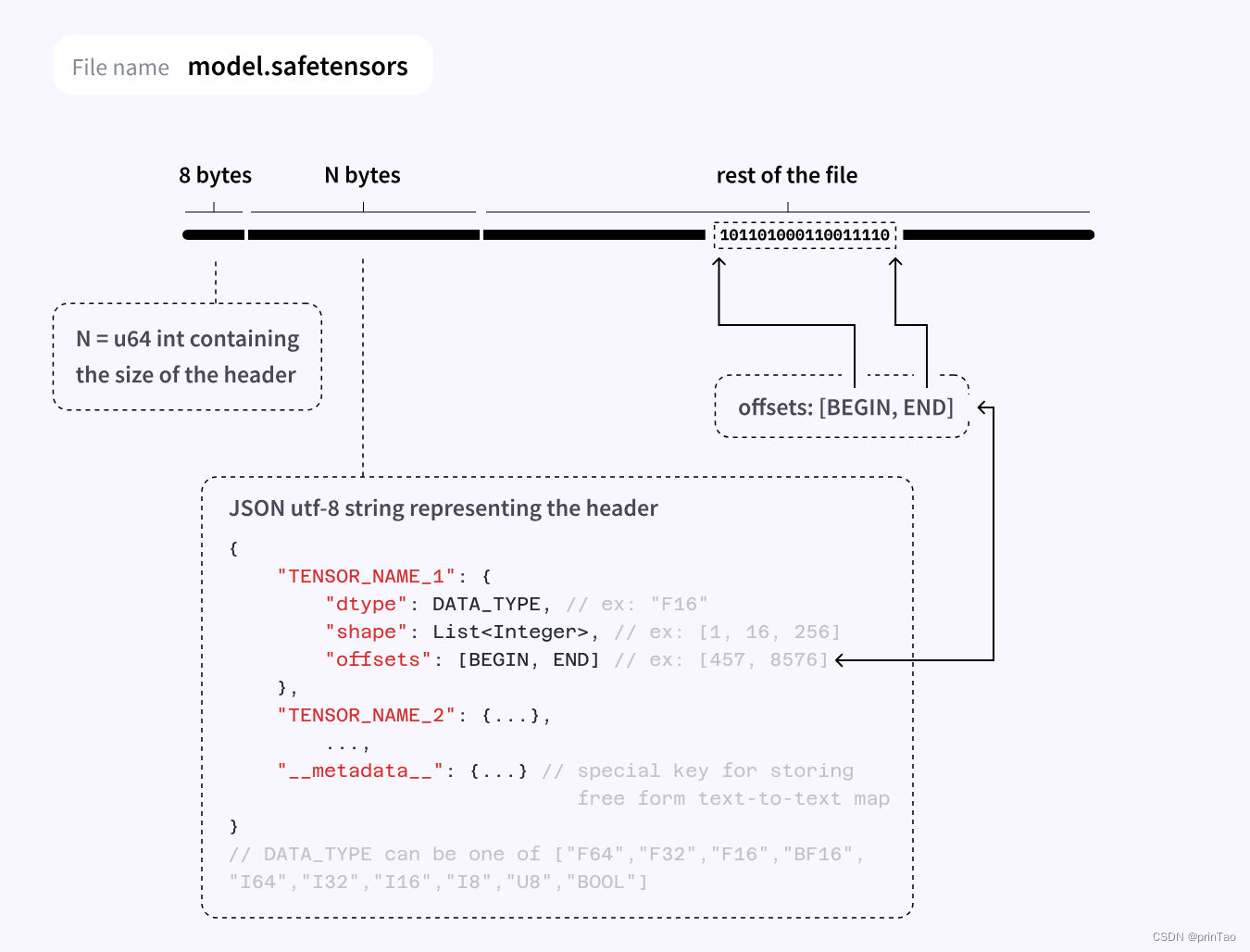
安装
with pip: Copied pip install safetensors with conda: Copied conda install -c huggingface safetensors- 1
- 2
- 3
- 4
- 5
- 6
- 7
- 8
Usage
文档: https://huggingface.co/docs/safetensors/index
github: https://github.com/huggingface/safetensors测试安装
import torch from safetensors import safe_open from safetensors.torch import save_file tensors = { "weight1": torch.zeros((1024, 1024)), "weight2": torch.zeros((1024, 1024)) } save_file(tensors, "model.safetensors") tensors = {} with safe_open("model.safetensors", framework="pt", device="cpu") as f: for key in f.keys(): tensors[key] = f.get_tensor(key)- 1
- 2
- 3
- 4
- 5
- 6
- 7
- 8
- 9
- 10
- 11
- 12
- 13
- 14
加载
文档 https://huggingface.co/docs/diffusers/using-diffusers/using_safetensors
from diffusers import StableDiffusionPipeline pipeline = StableDiffusionPipeline.from_single_file( "https://huggingface.co/WarriorMama777/OrangeMixs/blob/main/Models/AbyssOrangeMix/AbyssOrangeMix.safetensors" )- 1
- 2
- 3
- 4
- 5
Load tensors
from safetensors import safe_open tensors = {} with safe_open("model.safetensors", framework="pt", device=0) as f: for k in f.keys(): tensors[k] = f.get_tensor(k)- 1
- 2
- 3
- 4
- 5
- 6
- 7
# Loading only part of the tensors (interesting when running on multiple GPU) from safetensors import safe_open tensors = {} with safe_open("model.safetensors", framework="pt", device=0) as f: tensor_slice = f.get_slice("embedding") vocab_size, hidden_dim = tensor_slice.get_shape() tensor = tensor_slice[:, :hidden_dim]- 1
- 2
- 3
- 4
- 5
- 6
- 7
- 8
- 9
保存
import torch from safetensors.torch import save_file tensors = { "embedding": torch.zeros((2, 2)), "attention": torch.zeros((2, 3)) } save_file(tensors, "model.safetensors")- 1
- 2
- 3
- 4
- 5
- 6
- 7
- 8
- 9
转换到safetensor
- 在线,利用hugging face
The easiest way to convert your model weights is to use the Convert Space, given your model weights are already stored on the Hub. The Convert Space downloads the pickled weights, converts them, and opens a Pull Request to upload the newly converted .safetensors file to your repository.
- 本地 运行
see 转换代码 convert.py
# 主函数 def convert_file( pt_filename: str, sf_filename: str, ): loaded = torch.load(pt_filename, map_location="cpu") if "state_dict" in loaded: loaded = loaded["state_dict"] shared = shared_pointers(loaded) for shared_weights in shared: for name in shared_weights[1:]: loaded.pop(name) # For tensors to be contiguous loaded = {k: v.contiguous() for k, v in loaded.items()} dirname = os.path.dirname(sf_filename) os.makedirs(dirname, exist_ok=True) save_file(loaded, sf_filename, metadata={"format": "pt"}) check_file_size(sf_filename, pt_filename) reloaded = load_file(sf_filename) for k in loaded: pt_tensor = loaded[k] sf_tensor = reloaded[k] if not torch.equal(pt_tensor, sf_tensor): raise RuntimeError(f"The output tensors do not match for key {k}")- 1
- 2
- 3
- 4
- 5
- 6
- 7
- 8
- 9
- 10
- 11
- 12
- 13
- 14
- 15
- 16
- 17
- 18
- 19
- 20
- 21
- 22
- 23
- 24
- 25
- 26
- 27
例子
解析
import requests # pip install requests import struct def parse_single_file(url): # Fetch the first 8 bytes of the file headers = {'Range': 'bytes=0-7'} response = requests.get(url, headers=headers) # Interpret the bytes as a little-endian unsigned 64-bit integer length_of_header = struct.unpack('- 1
- 2
- 3
- 4
- 5
- 6
- 7
- 8
- 9
- 10
- 11
- 12
- 13
- 14
- 15
- 16
- 17
- 18
- 19
- 20
-
相关阅读:
python读取PDF文件并做词云可视化
Python从0到1丨详解图像锐化的Sobel、Laplacian算子
Python魔法:20个让你编程事半功倍的奇淫技巧(建议收藏)
LeetCode-剑指39-数组中出现次数冲过一半的数字
Streamsets Data Collector 3.12
使用C# Net6连接国产达梦数据库记录
selenium-webdriver 阿里云ARMS 自动化巡检
Character.AI:产品优势和商业壁垒在哪里?
[linux] depmod和 modprobe
【无标题】Matlab 之axes函数——创建笛卡尔坐标区
- 原文地址:https://blog.csdn.net/prinTao/article/details/133972928