-
Android Framework系列---输入法服务
Android Framework系列之输入法服务
- 本文基于Android R(11),从Framework角度介绍Android输入法框架流程及常用调试方法。

写在前面
车载项目需要定制输入法,也有一些POC演示的项目使用原生比如LatinIME(源码路径为/packages/inputmethods/LatinIME),关于输入法可能会遇到以下一些问题
- 输入法进程启动崩溃
- 输入法画面被其他应用遮挡
- 输入法输入内容显示到错误的编辑框内
- 多屏情况下输入法显示异常
- 输入法未弹出或输入法未隐藏
- 定制多屏多客户端输入法
上面举了一些常见例子,实际开发过程中也会有定制输入法服务这类需求。所以对于Android输入法,作为Android Framework工程师对其要有一个整体框架性的了解。
专用术语
- IMMS: InputMethodManagerService
- IMS: InputMethodService
- IMM: InputMethodManager
- IME: InputMethodEditor
- MCIMMS:MultiClientInputMethodManagerService
输入法知识点
输入法框架
Android输入法框架包括:IMMS输入法管理服务、IMS输入法服务、IMM输入法管理(客户端)。
- IMMS:顾名思义,用于管理输入法的Service,包括打开、关闭、显示、隐藏、切换、绑定输入法等等。这个Service运行在SystemServer中。另外,Android中引入了MCIMMS用于支持多个输入法Client,MCIMMS目前仅作为一个Test功能,感兴趣的可自行研究。
- IMS: 输入法服务,比如Android原生自带的LatinIME通过继承InputMethodService的方式实现了一个IMS。IMS以 Application Service的形式运行在应用进程中,通过IMMS管理其状态(比如打开输入法)。

- IMM: 输入法管理(客户端),Android中经常将Client端被命名为 XXManager,比如AudioManager,WindowManager,输入法的客户端也是这样。IMM主要指InputMethodManager这个单例类,应用进程通过这个单例对象与IMMS/IMS进行交互。

输入法的启动
IMMS初始化
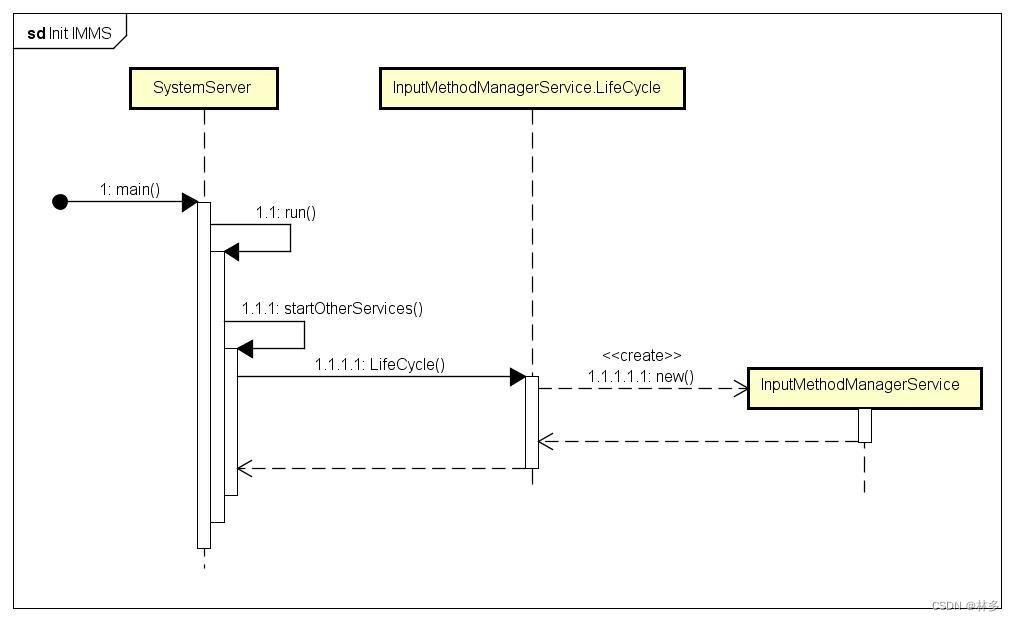
- Kernel拉起Init进程,Init启动Zygote,Zyogte启动SystemServer。SystemServer在startOtherServices阶段启动 IMMS,代码如下(本文下述代码中省略了部分源码)
// SystemServer.java public static void main(String[] args) { new SystemServer().run(); } // SystemServer.java private void run() { // Start services. try { t.traceBegin("StartServices"); startBootstrapServices(t); startCoreServices(t); startOtherServices(t); } catch (Throwable ex) { Slog.e("System", "******************************************"); Slog.e("System", "************ Failure starting system services", ex); throw ex; } finally { t.traceEnd(); // StartServices } } // SystemServer.java private void startOtherServices(@NonNull TimingsTraceAndSlog t) { // Bring up services needed for UI. if (mFactoryTestMode != FactoryTest.FACTORY_TEST_LOW_LEVEL) { t.traceBegin("StartInputMethodManagerLifecycle"); if (InputMethodSystemProperty.MULTI_CLIENT_IME_ENABLED) { // 多客户端(针对多屏情况下的一个Sample,默认不启用) mSystemServiceManager.startService( MultiClientInputMethodManagerService.Lifecycle.class); } else { mSystemServiceManager.startService(InputMethodManagerService.Lifecycle.class); } t.traceEnd(); } }- 1
- 2
- 3
- 4
- 5
- 6
- 7
- 8
- 9
- 10
- 11
- 12
- 13
- 14
- 15
- 16
- 17
- 18
- 19
- 20
- 21
- 22
- 23
- 24
- 25
- 26
- 27
- 28
- 29
- 30
- 31
- 32
- 33
- 34
- 35
- 36
- 37
- 执行InputMethodManagerService的Lifecycle的构造函数,初始化IMMS。
// InputMethodManagerService.java public static final class Lifecycle extends SystemService { private InputMethodManagerService mService; public Lifecycle(Context context) { super(context); mService = new InputMethodManagerService(context); } @Override public void onStart() { // 填加到本地服务 LocalServices.addService(InputMethodManagerInternal.class, new LocalServiceImpl(mService)); // push到binder service中,之后可以通过bind服务找到IMMS。 publishBinderService(Context.INPUT_METHOD_SERVICE, mService); } } //InputMethodManagerService.java public InputMethodManagerService(Context context) { mIPackageManager = AppGlobals.getPackageManager(); mContext = context; mRes = context.getResources(); mHandler = new Handler(this); // Note: SettingsObserver doesn't register observers in its constructor. // 监听输入法的设置,比如默认输入法 mSettingsObserver = new SettingsObserver(mHandler); // 下面几行获取了相关服务的LocalService对象,IMMS与window、package、input进行交互。比如显示输入法时,需要利用WMS服务判定IME显示层级。 mIWindowManager = IWindowManager.Stub.asInterface( ServiceManager.getService(Context.WINDOW_SERVICE)); mWindowManagerInternal = LocalServices.getService(WindowManagerInternal.class); mPackageManagerInternal = LocalServices.getService(PackageManagerInternal.class); mInputManagerInternal = LocalServices.getService(InputManagerInternal.class); mDisplayManagerInternal = LocalServices.getService(DisplayManagerInternal.class); // 这个写法比较特殊,是一个lambda表达式 mImeDisplayValidator = displayId -> mWindowManagerInternal.shouldShowIme(displayId); mCaller = new HandlerCaller(context, null, new HandlerCaller.Callback() { @Override public void executeMessage(Message msg) { handleMessage(msg); } }, true /*asyncHandler*/); mAppOpsManager = mContext.getSystemService(AppOpsManager.class); mUserManager = mContext.getSystemService(UserManager.class); mUserManagerInternal = LocalServices.getService(UserManagerInternal.class); mHardKeyboardListener = new HardKeyboardListener(); mHasFeature = context.getPackageManager().hasSystemFeature( PackageManager.FEATURE_INPUT_METHODS); mSlotIme = mContext.getString(com.android.internal.R.string.status_bar_ime); // 判断是否为低内存模式 mIsLowRam = ActivityManager.isLowRamDeviceStatic(); Bundle extras = new Bundle(); extras.putBoolean(Notification.EXTRA_ALLOW_DURING_SETUP, true); @ColorInt final int accentColor = mContext.getColor( com.android.internal.R.color.system_notification_accent_color); mImeSwitcherNotification = new Notification.Builder(mContext, SystemNotificationChannels.VIRTUAL_KEYBOARD) .setSmallIcon(com.android.internal.R.drawable.ic_notification_ime_default) .setWhen(0) .setOngoing(true) .addExtras(extras) .setCategory(Notification.CATEGORY_SYSTEM) .setColor(accentColor); Intent intent = new Intent(ACTION_SHOW_INPUT_METHOD_PICKER) .setPackage(mContext.getPackageName()); mImeSwitchPendingIntent = PendingIntent.getBroadcast(mContext, 0, intent, PendingIntent.FLAG_IMMUTABLE); mShowOngoingImeSwitcherForPhones = false; mNotificationShown = false; int userId = 0; try { userId = ActivityManager.getService().getCurrentUser().id; } catch (RemoteException e) { Slog.w(TAG, "Couldn't get current user ID; guessing it's 0", e); } mLastSwitchUserId = userId; // mSettings should be created before buildInputMethodListLocked mSettings = new InputMethodSettings( mRes, context.getContentResolver(), mMethodMap, userId, !mSystemReady); updateCurrentProfileIds(); AdditionalSubtypeUtils.load(mAdditionalSubtypeMap, userId); mSwitchingController = InputMethodSubtypeSwitchingController.createInstanceLocked( mSettings, context); }- 1
- 2
- 3
- 4
- 5
- 6
- 7
- 8
- 9
- 10
- 11
- 12
- 13
- 14
- 15
- 16
- 17
- 18
- 19
- 20
- 21
- 22
- 23
- 24
- 25
- 26
- 27
- 28
- 29
- 30
- 31
- 32
- 33
- 34
- 35
- 36
- 37
- 38
- 39
- 40
- 41
- 42
- 43
- 44
- 45
- 46
- 47
- 48
- 49
- 50
- 51
- 52
- 53
- 54
- 55
- 56
- 57
- 58
- 59
- 60
- 61
- 62
- 63
- 64
- 65
- 66
- 67
- 68
- 69
- 70
- 71
- 72
- 73
- 74
- 75
- 76
- 77
- 78
- 79
- 80
- 81
- 82
- 83
- 84
- 85
- 86
- 87
- 88
- 89
- 90
- 91
- 92
- 上述代码中IMMS获取了许多其他服务的代理对象(WindowManager、PackageManager、InputManager等等),通过它们获取相关功能。从这里也可以看出,合理的功能模块划分,是有利于代码的开发维护。
IMM的初始化
- IMM是一个单例类,在每个应用中有一个实例。应用通过IMM请求IMMS启动输入法,IMMS通过Callback形式通知到IMM,进而告知应用相关输入法状态。

- 添加Window时会实例化ViewRootImpl,在ViewRootImpl中会初始化IMM。
// ViewRootImpl.java public ViewRootImpl(Context context, Display display) { this(context, display, WindowManagerGlobal.getWindowSession(), false /* useSfChoreographer */); } // WindowManagerGlobal.java public static IWindowSession getWindowSession() { synchronized (WindowManagerGlobal.class) { if (sWindowSession == null) { try { // Emulate the legacy behavior. The global instance of InputMethodManager // was instantiated here. // TODO(b/116157766): Remove this hack after cleaning up @UnsupportedAppUsage InputMethodManager.ensureDefaultInstanceForDefaultDisplayIfNecessary(); IWindowManager windowManager = getWindowManagerService(); sWindowSession = windowManager.openSession( new IWindowSessionCallback.Stub() { @Override public void onAnimatorScaleChanged(float scale) { ValueAnimator.setDurationScale(scale); } }); } catch (RemoteException e) { throw e.rethrowFromSystemServer(); } } return sWindowSession; } }- 1
- 2
- 3
- 4
- 5
- 6
- 7
- 8
- 9
- 10
- 11
- 12
- 13
- 14
- 15
- 16
- 17
- 18
- 19
- 20
- 21
- 22
- 23
- 24
- 25
- 26
- 27
- 28
- 29
- 30
- 上面的代码调用了 InputMethodManager.ensureDefaultInstanceForDefaultDisplayIfNecessary(),在这个函数中对IMM进行了初始化。
// InputMethodManager.java public static void ensureDefaultInstanceForDefaultDisplayIfNecessary() { forContextInternal(Display.DEFAULT_DISPLAY, Looper.getMainLooper()); } // InputMethodManager.java private static InputMethodManager forContextInternal(int displayId, Looper looper) { final boolean isDefaultDisplay = displayId == Display.DEFAULT_DISPLAY; synchronized (sLock) { // 从缓存map中根据displayID查找 imm,如果已经创建则返回。 InputMethodManager instance = sInstanceMap.get(displayId); if (instance != null) { return instance; } // 创建IMM实例 instance = createInstance(displayId, looper); // For backward compatibility, store the instance also to sInstance for default display. if (sInstance == null && isDefaultDisplay) { sInstance = instance; } // IMM实例放入缓存map sInstanceMap.put(displayId, instance); return instance; } } // InputMethodManager.java private static InputMethodManager createRealInstance(int displayId, Looper looper) { final IInputMethodManager service; try { // 取得IMMS服务对象。这里个INPUT_METHOD_SERVICE,就是IMMS初始化时push到binder中的service标志。 service = IInputMethodManager.Stub.asInterface( ServiceManager.getServiceOrThrow(Context.INPUT_METHOD_SERVICE)); } catch (ServiceNotFoundException e) { throw new IllegalStateException(e); } // 创建IMM实例对象 final InputMethodManager imm = new InputMethodManager(service, displayId, looper); final long identity = Binder.clearCallingIdentity(); try { // 将Client告知IMMS。IMMS内部会管理多个Client(每个应用都会有一个Client) service.addClient(imm.mClient, imm.mIInputContext, displayId); } catch (RemoteException e) { e.rethrowFromSystemServer(); } finally { Binder.restoreCallingIdentity(identity); } return imm; }- 1
- 2
- 3
- 4
- 5
- 6
- 7
- 8
- 9
- 10
- 11
- 12
- 13
- 14
- 15
- 16
- 17
- 18
- 19
- 20
- 21
- 22
- 23
- 24
- 25
- 26
- 27
- 28
- 29
- 30
- 31
- 32
- 33
- 34
- 35
- 36
- 37
- 38
- 39
- 40
- 41
- 42
- 43
- 44
- 45
- 46
- 47
- 48
- 49
- 50
- 51
- 52
- 到此创建了IMM对象,并获取了与IMMS服务交互的代理对象。每个IMM通过IMMS的addClient将自己的相关信息告诉IMMS,包括 mClient、mIInputContext、displayId。对于DisplayID,就是屏幕的逻辑ID。那么其他两个是什么?
// InputMethodManager.java private InputMethodManager(IInputMethodManager service, int displayId, Looper looper) { mService = service; mMainLooper = looper; mH = new H(looper); mDisplayId = displayId; // mIInputContext 实际上是IInputContext.Stub对象,输入法上下文。 这个对象会同过 IMMS 最终告知 IMS。通过这个对象,应用端接收输入的相关字符,让view进行处理。 mIInputContext = new ControlledInputConnectionWrapper(looper, mDummyInputConnection, this, null); } // InputMethodManager.java private static class ControlledInputConnectionWrapper extends IInputConnectionWrapper {} // InputMethodManager.java public abstract class IInputConnectionWrapper extends IInputContext.Stub {} // InputMethodManager.java // mClient实际上是IInputMethodClient.Stub对象,它作为Callback从IMMS获得输入法相关状态,使得应用可以做出相关动作。 final IInputMethodClient.Stub mClient = new IInputMethodClient.Stub() {} // IInputMethodClient.aidl /** * Interface a client of the IInputMethodManager implements, to identify * itself and receive information about changes to the global manager state. */ oneway interface IInputMethodClient { // IInputContext.aidl /** * Interface from an input method to the application, allowing it to perform * edits on the current input field and other interactions with the application. * {@hide} */ oneway interface IInputContext { }- 1
- 2
- 3
- 4
- 5
- 6
- 7
- 8
- 9
- 10
- 11
- 12
- 13
- 14
- 15
- 16
- 17
- 18
- 19
- 20
- 21
- 22
- 23
- 24
- 25
- 26
- 27
- 28
- 29
- 30
- 31
- 32
- 33
- 34
- 35
- 36
IMS的初始化
-
IMS运行在输入法进程中,是一个Application里的service。可以通过BindService获取IMS服务对象。如果系统有多款输入法,那么就会有多个IMS(可以通过 ime list -s查看系统当前支持的输入法服务)。以Android原始自带的LatinIME为例。

-
AndroidManifest.xml中定义了Service
<manifest xmlns:android="http://schemas.android.com/apk/res/android" coreApp="true" package="com.android.inputmethod.latin" android:versionCode="28"> <application android:label="@string/english_ime_name" android:icon="@drawable/ic_launcher_keyboard" android:supportsRtl="true" android:allowBackup="true" android:defaultToDeviceProtectedStorage="true" android:directBootAware="true"> <service android:name="LatinIME" android:label="@string/english_ime_name" android:permission="android.permission.BIND_INPUT_METHOD"> <intent-filter> <action android:name="android.view.InputMethod" /> intent-filter> <meta-data android:name="android.view.im" android:resource="@xml/method" /> service> application> manifest>- 1
- 2
- 3
- 4
- 5
- 6
- 7
- 8
- 9
- 10
- 11
- 12
- 13
- 14
- 15
- 16
- 17
- 18
- 19
- 20
- 21
- 22
- 23
- 24
- 25
- LatinIME的实现类继承了InputMethodService,也就是实现了IMS。
/** * Input method implementation for Qwerty'ish keyboard. */ public class LatinIME extends InputMethodService implements KeyboardActionListener, SuggestionStripView.Listener, SuggestionStripViewAccessor, DictionaryFacilitator.DictionaryInitializationListener, PermissionsManager.PermissionsResultCallback { }- 1
- 2
- 3
- 4
- 5
- 6
- 7
- 点击文本输入框触发Focus焦点变更是,IMM会告知IMMS启动IMS(这个流程在下章会介绍,这个关注IMS自身的初始化。),IMMS通过BindServic初始化IMS服务。
///packages/inputmethods/LatinIME/java/src/com/android/inputmethod/latin/LatinIME.java public void onCreate() { // LatinIME会进行自身的一些初始化,这里主要关注其InputMethodService的初始化。 super.onCreate(); } // InputMethodService.java @Override public void onCreate() { mTheme = Resources.selectSystemTheme(mTheme, getApplicationInfo().targetSdkVersion, android.R.style.Theme_InputMethod, android.R.style.Theme_Holo_InputMethod, android.R.style.Theme_DeviceDefault_InputMethod, android.R.style.Theme_DeviceDefault_InputMethod); super.setTheme(mTheme); super.onCreate(); // 获取IMMS服务对象 mImm = (InputMethodManager)getSystemService(INPUT_METHOD_SERVICE); mSettingsObserver = SettingsObserver.createAndRegister(this); // 判断是否为车载系统 mIsAutomotive = isAutomotive(); mAutomotiveHideNavBarForKeyboard = getApplicationContext().getResources().getBoolean( com.android.internal.R.bool.config_automotiveHideNavBarForKeyboard); // TODO(b/111364446) Need to address context lifecycle issue if need to re-create // for update resources & configuration correctly when show soft input // in non-default display. mInflater = (LayoutInflater)getSystemService( Context.LAYOUT_INFLATER_SERVICE); // 创建输入法窗口(Dialog类型) mWindow = new SoftInputWindow(this, "InputMethod", mTheme, null, null, mDispatcherState, WindowManager.LayoutParams.TYPE_INPUT_METHOD, Gravity.BOTTOM, false); mWindow.getWindow().getAttributes().setFitInsetsTypes(statusBars() | navigationBars()); mWindow.getWindow().getAttributes().setFitInsetsSides(Side.all() & ~Side.BOTTOM); mWindow.getWindow().getAttributes().setFitInsetsIgnoringVisibility(true); // IME layout should always be inset by navigation bar, no matter its current visibility, // unless automotive requests it. Automotive devices may request the navigation bar to be // hidden when the IME shows up (controlled via config_automotiveHideNavBarForKeyboard) // in order to maximize the visible screen real estate. When this happens, the IME window // should animate from the bottom of the screen to reduce the jank that happens from the // lack of synchronization between the bottom system window and the IME window. if (mIsAutomotive && mAutomotiveHideNavBarForKeyboard) { mWindow.getWindow().setDecorFitsSystemWindows(false); } mWindow.getWindow().getDecorView().setOnApplyWindowInsetsListener( (v, insets) -> v.onApplyWindowInsets( new WindowInsets.Builder(insets).setInsets( navigationBars(), insets.getInsetsIgnoringVisibility(navigationBars())) .build())); // For ColorView in DecorView to work, FLAG_DRAWS_SYSTEM_BAR_BACKGROUNDS needs to be set // by default (but IME developers can opt this out later if they want a new behavior). mWindow.getWindow().setFlags( FLAG_DRAWS_SYSTEM_BAR_BACKGROUNDS, FLAG_DRAWS_SYSTEM_BAR_BACKGROUNDS); // 初始化View相关内容 initViews(); mWindow.getWindow().setLayout(MATCH_PARENT, WRAP_CONTENT); mInlineSuggestionSessionController = new InlineSuggestionSessionController( this::onCreateInlineSuggestionsRequest, this::getHostInputToken, this::onInlineSuggestionsResponse); } // SoftInputWindow.java public SoftInputWindow(Context context, String name, int theme, Callback callback, KeyEvent.Callback keyEventCallback, KeyEvent.DispatcherState dispatcherState, int windowType, int gravity, boolean takesFocus) { super(context, theme); mName = name; mCallback = callback; mKeyEventCallback = keyEventCallback; mDispatcherState = dispatcherState; mWindowType = windowType; mGravity = gravity; mTakesFocus = takesFocus; initDockWindow(); } // SoftInputWindow.java private void initDockWindow() { WindowManager.LayoutParams lp = getWindow().getAttributes(); // mWindowType是 WindowManager.LayoutParams.TYPE_INPUT_METHOD,可以通过改这里改变输入法WindowType,进行影响默认层级。 lp.type = mWindowType; lp.setTitle(mName); lp.gravity = mGravity; updateWidthHeight(lp); getWindow().setAttributes(lp); int windowSetFlags = WindowManager.LayoutParams.FLAG_LAYOUT_IN_SCREEN; int windowModFlags = WindowManager.LayoutParams.FLAG_LAYOUT_IN_SCREEN | WindowManager.LayoutParams.FLAG_NOT_FOCUSABLE | WindowManager.LayoutParams.FLAG_DIM_BEHIND; // 默认走if里面,不获取焦点。 if (!mTakesFocus) { windowSetFlags |= WindowManager.LayoutParams.FLAG_NOT_FOCUSABLE; } else { windowSetFlags |= WindowManager.LayoutParams.FLAG_NOT_TOUCH_MODAL; windowModFlags |= WindowManager.LayoutParams.FLAG_NOT_TOUCH_MODAL; } getWindow().setFlags(windowSetFlags, windowModFlags); }- 1
- 2
- 3
- 4
- 5
- 6
- 7
- 8
- 9
- 10
- 11
- 12
- 13
- 14
- 15
- 16
- 17
- 18
- 19
- 20
- 21
- 22
- 23
- 24
- 25
- 26
- 27
- 28
- 29
- 30
- 31
- 32
- 33
- 34
- 35
- 36
- 37
- 38
- 39
- 40
- 41
- 42
- 43
- 44
- 45
- 46
- 47
- 48
- 49
- 50
- 51
- 52
- 53
- 54
- 55
- 56
- 57
- 58
- 59
- 60
- 61
- 62
- 63
- 64
- 65
- 66
- 67
- 68
- 69
- 70
- 71
- 72
- 73
- 74
- 75
- 76
- 77
- 78
- 79
- 80
- 81
- 82
- 83
- 84
- 85
- 86
- 87
- 88
- 89
- 90
- 91
- 92
- 93
- 94
- 95
- 96
- 97
- 98
- 99
- 100
- 101
- 102
- 103
- 104
- 105
- 106
- 107
- 108
- 上面对于IMS进行了一些初始化,主要是设置输入法窗口的一些属性。下面看一下,IMS通过onBind接口返回的Binder对象。Client端通过onBind时返回的对象与IMS服务交互。IMS继承了AbstractInputMethodService,onBind的 实现定义在这个类中。
// AbstractInputMethodService.java public abstract class AbstractInputMethodService extends Service { final public IBinder onBind(Intent intent) { if (mInputMethod == null) { mInputMethod = onCreateInputMethodInterface(); } // IMMS通过这个对象控制 输入法服务(IMS)。IInputMethodWrapper 实际上是IInputMethod.Stub类型。 return new IInputMethodWrapper(this, mInputMethod); } } // IInputMethodWrapper.java class IInputMethodWrapper extends IInputMethod.Stub {} // IInputMethod.aidl oneway interface IInputMethod {}- 1
- 2
- 3
- 4
- 5
- 6
- 7
- 8
- 9
- 10
- 11
- 12
- 13
- 14
- 15
- 16
- 综上,IMS启动完成。返回 IInputMethod.stub对象给IMMS用于操作IMS。
输入法的启动
-
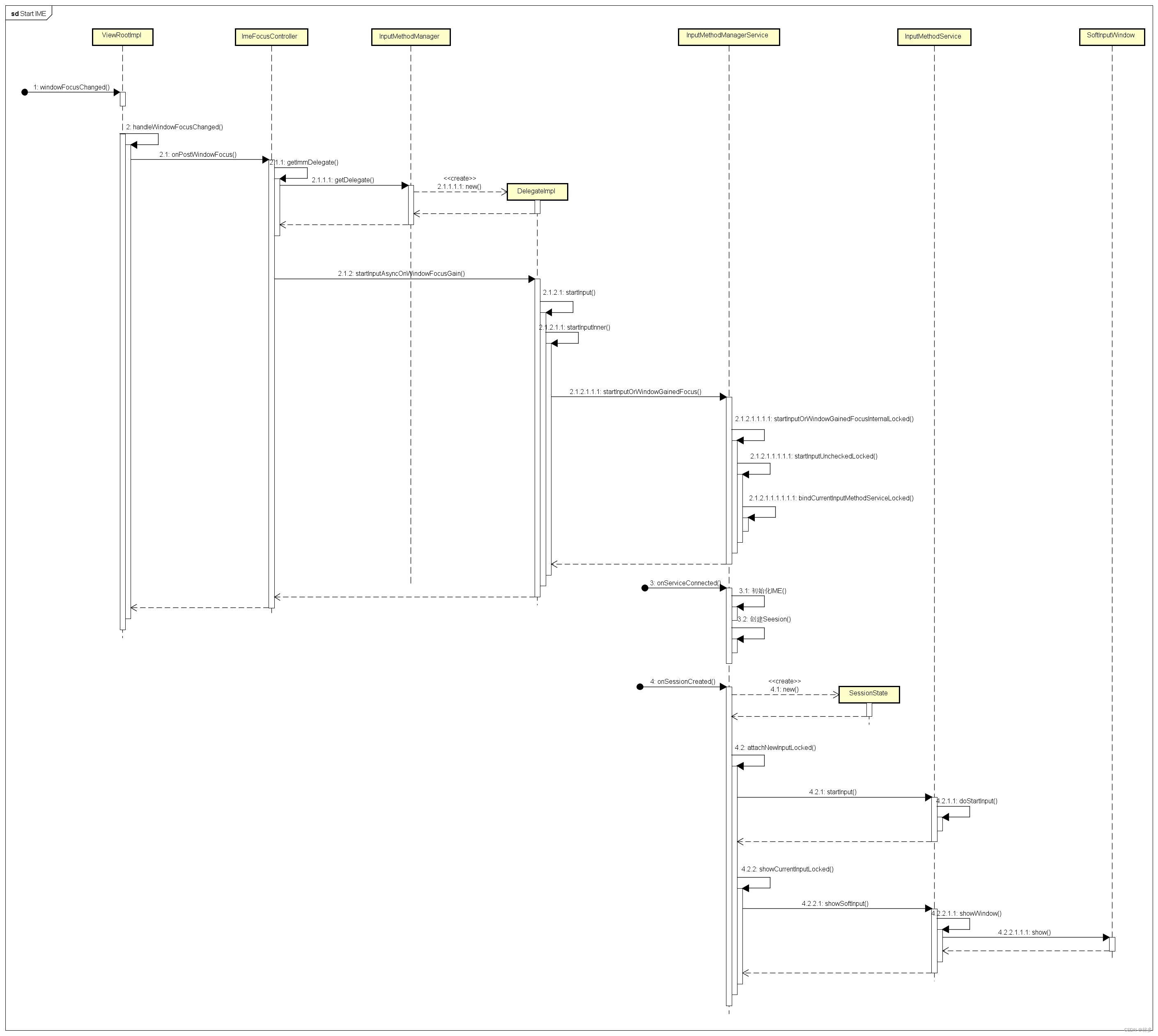
上面的内容,主要关注 IMM、IMS、IMMS的初始化过程。在应用中点击文本输入框会弹出输入法界面。下面主要对这个流程进行分析。
-
点击文本输入框后,控件获取焦点,会触发ViewRootImpl的焦点变更流程。这个流程会调用IMM的startInput函数启动输入法。
// ViewRootImpl.java public void windowFocusChanged(boolean hasFocus, boolean inTouchMode) { Message msg = Message.obtain(); msg.what = MSG_WINDOW_FOCUS_CHANGED; mHandler.sendMessage(msg); } // ViewRootImpl.java public void handleMessage(Message msg) // 省略 case MSG_WINDOW_FOCUS_CHANGED: { handleWindowFocusChanged(); } break; } // ViewRootImpl.java private void handleWindowFocusChanged() { if (mAdded) { // Note: must be done after the focus change callbacks, // so all of the view state is set up correctly. mImeFocusController.onPostWindowFocus(mView.findFocus(), hasWindowFocus, mWindowAttributes); } } // ImeFocusController.java void onPostWindowFocus(View focusedView, boolean hasWindowFocus, WindowManager.LayoutParams windowAttribute) { // 没有焦点的话,不弹出输入法 if (!hasWindowFocus || !mHasImeFocus || isInLocalFocusMode(windowAttribute)) { return; } // 获取Delegate对象(包装了IMM) boolean forceFocus = false; final InputMethodManagerDelegate immDelegate = getImmDelegate(); // 请求启动输入法 immDelegate.startInputAsyncOnWindowFocusGain(viewForWindowFocus, windowAttribute.softInputMode, windowAttribute.flags, forceFocus); } // InputMethodManager.java public void startInputAsyncOnWindowFocusGain(View focusedView, @SoftInputModeFlags int softInputMode, int windowFlags, boolean forceNewFocus) { if (controller.checkFocus(forceNewFocus, false)) { // We need to restart input on the current focus view. This // should be done in conjunction with telling the system service // about the window gaining focus, to help make the transition // smooth. // 通常情况下会走到这里 if (startInput(StartInputReason.WINDOW_FOCUS_GAIN, focusedView, startInputFlags, softInputMode, windowFlags)) { return; } } } // InputMethodManager.java public boolean startInput(@StartInputReason int startInputReason, View focusedView, @StartInputFlags int startInputFlags, @SoftInputModeFlags int softInputMode, int windowFlags) { // 这些代码是在UIThread中执行的 return startInputInner(startInputReason, focusedView != null ? focusedView.getWindowToken() : null, startInputFlags, softInputMode, windowFlags); } // InputMethodManager.java boolean startInputInner(@StartInputReason int startInputReason, @Nullable IBinder windowGainingFocus, @StartInputFlags int startInputFlags, @SoftInputModeFlags int softInputMode, int windowFlags) { final View view; synchronized (mH) { view = getServedViewLocked(); } // Okay we are now ready to call into the served view and have it // do its stuff. // Life is good: let's hook everything up! // 记录编辑器相关信息的对象,输入法根据这些信息显示不同的效果 EditorInfo tba = new EditorInfo(); tba.packageName = view.getContext().getOpPackageName(); tba.autofillId = view.getAutofillId(); tba.fieldId = view.getId(); // 创建InputConnection,调用的是TextView中的对应函数。创建了EditableInputConnection类型对象 // 后续利用InputConnection对目标控件进行相关字符串操作 InputConnection ic = view.onCreateInputConnection(tba); synchronized (mH) { if (ic != null) { // 这个对象实际上是 IInputContext.stub对象。上面创建的InpuConnection传给这个对象。 // IMS与 IInputContext.stub交互, IInputContext.stub通过 InpuConnection与控件交互。 servedContext = new ControlledInputConnectionWrapper( icHandler != null ? icHandler.getLooper() : vh.getLooper(), ic, this, view); } else { servedContext = null; missingMethodFlags = 0; } mServedInputConnectionWrapper = servedContext; try { // 真正启动输入法的地方,返回的InputBindResult是一个Parcelable final InputBindResult res = mService.startInputOrWindowGainedFocus( startInputReason, mClient, windowGainingFocus, startInputFlags, softInputMode, windowFlags, tba, servedContext, missingMethodFlags, view.getContext().getApplicationInfo().targetSdkVersion); if (res == null) { Log.wtf(TAG, "startInputOrWindowGainedFocus must not return" + " null. startInputReason=" + InputMethodDebug.startInputReasonToString(startInputReason) + " editorInfo=" + tba + " startInputFlags=" + InputMethodDebug.startInputFlagsToString(startInputFlags)); return false; } if (res.id != null) { // 设置InputChannel setInputChannelLocked(res.channel); mBindSequence = res.sequence; // IInputMethodSession类型对象,这个对象是IMS的Binder代理。通过它与IMS直接交互。 // 这样应用端就拿到了与IMS直接交互的对象 mCurMethod = res.method; // 当前输入法的ID(不同输入法ID值不一样) mCurId = res.id; } else if (res.channel != null && res.channel != mCurChannel) { res.channel.dispose(); } } catch (RemoteException e) { Log.w(TAG, "IME died: " + mCurId, e); } } return true; }- 1
- 2
- 3
- 4
- 5
- 6
- 7
- 8
- 9
- 10
- 11
- 12
- 13
- 14
- 15
- 16
- 17
- 18
- 19
- 20
- 21
- 22
- 23
- 24
- 25
- 26
- 27
- 28
- 29
- 30
- 31
- 32
- 33
- 34
- 35
- 36
- 37
- 38
- 39
- 40
- 41
- 42
- 43
- 44
- 45
- 46
- 47
- 48
- 49
- 50
- 51
- 52
- 53
- 54
- 55
- 56
- 57
- 58
- 59
- 60
- 61
- 62
- 63
- 64
- 65
- 66
- 67
- 68
- 69
- 70
- 71
- 72
- 73
- 74
- 75
- 76
- 77
- 78
- 79
- 80
- 81
- 82
- 83
- 84
- 85
- 86
- 87
- 88
- 89
- 90
- 91
- 92
- 93
- 94
- 95
- 96
- 97
- 98
- 99
- 100
- 101
- 102
- 103
- 104
- 105
- 106
- 107
- 108
- 109
- 110
- 111
- 112
- 113
- 114
- 115
- 116
- 117
- 118
- 119
- 120
- 121
- 122
- 123
- 124
- 125
- 126
- 127
- 128
- 129
- 130
- 131
- 132
- 133
- 134
- 135
- 136
- 137
- 138
- 139
- 140
- 如果startInputInner执行成功的话,应用端的IMM中便会持有 IInputMethodSession类型对象,通过它与IMS进行交互。上面的mService是IMMS的客户端代理,在其startInputOrWindowGainedFocus函数会启动输入法。
public InputBindResult startInputOrWindowGainedFocus( @StartInputReason int startInputReason, IInputMethodClient client, IBinder windowToken, @StartInputFlags int startInputFlags, @SoftInputModeFlags int softInputMode, int windowFlags, @Nullable EditorInfo attribute, IInputContext inputContext, @MissingMethodFlags int missingMethods, int unverifiedTargetSdkVersion) { final InputBindResult result; synchronized (mMethodMap) { final long ident = Binder.clearCallingIdentity(); try { // 加锁调用 result = startInputOrWindowGainedFocusInternalLocked(startInputReason, client, windowToken, startInputFlags, softInputMode, windowFlags, attribute, inputContext, missingMethods, unverifiedTargetSdkVersion, userId); } finally { Binder.restoreCallingIdentity(ident); } } return result; } // InputMethodManagerService.java private InputBindResult startInputOrWindowGainedFocusInternalLocked( @StartInputReason int startInputReason, IInputMethodClient client, @NonNull IBinder windowToken, @StartInputFlags int startInputFlags, @SoftInputModeFlags int softInputMode, int windowFlags, EditorInfo attribute, IInputContext inputContext, @MissingMethodFlags int missingMethods, int unverifiedTargetSdkVersion, @UserIdInt int userId) { // 计算IME的TargeWindow,输入法窗口会根据TargetWindow动态计算显示层级 // 此函数会调用到WMS,并调用到DisplayContent::computeImeTarget函数中。 if (!mWindowManagerInternal.isInputMethodClientFocus(cs.uid, cs.pid, cs.selfReportedDisplayId)) { // Check with the window manager to make sure this client actually // has a window with focus. If not, reject. This is thread safe // because if the focus changes some time before or after, the // next client receiving focus that has any interest in input will // be calling through here after that change happens. if (DEBUG) { Slog.w(TAG, "Focus gain on non-focused client " + cs.client + " (uid=" + cs.uid + " pid=" + cs.pid + ")"); } return InputBindResult.NOT_IME_TARGET_WINDOW; } // 判断是否是相同的Window获得了Focus final boolean sameWindowFocused = mCurFocusedWindow == windowToken; // 判断是不是文本编辑器 final boolean isTextEditor = (startInputFlags & StartInputFlags.IS_TEXT_EDITOR) != 0; // 启动要因是否为得到焦点 final boolean startInputByWinGainedFocus = (startInputFlags & StartInputFlags.WINDOW_GAINED_FOCUS) != 0; // 如果焦点window一样,并且是本文编辑器。表示之前已经启动了输入法,直接启动。 if (sameWindowFocused && isTextEditor) { if (DEBUG) { Slog.w(TAG, "Window already focused, ignoring focus gain of: " + client + " attribute=" + attribute + ", token = " + windowToken + ", startInputReason=" + InputMethodDebug.startInputReasonToString(startInputReason)); } if (attribute != null) { return startInputUncheckedLocked(cs, inputContext, missingMethods, attribute, startInputFlags, startInputReason); } return new InputBindResult( InputBindResult.ResultCode.SUCCESS_REPORT_WINDOW_FOCUS_ONLY, null, null, null, -1, null); } // We want to start input before showing the IME, but after closing // it. We want to do this after closing it to help the IME disappear // more quickly (not get stuck behind it initializing itself for the // new focused input, even if its window wants to hide the IME). boolean didStart = false; // 判断android:windowSoftInputMode InputBindResult res = null; switch (softInputMode & LayoutParams.SOFT_INPUT_MASK_STATE) { // 默认情况下走这里 case LayoutParams.SOFT_INPUT_STATE_UNSPECIFIED: if (!sameWindowFocused && (!isTextEditor || !doAutoShow)) { if (LayoutParams.mayUseInputMethod(windowFlags)) { // There is no focus view, and this window will // be behind any soft input window, so hide the // soft input window if it is shown. if (DEBUG) Slog.v(TAG, "Unspecified window will hide input"); hideCurrentInputLocked( mCurFocusedWindow, InputMethodManager.HIDE_NOT_ALWAYS, null, SoftInputShowHideReason.HIDE_UNSPECIFIED_WINDOW); // If focused display changed, we should unbind current method // to make app window in previous display relayout after Ime // window token removed. // Note that we can trust client's display ID as long as it matches // to the display ID obtained from the window. if (cs.selfReportedDisplayId != mCurTokenDisplayId) { unbindCurrentMethodLocked(); } } } else if (isTextEditor && doAutoShow && (softInputMode & LayoutParams.SOFT_INPUT_IS_FORWARD_NAVIGATION) != 0) { // There is a focus view, and we are navigating forward // into the window, so show the input window for the user. // We only do this automatically if the window can resize // to accommodate the IME (so what the user sees will give // them good context without input information being obscured // by the IME) or if running on a large screen where there // is more room for the target window + IME. if (DEBUG) Slog.v(TAG, "Unspecified window will show input"); if (attribute != null) { // 启动输入法 res = startInputUncheckedLocked(cs, inputContext, missingMethods, attribute, startInputFlags, startInputReason); didStart = true; } // 显示输入法 showCurrentInputLocked(windowToken, InputMethodManager.SHOW_IMPLICIT, null, SoftInputShowHideReason.SHOW_AUTO_EDITOR_FORWARD_NAV); } break; case LayoutParams.SOFT_INPUT_STATE_UNCHANGED: // 后面的代码省略。遇到问题时,可以根据具体情况,加log分析。 } if (!didStart) { // 如果没有启动的话,这里会做一下保护。感兴趣的可以看源码研究一下。 } return res; } // InputMethodManagerService.java InputBindResult startInputUncheckedLocked(@NonNull ClientState cs, IInputContext inputContext, @MissingMethodFlags int missingMethods, @NonNull EditorInfo attribute, @StartInputFlags int startInputFlags, @StartInputReason int startInputReason) { // If no method is currently selected, do nothing. // 如果当前没有输入法,直接返回 if (mCurMethodId == null) { return InputBindResult.NO_IME; } // 启动没有ready,直接返回 if (!mSystemReady) { // If the system is not yet ready, we shouldn't be running third // party code. return new InputBindResult( InputBindResult.ResultCode.ERROR_SYSTEM_NOT_READY, null, null, mCurMethodId, mCurSeq, null); } // 得到显示输入法的DisplayID final int displayIdToShowIme = computeImeDisplayIdForTarget(cs.selfReportedDisplayId, mImeDisplayValidator); // Check if the input method is changing. // We expect the caller has already verified that the client is allowed to access this // display ID. // 走到这个判断里面,基本上就是已经绑定过输入法了。直接返回结果就行。 if (mCurId != null && mCurId.equals(mCurMethodId) && displayIdToShowIme == mCurTokenDisplayId) { } // 没有绑定过,则重新开发绑定输入法。 InputMethodInfo info = mMethodMap.get(mCurMethodId); if (info == null) { throw new IllegalArgumentException("Unknown id: " + mCurMethodId); } unbindCurrentMethodLocked(); mCurIntent = new Intent(InputMethod.SERVICE_INTERFACE); mCurIntent.setComponent(info.getComponent()); mCurIntent.putExtra(Intent.EXTRA_CLIENT_LABEL, com.android.internal.R.string.input_method_binding_label); mCurIntent.putExtra(Intent.EXTRA_CLIENT_INTENT, PendingIntent.getActivity( mContext, 0, new Intent(Settings.ACTION_INPUT_METHOD_SETTINGS), PendingIntent.FLAG_IMMUTABLE)); // 实际上是调用BindService,获取输入法服务(IMS) if (bindCurrentInputMethodServiceLocked(mCurIntent, this, IME_CONNECTION_BIND_FLAGS)) { mLastBindTime = SystemClock.uptimeMillis(); mHaveConnection = true; mCurId = info.getId(); mCurToken = new Binder(); mCurTokenDisplayId = displayIdToShowIme; try { if (DEBUG) { Slog.v(TAG, "Adding window token: " + mCurToken + " for display: " + mCurTokenDisplayId); } // 添加用于显示输入法的Token mIWindowManager.addWindowToken(mCurToken, LayoutParams.TYPE_INPUT_METHOD, mCurTokenDisplayId); } catch (RemoteException e) { } // 成功:返回正在等待绑定IMS return new InputBindResult( InputBindResult.ResultCode.SUCCESS_WAITING_IME_BINDING, null, null, mCurId, mCurSeq, null); } mCurIntent = null; Slog.w(TAG, "Failure connecting to input method service: " + mCurIntent); return InputBindResult.IME_NOT_CONNECTED; } // InputMethodManagerService.java // BindService成功后的回调 public void onServiceConnected(ComponentName name, IBinder service) { synchronized (mMethodMap) { if (mCurIntent != null && name.equals(mCurIntent.getComponent())) { //得到IInputMethod对象,IMMS通过这个对象与IMS交互。 mCurMethod = IInputMethod.Stub.asInterface(service); //初始化输入法 executeOrSendMessage(mCurMethod, mCaller.obtainMessageIOO( MSG_INITIALIZE_IME, mCurTokenDisplayId, mCurMethod, mCurToken)); scheduleNotifyImeUidToAudioService(mCurMethodUid); if (mCurClient != null) { // 接上述流程,此时有客户端等待。先清理session,然后创建session。session用于应用与输入法交互。 clearClientSessionLocked(mCurClient); requestClientSessionLocked(mCurClient); } } } } // InputMethodManagerService.java void requestClientSessionLocked(ClientState cs) { if (!cs.sessionRequested) { if (DEBUG) Slog.v(TAG, "Creating new session for client " + cs); InputChannel[] channels = InputChannel.openInputChannelPair(cs.toString()); cs.sessionRequested = true; executeOrSendMessage(mCurMethod, mCaller.obtainMessageOOO( MSG_CREATE_SESSION, mCurMethod, channels[1], new MethodCallback(this, mCurMethod, channels[0]))); } } // IInputMethodWrapper.java public void createSession(InputChannel channel, IInputSessionCallback callback) { mCaller.executeOrSendMessage(mCaller.obtainMessageOO(DO_CREATE_SESSION, channel, callback)); } // IInputMethodWrapper.java public void executeMessage(Message msg) { case DO_CREATE_SESSION: { SomeArgs args = (SomeArgs)msg.obj; inputMethod.createSession(new InputMethodSessionCallbackWrapper( mContext, (InputChannel)args.arg1, (IInputSessionCallback)args.arg2)); args.recycle(); return; } } // AbstractInputMethodService.java public abstract class AbstractInputMethodImpl implements InputMethod { /** * Instantiate a new client session for the input method, by calling * back to {@link AbstractInputMethodService#onCreateInputMethodSessionInterface() * AbstractInputMethodService.onCreateInputMethodSessionInterface()}. */ @MainThread public void createSession(SessionCallback callback) { // 走这里,把session通知回去(IMS给IMMS通知) callback.sessionCreated(onCreateInputMethodSessionInterface()); } } // InputMethodService.java // InputMethodSessionImpl 这个对象,在IInputMethodWrapper.java中被 被InputMethodSessionCallbackWrapper包装成 IInputMethodSessionWrapper 对象。 // IInputMethodSessionWrapper 是IInputMethodSession.Stub 类型。 public AbstractInputMethodSessionImpl onCreateInputMethodSessionInterface() { return new InputMethodSessionImpl(); }- 1
- 2
- 3
- 4
- 5
- 6
- 7
- 8
- 9
- 10
- 11
- 12
- 13
- 14
- 15
- 16
- 17
- 18
- 19
- 20
- 21
- 22
- 23
- 24
- 25
- 26
- 27
- 28
- 29
- 30
- 31
- 32
- 33
- 34
- 35
- 36
- 37
- 38
- 39
- 40
- 41
- 42
- 43
- 44
- 45
- 46
- 47
- 48
- 49
- 50
- 51
- 52
- 53
- 54
- 55
- 56
- 57
- 58
- 59
- 60
- 61
- 62
- 63
- 64
- 65
- 66
- 67
- 68
- 69
- 70
- 71
- 72
- 73
- 74
- 75
- 76
- 77
- 78
- 79
- 80
- 81
- 82
- 83
- 84
- 85
- 86
- 87
- 88
- 89
- 90
- 91
- 92
- 93
- 94
- 95
- 96
- 97
- 98
- 99
- 100
- 101
- 102
- 103
- 104
- 105
- 106
- 107
- 108
- 109
- 110
- 111
- 112
- 113
- 114
- 115
- 116
- 117
- 118
- 119
- 120
- 121
- 122
- 123
- 124
- 125
- 126
- 127
- 128
- 129
- 130
- 131
- 132
- 133
- 134
- 135
- 136
- 137
- 138
- 139
- 140
- 141
- 142
- 143
- 144
- 145
- 146
- 147
- 148
- 149
- 150
- 151
- 152
- 153
- 154
- 155
- 156
- 157
- 158
- 159
- 160
- 161
- 162
- 163
- 164
- 165
- 166
- 167
- 168
- 169
- 170
- 171
- 172
- 173
- 174
- 175
- 176
- 177
- 178
- 179
- 180
- 181
- 182
- 183
- 184
- 185
- 186
- 187
- 188
- 189
- 190
- 191
- 192
- 193
- 194
- 195
- 196
- 197
- 198
- 199
- 200
- 201
- 202
- 203
- 204
- 205
- 206
- 207
- 208
- 209
- 210
- 211
- 212
- 213
- 214
- 215
- 216
- 217
- 218
- 219
- 220
- 221
- 222
- 223
- 224
- 225
- 226
- 227
- 228
- 229
- 230
- 231
- 232
- 233
- 234
- 235
- 236
- 237
- 238
- 239
- 240
- 241
- 242
- 243
- 244
- 245
- 246
- 247
- 248
- 249
- 250
- 251
- 252
- 253
- 254
- 255
- 256
- 257
- 258
- 259
- 260
- 261
- 262
- 263
- 264
- 265
- 266
- 267
- 268
- 269
- 270
- 271
- 272
- 273
- 274
- 275
- 276
- 277
- 278
- 279
- 280
- IMS创建了将IInputMethodSession的代理,并通过Callback返回给IMMS。
// InputMethodManagerService.java // callback.sessionCreated 通过Binder回调到IMMS端的这个函数。 void onSessionCreated(IInputMethod method, IInputMethodSession session, InputChannel channel) { synchronized (mMethodMap) { if (mCurMethod != null && method != null && mCurMethod.asBinder() == method.asBinder()) { if (mCurClient != null) { clearClientSessionLocked(mCurClient); // 这个Client是IMM 通过addClient告知 IMMS的。它对应着某个应用端 mCurClient.curSession = new SessionState(mCurClient, method, session, channel); // 可以真正启动输入法了!!! InputBindResult res = attachNewInputLocked( StartInputReason.SESSION_CREATED_BY_IME, true); if (res.method != null) { // method 是 InputSession。如果非空,代表IMS已经创建了一个会话,那么 将这个会话与对应的应用Client端绑定。实际上调用了IInputMethodClient 的onBindMethod,将Parcelabled对象告知应用端。 executeOrSendMessage(mCurClient.client, mCaller.obtainMessageOO( MSG_BIND_CLIENT, mCurClient.client, res)); } return; } } } } // InputMethodManagerService.java InputBindResult attachNewInputLocked(@StartInputReason int startInputReason, boolean initial) { if (!mBoundToMethod) { // 将客户端绑定到IME(IMS),将InputConnection告知IMS。 // 调用InputMethod的bindInput API executeOrSendMessage(mCurMethod, mCaller.obtainMessageOO( MSG_BIND_INPUT, mCurMethod, mCurClient.binding)); mBoundToMethod = true; } // 启动输入法(告知IMS显示输入法) final SessionState session = mCurClient.curSession; executeOrSendMessage(session.method, mCaller.obtainMessageIIOOOO( MSG_START_INPUT, mCurInputContextMissingMethods, initial ? 0 : 1 /* restarting */, startInputToken, session, mCurInputContext, mCurAttribute)); if (mShowRequested) { // 显示输入法,调用了InputMethod的showSoftInput if (DEBUG) Slog.v(TAG, "Attach new input asks to show input"); showCurrentInputLocked(mCurFocusedWindow, getAppShowFlags(), null, SoftInputShowHideReason.ATTACH_NEW_INPUT); } return new InputBindResult(InputBindResult.ResultCode.SUCCESS_WITH_IME_SESSION, session.session, (session.channel != null ? session.channel.dup() : null), mCurId, mCurSeq, mCurActivityViewToScreenMatrix); } // InputMethodManagerService.java public boolean handleMessage(Message msg) { case MSG_START_INPUT: { final int missingMethods = msg.arg1; final boolean restarting = msg.arg2 != 0; args = (SomeArgs) msg.obj; final IBinder startInputToken = (IBinder) args.arg1; final SessionState session = (SessionState) args.arg2; final IInputContext inputContext = (IInputContext) args.arg3; final EditorInfo editorInfo = (EditorInfo) args.arg4; try { setEnabledSessionInMainThread(session); session.method.startInput(startInputToken, inputContext, missingMethods, editorInfo, restarting, session.client.shouldPreRenderIme); } catch (RemoteException e) { } args.recycle(); return true; } }- 1
- 2
- 3
- 4
- 5
- 6
- 7
- 8
- 9
- 10
- 11
- 12
- 13
- 14
- 15
- 16
- 17
- 18
- 19
- 20
- 21
- 22
- 23
- 24
- 25
- 26
- 27
- 28
- 29
- 30
- 31
- 32
- 33
- 34
- 35
- 36
- 37
- 38
- 39
- 40
- 41
- 42
- 43
- 44
- 45
- 46
- 47
- 48
- 49
- 50
- 51
- 52
- 53
- 54
- 55
- 56
- 57
- 58
- 59
- 60
- 61
- 62
- 63
- 64
- 65
- 66
- 67
- 68
- 69
- 70
- 71
- 72
- 73
- 74
- 到这里,输入法启动的大部分流程已经完成。当客户端的 onBindMethod被触发(InputMethodManager.java)应用客户端就收到了输入法对象,后续做了绑定以及再次请求启动输入法(此时已经启动过了)等操作。这些操作,遇到相关问题 时看代码分析即可。
输入法组件图
- 综上,总结一下IMS、IMM和IMMS的组件图。通过组件图可以了解个模块间的交互接口。
- IInputMethodManager: IMM通过它请求IMMS
- IInputMethodClient: IMMS通过它告知IMM相关通知及状态(包括Session对象)
- IInputMethod: IMMS用来请求IMS的对象
- IInputMethodSessionCallback: IMS通过这个Callback,把
- IInputMethodSession告知IMMS,进而告知IMM
- InputContext:IMM通过IMMS告知IMS的对象,IMS通过这个对象回调IMM
- IInputMethodSession:IMM用来请求IMS的对象

输入法调试
- 可以通过一下方式配置系统输入法(PS:原生Setting中有输入法设置画面,但实际项目中原始Setting一般都会被禁用或只能 以Debug方式启动。)
通过配置文件修改默认输入法
- 在framework的res文件中,定义def_input_method和config_default_input_method的值,并在DatabaseHelper.java的loadSecureSettings中加载定义的默认值(前提是输入法应用已被打包到系统)
<string name="def_input_method" translatable="false">xxxxstring> <string name="def_enabled_input_methods" translatable="false">xxxxxstring>- 1
- 2
- 3
// /frameworks/base/packages/SettingsProvider/src/com/android/providers/settings/DatabaseHelper.java private void loadSecureSettings(SQLiteDatabase db) { loadStringSetting(stmt, Settings.Secure.ENABLED_INPUT_METHODS,R.string.def_enabled_input_methods); loadStringSetting(stmt,Settings.Secure.DEFAULT_INPUT_METHOD,R.string.def_input_method); }- 1
- 2
- 3
- 4
- 5
- 6
通过ime命令调试
- 通过ime命令,配置当前系统的输入法
# xxx.apk 是输入法安装包 # root和remount非必须命令 adb root adb remount adb install xxx.apk # 启用输入法,否则ims list -s 看不到输入法 adb shell # 比如 com.android.inputmethod.leanback/.service.LeanbackImeService # 根据自己安装的输入法信息设置 # 实在不知道的,可以通过 dumpsys package 包名 | grep Service 确认 ime enable 包名/.Service名 ime set 包名/.Service名 # 点击输入法测试即可 ##### 查看输入法相关状态 dumpsys input_method- 1
- 2
- 3
- 4
- 5
- 6
- 7
- 8
- 9
- 10
- 11
- 12
- 13
- 14
- 15
- 16
- 17
- 18
- 本文基于Android R(11),从Framework角度介绍Android输入法框架流程及常用调试方法。
-
相关阅读:
Paddle模型转onnx, PP-OCR系列模型列表
JVM成神之路(十二) -- Jvm性能优化指南
SAP 特殊采购类遇到Q库存
好饭不怕晚,Google基于人工智能AI大语言对话模型Bard测试和API调用(Python3.10)
前端小案例1:用css实现蒙层效果
全志 d1 licheerv opensbi uboot linux debian
visdom安装及使用
经典案例|使用Supabase解决可视化大屏项目的常见问题
VUE前端问题
8个内容营销策略分享,手把手教你创作爆款短视频
- 原文地址:https://blog.csdn.net/zxc024000/article/details/133964507
