-
xxl-job任务调度2.0.2升级到2.3.0版本,执行器改造过程中经验总结
一、背景
现在要对一批老项目中的执行器进行升级,原来老项目中的执行器,依赖的任务调度中心xxl-job版本是2.0.2-SNAPSHOT版本,现在要依赖2.3.0版本的xxl-job任务调度中心
二、开始改造
老项目的执行器,使用的是spring版本,需要tomcat来启动服务,这里拿一个纯净的spring项目来演示,具体如下:

1、修改pom.xml
打开pom.xml文件,原文件是这样的

如下:<parent> <groupId>com.xuxueligroupId> <artifactId>xxl-job-executor-samplesartifactId> <version>2.0.2-SNAPSHOTversion> parent>- 1
- 2
- 3
- 4
- 5
修改执行器依赖xxl-job-core的版本,改为2.3.0版本

如下:<parent> <groupId>com.xuxueligroupId> <artifactId>xxl-job-executor-samplesartifactId> <version>2.3.0version> parent>- 1
- 2
- 3
- 4
- 5
2、修改Handler
升级到2.3.0版本之后,我们发现Handler类报错了

原因就是因为,新版本的xxl-job,已经弃用了@JobHandler注解,采用了@XxlJob注解,并且@XxlJob注解只能作用在方法上面哦。改造步骤:
- 1、去掉@JobHandler注解
- 2、去掉 extends IJobHandler
- 3、方法上加上@XxlJob注解
- 4、返回值 SUCCESS 改为 ReturnT.SUCCESS
代码参考:
package com.xxl.job.executor.service.jobhandler; import com.xxl.job.core.biz.model.ReturnT; import com.xxl.job.core.handler.annotation.XxlJob; import com.xxl.job.core.log.XxlJobLogger; import org.springframework.stereotype.Component; import java.util.concurrent.TimeUnit; @Component public class DemoJobHandler { @XxlJob("demoJobHandler") public ReturnT<String> execute(String param) throws Exception { XxlJobLogger.log("XXL-JOB, Hello World."); for (int i = 0; i < 5; i++) { XxlJobLogger.log("beat at:" + i); TimeUnit.SECONDS.sleep(2); } return ReturnT.SUCCESS; } }- 1
- 2
- 3
- 4
- 5
- 6
- 7
- 8
- 9
- 10
- 11
- 12
- 13
- 14
- 15
- 16
- 17
- 18
- 19
- 20
- 21
- 22
- 23
- 24
3、启动服务并验证
版本也升级了,handler类也改造好了,貌似没什么问题了,那我们直接启动tomcat服务,来验证一下。
启动之后,我们看一下控制台日志
Connected to server [2023-10-20 10:34:31,713] Artifact xxl-job-executor-sample-spring:war exploded: Artifact is being deployed, please wait... 20-Oct-2023 10:34:38.787 信息 [RMI TCP Connection(5)-127.0.0.1] org.apache.jasper.servlet.TldScanner.scanJars At least one JAR was scanned for TLDs yet contained no TLDs. Enable debug logging for this logger for a complete list of JARs that were scanned but no TLDs were found in them. Skipping unneeded JARs during scanning can improve startup time and JSP compilation time. 20-Oct-2023 10:34:38.885 严重 [RMI TCP Connection(5)-127.0.0.1] org.apache.catalina.core.StandardContext.startInternal One or more listeners failed to start. Full details will be found in the appropriate container log file 20-Oct-2023 10:34:38.887 严重 [RMI TCP Connection(5)-127.0.0.1] org.apache.catalina.core.StandardContext.startInternal Context [] startup failed due to previous errors [2023-10-20 10:34:38,903] Artifact xxl-job-executor-sample-spring:war exploded: Error during artifact deployment. See server log for details.- 1
- 2
- 3
- 4
- 5
- 6
如果这个看不出来,可以看一下另外的输出日志

org.apache.catalina.core.ApplicationContext.log No Spring WebApplicationInitializer types detected on classpath 20-Oct-2023 10:34:38.834 严重 [RMI TCP Connection(5)-127.0.0.1] org.apache.catalina.core.StandardContext.listenerStart Error configuring application listener of class org.springframework.web.util.Log4jConfigListener java.lang.ClassNotFoundException: org.springframework.web.util.Log4jConfigListener- 1
- 2
- 3
4、解决异常
刚刚启动服务的时候,报错了,比较核心的错误日志是这一句:
java.lang.ClassNotFoundException: org.springframework.web.util.Log4jConfigListener- 1
就是说tomcat启动的时候,没有找到spring中的Log4jConfigListener类,OK,我们先看一下spring的版本,升级到2.3.0之后,spring-webmvc的版本也跟着改变了,变成了5.3.3版本
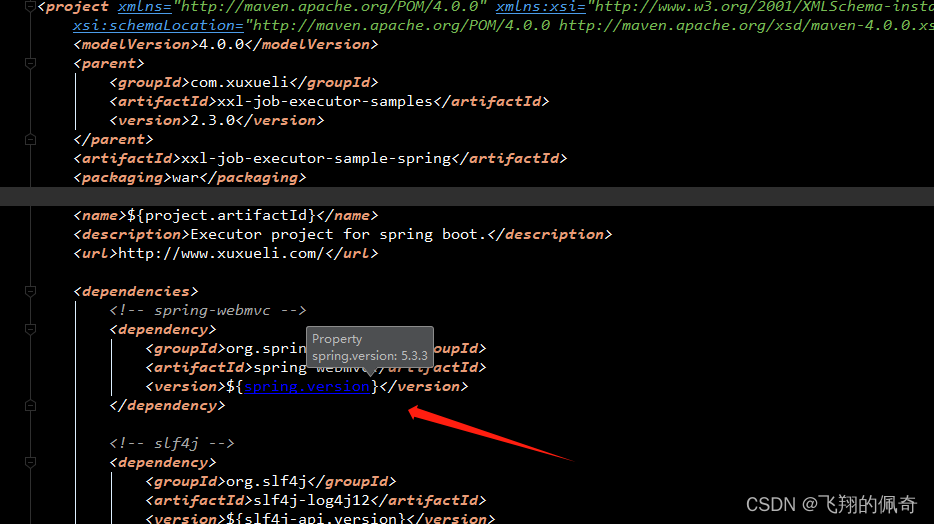
经过查询,发现org.springframework.web.util.Log4jConfigListener这个类在spring5.0及以上版本已经废弃删除,如果想使用这个类,spring版本需要降低。原来如此,那我们直接将spring的版本降为升级前的版本<dependency> <groupId>org.springframeworkgroupId> <artifactId>spring-webmvcartifactId> <version>4.3.22.RELEASEversion> dependency>- 1
- 2
- 3
- 4
- 5
OK,接下来启动服务,看一下

我们发现虽然报错了,但至少spring容器在加载初始化一些配置了,我们分析一下错误:
Invalid property 'appName' of bean class [com.xxl.job.core.executor.impl.XxlJobSpringExecutor]: Bean property 'appName' is not writable or has an invalid setter method. Did you mean 'appname'?- 1
应该是属性名称不一样,我们找一下源码,打开一下XxlJobSpringExecutor类
public class XxlJobSpringExecutor extends XxlJobExecutor implements ApplicationContextAware, SmartInitializingSingleton, DisposableBean { private static final Logger logger = LoggerFactory.getLogger(XxlJobSpringExecutor.class); private static ApplicationContext applicationContext; public XxlJobSpringExecutor() { } public void afterSingletonsInstantiated() { this.initJobHandlerMethodRepository(applicationContext); GlueFactory.refreshInstance(1); try { super.start(); } catch (Exception var2) { throw new RuntimeException(var2); } } .....- 1
- 2
- 3
- 4
- 5
- 6
- 7
- 8
- 9
- 10
- 11
- 12
- 13
- 14
- 15
- 16
- 17
- 18
发现没有,继续找他的父类XxlJobExecutor,终于找到了,我们看到appname这个字段是这样命名的

所以,我们回到项目中,看一下项目中的配置文件

原来这个地方写成了appName,所以只要把他改成appname就可以了

5、再次启动服务并验证

我们发现终于启动成功了,再看一下,执行器是否注册到任务调度中心了

我们随便建一个任务执行一下看看

执行成功


至此,执行器的版本升级结束 -
相关阅读:
数据库的基本操作(期末复习大全)
第十届MathorCup高校数学建模挑战赛-B题:养老服务床位需求预测与运营模式研究(续)
机器学习-有监督算法-决策树和支持向量机
优化系统报错提示信息,提高人机交互(一)
【Spring Boot】从配置文件中读取配置参数
Git(3)——Git的三大区域
瑞吉外卖(优化篇)
MyBatis注解开发的多表操作
总结万字长文笔记webpack5打包资源优化
lxm not found:Mac Python 安装 lxml包
- 原文地址:https://blog.csdn.net/weixin_43860634/article/details/133940761