-
Keeplived安装部署(单机&双机)
Keeplived官网:https://www.keepalived.org/download.html

一 、单机安装配置:
1.上传keepalived安装包并且安装
- [root@master1 local]# tar -zxvf keepalived-2.2.8.tar.gz
- [root@master1 local]# mv keepalived-2.2.8 keepalived
- [root@master1 local]# chown root:root -R keepalived
- [root@master1 local]# cd keepalived
- [root@master1 keepalived]# ./configure --prefix=/usr/local/keepalived
- [root@master1 keepalived]# make && make install
- [root@master1 keepalived]# ls
- aclocal.m4 autogen.sh bin_install build_setup config.log configure CONTRIBUTORS doc Dockerfile.in INSTALL keepalived.spec lib Makefile Makefile.in README.md share TODO
- AUTHOR bin build-aux ChangeLog config.status configure.ac COPYING Dockerfile etc keepalived keepalived.spec.in m4 Makefile.am README sbin snap tools
2.修改配置
- [root@master1 keepalived]# cd etc/keepalived/
- [root@master1 keepalived]# ls
- keepalived.conf.sample samples
- [root@master1 keepalived]# cp keepalived.conf.sample keepalived.conf
- [root@master1 keepalived]# ls
- keepalived.conf keepalived.conf.sample samples
3.添加系统启动项
vim /lib/systemd/system/keepalived.service- [Unit]
- Description=LVS and VRRP High Availability Monitor
- After=network-online.target syslog.target
- Wants=network-online.target
- Documentation=man:keepalived(8)
- Documentation=man:keepalived.conf(5)
- Documentation=man:genhash(1)
- Documentation=https://keepalived.org
- [Service]
- Type=forking
- PIDFile=/run/keepalived.pid
- KillMode=process
- EnvironmentFile=-/usr/local/keepalived/etc/sysconfig/keepalived
- ExecStart=/usr/local/keepalived/sbin/keepalived $KEEPALIVED_OPTIONS
- ExecReload=/bin/kill -HUP $MAINPID
- [Install]
- WantedBy=multi-user.target
- 重新加载配置:
- systemctl daemon-reload
- 设置开机启动:
- cp /usr/local/keepalived/sbin/keepalived /etc/init.d/keepalived
- systemctl enable keepalived
- 启动命令:
- systemctl start keepalived
- systemctl status keepalived
- systemctl restart keepalived
启动和相关报错:
报错1:
WARNING - this build will not support IPVS with IPv6. Please install libnl/libnl-3 dev libraries to support IPv6 with IPVS.解决:
yum -y install libnl libnl-devel报错2:
- [root@master1 etc]# systemctl start keepalived
- [root@master1 keepalived]# systemctl status keepalived
- ● keepalived.service - LVS and VRRP High Availability Monitor
- Loaded: loaded (/usr/lib/systemd/system/keepalived.service; enabled; vendor preset: disabled)
- Active: failed (Result: exit-code) since 四 2023-10-19 18:05:36 CST; 3s ago
- Docs: man:keepalived(8)
- man:keepalived.conf(5)
- man:genhash(1)
- https://keepalived.org
- Process: 110509 ExecStart=/usr/local/keepalived/sbin/keepalived $KEEPALIVED_OPTIONS (code=exited, status=0/SUCCESS)
- Main PID: 110510 (code=exited, status=2)
- Tasks: 0
- Memory: 0B
- CGroup: /system.slice/keepalived.service
- 10月 19 18:05:36 master1 Keepalived[110510]: NOTICE: setting config option max_auto_priority should result in better keepalived performance
- 10月 19 18:05:36 master1 Keepalived[110510]: Starting Healthcheck child process, pid=110511
- 10月 19 18:05:36 master1 Keepalived[110510]: Starting VRRP child process, pid=110512
- 10月 19 18:05:36 master1 Keepalived_healthcheckers[110511]: Initializing ipvs
- 10月 19 18:05:36 master1 systemd[1]: keepalived.service: main process exited, code=exited, status=2/INVALIDARGUMENT
- 10月 19 18:05:36 master1 systemd[1]: Unit keepalived.service entered failed state.
- 10月 19 18:05:36 master1 systemd[1]: keepalived.service failed.
- 10月 19 18:05:36 master1 Keepalived_healthcheckers[110511]: Gained quorum 1+0=1 <= 1 for VS [192.168.200.100]:tcp:443
- 10月 19 18:05:36 master1 Keepalived_healthcheckers[110511]: Gained quorum 1+0=1 <= 2 for VS [10.10.10.2]:tcp:1358
- 10月 19 18:05:36 master1 Keepalived_healthcheckers[110511]: Gained quorum 1+0=1 <= 2 for VS [10.10.10.3]:tcp:1358
解决:需要修改虚拟ip等配置
- [root@master1 keepalived]# tail -f /var/log/messages
- Oct 19 18:07:04 master1 grafana: logger=plugins.update.checker t=2023-10-19T18:07:04.752278809+08:00 level=info msg="Update check succeeded" duration=6.432745249s
- Oct 19 18:07:06 master1 systemd: Starting LVS and VRRP High Availability Monitor...
- Oct 19 18:07:06 master1 Keepalived[110735]: Starting Keepalived v2.2.8 (04/04,2023), git commit v2.2.7-154-g292b299e+
- Oct 19 18:07:06 master1 Keepalived[110735]: Running on Linux 3.10.0-1160.76.1.el7.x86_64 #1 SMP Wed Aug 10 16:21:17 UTC 2022 (built for Linux 3.10.0)
- Oct 19 18:07:06 master1 Keepalived[110735]: Command line: '/usr/local/keepalived/sbin/keepalived' '-D'
- Oct 19 18:07:06 master1 Keepalived[110735]: Opening file '/usr/local/keepalived/etc/keepalived/keepalived.conf'.
- Oct 19 18:07:06 master1 Keepalived[110735]: Configuration file /usr/local/keepalived/etc/keepalived/keepalived.conf
- Oct 19 18:07:06 master1 systemd: Started LVS and VRRP High Availability Monitor.
- Oct 19 18:07:06 master1 Keepalived[110735]: (Line 15) WARNING - number '0' outside range [0.000001, 4294.967295]
- Oct 19 18:07:06 master1 Keepalived[110735]: (Line 15) vrrp_garp_interval '0' is invalid
- Oct 19 18:07:06 master1 Keepalived[110735]: (Line 16) WARNING - number '0' outside range [0.000001, 4294.967295]
- Oct 19 18:07:06 master1 Keepalived[110735]: (Line 16) vrrp_gna_interval '0' is invalid
- Oct 19 18:07:06 master1 Keepalived[110736]: NOTICE: setting config option max_auto_priority should result in better keepalived performance
- Oct 19 18:07:06 master1 Keepalived[110736]: Starting Healthcheck child process, pid=110737
- Oct 19 18:07:06 master1 Keepalived[110736]: Starting VRRP child process, pid=110738
- Oct 19 18:07:06 master1 Keepalived_vrrp[110738]: Registering Kernel netlink reflector
- Oct 19 18:07:06 master1 systemd: keepalived.service: main process exited, code=exited, status=2/INVALIDARGUMENT
- Oct 19 18:07:06 master1 Keepalived_vrrp[110738]: Registering Kernel netlink command channel
- Oct 19 18:07:06 master1 systemd: Unit keepalived.service entered failed state.
- Oct 19 18:07:06 master1 Keepalived_vrrp[110738]: (/usr/local/keepalived/etc/keepalived/keepalived.conf: Line 21) WARNING - interface eth0 for vrrp_instance VI_1 doesn't exist
- Oct 19 18:07:06 master1 systemd: keepalived.service failed.
- Oct 19 18:07:06 master1 Keepalived_vrrp[110738]: Non-existent interface specified in configuration
- Oct 19 18:07:06 master1 Keepalived_vrrp[110738]: Stopped - used 0.000000 user time, 0.001848 system time
- Oct 19 18:07:06 master1 Keepalived[110736]: pid 110738 exited with permanent error CONFIG. Terminating
- Oct 19 18:07:06 master1 Keepalived_healthcheckers[110737]: Gained quorum 1+0=1 <= 1 for VS [192.168.200.100]:tcp:443
- Oct 19 18:07:06 master1 Keepalived_healthcheckers[110737]: Gained quorum 1+0=1 <= 2 for VS [10.10.10.2]:tcp:1358
- Oct 19 18:07:06 master1 Keepalived[110736]: CPU usage (self/children) user: 0.000000/0.000000 system: 0.001606/0.002565
- Oct 19 18:07:06 master1 Keepalived[110736]: Stopped Keepalived v2.2.8 (04/04,2023), git commit v2.2.7-154-g292b299e+
- Oct 19 18:07:06 master1 Keepalived_healthcheckers[110737]: Gained quorum 1+0=1 <= 2 for VS [10.10.10.3]:tcp:1358
- Oct 19 18:07:06 master1 Keepalived_healthcheckers[110737]: Activating healthchecker for service [192.168.201.100]:tcp:443 for VS [192.168.200.100]:tcp:443
- Oct 19 18:07:06 master1 Keepalived_healthcheckers[110737]: Activating healthchecker for service [192.168.200.2]:tcp:1358 for VS [10.10.10.2]:tcp:1358
- Oct 19 18:07:06 master1 Keepalived_healthcheckers[110737]: Activating healthchecker for service [192.168.200.3]:tcp:1358 for VS [10.10.10.2]:tcp:1358
- Oct 19 18:07:06 master1 Keepalived_healthcheckers[110737]: Activating healthchecker for service [192.168.200.4]:tcp:1358 for VS [10.10.10.3]:tcp:1358
- Oct 19 18:07:06 master1 Keepalived_healthcheckers[110737]: Activating healthchecker for service [192.168.200.5]:tcp:1358 for VS [10.10.10.3]:tcp:1358
- Oct 19 18:07:06 master1 Keepalived_healthcheckers[110737]: Shutting down service [192.168.201.100]:tcp:443 from VS [192.168.200.100]:tcp:443
- Oct 19 18:07:06 master1 Keepalived_healthcheckers[110737]: Shutting down service [192.168.200.2]:tcp:1358 from VS [10.10.10.2]:tcp:1358
- Oct 19 18:07:06 master1 Keepalived_healthcheckers[110737]: Shutting down service [192.168.200.3]:tcp:1358 from VS [10.10.10.2]:tcp:1358
- Oct 19 18:07:06 master1 Keepalived_healthcheckers[110737]: Shutting down service [192.168.200.4]:tcp:1358 from VS [10.10.10.3]:tcp:1358
- Oct 19 18:07:06 master1 Keepalived_healthcheckers[110737]: Shutting down service [192.168.200.5]:tcp:1358 from VS [10.10.10.3]:tcp:1358
- Oct 19 18:07:06 master1 Keepalived_healthcheckers[110737]: Stopped - used 0.001620 user time, 0.001620 system time
[root@master1 keepalived]# vim keepalived.conf- ! Configuration File for keepalived
- global_defs {
- notification_email {
- acassen@firewall.loc
- failover@firewall.loc
- sysadmin@firewall.loc
- }
- notification_email_from Alexandre.Cassen@firewall.loc
- smtp_server 192.168.200.1
- smtp_connect_timeout 30
- router_id LVS_DEVEL
- vrrp_skip_check_adv_addr
- vrrp_strict
- vrrp_garp_interval 0
- vrrp_gna_interval 0
- }
- vrrp_instance VI_1 {
- state MASTER #单机就直接master,如果有备份机,备份机需要改成BACKUP
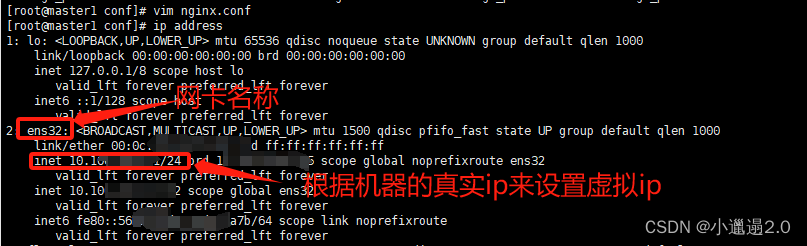
- interface ens32 #这个是根据ip address来的,就是本机的网卡名称
- virtual_router_id 51
- priority 100 #优先级
- advert_int 1
- authentication {
- auth_type PASS
- auth_pass 1111
- }
- virtual_ipaddress {
- 10.10.10.33 #这个地址是根据原来机器的ip来的,比如原ip:10.10.10.10,虚拟ip写成10.10.10.33或其他的,还可以配置多个虚拟ip,注意:如果有备份机,备份机也要和master配置是一样的
- 10.10.10.34
- 10.10.10.35
- }
- }
测试:
1.需要安装nginx并且配置(nginx自己安装)- [root@master1 conf]# cd /usr/local/nginx/html
- [root@master1 html]# vim test.html
- this is a test url!
vim nginx.conf
测试结果:

二 、高可用安装配置:
在第二台机器上也安装keepalived,作为备份机(安装方法在上面)
第一台安装的作为主机主机配置文件:
- ! Configuration File for keepalived
- global_defs {
- notification_email {
- acassen@firewall.loc
- failover@firewall.loc
- sysadmin@firewall.loc
- }
- notification_email_from Alexandre.Cassen@firewall.loc
- smtp_server 192.168.200.1
- smtp_connect_timeout 30
- router_id LVS_DEVEL
- vrrp_skip_check_adv_addr
- vrrp_strict
- vrrp_garp_interval 0
- vrrp_gna_interval 0
- }
- vrrp_instance VI_1 {
- state MASTER
- interface ens32
- virtual_router_id 51
- priority 100 #主机优先级是100
- advert_int 1
- authentication {
- auth_type PASS
- auth_pass 1111
- }
- virtual_ipaddress {
- 10.10.10.33
- }
- }
备份机配置文件:
- ! Configuration File for keepalived
- global_defs {
- notification_email {
- acassen@firewall.loc
- failover@firewall.loc
- sysadmin@firewall.loc
- }
- notification_email_from Alexandre.Cassen@firewall.loc
- smtp_server 192.168.200.1
- smtp_connect_timeout 30
- router_id LVS_DEVEL
- vrrp_skip_check_adv_addr
- vrrp_strict
- vrrp_garp_interval 0
- vrrp_gna_interval 0
- }
- vrrp_instance VI_1 {
- state BACKUP
- interface ens32
- virtual_router_id 51
- priority 50 #备份机优先级改为50
- advert_int 1
- authentication {
- auth_type PASS
- auth_pass 1111
- }
- virtual_ipaddress {
- 10.10.10.33
- }
- }
测试:
正常情况
master:

backup:

1.停掉master上的keeplived,查看backup上的请情况
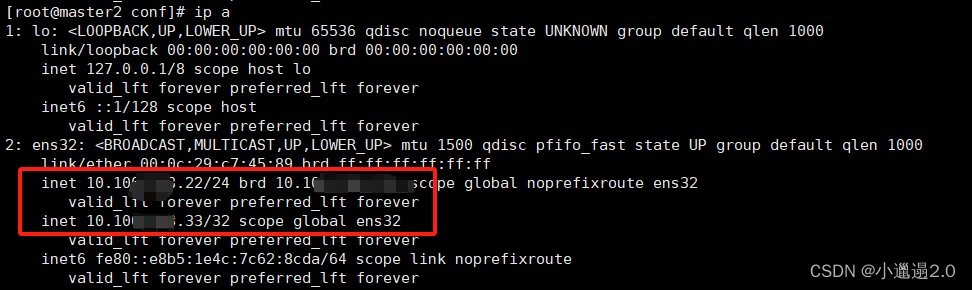
正常:停掉master上的keepalived虚拟ip会跳到backup上
2.启动master上的keepalived,看backup上的情况
正常:启动master上的keepalived后,backup的虚拟ip会回到master上
master:

backup:

-
相关阅读:
算法基础之二分查找
【单源最短路 图论】3112. 访问消失节点的最少时间
入门力扣自学笔记115 C++ (题目编号1408)
HDFS的启动流程和HA
4、wireshark使用教程
LeetCode128. Longest Consecutive Sequence
直接选择排序
SparkStreaming 案例实操 完整使用 (第十七章)
Android 性能优化--APK加固(1)混淆
apt update和apt upgrade命令 - 有什么区别?
- 原文地址:https://blog.csdn.net/weixin_46627652/article/details/133947510