-
3、Kafka Broker
4.1 Kafka Broker 工作流程
4.1.1 Zookeeper 存储的 Kafka 信息
(1)启动 Zookeeper 客户端。[hadoop102 zookeeper-3.5.7]$ bin/zkCli.sh- 1
(2)通过 ls 命令可以查看 kafka 相关信息。
[zk: localhost:2181(CONNECTED) 2] ls /kafka- 1

4.1.2 Kafka Broker 总体工作流程

1)模拟 Kafka 上下线,Zookeeper 中数据变化
(1)查看/kafka/brokers/ids 路径上的节点。[zk: localhost:2181(CONNECTED) 2] ls /kafka/brokers/ids [0, 1, 2]- 1
- 2
(2)查看/kafka/controller 路径上的数据。
[zk: localhost:2181(CONNECTED) 15] get /kafka/controller {"version":1,"brokerid":0,"timestamp":"1637292471777"}- 1
- 2
(3)查看/kafka/brokers/topics/first/partitions/0/state 路径上的数据
[zk: localhost:2181(CONNECTED) 16] get /kafka/brokers/topics/first/partitions/0/state {"controller_epoch":24,"leader":0,"version":1,"leader_epoch":18," isr":[0,1,2]}- 1
- 2
- 3
- 4
(4)停止 hadoop104 上的 kafka。
[hadoop104 kafka]$ bin/kafka-server-stop.sh- 1
(5)再次查看/kafka/brokers/ids 路径上的节点。
[zk: localhost:2181(CONNECTED) 3] ls /kafka/brokers/ids [0, 1]- 1
- 2
(6)再次查看/kafka/controller 路径上的数据。
[zk: localhost:2181(CONNECTED) 15] get /kafka/controller {"version":1,"brokerid":0,"timestamp":"1637292471777"}- 1
- 2
(7)再次查看/kafka/brokers/topics/first/partitions/0/state 路径上的数据。
[zk: localhost:2181(CONNECTED) 16] get /kafka/brokers/topics/first/partitions/0/state {"controller_epoch":24,"leader":0,"version":1,"leader_epoch":18," isr":[0,1]}- 1
- 2
- 3
- 4
(8)启动 hadoop104 上的 kafka。
[hadoop104 kafka]$ bin/kafka-server-start.sh - daemon ./config/server.properties- 1
- 2
(9)再次观察(1)、(2)、(3)步骤中的内容
4.1.3 Broker 重要参数

2. 节点服役和退役
2.1 服役新节点
1)新节点准备(1)关闭 hadoop104,并右键执行克隆操作。
(2)开启 hadoop105,并修改 IP 地址。[root@hadoop104 ~]# vim /etc/sysconfig/network-scripts/ifcfgens33 DEVICE=ens33 TYPE=Ethernet ONBOOT=yes BOOTPROTO=static NAME="ens33" IPADDR=192.168.10.105 PREFIX=24 GATEWAY=192.168.10.2 DNS1=192.168.10.2- 1
- 2
- 3
- 4
- 5
- 6
- 7
- 8
- 9
- 10
(3)在 hadoop105 上,修改主机名称为 hadoop105。
[root@hadoop104 ~]# vim /etc/hostname hadoop105- 1
- 2
(4)重新启动 hadoop104、hadoop105。
(5)修改 haodoop105 中 kafka 的 broker.id 为 3。
(6)删除 hadoop105 中 kafka 下的 datas 和 logs。[hadoop105 kafka]$ rm -rf datas/* logs/*- 1
(7)启动 hadoop102、hadoop103、hadoop104 上的 kafka 集群。
[hadoop102 ~]$ zk.sh start [hadoop102 ~]$ kf.sh start- 1
- 2
(8)单独启动 hadoop105 中的 kafka。
[hadoop105 kafka]$ bin/kafka-server-start.sh - daemon ./config/server.properties- 1
- 2
2)执行负载均衡操作
(1)创建一个要均衡的主题。[hadoop102 kafka]$ vim topics-to-move.json { "topics": [ {"topic": "first"} ], "version": 1 }- 1
- 2
- 3
- 4
- 5
- 6
- 7
(2)生成一个负载均衡的计划。
[hadoop102 kafka]$ bin/kafka-reassign-partitions.sh -- bootstrap-server hadoop102:9092 --topics-to-move-json-file topics-to-move.json --broker-list "0,1,2,3" --generate Current partition replica assignment {"version":1,"partitions":[{"topic":"first","partition":0,"replic as":[0,2,1],"log_dirs":["any","any","any"]},{"topic":"first","par tition":1,"replicas":[2,1,0],"log_dirs":["any","any","any"]},{"to pic":"first","partition":2,"replicas":[1,0,2],"log_dirs":["any"," any","any"]}]} Proposed partition reassignment configuration {"version":1,"partitions":[{"topic":"first","partition":0,"replic as":[2,3,0],"log_dirs":["any","any","any"]},{"topic":"first","par tition":1,"replicas":[3,0,1],"log_dirs":["any","any","any"]},{"to pic":"first","partition":2,"replicas":[0,1,2],"log_dirs":["any"," any","any"]}]}- 1
- 2
- 3
- 4
- 5
- 6
- 7
- 8
- 9
- 10
- 11
- 12
- 13
- 14
- 15
(3)创建副本存储计划(所有副本存储在 broker0、broker1、broker2、broker3 中)。
[hadoop102 kafka]$ vim increase-replication-factor.json- 1
输入如下内容:
{"version":1,"partitions":[{"topic":"first","partition":0,"replic as":[2,3,0],"log_dirs":["any","any","any"]},{"topic":"first","par tition":1,"replicas":[3,0,1],"log_dirs":["any","any","any"]},{"to pic":"first","partition":2,"replicas":[0,1,2],"log_dirs":["any"," any","any"]}]}- 1
- 2
- 3
- 4
- 5
(4)执行副本存储计划。
[atguigu@hadoop102 kafka]$ bin/kafka-reassign-partitions.sh –
bootstrap-server hadoop102:9092 --reassignment-json-file
increase-replication-factor.json --execute
(5)验证副本存储计划。[hadoop102 kafka]$ bin/kafka-reassign-partitions.sh -- bootstrap-server hadoop102:9092 --reassignment-json-file increase-replication-factor.json --verify Status of partition reassignment: Reassignment of partition first-0 is complete. Reassignment of partition first-1 is complete. Reassignment of partition first-2 is complete. Clearing broker-level throttles on brokers 0,1,2,3 Clearing topic-level throttles on topic first- 1
- 2
- 3
- 4
- 5
- 6
- 7
- 8
- 9
4.2.2 退役旧节点
1)执行负载均衡操作
先按照退役一台节点,生成执行计划,然后按照服役时操作流程执行负载均衡。
(1)创建一个要均衡的主题。[hadoop102 kafka]$ vim topics-to-move.json { "topics": [ {"topic": "first"} ], "version": 1 }- 1
- 2
- 3
- 4
- 5
- 6
- 7
(2)创建执行计划。
[hadoop102 kafka]$ bin/kafka-reassign-partitions.sh -- bootstrap-server hadoop102:9092 --topics-to-move-json-file topics-to-move.json --broker-list "0,1,2" --generate Current partition replica assignment {"version":1,"partitions":[{"topic":"first","partition":0,"replic as":[2,0,1],"log_dirs":["any","any","any"]},{"topic":"first","par tition":1,"replicas":[3,1,2],"log_dirs":["any","any","any"]},{"to pic":"first","partition":2,"replicas":[0,2,3],"log_dirs":["any"," any","any"]}]} Proposed partition reassignment configuration {"version":1,"partitions":[{"topic":"first","partition":0,"replic as":[2,0,1],"log_dirs":["any","any","any"]},{"topic":"first","par tition":1,"replicas":[0,1,2],"log_dirs":["any","any","any"]},{"to pic":"first","partition":2,"replicas":[1,2,0],"log_dirs":["any"," any","any"]}]}- 1
- 2
- 3
- 4
- 5
- 6
- 7
- 8
- 9
- 10
- 11
- 12
- 13
- 14
- 15
(3)创建副本存储计划(所有副本存储在 broker0、broker1、broker2 中)。
[hadoop102 kafka]$ vim increase-replication-factor.json {"version":1,"partitions":[{"topic":"first","partition":0,"replic as":[2,0,1],"log_dirs":["any","any","any"]},{"topic":"first","par tition":1,"replicas":[0,1,2],"log_dirs":["any","any","any"]},{"to pic":"first","partition":2,"replicas":[1,2,0],"log_dirs":["any"," any","any"]}]}- 1
- 2
- 3
- 4
- 5
- 6
(4)执行副本存储计划。
[hadoop102 kafka]$ bin/kafka-reassign-partitions.sh -- bootstrap-server hadoop102:9092 --reassignment-json-file increase-replication-factor.json --execute- 1
- 2
- 3
(5)验证副本存储计划。
[hadoop102 kafka]$ bin/kafka-reassign-partitions.sh -- bootstrap-server hadoop102:9092 --reassignment-json-file increase-replication-factor.json --verify Status of partition reassignment: Reassignment of partition first-0 is complete. Reassignment of partition first-1 is complete. Reassignment of partition first-2 is complete. Clearing broker-level throttles on brokers 0,1,2,3 Clearing topic-level throttles on topic first- 1
- 2
- 3
- 4
- 5
- 6
- 7
- 8
- 9
2)执行停止命令
在 hadoop105 上执行停止命令即可。[hadoop105 kafka]$ bin/kafka-server-stop.sh- 1
4.3 Kafka 副本
4.3.1 副本基本信息
(1)Kafka 副本作用:提高数据可靠性。
(2)Kafka 默认副本 1 个,生产环境一般配置为 2 个,保证数据可靠性;太多副本会
增加磁盘存储空间,增加网络上数据传输,降低效率。
(3)Kafka 中副本分为:Leader 和 Follower。Kafka 生产者只会把数据发往 Leader,
然后 Follower 找 Leader 进行同步数据。
(4)Kafka 分区中的所有副本统称为 AR(Assigned Repllicas)。
AR = ISR + OSR
ISR,表示和 Leader 保持同步的 Follower 集合。如果 Follower 长时间未向 Leader 发送
通信请求或同步数据,则该 Follower 将被踢出 ISR。该时间阈值由 replica.lag.time.max.ms
参数设定,默认 30s。Leader 发生故障之后,就会从 ISR 中选举新的 Leader。
OSR,表示 Follower 与 Leader 副本同步时,延迟过多的副本。
4.3.2 Leader 选举流程
Kafka 集群中有一个 broker 的 Controller 会被选举为 Controller Leader,负责管理集群
broker 的上下线,所有 topic 的分区副本分配和 Leader 选举等工作。
Controller 的信息同步工作是依赖于 Zookeeper 的

(1)创建一个新的 topic,4 个分区,4 个副本[hadoop102 kafka]$ bin/kafka-topics.sh --bootstrap-server hadoop102:9092 --create --topic atguigu1 --partitions 4 --replication-factor 4 Created topic atguigu1.- 1
- 2
- 3
- 4
(2)查看 Leader 分布情况
[hadoop102 kafka]$ bin/kafka-topics.sh --bootstrap-server hadoop102:9092 --describe --topic atguigu1 Topic: atguigu1 TopicId: awpgX_7WR-OX3Vl6HE8sVg PartitionCount: 4 ReplicationFactor: 4 Configs: segment.bytes=1073741824 Topic: atguigu1 Partition: 0 Leader: 3 Replicas: 3,0,2,1 Isr: 3,0,2,1 Topic: atguigu1 Partition: 1 Leader: 1 Replicas: 1,2,3,0 Isr: 1,2,3,0 Topic: atguigu1 Partition: 2 Leader: 0 Replicas: 0,3,1,2 Isr: 0,3,1,2 Topic: atguigu1 Partition: 3 Leader: 2 Replicas: 2,1,0,3 Isr: 2,1,0,3- 1
- 2
- 3
- 4
- 5
- 6
- 7
- 8
(3)停止掉 hadoop105 的 kafka 进程,并查看 Leader 分区情况
[hadoop105 kafka]$ bin/kafka-server-stop.sh [hadoop102 kafka]$ bin/kafka-topics.sh --bootstrap-server hadoop102:9092 --describe --topic atguigu1 Topic: atguigu1 TopicId: awpgX_7WR-OX3Vl6HE8sVg PartitionCount: 4 ReplicationFactor: 4 Configs: segment.bytes=1073741824 Topic: atguigu1 Partition: 0 Leader: 0 Replicas: 3,0,2,1 Isr: 0,2,1 pic: atguigu1 Partition: 1 Leader: 1 Replicas: 1,2,3,0 Isr: 1,2,0 Topic: atguigu1 Partition: 2 Leader: 0 Replicas: 0,3,1,2 Isr: 0,1,2 Topic: atguigu1 Partition: 3 Leader: 2 Replicas: 2,1,0,3 Isr: 2,1,0- 1
- 2
- 3
- 4
- 5
- 6
- 7
- 8
- 9
(4)停止掉 hadoop104 的 kafka 进程,并查看 Leader 分区情况
[hadoop104 kafka]$ bin/kafka-server-stop.sh [hadoop102 kafka]$ bin/kafka-topics.sh --bootstrap-server hadoop102:9092 --describe --topic atguigu1 Topic: atguigu1 TopicId: awpgX_7WR-OX3Vl6HE8sVg PartitionCount: 4 ReplicationFactor: 4 Configs: segment.bytes=1073741824 Topic: atguigu1 Partition: 0 Leader: 0 Replicas: 3,0,2,1 Isr: 0,1 Topic: atguigu1 Partition: 1 Leader: 1 Replicas: 1,2,3,0 Isr: 1,0 Topic: atguigu1 Partition: 2 Leader: 0 Replicas: 0,3,1,2 Isr: 0,1 Topic: atguigu1 Partition: 3 Leader: 1 Replicas: 2,1,0,3 Isr: 1,0- 1
- 2
- 3
- 4
- 5
- 6
- 7
- 8
- 9
(5)启动 hadoop105 的 kafka 进程,并查看 Leader 分区情况
[hadoop105 kafka]$ bin/kafka-server-start.sh -daemon config/server.properties [hadoop102 kafka]$ bin/kafka-topics.sh --bootstrap-server hadoop102:9092 --describe --topic atguigu1 Topic: atguigu1 TopicId: awpgX_7WR-OX3Vl6HE8sVg PartitionCount: 4 ReplicationFactor: 4 Configs: segment.bytes=1073741824 Topic: atguigu1 Partition: 0 Leader: 0 Replicas: 3,0,2,1 Isr: 0,1,3 Topic: atguigu1 Partition: 1 Leader: 1 Replicas: 1,2,3,0 Isr: 1,0,3 Topic: atguigu1 Partition: 2 Leader: 0 Replicas: 0,3,1,2 Isr: 0,1,3 Topic: atguigu1 Partition: 3 Leader: 1 Replicas: 2,1,0,3 Isr: 1,0,3- 1
- 2
- 3
- 4
- 5
- 6
- 7
- 8
- 9
(6)启动 hadoop104 的 kafka 进程,并查看 Leader 分区情况
[hadoop104 kafka]$ bin/kafka-server-start.sh -daemon config/server.properties [hadoop102 kafka]$ bin/kafka-topics.sh --bootstrap-server hadoop102:9092 --describe --topic atguigu1 Topic: atguigu1 TopicId: awpgX_7WR-OX3Vl6HE8sVg PartitionCount: 4 ReplicationFactor: 4 Configs: segment.bytes=1073741824 Topic: atguigu1 Partition: 0 Leader: 0 Replicas: 3,0,2,1 Isr: 0,1,3,2 Topic: atguigu1 Partition: 1 Leader: 1 Replicas: 1,2,3,0 Isr: 1,0,3,2 Topic: atguigu1 Partition: 2 Leader: 0 Replicas: 0,3,1,2 Isr: 0,1,3,2 Topic: atguigu1 Partition: 3 Leader: 1 Replicas: 2,1,0,3 Isr: 1,0,3,2- 1
- 2
- 3
- 4
- 5
- 6
- 7
- 8
- 9
(7)停止掉 hadoop103 的 kafka 进程,并查看 Leader 分区情况
[hadoop103 kafka]$ bin/kafka-server-stop.sh [hadoop102 kafka]$ bin/kafka-topics.sh --bootstrap-server hadoop102:9092 --describe --topic atguigu1 Topic: atguigu1 TopicId: awpgX_7WR-OX3Vl6HE8sVg PartitionCount: 4 ReplicationFactor: 4 Configs: segment.bytes=1073741824 Topic: atguigu1 Partition: 0 Leader: 0 Replicas: 3,0,2,1 Isr: 0,3,2 Topic: atguigu1 Partition: 1 Leader: 2 Replicas: 1,2,3,0 Isr: 0,3,2 Topic: atguigu1 Partition: 2 Leader: 0 Replicas: 0,3,1,2 Isr: 0,3,2 Topic: atguigu1 Partition: 3 Leader: 2 Replicas: 2,1,0,3 Isr: 0,3,2- 1
- 2
- 3
- 4
- 5
- 6
- 7
- 8
- 9
4.3.3 Leader 和 Follower 故障处理细节


4.3.4 分区副本分配
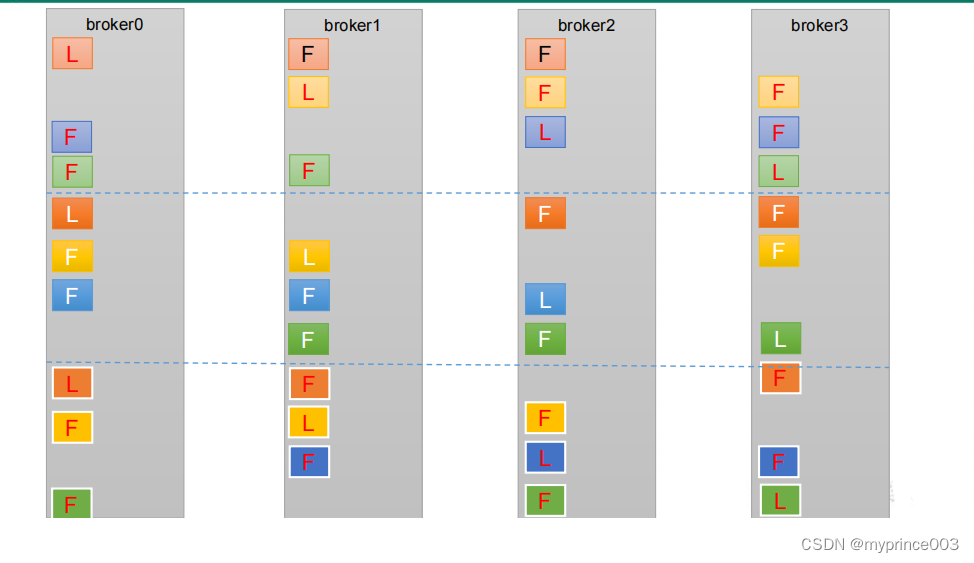
如果 kafka 服务器只有 4 个节点,那么设置 kafka 的分区数大于服务器台数,在 kafka
底层如何分配存储副本呢?
1)创建 16 分区,3 个副本
(1)创建一个新的 topic,名称为 second。[hadoop102 kafka]$ bin/kafka-topics.sh --bootstrap-server hadoop102:9092 --create --partitions 16 --replication-factor 3 -- topic second- 1
- 2
- 3
(2)查看分区和副本情况。
[hadoop102 kafka]$ bin/kafka-topics.sh --bootstrap-server hadoop102:9092 --describe --topic second Topic: second4 Partition: 0 Leader: 0 Replicas: 0,1,2 Isr: 0,1,2 Topic: second4 Partition: 1 Leader: 1 Replicas: 1,2,3 Isr: 1,2,3 Topic: second4 Partition: 2 Leader: 2 Replicas: 2,3,0 Isr: 2,3,0 Topic: second4 Partition: 3 Leader: 3 Replicas: 3,0,1 Isr: 3,0,1 Topic: second4 Partition: 4 Leader: 0 Replicas: 0,2,3 Isr: 0,2,3 Topic: second4 Partition: 5 Leader: 1 Replicas: 1,3,0 Isr: 1,3,0 Topic: second4 Partition: 6 Leader: 2 Replicas: 2,0,1 Isr: 2,0,1 Topic: second4 Partition: 7 Leader: 3 Replicas: 3,1,2 Isr: 3,1,2 Topic: second4 Partition: 8 Leader: 0 Replicas: 0,3,1 Isr: 0,3,1 Topic: second4 Partition: 9 Leader: 1 Replicas: 1,0,2 Isr: 1,0,2 Topic: second4 Partition: 10 Leader: 2 Replicas: 2,1,3 Isr: 2,1,3 Topic: second4 Partition: 11 Leader: 3 Replicas: 3,2,0 Isr: 3,2,0 Topic: second4 Partition: 12 Leader: 0 Replicas: 0,1,2 Isr: 0,1,2 Topic: second4 Partition: 13 Leader: 1 Replicas: 1,2,3 Isr: 1,2,3 Topic: second4 Partition: 14 Leader: 2 Replicas: 2,3,0 Isr: 2,3,0 Topic: second4 Partition: 15 Leader: 3 Replicas: 3,0,1 Isr: 3,0,1- 1
- 2
- 3
- 4
- 5
- 6
- 7
- 8
- 9
- 10
- 11
- 12
- 13
- 14
- 15
- 16
- 17
- 18
4.3.5 生产经验——手动调整分区副本存储
生产经验——手动调整分区副本存储
在生产环境中,每台服务器的配置和性能不一致,但是Kafka只会根据自己的代码规则创建对应的分区副
本,就会导致个别服务器存储压力较大。所有需要手动调整分区副本的存储。需求:创建一个新的topic,4个分区,两个副本,名称为three。将 该topic的所有副本都存储到broker0和
broker1两台服务器上。

手动调整分区副本存储的步骤如下:
(1)创建一个新的 topic,名称为 three。[hadoop102 kafka]$ bin/kafka-topics.sh --bootstrap-server hadoop102:9092 --create --partitions 4 --replication-factor 2 -- topic three- 1
- 2
- 3
(2)查看分区副本存储情况。
[hadoop102 kafka]$ bin/kafka-topics.sh --bootstrap-server hadoop102:9092 --describe --topic three- 1
- 2
(3)创建副本存储计划(所有副本都指定存储在 broker0、broker1 中)。
[hadoop102 kafka]$ vim increase-replication-factor.json- 1
输入如下内容:
{ "version":1, "partitions":[{"topic":"three","partition":0,"replicas":[0,1]}, {"topic":"three","partition":1,"replicas":[0,1]}, {"topic":"three","partition":2,"replicas":[1,0]}, {"topic":"three","partition":3,"replicas":[1,0]}] }- 1
- 2
- 3
- 4
- 5
- 6
- 7
(4)执行副本存储计划。
[hadoop102 kafka]$ bin/kafka-reassign-partitions.sh -- bootstrap-server hadoop102:9092 --reassignment-json-file increase-replication-factor.json --execute- 1
- 2
- 3
(5)验证副本存储计划。
[hadoop102 kafka]$ bin/kafka-reassign-partitions.sh -- bootstrap-server hadoop102:9092 --reassignment-json-file increase-replication-factor.json --verify- 1
- 2
- 3
(6)查看分区副本存储情况。
[hadoop102 kafka]$ bin/kafka-topics.sh --bootstrap-server hadoop102:9092 --describe --topic three- 1
- 2
4.3.6 生产经验——Leader Partition 负载平衡


4.3.7 生产经验——增加副本因子
在生产环境当中,由于某个主题的重要等级需要提升,我们考虑增加副本。副本数的
增加需要先制定计划,然后根据计划执行。
1)创建 topic[hadoop102 kafka]$ bin/kafka-topics.sh --bootstrap-server hadoop102:9092 --create --partitions 3 --replication-factor 1 -- topic four- 1
- 2
- 3
2)手动增加副本存储
(1)创建副本存储计划(所有副本都指定存储在 broker0、broker1、broker2 中)。[hadoop102 kafka]$ vim increase-replication-factor.json- 1
输入如下内容:
{"version":1,"partitions":[{"topic":"four","partition":0,"replica s":[0,1,2]},{"topic":"four","partition":1,"replicas":[0,1,2]},{"t opic":"four","partition":2,"replicas":[0,1,2]}]}- 1
- 2
- 3
(2)执行副本存储计划。
[hadoop102 kafka]$ bin/kafka-reassign-partitions.sh -- bootstrap-server hadoop102:9092 --reassignment-json-file increase-replication-factor.json --execute- 1
- 2
- 3
4.4 文件存储
4.4.1 文件存储机制
1)Topic 数据的存储机制

2)思考:Topic 数据到底存储在什么位置?
(1)启动生产者,并发送消息。[hadoop102 kafka]$ bin/kafka-console-producer.sh -- bootstrap-server hadoop102:9092 --topic first >hello world- 1
- 2
- 3
- 4
(2)查看 hadoop102(或者 hadoop103、hadoop104)的/opt/module/kafk
a/datas/first-1(first-0、first-2)路径上的文件。[hadoop104 first-1]$ ls 00000000000000000092.index 00000000000000000092.log 00000000000000000092.snapshot 00000000000000000092.timeindex leader-epoch-checkpoint partition.metadata- 1
- 2
- 3
- 4
- 5
- 6
- 7
(3)直接查看 log 日志,发现是乱码。
[hadoop104 first-1]$ cat 00000000000000000092.log \CYnF|©|©ÿÿÿÿÿÿÿÿÿÿÿÿÿÿ"hello world- 1
- 2
(4)通过工具查看 index 和 log 信息。
[hadoop104 first-1]$ kafka-run-class.sh kafka.tools.DumpLogSegments --files ./00000000000000000000.index Dumping ./00000000000000000000.index offset: 3 position: 152 [atguigu@hadoop104 first-1]$ kafka-run-class.sh kafka.tools.DumpLogSegments --files ./00000000000000000000.log Dumping datas/first-0/00000000000000000000.log Starting offset: 0 baseOffset: 0 lastOffset: 1 count: 2 baseSequence: -1 lastSequence: -1 producerId: -1 producerEpoch: -1 partitionLeaderEpoch: 0 isTransactional: false isControl: false position: 0 CreateTime: 1636338440962 size: 75 magic: 2 compresscodec: none crc: 2745337109 isvalid: true baseOffset: 2 lastOffset: 2 count: 1 baseSequence: -1 lastSequence: -1 producerId: -1 producerEpoch: -1 partitionLeaderEpoch: 0 isTransactional: false isControl: false position: 75 CreateTime: 1636351749089 size: 77 magic: 2 compresscodec: none crc: 273943004 isvalid: true baseOffset: 3 lastOffset: 3 count: 1 baseSequence: -1 lastSequence: -1 producerId: -1 producerEpoch: -1 partitionLeaderEpoch: 0 isTransactional: false isControl: false position: 152 CreateTime: 1636351749119 size: 77 magic: 2 compresscodec: none crc: 106207379 isvalid: true baseOffset: 4 lastOffset: 8 count: 5 baseSequence: -1 lastSequence: -1 producerId: -1 producerEpoch: -1 partitionLeaderEpoch: 0 isTransactional: false isControl: false position: 229 CreateTime: 1636353061435 size: 141 magic: 2 compresscodec: none crc: 157376877 isvalid: true baseOffset: 9 lastOffset: 13 count: 5 baseSequence: -1 lastSequence: -1 producerId: -1 producerEpoch: -1 partitionLeaderEpoch: 0 isTransactional: false isControl: false position: 370 CreateTime: 1636353204051 size: 146 magic: 2 compresscodec: none crc: 4058582827 isvalid: true- 1
- 2
- 3
- 4
- 5
- 6
- 7
- 8
- 9
- 10
- 11
- 12
- 13
- 14
- 15
- 16
- 17
- 18
- 19
- 20
- 21
- 22
- 23
- 24
- 25
- 26
- 27
- 28
3)index 文件和 log 文件详解


4.4.2 文件清理策略
Kafka 中默认的日志保存时间为 7 天,可以通过调整如下参数修改保存时间。
⚫ log.retention.hours,最低优先级小时,默认 7 天。
⚫ log.retention.minutes,分钟。
⚫ log.retention.ms,最高优先级毫秒。
⚫ log.retention.check.interval.ms,负责设置检查周期,默认 5 分钟。
那么日志一旦超过了设置的时间,怎么处理呢?
Kafka 中提供的日志清理策略有 delete 和 compact 两种。
1)delete 日志删除:将过期数据删除
⚫ log.cleanup.policy = delete 所有数据启用删除策略
(1)基于时间:默认打开。以 segment 中所有记录中的最大时间戳作为该文件时间戳。
(2)基于大小:默认关闭。超过设置的所有日志总大小,删除最早的 segment。
log.retention.bytes,默认等于-1,表示无穷大。
思考:如果一个 segment 中有一部分数据过期,一部分没有过期,怎么处理?

2)compact 日志压缩

4.5 高效读写数据
1)Kafka 本身是分布式集群,可以采用分区技术,并行度高
2)读数据采用稀疏索引,可以快速定位要消费的数据
3)顺序写磁盘
Kafka 的 producer 生产数据,要写入到 log 文件中,写的过程是一直追加到文件末端,
为顺序写。官网有数据表明,同样的磁盘,顺序写能到 600M/s,而随机写只有 100K/s。这
与磁盘的机械机构有关,顺序写之所以快,是因为其省去了大量磁头寻址的时间。
4)页缓存 + 零拷贝技术

-
相关阅读:
两天学会微服务网关Gateway-Gateway过滤器
C++ Qt开发:StatusBar底部状态栏组件
渗透测试-提权专题
RabbitMQ
mybatis
Istio(二):在Kubernetes(k8s)集群上安装部署istio1.14
本地搭建http模拟服务
C++ Reference: Standard C++ Library reference: C Library: cwchar: wcsftime
Hi3516DV500部署paddle版型分析模型记录
XML解析
- 原文地址:https://blog.csdn.net/weixin_45817985/article/details/133939964