-
【MultiOTP】在Linux上使用MultiOTP进行SSH登录
在前面的文章中【FreeRADIUS】使用FreeRADIUS进行SSH身份验证已经了解过如何通过Radius去来实现SSH和SUDO的登录,在接下来的文章中只是将密码从【LDAP PASSWORD + Googlt OTP】改成了【MultiOTP】生成的passcode,不在需要密码,只需要OTP去登录。这样再也不用担心密码忘记了。
拓扑图
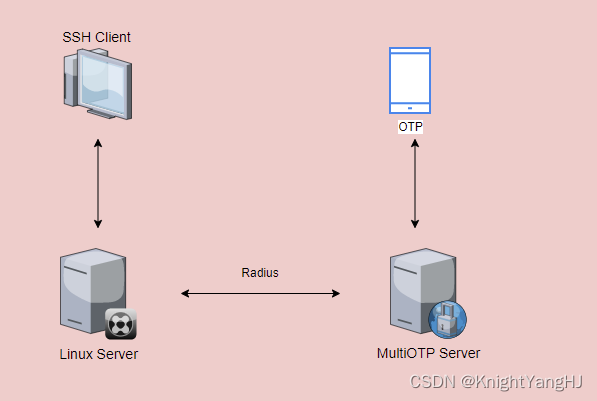
前提条件:
- 一台提供RADIUS服务的MultiOTP服务器,如何配置可参考【MultiOTP】Docker安裝MultiOTP, 让Windows登入更安全(MFA)
- 一台客户端【Ubuntu 22.04】,sudo权限的用户
- 两台设备之间可以互通
实施:
0. 在MultiOTP服务器上修改
clients.conf定义哪些设备被允许连接到RADIUS服务器root@multiotp-Virtual-Machine:/home/ud# cat /multiotp/freeradius/config/3.0/clients.conf # -*- text -*- ## ## clients.conf -- client configuration directives ## ... ... client 0.0.0.0/0 { # multiotp my-first-network secret = myfirstpass # multiotp my-first-network shortname = my-first-network # multiotp my-first-network } # multiotp my-first-network # multiotp my-first-network END- 1
- 2
- 3
- 4
- 5
- 6
- 7
- 8
- 9
- 10
- 11
- 12
- 13
1. 安装必要的软件包,以便客户端可以通过以下命令与FreeRADIUS进行交互
apt-get install libpam-radius-auth freeradius-utils -y root@ud-Virtual-Machine:/home/ud# apt-get install libpam-radius-auth freeradius-utils -y Reading package lists... Done Building dependency tree... Done Reading state information... Done freeradius-utils is already the newest version (3.0.26~dfsg~git20220223.1.00ed0241fa-0ubuntu3.1). The following NEW packages will be installed: libpam-radius-auth 0 upgraded, 1 newly installed, 0 to remove and 0 not upgraded. Need to get 25.4 kB of archives. After this operation, 84.0 kB of additional disk space will be used. Get:1 http://mirrors.tuna.tsinghua.edu.cn/ubuntu jammy/universe amd64 libpam-radius-auth amd64 2.0.0-1 [25.4 kB] Fetched 25.4 kB in 8s (3,342 B/s) Selecting previously unselected package libpam-radius-auth. (Reading database ... 182939 files and directories currently installed.) Preparing to unpack .../libpam-radius-auth_2.0.0-1_amd64.deb ... Unpacking libpam-radius-auth (2.0.0-1) ... Setting up libpam-radius-auth (2.0.0-1) ...- 1
- 2
- 3
- 4
- 5
- 6
- 7
- 8
- 9
- 10
- 11
- 12
- 13
- 14
- 15
- 16
- 17
- 18
2. 修改配置文件
i. 编辑
/etc/pam_radius_auth.conf文件,并注释掉默认的4行。然后添加一行,指定RADIUS服务器的IP地址和共享密钥。root@ud-Virtual-Machine:/home/ud# cat /etc/pam_radius_auth.conf # pam_radius_auth configuration file. Copy to: /etc/raddb/server # ...... # Note: specifying a source_ip field is mandatory due to config parsing, # but if not needed it can be just set to 0. # # server[:port] shared_secret timeout (s) source_ip vrf #127.0.0.1 secret 3 #other-server other-secret 5 192.168.1.10 vrf-blue #[2001:0db8:85a3::4]:1812 other6-secret 3 [2001:0db8:85a3::3] vrf-red #other-other-server other-other-secret 5 0 vrf-blue 10.2.112.4:1812 myfirstpass 30 # # having localhost in your radius configuration is a Good Thing. # # See the INSTALL file for pam.conf hints.- 1
- 2
- 3
- 4
- 5
- 6
- 7
- 8
- 9
- 10
- 11
- 12
- 13
- 14
- 15
- 16
- 17
ii. 编辑
/etc/ssh/sshd_config文件,启用ssh服务中的PAM认证。root@ud-Virtual-Machine:/home/ud# cat /etc/ssh/sshd_config # This is the sshd server system-wide configuration file. See # sshd_config(5) for more information. ...... # To disable tunneled clear text passwords, change to no here! PasswordAuthentication no ChallengeResponseAuthentication yes #PermitEmptyPasswords no ...... # Set this to 'yes' to enable PAM authentication, account processing, # and session processing. If this is enabled, PAM authentication will # be allowed through the KbdInteractiveAuthentication and # PasswordAuthentication. Depending on your PAM configuration, # PAM authentication via KbdInteractiveAuthentication may bypass # the setting of "PermitRootLogin without-password". # If you just want the PAM account and session checks to run without # PAM authentication, then enable this but set PasswordAuthentication # and KbdInteractiveAuthentication to 'no'. UsePAM yes ......- 1
- 2
- 3
- 4
- 5
- 6
- 7
- 8
- 9
- 10
- 11
- 12
- 13
- 14
- 15
- 16
- 17
- 18
- 19
- 20
- 21
- 22
iii. 编辑
/etc/pam.d/sshd文件,启用带有Radius的PAM模块。root@ud-Virtual-Machine:/home/ud# cat /etc/pam.d/sshd # PAM configuration for the Secure Shell service #Radius authentication auth sufficient pam_radius_auth.so ...... root@ud-Virtual-Machine:/home/ud#- 1
- 2
- 3
- 4
- 5
- 6
- 7
- 8
3. 重启SSHD服务
service ssh restart- 1
4. 添加本地账户
root@ud-Virtual-Machine:/home/ud# adduser knightyang --disabled-password --quiet --gecos ""- 1
sudo同时也需要使用MultiOTP认证的话需要修改以下:
1. 编辑
/etc/pam.d/sudo文件,启用带有Radius的PAM模块root@ud-Virtual-Machine:/home/ud# cat /etc/pam.d/sudo #%PAM-1.0 auth sufficient pam_radius_auth.so # Set up user limits from /etc/security/limits.conf. session required pam_limits.so session required pam_env.so readenv=1 user_readenv=0 session required pam_env.so readenv=1 envfile=/etc/default/locale user_readenv=0 @include common-auth @include common-account @include common-session-noninteractive root@ud-Virtual-Machine:/home/ud#- 1
- 2
- 3
- 4
- 5
- 6
- 7
- 8
- 9
- 10
- 11
- 12
- 13
- 14
- 15
2. 给用户添加sudo权限
root@ud-Virtual-Machine:sudo usermod -aG sudo knightyang- 1
-
相关阅读:
云计算(Docker)
RTOS任务调度过程(上下文切换)
电子签章软件怎么解救电子检测报告
Linux文件系统(Linux一切皆文件)
图解Kubernetes的Pod核心资源-来白嫖啊
2022年全球最具技术实力的的智能合约安全审计公司推荐
VS编译器常见的错误
软件工程一些图的画法
【Homeassistant 的Node-red插件之小爱同学语音功能开通】
交换机笔记二
- 原文地址:https://blog.csdn.net/u012153104/article/details/133883461
