-
left join时筛选条件对查询结果的
-- 创建表
CREATE TABLE `table1`
(
    `id`          int(11) NOT NULL AUTO_INCREMENT,
    `card_num`    varchar(60) DEFAULT NULL,
    `customer_id` varchar(60) DEFAULT NULL,
    PRIMARY KEY (`id`)
) ENGINE = InnoDB
  AUTO_INCREMENT = 12
  DEFAULT CHARSET = utf8mb4 COMMENT ='测试表1';

-- 创建表
CREATE TABLE `table2`
(
    `id`          int(11)     NOT NULL AUTO_INCREMENT,
    `customer_id` varchar(60) DEFAULT NULL,
    `type`        varchar(60) DEFAULT NULL COMMENT '联系方式',
    `phone`       varchar(60) NOT NULL COMMENT '联系号码',
    PRIMARY KEY (`id`)
) ENGINE = InnoDB
  AUTO_INCREMENT = 12
  DEFAULT CHARSET = utf8mb4 COMMENT ='测试表2';

-- 插入数据
insert into table1
values (1, 6223123456781001, 1001)
insert into table1
values (2, 6223123456781002, 1002)
insert into table1
values (3, 6223123456781003, 1003)

-- 插入数据
insert into table2
values (1, 1001, 1, 010 - 78586)
insert into table2
values (2, 1001, 2, 18810123456)
insert into table2
values (3, 1002, 1, 010 - 837433)
insert into table2
values (4, 1003, 1, 010 - 837433)

-- 筛选条件在最外层
select t1.card_num, t2.phone, t2.type
from table1 t1
         left join ssm.table2 t2 on t1.customer_id = t2.customer_id
where t2.type = '2'

-- 筛序条件在内层
select t1.card_num, t2.phone,t2.type
from table1 t1
         left join (select * from table2
where type = '2') t2 on t1.customer_id = t2.customer_id
创建的表格:
table1
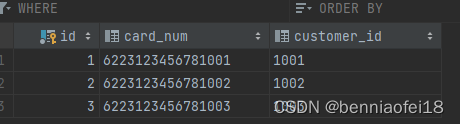
table2

结果:
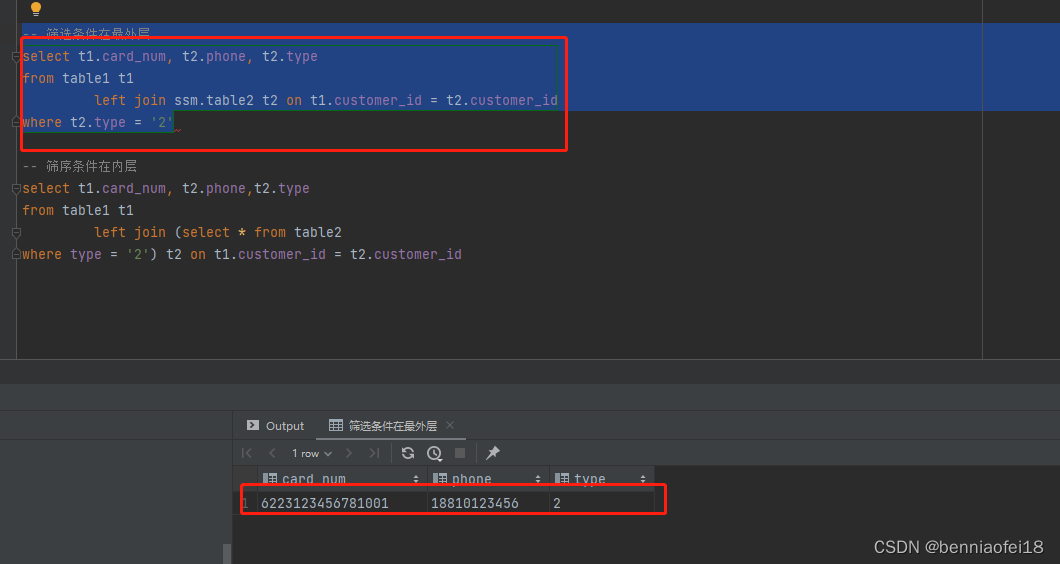
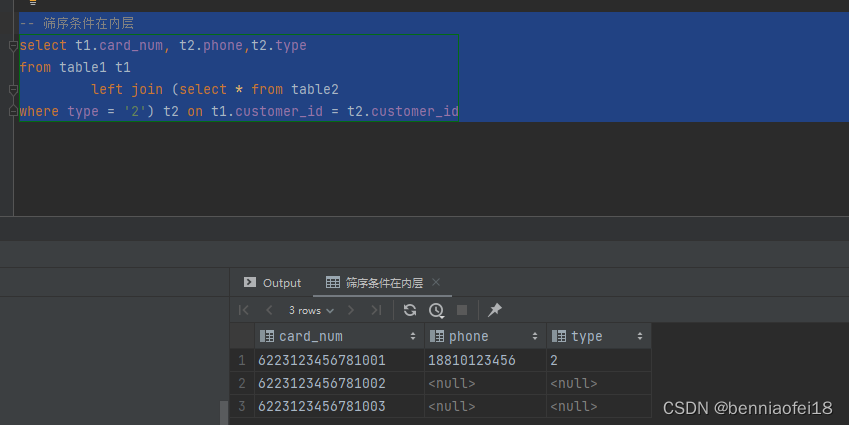
-
相关阅读:
Lock锁和AQS
ETL工具之Talend简介与安装
30分钟使用百度EasyDL实现烟雾检测
1.HTML表格跨行、跨列操作
python中numpy创建数组
【LC简单】387. 字符串中的第一个唯一字符
Git全套命令使用
使用hyper-V 编译和调试Android13(android-13.0.0_r3)源码
查看C语言文件依赖关系(用-Wp,MD参数生成.d文件)
csrf总结
- 原文地址:https://blog.csdn.net/benniaofei18/article/details/133901398