-
Qt 5.12.12 静态编译(MinGW)
前置准备
系统环境
版本 Windows 11 专业版 版本 22H2 安装日期 2023/6/18 操作系统版本 22621.2428 体验 Windows Feature Experience Pack 1000.22674.1000.0- 1
- 2
- 3
- 4
- 5
依赖工具
gcc
Qt 5.12.12 安装 MinGW 后自动安装
https://download.qt.io/archive/qt/5.12/5.12.12/qt-opensource-windows-x86-5.12.12.exe


Perl
https://www.perl.org/get.html下载 Strawberry Perl,并安装

Python
https://www.python.org/downloads/
Qt 源码(5.12.12)
https://download.qt.io/archive/qt/5.12/5.12.12/single/qt-everywhere-src-5.12.12.zip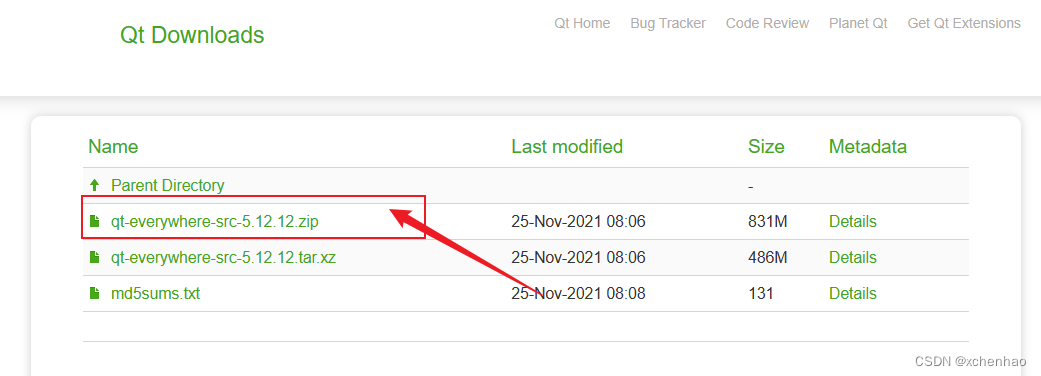
开始编译
源码准备
将上述下载的
qt-everywhere-src-5.12.12.zip源码解压至D:\Qt\qt-everywhere-src-5.12.12目录生成编译文件
cd D:\Qt\qt-everywhere-src-5.12.12 configure.bat -static -release -platform win32-g++ -opensource -confirm-license -prefix "D:\Qt\Qt5.12.12\5.12.12\mingw73_64_static" -qt-zlib -qt-libpng -qt-webp -qt-libjpeg -qt-freetype -no-opengl -skip qt3d -skip qtactiveqt -skip qtandroidextras -skip qtcharts -skip qtconnectivity -skip qtdatavis3d -skip qtdeclarative -skip qtdoc -skip qtgamepad -skip qtlocation -skip qtlottie -skip qtmacextras -skip qtmultimedia -skip qtnetworkauth -skip qtpurchasing -skip qtquick3d -skip qtquickcontrols -skip qtquickcontrols2 -skip qtquicktimeline -skip qtremoteobjects -skip qtscript -skip qtsensors -skip qtspeech -skip qtsvg -skip qtwayland -skip qtwebglplugin -skip qtwebview -skip webengine -make libs -nomake tools -nomake examples -nomake tests # 上述命令中 D:\Qt\Qt5.12.12\5.12.12\mingw73_64_static 为需要安装的目录- 1
- 2
- 3
- 4
- 5
编译
mingw32-make -j16 # 使用 16 个线程编译- 1
- 2
- 3
安装
mingw32-make install- 1

修改 conf 文件
修改安装目录下的
mkspecs\common\g++-win32.conf,例:D:\Qt\Qt5.12.12\5.12.12\mingw73_64_static\mkspecs\common\g++-win32.conf

- 新增
QMAKE_LFLAGS = -static - 将
QMAKE_LFLAGS_DLL = -shared修改为QMAKE_LFLAGS_DLL = -static

Qt Creator 配置
添加 Qt 版本
打开
工具>选项

在Kits中选择Qt Versions,添加刚才编译安装的 qmake
添加套件
在
Kits选择一个套件(MinGW 64-bit)进行克隆
然后选择克隆后的套件,修改Qt version为刚才编译安装的版本

测试
在项目中选择刚刚添加的套件,进行 build

编译结果

参考
- https://blog.51cto.com/DreamLife/5357055
Qt 静态编译(5.15.2 MinGW 32-bit) - https://wiki.qt.io/Building_a_static_Qt_for_Windows_using_MinGW
Building a static Qt for Windows using MinGW - https://tadeubento.com/2020/qt-static-builds-under-windows/
Qt: Static Builds Under Windows
-
相关阅读:
聊一聊前端图片懒加载背后的故事
文件管理模块总结
华为HCIA(五)
我的云栖大会之旅:见证云计算创新的15年
阿里云 —— Windows下搭建“阿里云音视频通信RTC“(2)
SpringBoot分页其实很简单
JAVA this关键词作用
SAP 自定义表数据导入程序
mysql添加时间戳列与触发器
详述 MIMIC护理人员信息表(十五)
- 原文地址:https://blog.csdn.net/xchenhao/article/details/133824486