-
Vue绑定style和class 对象写法
适用于:要绑定多个样式,个数确定,名字也确定,但不确定用不用。
绑定 class 样式【对象写法】:
- .box{
- width: 100px;
- height: 100px;
- }
- .aqua{
- background-color: aqua;
- }
- .border{
- border: 20px solid red;
- }
- .radius{
- border-radius: 25px;
- }
- <div id="APP">
- <div class="box" :class="classObj">多个class样式div>
- div>
- const vm = new Vue({
- el: "#APP",
- data(){
- return {
- classObj:{
- aqua: true,
- border: false,
- radius:false
- }
- }
- }
- });
注:对象写法中的键名必须是 class 类名,值如果为 true 表示使用,如果为 false 表示不使用。当然我们也可以动态修改它的值,选择是否使用。

对象写法也可以直接写在标签中,例:
- .box{
- width: 100px;
- height: 100px;
- }
- .aqua{
- background-color: aqua;
- }
- .border{
- border: 20px solid red;
- }
- .radius{
- border-radius: 25px;
- }
- <div id="APP">
- <div class="box" :class="{aqua:a, border:b, radius:c}">多个class样式div>
- div>
注:效果与上边的示例相同,a、b、c 都是变量,控制是否使用某个 class 样式。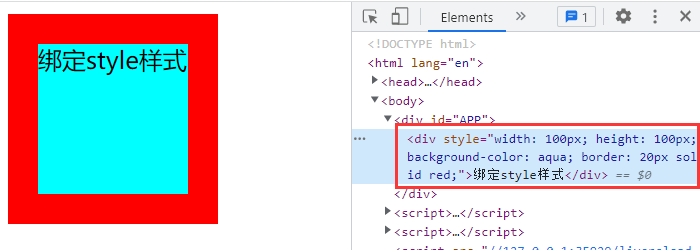
绑定 style 样式【对象写法】 :
- <div id="APP">
- <div :style="styleObj">绑定style样式div>
- div>
- const vm = new Vue({
- el: "#APP",
- data(){
- return {
- styleObj:{
- width: '100px',
- height: '100px',
- backgroundColor: "aqua"
- }
- }
- }
- });
注:动态绑定 style 样式时,属性必须使用小驼峰命名法,例如:backgroundColor 。

绑定 style 样式【数组写法】:
- <div id="APP">
- <div :style="styleArr">绑定style样式div>
- div>
- const vm = new Vue({
- el: "#APP",
- data(){
- return {
- styleArr:[
- {
- width: "100px",
- height: "100px"
- },
- {
- backgroundColor: "aqua",
- border:"20px solid red"
- }
- ]
- }
- }
- });
注:使用数组写法绑定 style 样式时,数组其实是由多个 样式对象 组成的。
数组写法也可以直接写在标签中,与上面示例的效果相同。
- <div id="APP">
- <div :style="[styleObj1,styleObj2]">绑定style样式div>
- div>
- const vm = new Vue({
- el: "#APP",
- data(){
- return {
- styleObj1:{
- width: "100px",
- height: "100px"
- },
- styleObj2:{
- backgroundColor: "aqua",
- border:"20px solid red"
- }
- }
- }
- });

原创作者:吴小糖
创作时间:2023.10.13
-
相关阅读:
使用脚本获取系统信息
Qt实战 数据统计柱状图显示
如何在Linux系统安装Nginx
【现代密码学原理实验】——CrypTool2与OpenSSL的使用(学习笔记)
.Net IDE智能提示汉化(.Net6、AspNetCore)
[echarts] 图表网站 ppchart made a pie
vue中把弹出层.vue文件注册成组件供其他.vue文件调用的写法
30岁HR转行软件测试,3个月学习斩获12.8K车联网公司offer
「SpringCloud」09 Bus消息总线
展会资讯 | 中秋佳节,图扑与您再聚 2022 厦门九八洽谈会
- 原文地址:https://blog.csdn.net/xiaowude_boke/article/details/133818688
