-
CustomTabBar 自定义选项卡视图
1. 用到的技术点
1) Generics 泛型
2) ViewBuilder 视图构造器
3) PreferenceKey 偏好设置
4) MatchedGeometryEffect 几何效果
2. 创建枚举选项卡项散列,TabBarItem.swift
- import Foundation
- import SwiftUI
- //struct TabBarItem: Hashable{
- // let iconName: String
- // let title: String
- // let color: Color
- //}
- ///枚举选项卡项散列
- enum TabBarItem: Hashable{
- case home, favorites, profile, messages
- var iconName: String{
- switch self {
- case .home: return "house"
- case .favorites: return "heart"
- case .profile: return "person"
- case .messages: return "message"
- }
- }
- var title: String{
- switch self {
- case .home: return "Home"
- case .favorites: return "Favorites"
- case .profile: return "Profile"
- case .messages: return "Messages"
- }
- }
- var color: Color{
- switch self {
- case .home: return Color.red
- case .favorites: return Color.blue
- case .profile: return Color.green
- case .messages: return Color.orange
- }
- }
- }
3. 创建选项卡偏好设置 TabBarItemsPreferenceKey.swift
- import Foundation
- import SwiftUI
- /// 选项卡项偏好设置
- struct TabBarItemsPreferenceKey: PreferenceKey{
- static var defaultValue: [TabBarItem] = []
- static func reduce(value: inout [TabBarItem], nextValue: () -> [TabBarItem]) {
- value += nextValue()
- }
- }
- /// 选项卡项视图修饰符
- struct TabBarItemViewModifer: ViewModifier{
- let tab: TabBarItem
- @Binding var selection: TabBarItem
- func body(content: Content) -> some View {
- content
- .opacity(selection == tab ? 1.0 : 0.0)
- .preference(key: TabBarItemsPreferenceKey.self, value: [tab])
- }
- }
- extension View{
- /// 选项卡项视图修饰符
- func tabBarItem(tab: TabBarItem, selection: Binding<TabBarItem>) -> some View{
- modifier(TabBarItemViewModifer(tab: tab, selection: selection))
- }
- }
4. 创建自定义选项卡视图 CustomTabBarView.swift
- import SwiftUI
- /// 自定义选项卡视图
- struct CustomTabBarView: View {
- let tabs: [TabBarItem]
- @Binding var selection: TabBarItem
- @Namespace private var namespace
- @State var localSelection: TabBarItem
- var body: some View {
- //tabBarVersion1
- tabBarVersion2
- .onChange(of: selection) { value in
- withAnimation(.easeInOut) {
- localSelection = value
- }
- }
- }
- }
- extension CustomTabBarView{
- /// 自定义 tabitem 布局
- private func tabView1(tab: TabBarItem) -> some View{
- VStack {
- Image(systemName: tab.iconName)
- .font(.subheadline)
- Text(tab.title)
- .font(.system(size: 12, weight: .semibold, design: .rounded))
- }
- .foregroundColor(localSelection == tab ? tab.color : Color.gray)
- .padding(.vertical, 8)
- .frame(maxWidth: .infinity)
- .background(localSelection == tab ? tab.color.opacity(0.2) : Color.clear)
- .cornerRadius(10)
- }
- /// 选项卡版本1
- private var tabBarVersion1: some View{
- HStack {
- ForEach(tabs, id: \.self) { tab in
- tabView1(tab: tab)
- .onTapGesture {
- switchToTab(tab: tab)
- }
- }
- }
- .padding(6)
- .background(Color.white.ignoresSafeArea(edges: .bottom))
- }
- /// 切换选项卡
- private func switchToTab(tab: TabBarItem){
- selection = tab
- }
- }
- extension CustomTabBarView{
- /// 自定义 tabitem 布局 2
- private func tabView2(tab: TabBarItem) -> some View{
- VStack {
- Image(systemName: tab.iconName)
- .font(.subheadline)
- Text(tab.title)
- .font(.system(size: 12, weight: .semibold, design: .rounded))
- }
- .foregroundColor(localSelection == tab ? tab.color : Color.gray)
- .padding(.vertical, 8)
- .frame(maxWidth: .infinity)
- .background(
- ZStack {
- if localSelection == tab{
- RoundedRectangle(cornerRadius: 10)
- .fill(tab.color.opacity(0.2))
- .matchedGeometryEffect(id: "background_rectangle", in: namespace)
- }
- }
- )
- }
- /// 选项卡版本 2
- private var tabBarVersion2: some View{
- HStack {
- ForEach(tabs, id: \.self) { tab in
- tabView2(tab: tab)
- .onTapGesture {
- switchToTab(tab: tab)
- }
- }
- }
- .padding(6)
- .background(Color.white.ignoresSafeArea(edges: .bottom))
- .cornerRadius(10)
- .shadow(color: Color.black.opacity(0.3), radius: 10, x: 0, y: 5)
- .padding(.horizontal)
- }
- }
- struct CustomTabBarView_Previews: PreviewProvider {
- static let tabs: [TabBarItem] = [.home, .favorites, .profile]
- static var previews: some View {
- VStack {
- Spacer()
- CustomTabBarView(tabs: tabs, selection: .constant(tabs.first!), localSelection: tabs.first!)
- }
- }
- }
5. 创建自定义选项卡容器视图 CustomTabBarContainerView.swift
- import SwiftUI
- /// 自定义选项卡容器视图
- struct CustomTabBarContainerView<Content: View>: View {
- @Binding var selection: TabBarItem
- let content: Content
- @State private var tabs: [TabBarItem] = []
- init(selection: Binding<TabBarItem>, @ViewBuilder content: () -> Content){
- self._selection = selection
- self.content = content()
- }
- var body: some View {
- ZStack(alignment: .bottom) {
- content
- .ignoresSafeArea()
- CustomTabBarView(tabs: tabs, selection: $selection, localSelection: selection)
- }
- .onPreferenceChange(TabBarItemsPreferenceKey.self) { value in
- tabs = value
- }
- }
- }
- struct CustomTabBarContainerView_Previews: PreviewProvider {
- static let tabs: [TabBarItem] = [ .home, .favorites, .profile]
- static var previews: some View {
- CustomTabBarContainerView(selection: .constant(tabs.first!)) {
- Color.red
- }
- }
- }
6. 创建应用选项卡视图 AppTabBarView.swift
- import SwiftUI
- // Generics 泛型
- // ViewBuilder 视图构造器
- // PreferenceKey 偏好设置
- // MatchedGeometryEffect 几何效果
- /// 应用选项卡视图
- struct AppTabBarView: View {
- @State private var selection: String = "Home"
- @State private var tabSelection: TabBarItem = .home
- var body: some View {
- /// 默认系统的 TabView
- // defaultTabView
- /// 自定义 TabView
- customTabView
- }
- }
- extension AppTabBarView{
- /// 默认系统的 TabView
- private var defaultTabView: some View{
- TabView(selection: $selection) {
- Color.red
- .ignoresSafeArea(edges: .top)
- .tabItem {
- Image(systemName: "house")
- Text("Home")
- }
- Color.blue
- .ignoresSafeArea(edges: .top)
- .tabItem {
- Image(systemName: "heart")
- Text("Favorites")
- }
- Color.orange
- .ignoresSafeArea(edges: .top)
- .tabItem {
- Image(systemName: "person")
- Text("Profile")
- }
- }
- }
- /// 自定义 TabView
- private var customTabView: some View{
- CustomTabBarContainerView(selection: $tabSelection) {
- Color.red
- .tabBarItem(tab: .home, selection: $tabSelection)
- Color.blue
- .tabBarItem(tab: .favorites, selection: $tabSelection)
- Color.green
- .tabBarItem(tab: .profile, selection: $tabSelection)
- Color.orange
- .tabBarItem(tab: .messages, selection: $tabSelection)
- }
- }
- }
- struct AppTabBarView_Previews: PreviewProvider {
- static var previews: some View {
- AppTabBarView()
- }
- }
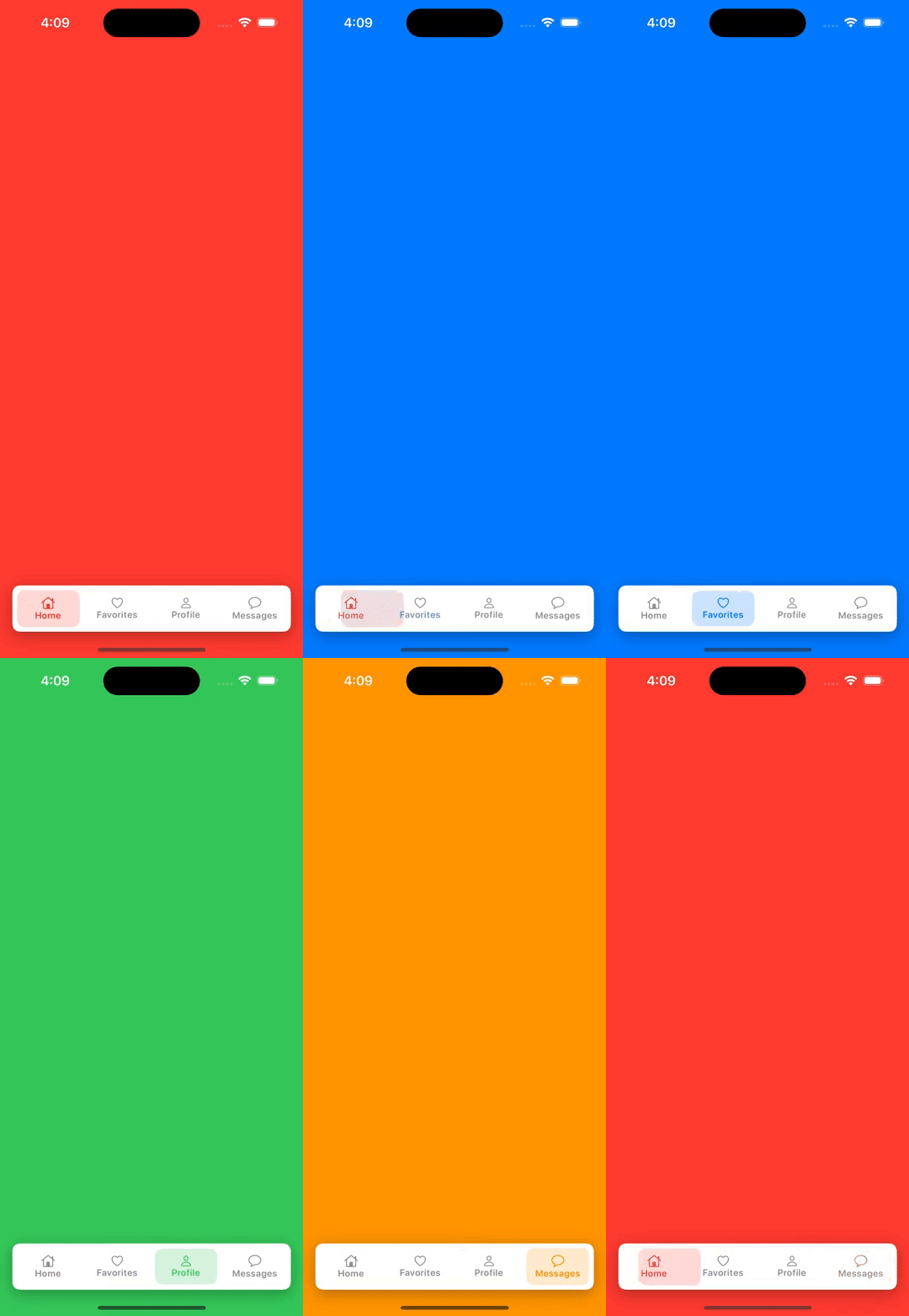
7. 效果图:

-
相关阅读:
【C语言】指针的进阶(三)—— 模拟实现qsort函数以及指针和数组的笔试题解析
python之singledispatch单分派问题
call\apply\bind详解
SpringSecurity(三)- SpringSecurity 原理
Android 开发入门教程-入门基础
手把手教你Nginx常用模块详解之ngx_stream_ssl_module(七)
哈莫尼斯 手工王国 Harmonis the hand made kingdoms,官方中文,解压即玩,
阿里面试官:给我描述一下缓存击穿的现象,并说说你的解决思路?
Linux--shell脚本详解
15-基于Nginx构建Tomcat集群
- 原文地址:https://blog.csdn.net/u011193452/article/details/133813459
