-
深度学习系列51:hugging face加速库optimum
1. 普通模型
Optimum是huggingface transformers库的一个扩展包,用来提升模型在指定硬件上的训练和推理性能。Optimum支持多种硬件,不同硬件下的安卓方式如下:

如果是国内安装的话,记得加上-i https://pypi.tuna.tsinghua.edu.cn/simple。
hugging face目前是被墙的状态,在使用示例代码时,需要将模型离线下载下来使用。
如下图,模型离线下载下来后的测试代码如下:

对比原模型,提速约一倍:

2. stable diffusion
首先安装diffusion库:
pip install optimum[diffusers]
下载模型文件:

hugging face上是如下这个:
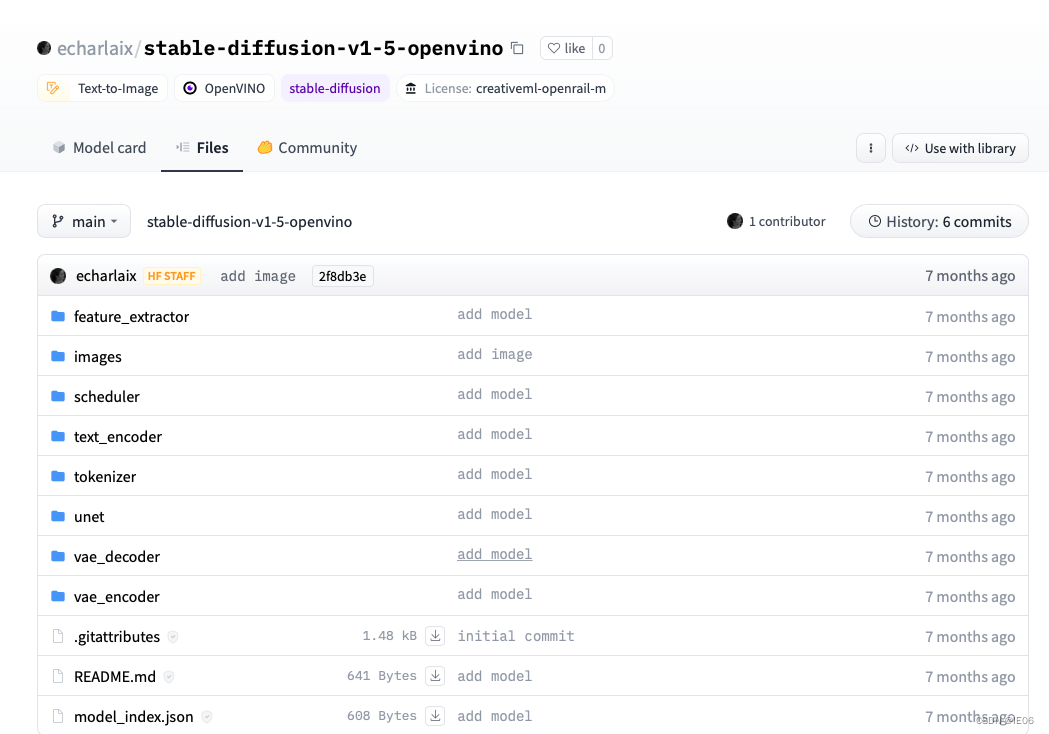
unet模型有3个多G,下载好后按照上面文件夹的格式放在程序的目录下。接下来是代码:from optimum.intel import OVStableDiffusionPipeline model_id = "echarlaix/stable-diffusion-v1-5-openvino" pipeline = OVStableDiffusionPipeline.from_pretrained(model_id) prompt = "sailing ship in storm by Rembrandt" images = pipeline(prompt).images- 1
- 2
- 3
- 4
- 5
如果我们是从pytorch模型export进来的,注意保存一下ov的模型:
model_id = "runwayml/stable-diffusion-v1-5" pipeline = OVStableDiffusionPipeline.from_pretrained(model_id, export=True) # Don't forget to save the exported model pipeline.save_pretrained("openvino-sd-v1-5")- 1
- 2
- 3
- 4
然后固定尺寸,加速推理:
# Define the shapes related to the inputs and desired outputs batch_size = 1 num_images_per_prompt = 1 height = 512 width = 512 # Statically reshape the model pipeline.reshape(batch_size=batch_size, height=height, width=width, num_images_per_prompt=num_images_per_prompt) # Compile the model before the first inference pipeline.compile() # Run inference images = pipeline(prompt, height=height, width=width, num_images_per_prompt=num_images_per_prompt).images- 1
- 2
- 3
- 4
- 5
- 6
- 7
- 8
- 9
- 10
- 11
- 12
- 13
如果要添加Textual Inversion
pipeline.clear_requests() # Load textual inversion into stable diffusion pipeline pipeline.load_textual_inversion("sd-concepts-library/cat-toy", "") # Compile the model before the first inference pipeline.compile() image2 = pipeline(prompt, num_inference_steps=50).images[0] image2.save("stable_diffusion_v1_5_with_textual_inversion.png") - 1
- 2
- 3
- 4
- 5
- 6
- 7
- 8
- 9
如果是image-to-image:
import requests import torch from PIL import Image from io import BytesIO from optimum.intel import OVStableDiffusionImg2ImgPipeline model_id = "runwayml/stable-diffusion-v1-5" pipeline = OVStableDiffusionImg2ImgPipeline.from_pretrained(model_id, export=True) url = "https://raw.githubusercontent.com/CompVis/stable-diffusion/main/assets/stable-samples/img2img/sketch-mountains-input.jpg" response = requests.get(url) init_image = Image.open(BytesIO(response.content)).convert("RGB") init_image = init_image.resize((768, 512)) prompt = "A fantasy landscape, trending on artstation" image = pipeline(prompt=prompt, image=init_image, strength=0.75, guidance_scale=7.5).images[0] image.save("fantasy_landscape.png")- 1
- 2
- 3
- 4
- 5
- 6
- 7
- 8
- 9
- 10
- 11
- 12
- 13
- 14
- 15
- 16
结果如图:

-
相关阅读:
TPM零知识学习二—— 相关链接和页面
告别单调,Django后台主页改造 - 使用AdminLTE组件
HUST网络攻防实践|6_物联网设备固件安全实验|实验二 基于 MPU 的物联网设备攻击缓解技术
【web前端期末大作业】html网上在线书城大学生静态网页 大学生html当当书城仿站 网上书城购物网页作业HTML
HTML <meta> 标签常见属性及应用场景
【C++】string类超详细解析
探索ChatGPT的前沿科技:解锁其在地理信息系统、气候预测、农作物生长等关键领域的创新应用
ssm162基于SSM的药房药品采购集中管理系统的设计与实现+vue
美容院沙龙活动方案
jpsall脚本
- 原文地址:https://blog.csdn.net/kittyzc/article/details/132406065
