-
vue3+ts项目03 element-plus、vue-router、pinia
yarn add element-plus yarn add @element-plus/icons-vue- 1
- 2
修改main.ts
import { createApp } from 'vue' import App from './App.vue' import ElementPlus from 'element-plus' import 'element-plus/dist/index.css' import zhCn from 'element-plus/dist/locale/zh-cn.mjs' const app = createApp(App) app.use(ElementPlus, { locale: zhCn, }) app.mount('#app')- 1
- 2
- 3
- 4
- 5
- 6
- 7
- 8
- 9
- 10
- 11
- 12
- 13
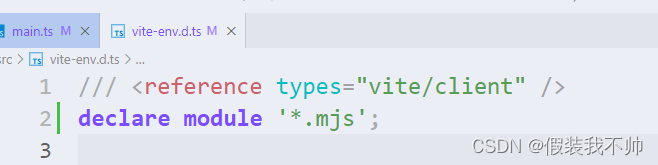
在使用 Element-Plus ,配置国际化时可能会出现Could not find a declaration file for module 'element-plus/dist/locale/zh-cn.mjs的报错。
解决方案:
在 vite-env.d.ts 配置 declare module “*.mjs” 即可。
此外,如果其他因为 ts 类型检测出现报错,导致打包失败,可以添加 // @ts-ignore 的代码注释,则会直接忽略当前文件 ts 类型的检测。
配置src别名
安装
yarn add @types/node --save-dev- 1
修改vite.config.ts
import path from 'path' resolve: { alias: { '@': path.resolve('./src') } },- 1
- 2
修改tsconfig.json,这样以后的路径都可以写
@/了//compilerOptions节点下 "baseUrl": "./", // 解析非相对模块的基地址,默认是当前目录 "paths": { //路径映射,相对于baseUrl "@/*": ["src/*"] },- 1
- 2
- 3
- 4
- 5
- 6
配置项目中的环境变量
新建.env.development
# 变量必须以VITE_为前缀才能暴露给外部读取 NODE_ENV = 'development' VITE_APP_TITLE = 'vue-admin' VITE_APP_BASE_API = '/api' VITE_SERVE = 'http://sph-api.atguigu.cn'- 1
- 2
- 3
- 4
- 5
新建.env.production
NODE_ENV = 'production' VITE_APP_TITLE = 'vue-admin' VITE_APP_BASE_API = 'http://sph-api.atguigu.cn' VITE_SERVE = 'http://sph-api.atguigu.cn'- 1
- 2
- 3
- 4
新建.env.test
NODE_ENV = 'test' VITE_APP_TITLE = 'vue-admin' VITE_APP_BASE_API = '/test-api' VITE_SERVE = 'http://sph-api.atguigu.cn'- 1
- 2
- 3
- 4
配置项目中的环境变量
新建.env.development
# 变量必须以VITE_为前缀才能暴露给外部读取 NODE_ENV = 'development' VITE_APP_TITLE = 'vue-admin' VITE_APP_BASE_API = '/api' VITE_SERVE = 'http://sph-api.atguigu.cn'- 1
- 2
- 3
- 4
- 5
新建.env.production
NODE_ENV = 'production' VITE_APP_TITLE = 'vue-admin' VITE_APP_BASE_API = 'http://sph-api.atguigu.cn' VITE_SERVE = 'http://sph-api.atguigu.cn'- 1
- 2
- 3
- 4
新建.env.test
NODE_ENV = 'test' VITE_APP_TITLE = 'vue-admin' VITE_APP_BASE_API = '/test-api' VITE_SERVE = 'http://sph-api.atguigu.cn'- 1
- 2
- 3
- 4
package.json新增两个命令
"build:test": "vue-tsc && vite build --mode test", "build:pro": "vue-tsc && vite build --mode production",- 1
- 2
获取环境变量
// import.meta.env里面就有 console.log(import.meta.env)- 1
- 2
开发环境的配置
{ "VITE_APP_TITLE": "vue-admin", "VITE_APP_BASE_API": "/api", "VITE_SERVE": "http://sph-api.atguigu.cn", "VITE_USER_NODE_ENV": "development", "BASE_URL": "/", "MODE": "development", "DEV": true, "PROD": false, "SSR": false }- 1
- 2
- 3
- 4
- 5
- 6
- 7
- 8
- 9
- 10
- 11
自带属性介绍
import.meta.env.MODE: 当前构建模式,可以是"development"、"production"或"test"之一。
import.meta.env.BASE_URL: 当前项目的基准URL。
import.meta.env.PROD: 一个布尔值,表示当前是否处于生产模式。
import.meta.env.DEV: 一个布尔值,表示当前是否处于开发模式vue-router
添加路由
yarn add vue-router- 1
src下新建views文件夹,该文件夹下新建404、home、login文件夹,这些文件夹下新建index.vue
我是404- 1
- 2
- 3
- 4
- 5
src下新建router文件夹,该文件夹下新建index.ts和routers.ts
index.tsimport { createRouter, createWebHashHistory } from 'vue-router' import { constantRoute } from './routers' const router = createRouter({ history: createWebHashHistory(), routes: constantRoute, // 滚动行为 scrollBehavior() { return { left: 0, top: 0, } }, }) export default router- 1
- 2
- 3
- 4
- 5
- 6
- 7
- 8
- 9
- 10
- 11
- 12
- 13
- 14
- 15
- 16
routers.ts
export const constantRoute = [ { path: '/login', component: () => import('@/views/login/index.vue'), name: 'login', }, { path: '/', component: () => import('@/views/home/index.vue'), name: 'layout', }, { path: '/404', component: () => import('@/views/404/index.vue'), name: '404', }, ] //任意路由 export const anyRoute = { path: '/:pathMatch(.*)*', redirect: '/404', name: 'Any', }- 1
- 2
- 3
- 4
- 5
- 6
- 7
- 8
- 9
- 10
- 11
- 12
- 13
- 14
- 15
- 16
- 17
- 18
- 19
- 20
- 21
- 22
- 23
app.vue
- 1
main.ts
import router from '@/router/index' app.use(router)- 1
- 2
- 3
pinia
yarn add pinia- 1
新建stores文件夹,该文件下新建index.ts
// https://pinia.vuejs.org/ import { createPinia } from 'pinia'; // 创建 const pinia = createPinia(); // 导出 export default pinia;- 1
- 2
- 3
- 4
- 5
- 6
- 7
使用
import pinia from '/@/stores/index'; app.use(pinia)- 1
- 2
- 3
-
相关阅读:
docker部署Jenkins
回归算法详解
[附源码]java毕业设计基于协同过滤推荐的电影推荐系统
【Arduino+ESP32专题】案例:为什么呼吸灯从暗到亮一次后就再也不呼吸了
新来个技术总监,把Redis高可用讲的那叫一个明白,YYDS
创新工具 | 如何以3×3增长模型矩阵驱动产品规模化增长
Nginx第三方模块nginx_upstream_check_module实现http检测
【在线聊天】原来微信小程序也能回复Facebook主页消息!
VScode运行程序弹出小黑窗
Spring学习笔记注解式开发(3)
- 原文地址:https://blog.csdn.net/qq_36437991/article/details/133745311
