-
手写模拟SpringBoot核心流程
通过手写模拟实现一个Spring Boot,让大家能以非常简单的方式就能知道Spring Boot大概是如何工作的。
依赖
建一个工程,两个Module:1.springboot模块,表示springboot框架的源码实现
2.user包,表示用户业务系统,用来写业务代码来测试我们所模拟出来的SpringBoot首先,SpringBoot是基于的Spring,所以我们要依赖Spring,然后我希望我们模拟出来的SpringBoot也支持Spring MVC的那一套功能,所以也要依赖Spring MVC,包括Tomcat等,所以在SpringBoot模块中要添加以下依赖:
<dependencies> <dependency> <groupId>org.springframework</groupId> <artifactId>spring-context</artifactId> <version>5.3.18</version> </dependency> <dependency> <groupId>org.springframework</groupId> <artifactId>spring-web</artifactId> <version>5.3.18</version> </dependency> <dependency> <groupId>org.springframework</groupId> <artifactId>spring-webmvc</artifactId> <version>5.3.18</version> </dependency> <dependency> <groupId>javax.servlet</groupId> <artifactId>javax.servlet-api</artifactId> <version>4.0.1</version> </dependency> <dependency> <groupId>org.apache.tomcat.embed</groupId> <artifactId>tomcat-embed-core</artifactId> <version>9.0.60</version> </dependency> </dependencies>- 1
- 2
- 3
- 4
- 5
- 6
- 7
- 8
- 9
- 10
- 11
- 12
- 13
- 14
- 15
- 16
- 17
- 18
- 19
- 20
- 21
- 22
- 23
- 24
- 25
- 26
- 27
- 28
- 29
在User模块下我们进行正常的开发就行了,比如先添加SpringBoot依赖:
<dependencies> <dependency> <groupId>org.example</groupId> <artifactId>springboot</artifactId> <version>1.0-SNAPSHOT</version> </dependency> </dependencies>- 1
- 2
- 3
- 4
- 5
- 6
- 7
然后定义相关的Controller和Service:
@RestController public class UserController { @Autowired private UserService userService; @GetMapping("test") public String test(){ return userService.test(); } }- 1
- 2
- 3
- 4
- 5
- 6
- 7
- 8
- 9
- 10
- 11
因为我们模拟实现的是SpringBoot,而不是SpringMVC,所以我直接在user包下定义了UserController和UserService,最终我希望能运行MyApplication中的main方法,就直接启动了项目,并能在浏览器中正常的访问到UserController中的某个方法。
核心注解和核心类
我们在真正使用SpringBoot时,核心会用到SpringBoot一个类和注解:
1.@SpringBootApplication,这个注解是加在应用启动类上的,也就是main方法所在的类
2.SpringApplication,这个类中有个run()方法,用来启动SpringBoot应用的
所以我们也来模拟实现他们。一个@ZhouyuSpringBootApplication注解:
@Target(ElementType.TYPE) @Retention(RetentionPolicy.RUNTIME) @Configuration @ComponentScan public @interface ZhouyuSpringBootApplication { }- 1
- 2
- 3
- 4
- 5
- 6
一个用来实现启动逻辑的ZhouyuSpringApplication类。
public class ZhouyuSpringApplication { public static void run(Class clazz){ } }- 1
- 2
- 3
- 4
- 5
- 6
- 7
注意run方法需要接收一个Class类型的参数,这个class是用来干嘛的,等会就知道了。
有了以上两者,我们就可以在MyApplication中来使用了,比如:
@ZhouyuSpringBootApplication public class MyApplication { public static void main(String[] args) { ZhouyuSpringApplication.run(MyApplication.class); } }- 1
- 2
- 3
- 4
- 5
- 6
- 7
现在用来是有模有样了,但中看不中用,所以我们要来好好实现以下run方法中的逻辑了。
run方法
run方法中需要实现什么具体的逻辑呢?首先,我们希望run方法一旦执行完,我们就能在浏览器中访问到UserController,那势必在run方法中要启动Tomcat,通过Tomcat就能接收到请求了。
大家如果学过Spring MVC的底层原理就会知道,在SpringMVC中有一个Servlet非常核心,那就是DispatcherServlet,这个DispatcherServlet需要绑定一个Spring容器,因为DispatcherServlet接收到请求后,就会从所绑定的Spring容器中找到所匹配的Controller,并执行所匹配的方法。
所以,在run方法中,我们要实现的逻辑如下:
1.创建一个Spring容器
2.创建Tomcat对象
3.生成DispatcherServlet对象,并且和前面创建出来的Spring容器进行绑定
4.将DispatcherServlet添加到Tomcat中
5.启动Tomcat创建Spring容器
这个步骤比较简单,代码如下:public class ZhouyuSpringApplication { public static void run(Class clazz){ AnnotationConfigWebApplicationContext applicationContext = new AnnotationConfigWebApplicationContext(); applicationContext.register(clazz); applicationContext.refresh(); } }- 1
- 2
- 3
- 4
- 5
- 6
- 7
- 8
我们创建的是一个AnnotationConfigWebApplicationContext容器,并且把run方法传入进来的class作为容器的配置类,比如在MyApplication的run方法中,我们就是把MyApplication.class传入到了run方法中,最终MyApplication就是所创建出来的Spring容器的配置类,并且由于MyApplication类上有@ZhouyuSpringBootApplication注解,而@ZhouyuSpringBootApplication注解的定义上又存在@ComponentScan注解,所以AnnotationConfigWebApplicationContext容器在执行refresh时,就会解析MyApplication这个配置类,从而发现定义了@ComponentScan注解,也就知道了要进行扫描,只不过扫描路径为空,而AnnotationConfigWebApplicationContext容器会处理这种情况,如果扫描路径会空,则会将MyApplication所在的包路径做为扫描路径,从而就会扫描到UserService和UserController。
所以Spring容器创建完之后,容器内部就拥有了UserService和UserController这两个Bean。
启动Tomcat
我们用的是Embed-Tomcat,也就是内嵌的Tomcat,真正的SpringBoot中也用的是内嵌的Tomcat,而对于启动内嵌的Tomcat,也并不麻烦,代码如下:
public static void startTomcat(WebApplicationContext applicationContext){ Tomcat tomcat = new Tomcat(); Server server = tomcat.getServer(); Service service = server.findService("Tomcat"); Connector connector = new Connector(); connector.setPort(8081); Engine engine = new StandardEngine(); engine.setDefaultHost("localhost"); Host host = new StandardHost(); host.setName("localhost"); String contextPath = ""; Context context = new StandardContext(); context.setPath(contextPath); context.addLifecycleListener(new Tomcat.FixContextListener()); host.addChild(context); engine.addChild(host); service.setContainer(engine); service.addConnector(connector); tomcat.addServlet(contextPath, "dispatcher", new DispatcherServlet(applicationContext)); context.addServletMappingDecoded("/*", "dispatcher"); try { tomcat.start(); } catch (LifecycleException e) { e.printStackTrace(); } }- 1
- 2
- 3
- 4
- 5
- 6
- 7
- 8
- 9
- 10
- 11
- 12
- 13
- 14
- 15
- 16
- 17
- 18
- 19
- 20
- 21
- 22
- 23
- 24
- 25
- 26
- 27
- 28
- 29
- 30
- 31
- 32
- 33
- 34
- 35
- 36
- 37
代码虽然看上去比较多,但是逻辑并不复杂,比如配置了Tomcat绑定的端口为8081,后面向当前Tomcat中添加了DispatcherServlet,并设置了一个Mapping关系,最后启动,其他代码则不用太过关心。
而且在构造DispatcherServlet对象时,传入了一个ApplicationContext对象,也就是一个Spring容器,就是我们前文说的,DispatcherServlet对象和一个Spring容器进行绑定。
接下来,我们只需要在run方法中,调用startTomcat即可:
public static void run(Class clazz){ AnnotationConfigWebApplicationContext applicationContext = new AnnotationConfigWebApplicationContext(); applicationContext.register(clazz); applicationContext.refresh(); startTomcat(applicationContext); }- 1
- 2
- 3
- 4
- 5
- 6
- 7
- 8
实际上代码写到这,一个极度精简版的SpringBoot就写出来了,比如现在运行MyApplication,就能正常的启动项目,并能接收请求。
启动能看到Tomcat的启动日志:

然后在浏览器上访问:http://localhost:8081/test也能正常的看到结果:

此时,你可以继续去写其他的Controller和Service了,照样能正常访问到,而我们的业务代码中仍然只用到了ZhouyuSpringApplication类和@ZhouyuSpringBootApplication注解。
实现Tomcat和Jetty的切换
虽然我们前面已经实现了一个比较简单的SpringBoot,不过我们可以继续来扩充它的功能,比如现在我有这么一个需求,这个需求就是我现在不想使用Tomcat了,而是想要用Jetty,那该怎么办?
我们前面代码中默认启动的是Tomcat,那我现在想改成这样子:
1.如果项目中有Tomcat的依赖,那就启动Tomcat
2.如果项目中有Jetty的依赖就启动Jetty
3.如果两者都没有则报错
4.如果两者都有也报错这个逻辑希望SpringBoot自动帮我实现,对于程序员用户而言,只要在Pom文件中添加相关依赖就可以了,想用Tomcat就加Tomcat依赖,想用Jetty就加Jetty依赖。
那SpringBoot该如何实现呢?
我们知道,不管是Tomcat还是Jetty,它们都是应用服务器,或者是Servlet容器,所以我们可以定义接口来表示它们,这个接口叫做WebServer(别问我为什么叫这个,因为真正的SpringBoot源码中也叫这个)。
并且在这个接口中定义一个start方法:
public interface WebServer { public void start(); }- 1
- 2
- 3
- 4
- 5
有了WebServer接口之后,就针对Tomcat和Jetty提供两个实现类:
public class TomcatWebServer implements WebServer{ @Override public void start() { System.out.println("启动Jetty"); } } public class JettyWebServer implements WebServer{ @Override public void start() { System.out.println("启动Tomcat"); } }- 1
- 2
- 3
- 4
- 5
- 6
- 7
- 8
- 9
- 10
- 11
- 12
- 13
- 14
- 15
而在ZhouyuSpringApplication中的run方法中,我们就要去获取对应的WebServer,然后启动对应的webServer,代码为:
public static void run(Class clazz){ AnnotationConfigWebApplicationContext applicationContext = new AnnotationConfigWebApplicationContext(); applicationContext.register(clazz); applicationContext.refresh(); WebServer webServer = getWebServer(applicationContext); webServer.start(); } public static WebServer getWebServer(ApplicationContext applicationContext){ return null; }- 1
- 2
- 3
- 4
- 5
- 6
- 7
- 8
- 9
- 10
- 11
- 12
- 13
这样,我们就只需要在getWebServer方法中去判断到底该返回TomcatWebServer还是JettyWebServer。
前面提到过,我们希望根据项目中的依赖情况,来决定到底用哪个WebServer,我就直接用SpringBoot中的源码实现方式来模拟了。
模拟实现条件注解
首先我们得实现一个条件注解@ZhouyuConditionalOnClass,对应代码如下:@Target({ ElementType.TYPE, ElementType.METHOD }) @Retention(RetentionPolicy.RUNTIME) @Conditional(ZhouyuOnClassCondition.class) public @interface ZhouyuConditionalOnClass { String value() default ""; }- 1
- 2
- 3
- 4
- 5
- 6
注意核心为@Conditional(ZhouyuOnClassCondition.class)中的ZhouyuOnClassCondition,因为它才是真正得条件逻辑:
public class ZhouyuOnClassCondition implements Condition { @Override public boolean matches(ConditionContext context, AnnotatedTypeMetadata metadata) { Map<String, Object> annotationAttributes = metadata.getAnnotationAttributes(ZhouyuConditionalOnClass.class.getName()); String className = (String) annotationAttributes.get("value"); try { context.getClassLoader().loadClass(className); return true; } catch (ClassNotFoundException e) { return false; } } }- 1
- 2
- 3
- 4
- 5
- 6
- 7
- 8
- 9
- 10
- 11
- 12
- 13
- 14
- 15
- 16
- 17
具体逻辑为,拿到@ZhouyuConditionalOnClass中的value属性,然后用类加载器进行加载,如果加载到了所指定的这个类,那就表示符合条件,如果加载不到,则表示不符合条件。
模拟实现自动配置类
有了条件注解,我们就可以来使用它了,那如何实现呢?这里就要用到自动配置类的概念,我们先看代码:
@Configuration public class WebServiceAutoConfiguration { @Bean @ZhouyuConditionalOnClass("org.apache.catalina.startup.Tomcat") public TomcatWebServer tomcatWebServer(){ return new TomcatWebServer(); } @Bean @ZhouyuConditionalOnClass("org.eclipse.jetty.server.Server") public JettyWebServer jettyWebServer(){ return new JettyWebServer(); } }- 1
- 2
- 3
- 4
- 5
- 6
- 7
- 8
- 9
- 10
- 11
- 12
- 13
- 14
- 15
- 16
这个代码还是比较简单的,通过一个WebServiceAutoConfiguration的Spring配置类,在里面定义了两个Bean,一个TomcatWebServer,一个JettyWebServer,不过这两个要生效的前提是符合当前所指定的条件,比如:
1.只有存在"org.apache.catalina.startup.Tomcat"类,那么才有TomcatWebServer这个Bean
2.只有存在"org.eclipse.jetty.server.Server"类,那么才有TomcatWebServer这个Bean并且我们只需要在ZhouyuSpringApplication中getWebServer方法,如此实现:
public static WebServer getWebServer(ApplicationContext applicationContext){ // key为beanName, value为Bean对象 Map<String, WebServer> webServers = applicationContext.getBeansOfType(WebServer.class); if (webServers.isEmpty()) { throw new NullPointerException(); } if (webServers.size() > 1) { throw new IllegalStateException(); } // 返回唯一的一个 return webServers.values().stream().findFirst().get(); }- 1
- 2
- 3
- 4
- 5
- 6
- 7
- 8
- 9
- 10
- 11
- 12
- 13
- 14
- 15
这样整体SpringBoot启动逻辑就是这样的:
1.创建一个AnnotationConfigWebApplicationContext容器
2.解析MyApplication类,然后进行扫描
3.通过getWebServer方法从Spring容器中获取WebServer类型的Bean
4.调用WebServer对象的start方法有了以上步骤,我们还差了一个关键步骤,就是Spring要能解析到WebServiceAutoConfiguration这个自动配置类,因为不管这个类里写了什么代码,Spring不去解析它,那都是没用的,此时我们需要SpringBoot在run方法中,能找到WebServiceAutoConfiguration这个配置类并添加到Spring容器中。
MyApplication是Spring的一个配置类,但是MyApplication是我们传递给SpringBoot,从而添加到Spring容器中去的,而WebServiceAutoConfiguration就需要SpringBoot去自动发现,而不需要程序员做任何配置才能把它添加到Spring容器中去,而且要注意的是,Spring容器扫描也是扫描不到WebServiceAutoConfiguration这个类的,因为我们的扫描路径是"com.zhouyu.user",而WebServiceAutoConfiguration所在的包路径为"com.zhouyu.springboot"。
那SpringBoot中是如何实现的呢?通过SPI,当然SpringBoot中自己实现了一套SPI机制,也就是我们熟知的spring.factories文件,那么我们模拟就不搞复杂了,就直接用JDK自带的SPI机制。
发现自动配置类
为了实现这个功能,以及为了最后的效果演示,我们需要把springboot源码和业务代码源码拆分两个maven模块,也就相当于两个项目,最后的源码结构为:

现在我们只需要在springboot项目中的resources目录下添加如下目录(META-INF/services)和文件:
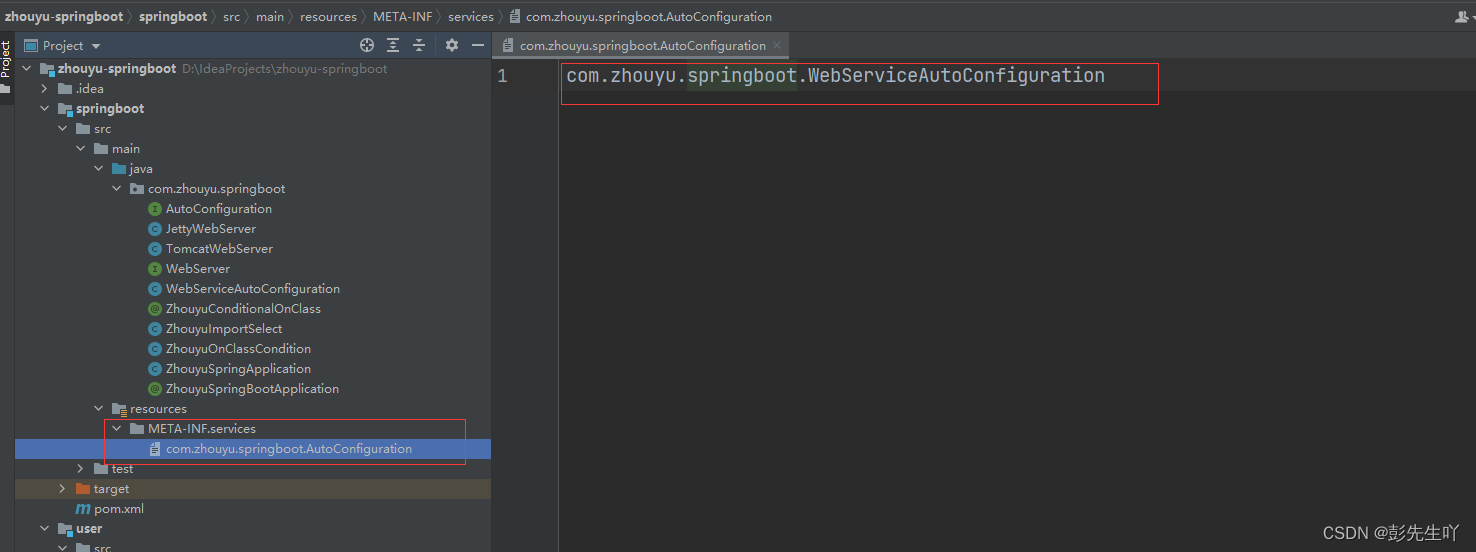
SPI的配置就完成了,相当于通过com.zhouyu.springboot.AutoConfiguration文件配置了springboot中所提供的配置类。
并且提供一个接口:
public interface AutoConfiguration { }- 1
- 2
并且WebServiceAutoConfiguration实现该接口:
@Configuration public class WebServiceAutoConfiguration implements AutoConfiguration { @Bean @ZhouyuConditionalOnClass("org.apache.catalina.startup.Tomcat") public TomcatWebServer tomcatWebServer(){ return new TomcatWebServer(); } @Bean @ZhouyuConditionalOnClass("org.eclipse.jetty.server.jetty") public JettyWebServer jettyWebServer(){ return new JettyWebServer(); } }- 1
- 2
- 3
- 4
- 5
- 6
- 7
- 8
- 9
- 10
- 11
- 12
- 13
- 14
- 15
然后我们再利用spring中的@Import技术来导入这些配置类,我们在@ZhouyuSpringBootApplication的定义上增加如下代码:
@Target(ElementType.TYPE) @Retention(RetentionPolicy.RUNTIME) @Configuration @ComponentScan @Import(ZhouyuImportSelect.class) public @interface ZhouyuSpringBootApplication { }- 1
- 2
- 3
- 4
- 5
- 6
- 7
- 8
ZhouyuImportSelect类为:
public class ZhouyuImportSelect implements DeferredImportSelector { @Override public String[] selectImports(AnnotationMetadata importingClassMetadata) { ServiceLoader<AutoConfiguration> serviceLoader = ServiceLoader.load(AutoConfiguration.class); List<String> list = new ArrayList<>(); for (AutoConfiguration autoConfiguration : serviceLoader) { list.add(autoConfiguration.getClass().getName()); } return list.toArray(new String[0]); } }- 1
- 2
- 3
- 4
- 5
- 6
- 7
- 8
- 9
- 10
- 11
- 12
- 13
这就完成了从com.zhouyu.springboot.AutoConfiguration文件中获取自动配置类的名字,并导入到Spring容器中,从而Spring容器就知道了这些配置类的存在,而对于user项目而言,是不需要修改代码的。
此时运行MyApplication,就能看到启动了Tomcat:
因为SpringBoot默认在依赖中添加了Tomcat依赖,而如果在User模块中再添加jetty的依赖:
<dependencies> <dependency> <groupId>org.example</groupId> <artifactId>springboot</artifactId> <version>1.0-SNAPSHOT</version> </dependency> <dependency> <groupId>org.eclipse.jetty</groupId> <artifactId>jetty-server</artifactId> <version>9.4.43.v20210629</version> </dependency> </dependencies>- 1
- 2
- 3
- 4
- 5
- 6
- 7
- 8
- 9
- 10
- 11
- 12
- 13
那么启动MyApplication就会报错:

只有先排除到Tomcat的依赖,再添加Jetty的依赖才能启动Jetty:

注意:由于没有了Tomcat的依赖,记得把最开始写的startTomcat方法给注释掉,并删除掉相关依赖。
总结
到此,我们实现了一个简单版本的SpringBoot,因为SpringBoot首先是基于Spring的,而且提供的功能也更加强大,随着后续内容的展开,相信大家会对本文中的各个功能会有更加深刻的理解,也希望大家都自己去实现一边 -
相关阅读:
【JVM故障问题排查心得】「内存诊断系列」JVM内存与Kubernetes中pod的内存、容器的内存不一致所引发的OOMKilled问题总结(上)
从飞天到倚天 阿里云底层自研技术大爆发
达梦数据备份还原(物理逻辑)
项目-云备份
hugo-stack for github
【深度学习】UniControl 一个统一的扩散模型用于可控的野外视觉生成
JUC并发工具类在大厂的应用场景详解
智能制造车间生产线可视化
「医疗行业」DevExpress助力上海一院HIS系统稳定升级
计算机毕设(附源码)JAVA-SSM基于自组网的空地一体化信息系统
- 原文地址:https://blog.csdn.net/yixuan_love/article/details/133703456
