-
MybatisPlus01
MybatisPlus01
1.MybatisPlus初体验
1.1首先要引入MybatisPlus的依赖
<dependency> <groupId>com.baomidougroupId> <artifactId>mybatis-plus-boot-starterartifactId> <version>3.4.2version> dependency>- 1
- 2
- 3
- 4
- 5
1.2定义Mapper接口并继承BaseMapper
public interface UserMapper extends BaseMapper<User> { //在继承时,需要指定操作实体类的泛型 }- 1
- 2
- 3
1.3直接使用
package com.itheima.mp.mapper; import com.itheima.mp.domain.po.User; import org.junit.jupiter.api.Test; import org.springframework.beans.factory.annotation.Autowired; import org.springframework.boot.test.context.SpringBootTest; import java.time.LocalDateTime; import java.util.List; @SpringBootTest class UserMapperTest { @Autowired private UserMapper userMapper; @Test void testInsert() { User user = new User(); user.setId(5L); user.setUsername("Lucy"); user.setPassword("123"); user.setPhone("18688990011"); user.setBalance(200); user.setInfo("{\"age\": 24, \"intro\": \"英文老师\", \"gender\": \"female\"}"); user.setCreateTime(LocalDateTime.now()); user.setUpdateTime(LocalDateTime.now()); userMapper.insert(user); } @Test void testSelectById() { User user = userMapper.selectById(5L); System.out.println("user = " + user); } @Test void testQueryByIds() { List<User> users = userMapper.selectBatchIds(List.of(1L, 2L, 3L, 4L)); users.forEach(System.out::println); } @Test void testUpdateById() { User user = new User(); user.setId(5L); user.setBalance(20000); userMapper.updateById(user); } @Test void testDeleteUser() { userMapper.deleteById(5L); } }- 1
- 2
- 3
- 4
- 5
- 6
- 7
- 8
- 9
- 10
- 11
- 12
- 13
- 14
- 15
- 16
- 17
- 18
- 19
- 20
- 21
- 22
- 23
- 24
- 25
- 26
- 27
- 28
- 29
- 30
- 31
- 32
- 33
- 34
- 35
- 36
- 37
- 38
- 39
- 40
- 41
- 42
- 43
- 44
- 45
- 46
- 47
- 48
- 49
- 50
- 51
- 52
- 53
- 54
- 55
- 56
2.常用注解
MybatisPlus扫描实体类,并基于反射获取实体类信息作为数据库表信息
2.1默认约定
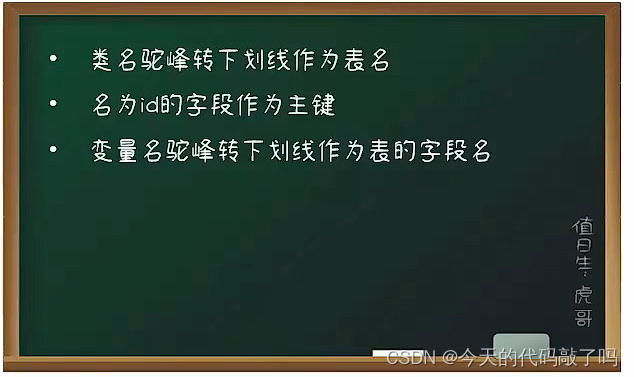
2.2注解使用
当你的实体,不符合默认约定时,就可以使用注解配置
- @TableName: 用来指定表名 放在实体类的上边
- @TableId: 用来指定表中的主键字段信息 放在实体类成员变量上边
- @TableField: 用来指定表中的普通字段信息 放在实体类成员变量上边

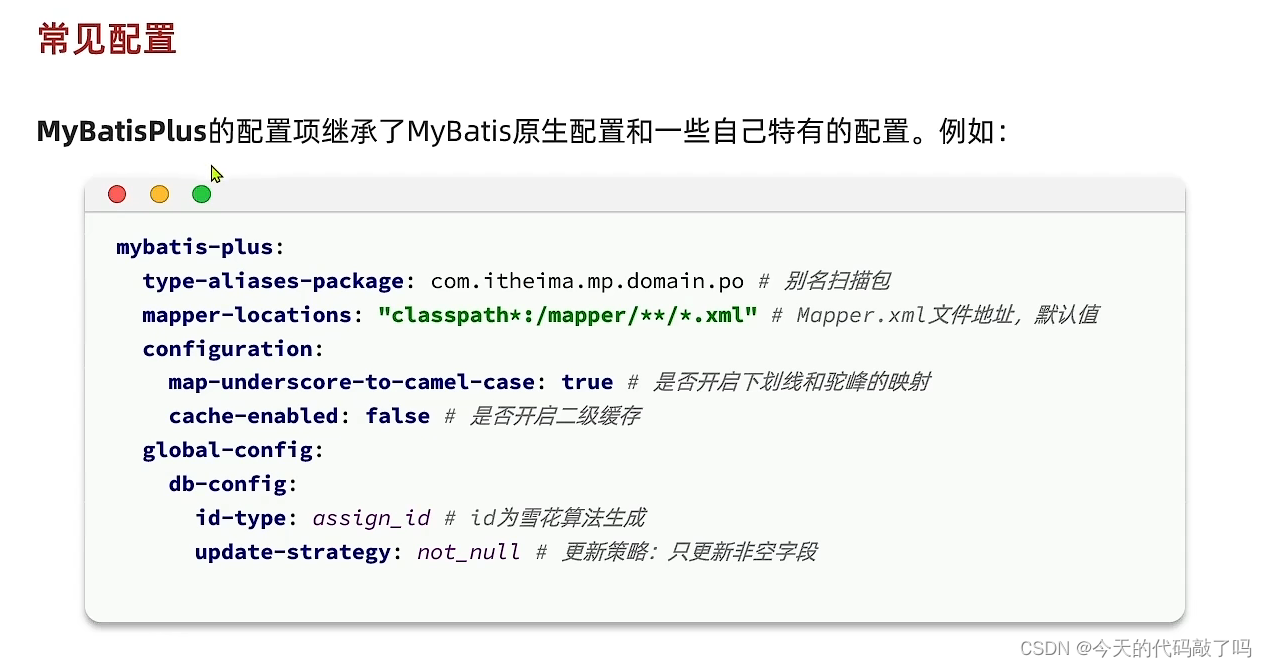
3.常用配置
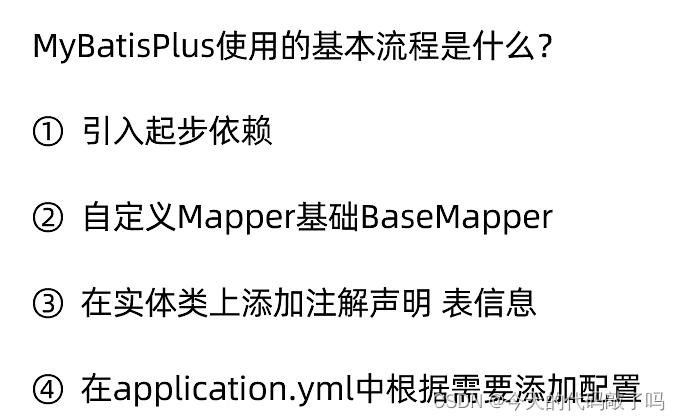
4.使用的基本流程
-
相关阅读:
LruCache的使用
这样的攒钱方式,青鸟学员表示可以轻松复制
车载ECU嵌入式设备的诊断测试 – 读和写
friewall/ansible
linux下nginx重启命令
mysql索引常见问题
MySQL——表的插入
SpringCloud无介绍快使用,Nacos集群和Nginx代理(二十)
Windows - WINS Service
Java面试(JVM篇)——JVM 面试题合集 & 深入理解JVM虚拟机
- 原文地址:https://blog.csdn.net/g877835148/article/details/133657392
