-
ELFK(filebeat)部署
部署环境
主机名 ip地址 主要软件 系统 node1 192.168.154.70 ElasticSearh、Kibana Centos7.5 node2 192.168.154.60 ElasticSearh Centos7.5 Apache 192.168.154.50 Logstash、Apache Centos7.5 Filebeat 192.168.154.40 Filebeat Centos7.5 Node1节点上安装Filebeat
- #上传软件包 filebeat-6.2.4-linux-x86_64.tar.gz 到/opt目录
- tar zxvf filebeat-6.2.4-linux-x86_64.tar.gz
- mv filebeat-6.2.4-linux-x86_64/ /usr/local/filebeat

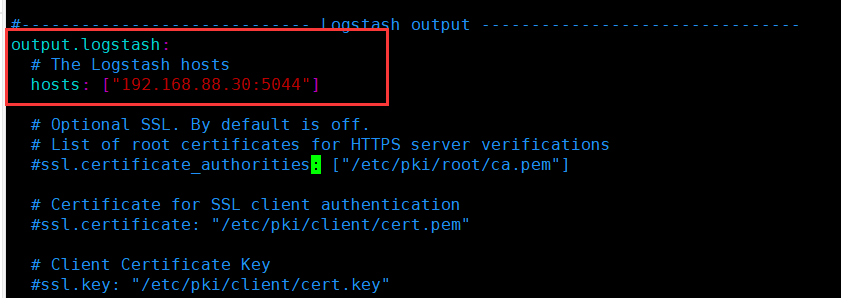

设置filebeat主配置文件
vim filebeat.yml

----------Elasticsearch output----------
全部注释

----------------Logstash output---------------------
output.logstash:
hosts: ["192.168.154.40:5044"] #指定 logstash 的 IP 和端口启动filebeat
./filebeat -e -c filebeat.yml
在 Logstash 组件所在节点上新建一个 Logstash 配置文件
- cd /etc/logstash/conf.d
- vim logstash.conf
- input {
- beats {
- port => "5044"
- }
- }
- output {
- elasticsearch {
- hosts => ["192.168.154.70:9200"]
- index => "%{[fields][service_name]}-%{+YYYY.MM.dd}"
- }
- stdout {
- codec => rubydebug
- }
- }
- #启动logstash服务
- logstash -f logstash.conf
浏览器访问 http://192.168.154.70:5601 登录 Kibana

-
相关阅读:
剑指offer专项突击版第40天
现货供应3~4.2V转5V 1A(FH6901)完美兼容FP6291
Git分布式版本控制工具(二)
00.为什么从零开始----企业基础信息化管理平台
4.4.2.1 内部类
腾讯测试开发复试<硬核面经>
redis未授权访问漏洞利用
【数据结构】自动机全家桶(AC、回文、后缀自动机)
Java浅谈随笔,你都会了吗?
序列模型 - 搭建循环神经网络及其应用
- 原文地址:https://blog.csdn.net/khvbjhb/article/details/133631856