-
华为云云耀云服务器L实例评测|基于canal缓存自动更新流程 & SpringBoot项目应用案例和源码
前言
最近华为云云耀云服务器L实例上新,也搞了一台来玩,期间遇到各种问题,在解决问题的过程中学到不少和运维相关的知识。
在之前的博客中,介绍过canal的安装和配置,参考博客
本篇博客给出了canal项目应用的案例,详细介绍基于canal实现数据库和缓存同步的流程,并给出了核心diamante的源码。
其他相关的华为云云耀云服务器L实例评测文章列表如下:

引出
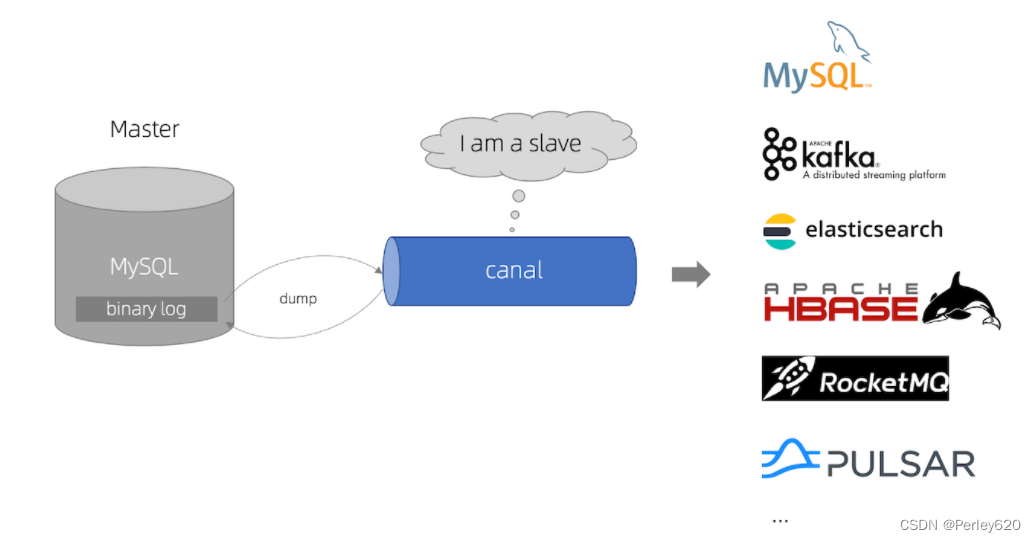
1.介绍基于canal实现数据库和缓存同步的流程;
2.给出了核心diamante的源码;基于canal缓存同步更新
整体的流程
启动spring项目时,同步启动缓存自动更新,如果数据库的相关表格数据发生变化,canal通过就会监听到,然后更新缓存redis中的相应数据

哪些数据从缓存中取?——不经常更新的数据:比如公司的部门,仓库等;
在项目启动时,启动了canal,canal用来监听数据库的变化;
业务逻辑:前端请求相关数据–> 问Redis要
(1)如果redis里面有,则返回给前端;
(2)如果redis里面没有,则从数据库查询,并且存到redis里面,返回给前端;
(3)如果数据库发生更新,canal监听到修改,同步更新到Redis里面,保证缓存和数据库一致;

相关代码和流程
1.canal通道的配置

缓存自动更新,读取配置文件中的ip和端口号
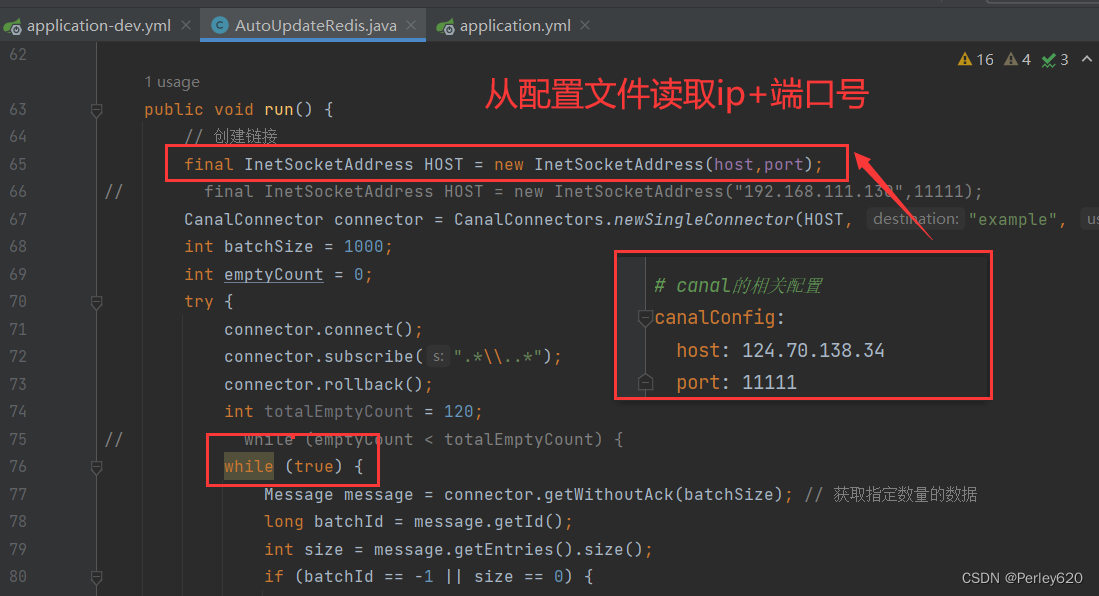
是否开启缓存自动更新,从配置文件中读取配置;

2.前端查询的业务代码

在数据库数据没有更新时,获取缓存中的数据

3.数据库数据更新
如果数据库的数据更新,canal监听到,发现是缓存对应的表,并且是对应的字段发生变化,则进行缓存的自动更新

缓存自动同步更新

存到Redis里面的最新的数据
4.缓存更新前端展示
缓存更新后,前端再次查询,获得最新的数据

核心代码源码
1.配置yml和配置类
配置yml文件
server: port: 10050 ## 是否启用安全框架 true为开启,false为关闭 security: isOpen: true ## 是否开启canal管道,true为开启,false为关闭 canal: isOpen: true # canal的相关配置 canalConfig: host: 124.70.138.34 port: 11111- 1
- 2
- 3
- 4
- 5
- 6
- 7
- 8
- 9
- 10
- 11
- 12
- 13
- 14
- 15

Redis存Java对象的配置类
package com.tianju.fresh.config.redis; import org.springframework.context.annotation.Bean; import org.springframework.context.annotation.Configuration; import org.springframework.data.redis.connection.RedisConnectionFactory; import org.springframework.data.redis.core.RedisTemplate; import org.springframework.data.redis.serializer.GenericJackson2JsonRedisSerializer; import org.springframework.data.redis.serializer.StringRedisSerializer; @Configuration public class RedisSerializeConfig { @Bean public RedisTemplate redisTemplateInit(RedisConnectionFactory redisConnectionFactory) { RedisTemplate<String,Object> redisTemplate = new RedisTemplate<>(); redisTemplate.setConnectionFactory(redisConnectionFactory); //设置序列化Key的实例化对象 redisTemplate.setKeySerializer(new StringRedisSerializer()); //设置序列化Value的实例化对象 redisTemplate.setValueSerializer(new GenericJackson2JsonRedisSerializer()); /** * * 设置Hash类型存储时,对象序列化报错解决 */ redisTemplate.setHashKeySerializer(new StringRedisSerializer()); redisTemplate.setHashValueSerializer(new GenericJackson2JsonRedisSerializer()); return redisTemplate; } }- 1
- 2
- 3
- 4
- 5
- 6
- 7
- 8
- 9
- 10
- 11
- 12
- 13
- 14
- 15
- 16
- 17
- 18
- 19
- 20
- 21
- 22
- 23
- 24
- 25
- 26
- 27
- 28
- 29
- 30
- 31
- 32
2.canal自动更新代码
canal自动更新的代码,用canal管道监听MySQL数据变化,自动更新redis缓存
package com.tianju.fresh.config.redis; import java.net.InetSocketAddress; import java.util.ArrayList; import java.util.Arrays; import java.util.List; import java.util.Map; import com.alibaba.otter.canal.client.CanalConnectors; import com.alibaba.otter.canal.client.CanalConnector; import com.alibaba.otter.canal.common.utils.AddressUtils; import com.alibaba.otter.canal.protocol.Message; import com.alibaba.otter.canal.protocol.CanalEntry.Column; import com.alibaba.otter.canal.protocol.CanalEntry.Entry; import com.alibaba.otter.canal.protocol.CanalEntry.EntryType; import com.alibaba.otter.canal.protocol.CanalEntry.EventType; import com.alibaba.otter.canal.protocol.CanalEntry.RowChange; import com.alibaba.otter.canal.protocol.CanalEntry.RowData; import com.baomidou.mybatisplus.annotation.TableField; import com.tianju.fresh.entity.common.GoodsTypeVo; import com.tianju.fresh.entity.common.WarehouseVo; import com.tianju.fresh.entity.goods.GoodsType; import com.tianju.fresh.mapper.goods.GoodsTypeMapper; import com.tianju.fresh.mapper.warehouse.StorehouseMapper; import com.tianju.fresh.service.common.CommonStaticMethod; import com.tianju.fresh.util.Constance; import com.tianju.fresh.util.RedisUtil; import lombok.extern.slf4j.Slf4j; import org.springframework.beans.factory.annotation.Autowired; import org.springframework.beans.factory.annotation.Value; import org.springframework.data.redis.core.RedisTemplate; import org.springframework.data.redis.core.StringRedisTemplate; import org.springframework.stereotype.Component; /** * 用canal管道监听MySQL数据变化,自动更新redis缓存 */ @Slf4j @Component public class AutoUpdateRedis { @Value("${canalConfig.host}") private String host; @Value("${canalConfig.port}") private Integer port; @Autowired private RedisTemplate<String,Object> redisTemplate; @Autowired private GoodsTypeMapper typeMapper; @Autowired private StorehouseMapper storehouseMapper; @Autowired private RedisUtil redisUtil; public void run() { // 创建链接 final InetSocketAddress HOST = new InetSocketAddress(host,port); // final InetSocketAddress HOST = new InetSocketAddress("192.168.111.130",11111); CanalConnector connector = CanalConnectors.newSingleConnector(HOST, "example", "", ""); int batchSize = 1000; int emptyCount = 0; try { connector.connect(); connector.subscribe(".*\\..*"); connector.rollback(); int totalEmptyCount = 120; // while (emptyCount < totalEmptyCount) { while (true) { Message message = connector.getWithoutAck(batchSize); // 获取指定数量的数据 long batchId = message.getId(); int size = message.getEntries().size(); if (batchId == -1 || size == 0) { emptyCount++; if(emptyCount % 100==0 || emptyCount==1){ System.out.println("empty count : " + emptyCount); } try { Thread.sleep(1000); } catch (InterruptedException e) { } } else { emptyCount = 0; // System.out.printf("message[batchId=%s,size=%s] \n", batchId, size); printEntry(message.getEntries()); } connector.ack(batchId); // 提交确认 // connector.rollback(batchId); // 处理失败, 回滚数据 } // System.out.println("empty too many times, exit"); } finally { connector.disconnect(); } } private void printEntry(List<Entry> entrys) { for (Entry entry : entrys) { if (entry.getEntryType() == EntryType.TRANSACTIONBEGIN || entry.getEntryType() == EntryType.TRANSACTIONEND) { continue; } RowChange rowChage = null; try { rowChage = RowChange.parseFrom(entry.getStoreValue()); } catch (Exception e) { throw new RuntimeException("ERROR ## parser of eromanga-event has an error , data:" + entry.toString(), e); } EventType eventType = rowChage.getEventType(); System.out.println(String.format("================> binlog[%s:%s] , name[%s,%s] , eventType : %s", entry.getHeader().getLogfileName(), entry.getHeader().getLogfileOffset(), entry.getHeader().getSchemaName(), entry.getHeader().getTableName(), eventType)); String tableName = entry.getHeader().getTableName(); if (Constance.LISTEN_TAB_NAMES.contains(tableName)){ for (RowData rowData : rowChage.getRowDatasList()) { if (eventType == EventType.DELETE){ // 删除之前 log.debug("-------删除之前before"); changeBefore(rowData.getBeforeColumnsList()); log.debug("-------删除之后after"); // 传修改的表名,和常量中的map对比,从而对应的redis里的key // changeAfter(rowData.getAfterColumnsList(),tableName); }else if (eventType == EventType.INSERT){ // 插入之前 log.debug("-------插入之前before"); changeBefore(rowData.getBeforeColumnsList()); log.debug("-------插入之后after"); // 传修改的表名,和常量中的map对比,从而对应的redis里的key // changeAfter(rowData.getAfterColumnsList(),tableName); }else { // 修改之前 log.debug("-------修改之前before"); changeBefore(rowData.getBeforeColumnsList()); log.debug("-------修改之后after"); // 传修改的表名,和常量中的map对比,从而对应的redis里的key changeAfter(rowData.getAfterColumnsList(),tableName); } } } } } /** * 数据库更新之前 * @param columns */ private void changeBefore(List<Column> columns) { for (Column column : columns) { System.out.println(column.getName() + " : " + column.getValue() + " update=" + column.getUpdated()); } } private void changeAfter(List<Column> columns, String tableName) { for (Column column : columns) { System.out.println(column.getName() + " : " + column.getValue() + " update=" + column.getUpdated()); // 如果是商品类别表变化 if ("name".equals(column.getName()) && Constance.GOODS_TYPE_TAB_NAME.equals(tableName)){ // 默认是名称那一列变化才更新缓存 // 先删除key,再设置好新的key Map tabNameToRedisKey = Constance.getTabNameToRedisKey(); String redisKey = (String) tabNameToRedisKey.get(tableName); redisTemplate.delete(redisKey); // TODO:设置新的key List<GoodsTypeVo> list = CommonStaticMethod.getGoodsTypeVos(typeMapper); redisUtil.saveObjectToRedis(Constance.GOODS_TYPE_REDIS_KEY, list); break; } // 如果是仓库那张表变化 storehouse if ("name".equals(column.getName()) && Constance.STOREHOUSE_TAB_NAME.equals(tableName)){ // 默认是名称那一列变化才更新缓存 // 先删除key,再设置好新的key Map tabNameToRedisKey = Constance.getTabNameToRedisKey(); String redisKey = (String) tabNameToRedisKey.get(tableName); redisTemplate.delete(redisKey); // 设置新的key,存到redis里面 List<WarehouseVo> list = CommonStaticMethod.getStorehouseVos(storehouseMapper); redisUtil.saveObjectToRedis(Constance.STOREHOUSE_REDIS_KEY,list); break; } } } }- 1
- 2
- 3
- 4
- 5
- 6
- 7
- 8
- 9
- 10
- 11
- 12
- 13
- 14
- 15
- 16
- 17
- 18
- 19
- 20
- 21
- 22
- 23
- 24
- 25
- 26
- 27
- 28
- 29
- 30
- 31
- 32
- 33
- 34
- 35
- 36
- 37
- 38
- 39
- 40
- 41
- 42
- 43
- 44
- 45
- 46
- 47
- 48
- 49
- 50
- 51
- 52
- 53
- 54
- 55
- 56
- 57
- 58
- 59
- 60
- 61
- 62
- 63
- 64
- 65
- 66
- 67
- 68
- 69
- 70
- 71
- 72
- 73
- 74
- 75
- 76
- 77
- 78
- 79
- 80
- 81
- 82
- 83
- 84
- 85
- 86
- 87
- 88
- 89
- 90
- 91
- 92
- 93
- 94
- 95
- 96
- 97
- 98
- 99
- 100
- 101
- 102
- 103
- 104
- 105
- 106
- 107
- 108
- 109
- 110
- 111
- 112
- 113
- 114
- 115
- 116
- 117
- 118
- 119
- 120
- 121
- 122
- 123
- 124
- 125
- 126
- 127
- 128
- 129
- 130
- 131
- 132
- 133
- 134
- 135
- 136
- 137
- 138
- 139
- 140
- 141
- 142
- 143
- 144
- 145
- 146
- 147
- 148
- 149
- 150
- 151
- 152
- 153
- 154
- 155
- 156
- 157
- 158
- 159
- 160
- 161
- 162
- 163
- 164
- 165
- 166
- 167
- 168
- 169
- 170
- 171
- 172
- 173
- 174
- 175
- 176
- 177
- 178
- 179
- 180
- 181
- 182
- 183
- 184
- 185
- 186
- 187
- 188
- 189
- 190
- 191
- 192
- 193
- 194
- 195
- 196
- 197
- 198
- 199
- 200
- 201
- 202
- 203
- 204
- 205
- 206
redis的工具类
package com.tianju.fresh.util; import org.springframework.beans.factory.annotation.Autowired; import org.springframework.data.redis.core.RedisTemplate; import org.springframework.stereotype.Component; @Component public class RedisUtil { @Autowired private RedisTemplate<String,Object> redisTemplate; public void saveObjectToRedis(String key,Object json){ redisTemplate.opsForValue().set(key,json); } /** * 从redis里面获取json对象,如果没有,返回null * @param key * @return */ public Object getJsonFromRedis(String key){ return redisTemplate.opsForValue().get(key); } }- 1
- 2
- 3
- 4
- 5
- 6
- 7
- 8
- 9
- 10
- 11
- 12
- 13
- 14
- 15
- 16
- 17
- 18
- 19
- 20
- 21
- 22
- 23
- 24
- 25
- 26
- 27
监听数据库表,列名的常量类
package com.tianju.fresh.util; import java.util.Arrays; import java.util.HashMap; import java.util.List; import java.util.Map; /** * 专门放各种常量 */ public interface Constance { // 设置哪些数据库表需要监听,比如单位unit,仓库warehouse,商品类型等 List<String> LISTEN_TAB_NAMES = Arrays.asList("goods_type","unit_commodity","warehouse_center","warehouse_tab"); String GOODS_TYPE_TAB_NAME = "goods_type"; String GOODS_TYPE_REDIS_KEY = "goodsTypeVo"; String UNIT_TAB_NAME = "unit_commodity"; String UNIT_REDIS_KEY = "unitVo"; String WAREHOUSE_TAB_NAME = "warehouse_center"; String WAREHOUSE_REDIS_KEY = "warehouseCenterVo"; String STOREHOUSE_TAB_NAME = "warehouse_tab"; String STOREHOUSE_REDIS_KEY = "storehouseVo"; static Map getTabNameToRedisKey(){ Map<String,String> map = new HashMap<>(); map.put(GOODS_TYPE_TAB_NAME,"goodsTypeVo"); map.put("unit_commodity","unitVo"); map.put("warehouse_center","warehouseCenterVo"); map.put("warehouse_tab","storehouseVo"); return map; } }- 1
- 2
- 3
- 4
- 5
- 6
- 7
- 8
- 9
- 10
- 11
- 12
- 13
- 14
- 15
- 16
- 17
- 18
- 19
- 20
- 21
- 22
- 23
- 24
- 25
- 26
- 27
- 28
- 29
- 30
- 31
- 32
3.查询的业务层service代码

@Override public List<WarehouseVo> findStorehouse() { // Liststorehouses = storehouseMapper.selectList(null); // Listlist = new ArrayList<>(storehouses.size()); // storehouses.forEach(s->{ // list.add(new WarehouseVo(s.getId()+"", s.getName())); // }); // 是否有小仓库的redis的key Boolean hasKey = redisTemplate.hasKey(Constance.STOREHOUSE_REDIS_KEY); if (hasKey){ // 如果有,走缓存 List<WarehouseVo> list = (List<WarehouseVo>) redisTemplate.opsForValue() .get(Constance.STOREHOUSE_REDIS_KEY); log.debug("get storehouseVo from redis: "+list); return list; } // 如果没有从数据库查询,存到redis里面 List<WarehouseVo> list = CommonStaticMethod.getStorehouseVos(storehouseMapper); log.debug("get storehouseVo from mysql: "+list); redisUtil.saveObjectToRedis(Constance.STOREHOUSE_REDIS_KEY, list); return list; }- 1
- 2
- 3
- 4
- 5
- 6
- 7
- 8
- 9
- 10
- 11
- 12
- 13
- 14
- 15
- 16
- 17
- 18
- 19
- 20
- 21
- 22
4.主启动类
主启动类实现implements CommandLineRunner方法,启动canal通道,进行监听数据库的变化,实现缓存同步更新
package com.woniu.fresh; import com.woniu.fresh.config.redis.AutoUpdateRedis; import lombok.extern.slf4j.Slf4j; import org.springframework.beans.factory.annotation.Autowired; import org.springframework.beans.factory.annotation.Value; import org.springframework.boot.SpringApplication; import org.springframework.boot.autoconfigure.SpringBootApplication; import org.springframework.boot.CommandLineRunner; import org.springframework.context.annotation.EnableAspectJAutoProxy; import org.springframework.scheduling.annotation.EnableScheduling; @SpringBootApplication @Slf4j @EnableAspectJAutoProxy // 让动态代理生效 @EnableScheduling // 让定时任务生效 public class FreshApp implements CommandLineRunner { public static void main(String[] args) { SpringApplication.run(FreshApp.class); } @Autowired private AutoUpdateRedis autoUpdateRedis; @Value("${canal.isOpen}") private Boolean isCanal; @Override public void run(String... args) throws Exception { if (isCanal){ log.debug(">>>>>启动缓存自动更新"); autoUpdateRedis.run(); } } }- 1
- 2
- 3
- 4
- 5
- 6
- 7
- 8
- 9
- 10
- 11
- 12
- 13
- 14
- 15
- 16
- 17
- 18
- 19
- 20
- 21
- 22
- 23
- 24
- 25
- 26
- 27
- 28
- 29
- 30
- 31
- 32
- 33
- 34
- 35
- 36
- 37
- 38
5.前端vue代码
<template> <div> <el-row> <el-col :span="24"> <el-form :inline="true" label-width="80px"> <el-form-item label="领料单号"> <el-input v-model="findGoodsParams.shoppingNo"></el-input> </el-form-item> <el-form-item label="领料数量≥"> <el-input v-model="findGoodsParams.nums"></el-input> </el-form-item> <el-form-item label="原料名称"> <el-input v-model="findGoodsParams.rawName"></el-input> </el-form-item> <el-form-item label="领料仓库"> <el-select v-model="findGoodsParams.warehouseId" placeholder="请选择"> <el-option v-for="item in commondata.storehouse" :key="item.value" :label="item.label" :value="item.value"> </el-option> </el-select> </el-form-item> <el-form-item label="状态"> <el-select v-model="findGoodsParams.status" placeholder="请选择"> <el-option v-for="item in commondata.status" :key="item.value" :label="item.label" :value="item.value"> </el-option> </el-select> </el-form-item> <el-form-item> <el-button type="primary" @click="findGoods">查询</el-button> <el-button type="success" @click="reFindGoods">重置</el-button> </el-form-item> </el-form> </el-col> </el-row> <el-row> <el-col :span="24"> <el-button type="success" @click="addGoodsBtn">新增</el-button> <el-button type="warning" icon="el-icon-edit" @click="batchDelete">批量审批</el-button> <el-button type="primary" icon="el-icon-magic-stick" @click="batchPickDoing">批量领取中</el-button> <el-button type="primary" icon="el-icon-shopping-cart-full" @click="batchPickDown">批量已领完</el-button> </el-col> </el-row> <el-row> <el-col :span="24"> <el-table :data="tableData" style="width: 100%" @selection-change="handleSelectionChange"> <el-table-column type="selection" width="55"> </el-table-column> <el-table-column prop="pickNo" label="领料单号" width="240"> </el-table-column> <el-table-column prop="name" label="原材料名" width="100"> </el-table-column> <el-table-column prop="nums" label="领料数量" width="80"> </el-table-column> <el-table-column prop="unit" label="单位" width="80"> </el-table-column> <el-table-column prop="warehouse" label="领料仓库" width="180"> </el-table-column> <el-table-column prop="emp" label="仓管员" width="150"> </el-table-column> <el-table-column prop="status" label="状态" width="80"> <template slot-scope="scope"> <span v-if="scope.row.status == '0'" style="color: red;">未审批</span> <span v-if="scope.row.status == '1'" style="color: rgb(9, 209, 109);">已审批</span> <span v-if="scope.row.status == '2'" style="color: rgb(44, 39, 205);">已领取</span> <span v-if="scope.row.status == '3'" style="color: rgb(173, 16, 157);">已领完</span> <!-- {{ scope.row.status == 1 ? '已上架' : '下架' }} --> </template> </el-table-column> <el-table-column label="操作"> <template slot-scope="scope"> <el-button type="primary" icon="el-icon-edit" circle @click="loadBtn(scope.row.id)">审批</el-button> </template> </el-table-column> </el-table> </el-col> </el-row> <el-row> <el-col :span="24"> <div class="block"> <el-pagination @size-change="handleSizeChange" @current-change="handleCurrentChange" :current-page.sync="currentPage" :page-sizes="[3, 5, 10]" :page-size="3" layout="total,sizes, prev, pager, next" :total=total> </el-pagination> </div> </el-col> </el-row> <!-- 新增原材料入库弹窗 ******* --> <el-dialog title="添加原材料单" :visible.sync="b"> <el-form> <el-row> <el-col :span="12"> <el-form-item label="原料名称" clearable> <el-select v-model="shoppingNoId" placeholder="请选择" style="width: 355px;margin-right:px;margin-left:px" @change="selectBuyNo"> <el-option v-for="item in shoppingIdToNo" :key="item.label" :label="item.label" :value="item.label"> </el-option> </el-select> </el-form-item> <el-form-item label="数量" :label-width="formLabelWidth"> <el-input v-model="goods.nums" autocomplete="off"></el-input> </el-form-item> <el-form-item label="单位" clearable> <el-select v-model="goods.unit" placeholder="请选择商品单位" style="width: 355px;margin-right:px;margin-left:px"> <el-option v-for="item in commondata.unit" :key="item.value" :label="item.label" :value="item.value"> </el-option> </el-select> </el-form-item> <el-form-item label="中心仓库" clearable> <el-select v-model="goods.warehouse" placeholder="请选择" disabled style="width: 355px;margin-right:px;margin-left:px"> <el-option v-for="item in commondata.warehouse" :key="item.value" :label="item.label" :value="item.value"> </el-option> </el-select> </el-form-item> <el-form-item label="领料仓库" clearable> <el-select v-model="goods.storehouse" placeholder="请选择" style="width: 355px;margin-right:px;margin-left:px"> <el-option v-for="item in commondata.storehouse" :key="item.value" :label="item.label" :value="item.value"> </el-option> </el-select> </el-form-item> </el-col> </el-row> </el-form> <div slot="footer" class="dialog-footer"> <el-button @click="b = false">取 消</el-button> <el-button type="primary" @click="addGoods()">确 定</el-button> </div> </el-dialog> </div> </template> <script> export default { data() { return { findGoodsParams: { "pickNo": "" , "name": "" , "nums": "" , "storehouseId": "" , "status": "" }, // 批量删除的id deleteIds: [], tableData: [ { "id": 1, "pickNo": "PICK2023090818003927", "name": "富士苹果", "nums": "350.00", "unit": "千克", "warehouse": "南京江宁生鲜1号仓库", "storehouseId": 2, "emp": "领料操作员1李四", "status": "0" } ], // 分页相关的参数 total: 10, currentPage: 1, pageSize: 3, options: [ { value: '0', label: '未审批' }, { value: '1', label: '审批通过' }, { value: '2', label: '已领取' }, { value: '3', label: '已领完' }, ], commondata: { "storehouse": [ { "value": 1, "label": "南京中心仓库南京总统府" },], "status": [ { "value": 0, "label": "未审批" }, { "value": 1, "label": "审批通过" }] }, // 新增商品弹窗控制变量 b: false, // 新增的入库信息 goods shoppingNoId goods: { "name":"富士苹果", "nums":"200.56", "unit":"1", // 中心仓库 "warehouse":"1", // 目标仓库 "storehouse":"2" }, formLabelWidth: '100px', // 新增原材料入库清单 addRawTab:[{ "name": { "unit": "", "warehouse": { "1": 1000.20 } }}, ], // 和上面进行比对 shoppingNoId:"", // 选择采购清单的下拉框 shoppingIdToNo: [ {"label": "BUY2023091317093927"},], } }, methods: { handleSizeChange(val) { console.log(`每页 ${val} 条`); this.pageSize = val this.findGoods() }, handleCurrentChange(val) { console.log(`当前页: ${val}`); this.pageNum = val this.findGoods() }, findGoods() { let params = {} params.pageNum = this.currentPage params.pageSize = this.pageSize params.param = this.findGoodsParams console.log(params) this.$axios.post("/api/warehouse/findPagePickRaw", params) .then(response => { let resp = response.data console.log(resp) if (resp.resultCode.code == 20000) { this.tableData = resp.results.list this.total = resp.results.total this.currentPage = resp.results.pageNum this.pageSize = resp.results.pageSize } }) }, reFindGoods() { let params = {} this.findGoodsParams = { "pickNo": "" , "name": "" , "nums": "" , "storehouseId": "" , "status": "" }, params.pageNum = this.currentPage params.pageSize = this.pageSize params.param = this.findGoodsParams console.log(params) this.$axios.post("/api/warehouse/findPagePickRaw", params) .then(response => { let resp = response.data console.log(resp) if (resp.resultCode.code == 20000) { this.tableData = resp.results.list this.total = resp.results.total this.currentPage = resp.results.pageNum this.pageSize = resp.results.pageSize } }) }, handleSelectionChange(val) { this.deleteIds = [] console.log(val); val.forEach(e => this.deleteIds.push(e.id)) }, // 批量修改领取中 batchPickDoing() { console.log(this.deleteIds) this.$axios.put("/api/warehouse/batchDoingPickMaterial", this.deleteIds) .then(response => { let resp = response.data console.log(resp) if (resp.resultCode.code == 20000) { this.findGoods() } else { alert(resp.results) } }) }, // 批量修改已领完 batchPickDown() { console.log(this.deleteIds) this.$axios.put("/api/warehouse/batchDownPickMaterial", this.deleteIds) .then(response => { let resp = response.data console.log(resp) if (resp.resultCode.code == 20000) { this.findGoods() } else { alert(resp.results) } }) }, // 批量审批通过 batchDelete() { console.log(this.deleteIds) this.$axios.put("/api/warehouse/batchPassPickMaterial", this.deleteIds) .then(response => { let resp = response.data console.log(resp) if (resp.resultCode.code == 20000) { this.findGoods() } else { alert(resp.results) } }) }, // 逐一审批通过 loadBtn(val) { console.log(val) const deleteIds = [] deleteIds.push(val) console.log(deleteIds) this.$axios.put("/api/warehouse/batchPassPickMaterial", deleteIds) .then(response => { let resp = response.data console.log(resp) if (resp.resultCode.code == 20000) { this.findGoods() } else { alert(resp.results) } }) }, // 获取公共数据 getCommonData() { this.$axios.get("/api/common/pickCommon") .then(response => { let resp = response.data if (resp.resultCode.code == 20000) { this.commondata = resp.results console.log("#############") console.log(this.commondata) } }) }, addGoodsBtn() { this.b = true this.goods = {} this.shoppingIdToNo = [] this.$axios.get('/api/warehouse/findRawNames') .then(res => { if (res.data.resultCode.code == 20000) { this.addRawTab = res.data.results console.log(this.addRawTab) this.addRawTab.forEach(r=>{ this.shoppingIdToNo.push( {"label": Object.keys(r)[0]} ) }) console.log(this.shoppingIdToNo) } }) }, // 弹出的新增窗口的添加 addGoods() { console.log("#############") console.log(this.goods) this.$axios.post('/api/warehouse/addPickRaw', this.goods) .then(res => { console.log("&&&&&") console.log(res.data) if (res.data.resultCode.code == 20000) { alert('添加成功') this.findGoods() }else{ alert('添加失败') } }), this.b = false }, // 绑定下拉框的选择事件 selectBuyNo(){ console.log("change") const goodsTemp = this.addRawTab.filter(r=> Object.keys(r)[0] == this.shoppingNoId)[0] console.log(goodsTemp) const nameTmp = Object.keys(goodsTemp)[0] const nextTmp = Object.values(goodsTemp)[0].warehouse const keyTmp = Object.keys(nextTmp)[0] console.log(nextTmp) this.goods={ name:nameTmp, nums:nextTmp[keyTmp], unit:Object.values(goodsTemp)[0].unit+"", warehouse:Object.keys(nextTmp)[0] } console.log(this.goods) }, }, created() { this.findGoods() this.getCommonData() } } </script>- 1
- 2
- 3
- 4
- 5
- 6
- 7
- 8
- 9
- 10
- 11
- 12
- 13
- 14
- 15
- 16
- 17
- 18
- 19
- 20
- 21
- 22
- 23
- 24
- 25
- 26
- 27
- 28
- 29
- 30
- 31
- 32
- 33
- 34
- 35
- 36
- 37
- 38
- 39
- 40
- 41
- 42
- 43
- 44
- 45
- 46
- 47
- 48
- 49
- 50
- 51
- 52
- 53
- 54
- 55
- 56
- 57
- 58
- 59
- 60
- 61
- 62
- 63
- 64
- 65
- 66
- 67
- 68
- 69
- 70
- 71
- 72
- 73
- 74
- 75
- 76
- 77
- 78
- 79
- 80
- 81
- 82
- 83
- 84
- 85
- 86
- 87
- 88
- 89
- 90
- 91
- 92
- 93
- 94
- 95
- 96
- 97
- 98
- 99
- 100
- 101
- 102
- 103
- 104
- 105
- 106
- 107
- 108
- 109
- 110
- 111
- 112
- 113
- 114
- 115
- 116
- 117
- 118
- 119
- 120
- 121
- 122
- 123
- 124
- 125
- 126
- 127
- 128
- 129
- 130
- 131
- 132
- 133
- 134
- 135
- 136
- 137
- 138
- 139
- 140
- 141
- 142
- 143
- 144
- 145
- 146
- 147
- 148
- 149
- 150
- 151
- 152
- 153
- 154
- 155
- 156
- 157
- 158
- 159
- 160
- 161
- 162
- 163
- 164
- 165
- 166
- 167
- 168
- 169
- 170
- 171
- 172
- 173
- 174
- 175
- 176
- 177
- 178
- 179
- 180
- 181
- 182
- 183
- 184
- 185
- 186
- 187
- 188
- 189
- 190
- 191
- 192
- 193
- 194
- 195
- 196
- 197
- 198
- 199
- 200
- 201
- 202
- 203
- 204
- 205
- 206
- 207
- 208
- 209
- 210
- 211
- 212
- 213
- 214
- 215
- 216
- 217
- 218
- 219
- 220
- 221
- 222
- 223
- 224
- 225
- 226
- 227
- 228
- 229
- 230
- 231
- 232
- 233
- 234
- 235
- 236
- 237
- 238
- 239
- 240
- 241
- 242
- 243
- 244
- 245
- 246
- 247
- 248
- 249
- 250
- 251
- 252
- 253
- 254
- 255
- 256
- 257
- 258
- 259
- 260
- 261
- 262
- 263
- 264
- 265
- 266
- 267
- 268
- 269
- 270
- 271
- 272
- 273
- 274
- 275
- 276
- 277
- 278
- 279
- 280
- 281
- 282
- 283
- 284
- 285
- 286
- 287
- 288
- 289
- 290
- 291
- 292
- 293
- 294
- 295
- 296
- 297
- 298
- 299
- 300
- 301
- 302
- 303
- 304
- 305
- 306
- 307
- 308
- 309
- 310
- 311
- 312
- 313
- 314
- 315
- 316
- 317
- 318
- 319
- 320
- 321
- 322
- 323
- 324
- 325
- 326
- 327
- 328
- 329
- 330
- 331
- 332
- 333
- 334
- 335
- 336
- 337
- 338
- 339
- 340
- 341
- 342
- 343
- 344
- 345
- 346
- 347
- 348
- 349
- 350
- 351
- 352
- 353
- 354
- 355
- 356
- 357
- 358
- 359
- 360
- 361
- 362
- 363
- 364
- 365
- 366
- 367
- 368
- 369
- 370
- 371
- 372
- 373
- 374
- 375
- 376
- 377
- 378
- 379
- 380
- 381
- 382
- 383
- 384
- 385
- 386
- 387
- 388
- 389
- 390
- 391
- 392
- 393
- 394
- 395
- 396
- 397
- 398
- 399
- 400
- 401
- 402
- 403
- 404
- 405
- 406
- 407
- 408
- 409
- 410
- 411
- 412
- 413
- 414
- 415
- 416
- 417
- 418
- 419
- 420
- 421
- 422
- 423
- 424
- 425
- 426
- 427
- 428
- 429
- 430
- 431
- 432
- 433
- 434
- 435
- 436
- 437
- 438
- 439
- 440
- 441
- 442
- 443
- 444
- 445
- 446
- 447
- 448
- 449
- 450
- 451
- 452
- 453
- 454
- 455
- 456
- 457
- 458
- 459
- 460
- 461
总结
1.介绍基于canal实现数据库和缓存同步的流程;
2.给出了核心diamante的源码; -
相关阅读:
AI芯片技术-2022年
二、Spark 调度系统
leetcode 13. 罗马数字转整数
.NET高级技术_03反射和Attribute
将你的桌面变成一个雨滴窗口:关于两个有趣的应用的整合
免费开源的地图解析工具【快速上手】
JAVA高级教程-Java Map(6)
51单片机应用从零开始(二)
工业树莓派的应用:助力构建智慧能源管理系统
【Vite】Vite配置文件中的插件学习
- 原文地址:https://blog.csdn.net/Pireley/article/details/133548639
