-
十四天学会C++之第三天(数组和字符串)

1. 数组的定义和初始化
数组是一种由相同数据类型的元素组成的集合,这些元素按照一定的顺序存储在连续的内存位置上。数组的大小在创建时是固定的,无法在运行时改变。
在C++中,数组的定义和声明非常简单。定义一个数组:
数据类型 数组名[数组大小];- 1
数据类型可以是整数、浮点数、字符等,数组名是你为数组取的名字,数组大小表示数组可以容纳的元素数量。示例:
int numbers[5]; // 整数数组,包含5个元素 double temperatures[7]; // 浮点数数组,包含7个元素 char vowels[5]; // 字符数组,包含5个元素- 1
- 2
- 3
数组的初始化。数组可以在声明时进行初始化,也可以后期赋值。静态初始化是在声明时提供初始值,动态初始化是在声明后使用赋值语句赋初值。
静态初始化:
int numbers[5] = {1, 2, 3, 4, 5}; // 静态初始化,包含5个整数- 1
动态初始化:
double temperatures[7]; // 声明数组 temperatures[0] = 98.6; // 动态初始化第一个元素 temperatures[1] = 95.5; // 动态初始化第二个元素 // 以此类推...- 1
- 2
- 3
- 4
2. 数组的基本操作
访问数组元素: 要访问数组中的元素,使用数组名称后跟方括号,方括号中包含元素的索引(从0开始)。访问数组中的第一个元素:
int numbers[5] = {1, 2, 3, 4, 5}; int firstNumber = numbers[0]; // 访问第一个元素- 1
- 2
修改数组元素: 修改数组中的元素,使用相同的索引来指定要修改的元素,并分配一个新的值给它。修改数组中的第三个元素:
int numbers[5] = {1, 2, 3, 4, 5}; numbers[2] = 100; // 修改第三个元素的值为100- 1
- 2
获取数组长度: C++中,获取数组的长度可以使用
sizeof运算符来实现。获取上面数组numbers的长度:int length = sizeof(numbers) / sizeof(numbers[0]);- 1
返回数组中元素的数量,在循环等操作中控制数组的访问。
数组的遍历: 遍历数组意味着访问数组的每个元素。通过循环来完成,最常见的是使用
for循环。遍历数组并打印每个元素的示例:int numbers[5] = {1, 2, 3, 4, 5}; for (int i = 0; i < 5; i++) { cout << numbers[i] << " "; // 打印每个元素 }- 1
- 2
- 3
- 4
3. 字符串的处理
引入字符串的概念: 字符串是一组字符的序列,表示文本数据。在C++中,有两种主要的字符串表示方式:C-风格字符串和C++字符串类。
C-风格字符串: C-风格字符串实际上是字符数组,以空字符
'\0'结尾。例如:char greeting[] = "Hello, World!";- 1
C-风格字符串需要手动处理字符串的长度和内存分配。
C++字符串类: C++提供了一个名为
std::string的字符串类,它是C-风格字符串的现代替代品。使用字符串类,可以方便地处理字符串,无需担心内存管理和长度问题。#includestd::string greeting = "Hello, World!"; - 1
- 2
字符串的基本操作: 无论是C-风格字符串还是C++字符串类,都支持基本的字符串操作,如拼接、查找子串、比较等。示例:
- 拼接字符串:
std::string firstName = "John"; std::string lastName = "Doe"; std::string fullName = firstName + " " + lastName;- 1
- 2
- 3
- 查找子串:
std::string sentence = "This is a sample sentence."; size_t found = sentence.find("sample"); if (found != std::string::npos) { std::cout << "Found 'sample' at position " << found << std::endl; }- 1
- 2
- 3
- 4
- 5
- 比较字符串:
std::string str1 = "apple"; std::string str2 = "banana"; int result = str1.compare(str2); if (result == 0) { std::cout << "Strings are equal." << std::endl; } else if (result < 0) { std::cout << "str1 is less than str2." << std::endl; } else { std::cout << "str1 is greater than str2." << std::endl; }- 1
- 2
- 3
- 4
- 5
- 6
- 7
- 8
- 9
- 10
4. C-风格字符串和C++字符串类
对比C-风格字符串和C++字符串类:
- C-风格字符串(字符数组):
- 使用字符数组表示,以null字符(
'\0')结尾。 - 需要手动管理内存和长度。
- 操作较为繁琐,容易造成越界和内存泄漏。
- 使用字符数组表示,以null字符(
char greeting[20] = "Hello, World!";- 1
- C++字符串类 (
std::string):- 使用现代C++标准库提供的
std::string类。 - 自动管理内存,不需要担心内存分配和释放。
- 提供丰富的字符串操作方法,更安全和高效。
- 使用现代C++标准库提供的
#includestd::string greeting = "Hello, World!"; - 1
- 2
C++字符串类的常见操作:
- 拼接字符串:
std::string str1 = "Hello, "; std::string str2 = "World!"; std::string greeting = str1 + str2; // "Hello, World!"- 1
- 2
- 3
- 查找子串:
std::string sentence = "This is a sample sentence."; size_t found = sentence.find("sample"); if (found != std::string::npos) { std::cout << "Found 'sample' at position " << found << std::endl; }- 1
- 2
- 3
- 4
- 5
- 替换子串:
std::string sentence = "The quick brown fox jumps over the lazy dog."; sentence.replace(10, 5, "red"); // Replace "brown" with "red"- 1
- 2
5. 示例和练习
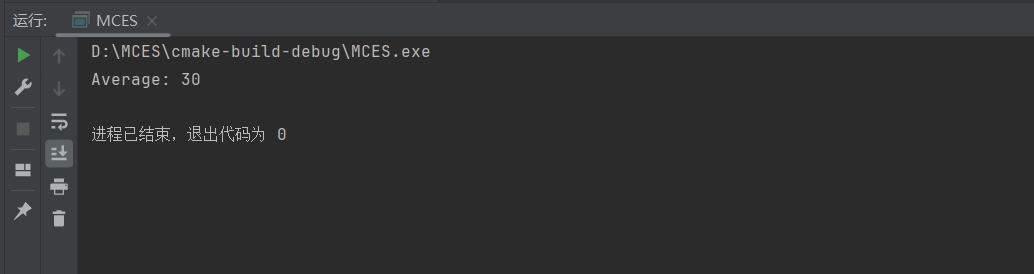
示例 1:使用数组存储一组数字,并计算它们的平均值。
#includeint main() { int numbers[] = {10, 20, 30, 40, 50}; int sum = 0; for (int i = 0; i < 5; i++) { sum += numbers[i]; } double average = static_cast<double>(sum) / 5; std::cout << "Average: " << average << std::endl; return 0; } - 1
- 2
- 3
- 4
- 5
- 6
- 7
- 8
- 9
- 10
- 11
- 12
- 13
- 14
- 15
运行结果:
示例 2:使用字符串处理用户输入的姓名,并输出欢迎消息。
#include#include int main() { std::string name; std::cout << "Enter your name: "; std::cin >> name; std::cout << "Welcome, " << name << "!" << std::endl; return 0; } - 1
- 2
- 3
- 4
- 5
- 6
- 7
- 8
- 9
- 10
- 11
运行结果:
练习题:
-
创建一个整数数组,存储一组学生的考试成绩,并计算平均分。
-
编写一个程序,要求用户输入一个句子,然后统计句子中的单词数。
-
使用C++字符串类,编写一个程序,将两个字符串拼接在一起,并输出结果。
-
创建一个字符数组,存储你喜欢的一句名言,并编写程序将其中的某个单词替换为其他单词。
问题 1:创建一个整数数组,存储一组学生的考试成绩,并计算平均分。
#includeint main() { const int numStudents = 5; // 假设有5名学生 int scores[numStudents]; int sum = 0; // 输入学生的成绩 for (int i = 0; i < numStudents; i++) { std::cout << "输入第 " << i + 1 << " 名学生的成绩:"; std::cin >> scores[i]; sum += scores[i]; } double average = static_cast<double>(sum) / numStudents; std::cout << "平均分:" << average << std::endl; return 0; } - 1
- 2
- 3
- 4
- 5
- 6
- 7
- 8
- 9
- 10
- 11
- 12
- 13
- 14
- 15
- 16
- 17
- 18
- 19
运行结果:

问题 2:编写一个程序,要求用户输入一个句子,然后统计句子中的单词数。
#include#include int main() { std::string sentence; int wordCount = 0; std::cout << "请输入一个句子:"; std::getline(std::cin, sentence); // 通过空格切分句子并统计单词数 for (char c : sentence) { if (c == ' ') { wordCount++; } } // 最后一个单词后没有空格,所以需要额外加一 wordCount++; std::cout << "单词数:" << wordCount << std::endl; return 0; } - 1
- 2
- 3
- 4
- 5
- 6
- 7
- 8
- 9
- 10
- 11
- 12
- 13
- 14
- 15
- 16
- 17
- 18
- 19
- 20
- 21
- 22
- 23
- 24
运行结果:

问题 3:使用C++字符串类,编写一个程序,将两个字符串拼接在一起,并输出结果。
#include#include int main() { std::string str1 = "Hello, "; std::string str2 = "World!"; std::string result = str1 + str2; std::cout << result << std::endl; return 0; } - 1
- 2
- 3
- 4
- 5
- 6
- 7
- 8
- 9
- 10
- 11
- 12
运行结果:

问题 4:创建一个字符数组,存储你喜欢的一句名言,并编写程序将其中的某个单词替换为其他单词。
#include#include int main() { char quote[] = "生活不止眼前的苟且,还有诗和远方。"; const char* wordToReplace = "苟且"; const char* replacement = "快乐"; // 查找目标单词的位置 char* found = std::strstr(quote, wordToReplace); if (found) { // 找到目标单词,进行替换 int position = found - quote; std::strcpy(quote + position, replacement); } std::cout << quote << std::endl; return 0; } - 1
- 2
- 3
- 4
- 5
- 6
- 7
- 8
- 9
- 10
- 11
- 12
- 13
- 14
- 15
- 16
- 17
- 18
- 19
- 20
- 21
运行结果:
-
相关阅读:
1033 To Fill or Not to Fill
软考高级系统架构 上午真题错题总结
从一道ctf题学习LD_PRELOAD绕过函数禁用
纯干货|AI辅助写论文的正确打开方式!
李宏毅机器学习|图神经网络Graph Nerual Networks(GNN)|学习笔记-part1
LeetCode 面试题 16.26. 计算器
从Gamma空间改为Linear空间会导致性能下降吗
【校招VIP】前端JS语言之CSS基础属性
find_package(Boost COMPONENTS system thread)报错
刷题之单词搜索(leetcode)
- 原文地址:https://blog.csdn.net/m0_53918860/article/details/133528904
