-
【KingbaseES】银河麒麟V10 ARM64架构_安装人大金仓数据库KingbaseES_V8R6(CentOS8)

🍁 博主 "开着拖拉机回家"带您 Go to New World.✨🍁
🦄 个人主页——🎐开着拖拉机回家_Linux,Java基础学习,大数据运维-CSDN博客 🎐✨🍁
🪁🍁 希望本文能够给您带来一定的帮助🌸文章粗浅,敬请批评指正!🍁🐥
🪁🍁🪁🍁🪁🍁🪁🍁 🪁🍁🪁🍁🪁🍁🪁 🪁🍁🪁🍁🪁🍁🪁🍁🪁🍁🪁🍁
感谢点赞和关注 ,每天进步一点点!加油!
目录
🍁 博主 "开着拖拉机回家"带您 Go to New World.✨🍁
一、版本信息
组件
版本
操作系统
Kylin Linux Advanced Server V10 (Sword)
Kernel
Linux 4.19.90-25.23.v2101.ky10.aarch64(CentOS8)
KingbaseES
KingbaseES_V008R006C007B0024_Aarch64_install
JDK
jdk-8u381-linux-aarch64
二、人大金仓数据库概述和下载
2.1 KES简介
人大金仓数据库管理系统 KingbaseES(KES) 是面向全行业、全客户关键应用的企业级大型通用数据库管理系统,适用于联机事务处理、查询密集型数据仓库、要求苛刻的互联网应用等场景,提供全部应用开发及系统管理功能,提供性能增强特性,可支持主备集群、读写分离集群、多活共享存储集群等全集群架构,具有高性能、高安全、高可用、易使用、易管理、易维护的特点,支持所有国内外主流CPU、操作系统与云平台部署。
产品优势

2.2 数据库下载
通用性数据库下载,人大金仓官网下载地址:

license 下载

据了解,Kingbase 是基于 开源数据库 PostgreSQL 开发的,大部分功能与 PostgreSQL兼容。Kingbase 8 是基于 PostgreSQL 9.6 的,所以语法的使用大差不差。
PG相关文章参考链接:
【PostgreSQL】系列之 一 CentOS 7安装PGSQL15版本(一)-CSDN博客
【PostgreSQL】系列之 一 schema详解(二)_postgresql 查看schema_开着拖拉机回家的博客-CSDN博客
【PostgreSQL】系列之 一 用户创建和授权(三)_postgre创建用户_开着拖拉机回家的博客-CSDN博客2.3 安装准备
安装过程可以参考官网安装手册步骤非常详细 。
2.3.1 资源使用参数
- vim /etc/security/limits.conf
- #for kingbase
- kingbase soft nproc 65536
- kingbase hard nproc 65536
- kingbase soft nofile 65536
- kingbase hard nofile 65536
2.3.2 创建新⽤户
- useradd -m kingbase
- passwd kingbase
2.3.3 安装目录
- mkdir -p /hadoop/Kingbase/ES/V8
- chmod o+rwx /hadoop/Kingbase/ES/V8
- chown -R kingbase:kingbase /hadoop/Kingbase

2.3.4 挂载iso文件
- mkdir /mnt/cdrom/
- mount -o loop KingbaseES_V008R006C007B0024_Aarch64_install.iso /mnt/cdrom/

挂载完成后会在相应目录有 setup.sh 脚本

三、安装 KingbaseES
3.1 命令行安装
3.1.1 执行安装脚本开始安装
我们选择命令⾏安装步骤,命令行安装支持中文和英文的文字提示。根据操作系统的语言设置会显示对应语言的提示信息。
- # 使用中文
- export LANG=zh_CN.UTF-8
- # 切换用户
- su kingbase
- cd /mnt/cdrom/
- sh setup.sh

按照提示持续输入几个ENTER

3.1.2 许可协议
一直ENTER 就可以


3.1.3 选择安装集
- 完全安装:包括数据库服务器、高可用组件、接口、数据库开发管理工具、数据库迁移工具、数据库部署工具
- 客户端安装:包括接口、数据库开发管理工具、数据库迁移工具、数据库部署工具。
- 定制安装:在数据库服务器、高可用组件、接口、数据库开发管理工具、数据库迁移工具、数据库部署工具所 有组件中自由选择。

3.1.4 选择授权文件

3.1.5 选择安装目录
此步骤用于选择安装路径。默认安装路径是/opt/Kingbase/ES/V8。我们采用自定义。

3.1.6 预安装摘要

3.1.7 正在安装
安装过程中会不断刷新安装进度。

3.1.8 选择存储数据的文件夹
首先选择数据库数据目录,默认为安装目录下的 data 目录。

3.1.9 配置数据库监听端口

3.1.10 设置管理员账户及密码

3.1.11 设置数据库服务字符集

我选择了 兼容 PG

默认

默认

3.1.12 安装完成
看到如下提示说明安装完成。

3.1.13 数据库服务自启动
切换到 root 用户, 执行脚本:
sh /hadoop/Kingbase/ES/V8/install/script/root.sh
3.1.14 查看服务进程及监听端口
- service kingbase8d status
- netstat -nltp | grep 54321

3.2 安装后检查
安装日志检查
install/Logs/KingbaseES_V8_安装_09_25_2023_15_02_42.log查看已安装数据库的版本信息

如下时使用Navicat15 PG 数据库连接数据库测试成功

三、数据库使用简介
3.1 命令简介
如下为常用的命令,跟PG一模一样:
- \l:列出系统中的数据库
- \h:查看SQL命令的解释,比如\h select。
- \?:查看psql命令列表。
- \l:列出所有数据库。
- \c [database_name]:连接其他数据库。
- \d:列出当前数据库的所有表格。
- \du:列出所有用户。
- [root@windp-aio ES]# ./V8/ClientTools/bin/ksql --help
- ksql is the Kingbase interactive terminal.
- Usage:
- ksql [OPTION]... [DBNAME [USERNAME]]
- General options:
- -c, --command=COMMAND run only single command (SQL or internal) and exit
- -d, --dbname=DBNAME database name to connect to (default: "root")
- -f, --file=FILENAME execute commands from file, then exit
- -l, --list list available databases, then exit
- -v, --set=, --variable=NAME=VALUE
- set ksql variable NAME to VALUE
- (e.g., -v ON_ERROR_STOP=1)
- -V, --version output version information, then exit
- -X, --no-ksqlrc do not read startup file (~/.ksqlrc)
- -1 ("one"), --single-transaction
- execute as a single transaction (if non-interactive)
- -?, --help[=options] show this help, then exit
- --help=commands list backslash commands, then exit
- --help=variables list special variables, then exit
- Input and output options:
- -a, --echo-all echo all input from script
- -b, --echo-errors echo failed commands
- -e, --echo-queries echo commands sent to server
- -E, --echo-hidden display queries that internal commands generate
- -L, --log-file=FILENAME send session log to file
- -n, --no-readline disable enhanced command line editing (readline)
- -o, --output=FILENAME send query results to file (or |pipe)
- -q, --quiet run quietly (no messages, only query output)
- -s, --single-step single-step mode (confirm each query)
- -S, --single-line single-line mode (end of line terminates SQL command)
- Output format options:
- -A, --no-align unaligned table output mode
- --csv CSV (Comma-Separated Values) table output mode
- -F, --field-separator=STRING
- field separator for unaligned output (default: "|")
- -H, --html HTML table output mode
- -P, --pset=VAR[=ARG] set printing option VAR to ARG (see \pset command)
- -R, --record-separator=STRING
- record separator for unaligned output (default: newline)
- -t, --tuples-only print rows only
- -T, --table-attr=TEXT set HTML table tag attributes (e.g., width, border)
- -x, --expanded turn on expanded table output
- -z, --field-separator-zero
- set field separator for unaligned output to zero byte
- -0, --record-separator-zero
- set record separator for unaligned output to zero byte
- Connection options:
- -h, --host=HOSTNAME database server host or socket directory (default: "local socket")
- -p, --port=PORT database server port (default: "54321")
- -U, --username=USERNAME database user name (default: "root")
- -w, --no-password never prompt for password
- -W, --password force password prompt (should happen automatically)
- For more information, type "\?" (for internal commands) or "\help" (for SQL
- commands) from within ksql, or consult the ksql section in the Kingbase
- documentation.
- Report bugs to <kingbase-bugs@kingbase.com.cn>.
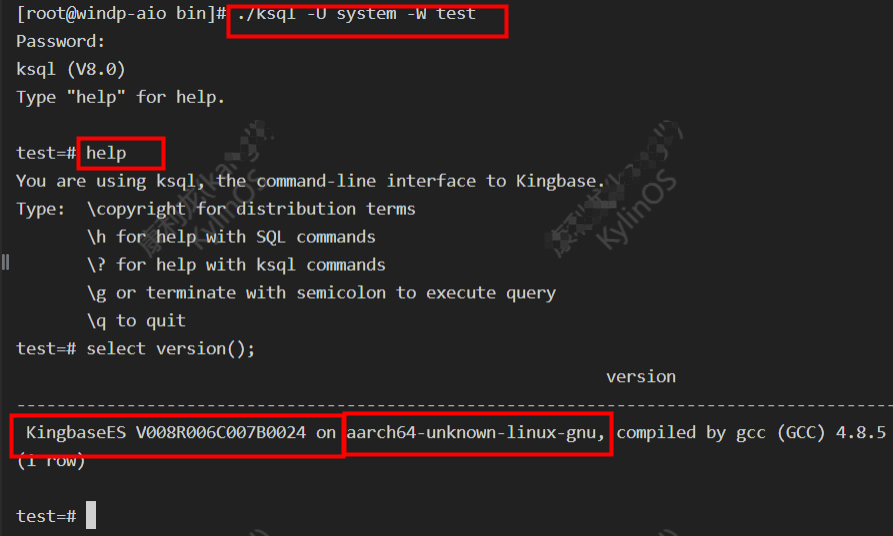
进入KES数据库命令行
- cd /hadoop/Kingbase/ES/V8/ClientTools/bin
- ./ksql -U system -W test
查看数据库的版本信息
创建kangll 数据库,并创建表 stu 进行查询
- create database kangll;
- CREATE TABLE stu(
- stu_id BIGINT NOT NULL,
- stu_name VARCHAR(255) NOT NULL);
- # 插入数据
- INSERT INTO stu VALUES(1, 'kangll');
- # 查询
- SELECT * FROM stu;
也可在服务器命令行直接查询
./ksql -U system -W kangll -c "select * from stu;"
3.2 SQl文件执行
在ambari 数据库中执行SQL文件创建表。
- cd /hadoop/Kingbase/ES/V8/ClientTools/bin
- ./ksql -U system -W ambari -f /var/lib/ambari-server/resources/Ambari-DDL-Postgres-CREATE.sql

切换到 ambari 数据库,查看创建的表信息

3.3 数据库创建和授权
- -- Postgresql使用默认的schema public
- -- 创建 Ambari 数据库及用户 管理员账号
- create user ambari with password 'winner001';
- create database ambari owner ambari;
- grant all privileges on database ambari to ambari;
- grant usage on schema public to ambari;
- grant all privileges on all tables in schema public to ambari;
- grant all privileges on all sequences in schema public to ambari;
- grant select,insert,update,delete on all tables in schema public to ambari;
- grant all on schema public to ambari;
PG相关文章参考链接:
【PostgreSQL】系列之 一 CentOS 7安装PGSQL15版本(一)-CSDN博客
【PostgreSQL】系列之 一 schema详解(二)_postgresql 查看schema_开着拖拉机回家的博客-CSDN博客
【PostgreSQL】系列之 一 用户创建和授权(三)_postgre创建用户_开着拖拉机回家的博客-CSDN博客 -
相关阅读:
Unity 利用Cache实现边下边玩
视频 | 生信Linux - Linux下文件内容操作03
Linux中常用数据库管理系统之MariaDB
C1. Increasing Subsequence (easy version)
Linux centos7安装部署KETTLE-9.3.0
两张图完全理解单点登录
MyBatis-Plus中的Mapper用法
【机器学习基础】无监督学习(5)——生成模型
进程状态分析
鸿蒙应用ArkTS开发- 选择图片、文件和拍照功能实现
- 原文地址:https://blog.csdn.net/qq_35995514/article/details/133430615
