-
利用maskrcnn来实现目标检测与追踪
首先下载源代码仓库,链接地址如下:
能够实现的效果如图所示:

该存储库包括:
- 基于FPN和ResNet101构建的Mask R-CNN的源代码。
- MS COCO 的训练代码
- MS COCO 的预训练砝码
- Jupyter 笔记本,用于可视化每一步的检测管道
- 用于多 GPU 训练的并行模型类
- 对 MS COCO 指标 (AP) 的评估
- 在自己的数据集上进行训练的示例
下载代码仓库,进行解压后的目录如下:
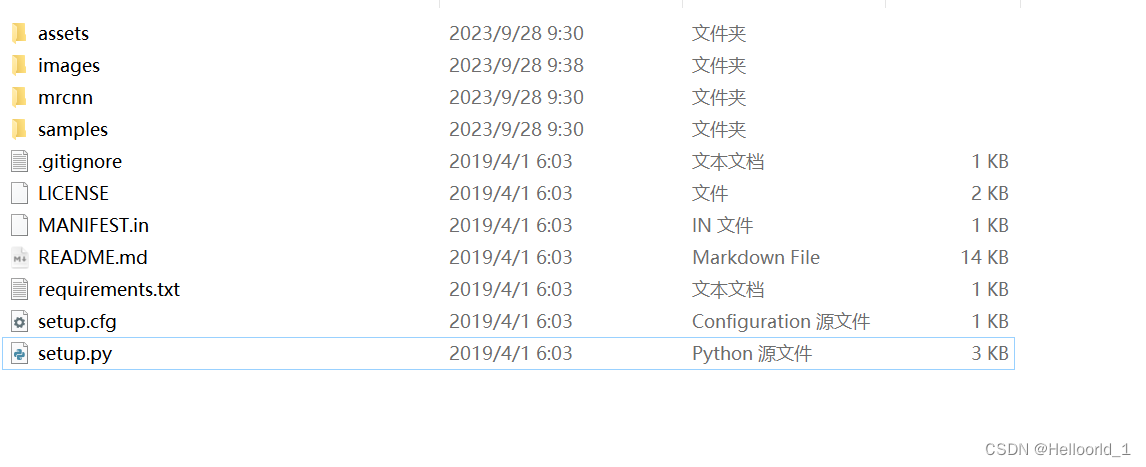
可以使用下面:
pip install -r requirements.txt -i https://pypi.tuna.tsinghua.edu.cn/simple也可以使用
python setup.py install来安装相关的依赖包,安装完成后,还需要下载模型文件,
下载链接地址如下:
测试代码如下所示:
- import os
- import sys
- import random
- import math
- import numpy as np
- import skimage.io
- import matplotlib
- import matplotlib.pyplot as plt
- # Root directory of the project
- ROOT_DIR = os.path.abspath("../")
- # Import Mask RCNN
- sys.path.append(ROOT_DIR) # To find local version of the library
- from mrcnn import utils
- import mrcnn.model as modellib
- from mrcnn import visualize
- # Import COCO config
- sys.path.append(os.path.join(ROOT_DIR, "samples/coco/")) # To find local version
- import coco
- %matplotlib inline
- # Directory to save logs and trained model
- MODEL_DIR = os.path.join(ROOT_DIR, "logs")
- # Local path to trained weights file
- COCO_MODEL_PATH = os.path.join(ROOT_DIR, "mask_rcnn_coco.h5")
- # Download COCO trained weights from Releases if needed
- if not os.path.exists(COCO_MODEL_PATH):
- utils.download_trained_weights(COCO_MODEL_PATH)
- # Directory of images to run detection on
- IMAGE_DIR = os.path.join(ROOT_DIR, "images")
- class InferenceConfig(coco.CocoConfig):
- # Set batch size to 1 since we'll be running inference on
- # one image at a time. Batch size = GPU_COUNT * IMAGES_PER_GPU
- GPU_COUNT = 1
- IMAGES_PER_GPU = 1
- config = InferenceConfig()
- config.display()
- # Create model object in inference mode.
- model = modellib.MaskRCNN(mode="inference", model_dir=MODEL_DIR, config=config)
- # Load weights trained on MS-COCO
- model.load_weights(COCO_MODEL_PATH, by_name=True)
- # COCO Class names
- # Index of the class in the list is its ID. For example, to get ID of
- # the teddy bear class, use: class_names.index('teddy bear')
- class_names = ['BG', 'person', 'bicycle', 'car', 'motorcycle', 'airplane',
- 'bus', 'train', 'truck', 'boat', 'traffic light',
- 'fire hydrant', 'stop sign', 'parking meter', 'bench', 'bird',
- 'cat', 'dog', 'horse', 'sheep', 'cow', 'elephant', 'bear',
- 'zebra', 'giraffe', 'backpack', 'umbrella', 'handbag', 'tie',
- 'suitcase', 'frisbee', 'skis', 'snowboard', 'sports ball',
- 'kite', 'baseball bat', 'baseball glove', 'skateboard',
- 'surfboard', 'tennis racket', 'bottle', 'wine glass', 'cup',
- 'fork', 'knife', 'spoon', 'bowl', 'banana', 'apple',
- 'sandwich', 'orange', 'broccoli', 'carrot', 'hot dog', 'pizza',
- 'donut', 'cake', 'chair', 'couch', 'potted plant', 'bed',
- 'dining table', 'toilet', 'tv', 'laptop', 'mouse', 'remote',
- 'keyboard', 'cell phone', 'microwave', 'oven', 'toaster',
- 'sink', 'refrigerator', 'book', 'clock', 'vase', 'scissors',
- 'teddy bear', 'hair drier', 'toothbrush']
- # Load a random image from the images folder
- file_names = next(os.walk(IMAGE_DIR))[2]
- image = skimage.io.imread(os.path.join(IMAGE_DIR, random.choice(file_names)))
- # Run detection
- results = model.detect([image], verbose=1)
- # Visualize results
- r = results[0]
- visualize.display_instances(image, r['rois'], r['masks'], r['class_ids'],
- class_names, r['scores'])
-
相关阅读:
echarts案例之仪表盘如何单独设置指针颜色?
大数据扫黄,是真的吗?
OCR文字识别方法综述
【Java技术专题】「原理分析系列」Lambda表达式实现原理分析
【AD9361 数字接口CMOS &LVDS&SPI】B 并行数据之CMOS
小红书种草推广步骤是怎样的,小红书种草效果好吗?
Redis 数据迁移篇之move、dump、migrate、redis-rdb-tools和redis-dump工具使用手册
Servlet学习(七):Cookie
基于增强蛇优化算法求解单目标优化问题附matlab代码
Git 名词简单学习
- 原文地址:https://blog.csdn.net/Helloorld_1/article/details/133382323