-
python运算函数
python
>>> import this The Zen of Python, by Tim Peters Beautiful is better than ugly. Explicit is better than implicit. Simple is better than complex. Complex is better than complicated. Flat is better than nested. Sparse is better than dense. Readability counts. Special cases aren't special enough to break the rules. Although practicality beats purity. Errors should never pass silently. Unless explicitly silenced. In the face of ambiguity, refuse the temptation to guess. There should be one-- and preferably only one --obvious way to do it. Although that way may not be obvious at first unless you're Dutch. Now is better than never. Although never is often better than *right* now. If the implementation is hard to explain, it's a bad idea. If the implementation is easy to explain, it may be a good idea. Namespaces are one honking great idea -- let's do more of those! >>>- 1
- 2
- 3
- 4
- 5
- 6
- 7
- 8
- 9
- 10
- 11
- 12
- 13
- 14
- 15
- 16
- 17
- 18
- 19
- 20
- 21
- 22
- 23
输入输出函数
input() :用户用于读取键盘输入的函数,返回值为“string”类型
不管输入什么类型的字符,返回都是字符型的
>>> a=input("请输入:") 请输入:123 >>> print(type(a)) <class 'str'> >>> type(a) <class 'str'> >>> b=input() ads >>> print(b) ads >>> print(type(b)) <class 'str'> >>> c=input() 12.3 >>> print(type(c)) <class 'str'> >>> print(c) 12.3- 1
- 2
- 3
- 4
- 5
- 6
- 7
- 8
- 9
- 10
- 11
- 12
- 13
- 14
- 15
- 16
- 17
- 18
一次可以有多个输入,调用split()函数,调整输入的间隙控制符
a,b,c =input(":").split(',')#用‘,’隔开 d,e,f =input(':').split(' ')#用‘ ’隔开 print(a,b,c) print(d,e,f)- 1
- 2
- 3
- 4
输出结果:

split()
split(chars,int)函数有两个参数,第一个参数为指定的分隔符,第二个参数为指定的分割次数
运算符

//
//:确保得到的结果是一个整数,向下取整
(取比目标结果小的最大整数)
对比 / 和 // 的区别#当结果为正数时 >>> 3/2 1.5 >>> 3//2 1 #当结果为负数时 >>> -3/2 -1.5 >>> -3//2 -2 >>> 3/-2 -1.5 >>> 3//-2 -2- 1
- 2
- 3
- 4
- 5
- 6
- 7
- 8
- 9
- 10
- 11
- 12
- 13
- 14
x=(x//y)*y+x%y
>>> x=15 >>> y=4 >>> (x//y)*y+x%y 15- 1
- 2
- 3
- 4
运算函数
abs(x) :x的绝对值

int(x) :将x转换成整型(截掉小数部分)

float(x):浮点数
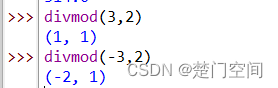
divmod(x,y):返回(x//y,x%y)
x//y:向下取整
complex(re,im):返回一个复数,re是实部,im是虚部

pow(x,y):计算x的y次方
x**y:计算x的y次方
如果加入第三个参数,则结果对第三个参数取余
即:222%5=3

bool(x):输出True或False


range(stop):依次生成一个(0~stop)的数
range(stop) — 依次生成一个(0~stop)的数
例如: range(5) 打印输出: 0 1 2 3 4- 1
- 2
- 3
- 4
- 5
- 6
- 7
- 8
range(start,stop) — 依次生成一个(start~stop)的数
例如: range(5,10) 打印输出: 5 6 7 8 9- 1
- 2
- 3
- 4
- 5
- 6
- 7
- 8
range(start,stop,step) — 依次生成一个(start~stop)的数,跨度为step
例如: range(3,10,2) 打印输出: 3 5 7 9- 1
- 2
- 3
- 4
- 5
- 6
- 7
随机数
头文件 random
函数原型:random.randint(下限,上限)
返回值:int型
import random counts=0 while counts<5: print("随机数为",random.randint(1,10)) counts+=1- 1
- 2
- 3
- 4
- 5

random.getstate()
import random x=random.getstate() print(x) counts=0 while counts<5: print("随机数为",random.randint(1,10)) counts+=1 random.setstate(x) counts=0 while counts<5: print("随机数为",random.randint(1,10)) counts+=1- 1
- 2
- 3
- 4
- 5
- 6
- 7
- 8
- 9
- 10
- 11
- 12
- 13
-
相关阅读:
基础---nginx 启动不了,跟 Apache2 服务冲突
基于Nodejs的知识信息分享平台的设计和实现
树,二叉树的概念与结构
Three.js添加父物体
特征匹配算法GMS(Grid-based Motion Statistics)理论与实践
玄子Share-服务器硬件及RAID配置实战
Python的对象与类
《设计模式之美》第四章 总结
服务器遭受攻击之后的常见思路
数据结构入门——排序(代码实现)(上)
- 原文地址:https://blog.csdn.net/l16_7_35/article/details/133244231
