-
【prometheus+grafana】快速入门搭建-服务监控各插件及企业微信告警
目录
1.1. 新建目录/opt/prometheus/qywechathook/conf
3.3.2. 启动方式2:脚本方式启动node_exporter
1. 安装qywechat_webhook插件通知企业微信
1.1. 新建目录/opt/prometheus/qywechathook/conf
mkdir -p /opt/prometheus/qywechathook/conf1.2. 新建编辑wx.js文件
- exports.template = function(body) {
- //企业微信群机器人API,https://work.weixin.qq.com/help?person_id=1&doc_id=13376#markdown%E7%B1%BB%E5%9E%8B
- //prometheus alert manager webhook : https://prometheus.io/docs/alerting/configuration/#webhook_config
- var alerts = body.alerts;
- var content = alerts.map(
- alert => {
- return [`# Name:${alert.labels.alertname}`, "## Labels:"]
- .concat(Object.entries(alert.labels).map(label => `<font color="comment">${label[0]}:</font>${label[1]}`))
- .concat("## Annotations:")
- .concat(Object.entries(alert.annotations).map(annotation => `<font color="comment">${annotation[0]}:</font>${annotation[1]}`))
- .join("\n")
- }
- ).concat(`<font color="comment">Status:</font><font color="${body.status === 'firing' ? 'warning' : 'info'}">${body.status}</font>`).join("\n\n")
- return {
- msgtype: "markdown",
- markdown: {
- content: content
- }
- }
- }
1.3. 运行启动容器
- docker run -d --name qywechat-webhook-adapter \
- --restart always -p 9081:80 \
- -v /opt/prometheus/qywechathook/conf/wx.js:/app/prometheusalert/wx.js \
- guyongquan/webhook-adapter \
- --adapter=/app/prometheusalert/wx.js=/wx=替换成自己企业微信机器人地址
1.4. 查看容器启动情况
docker ps -a
1.5 企业微信通知地址为:
- #容器启动后,下面这个地址在后面安装altermanager插件里面的配置文件altermanager.yml会用到
- http://127.0.0.1:8091/adapter/wx
2. 安装altermanager
2.1. 下载altermanager

2.2. 解压altermanager
tar -xf alertmanager-0.26.0.linux-amd64.tar.gz2.3. 编辑altermanager.yml
- route:
- group_by: ['alertname']
- group_wait: 30s
- group_interval: 1m
- repeat_interval: 1m
- receiver: 'qywechat.webhook'
- receivers:
- - name: 'web.hook'
- webhook_configs:
- - url: 'http://127.0.0.1:5001/'
- - name: 'qywechat.webhook'
- webhook_configs:
- - url: 'http://127.0.0.1:8091/adapter/wx'
- send_resolved: true
- inhibit_rules:
- - source_match:
- severity: 'critical'
- target_match:
- severity: 'warning'
- equal: ['alertname', 'dev', 'instance
 2.4. 检查配置文件
./amtool check-config alertmanager.yml2.5. 启动altermanager
2.5.1方式1-命令后台启动altermanager
nohup ./alertmanager --cluster.listen-address= --config.file=alertmanager.yml > /dev/null 2>&1 &2.5.2. 启动方式2-脚本启动altermanager
- #!/bin/sh
- # 时间:2023年9月24日10:37:24
- # 开发者: AL
- # 管理启停prometheus脚本
- # 检查参数个数
- PORT=9093
- NAME="altermanager"
- START_TIMEOUT=30
- #健康检查方法
- fun_health_check() {
- exptime=0
- echo "正在启动"
- while true
- do
- pid=`netstat -antup | grep "${PORT}" | awk '{print $7}' | awk -F "/" '{print $1}' | head -n 1`
- echo "检查端口${PORT}的pid 是 ${pid}"
- if [ -z $pid ];then
- sleep 1
- ((exptime++))
- echo -n -e "启动已经用时: ${exptime}s..."
- else
- break
- fi
- if [ $exptime -gt ${START_TIMEOUT} ]; then
- echo '启动失败'
- exit 1
- fi
- done
- echo "恭喜,启动${NAME} ${PORT}成功"
- }
- #启动命令
- fun_start_cmd() {
- nohup ./alertmanager --cluster.listen-address= --config.file=alertmanager.yml > /dev/null 2>&1 &
- }
- ID=`netstat -antup | grep "${PORT}" | awk '{print $7}' | awk -F "/" '{print $1}' | head -n 1`
- echo "开始查找-端口${PORT}的pid 是 ${ID}"
- if [ $# -eq 0 ]; then
- echo "请输入控制参数,可选【start,stop,restart】"
- elif [ "$1" = "start" ]; then
- echo "启动${NAME}"
- if [ ! -z $ID ];then
- echo "${PORT}端口已经占用,启动失败,请输入参数【restart】"
- else
- fun_start_cmd
- fun_health_check
- fi
- elif [ "$1" = "stop" ]; then
- echo "停止${NAME}"
- if [ -z $ID ];then
- echo "${PORT}端口未启用"
- else
- kill -9 $ID
- echo "${PORT}端口的进程已关闭"
- fi
- elif [ "$1" = "restart" ]; then
- echo "重启${NAME}"
- if [ ! -z $ID ];then
- kill -9 $ID
- else
- fun_start_cmd
- fun_health_check
- fi
- else
- echo "请输入控制参数,可选【start,stop,restart】 "
- fi
2.6. 访问地址验证
http://10.217.108.101:9093/#/alerts

3. 源码方式安装node_exporter
3.1. 下载node_exporter

3.2. 解压node_exporter
在linux上解压node_exporter
tar -xf node_exporter-1.6.1.linux-amd64.tar.gz3.3. 后台启动node_exporter
3.3.1启动方式1:命令方式
nohup ./node_exporter --web.listen-address=":9100" > /dev/null 2>&1 &3.3.2. 启动方式2:脚本方式启动node_exporter
- #!/bin/sh
- # 时间:2023年9月24日09:44:06
- # 开发者: AL
- # 管理启停node_exporter脚本
- # 检查参数个数
- PORT=9100
- NAME="node_exporter"
- START_TIMEOUT=30
- #健康检查方法
- fun_health_check() {
- exptime=0
- echo "正在启动"
- while true
- do
- pid=`netstat -antup | grep "${PORT}" | awk '{print $7}' | awk -F "/" '{print $1}' | head -n 1`
- echo "检查端口${PORT}的pid 是 ${pid}"
- if [ -z $pid ];then
- sleep 1
- ((exptime++))
- echo -n -e "启动已经用时: ${exptime}s..."
- else
- break
- fi
- if [ $exptime -gt ${START_TIMEOUT} ]; then
- echo '启动失败'
- exit 1
- fi
- done
- echo "恭喜,启动${NAME} ${PORT}成功"
- }
- #启动命令
- fun_start_cmd() {
- nohup ./node_exporter --web.listen-address=":${PORT}" > /dev/null 2>&1 &
- }
- ID=`netstat -antup | grep "${PORT}" | awk '{print $7}' | awk -F "/" '{print $1}' | head -n 1`
- echo "开始查找-端口${PORT}的pid 是 ${ID}"
- if [ $# -eq 0 ]; then
- echo "请输入控制参数,可选【start,stop,restart】"
- elif [ "$1" = "start" ]; then
- echo "启动${NAME}"
- if [ ! -z $ID ];then
- echo "${PORT}端口已经占用,启动失败,请输入参数【restart】"
- else
- fun_start_cmd
- fun_health_check
- fi
- elif [ "$1" = "stop" ]; then
- echo "停止${NAME}"
- if [ -z $ID ];then
- echo "${PORT}端口未启用"
- else
- kill -9 $ID
- echo "${PORT}端口的进程已关闭"
- fi
- elif [ "$1" = "restart" ]; then
- echo "重启${NAME}"
- if [ ! -z $ID ];then
- kill -9 $ID
- else
- fun_start_cmd
- fun_health_check
- fi
- else
- echo "请输入控制参数,可选【start,stop,restart】 "
- fi
3.4. 验证访问
http://ip:端口/mertics4. 源码包方式安装prometheus
4.1. 下载prometheus

4.2. 解压prometheus源码包
解压源码包到linux,opt目录下,/opt/prometheus/prometheus2.47
tar -xf prometheus-2.47.0.linux-amd64.tar.gz
4.3.添加rules.yml文件
在promethues安装目录(跟prometheus.yml)同级目录新建rule文件夹,并在rule文件加新建rules.yml
- groups:
- - name: alertmanager_pod.rules #告警规则组名,注意这和Altermanager中的组不是一个概念
- rules:
- - alert: Pod_all_cpu_usage #告警名称,对应标签alertname
- expr: (sum by(name)(rate(container_cpu_usage_seconds_total{image!=""}[5m]))*100) > 10 #告警表达式
- for: 1s #持续时长,表示上面的表达式满足且超过两分钟才会触发告警
- labels: #对告警附加的标签
- severity: critical
- service: pods
- project: myserver
- annotations: #告警通知中的注释内容,可用于描述告警具体信息
- description: 容器 {{ $labels.name }} CPU 资源利用率大于 10% , (current value is {{ $value }})
- summary: Dev CPU 负载告警
- - alert: Pod_all_memory_usage
- expr: sort_desc(avg by(name)(irate(container_memory_usage_bytes{name!=""}[5m]))*100) > 10 #内存大于10%
- #expr: sort_desc(avg by(name)(irate(node_memory_MemFree_bytes {name!=""}[5m]))) > 2*1024*1024*1024 #内存大于2G
- for: 10s
- labels:
- severity: critical
- type: pods
- #project: myserver
- annotations:
- description: 容器 {{ $labels.name }} Memory 资源利用率大于 2G , (current value is {{ $value }})
- summary: Dev Memory 负载告警
- - alert: Pod_all_network_receive_usage
- #expr: sum by (name)(irate(container_network_receive_bytes_total{container_name="POD"}[1m])) > 50*1024*1024
- expr: sum by (name)(irate(container_network_receive_bytes_total{container_name="POD"}[1m])) > 0
- for: 2m
- labels:
- #severity: critical
- project: myserver
- annotations:
- description: 容器 {{ $labels.name }} network_receive 资源利用率大于 50M , (current value is {{ $value }})
- - alert: node内存可用大小
- expr: node_memory_MemFree_bytes < 524288000 #内存小于500兆
- for: 30s
- labels:
- type: nodes
- annotations:
- description: node节点可用内存小于500M
4.4. 编辑prometheus.yml
 4.5. 校验prometheus.yml
./promtool check config prometheus.yml4.6. 后台启动prometheus
4.6.1启动方式1:命令启动
nohup ./prometheus --storage.tsdb.retention.time=7d --config.file=prometheus.yml --web.enable-admin-api > prometheus.log 2>&1 &4.6.2. 启动方式2:脚本启动prometheus
- #!/bin/sh
- # 时间:2023年9月24日10:37:24
- # 开发者: AL
- # 管理启停prometheus脚本
- # 检查参数个数
- PORT=9090
- NAME="prometheus"
- START_TIMEOUT=30
- #健康检查方法
- fun_health_check() {
- exptime=0
- echo "正在启动"
- while true
- do
- pid=`netstat -antup | grep "${PORT}" | awk '{print $7}' | awk -F "/" '{print $1}' | head -n 1`
- echo "检查端口${PORT}的pid 是 ${pid}"
- if [ -z $pid ];then
- sleep 1
- ((exptime++))
- echo -n -e "启动已经用时: ${exptime}s..."
- else
- break
- fi
- if [ $exptime -gt ${START_TIMEOUT} ]; then
- echo '启动失败'
- exit 1
- fi
- done
- echo "恭喜,启动${NAME} ${PORT}成功"
- }
- #启动命令
- fun_start_cmd() {
- nohup ./prometheus --storage.tsdb.retention.time=7d --config.file=prometheus.yml --web.enable-admin-api > prometheus.log 2>&1 &
- }
- ID=`netstat -antup | grep "${PORT}" | awk '{print $7}' | awk -F "/" '{print $1}' | head -n 1`
- echo "开始查找-端口${PORT}的pid 是 ${ID}"
- if [ $# -eq 0 ]; then
- echo "请输入控制参数,可选【start,stop,restart】"
- elif [ "$1" = "start" ]; then
- echo "启动${NAME}"
- if [ ! -z $ID ];then
- echo "${PORT}端口已经占用,启动失败,请输入参数【restart】"
- else
- fun_start_cmd
- fun_health_check
- fi
- elif [ "$1" = "stop" ]; then
- echo "停止${NAME}"
- if [ -z $ID ];then
- echo "${PORT}端口未启用"
- else
- kill -9 $ID
- echo "${PORT}端口的进程已关闭"
- fi
- elif [ "$1" = "restart" ]; then
- echo "重启${NAME}"
- if [ ! -z $ID ];then
- kill -9 $ID
- else
- fun_start_cmd
- fun_health_check
- fi
- else
- echo "请输入控制参数,可选【start,stop,restart】 "
- fi
4.7. 验证访问
 5. 源码包方式安装grafana
5.1. 下载grafana
下载地址:Download Grafana | Grafana Labs

5.2. 解压grafana
tar -xf grafana-enterprise-10.1.2.linux-amd64.tar.gz5.3. 进入bin目录,后台启动grafana
5.3.1启动方式1:进入bin目录,命令启动
nohup ./grafana-server > grafana.log 2>&1 &5.3.2. 启动方式2:脚本方式启动grafana
- #!/bin/sh
- # 时间:2023年9月24日15:19:51
- # 开发者: AL
- # 管理启停grafana脚本
- # 检查参数个数
- PORT=3000
- NAME="grafana"
- START_TIMEOUT=30
- #健康检查方法
- fun_health_check() {
- exptime=0
- echo "正在启动"
- while true
- do
- pid=`netstat -antup | grep "${PORT}" | awk '{print $7}' | awk -F "/" '{print $1}' | head -n 1`
- echo "检查端口${PORT}的pid 是 ${pid}"
- if [ -z $pid ];then
- sleep 1
- ((exptime++))
- echo -n -e "启动已经用时: ${exptime}s..."
- else
- break
- fi
- if [ $exptime -gt ${START_TIMEOUT} ]; then
- echo '启动失败'
- exit 1
- fi
- done
- echo "恭喜,启动${NAME} ${PORT}成功"
- }
- #启动命令
- fun_start_cmd() {
- nohup ./grafana-server > grafana.log 2>&1 &
- }
- ID=`netstat -antup | grep "${PORT}" | awk '{print $7}' | awk -F "/" '{print $1}' | head -n 1`
- echo "开始查找-端口${PORT}的pid 是 ${ID}"
- if [ $# -eq 0 ]; then
- echo "请输入控制参数,可选【start,stop,restart】"
- elif [ "$1" = "start" ]; then
- echo "启动${NAME}"
- if [ ! -z $ID ];then
- echo "${PORT}端口已经占用,启动失败,请输入参数【restart】"
- else
- fun_start_cmd
- fun_health_check
- fi
- elif [ "$1" = "stop" ]; then
- echo "停止${NAME}"
- if [ -z $ID ];then
- echo "${PORT}端口未启用"
- else
- kill -9 $ID
- echo "${PORT}端口的进程已关闭"
- fi
- elif [ "$1" = "restart" ]; then
- echo "重启${NAME}"
- if [ ! -z $ID ];then
- kill -9 $ID
- else
- fun_start_cmd
- fun_health_check
- fi
- else
- echo "请输入控制参数,可选【start,stop,restart】 "
- fi
5.4. 登录grafana
5.5. 添加数据源


最后记得往下滚动保存
5.6. 搜索grafana的仪表盘模板
grafana的仪表盘模板地址:Dashboards | Grafana Labs

复制仪表盘模板ID
5.7. 在自建的grafana导入模板ID
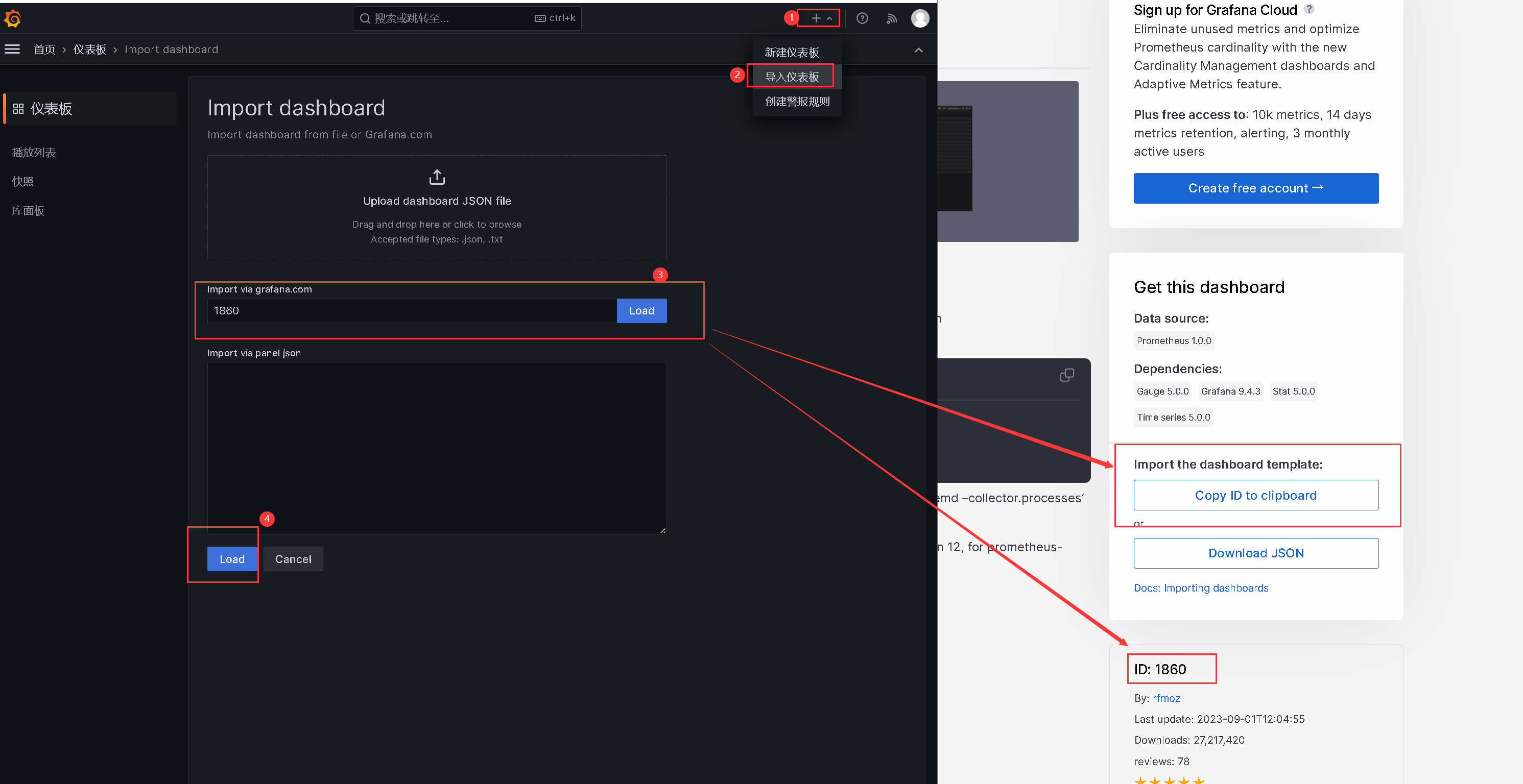
5.8. 查看自建的grafana监控仪表盘

6.告警效果-通知企业微信机器人

-
相关阅读:
【canvas】-- H5新增标签canvas的简单用法
Vue——使用内置组件Keep-alive
PostgreSQL 逻辑复制模块(二)
[原创][开源]C# Winform DPI自适应方案,SunnyUI三步搞定
高频面试(JavaScript高级)
vue3+Cesium 遇到的问题及解决办法(持续更新)
算法 - 路径总和
好用合并工具安利!需要的来关注一下
C++核心编程--多态篇
微博超话签到Js脚本
- 原文地址:https://blog.csdn.net/skybboy/article/details/133245150
