-
CMS之织梦导航二级下拉菜单
操作步骤
1、首先:
将下面这段代码贴到templets\default\footer.htm文件里(只要在此文件里就行,位置无所谓啦!自己看着办!)
{dede:channelartlist typeid='top' cacheid='channelsonlist'} {/dede:channelartlist}- 1
- 2
- 3
- 4
- 5
- 6
- 7
- 8
- 9
- 10
以上代码可以看出,二级子类下拉菜单是由dropdown.js控制的,我们来看dropdown.js文件:
由以上的cssdropdown.startchrome(“navMenu”),可以看出我们调用的是 startchrome:function()
具体源码请参考/images/js/dropdown.js
由上可以看出,var cssdropdown变量中有多个函数:getposOffset:function(what, offsettype) swipeeffect:function() showhide:function(obj, e) iecompattest:function() clearbrowseredge:function(obj, whichedge) dropit:function(obj, e, dropmenuID) positionshim:function() hideshim:function() dynamichide:function(e) delayhidemenu:function() clearhidemenu:function() startchrome:function()- 1
- 2
- 3
- 4
- 5
- 6
- 7
- 8
- 9
- 10
- 11
- 12
- 13
- 14
- 15
- 16
- 17
- 18
- 19
- 20
- 21
- 22
- 23
2、然后,奇迹就出现了,跟新一下!会发现导航栏已经出现下拉菜单了,只是背景是透明的,原因是没有背景图片。是不是很简单呢??
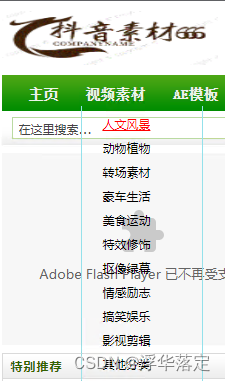
3、可是头疼的是,这个下拉菜单是透明的!咋么办??
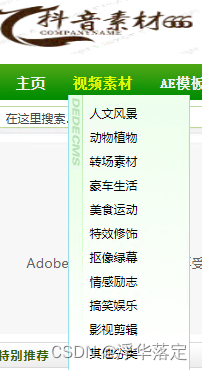
接着来你需要把DedeCMS5.7程序文件夹\dede\img里的mmenubg.gif(绿色背景图片,适用于绿色主题模板)或者DedeCMS5.5程 序文件夹\templets\images里的mmenubg.gif(蓝色背景图片,适用于蓝色主题模板)复制到DedeCMS5.6程序文件夹 /templets/default/images下面
现在你再看一下效果,呵呵,导航栏是不是已经出现熟悉的下拉菜单了:
4、此时,你想要的效果基本上已经完成了!如果你还想做其他的设置,比如调整位置,呵呵。。。只需要去/templets/default/style/dedecms.css
里你可以ctrl+f 寻找 .dropMenu 没错就是他控制着呢?
/*-------- 下拉菜单 --------------*/ .dropMenu { position:absolute; top: 0; z-index:100; width: 120px; visibility: hidden; filter: progid:DXImageTransform.Microsoft.Shadow(color=#CACACA, direction=135, strength=4); margin-top: -1px; border: 1px solid #93E1EB; border-top: 0px solid #3CA2DC; background-color: #FFF; background:url(../images/mmenubg.gif); padding-top:6px; padding-bottom:6px; }.dropMenu li { margin-top:2px; margin-bottom:4px; padding-left:6px; } .dropMenu a { width: auto; display: block; color: black; padding: 2px 0 2px 1.2em; } * html .dropMenu a { width: 100%; } .dropMenu a:hover { color:red; text-decoration: underline; }- 1
- 2
- 3
- 4
- 5
- 6
- 7
- 8
- 9
- 10
- 11
- 12
- 13
- 14
- 15
- 16
- 17
- 18
- 19
- 20
- 21
- 22
- 23
- 24
- 25
- 26
- 27
- 28
- 29
- 30
- 31
- 32
- 33
如果只是调整宽度,只用修改 :
width: 100px;/—— //原来参数是120-,如果二级标题字数少,还可以把参数调整到80,乃至是60——–/
在此,就不多说了,如果看不懂,希望去学一学css的知识!
三、原理
1、我们来看默认模板index.htm中有:{dede:myad name='indexfooterAD'/}{dede:include filename="footer.htm"/}
