-
PowerDesigner 与 mysql 同步数据
PowerDesigner 连接上数据库
创建数据库表 table_5


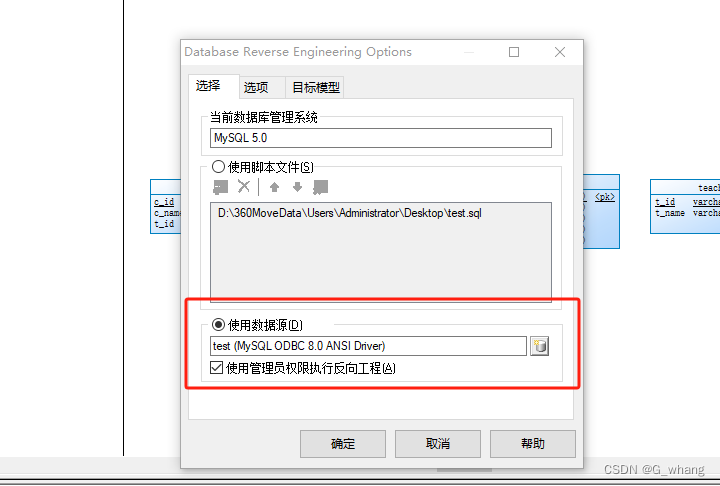
选择:


点击确认后弹出

点击run执行刷新数据库表,已创建成功

修改测试表1,新增一个字段


取消全选

选择数据库,勾选修改的表,如果全部勾选的话,就会全部同步


就同步出来了
其他:打开注释
双击表打开表详情 ,选择columns

快捷键: Ctrl+U 找到注释并勾选

然后就出来:

一般注释与Name应该是联动的,所以可以执行脚本:
在PowerDesigner中打开脚本的方法为:
PowerDesigner->Tools->Execute Commands->Edit/Run Scripts1 将comment覆盖name
Option Explicit ValidationMode = True InteractiveMode = im_Batch Dim mdl ' the current model ' get the current active model Set mdl = ActiveModel If (mdl Is Nothing) Then MsgBox "There is no current Model " ElseIf Not mdl.IsKindOf(PdPDM.cls_Model) Then MsgBox "The current model is not an Physical Data model. " Else ProcessFolder mdl End If Private sub ProcessFolder(folder) On Error Resume Next Dim Tab 'running table for each Tab in folder.tables if not tab.isShortcut then tab.name = tab.comment Dim col ' running column for each col in tab.columns if col.comment="" then else col.name= col.comment end if next end if next Dim view 'running view for each view in folder.Views if not view.isShortcut then view.name = view.comment end if next ' go into the sub-packages Dim f ' running folder For Each f In folder.Packages if not f.IsShortcut then ProcessFolder f end if Next end sub- 1
- 2
- 3
- 4
- 5
- 6
- 7
- 8
- 9
- 10
- 11
- 12
- 13
- 14
- 15
- 16
- 17
- 18
- 19
- 20
- 21
- 22
- 23
- 24
- 25
- 26
- 27
- 28
- 29
- 30
- 31
- 32
- 33
- 34
- 35
- 36
- 37
- 38
- 39
- 40
- 41
- 42
- 43
- 44
2 将name覆盖comment
Option Explicit ValidationMode = True InteractiveMode = im_Batch Dim mdl ' the current model ' get the current active model Set mdl = ActiveModel If (mdl Is Nothing) Then MsgBox "There is no current Model " ElseIf Not mdl.IsKindOf(PdPDM.cls_Model) Then MsgBox "The current model is not an Physical Data model. " Else ProcessFolder mdl End If ' This routine copy name into comment for each table, each column and each view ' of the current folder Private sub ProcessFolder(folder) Dim Tab 'running table for each Tab in folder.tables if not tab.isShortcut then tab.comment = tab.name Dim col ' running column for each col in tab.columns col.comment= col.name next end if next Dim view 'running view for each view in folder.Views if not view.isShortcut then view.comment = view.name end if next ' go into the sub-packages Dim f ' running folder For Each f In folder.Packages if not f.IsShortcut then ProcessFolder f end if Next end sub- 1
- 2
- 3
- 4
- 5
- 6
- 7
- 8
- 9
- 10
- 11
- 12
- 13
- 14
- 15
- 16
- 17
- 18
- 19
- 20
- 21
- 22
- 23
- 24
- 25
- 26
- 27
- 28
- 29
- 30
- 31
- 32
- 33
- 34
- 35
- 36
- 37
- 38
- 39
- 40
- 41
将code覆盖name
OPTION Explicit ValidationMode = TRUE InteractiveMode = im_Batch Dim mdl ' the current model ' get the current active model SET mdl = ActiveModel IF (mdl IS Nothing) THEN MsgBox "There is no current Model " ELSEIF NOT mdl.IsKindOf(PdPDM.cls_Model) THEN MsgBox "The current model is not an Physical Data model. " ELSE ProcessFolder mdl END IF Private sub ProcessFolder(folder) ON Error RESUME NEXT Dim Tab 'running table for each Tab in folder.tables if not tab.isShortcut then tab.name = tab.code Dim col ' running COLUMN FOR EACH col IN tab.columns IF col.code="" THEN ELSE col.name= col.code END IF NEXT END IF NEXT Dim VIEW 'running view for each view in folder.Views if not view.isShortcut then view.name = view.code end if next ' go INTO the sub-packages Dim f ' running folder For Each f In folder.Packages if not f.IsShortcut then ProcessFolder f end if Next end sub- 1
- 2
- 3
- 4
- 5
- 6
- 7
- 8
- 9
- 10
- 11
- 12
- 13
- 14
- 15
- 16
- 17
- 18
- 19
- 20
- 21
- 22
- 23
- 24
- 25
- 26
- 27
- 28
- 29
- 30
- 31
- 32
- 33
- 34
- 35
- 36
- 37
- 38
- 39
- 40
- 41
- 42
- 43
注释联动脚本参考:PowerDesigner设计Name和注释相互替换
-
相关阅读:
Revisiting Time Series Outlier Detection: Definitions and Benchmarks
Appium 全新 2.0 全新跨平台生态,版本特性抢鲜体验!
[附源码]计算机毕业设计springboot室内设计类网站
基于J2EE的大型视频影音系统的设计与实现
CesiumJS 中绘制大多边形
2013-2020年全国31省数字经济信息化基础数据
SQL比较两次的字段集合,找出并返回差异,主要用于更新记录事件
Kafka三种认证模式,Kafka 安全认证及权限控制详细配置与搭建
如何搭建android源代码repo仓库
什么专业越老越吃香?
- 原文地址:https://blog.csdn.net/G_whang/article/details/133035168
